Why is my phone’s battery draining so fast?

If your phone’s battery is draining faster than usual, it either means you’re using a lot of energy or your phone is not using energy efficiently.This could mean you’re overworking your phone by running too many applications, or something is physically wrong with the phone battery itself.


How do phone batteries work?


When you plug in your phone, electrons enter your phone battery from the power source, according to the National Center for Biotechnology Information (NCBI). These electrons attract lithium ions. Think of them as really tiny balls of lightweight metal. to the anode.When the phone is disconnected from the power source, the lithium ions switch directions and travel from anode to cathode. Once all of the lithium ions end up in the cathode, the battery will “die” because it’s no longer producing a circuit.


Reasons why your phone is draining so fast


If your phone is using a lot of energy, or if it’s not using energy efficiently, the battery will drain faster. Here are some of the main factors that can cause it to drain fast.
Your screen is too brightThe brighter your screen, the more energy you’re using, according to a study from Purdue University.
Most phones have a feature that automatically adjusts your screen’s brightness to complement the lighting of your surroundings.
You don’t necessarily have to worry about reducing brightness while using your phone but think about reducing brightness when you’re not using it. One way to do this is to make the screen idle time as short as possible, which automatically shuts the screen off when you’re not actively using it.


Does dark mode use less battery?

Yes, using dark mode is generally more energy efficient. Dark mode is a feature some phones have where you can make the background of your interface darker colors. The study from Purdue University found that switching to dark mode when your screen is at 100% brightness Can save up to almost 50% battery power.
You’re using data instead of Wi-FiTypically, Wi-Fi connections use less battery power than data connections, states The New York Times. Because constantly searching and switching connections between multiple towers typically uses more battery power. A weak Wi-Fi connection, however, could drain faster than it would if you had a strong connection, as it strains to remain connected to a weak signal.A weak Wi-Fi connection, however, could drain faster than it would if you had a strong connection, as it strains to remain connected to a weak signal .
Some phone settings allow apps to operate in the background, says The New York Times, so long as you’re connected to Wi-Fi or data, which would also contribute to a quicker draining battery.
You have poor receptionIt takes energy for your phone to search for a signal, according to The New York Times, and it’s not necessarily going to stop searching on its own. Many underground, remote, and/or mountainous areas are prone to having poor reception, and it’s best to turn off your cellphone’s data while traveling through these areas to preserve battery life.
The phone is old or outdatedModern smartphones that came out after 2017 have OLED (organic light-emitting diode) screens, which don’t have backlights like LCD (liquid crystal display) screens do.
Upgrading your phone to a modern model may be the simplest way to get the most battery-friendly features available.


Your phone is exposed to extreme temperaturesExtreme heat and cold can negatively affect how your battery operates, according to The New York Times. Specifically, it often makes it harder for the battery to hold a charge. Be mindful of keeping your phone warm when it’s below freezing and cool when it’s hot out.
You charged your phone too longReducing the amount of times you charge your phone to 100% can help prolong the life of your battery to a certain extent, says The New York Times.
And just as you might avoid overcharging, so do you want to stay away from letting your phone run completely low. Consumer Reports pegs 80% as the ideal charging limit for your battery. But it’s important to note that charging your battery, period, will cause it to degrade over time.
Also important is where you charge your phone. As mentioned above, overheating can cause affect battery health and charging your phone under your pillow runs the risk of doing just that, says PCMag.


Always check for OS system updatesSystem updates can help your phone use battery energy more efficiently in many ways according to PCMag. For example, some modern operating systems have features that allow your phone to better limit background usage of programs, other updates let your phone control how much battery it uses while charging.


How long do phone batteries last?

Modern lithium-ion phone batteries usually operate at full capacity for at least a year and up to five years (or between 500–1000 charge cycles), according to TechAdvisor. After that, their capacity will be reduced, meaning the older batteries won’t hold a charge as well or as long.
Daily charging and keeping the phone away from extreme temperatures (both hot and cold) will help prolong the life of the battery.

3 tips to make your phone’s battery last longer

When you start to see your battery draining as soon as you power it on, there may be some simple things you can do to extend the battery’s life. Here are a few ways to squeeze out a bit more time from your phone battery.
1. Keep away from extreme temperaturesExtreme temperatures are among the fastest ways to ruin your phone’s battery life. Keeping your phone at room temperature is ideal and be mindful of how hot your phone gets when it’s being charged.
2. Keep the battery at roughly 80%The longer you can keep your phone adequately charged between at 80%, the better.
Keeping it charged – instead of turning it off and on when you have a low battery –will help it better retain its power over the long run.
3. Use only the apps you needDelete apps you don’t use to declutter your phone, turn the brightness down when you can and restrict background usage of nonessential apps.
Many modern phones now include a “battery-saving” feature, which will automatically adjust elements of brightness and app usage to maximize your battery’s efficiency.
Tested: How much does Bluetooth actually drain your phone battery?

Does Bluetooth drain your battery?

All wireless technologies need power, but how much is a topic riddled with anecdotes and theories? Despite advancements in Bluetooth technology, it’s still a pretty common belief that you’ll get much more life out of your phone by turning off Bluetooth, Wi-Fi, NFC, and various other features when you’re not using them.

How we tested

To grasp exactly how using Bluetooth impacts battery life, we picked up five different smartphones from 2020. We have the Samsung Galaxy S20 Plus, HUAWEI P40 Pro, ZTE Axon 11, Xiaomi POCO F2 Pro, and realme X3 Superzoom in this test. We ran them through two unique scenarios and monitored the results with our in-house testing software.

The first is a typical daily battery drain scenario designed to determine if turning off Bluetooth actually saves battery. To do this, we performed two sets of tests. The first was done with Bluetooth off and the second with Bluetooth on but idle — i.e., not connected to anything — and then we compared the results. The test itself consists of three cycles — the first features 90 minutes of web browsing followed by 90 minutes of sleep and then 90 more minutes of browsing. Then the phones sleep for 16 hours in the second cycle to give us a good look at idle power draw. The third cycle repeats the first cycle.
We ran five phones through two unique testing scenarios.
Our second set of tests simulates a more demanding Bluetooth-specific use case and should determine how much Bluetooth impacts battery life when you’re actively using it. To simulate this, we monitored video playback for 4 hours straight, as you might do on a long flight. This series consists of a control test with Bluetooth off, Bluetooth on but no connection, and finally, the video audio over Bluetooth using the basic SBC audio codec.

We locked each display brightness to 200 nits to keep the tests fair. Mobile data, NFC, and anything else was also disabled on each handset for all these tests. Except for leaving Wi-Fi on in the first scenario so we can web surf.
We also took averages of the results to give us a better overall look at Bluetooth battery drain. All of the graphs in this article are based on an average based on testing across the five devices mentioned above.

There was a slight difference between the devices we tested. The HUAWEI P40 Pro and POCO F2 Pro saw the most significant difference with Bluetooth on and off — a 3% difference. Meanwhile, the Samsung Galaxy S20 and realme Superzoom recorded slightly less power drain with Bluetooth on. This is likely down to a margin of error, highlighting just how little impact Bluetooth actually has on battery life.

Bluetooth radios turn off during phone sleep, reducing battery drain.
This highlights that modern smartphones put Bluetooth radios to sleep when not in use. They’re only awake and periodically scanning for pairable devices while your smartphone is awake. So, you really don’t need to worry about turning Bluetooth off before you go to bed.

Does using Bluetooth headphones drain battery?
Sony WH 1000MX3 Bluetooth pairing
This is an excellent question and why we conducted these second tests with audio playback as the baseline use case. After all, it’s what most people use Bluetooth for these days.

The results show that playing back audio over Bluetooth consumes essentially the same amount of power as playing back audio over speakers or headphones with Bluetooth turned off. On average, our devices recorded just a 0.2% increase in power consumption when playing back audio over Bluetooth. So, well into the margin of error territory. The Galaxy S20 Plus and POCO F2 Pro recorded no noticeable difference in battery drain over a four-hour listening period.

This is because Bluetooth audio encoding algorithms run efficiently on digital signal processors (DSP) found inside modern smartphones — consuming very little power. At the same time, audio amplifier circuits switch off when playing back audio over Bluetooth. This balances out the power drawn from the Bluetooth wireless chip. The louder you listen, the greater the savings become.

How to check your iPhone’s battery health

The most important component of anysmartphoneis the battery. A phone with a kaput battery is like a car with an empty gas tank. It may look good on the outside, but on the inside, all the cool features in the world are useless without its source of power. If you have an iPhone, you must constantly check what’s called Battery Health to ensure it doesn’t dip below a certain level. If it does, you’ll end up with charging issues and the eventual need to have the battery replaced. Here’s how to check your iPhone’s battery health and what it all means.Read more: Is your iPhone battery draining too fast?QUICK ANSWER
The iPhone’s Battery Health section displays important key information about your battery’s capacity, peak performance, and whether or not your battery needs to be serviced. You can locate it at Settings > Battery.What is Battery Health on an iPhone?Battery Health is a section in your iPhone settings that tells you how healthy the battery is, compared to when the phone was brand new. New iPhones obviously start off with a brand-new 100% healthy battery. Over time, as the iPhone is used and various features are enabled and disabled, the battery’s overall health and performance will start to decline. However, as long as the battery remains at 80% or higher, Apple still considers that to be an optimal peak level.How to check your iPhone’s battery healthGo to Settings > Battery > Battery Health & Charging.Here, you will see the Maximum Capacity, which is the maximum charge the phone can hold. Mine is 100% as it’s a new phone. It shouldn’t go below 80%; otherwise, you will begin to experience charging issues.You should always enable Optimized Battery Charging. This ensures that the phone is not charged right up to 100%, which will impact the battery faster.If you go back a screen (Settings > Battery), scroll down to see the performance of the battery since you last charged it. It will tell you the last time the battery was fully charged and what has been eating away at that charge since then You can view how much battery charge each app has been using, with the worst offenders at the top.
So if you’re experiencing battery issues, maybe try uninstalling or offloading the really big battery suckers. That Sudoku game at 38% of the battery charge really needs to come off.Once the battery dips below 80%, you will gradually start to experience charging problems with the iPhone, and that battery percentage will begin dropping faster than usual. At this point, you should seriously consider getting thebattery changed or even getting a new phone if your current one can’t hold a charge for very long.

5 Myths About Your Smart Phone Battery (and Real Tips for Preserving It)

Smartphones have the mighty power of super computers in a tiny package that can fit in the palm of our hands. Avoid battery drain—and the anxiety that comes with it—by learning how to make your phone’s battery last longer and keep you connected when you need it most.


Here we’ll bust five common myths about charging your iPhone or Android, plus provide helpful tips on getting the most out of every charge.


Myth 1: You shouldn’t charge your phone overnight


It’s absolutely fine to charge your battery overnight. In fact, it’s the best way to make sure you have a full, juicy battery to get you through the day.
This myth came from the days when we had nickel-ion batteries in our phones that suffered from something called “memory charge,” where if you didn’t let them deplete entirely, the batteries would “forget about” the part that didn’t get used.
Today’s phones use lithium-ion batteries, which don’t suffer from memory loss and are smart enough to regulate their power management. When you plug a smartphone into a charger, it will stop charging once it reaches 100 percent, so you don’t need to worry about “overcharging.”
Charging tip: Plug your phone in at night before you go to bed. In the morning, you’ll be ready with a phone that will last you all day.

Myth 2: You should let your battery drain completely before charging


Not only do you not need to do this, but you also shouldn’t. Every lithium-ion battery comes with a fixed amount of charge cycles (the number of times you can charge up to 100 percent and run down to 0 percent). An iPhone has a lifespan of about 400 to 500 charge cycles. But that doesn’t mean you can only plug it in 500 times—it means you have 500 chances to let it go from a full charge to no charge at all. if you let your battery drain completely every day, it will last 500 days.
There is one reason to let your battery drain completely. If it “dies” when the battery icon is showing a positive charge, it means the battery needs to be recalibrated. Draining it all the way down then charging it up again should fix the issue .
Charging tip: Remember your ABC’s: Always Be Charging. If you have a charger nearby, whether you’re at home, in the car or at the office, plug in your phone.


Myth 3: My battery will last forever if I charge it properly


Batteries are our smartphone’s weak spot, and until someone invents a battery that can last for years and go for days without a charge, we have to accept that they’ll need to be replaced. Lithium-ion batteries lose their capacity to hold a charge as they age, so even if you still have plenty of lifecycles left, you may only be able to charge your phone to 60 percent of its capacity. You can download an app to check on battery wear, and if it’s excessive, consider replacing the battery to give the phone a longer life.
Charging tip: Lithium-ion batteries don’t like being really low or really high. Experts agree that keeping your phone’s battery between 30 and 80 percent most of the time is the sweet spot for promoting its longevity.


Myth 4: I shouldn’t use my phone while it’s charging


There is no danger in using your phone while it’s charging. This myth comes from fears about batteries overheating. Lithium-ion batteries can be dangerous if they have any type of manufacturing defect, but this is rare. warm (while charging or not), get it checked out immediately.
Another issue to consider is counterfeit chargers. Charging cables contain chips in them, and if you are not using a manufacturer-approved cable, you could damage your phone. Buy name-brand chargers for safety and to help charge your phone more effectively.
Charging tip: While you can use it during a charge, having the screen on or apps refreshing in the background uses power, so it will charge at half the speed. If you want your phone to charge more quickly, put it in airplane mode or turn it off. Also, charging from a wall plug is always faster than using a computer or car charger.


Myth 5: Killing apps saves power


This is simply untrue, and it’s also bad advice. Instead of closing your apps, use some of these tips if you’re low on juice and can’t get to a charger:Power saving tips:On an iPhone, manually switch to Low Power Mode. Swipe up on the Home Screen to access the Control Panel and toggle on the battery symbol. If it’s not in your Control Center, add it there through Settings. On Android phones, activate your device’s Battery Saver Feature. (This has different names on different devices—LG calls it Power Saver Mode, Samsung calls it Ultra Power Saving Mode—but they all do essentially the same thing.)For Android phones, be sure to keep your operating system up to date. Android 6.0 introduced Doze Mode, which shuts down services you’re not using to conserve battery life. 

How to Keep Your Phone Battery Healthy

Does your Android or iPhone’s battery seem to hold less of a charge over time? Like all rechargeable batteries, Li-ion batteries (which are in most phones) become less effective as they age. Even though these batteries aren’t made to last forever , having a healthy battery and charging habits can extend the life of your battery

We’ll show you easy ways to maximize your smartphone battery’s lifespan by changing your charging habits.


1.Don’t wait until the battery is empty to recharge.
Charge your phone throughout the day. Your phone’s battery has a fixed amount of charging cycles (the number of times you charge the battery from 0% to 100%). For example, if your battery has a lifespan of 400 charging cycles, letting the battery drain every day means your battery will only last 400 days.[1] If you top off the battery before it drains completely, it reduces the number of overall charging cycles, which makes your battery last longer.Keeping a battery at full charge or always draining it to 0 can damage it and reduce its capacity. Try to keep your battery midway charged when you can and only charge to 100% when you need the extra time.


2.Avoid extreme temperatures.
Exposure to very high or low temperatures drains the battery quickly. Batteries are made to work best at room temperature, which is about 68 °F (20 °C).[2] Your battery, especially when fully charged, will drain much faster in extreme temperatures.This can cause damage to the battery over time.[3]Avoid using your phone at all if the temperature is below freezing 32 °F (0 °C).If you live in a very cold region and spend a lot of time outdoors, invest in an insulated phone case.Only charge your battery at temperatures between 41 °F (5 °C) and 95 °F (35 °C).If the phone or charger feels hot to the touch during a charging session, unplug the phone from the charger as soon as possible to avoid damaging the battery.


3.Don’t always charge your battery to 100%.When you’re always charging to 100%, the frequent high voltage can cause stress to the battery. Fully charging your battery won’t destroy it, you can add some time to the battery’s lifespan by only charging to 80% when possible.


4.Only use ultra-fast charging when necessary.

Fast charging is convenient, but don’t use it every time you charge your phone. Fast charging puts more stress on the battery than necessary, so battery performance can suffer over time.[4] Opt for a standard “slow” charge more often than not to preserve battery longevity.


5. Use your phone sparingly while it’s charging.


To avoid parasitic load, don’t play games or stream videos while charging your phone. Parasitic load is what happens while a battery is being drained during charging.[5] Parasitic load adds higher voltage stress to the battery, increases heat, and can cause parts of the battery to continually cycle and deteriorate faster than the rest of the cell. While you can take calls or browse the web during a charging session, avoid heavy tasks.


6.Use power-saving modes to increase time between charges.


When your battery is slow, turn on your phone’s low-power or battery-saving mode. Both Androids and iPhones have special battery-conservation modes that turn off background apps, decrease processing power, dim the screen, and disable other services that can drain your battery quickly.To turn on your iPhone’s Low Power Mode, open the Control Center and tap the battery icon.If you have a Samsung Galaxy, open Settings and go to Battery and device care > Battery > Power saving. Tap the switch to turn on Power Saving Mode.[6]For other Androids, go to Settings > Battery > Battery Saver and tap Turn on now.[7]


7.Stick to the power adapter that came with your phone.


Third-party phone chargers may have different voltage ratings than what’s recommended by your phone manufacturer. Using a charger that supplies your phone with an inconsistent or too-high voltage level can severely impact your battery, and possibly even the rest of your phone.


8.Partially charge the battery before long-term storage.

If you won’t be using your phone for a while, charge it to 50% first. Don’t charge it to 100%, as that can cause the Mobile Batteries   to lose some of its capacity over time.[8] Charging the battery halfway first will help prevent the battery from draining so much that it can’t be recovered after a long period of no usage. 

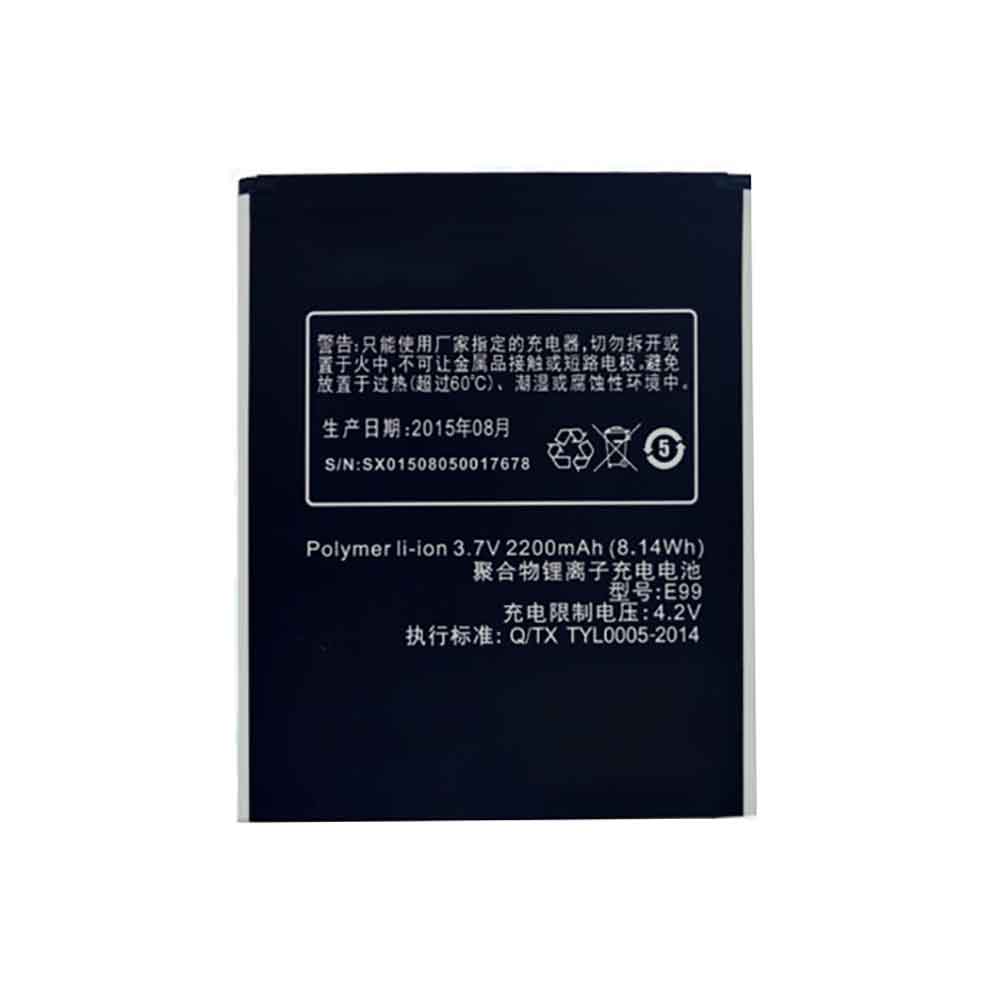
K-touch E99 Li-ion Battery, E99 Replacement Battery for K-Touch E99

2200mAh 3.7V for K-Touch E99,K-touch E99 Li-ion battery is a new brand and it is compatible with 100% original and replacement battery. Wholesale and retail of K-touch E99 battery is of high quality and low price!

Specifications:

  • Brand:K-Touch
  • Capacity :2200mAh
  • Voltage :3.7V
  • Type :Li-ion Polymer
  • Battery quality: Grade A
  • Guarantee: Replacement Battery – 1 Year Warranty
  • Description: New brand,1 year warranty!30 days refund!Fast shipping!

How do we test the K-touch E99 Battery
Step1: Make sure you buy the right battery.
Step2: Check battery’s appearance and interface.
Step3: Test battery charger and charging function.
Step4: Charge the battery to 100% and discharge it to 0% to get the actual battery capacity.
Step5: Use EV2300 to check the voltage difference of each group of batteries.
Compatible Part Number:
E99

Compatible Model Number:
K-Touch E99

How much do you know about how to extend battery life? The methods for protecting battery life are as follows:


1). Please charge or replace other batteries when the battery is low.
2). Use K-touch E99 Li-ion battery than non-lithium-ion battery work longer.
3). After the battery is fully charged, unplug the charger to avoid prolonged or long-term high battery status to accelerate battery aging.
4). Avoid charging in extreme environments.
5). Keep the battery in a dry and cool environment when it is idle.
6). Please charge the battery in time to avoid deep discharge.
7). Carry out complete cycle charging regularly, and keep the power level at about 20%-80% .

Hot Products

3460mAh/13.3WH SONY SNYSV24 for Sony Xperia 10 II6041mAh/45.8WH MICROSOFT G3HTA057H for Microsoft Surface laptop3 15 i24.12Wh HIKMICRO INR18650-35E-1S2P for Hikmicro INR18650-35E-1S2P67Wh ASUS A32N1511 for ASUS ROG G752VL G752VM G752VT3100mAh ZEBRA BT-000409 for Zebra TC21 TC26 TC2X4000mAh 15.2WH COOLPAD CPLD-192 for Coolpad CPLD-19248Wh/6Cell DELL 8858X for Dell Inspiron 15 7520 5520 5726000MAH/22.8Wh SAMSUNG BT550ABE for Samsung Galaxy Tab A 9.7 SM-T54850mAh/19.25WH ASUS C11P1706 for ASUS ZenFone Max Pro ZB602KL5380mAh 20.713WH BLACKVIEW Li486690JLY for Blackview A70

Datalogic BY-01 Li-ion Battery, BY-01 Replacement Battery for Datalogic Barcode Scanners

3300mAh 3.6V for Datalogic Barcode Scanners,Datalogic BY-01 Li-ion battery is a new brand and it is compatible with 100% original and replacement battery. Wholesale and retail of Datalogic BY-01 battery is of high quality and low price!

Specifications:

  • Brand:Datalogic
  • Capacity :3300mAh
  • Voltage :3.6V
  • Type :Li-ion
  • Battery quality: Grade A
  • Guarantee: Replacement Battery – 1 Year Warranty
  • Description: New brand,1 year warranty!30 days refund!Fast shipping!

How do we test the Datalogic BY-01 Battery
Step1: Make sure you buy the right battery.
Step2: Check battery’s appearance and interface.
Step3: Test battery charger and charging function.
Step4: Charge the battery to 100% and discharge it to 0% to get the actual battery capacity.
Step5: Use EV2300 to check the voltage difference of each group of batteries.
Compatible Part Number:
BY-01

Compatible Model Number:
Datalogic Barcode Scanners

How much do you know about how to extend battery life? The methods for protecting battery life are as follows:


1). Please charge or replace other batteries when the battery is low.
2). Use Datalogic BY-01 Li-ion battery than non-lithium-ion battery work longer.
3). After the battery is fully charged, unplug the charger to avoid prolonged or long-term high battery status to accelerate battery aging.
4). Avoid charging in extreme environments.
5). Keep the battery in a dry and cool environment when it is idle.
6). Please charge the battery in time to avoid deep discharge.
7). Carry out complete cycle charging regularly, and keep the power level at about 20%-80% .

Hot Products

3460mAh/13.3WH SONY SNYSV24 for Sony Xperia 10 II6041mAh/45.8WH MICROSOFT G3HTA057H for Microsoft Surface laptop3 15 i24.12Wh HIKMICRO INR18650-35E-1S2P for Hikmicro INR18650-35E-1S2P67Wh ASUS A32N1511 for ASUS ROG G752VL G752VM G752VT3100mAh ZEBRA BT-000409 for Zebra TC21 TC26 TC2X4000mAh 15.2WH COOLPAD CPLD-192 for Coolpad CPLD-19248Wh/6Cell DELL 8858X for Dell Inspiron 15 7520 5520 5726000MAH/22.8Wh SAMSUNG BT550ABE for Samsung Galaxy Tab A 9.7 SM-T54850mAh/19.25WH ASUS C11P1706 for ASUS ZenFone Max Pro ZB602KL5380mAh 20.713WH BLACKVIEW Li486690JLY for Blackview A70

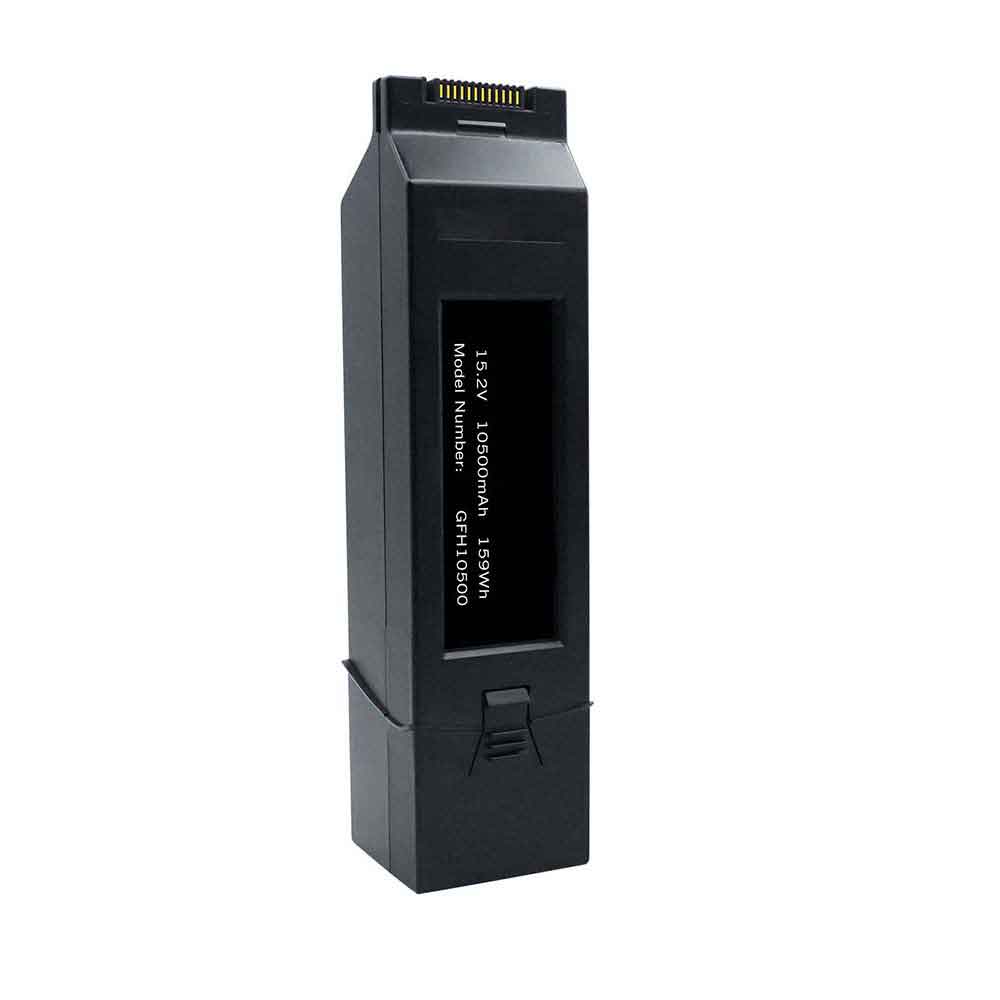
Yuneec GFH10500 Li-ion Battery, GFH10500 Replacement Battery for Yuneec H520E H3 Drone

10500mAh 15.2V for Yuneec H520E H3 Drone,Yuneec GFH10500 Li-ion battery is a new brand and it is compatible with 100% original and replacement battery. Wholesale and retail of Yuneec GFH10500 battery is of high quality and low price!

Specifications:

  • Brand:Yuneec
  • Capacity :10500mAh
  • Voltage :15.2V
  • Type :Li-HV
  • Battery quality: Grade A
  • Guarantee: Replacement Battery – 1 Year Warranty
  • Description: New brand,1 year warranty!30 days refund!Fast shipping!

How do we test the Yuneec GFH10500 Battery
Step1: Make sure you buy the right battery.
Step2: Check battery’s appearance and interface.
Step3: Test battery charger and charging function.
Step4: Charge the battery to 100% and discharge it to 0% to get the actual battery capacity.
Step5: Use EV2300 to check the voltage difference of each group of batteries.
Compatible Part Number:
GFH10500

Compatible Model Number:
Yuneec H520E H3 Drone

How much do you know about how to extend battery life? The methods for protecting battery life are as follows:


1). Please charge or replace other batteries when the battery is low.
2). Use Yuneec GFH10500 Li-ion battery than non-lithium-ion battery work longer.
3). After the battery is fully charged, unplug the charger to avoid prolonged or long-term high battery status to accelerate battery aging.
4). Avoid charging in extreme environments.
5). Keep the battery in a dry and cool environment when it is idle.
6). Please charge the battery in time to avoid deep discharge.
7). Carry out complete cycle charging regularly, and keep the power level at about 20%-80% .

Hot Products

3460mAh/13.3WH SONY SNYSV24 for Sony Xperia 10 II6041mAh/45.8WH MICROSOFT G3HTA057H for Microsoft Surface laptop3 15 i24.12Wh HIKMICRO INR18650-35E-1S2P for Hikmicro INR18650-35E-1S2P67Wh ASUS A32N1511 for ASUS ROG G752VL G752VM G752VT3100mAh ZEBRA BT-000409 for Zebra TC21 TC26 TC2X4000mAh 15.2WH COOLPAD CPLD-192 for Coolpad CPLD-19248Wh/6Cell DELL 8858X for Dell Inspiron 15 7520 5520 5726000MAH/22.8Wh SAMSUNG BT550ABE for Samsung Galaxy Tab A 9.7 SM-T54850mAh/19.25WH ASUS C11P1706 for ASUS ZenFone Max Pro ZB602KL5380mAh 20.713WH BLACKVIEW Li486690JLY for Blackview A70

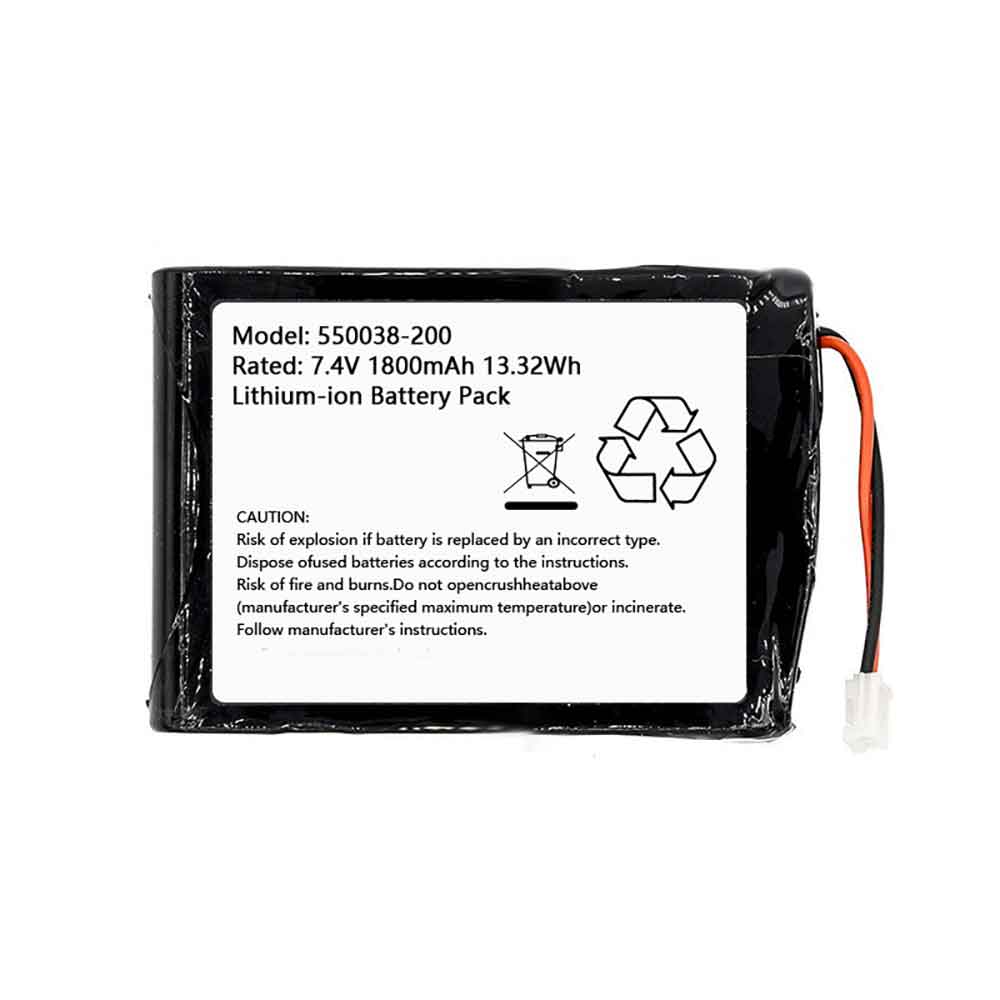
Oneil 550038-200 Li-ion Battery, 550038-200 Replacement Battery for ONeil MF2te Printer

1800mAh 7.4V for ONeil MF2te Printer,Oneil 550038-200 Li-ion battery is a new brand and it is compatible with 100% original and replacement battery. Wholesale and retail of Oneil 550038-200 battery is of high quality and low price!

Specifications:

  • Brand:ONeil
  • Capacity :1800mAh
  • Voltage :7.4V
  • Type :Li-ion
  • Battery quality: Grade A
  • Guarantee: Replacement Battery – 1 Year Warranty
  • Description: New brand,1 year warranty!30 days refund!Fast shipping!

How do we test the Oneil 550038-200 Battery
Step1: Make sure you buy the right battery.
Step2: Check battery’s appearance and interface.
Step3: Test battery charger and charging function.
Step4: Charge the battery to 100% and discharge it to 0% to get the actual battery capacity.
Step5: Use EV2300 to check the voltage difference of each group of batteries.
Compatible Part Number:
550038-200

Compatible Model Number:
ONeil MF2te Printer

How much do you know about how to extend battery life? The methods for protecting battery life are as follows:


1). Please charge or replace other batteries when the battery is low.
2). Use Oneil 550038-200 Li-ion battery than non-lithium-ion battery work longer.
3). After the battery is fully charged, unplug the charger to avoid prolonged or long-term high battery status to accelerate battery aging.
4). Avoid charging in extreme environments.
5). Keep the battery in a dry and cool environment when it is idle.
6). Please charge the battery in time to avoid deep discharge.
7). Carry out complete cycle charging regularly, and keep the power level at about 20%-80% .

Hot Products

48Wh/6Cell DELL 8858X for Dell Inspiron 15 7520 5520 5726000MAH/22.8Wh SAMSUNG BT550ABE for Samsung Galaxy Tab A 9.7 SM-T54850mAh/19.25WH ASUS C11P1706 for ASUS ZenFone Max Pro ZB602KL5380mAh 20.713WH BLACKVIEW Li486690JLY for Blackview A703200mAh/12.4WH SONY LIP1701ERPC for Sony Xperia 1 XZ4 J8110 J81704720mAh/18.2WH XIAOMI BM4W for Xiaomi Mi 10T Lite 5G1500mAh/5.7WH SAMSUNG EB-L1M7FLU for Samsung GT-I8190 I8190N Galaxy5580mAh BLACKVIEW Li616077HTT for Blackview BV4900 Pro DK0202245mAh/8.6WH MOTOROLA HC40 for Motorola XT1754 XT1755 XT17582000mAh/7.6WH MOTOROLA JE30 for Motorola E5 play go

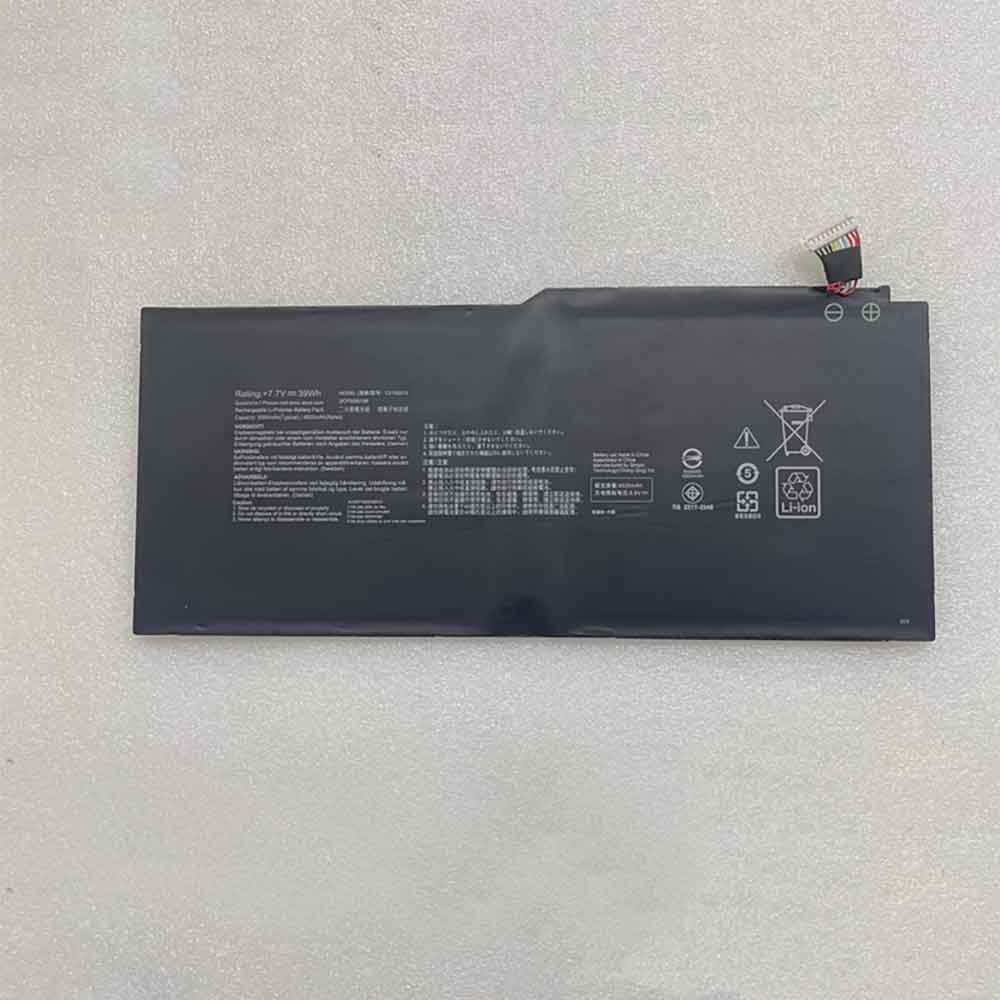
Asus C21N2012 Li-ion Battery, C21N2012 Replacement Battery for Asus C21N2012

4920mAh 7.7V for Asus C21N2012,Asus C21N2012 Li-ion battery is a new brand and it is compatible with 100% original and replacement battery. Wholesale and retail of Asus C21N2012 battery is of high quality and low price!

Specifications:

  • Brand:Asus
  • Capacity :4920mAh
  • Voltage :7.7V
  • Type :Li-Polymer
  • Battery quality: Grade A
  • Guarantee: Replacement Battery – 1 Year Warranty
  • Description: New brand,1 year warranty!30 days refund!Fast shipping!

How do we test the Asus C21N2012 Battery
Step1: Make sure you buy the right battery.
Step2: Check battery’s appearance and interface.
Step3: Test battery charger and charging function.
Step4: Charge the battery to 100% and discharge it to 0% to get the actual battery capacity.
Step5: Use EV2300 to check the voltage difference of each group of batteries.
Compatible Part Number:
C21N2012

Compatible Model Number:
Asus C21N2012

How much do you know about how to extend battery life? The methods for protecting battery life are as follows:


1). Please charge or replace other batteries when the battery is low.
2). Use Asus C21N2012 Li-ion battery than non-lithium-ion battery work longer.
3). After the battery is fully charged, unplug the charger to avoid prolonged or long-term high battery status to accelerate battery aging.
4). Avoid charging in extreme environments.
5). Keep the battery in a dry and cool environment when it is idle.
6). Please charge the battery in time to avoid deep discharge.
7). Carry out complete cycle charging regularly, and keep the power level at about 20%-80% .

Hot Products

48Wh/6Cell DELL 8858X for Dell Inspiron 15 7520 5520 5726000MAH/22.8Wh SAMSUNG BT550ABE for Samsung Galaxy Tab A 9.7 SM-T54850mAh/19.25WH ASUS C11P1706 for ASUS ZenFone Max Pro ZB602KL5380mAh 20.713WH BLACKVIEW Li486690JLY for Blackview A703200mAh/12.4WH SONY LIP1701ERPC for Sony Xperia 1 XZ4 J8110 J81704720mAh/18.2WH XIAOMI BM4W for Xiaomi Mi 10T Lite 5G1500mAh/5.7WH SAMSUNG EB-L1M7FLU for Samsung GT-I8190 I8190N Galaxy5580mAh BLACKVIEW Li616077HTT for Blackview BV4900 Pro DK0202245mAh/8.6WH MOTOROLA HC40 for Motorola XT1754 XT1755 XT17582000mAh/7.6WH MOTOROLA JE30 for Motorola E5 play go