5 Useful Mac Features You Might Not Know in 2022

 Apple’s line of Macs is full of features to help you stay productive, but some of these tools are easy to miss. In our Mac tips and tricks guide, we’ve rounded up five features you’ll find useful.

1. Start tasks on Mac and finish on iPhone

If you have both an Apple laptop and an iPhone, you can start tasks on one device and switch seamlessly to the other. For example, you might have opened a Safari page on your Mac and then decided to continue reading on the move. This is all done using a tool called Handoff.

Before you can use Handoff, you must activate it on your Mac and iPhone. Check the Apple website for details on which devices are compatible. Both devices also need to be signed into iCloud with the same Apple ID, with Bluetooth and Wi-Fi enabled.

Activate Handoff on Mac:

1. Click the Apple icon and select System Preferences

2. Select General

3. Select Allow switching between this Mac and your iCloud device

To activate Handoff on iPhone:

1. Go to settings

2. Select General > AirPlay & Handoff

3. Enable toggle

On a Mac, open Safari and navigate to which website. Then, on your iPhone, access the App Switcher by swiping up from the bottom of the screen. You should see a Safari banner – click it to open the same page you’re viewing on your Mac.

2. View two web pages at the same time

This is called split view, and you can place two web pages or even two apps side by side on the screen.

Hover over the green full screen button in the upper left corner of the window. From the drop-down menu, select Tile windows to the left of the screen or Tile windows to the right of the screen. Your window will then fill whichever side you choose. Then click the window on the other side of the screen to view it next to it.

To stop split view, click the green button again and the window will exit or swipe left or right with four fingers on the trackpad.

3. Use Do Not Disturb Mode

If you need to get things done on your Mac without distraction, Apple’s Focus Mode can help you stay on track. It works by temporarily hiding notifications that pop up in the corner of the screen.

To activate Focus, you can use the Control Center in the upper right corner of the screen. Click the Focus button to configure the tool. You can activate Do Not Disturb for an hour or until tonight.

In the same menu, you can select Focus Preferences, and you can see certain notifications—such as messages from friends or family—even when you’re in Do Not Disturb mode. You can also set tools to open automatically at specific times.

4. Change screen resolution to enlarge text

By default, your Mac automatically determines the “best” size for text and objects on the screen. However, if you wish to make the element larger, you can make some adjustments.

Click the Apple logo in the upper-left corner of the screen, then choose System Preferences. Select your monitor from here – you’ll see the computer image along with the screen resolution and brightness settings. Next to the Resolution menu, select Scale. Now you can choose to make the text bigger, or conversely, give yourself more screen real estate to use. Choose the setting that works best for you, then close the Display window to finish.

5. Interact with the text on the image

Since Live Text has been around on the Mac, you can select and interact with text embedded in images opened in Preview.

In the example above, you’ll see the phone number you can find highlighted in the picture. You can then add the phone number to your address book on your Mac, or dial the number from a connected iPhone.

Additional features of Live Text on Mac include:

1. Copy the text on the image and paste it into another document

2. Find the meaning of the text to open the dictionary

3. Translate the text into the language of your choice

4. Search the web for text

5. Share the text with others via email or text message.

>>>>>>>>>>Mac battery

Thanks for reading, hope it helps!

Friendly reminder: If you need to replace your device’s battery, this battery store is a good choice: www.batteryforpc.co.uk
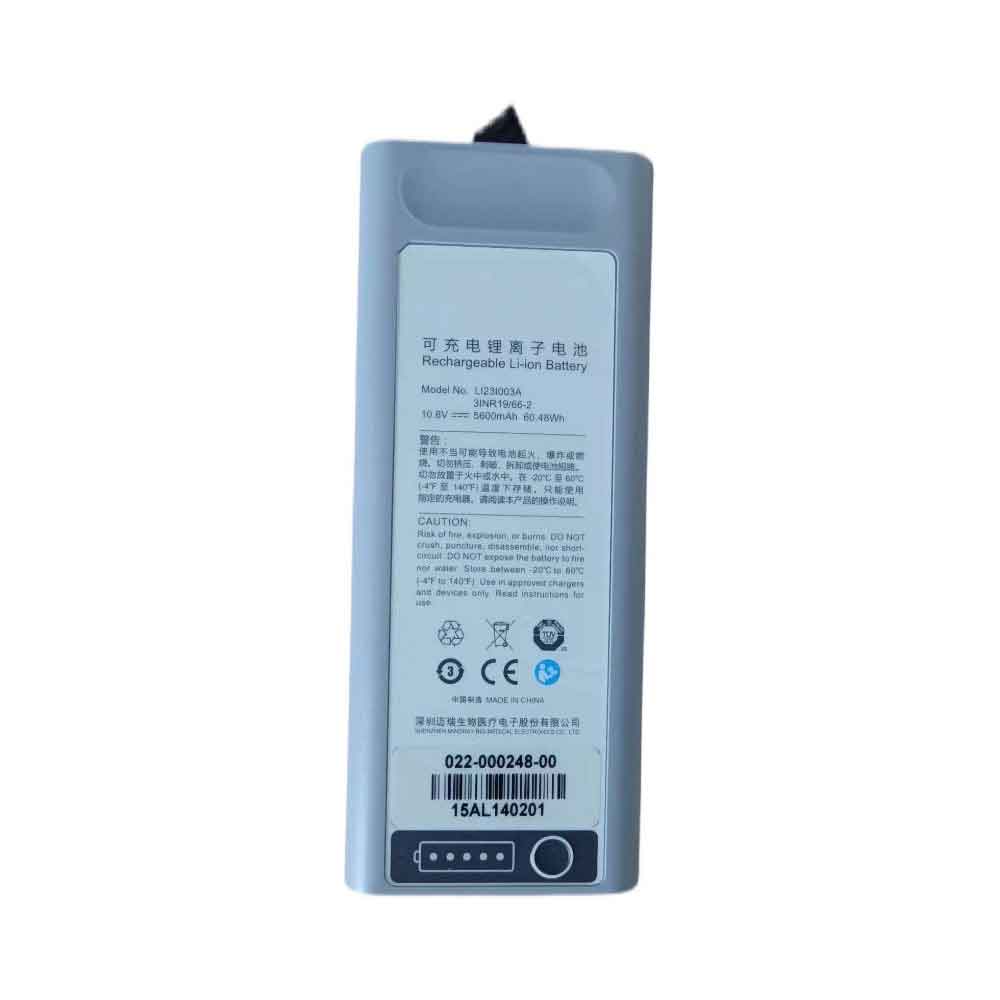
5600mAh 10.8V Mindray LI23S003A Li-ion Battery for Mindray SV600 SV650 SV800 SV850

5600mAh 10.8V Mindray LI23S003A Batteries for Mindray SV600 SV650 SV800 SV850, Mindray LI23S003A Other battery is a brand new,100% Compatible original and replacement battery,Purchase wholesale and retail LI23S003A with high quality and low price!

Find ou your original model number or part number(P/N), and move your eyes on the tag of battery

LI23S003A

Specifications

  • Brand:Mindray
  • Capacity :5600mAh
  • Voltage :10.8V
  • Type :Li-ion
  • Battery Cell Quality: Grade A
  • Descriptive: Replacement Battery – 1 Year Warranty
  • Description: Brand New, 1 Year Warranty! 30-Days Money Back! Fast Shipping!

How we test this Mindray LI23S003A Battery
Step 1: Make sure customer bought the correct battery.
Step 2: Check battery’s appearance and interface.
Step 3: Test battery charger and recharger function.
Step 4: Charger the battery to 100% and recharger to 0% to get real battery capacity
Step 5: Use Ev2300 to check the voltage difference of each goroup cells.
Step 6: Charger battery power more than 30%.
Step 7: Package battery carefully and send out

Compatible Part Numbers:
LI23S003A

Compatible Model Numbers:
Mindray SV600 SV650 SV800 SV850

How much do you know about how to run laptop well as any place? The follow Tips cut way back on protecting battery life.


1). Please recharge or change your Other battery when battery power low.
2). Using Li-Ion Replacement Mindray LI23S003A Other Battery for your notebook which can work longer time than Non Li-ion one.
3). It is better to defragmentation regularly for your Other battery life.
4). In order to reduce the laptop power consumpition, you can use some optical drive spin-down and hard drive in your Other .
5). Please keep your laptop in sleep or standby model without long time using, which both save the Replacement Mindray LI23S003A Other Battery power and extend battery using life.
6). Leave your battery in a dry and cool condition when without using.
7). When you rarely or generally plugged in fixed power using, Please take down your battery to avoid hurting battery life.

Hot Products

2330Mah/17Wh BOSE 088772 for BOSE Soundlink Mini 256WH DELL 90V7W for Dell XPS 13 9343 9350 JD25G 5K6080mAh/48Wh LENOVO L16C4PB1 for Lenovo YOGA 720-13IKB Series1800mAh 13.3Wh MOTOROLA PMNN4001C for Motorola GP68 Radio2580MAH/9.8Wh ALCATEL TLp025G2 for ALCATEL OT- 9001A OT- 9001X OT1500mAh/5.78WH NOKIA BV-6A for Nokia 3060 5250 81104200mAh PANASONIC VW-VBH20 for Panasonic NV-A1, NV-A1EN, NV-A750mAh/2.78WH ALCATEL CAB22D0000C1 for Alcatel phone5100mAh SAMSUNG HQ-3565N for Samsung Galaxy Tab A7 Lite4.3Ah VICTPOWER 10S2P18650 for 2 Wheels Hover Scooter Banlanc

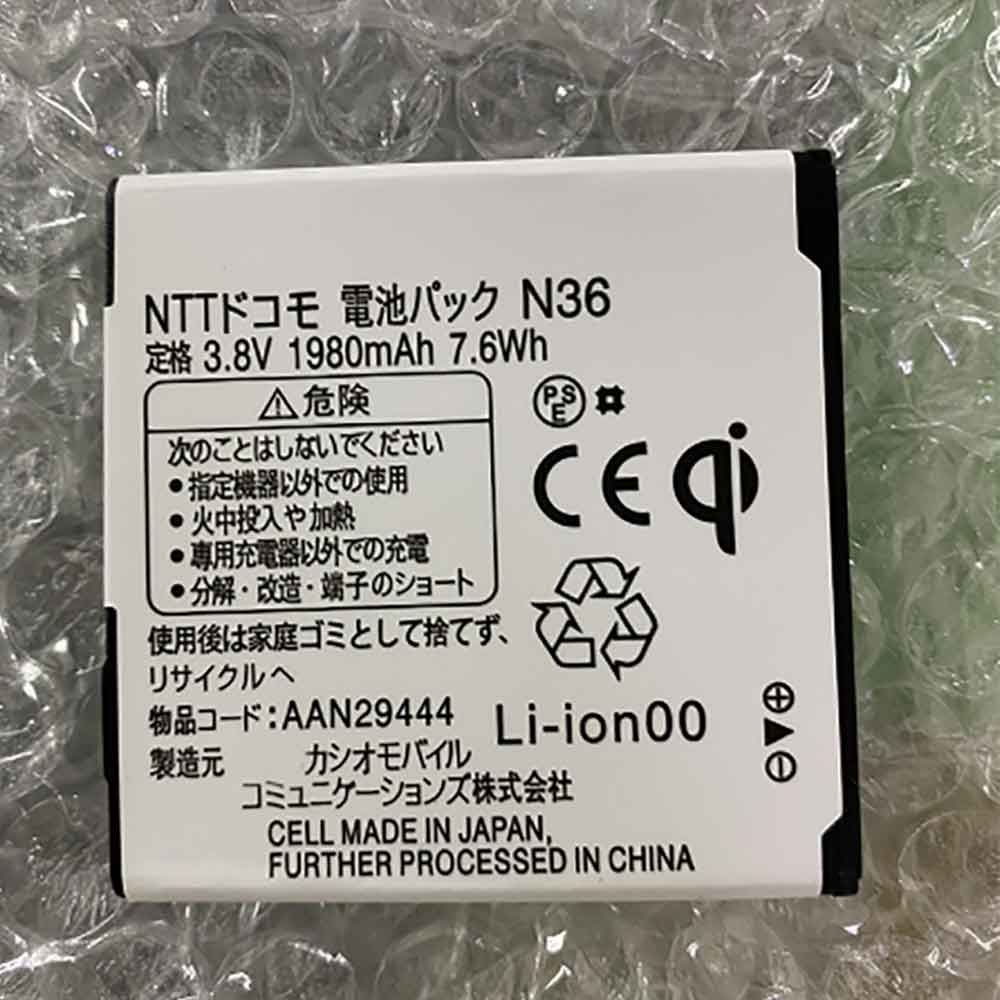
1980mAh 3.8V Nec AAN29444 Li-ion Battery for NEC AAN29444

1980mAh 3.8V Nec AAN29444 Batteries for NEC AAN29444, Nec AAN29444 Cell Phone battery is a brand new,100% Compatible original and replacement Phone battery,Purchase wholesale and retail AAN29444 with high quality and low price!

Find ou your original model number or part number(P/N), and move your eyes on the tag of battery

AAN29444

Specifications

  • Brand:NEC
  • Capacity :1980mAh
  • Voltage :3.8V
  • Type :Li-ion
  • Battery Cell Quality: Grade A
  • Descriptive: Replacement Battery – 1 Year Warranty
  • Description: Brand New, 1 Year Warranty! 30-Days Money Back! Fast Shipping!

How we test this Nec AAN29444 Battery
Step 1: Make sure customer bought the correct battery.
Step 2: Check battery’s appearance and interface.
Step 3: Test battery charger and recharger function.
Step 4: Charger the battery to 100% and recharger to 0% to get real battery capacity
Step 5: Use Ev2300 to check the voltage difference of each goroup cells.
Step 6: Charger battery power more than 30%.
Step 7: Package battery carefully and send out

Compatible Part Numbers:
AAN29444

Compatible Model Numbers:
NEC AAN29444

How much do you know about how to run laptop well as any place? The follow Tips cut way back on protecting battery life.


1). Please recharge or change your Cell Phone battery when battery power low.
2). Using Li-Ion Replacement Nec AAN29444 Cell Phone Battery for your notebook which can work longer time than Non Li-ion one.
3). It is better to defragmentation regularly for your Cell Phone battery life.
4). In order to reduce the laptop power consumpition, you can use some optical drive spin-down and hard drive in your Cell Phone .
5). Please keep your laptop in sleep or standby model without long time using, which both save the Replacement Nec AAN29444 Cell Phone Battery power and extend battery using life.
6). Leave your battery in a dry and cool condition when without using.
7). When you rarely or generally plugged in fixed power using, Please take down your battery to avoid hurting battery life.

Hot Products

2330Mah/17Wh BOSE 088772 for BOSE Soundlink Mini 256WH DELL 90V7W for Dell XPS 13 9343 9350 JD25G 5K6080mAh/48Wh LENOVO L16C4PB1 for Lenovo YOGA 720-13IKB Series1800mAh 13.3Wh MOTOROLA PMNN4001C for Motorola GP68 Radio2580MAH/9.8Wh ALCATEL TLp025G2 for ALCATEL OT- 9001A OT- 9001X OT1500mAh/5.78WH NOKIA BV-6A for Nokia 3060 5250 81104200mAh PANASONIC VW-VBH20 for Panasonic NV-A1, NV-A1EN, NV-A750mAh/2.78WH ALCATEL CAB22D0000C1 for Alcatel phone5100mAh SAMSUNG HQ-3565N for Samsung Galaxy Tab A7 Lite4.3Ah VICTPOWER 10S2P18650 for 2 Wheels Hover Scooter Banlanc

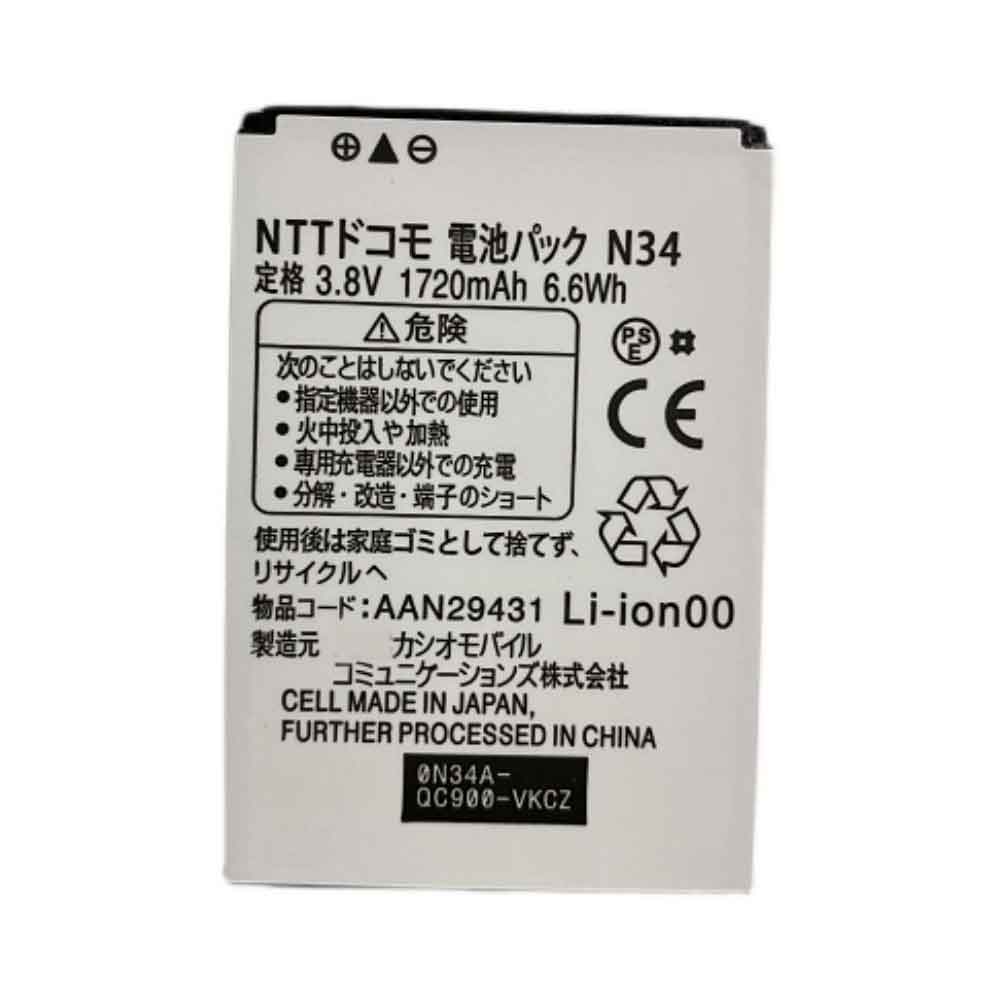
1720mAh 3.8V Nec AAN29431 Li-ion Battery for NEC AAN29431

1720mAh 3.8V Nec AAN29431 Batteries for NEC AAN29431, Nec AAN29431 Cell Phone battery is a brand new,100% Compatible original and replacement Phone battery,Purchase wholesale and retail AAN29431 with high quality and low price!

Find ou your original model number or part number(P/N), and move your eyes on the tag of battery

AAN29431

Specifications

  • Brand:NEC
  • Capacity :1720mAh
  • Voltage :3.8V
  • Type :Li-ion
  • Battery Cell Quality: Grade A
  • Descriptive: Replacement Battery – 1 Year Warranty
  • Description: Brand New, 1 Year Warranty! 30-Days Money Back! Fast Shipping!

How we test this Nec AAN29431 Battery
Step 1: Make sure customer bought the correct battery.
Step 2: Check battery’s appearance and interface.
Step 3: Test battery charger and recharger function.
Step 4: Charger the battery to 100% and recharger to 0% to get real battery capacity
Step 5: Use Ev2300 to check the voltage difference of each goroup cells.
Step 6: Charger battery power more than 30%.
Step 7: Package battery carefully and send out

Compatible Part Numbers:
AAN29431

Compatible Model Numbers:
NEC AAN29431

How much do you know about how to run laptop well as any place? The follow Tips cut way back on protecting battery life.


1). Please recharge or change your Cell Phone battery when battery power low.
2). Using Li-Ion Replacement Nec AAN29431 Cell Phone Battery for your notebook which can work longer time than Non Li-ion one.
3). It is better to defragmentation regularly for your Cell Phone battery life.
4). In order to reduce the laptop power consumpition, you can use some optical drive spin-down and hard drive in your Cell Phone .
5). Please keep your laptop in sleep or standby model without long time using, which both save the Replacement Nec AAN29431 Cell Phone Battery power and extend battery using life.
6). Leave your battery in a dry and cool condition when without using.
7). When you rarely or generally plugged in fixed power using, Please take down your battery to avoid hurting battery life.

Hot Products

790mAh/3.04WH HUAWEI HB672836EEW for Huawei GS PRO790mAh/3.04WH HUAWEI HB672836EEW for Huawei GS PRO790mAh/3.04WH HUAWEI HB672836EEW for Huawei GS PRO790mAh/3.04WH HUAWEI HB672836EEW for Huawei GS PRO790mAh/3.04WH HUAWEI HB672836EEW for Huawei GS PRO790mAh/3.04WH HUAWEI HB672836EEW for Huawei GS PRO420mAh HUITENG 401862 for Huiteng Toy Gun420mAh HUITENG 401862 for Huiteng Toy Gun420mAh HUITENG 401862 for Huiteng Toy Gun420mAh HUITENG 401862 for Huiteng Toy Gun

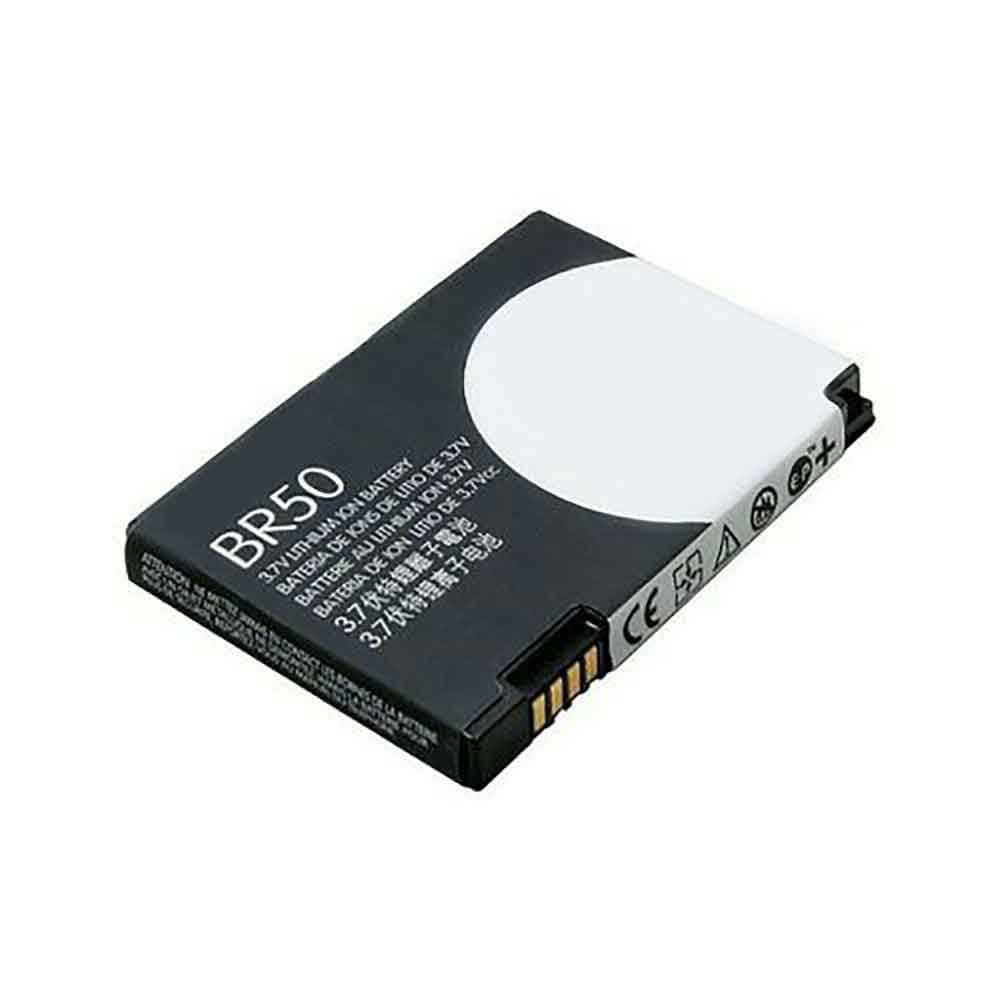
710mAh 3.7V Motorola BR50 Li-ion Battery for Motorola V3C V3IE U6 V3I V3 MS500

710mAh 3.7V Motorola BR50 Batteries for Motorola V3C V3IE U6 V3I V3 MS500, Motorola BR50 Cell Phone battery is a brand new,100% Compatible original and replacement Phone battery,Purchase wholesale and retail BR50 with high quality and low price!

Find ou your original model number or part number(P/N), and move your eyes on the tag of battery

BR50

Specifications

  • Brand:Motorola
  • Capacity :710mAh
  • Voltage :3.7V
  • Type :Li-ion
  • Battery Cell Quality: Grade A
  • Descriptive: Replacement Battery – 1 Year Warranty
  • Description: Brand New, 1 Year Warranty! 30-Days Money Back! Fast Shipping!

How we test this Motorola BR50 Battery
Step 1: Make sure customer bought the correct battery.
Step 2: Check battery’s appearance and interface.
Step 3: Test battery charger and recharger function.
Step 4: Charger the battery to 100% and recharger to 0% to get real battery capacity
Step 5: Use Ev2300 to check the voltage difference of each goroup cells.
Step 6: Charger battery power more than 30%.
Step 7: Package battery carefully and send out

Compatible Part Numbers:
BR50

Compatible Model Numbers:
Motorola V3C V3IE U6 V3I V3 MS500

How much do you know about how to run laptop well as any place? The follow Tips cut way back on protecting battery life.


1). Please recharge or change your Cell Phone battery when battery power low.
2). Using Li-Ion Replacement Motorola BR50 Cell Phone Battery for your notebook which can work longer time than Non Li-ion one.
3). It is better to defragmentation regularly for your Cell Phone battery life.
4). In order to reduce the laptop power consumpition, you can use some optical drive spin-down and hard drive in your Cell Phone .
5). Please keep your laptop in sleep or standby model without long time using, which both save the Replacement Motorola BR50 Cell Phone Battery power and extend battery using life.
6). Leave your battery in a dry and cool condition when without using.
7). When you rarely or generally plugged in fixed power using, Please take down your battery to avoid hurting battery life.

Hot Products

790mAh/3.04WH HUAWEI HB672836EEW for Huawei GS PRO790mAh/3.04WH HUAWEI HB672836EEW for Huawei GS PRO790mAh/3.04WH HUAWEI HB672836EEW for Huawei GS PRO790mAh/3.04WH HUAWEI HB672836EEW for Huawei GS PRO790mAh/3.04WH HUAWEI HB672836EEW for Huawei GS PRO790mAh/3.04WH HUAWEI HB672836EEW for Huawei GS PRO420mAh HUITENG 401862 for Huiteng Toy Gun420mAh HUITENG 401862 for Huiteng Toy Gun420mAh HUITENG 401862 for Huiteng Toy Gun420mAh HUITENG 401862 for Huiteng Toy Gun

The new Samsung Galaxy A23 5G offers strong specs at a low price

 In a flurry of announcements from Sony, Nokia and others, Samsung has unveiled the Samsung Galaxy A23 5G — a phone with a low price but promising specs options.

That includes a 6.6-inch FHD+ bezel-less display. It uses an LCD panel instead of AMOLED technology, but it has at least a 120Hz refresh rate.

The Samsung Galaxy A23 5G also has a multi-lens camera, but like most budget phones, not all of those lenses sound particularly special. Still, they’re headlined by a 50MP sensor, which is a promising spec tidbit. That’s coupled with a 2MP macro camera, a 2MP depth sensor, and an 8MP selfie snapper.

Other specs of the Samsung Galaxy A23 5G include a 5,000mAh battery, 25W charging, 5G and, of course, the Snapdragon 695 chipset, 4GB of RAM, 64GB of storage, and a microSD card slot. As for the design, there’s a V-shaped notch on the display, a large bezel below the screen, and a flat back with a sizable camera bump.

It’s priced at $299.99/£289, so if it performs well, it could be one of the cheapest phones around. It’s available in black in the US, and in the UK in black, white and light blue from September 16, but there’s no word on if or when it’s coming to Australia.

Analysis: This fits Samsung‘s lineup

The Samsung Galaxy A23 5G is the successor to the Samsung Galaxy A22 5G; a phone with a lower refresh rate and a slightly smaller chipset, but the same size battery, and the same screen size and resolution. So the new model should be an upgrade, but maybe not a huge one.

Going a step further is the Samsung Galaxy A33 5G, which is the model above the Galaxy A23 5G. It has a slightly more powerful chipset and a Super AMOLED screen, but the battery size is still the same, and the refresh rate is actually lower than 90Hz.

So it’s arguably an upgrade — and certainly positioned as such — but only slightly. If you want more upgrades, there are plenty of other options for the best Samsung phones.

>>>>>>>>>>>>>Samsung battery

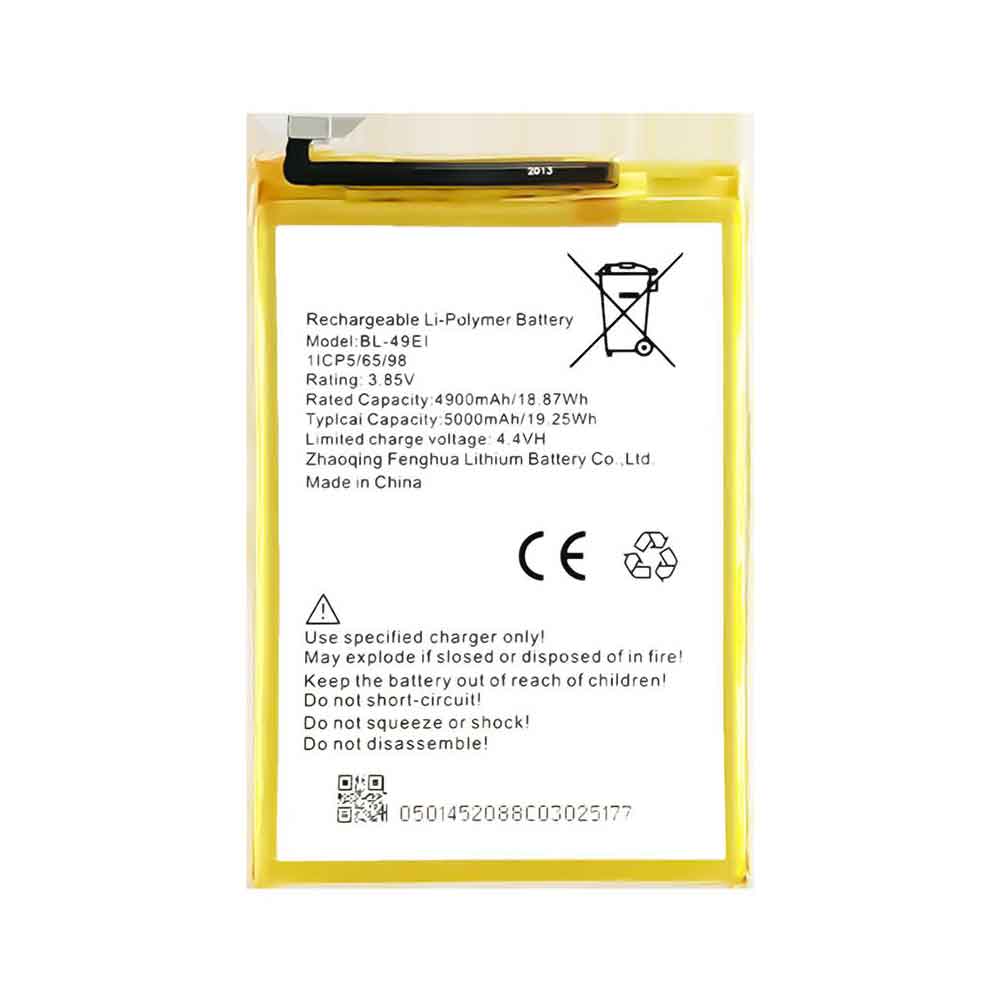
5000mAh 3.85V Itel BL-49Ei Li-ion Battery for iTel P33 Plus P33+ P46

5000mAh 3.85V Itel BL-49Ei Batteries for iTel P33 Plus P33+ P46, Itel BL-49Ei Cell Phone battery is a brand new,100% Compatible original and replacement Phone battery,Purchase wholesale and retail BL-49Ei with high quality and low price!

Find ou your original model number or part number(P/N), and move your eyes on the tag of battery

BL-49Ei

Specifications

  • Brand:iTel
  • Capacity :5000mAh
  • Voltage :3.85V
  • Type :Li-Polymer
  • Battery Cell Quality: Grade A
  • Descriptive: Replacement Battery – 1 Year Warranty
  • Description: Brand New, 1 Year Warranty! 30-Days Money Back! Fast Shipping!

How we test this Itel BL-49Ei Battery
Step 1: Make sure customer bought the correct battery.
Step 2: Check battery’s appearance and interface.
Step 3: Test battery charger and recharger function.
Step 4: Charger the battery to 100% and recharger to 0% to get real battery capacity
Step 5: Use Ev2300 to check the voltage difference of each goroup cells.
Step 6: Charger battery power more than 30%.
Step 7: Package battery carefully and send out

Compatible Part Numbers:
BL-49Ei

Compatible Model Numbers:
iTel P33 Plus P33+ P46

How much do you know about how to run laptop well as any place? The follow Tips cut way back on protecting battery life.


1). Please recharge or change your Cell Phone battery when battery power low.
2). Using Li-Ion Replacement Itel BL-49Ei Cell Phone Battery for your notebook which can work longer time than Non Li-ion one.
3). It is better to defragmentation regularly for your Cell Phone battery life.
4). In order to reduce the laptop power consumpition, you can use some optical drive spin-down and hard drive in your Cell Phone .
5). Please keep your laptop in sleep or standby model without long time using, which both save the Replacement Itel BL-49Ei Cell Phone Battery power and extend battery using life.
6). Leave your battery in a dry and cool condition when without using.
7). When you rarely or generally plugged in fixed power using, Please take down your battery to avoid hurting battery life.

Hot Products

3000MAH CUBOT A5 for Cubot A53660mAh/26.35WH NETGEAR A-2 for NETGEAR ARLO GO MOBILE VML403038Wh/5140mah T-GEE BS101 for T-GEE WINMATE M101B M101H M1013500mAh /26.6WH JUMPER H-30137162P for JUMPER Teclast F5 MaxBook Y114400mah SONY 3E03 for Mini NoteBook N450 PC230 S20 35850mAh 22.52WH TECNO BL-58BT for Tecno BL-58BT790mAh/3.04WH HUAWEI HB672836EEW for Huawei GS PRO3200mAh/12.32WH INFINIX BL-32AX for Infinix Zero 4 X5552500mAh/9.5WH BLU C806003250L for Blu Win Hd 5.5 X150Q X1503450mAh GIONEE BL-N3500A for Gionee S10

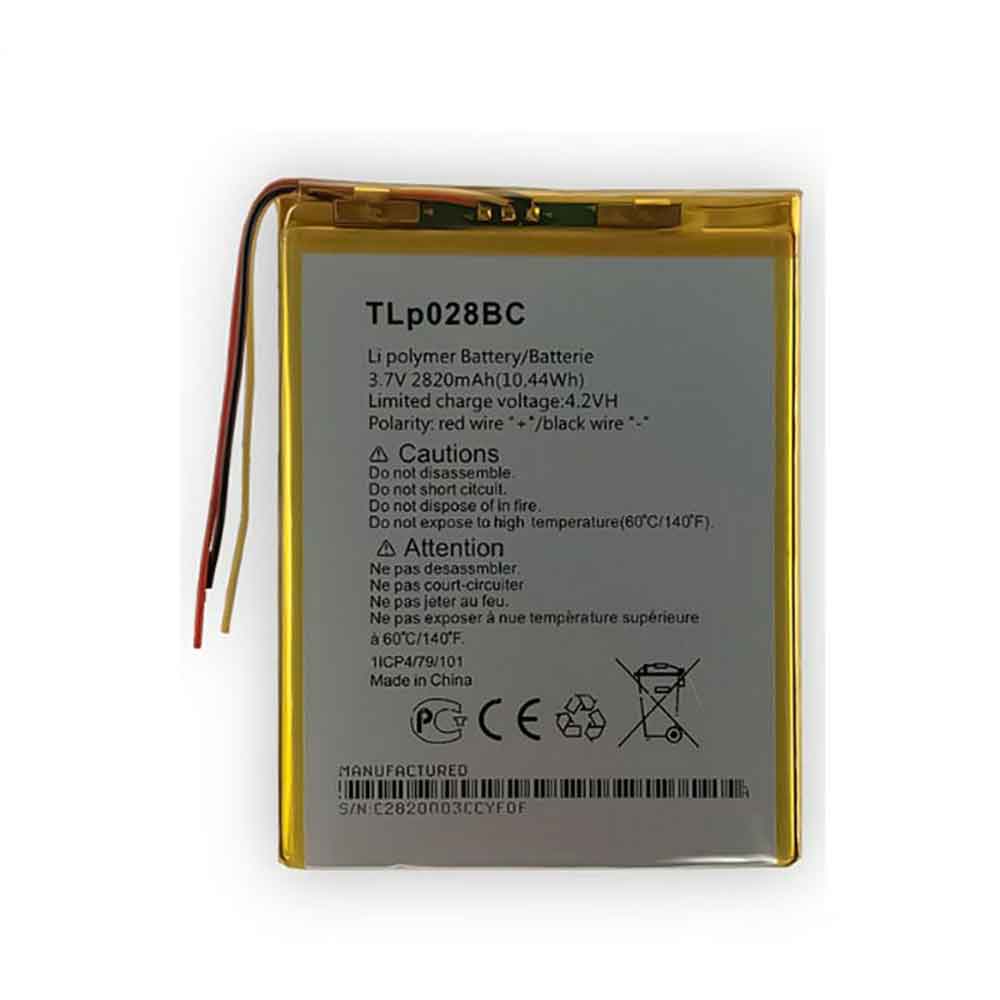
2820mAh 3.7V Alcatel TLp028BC Li-ion Battery for Alcatel OneTouch Pixi 3

2820mAh 3.7V Alcatel TLp028BC Batteries for Alcatel OneTouch Pixi 3, Alcatel TLp028BC Cell Phone battery is a brand new,100% Compatible original and replacement Phone battery,Purchase wholesale and retail TLp028BC with high quality and low price!

Find ou your original model number or part number(P/N), and move your eyes on the tag of battery

TLp028BC

Specifications

  • Brand:Alcatel
  • Capacity :2820mAh
  • Voltage :3.7V
  • Type :Li-Polymer
  • Battery Cell Quality: Grade A
  • Descriptive: Replacement Battery – 1 Year Warranty
  • Description: Brand New, 1 Year Warranty! 30-Days Money Back! Fast Shipping!

How we test this Alcatel TLp028BC Battery
Step 1: Make sure customer bought the correct battery.
Step 2: Check battery’s appearance and interface.
Step 3: Test battery charger and recharger function.
Step 4: Charger the battery to 100% and recharger to 0% to get real battery capacity
Step 5: Use Ev2300 to check the voltage difference of each goroup cells.
Step 6: Charger battery power more than 30%.
Step 7: Package battery carefully and send out

Compatible Part Numbers:
TLp028BC
TLp028B2

Compatible Model Numbers:
Alcatel OneTouch Pixi 3

How much do you know about how to run laptop well as any place? The follow Tips cut way back on protecting battery life.


1). Please recharge or change your Cell Phone battery when battery power low.
2). Using Li-Ion Replacement Alcatel TLp028BC Cell Phone Battery for your notebook which can work longer time than Non Li-ion one.
3). It is better to defragmentation regularly for your Cell Phone battery life.
4). In order to reduce the laptop power consumpition, you can use some optical drive spin-down and hard drive in your Cell Phone .
5). Please keep your laptop in sleep or standby model without long time using, which both save the Replacement Alcatel TLp028BC Cell Phone Battery power and extend battery using life.
6). Leave your battery in a dry and cool condition when without using.
7). When you rarely or generally plugged in fixed power using, Please take down your battery to avoid hurting battery life.

Hot Products

3000MAH CUBOT A5 for Cubot A53660mAh/26.35WH NETGEAR A-2 for NETGEAR ARLO GO MOBILE VML403038Wh/5140mah T-GEE BS101 for T-GEE WINMATE M101B M101H M1013500mAh /26.6WH JUMPER H-30137162P for JUMPER Teclast F5 MaxBook Y114400mah SONY 3E03 for Mini NoteBook N450 PC230 S20 35850mAh 22.52WH TECNO BL-58BT for Tecno BL-58BT790mAh/3.04WH HUAWEI HB672836EEW for Huawei GS PRO3200mAh/12.32WH INFINIX BL-32AX for Infinix Zero 4 X5552500mAh/9.5WH BLU C806003250L for Blu Win Hd 5.5 X150Q X1503450mAh GIONEE BL-N3500A for Gionee S10

Android 12 has some tricks up its sleeve, but you have to know where to look

 Android 13 is now available for some Google Pixel users to install, but Samsung Galaxy, Motorola and other Android users will have to wait until later this year to get Google’s latest mobile software update. However, there’s still a lot to explore on Android 12, and most people are still running on their Android phones.

Whether you own a Pixel 6 Pro or a Samsung Galaxy S22, you’ll find many hidden settings and features on Android 12 that can revolutionize the way you use your Android device.

Below, we’ll show you how to recover accidentally deleted notifications, use your phone with just one hand, and more. Let’s have a look!

Android 12 puts your notification history at your fingertips

Did you clear the notification without reading it? Android has provided device notification history for some time, but you either had to know where to look or you had to install a third-party app to see it.

In Android 12, you just scroll to the bottom of the notification shade and you’ll see a new history button. Tap it and you’ll see notifications that were recently cleared as well as alerts from the past 24 hours.

If you see Manage instead of History, it’s because notification history isn’t turned on. Enable it by tapping Manage, then select Notification History and slide the switch to the On position.

Android 12 makes big phones feel smaller

The new one-handed mode in Android 12 might not be headline news, but it could have a big impact on the way you use your phone. This is especially true if you’re using a phone with a large display, like the Galaxy S22 Ultra.

The new one-handed mode moves the top half of anything on the screen to the bottom half, making it easier to tap quick settings tiles or notifications. To use it, place your finger on the small bar at the bottom of your phone’s screen and swipe down. It might take a few tries, but once you figure out the gestures, it’s easy to reproduce.

Before you can do that, though, you’ll need to turn it on: go into the Settings app, enter One-Handed Mode and turn the feature on. Depending on the Android phone you have, this feature may have different settings that you can turn on and off.

There’s a dedicated game mode in Android 12

If you play a lot of games on your Android device, you’ll be happy to know that Google has added a dedicated gaming mode to Android 12. When it’s on, your phone does things like automatically turn on Do Not Disturb to play when it starts up.

But if you don’t dig into the notification settings everywhere, you’ll never know the mode exists. More specifically, go to Settings > Notifications > Do Not Disturb > Schedule. Once there, check the box next to Game Mode to turn it on. Next, click the settings gear icon and toggle the two items.

Android 12 has a new app layout option

The app grid on a phone‘s home screen is typically a 4×4, 5×5, or 6×6 grid. However, in Android 12 on the Pixel, there’s a new app grid option that’s quite interesting at first glance – 2×2. I think it’s limited to Pixel phones, but hope other phone makers adopt it, as it’s a huge accessibility feature for those who need larger app icons. Switch to the new 2×2 layout with a long press on the home screen, then select Wallpaper & Styles > Apps Grid > 2×2.

>>>>>>>>>>>>>Phone battery

Thanks for reading, hope it helps!

Friendly reminder: If you need to replace the battery of your device, this battery store will be a good choice: www.batteryforpc.co.uk
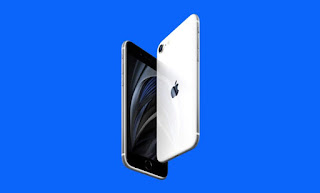
Apple’s iPhone SE 4 could mark the end of the iPhone’s iconic feature

 Apple’s iPhone SE (2022) may have launched only a few months ago, but there’s already talk of the next iteration of the budget smartphone lineup – and the latest rumors suggest we may be saying goodbye to the iconic home button again.

The current iPhone SE model bears a striking resemblance to the iPhone 6 released in 2014. It offers a 5.4-inch display and a single rear camera, and houses the iPhone’s signature home button at the bottom of the screen.

However, on the Geared Up podcast, guest Jon Prosser hinted that the iPhone SE 4 will instead mimic the iPhone XR. It might still be stuck with a camera, but should get a slightly larger 6.1-inch screen and swap out the physical home button and Touch ID for Face ID.

With the launch of the iPhone X in November 2017, Apple removed the Home button from its flagship smartphone, and shortly after discontinuing the first-generation iPhone SE in September 2018, the company did not offer an Home button on the new iPhone all. However, just a year and a half later, with the launch of the iPhone SE (2020), the home button is back.

Still, if the Prosser rumors are true, we may soon be saying goodbye to buttons again when the fourth-generation iPhone SE launches. That being said, we should definitely take this rumor with a grain of salt. Based on Apple’s current release pattern, the next iPhone SE could be two years away, so any design decisions are unlikely to be set in stone.

Analysis: Why remove the iPhone home button?

Apple may have removed the home button entirely from its lineup in the past, but is it really that much of a hassle? Unfortunately for those who like buttons, it does.

Even before the iPhone X was completely removed from flagship stores, Apple had to make major changes to the buttons it used, turning them from actual moving parts to solid fakes that no longer clicked when pressed. This change happened with the introduction of the iPhone 7, as too many users with an iPhone 6 or earlier reported that the physical buttons became less reliable or even stopped working after too much use.

However, even this solution has flaws. The button still takes up valuable space on the face of the iPhone, and by removing it entirely, Apple can increase the usable area of ​​its display without increasing the size of its phone.

At the same time, many users with a dead home button found that the iPhone came with a virtual assistive touch replacement. This digital home button not only performs the basic functions of the original, but also gives users easy access to some other basic functions of the iPhone.

So it makes sense that Apple wants to say so long about the home button on its flagship models, since buttons take up valuable space, and there are already improved alternatives.

We’ll have to wait and see if the iPhone SE 4 follows suit anytime soon, but don’t be surprised if Apple’s next budget smartphone ends up with a more modern look.

>>>>>>>>>>>>iPhone battery