On Monday, Apple released iPadOS 16.1 for its iPad lineup — the first official release of iPadOS 16, while skipping iPadOS 16.0 in the process.
Like iOS 16 for iPhone, iPadOS updates include editing and unsending text messages, easier sharing of photos and videos using iCloud Shared Photo Library, and the ability to view sports scores on the lock screen with live activity, as well as some iPad-specific features. new function. As long as you have a compatible iPad, such as an iPad Pro or iPad Air, you can download and install iPadOS 16.1 right away. Let’s take a look below!
Does your iPad support iPadOS 16.1?
Apple says the following devices support iPadOS 16.1:
iPad Pro (all models), iPad Air (3rd generation and later), iPad (5th generation and later), iPad Mini (5th generation and later)
If you don’t know which iPad you have, go to Settings > General > About and check the option next to Model Name, which should include the model and generation of the iPad.
How to download iPadOS 16.1
If you own any of the Apple tablets listed in the previous section, you can download and install iPadOS 16.1. To download the latest software, go to Settings > General > Software Update and wait a few seconds for the iPadOS 16.1 update to appear.
Now click Upgrade to iPadOS 16.1 > Download and Install, if prompted to enter your password and wait for iPadOS 16.1 to download, agree to the terms and conditions, and wait again. After the download is complete, click Install Now and your iPadOS 16.1 will reboot. When it restarts, iPadOS 16.1 will be installed on your iPad.
Will you get all the new features of iPadOS 16.1?
As long as your iPad supports iPadOS 16.1, you should get most of the new features, with a few caveats. Some of the new iPadOS 16.1 features listed below are only available on iPads with M1 or M2 chips:
External monitor support (M1 iPad and later), reference mode (12.9-inch iPad Pro), magnifying glass detection (2020 iPad Pro), door detection (2020 iPad Pro), virtual memory swap (iPad Air 5 256GB or M1 iPad Pro) , Stage Manager (iPad Pro 3rd generation and later)
The latest Acer Swift 5 and the MacBook Air with M2 are both great laptops, but which one is the best? That’s the question we’ll try to answer here.
Each packs the latest Apple and Intel laptop-centric chipsets, making them two of the best laptops you can buy right now. So, which one should you buy? Let’s find out.
ACER SWIFT 5 VS MACBOOK AIR M2: PRICE AND VALUE
It’s definitely not surprising that Acer is offering more money than Apple. Of course, when you look at the lowest possible prices, the base MacBook Air M2 is $1,199, and the Acer Swift 5 is $1,549.
Considering the cost, the Acer Swift 5 comes with an Intel Core i7-1260P processor, 16GB LPDDR5 RAM, and a 1TB SSD. To get similar specs in the MacBook Air, you’ll need to shell out $1,899, because honestly, 256GB of storage isn’t enough in the base model.
Apple moved decisively to make the Air look like a MacBook Pro. Gone are the sleek, stylish receding wedges that gave the Air a near-impossible size, replaced by a uniform thickness. Open the lid and you’ll see the full-size backlit keyboard at the top of the Starlight keyboard deck is slightly recessed. Directly below is a larger trackpad.
As for the Swift, Acer claims it has a “refined design,” although many OEMs tend to exaggerate with catchy buzzwords and enticing wording.
The Swift 5 measures 12.2 by 8.4 by 0.6 inches and weighs 2.7 pounds, while the MacBook Air is slightly smaller at 12 by 8.5 by 0.4 inches, but weighs the same, at 2.7 pounds.
ACER SWIFT 5 AND MACBOOK AIR M2: PORTS
The Acer Swift 5 wins handily with two Thunderbolt 4 ports, HDMI, two USB 3.2 Gen 1 Type-A ports, a headphone jack, and a Kensington Lock.
The M2 MacBook Air does improve slightly over its predecessor by moving charging to the dedicated MagSafe port, which leaves the two Thunderbolt 4 ports free next to the 3.5mm headphone jack.
ACER SWIFT 5 vs MACBOOK AIR M2: DISPLAY
In the Acer Swift 5 and MacBook Air, you get gorgeous, spacious screens with tiny bezels. Digging into the details will tell you exactly where Acer starts to lead slightly
The MacBook Air now has a 13.6-inch, 2560 x 1664p Liquid Retina display, compared to the previous version’s 13.3-inch. The aspect ratio is technically 3:2, but since the notch at the top forms part of the taskbar, you actually get a work area that’s closer to 16:10.
When passing our lab tests, the Air recorded a DCI-P3 color gamut of 75.9 percent and an impressive average brightness of 489 nits. In real-world use, as expected, the M2’s screen is rich in color and crisp in detail, enhanced by Apple’s proprietary TrueTone technology.
Meanwhile, the Acer Swift 5 features a 14-inch WQXGA 2560 x 1600 pixel Corning Gorilla Glass touchscreen with a 16:10 aspect ratio. The test results showed how the Acer fared in 93.3 percent of the DCI-P3 color gamut, but trailed the Air slightly at 457 nits of brightness. With numbers like these, monitors inevitably emit rich, saturated colors.
There will be people who would like the extra brightness, but in my workload the priority is always color accuracy, and the Acer gets away with it here. I can see myself working on Photoshop with ease and enjoying all kinds of vivid content, but the Swift 5 is clearly more realistic.
How does the laptop-centric M2 chipset stack up against similar competitors like the Intel Core i7-1260P? The answer may surprise you.
On Geekbench 5.4’s overall performance test, the Swift 5 scored a whopping 9,859, beating the average laptop average. Meanwhile, the M2 Air also performed well in our synthetic benchmarks, but fell behind in raw power, with a Geekbench score of 8,919.
The Swift 5 also leads in our HandBrake benchmark — transcoding a 4K video to 1080p in just 7 minutes 36 seconds, compared to the Air’s 7 minutes 52 seconds.
In real-world use, both systems are excellent working systems – handling multitasking with ease. But while the MacBook Air is better in the graphics department, we have to compare each system as a whole, with the Swift 5 going to be slightly faster for your productivity needs.
The final round saw the M2 MacBook Air come to the fore, taking a toll on the Acer Swift 5. As you might have predicted, with Apple’s legendary laptop battery life and any system that uses its own silicon, the Air is the king of endurance.
It might be slightly shorter than the M1 MacBook Air, but at 14 hours and 6 minutes, it offers insanely long life for any commute or even a long flight. Meanwhile, the Acer Swift 5’s Laptop Mag Battery test came in pretty good at 11 hours and 24 minutes, but it clearly didn’t hold up to the Air’s prowess.
4900mAh 7.2V Cellebrite A-MAS-14-002 Batteries for Cellebrite A-MAS-14-002, Cellebrite A-MAS-14-002 Other battery is a brand new,100% Compatible original and replacement battery,Purchase wholesale and retail A-MAS-14-002 with high quality and low price!
Find ou your original model number or part number(P/N), and move your eyes on the tag of battery
Descriptive: Replacement Battery – 1 Year Warranty
Description: Brand New, 1 Year Warranty! 30-Days Money Back! Fast Shipping!
How we test this Cellebrite A-MAS-14-002 Battery Step 1: Make sure customer bought the correct battery. Step 2: Check battery’s appearance and interface. Step 3: Test battery charger and recharger function. Step 4: Charger the battery to 100% and recharger to 0% to get real battery capacity Step 5: Use Ev2300 to check the voltage difference of each goroup cells. Step 6: Charger battery power more than 30%. Step 7: Package battery carefully and send out
How much do you know about how to run laptop well as any place? The follow Tips cut way back on protecting battery life.
1). Please recharge or change your Other battery when battery power low. 2). Using Li-Ion Replacement Cellebrite A-MAS-14-002 Other Battery for your notebook which can work longer time than Non Li-ion one. 3). It is better to defragmentation regularly for your Other battery life. 4). In order to reduce the laptop power consumpition, you can use some optical drive spin-down and hard drive in your Other . 5). Please keep your laptop in sleep or standby model without long time using, which both save the Replacement Cellebrite A-MAS-14-002 Other Battery power and extend battery using life. 6). Leave your battery in a dry and cool condition when without using. 7). When you rarely or generally plugged in fixed power using, Please take down your battery to avoid hurting battery life.
5000mAh 3.87V Vivo B-T7 Batteries for Vivo Y32 Y21E, Vivo B-T7 Cell Phone battery is a brand new,100% Compatible original and replacement Phone battery,Purchase wholesale and retail B-T7 with high quality and low price!
Find ou your original model number or part number(P/N), and move your eyes on the tag of battery
Descriptive: Replacement Battery – 1 Year Warranty
Description: Brand New, 1 Year Warranty! 30-Days Money Back! Fast Shipping!
How we test this Vivo B-T7 Battery Step 1: Make sure customer bought the correct battery. Step 2: Check battery’s appearance and interface. Step 3: Test battery charger and recharger function. Step 4: Charger the battery to 100% and recharger to 0% to get real battery capacity Step 5: Use Ev2300 to check the voltage difference of each goroup cells. Step 6: Charger battery power more than 30%. Step 7: Package battery carefully and send out
How much do you know about how to run laptop well as any place? The follow Tips cut way back on protecting battery life.
1). Please recharge or change your Cell Phone battery when battery power low. 2). Using Li-Ion Replacement Vivo B-T7 Cell Phone Battery for your notebook which can work longer time than Non Li-ion one. 3). It is better to defragmentation regularly for your Cell Phone battery life. 4). In order to reduce the laptop power consumpition, you can use some optical drive spin-down and hard drive in your Cell Phone . 5). Please keep your laptop in sleep or standby model without long time using, which both save the Replacement Vivo B-T7 Cell Phone Battery power and extend battery using life. 6). Leave your battery in a dry and cool condition when without using. 7). When you rarely or generally plugged in fixed power using, Please take down your battery to avoid hurting battery life.
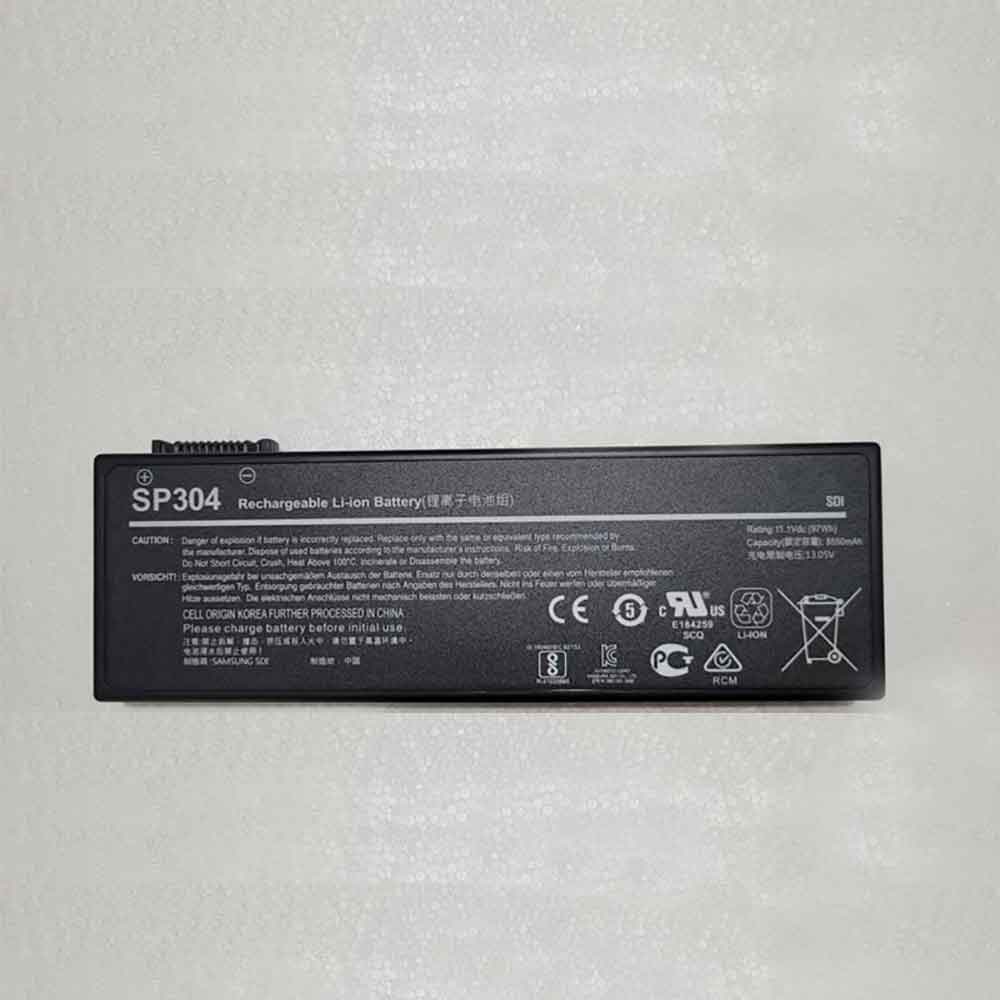
8650mAh 11.1V Siemens SP304 Batteries for Siemens Simatic Field PG M4, Siemens SP304 Laptop battery is a brand new,100% Compatible original and replacement Laptop battery,Purchase wholesale and retail SP304 with high quality and low price!
Find ou your original model number or part number(P/N), and move your eyes on the tag of battery
Descriptive: Replacement Battery – 1 Year Warranty
Description: Brand New, 1 Year Warranty! 30-Days Money Back! Fast Shipping!
How we test this Siemens SP304 Battery Step 1: Make sure customer bought the correct battery. Step 2: Check battery’s appearance and interface. Step 3: Test battery charger and recharger function. Step 4: Charger the battery to 100% and recharger to 0% to get real battery capacity Step 5: Use Ev2300 to check the voltage difference of each goroup cells. Step 6: Charger battery power more than 30%. Step 7: Package battery carefully and send out
Compatible Model Numbers: Siemens Simatic Field PG M4
How much do you know about how to run laptop well as any place? The follow Tips cut way back on protecting battery life.
1). Please recharge or change your Laptop battery when battery power low. 2). Using Li-Ion Replacement Siemens SP304 Laptop Battery for your notebook which can work longer time than Non Li-ion one. 3). It is better to defragmentation regularly for your Laptop battery life. 4). In order to reduce the laptop power consumpition, you can use some optical drive spin-down and hard drive in your Laptop . 5). Please keep your laptop in sleep or standby model without long time using, which both save the Replacement Siemens SP304 Laptop Battery power and extend battery using life. 6). Leave your battery in a dry and cool condition when without using. 7). When you rarely or generally plugged in fixed power using, Please take down your battery to avoid hurting battery life.
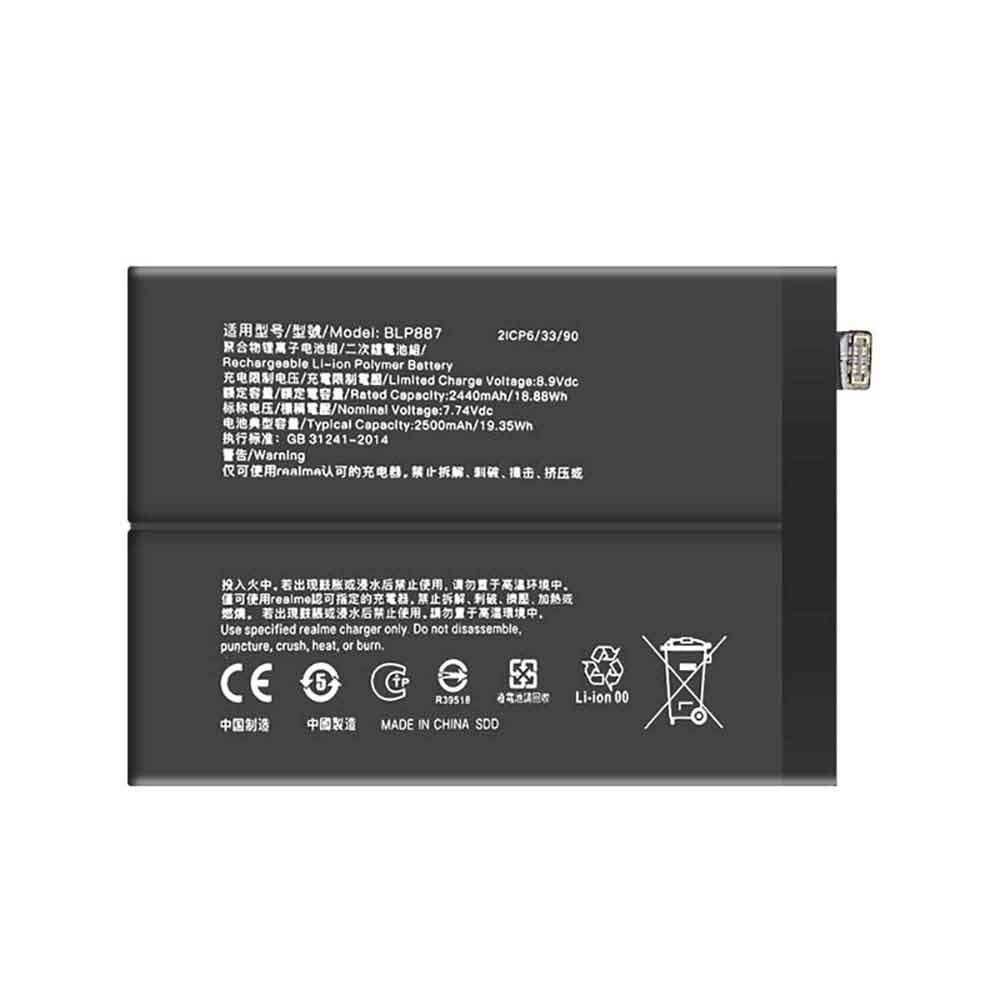
2500mAh 7.74V Realme BLP887 Batteries for Realme GT Neo2T, Realme BLP887 Cell Phone battery is a brand new,100% Compatible original and replacement Phone battery,Purchase wholesale and retail BLP887 with high quality and low price!
Find ou your original model number or part number(P/N), and move your eyes on the tag of battery
Descriptive: Replacement Battery – 1 Year Warranty
Description: Brand New, 1 Year Warranty! 30-Days Money Back! Fast Shipping!
How we test this Realme BLP887 Battery Step 1: Make sure customer bought the correct battery. Step 2: Check battery’s appearance and interface. Step 3: Test battery charger and recharger function. Step 4: Charger the battery to 100% and recharger to 0% to get real battery capacity Step 5: Use Ev2300 to check the voltage difference of each goroup cells. Step 6: Charger battery power more than 30%. Step 7: Package battery carefully and send out
How much do you know about how to run laptop well as any place? The follow Tips cut way back on protecting battery life.
1). Please recharge or change your Cell Phone battery when battery power low. 2). Using Li-Ion Replacement Realme BLP887 Cell Phone Battery for your notebook which can work longer time than Non Li-ion one. 3). It is better to defragmentation regularly for your Cell Phone battery life. 4). In order to reduce the laptop power consumpition, you can use some optical drive spin-down and hard drive in your Cell Phone . 5). Please keep your laptop in sleep or standby model without long time using, which both save the Replacement Realme BLP887 Cell Phone Battery power and extend battery using life. 6). Leave your battery in a dry and cool condition when without using. 7). When you rarely or generally plugged in fixed power using, Please take down your battery to avoid hurting battery life.
If your iPhone keeps freezing, it’s time to make some changes. Maybe you need to charge it differently with the proper cable, or invest in a decent power bank that allows you to charge your iPhone from anywhere without relying on a wall outlet. You can also turn on Low Power Mode permanently or put iPhone in Airplane Mode to help preserve the small battery you have.
Not all battery-saving tips are obvious, though, and if you’re running iOS 16, there are some new ways to help you extend the life of your iPhone’s battery. Below, we’ll cover two new features in iOS 16 that both drain your iPhone’s battery to varying degrees, and how to turn them off to improve battery life.
Remove widgets from lock screen
All widgets on the lock screen force your app to run automatically in the background, constantly fetching data to update the information the widget displays, such as sports scores or the weather. And because of your widgets, these apps are constantly running in the background, which means they’re constantly draining battery power.
If you want to help save some battery on iOS 16, your best bet is to avoid widgets on the lock screen. The easiest way is to switch to another lock screen profile – press your finger on the existing lock screen and swipe around to select a lock screen profile without any widgets. However, if you just want to remove widgets from an existing lock screen, press on the lock screen, tap Customize, select the lock screen option, tap the widget box, and then tap the “-” button on each widget to delete them.
Keep haptic keyboard feedback off
Surprisingly, the keyboard on the iPhone has never had the ability to vibrate as you type, something recently added on iOS 16 called haptic feedback. Rather than just hearing a click, haptic feedback provides vibrations to each keystroke, providing a more immersive experience as you type. However, according to Apple, the same feature may also affect battery life.
According to this Apple support page about the keyboard, haptic feedback “may affect iPhone battery life.” There’s no specifics on how much battery life the keyboard feature consumes, but it’s best to disable this feature if you want to save battery.
Fortunately, it’s not turned on by default. If you enabled it yourself, go to Settings > Sounds & Haptics > Keyboard Feedback and turn off Haptics to turn off haptic feedback for the keyboard.
Although they haven’t been released yet, Live Activity and iCloud Shared Photo Library are two iOS 16 features that can also drain your battery, so keep an eye out for updates to this story on how to disable them.
Apple is releasing iOS 16.1, the next iPhone software update, with a host of new features and some bug fixes. This includes a new way to charge your iPhone, using subscription-based Apple Fitness+ without the need for an Apple Watch, updating Dynamic Island for the iPhone 14 Pro, and more.
iOS 16.1, confirmed to launch on October 24, will also be released alongside other software updates, including iPadOS 16.1 and macOS Ventura.
So how to update to iOS 16.1?
To update, your iPhone may have an “Available Software Updates” option at the top of the settings for easy download. If not, you need to go to Settings > General > Software Update.
While iOS 16.1 fixes some bugs, this update includes some more interesting features – especially for those interested in Apple Fitness+, reducing carbon footprints, and live events. Let’s take a look below!
Apple Fitness+ is available to iPhone users
Starting October 24th, Apple Fitness+ will be available to iPhone users to subscribe, even if they don’t have an Apple Watch. It will be fully integrated with the Fitness app. Users without an Apple Watch won’t be able to see metrics like their heart rate and calories on the screen during a workout, but will still be able to follow up.
Clean and energy efficient
A new battery charging feature will be available on iPhone called Clean Energy. Available in Settings and currently only in the US, the feature will “attempt to reduce the iPhone’s carbon footprint by selectively charging low-carbon electricity when electricity is available.” This may result in slower charging, but is designed to reduce your carbon footprint.
Real-time activity of third-party applications
Want to check your sports scores or see your riding distance at a glance? iOS 16.1 brings live events to third-party apps, which allows iPhone users to watch live events directly on their lock screen and, for those with an iPhone 14 Pro or 14 Pro Max, on Dynamic Island.
Live activity will appear at the bottom of the lock screen on iPhone 14 and 14 Max models and earlier, while iPhone 14 Pro models will feature a feature set at the top of the screen to work with the new Dynamic Island.
iCloud Shared Photo Library
iOS 16.1 makes it easy for users to share photos and videos with up to five people with the iCloud Shared Photo Library feature. By setting up a shared gallery, users can allow photos taken by themselves to be sent directly to the gallery, and allow users in groups to add, edit, favorite, caption, and delete photos.
Enter the Home app
Matter, the new smart home connectivity standard, will now be supported in the Home app. This allows a wider selection of smart home accessories to work together, whether it’s Google Home, Amazon Alexa, and of course Apple’s Homekit.
Dynamic Island Reachability Support
For those with an iPhone 14 Pro or 14 Pro Max, iOS 16.1 will bring Reachability support to make one-handed access easier. It lowers the top of the iPhone‘s display by swiping down on the bottom of the screen. This is an optional feature that can be turned on through accessibility settings.
Key Sharing in Apple Wallet
iPhone users will be able to share their car, hotel room and other keys through iOS 16.1’s key sharing feature. This can be shared via messaging apps, including Messages and WhatsApp. What’s more, Apple Card customers will have access to a savings account that will automatically deposit “Daily Cash” cash back rewards into a high-yield savings account.
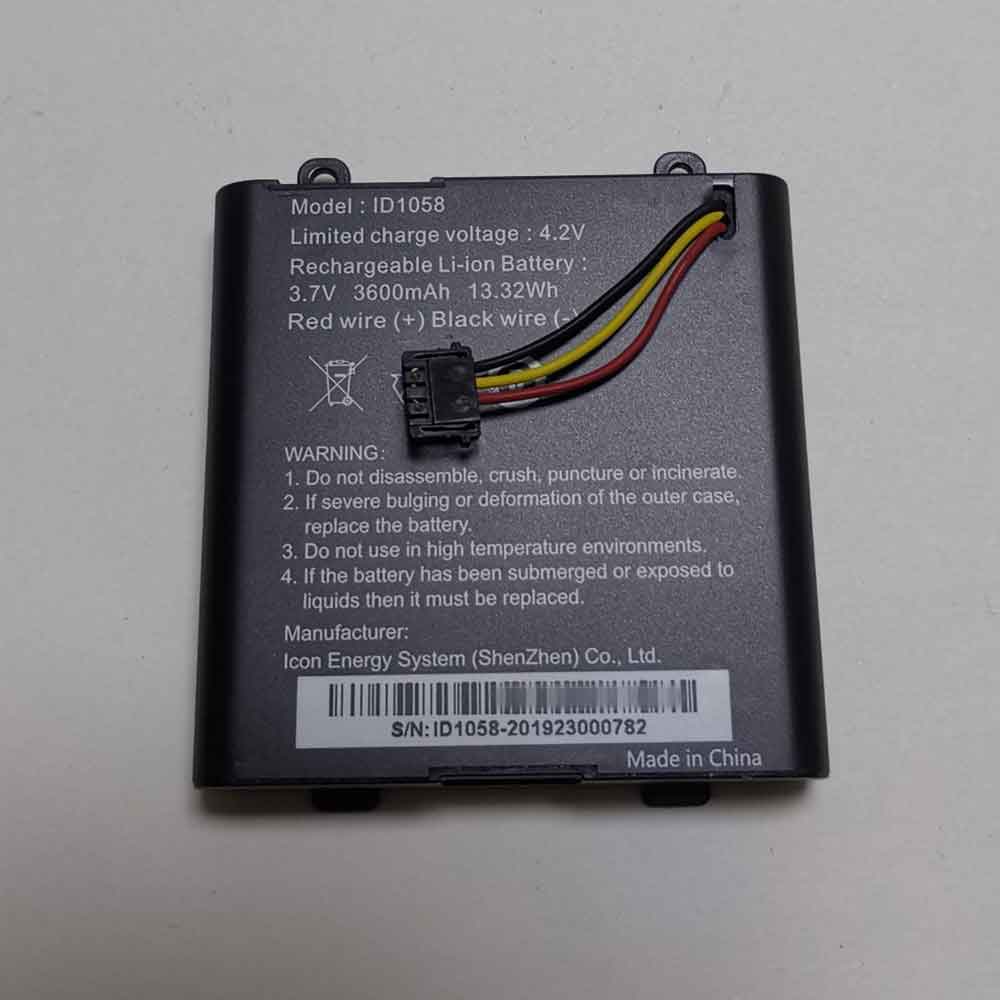
3600mAh 3.7V Ies ID1058 Batteries for IES ID1058, Ies ID1058 Other battery is a brand new,100% Compatible original and replacement battery,Purchase wholesale and retail ID1058 with high quality and low price!
Find ou your original model number or part number(P/N), and move your eyes on the tag of battery
Descriptive: Replacement Battery – 1 Year Warranty
Description: Brand New, 1 Year Warranty! 30-Days Money Back! Fast Shipping!
How we test this Ies ID1058 Battery Step 1: Make sure customer bought the correct battery. Step 2: Check battery’s appearance and interface. Step 3: Test battery charger and recharger function. Step 4: Charger the battery to 100% and recharger to 0% to get real battery capacity Step 5: Use Ev2300 to check the voltage difference of each goroup cells. Step 6: Charger battery power more than 30%. Step 7: Package battery carefully and send out
How much do you know about how to run laptop well as any place? The follow Tips cut way back on protecting battery life.
1). Please recharge or change your Other battery when battery power low. 2). Using Li-Ion Replacement Ies ID1058 Other Battery for your notebook which can work longer time than Non Li-ion one. 3). It is better to defragmentation regularly for your Other battery life. 4). In order to reduce the laptop power consumpition, you can use some optical drive spin-down and hard drive in your Other . 5). Please keep your laptop in sleep or standby model without long time using, which both save the Replacement Ies ID1058 Other Battery power and extend battery using life. 6). Leave your battery in a dry and cool condition when without using. 7). When you rarely or generally plugged in fixed power using, Please take down your battery to avoid hurting battery life.
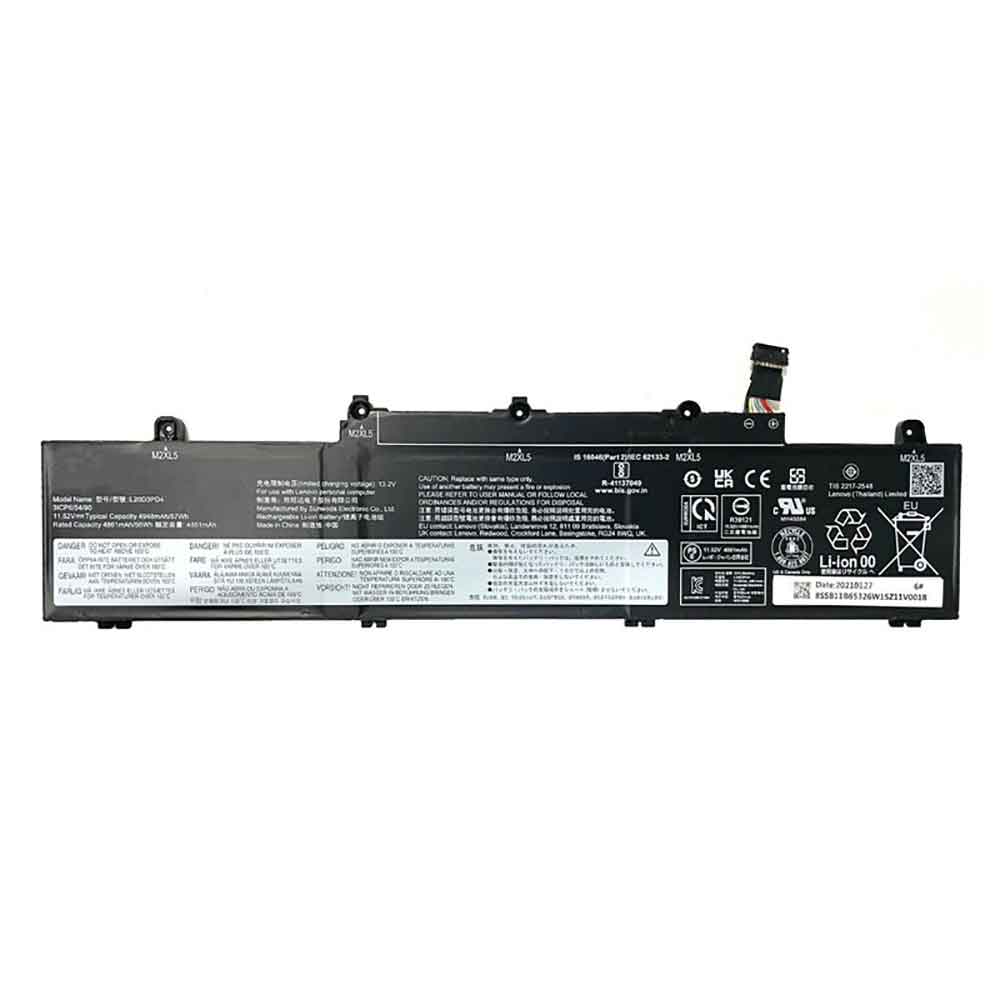
4958mAh 11.52V Lenovo L20D3PD4 Batteries for Lenovo ThinkPad E14 E15 Gen2 Gen3 2021, Lenovo L20D3PD4 Laptop battery is a brand new,100% Compatible original and replacement Laptop battery,Purchase wholesale and retail L20D3PD4 with high quality and low price!
Find ou your original model number or part number(P/N), and move your eyes on the tag of battery
Descriptive: Replacement Battery – 1 Year Warranty
Description: Brand New, 1 Year Warranty! 30-Days Money Back! Fast Shipping!
How we test this Lenovo L20D3PD4 Battery Step 1: Make sure customer bought the correct battery. Step 2: Check battery’s appearance and interface. Step 3: Test battery charger and recharger function. Step 4: Charger the battery to 100% and recharger to 0% to get real battery capacity Step 5: Use Ev2300 to check the voltage difference of each goroup cells. Step 6: Charger battery power more than 30%. Step 7: Package battery carefully and send out
Compatible Model Numbers: Lenovo ThinkPad E14 E15 Gen2 Gen3 2021
How much do you know about how to run laptop well as any place? The follow Tips cut way back on protecting battery life.
1). Please recharge or change your Laptop battery when battery power low. 2). Using Li-Ion Replacement Lenovo L20D3PD4 Laptop Battery for your notebook which can work longer time than Non Li-ion one. 3). It is better to defragmentation regularly for your Laptop battery life. 4). In order to reduce the laptop power consumpition, you can use some optical drive spin-down and hard drive in your Laptop . 5). Please keep your laptop in sleep or standby model without long time using, which both save the Replacement Lenovo L20D3PD4 Laptop Battery power and extend battery using life. 6). Leave your battery in a dry and cool condition when without using. 7). When you rarely or generally plugged in fixed power using, Please take down your battery to avoid hurting battery life.