The fastest way to charge your iPhone if you’re short on time

 Whether you have an iPhone 13, iPhone 12, or another model, realizing that it has a very low battery is never a good feeling, especially when you’re leaving a place where you can’t charge your device.

Let’s go over a few ways you can quickly fully charge your battery to get you through the next hour or so, if not longer. Some methods are tried and true, such as turning on airplane mode to reduce power consumption associated with cellular networks, and some newer methods, such as using a wireless MagSafe charger. These methods can also be mixed and matched, hopefully at least getting you enough power for basic tasks. Let’s take a look below!

If you have a fast charger, use it

The fastest way to charge your iPhone is to use a fast charger: connect the 20W power adapter with a USB-C to Lightning cable. As long as you own an iPhone 8 or newer, you can quickly charge your phone from dead to around 50% in about 30 minutes. If you have an hour to spare, you can fully charge it. Even just a 10-minute fast charge can boost your battery by double digits, so if you’re short on time, always opt for the fast charger option.

According to Apple, you can also use other compatible fast charging power bricks, but you will need at least a 20W power brick to fast charge iPhone 12 and later.

If you don’t have a fast charger, the wireless MagSafe charger is a good idea

The second fastest way to charge your iPhone is to use Apple’s MagSafe charger and 20W power adapter, but for this to work, you must have an iPhone 12 or iPhone 13 to get the faster 15W wireless charging. If your iPhone dies, you should get about 30 percent charge in about 30 minutes of wireless charging.

However, that doesn’t mean you can use any industry-standard Qi wireless charger for fast charging. While the MagSafe charger supports 15W, the Qi charger will only give you a maximum of 7.5W, which is significantly slower than the MagSafe and only slightly faster than a traditional 5W wall charger. Note that magnetic wireless chargers that are not MagSafe certified will also charge at a slower 7.5W speed.

Do not use a laptop or desktop computer

A laptop is a very convenient way to charge your iPhone, especially if you spend most of your time in front of your computer and want to keep an eye on any incoming text messages and notifications. Unfortunately, your computer will always charge your phone slower than any wall charger or wireless charger.

Your computer’s USB port, whether it’s the larger and older USB-A or the newer, smaller USB-C, can’t provide the same amount of power as any wall outlet — not even a 5W power adapter. This is especially true if your old computer has a faulty USB port or an incompatible charging cable, both of which can further slow down the charging process.

And don’t use your iPhone while it’s charging

If you’re charging your iPhone while streaming a video or playing a mobile game, the battery will charge much slower, so don’t touch it if you can.

For better results, please turn off the phone while charging

Even when your screen is off, your phone is still working in the background, constantly refreshing apps, sending notifications, and turning the screen on—all of which wastes battery. If you want your iPhone to charge faster, your best bet is to turn it off.

You can also put it in airplane mode while charging

If you don’t want to turn off your iPhone, but still want to help it charge faster, you can turn on Airplane Mode, which disables all wireless transmissions like cellular, Wi-Fi, and Bluetooth. If they are off, your iPhone can charge faster. That way, you can also quickly turn off airplane mode to quickly see any text messages or calls you might be waiting on.

Use low power mode, dark mode and turn down the brightness

If you’re not going to turn it off, you can use these same features and settings to help charge your iPhone faster.

Low Power Mode: Turn it on to reduce or affect power-hungry features.

Dark Mode: The jury is still out on how much battery life Dark Mode saves, but it doesn’t hurt to have it on while charging your iPhone, especially if every percentage counts.

Decrease screen brightness: The brighter the screen, the faster the battery drains, so turn it down while charging.

Disable optimized battery charging feature

Apple has a built-in tool that can help prevent your iPhone‘s battery from degrading quickly, but the same feature can also make your device charge more slowly. While the feature usually only slows down your iPhone during long periods of charging, it may still be worth disabling when charging your phone. Go to Settings > Battery > Battery Health and turn off Optimize battery charging to turn off this feature.

>>>>>>>>>>>>>iPhone battery

Thanks for reading, hope it helps!

Friendly reminder: If you need to replace your phone battery, this battery store will be a good choice: www.batteryforpc.co.uk

Massive Samsung Galaxy Watch 5 leak suggests it can beat Apple Watch 8

 Samsung‘s second big launch of 2022 is just around the corner, and the company will host an event on August 10 where we’re expecting to see the Samsung Galaxy Z Fold 4, Samsung Galaxy Z Flip 4 and Samsung Galaxy Watch 5 series – these watches are making Be the real highlight of the show.

The biggest news in this leak is battery capacity, the 40mm Samsung Galaxy Watch 5 apparently has a 284mAh battery, the 44mAh model is said to have a 410mAh battery, and the 45mm Samsung Galaxy Watch 5 Pro apparently has a 284mAh battery Equipped with a huge 590mAh battery.

These capacities will be higher than the battery capacity of the Samsung Galaxy Watch 4 series, and also higher than previous leaks have suggested. Apparently, the standard model has 50 hours of battery life, while the Galaxy Watch 5 Pro has 80 hours of battery life, which is even better than the three-day battery life we’ve heard before.

Other leaked specs include a 1.19-inch 396 x 396 AMOLED display on the 40mm model and a larger 1.36-inch 450 x 450 AMOLED screen on the other two models, all three versions of which use sapphire glass.

They also apparently both charge wirelessly at 10W, and both use the Exynos W920 chipset we saw earlier in the Galaxy Watch 4. It is said to come with up to 16GB of storage as well as GPS, NFC and – in this case a cellular model – an eSIM.

The standard Galaxy Watch 5 models are apparently all 9.8mm thick, with the 40mm model weighing in at 28.7g and the 44mm model at 33.5g. Meanwhile, the Samsung Galaxy Watch 5 Pro is 10.5mm thick and weighs 46.5 grams. All this extra weight is probably because of the bigger battery.

A new sensor can also be seen on the back of these wearables, which the website speculates may be used to measure body temperature.

Galaxy Watch 5 series could beat Apple Watch 8

The Galaxy Watch line is usually the main competitor to the Apple Watch, and this year it could bring more competition than in previous years.

While we’re not sure about the Watch 5 or the Apple Watch 8, leaks suggest Apple’s upcoming wearable will be at least as expensive. Since Samsung’s wearables are likely to significantly improve battery life, they could give the Apple Watch 8 an edge here; and, aside from a possible new Apple Watch 8 Rugged Edition, it doesn’t sound like Apple’s upcoming wearables won’t Provides too many upgrades. They may have body temperature sensors, but Samsung‘s watches may too.

The choice largely depends on your preferred operating system—if you have an Android phone, the Apple Watch 8 isn’t an option at all. But based on rumored specs and prices alone, the Samsung Galaxy Watch 5 series will likely match or beat the best Apple watches.

>>>>>>>>>>>>>>Samsung watch battery

1775mAh 10.8V Irobot ABL-C Li-ion Battery for iRobot Braava Jet M6 (6110) Ultimate Robot Mop

1775mAh 10.8V Irobot ABL-C Batteries for iRobot Braava Jet M6 (6110) Ultimate Robot Mop, Irobot ABL-C Other battery is a brand new,100% Compatible original and replacement battery,Purchase wholesale and retail ABL-C with high quality and low price!

Find ou your original model number or part number(P/N), and move your eyes on the tag of battery
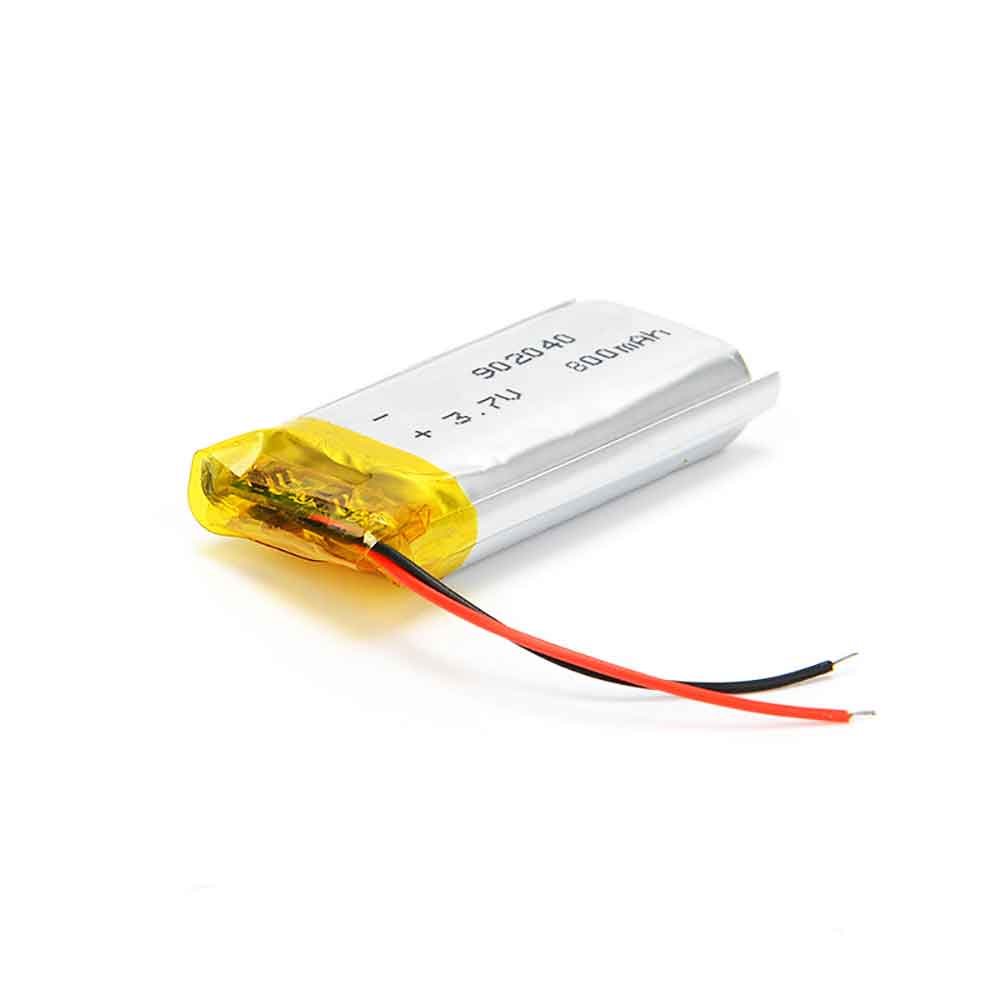
ABL-C

Specifications

  • Brand:iRobot
  • Capacity :1775mAh
  • Voltage :10.8V
  • Type :Li-ion
  • Battery Cell Quality: Grade A
  • Descriptive: Replacement Battery – 1 Year Warranty
  • Description: Brand New, 1 Year Warranty! 30-Days Money Back! Fast Shipping!

How we test this Irobot ABL-C Battery
Step 1: Make sure customer bought the correct battery.
Step 2: Check battery’s appearance and interface.
Step 3: Test battery charger and recharger function.
Step 4: Charger the battery to 100% and recharger to 0% to get real battery capacity
Step 5: Use Ev2300 to check the voltage difference of each goroup cells.
Step 6: Charger battery power more than 30%.
Step 7: Package battery carefully and send out

Compatible Part Numbers:
ABL-C

Compatible Model Numbers:
iRobot Braava Jet M6 (6110) Ultimate Robot Mop

How much do you know about how to run laptop well as any place? The follow Tips cut way back on protecting battery life.


1). Please recharge or change your Other battery when battery power low.
2). Using Li-Ion Replacement Irobot ABL-C Other Battery for your notebook which can work longer time than Non Li-ion one.
3). It is better to defragmentation regularly for your Other battery life.
4). In order to reduce the laptop power consumpition, you can use some optical drive spin-down and hard drive in your Other .
5). Please keep your laptop in sleep or standby model without long time using, which both save the Replacement Irobot ABL-C Other Battery power and extend battery using life.
6). Leave your battery in a dry and cool condition when without using.
7). When you rarely or generally plugged in fixed power using, Please take down your battery to avoid hurting battery life.

Hot Products

47WH TOSHIBA PA3928U-1BRS for TOSHIBA Qosmio X770 3D X772000mAh/7.6WH MOTOROLA JE30 for Motorola E5 play go1680mAh/6.21WH SONIM BAT-04900-01S for Sonim XP8 XP88005000mAh/19.25Wh CAT APP00223 for Cat S41 phone2400mAh MOTOROLA 82-150612-01 for Motorola Symbol MC2100 MC20807800mah FUJIKURA BTR-09 for Fujikura FSM-19S FSM-70S FSM-862WH HP 671567-421 for HP Pavilion DV4-5000 DV6-70003000mAh/11.4WH OUKITEL U15_Pro for Oukitel U15 Pro1043mAh/3.99WH APPLE A1641 for Apple iPod Touch 643Wh LENOVO 45N1094 for Lenovo ThinkPad Edge S230u Twi

2900mAh 3.82V Smartisan DC601 Li-ion Battery for Smartisan U1 YQ601 YQ603 YQ605 YQ607

2900mAh 3.82V Smartisan DC601 Batteries for Smartisan U1 YQ601 YQ603 YQ605 YQ607, Smartisan DC601 Cell Phone battery is a brand new,100% Compatible original and replacement Phone battery,Purchase wholesale and retail DC601 with high quality and low price!

Find ou your original model number or part number(P/N), and move your eyes on the tag of battery

DC601

Specifications

  • Brand:Smartisan
  • Capacity :2900mAh
  • Voltage :3.82V
  • Type :Li-ion
  • Battery Cell Quality: Grade A
  • Descriptive: Replacement Battery – 1 Year Warranty
  • Description: Brand New, 1 Year Warranty! 30-Days Money Back! Fast Shipping!

How we test this Smartisan DC601 Battery
Step 1: Make sure customer bought the correct battery.
Step 2: Check battery’s appearance and interface.
Step 3: Test battery charger and recharger function.
Step 4: Charger the battery to 100% and recharger to 0% to get real battery capacity
Step 5: Use Ev2300 to check the voltage difference of each goroup cells.
Step 6: Charger battery power more than 30%.
Step 7: Package battery carefully and send out

Compatible Part Numbers:
DC601

Compatible Model Numbers:
Smartisan U1 YQ601 YQ603 YQ605 YQ607

How much do you know about how to run laptop well as any place? The follow Tips cut way back on protecting battery life.


1). Please recharge or change your Cell Phone battery when battery power low.
2). Using Li-Ion Replacement Smartisan DC601 Cell Phone Battery for your notebook which can work longer time than Non Li-ion one.
3). It is better to defragmentation regularly for your Cell Phone battery life.
4). In order to reduce the laptop power consumpition, you can use some optical drive spin-down and hard drive in your Cell Phone .
5). Please keep your laptop in sleep or standby model without long time using, which both save the Replacement Smartisan DC601 Cell Phone Battery power and extend battery using life.
6). Leave your battery in a dry and cool condition when without using.
7). When you rarely or generally plugged in fixed power using, Please take down your battery to avoid hurting battery life.

Hot Products

47WH TOSHIBA PA3928U-1BRS for TOSHIBA Qosmio X770 3D X772000mAh/7.6WH MOTOROLA JE30 for Motorola E5 play go1680mAh/6.21WH SONIM BAT-04900-01S for Sonim XP8 XP88005000mAh/19.25Wh CAT APP00223 for Cat S41 phone2400mAh MOTOROLA 82-150612-01 for Motorola Symbol MC2100 MC20807800mah FUJIKURA BTR-09 for Fujikura FSM-19S FSM-70S FSM-862WH HP 671567-421 for HP Pavilion DV4-5000 DV6-70003000mAh/11.4WH OUKITEL U15_Pro for Oukitel U15 Pro1043mAh/3.99WH APPLE A1641 for Apple iPod Touch 643Wh LENOVO 45N1094 for Lenovo ThinkPad Edge S230u Twi

5000mAh 7.4V Jbl Xtreme Li-ion Battery for JBL Xtreme 1ST Portable Speaker

5000mAh 7.4V Jbl Xtreme Batteries for JBL Xtreme 1ST Portable Speaker, Jbl Xtreme Other battery is a brand new,100% Compatible original and replacement Phone battery,Purchase wholesale and retail Xtreme with high quality and low price!

Find ou your original model number or part number(P/N), and move your eyes on the tag of battery

Xtreme

Specifications

  • Brand:JBL
  • Capacity :5000mAh
  • Voltage :7.4V
  • Type :
  • Battery Cell Quality: Grade A
  • Descriptive: Replacement Battery – 1 Year Warranty
  • Description: Brand New, 1 Year Warranty! 30-Days Money Back! Fast Shipping!

How we test this Jbl Xtreme Battery
Step 1: Make sure customer bought the correct battery.
Step 2: Check battery’s appearance and interface.
Step 3: Test battery charger and recharger function.
Step 4: Charger the battery to 100% and recharger to 0% to get real battery capacity
Step 5: Use Ev2300 to check the voltage difference of each goroup cells.
Step 6: Charger battery power more than 30%.
Step 7: Package battery carefully and send out

Compatible Part Numbers:
Xtreme

Compatible Model Numbers:
JBL Xtreme 1ST Portable Speaker

How much do you know about how to run laptop well as any place? The follow Tips cut way back on protecting battery life.


1). Please recharge or change your Other battery when battery power low.
2). Using Li-Ion Replacement Jbl Xtreme Other Battery for your notebook which can work longer time than Non Li-ion one.
3). It is better to defragmentation regularly for your Other battery life.
4). In order to reduce the laptop power consumpition, you can use some optical drive spin-down and hard drive in your Other .
5). Please keep your laptop in sleep or standby model without long time using, which both save the Replacement Jbl Xtreme Other Battery power and extend battery using life.
6). Leave your battery in a dry and cool condition when without using.
7). When you rarely or generally plugged in fixed power using, Please take down your battery to avoid hurting battery life.

Hot Products

47WH TOSHIBA PA3928U-1BRS for TOSHIBA Qosmio X770 3D X772000mAh/7.6WH MOTOROLA JE30 for Motorola E5 play go1680mAh/6.21WH SONIM BAT-04900-01S for Sonim XP8 XP88005000mAh/19.25Wh CAT APP00223 for Cat S41 phone2400mAh MOTOROLA 82-150612-01 for Motorola Symbol MC2100 MC20807800mah FUJIKURA BTR-09 for Fujikura FSM-19S FSM-70S FSM-862WH HP 671567-421 for HP Pavilion DV4-5000 DV6-70003000mAh/11.4WH OUKITEL U15_Pro for Oukitel U15 Pro1043mAh/3.99WH APPLE A1641 for Apple iPod Touch 643Wh LENOVO 45N1094 for Lenovo ThinkPad Edge S230u Twi

2050mAh 3.8V Xiaomi BM41 Li-ion Battery for Xiaomi Redmi 1S

2050mAh 3.8V Xiaomi BM41 Batteries for Xiaomi Redmi 1S, Xiaomi BM41 Cell Phone battery is a brand new,100% Compatible original and replacement Phone battery,Purchase wholesale and retail BM41 with high quality and low price!

Find ou your original model number or part number(P/N), and move your eyes on the tag of battery

BM41

Specifications

  • Brand:Xiaomi
  • Capacity :2050mAh
  • Voltage :3.8V
  • Type :Li-ion
  • Battery Cell Quality: Grade A
  • Descriptive: Replacement Battery – 1 Year Warranty
  • Description: Brand New, 1 Year Warranty! 30-Days Money Back! Fast Shipping!

How we test this Xiaomi BM41 Battery
Step 1: Make sure customer bought the correct battery.
Step 2: Check battery’s appearance and interface.
Step 3: Test battery charger and recharger function.
Step 4: Charger the battery to 100% and recharger to 0% to get real battery capacity
Step 5: Use Ev2300 to check the voltage difference of each goroup cells.
Step 6: Charger battery power more than 30%.
Step 7: Package battery carefully and send out

Compatible Part Numbers:
BM41

Compatible Model Numbers:
Xiaomi Redmi 1S

How much do you know about how to run laptop well as any place? The follow Tips cut way back on protecting battery life.


1). Please recharge or change your Cell Phone battery when battery power low.
2). Using Li-Ion Replacement Xiaomi BM41 Cell Phone Battery for your notebook which can work longer time than Non Li-ion one.
3). It is better to defragmentation regularly for your Cell Phone battery life.
4). In order to reduce the laptop power consumpition, you can use some optical drive spin-down and hard drive in your Cell Phone .
5). Please keep your laptop in sleep or standby model without long time using, which both save the Replacement Xiaomi BM41 Cell Phone Battery power and extend battery using life.
6). Leave your battery in a dry and cool condition when without using.
7). When you rarely or generally plugged in fixed power using, Please take down your battery to avoid hurting battery life.

Hot Products

47WH TOSHIBA PA3928U-1BRS for TOSHIBA Qosmio X770 3D X772000mAh/7.6WH MOTOROLA JE30 for Motorola E5 play go1680mAh/6.21WH SONIM BAT-04900-01S for Sonim XP8 XP88005000mAh/19.25Wh CAT APP00223 for Cat S41 phone2400mAh MOTOROLA 82-150612-01 for Motorola Symbol MC2100 MC20807800mah FUJIKURA BTR-09 for Fujikura FSM-19S FSM-70S FSM-862WH HP 671567-421 for HP Pavilion DV4-5000 DV6-70003000mAh/11.4WH OUKITEL U15_Pro for Oukitel U15 Pro1043mAh/3.99WH APPLE A1641 for Apple iPod Touch 643Wh LENOVO 45N1094 for Lenovo ThinkPad Edge S230u Twi

Samsung Galaxy S23 may be the most powerful phone ever

 The Samsung Galaxy S23 may be the most powerful phone you can buy when it goes on sale early next year.

This comes from a leak on 91mobiles.com, which suggests that Samsung‘s next mainstream flagship will use the yet-to-be-announced Qualcomm Snapdragon 8 Gen2 chipset. The current king of smartphone chips, the Qualcomm Snapdragon 8+ Gen 1 has only recently started shipping on flagship phones, including the new OnePlus 10T.

Qualcomm is expected to release its next-generation smartphone chipsets later this year, but a November or December launch won’t give manufacturers time to put the chips in phones during the December holiday season. If the release history of Galaxy S phones is any guide, the Samsung Galaxy S23 could be released in February 2023. The timing is perfect for a new first-class chip.

Samsung probably deserves the status of being the first to use the Snapdragon 8 Gen2. Recent news suggests that Samsung is handing the next Galaxy S phones entirely to Qualcomm’s chips, rather than using its own Samsung Exynos chipsets for a fraction of global shipments.

It’s likely that every Galaxy S23 sold globally will pack the same chip, and if that chip is the Snapdragon 8 Gen2, Qualcomm will have a big win.

The leaker, the anonymous “Ice Universe” with a reputation for accuracy, also claims that the Galaxy S23 will have a 5000 mAh battery. It would be great if such a large battery ended up in the smallest Galaxy S23, but we’ll reserve judgement until we know for sure. The current Galaxy S22 Ultra uses a 5000 mAh battery, while the smaller Galaxy S22 uses a mid-capacity 3700 mAh battery.

Analysis: Samsung fights for victory

Not every phone maker is trying to come out with the fastest, longest-lasting, or best superlatives. Google calls itself the Pixel on its own sales site to release the “smartest and fastest Pixel yet”. Samsung is not content to beat itself, Samsung wants to beat everyone.

To do this, it needs to source the best parts. It has to have the best screen, the best camera, and the best chipset inside. For several years, that meant whatever Snapdragon chipset Qualcomm has launched recently. Regardless of which phones with Qualcomm’s Snapdragon 8+ Gen 1 chip come out over the holidays, Samsung is ready to take the lead as the new year rolls around.

>>>>>>>>>>>>>Samsung battery

2650mAh 3.85V Meitu MA-4013 Li-ion Battery for Meitu T8 T8s

2650mAh 3.85V Meitu MA-4013 Batteries for Meitu T8 T8s, Meitu MA-4013 Cell Phone battery is a brand new,100% Compatible original and replacement Phone battery,Purchase wholesale and retail MA-4013 with high quality and low price!

Find ou your original model number or part number(P/N), and move your eyes on the tag of battery

MA-4013

Specifications

  • Brand:Meitu
  • Capacity :2650mAh
  • Voltage :3.85V
  • Type :Li-ion
  • Battery Cell Quality: Grade A
  • Descriptive: Replacement Battery – 1 Year Warranty
  • Description: Brand New, 1 Year Warranty! 30-Days Money Back! Fast Shipping!

How we test this Meitu MA-4013 Battery
Step 1: Make sure customer bought the correct battery.
Step 2: Check battery’s appearance and interface.
Step 3: Test battery charger and recharger function.
Step 4: Charger the battery to 100% and recharger to 0% to get real battery capacity
Step 5: Use Ev2300 to check the voltage difference of each goroup cells.
Step 6: Charger battery power more than 30%.
Step 7: Package battery carefully and send out

Compatible Part Numbers:
MA-4013

Compatible Model Numbers:
Meitu T8 T8s

How much do you know about how to run laptop well as any place? The follow Tips cut way back on protecting battery life.


1). Please recharge or change your Cell Phone battery when battery power low.
2). Using Li-Ion Replacement Meitu MA-4013 Cell Phone Battery for your notebook which can work longer time than Non Li-ion one.
3). It is better to defragmentation regularly for your Cell Phone battery life.
4). In order to reduce the laptop power consumpition, you can use some optical drive spin-down and hard drive in your Cell Phone .
5). Please keep your laptop in sleep or standby model without long time using, which both save the Replacement Meitu MA-4013 Cell Phone Battery power and extend battery using life.
6). Leave your battery in a dry and cool condition when without using.
7). When you rarely or generally plugged in fixed power using, Please take down your battery to avoid hurting battery life.

Hot Products

2000mAh/7.6WH MOTOROLA JE30 for Motorola E5 play go1680mAh/6.21WH SONIM BAT-04900-01S for Sonim XP8 XP88005000mAh/19.25Wh CAT APP00223 for Cat S41 phone2400mAh MOTOROLA 82-150612-01 for Motorola Symbol MC2100 MC20807800mah FUJIKURA BTR-09 for Fujikura FSM-19S FSM-70S FSM-862WH HP 671567-421 for HP Pavilion DV4-5000 DV6-70003000mAh/11.4WH OUKITEL U15_Pro for Oukitel U15 Pro1043mAh/3.99WH APPLE A1641 for Apple iPod Touch 643Wh LENOVO 45N1094 for Lenovo ThinkPad Edge S230u Twi4730mAh/37WH ASUS C21N1818 for ASUS VivoBook 14 X412 X412DA X

3450mAh 3.85V Gionee BL-N3500A Li-ion Battery for Gionee S10

3450mAh 3.85V Gionee BL-N3500A Batteries for Gionee S10, Gionee BL-N3500A Cell Phone battery is a brand new,100% Compatible original and replacement Phone battery,Purchase wholesale and retail BL-N3500A with high quality and low price!

Find ou your original model number or part number(P/N), and move your eyes on the tag of battery

BL-N3500A

Specifications

  • Brand:Gionee
  • Capacity :3450mAh
  • Voltage :3.85V
  • Type :Li-ion
  • Battery Cell Quality: Grade A
  • Descriptive: Replacement Battery – 1 Year Warranty
  • Description: Brand New, 1 Year Warranty! 30-Days Money Back! Fast Shipping!

How we test this Gionee BL-N3500A Battery
Step 1: Make sure customer bought the correct battery.
Step 2: Check battery’s appearance and interface.
Step 3: Test battery charger and recharger function.
Step 4: Charger the battery to 100% and recharger to 0% to get real battery capacity
Step 5: Use Ev2300 to check the voltage difference of each goroup cells.
Step 6: Charger battery power more than 30%.
Step 7: Package battery carefully and send out

Compatible Part Numbers:
BL-N3500A

Compatible Model Numbers:
Gionee S10

How much do you know about how to run laptop well as any place? The follow Tips cut way back on protecting battery life.


1). Please recharge or change your Cell Phone battery when battery power low.
2). Using Li-Ion Replacement Gionee BL-N3500A Cell Phone Battery for your notebook which can work longer time than Non Li-ion one.
3). It is better to defragmentation regularly for your Cell Phone battery life.
4). In order to reduce the laptop power consumpition, you can use some optical drive spin-down and hard drive in your Cell Phone .
5). Please keep your laptop in sleep or standby model without long time using, which both save the Replacement Gionee BL-N3500A Cell Phone Battery power and extend battery using life.
6). Leave your battery in a dry and cool condition when without using.
7). When you rarely or generally plugged in fixed power using, Please take down your battery to avoid hurting battery life.

Hot Products

2000mAh/7.6WH MOTOROLA JE30 for Motorola E5 play go1680mAh/6.21WH SONIM BAT-04900-01S for Sonim XP8 XP88005000mAh/19.25Wh CAT APP00223 for Cat S41 phone2400mAh MOTOROLA 82-150612-01 for Motorola Symbol MC2100 MC20807800mah FUJIKURA BTR-09 for Fujikura FSM-19S FSM-70S FSM-862WH HP 671567-421 for HP Pavilion DV4-5000 DV6-70003000mAh/11.4WH OUKITEL U15_Pro for Oukitel U15 Pro1043mAh/3.99WH APPLE A1641 for Apple iPod Touch 643Wh LENOVO 45N1094 for Lenovo ThinkPad Edge S230u Twi4730mAh/37WH ASUS C21N1818 for ASUS VivoBook 14 X412 X412DA X

There’s a new way to factory reset M1 and M2 Macs

 If you’ve bought a new MacBook Air, MacBook Pro iMac, Mac Studio, or Mac Mini within the past few years, it’s almost certainly using Apple’s own processor, the Apple Silicon M1 or Apple Silicon M2, rather than an Intel chip. In your day-to-day use, you probably won’t notice any difference in operation, which is a good thing. But when it’s time to reset a new Mac, whether it’s because you sold it, handed it over, or troubleshoot it, there are completely new steps to completely wipe out M1 and M2-based models.

More specifically, the steps to access Recovery Mode (the tool you need to reset your Mac) have changed. I’ll walk you through how to get into recovery mode and use all the options, and provide some workarounds for the issues I’m having. Let’s take a look below!

How to Access MacOS Recovery on Apple Silicon Macs

Click the Apple icon and shut down your Mac. After the computer shuts down completely, press and hold the power button. When the Apple logo first appears, you’ll see text below it, letting you know to keep pressing it to access startup options. Press it until the text switches to “Loading Boot Options,” which takes about five seconds. Next, click Options > Continue. Select a user with administrator privileges and enter the account password when asked.

New recovery tool gives you some options

After logging into your user account, you will see a list of apps available in recovery.

Restore from Time Machine: Use this option if you want to restore your Mac from a previous Time Machine backup. This is helpful if you’ve lost a lot of files, changed settings, or installed an application that’s causing serious problems with your Mac.

Reinstall MacOS Monterey: If you are having trouble with MacOS, you can try to reinstall the latest version of MacOS using this option without deleting any files or losing any data.

Safari: You can use Apple’s browser to search and resolve how to fix your Mac.

Disk Utility: Tools for repairing, troubleshooting, or erasing hard drives.

In the menu bar at the top of the screen, you can also access other applications and tools, such as Terminal, Shared Disk, and Boot Security Utility.

Erase the hard drive, reinstall MacOS

To completely remove all information from the hard drive and reinstall MacOS, open Disk Utility and select the internal disk labeled Macintosh HD. Check the box if there is an option called Erase Volume Group. Otherwise, click Erase and follow the prompts. The volume name and format are reserved, but for reference, the name is usually “Macintosh HD” and the format should use AFPS.

After a few seconds, the hard drive will be completely wiped, taking away all your files, user accounts, and applications. When done, close Disk Utility and select Reinstall MacOS from the list of options. You’ll be asked to choose where to install, which should be Macintosh HD (or whatever the name of the hard drive is if you decide to change it).

Your Mac will then download the latest version of MacOS, install it, and when it’s done, it’s like it’s never been set up.

If you are unable to create a new user account

I can’t create a new user account after reinstalling MacOS: My MacBook Pro freezes when I try to create a default user account. Basically, it’s because MacOS is looking for account information in a place that doesn’t exist anymore.

If the system doesn’t freeze, try rebooting again into recovery mode, launch Terminal, type “resetpassword” in the command line, select the reset password option, then launch Recovery Assistant from the menu bar and select Erase Mac or Erase with Disk Utility Data partition, as described in the previous comment.

If it freezes, you need to try accessing it from a second device. You can connect it to another Mac and follow the process described in this StackExchange thread or follow the instructions in this Reddit comment to remove the partition from your iPhone.

>>>>>>>>>>>Apple battery

Thanks for reading, hope it helps!

Friendly reminder: If you need to replace the battery of your device, this battery store will be a good choice: www.batteryforpc.co.uk