Introduction to the method of calibrating the battery of the mobile phone

 Many people now own smartphones that run on batteries. Calibrating the newly installed Smart Battery is essential if you are replacing the battery due to possible damage or deterioration. The point of this is that your phone will show an accurate reading of the state of charge.

Calibration is a measurement technique in which measurements provided by a device under test are compared against a calibration standard of known accuracy. Also, phone calibration ensures you have a quality battery installed.

There are other reasons to perform phone calibration:

1. The phone battery is new.

2. The cell phone battery may have been modified or repaired.

3. When the battery is stored for a long time

4. When the working time of the battery is over

5. After or before critical measurements are performed on the battery.

6. The battery may have been damaged by vibration, shock or physical damage. These events tend to potentially compromise the integrity of the battery calibration.

7. If you observe that your battery charge status is not normal.

In short, calibrating your Android battery or any phone battery means getting the OS to correct some broken information so that it describes the actual battery level.

Should you calibrate your phone battery?

The answer is yes. Phone battery calibration is very important if you want the accuracy of your phone’s state of charge. When you use your phone, your phone’s battery drains and its capacity decreases, depending on a number of factors, including heat, usage, and age.

Many people complain that their phone battery drains faster. Your battery may discharge from fifty percent to zero percent in a short period of time. Also when plugged into the charger. The phone battery will be fully charged. When you unplug it and watch charging, it shows 90% or even less. If it’s not damaged, your phone may not be properly calibrated.

The danger of not calibrating your phone’s battery is that it could shut down immediately without warning. Therefore, it is very important to calibrate the battery regularly.

If your phone’s battery exhibits any of the following symptoms, you might want to calibrate it as well:

1. Display a charging percentage for a long time when plugged in

2. Charging failed

3. The phone may report battery issues through a pop-up window.

4. Shows 100% charge, then drops to low percentage after unplugging the charger.

So how do you calibrate your phone battery?

The beginning of calibration is to design the measuring instrument that needs to be calibrated. In many cases, the cell phone battery that needs to be calibrated is designed by the manufacturer. Most phone calibration processes are automatic. Also, you can calibrate your phone battery yourself. Here’s what you can try:

1. Make sure your phone is fully discharged.

2. Turn it on and let it turn itself off.

3. Plug in the battery charger and do not open the phone.

4. Let the phone reach 100% power and unplug the charger.

5. Turn on your phone. If your battery has calibration issues, it may show a smaller percentage when you turn it on. Plug in the battery charger.

6. Unplug your phone and reboot. If the phone shows 100% when it restarts, reinsert the charger until it is fully charged.

7. Repeat the process until it shows 100% after opening it.

8. Finally, let your phone battery discharge to 0%, then turn it off. Now plug in the charger and the battery percentage will be reset.

As technology has advanced, battery calibration apps have been proposed. The process is similar to the one above:

Follow the steps above until the phone battery shows 100%. Make sure your battery is at 100% before launching the battery calibration app. Launch the app and start the battery calibration process. After the calibration process is complete, discharge the battery to 0% and let the phone shut itself down. Fully charge the battery without interruption with the battery turned off. Your phone battery will now be calibrated.

Does a factory reset calibrate the battery?

Erasing all of these files with a factory reset might help calibrate your phone’s battery. After a factory reset, it is recommended to run all available firmware and OS updates. This will help with the calibration process.

NOTE: Before calibrating your phone battery, perform a visual inspection of the battery. Check for any leaks, cracks or bulges. If you see any of this, your battery is damaged, calibration won’t help, and your phone battery needs to be replaced.

>>>>>>>>>>>Phone battery

Thanks for reading, hope it helps!

Friendly reminder: If you need to replace your phone battery, this battery store will be a good choice: www.batteryforpc.co.uk

Microsoft fixes the cause of Windows 10 blue screen of death

 If Bluetooth has ever crashed your Windows 10 computer and greeted you with the dreaded Blue Screen of Death (BSOD), you’re in luck because Microsoft has now released a fix. Some users started experiencing crashes after installing the January KB5009596 cumulative update.

Now, Microsoft has pushed the optional KB5011543 Preview cumulative update. Seems optional as it will most likely only affect enterprise users.

Solve the problem

Windows 10 versions affected by the vulnerability include Windows 10 21H2, Windows 10 21H1, and Windows 10 20H2.

“After installing update KB5009596 or later, some organizations pairing Windows devices with Bluetooth devices may receive the error “Your device has encountered a problem and needs to restart. “Blue screen and ‘Stop Code: IRQ NOT LESS OR EQUAL’,” Microsoft said.

“Errors logged on the affected device will appear in the System log in Event Viewer and will be logged as ‘Microsoft-Windows-WER-SystemErrorRe Event 1001’ with the text ‘The computer has restarted from bugcheck. Error Checked as: 0x0000000a’.”

According to BleepingComputer, enabling specific CSP policies can affect the Bluetooth A2dp profile on some endpoints, resulting in BSOD.

Microsoft says there are two possible scenarios for the crash:

If a device that was previously paired with an audio device or phone via Bluetooth reboots after installing the update

After installing the update, the device is paired with another machine via bluetooth

The publication also found that those who currently cannot patch their systems but want to fix the problem can modify the Windows registry before installing KB5009596.

These are the instructions:

Go to HKEY_LOCAL_MACHINE\SOFTWARE\Microsoft\PolicyManager\current\device\Bluetooth\

Add the following registry keys: {0000110a-0000-1000-8000-00805f9b34fb} and {0000110b-0000-1000-8000-00805f9b34fb} to the ServicesAllowedList value

Obviously, taking a backup is crucial before making any changes to the Windows Registry.

>>>>>>>>>>Laptop battery

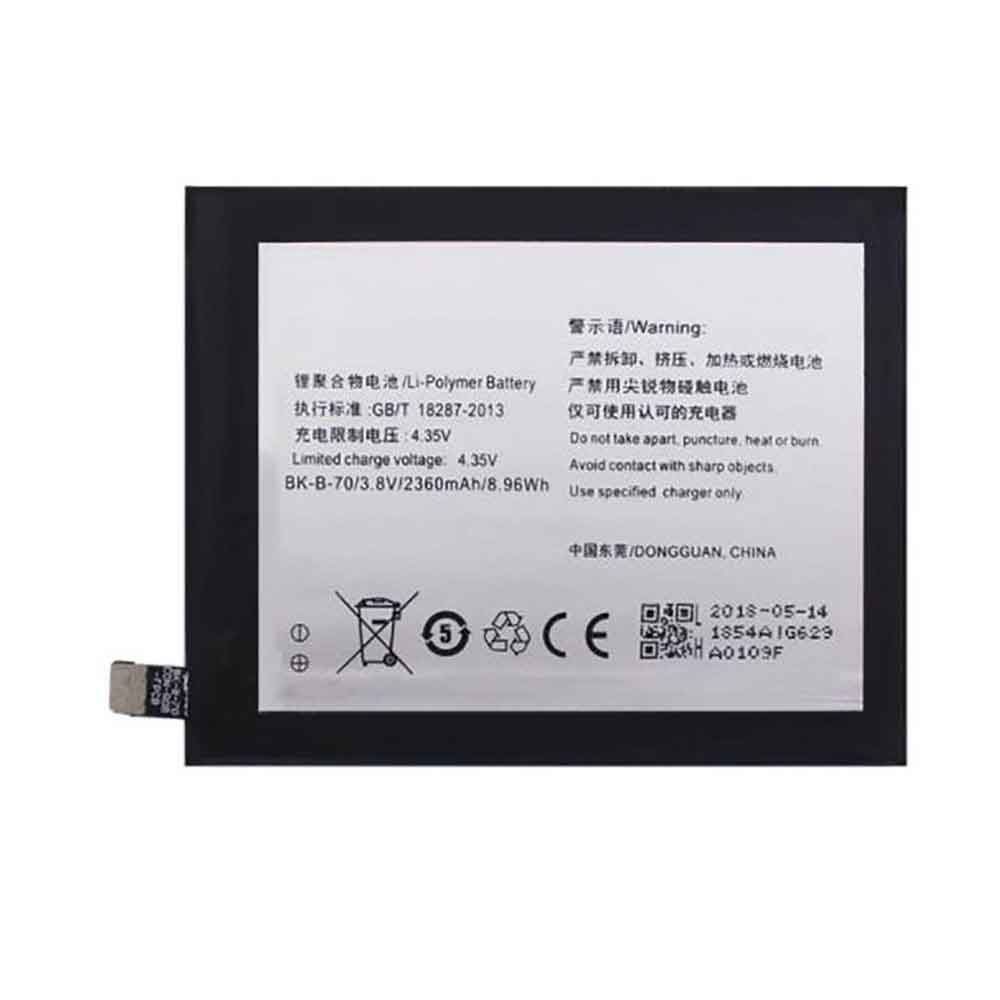
2360mAh 8.96WH 3.8V 4.35V Vivo BK-B-70 Li-ion Battery for Vivo X3L X3V X3F

2360mAh 8.96WH 3.8V 4.35V Vivo BK-B-70 Batteries for Vivo X3L X3V X3F, Vivo BK-B-70 Cell Phone battery is a brand new,100% Compatible original and replacement Phone battery,Purchase wholesale and retail BK-B-70 with high quality and low price!

Find ou your original model number or part number(P/N), and move your eyes on the tag of battery

BK-B-70

Specifications

  • Brand:Vivo
  • Capacity :2360mAh 8.96WH
  • Voltage :3.8V 4.35V
  • Type :Li-ion
  • Battery Cell Quality: Grade A
  • Descriptive: Replacement Battery – 1 Year Warranty
  • Description: Brand New, 1 Year Warranty! 30-Days Money Back! Fast Shipping!

How we test this Vivo BK-B-70 Battery
Step 1: Make sure customer bought the correct battery.
Step 2: Check battery’s appearance and interface.
Step 3: Test battery charger and recharger function.
Step 4: Charger the battery to 100% and recharger to 0% to get real battery capacity
Step 5: Use Ev2300 to check the voltage difference of each goroup cells.
Step 6: Charger battery power more than 30%.
Step 7: Package battery carefully and send out

Compatible Part Numbers:
BK-B-70

Compatible Model Numbers:
Vivo X3L X3V X3F

How much do you know about how to run laptop well as any place? The follow Tips cut way back on protecting battery life.


1). Please recharge or change your Cell Phone battery when battery power low.
2). Using Li-Ion Replacement Vivo BK-B-70 Cell Phone Battery for your notebook which can work longer time than Non Li-ion one.
3). It is better to defragmentation regularly for your Cell Phone battery life.
4). In order to reduce the laptop power consumpition, you can use some optical drive spin-down and hard drive in your Cell Phone .
5). Please keep your laptop in sleep or standby model without long time using, which both save the Replacement Vivo BK-B-70 Cell Phone Battery power and extend battery using life.
6). Leave your battery in a dry and cool condition when without using.
7). When you rarely or generally plugged in fixed power using, Please take down your battery to avoid hurting battery life.

Hot Products

4850mAh 18.43WH AMAZON 58-000313 for Amazon 26S1021200MAH/0.77Wh SAMSUNG EB-BR365FBE for Samsung Gear Fit 2 Pro Sports94Wh LENOVO 45N1016 for Lenovo ThinkPad T410 T420 T4304910mAh/19.00WH VIVO B-O5 for VIVO y20640MAh/70Wh PANASONIC CF-VZSU80U for Panasonic CF-C2 MK1 Toughbook7200mAh DELL PC764 for Dell Latitude D620 D630 Preci50Wh ASUS C31N1339 for Asus ZenBook UX303L Q302L Lapt4900mAh/18.87WH SAMSUNG HQ-50S for Samsung Galaxy A02S57.9Wh HP SH03XL for HP Spectre X360 13-AC0XX 13-AC2980MAH 11.33WH BLACKPHONE BP2 for Blackphone 2

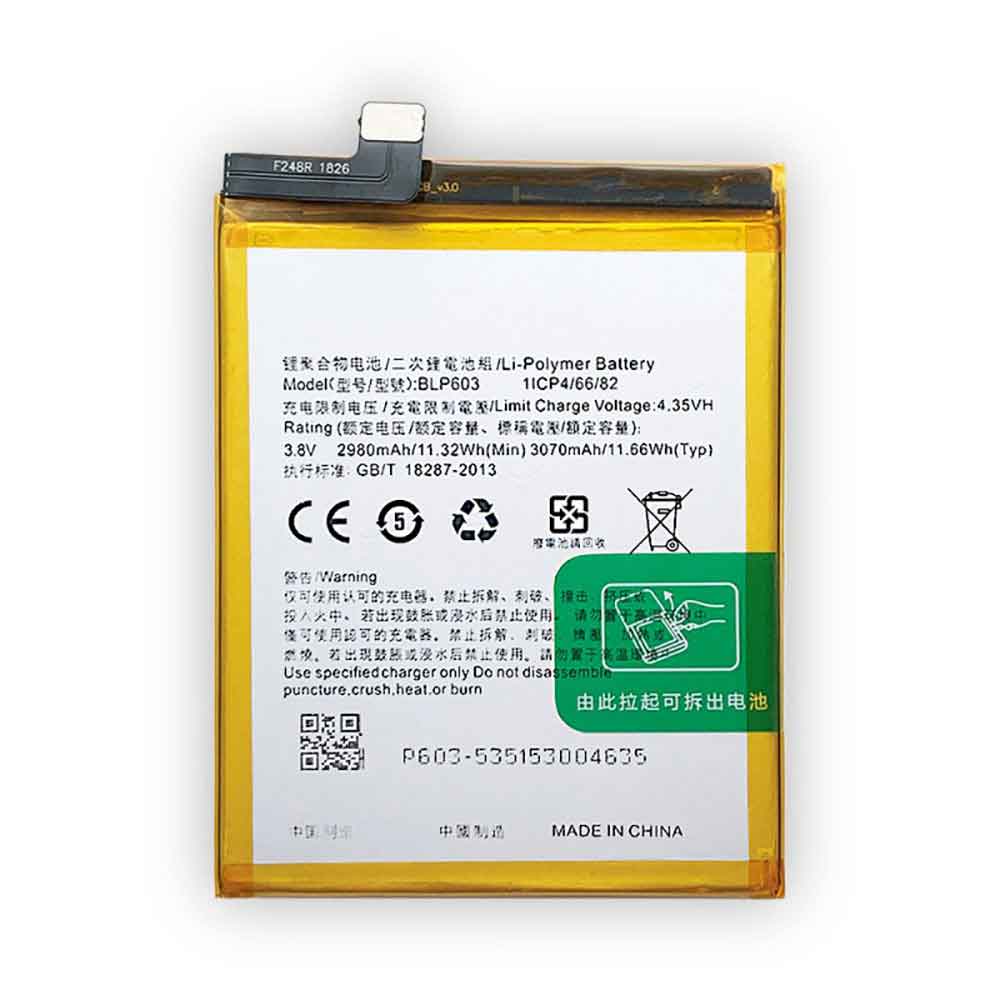
3070mAh 11.66WH 3.8V 4.35V Oppo BLP-603 Li-ion Battery for OPPO R7s R7ms R7st

3070mAh 11.66WH 3.8V 4.35V Oppo BLP-603 Batteries for OPPO R7s R7ms R7st, Oppo BLP-603 Cell Phone battery is a brand new,100% Compatible original and replacement Phone battery,Purchase wholesale and retail BLP-603 with high quality and low price!

Find ou your original model number or part number(P/N), and move your eyes on the tag of battery

BLP-603

Specifications

  • Brand:OPPO
  • Capacity :3070mAh 11.66WH
  • Voltage :3.8V 4.35V
  • Type :Li-ion
  • Battery Cell Quality: Grade A
  • Descriptive: Replacement Battery – 1 Year Warranty
  • Description: Brand New, 1 Year Warranty! 30-Days Money Back! Fast Shipping!

How we test this Oppo BLP-603 Battery
Step 1: Make sure customer bought the correct battery.
Step 2: Check battery’s appearance and interface.
Step 3: Test battery charger and recharger function.
Step 4: Charger the battery to 100% and recharger to 0% to get real battery capacity
Step 5: Use Ev2300 to check the voltage difference of each goroup cells.
Step 6: Charger battery power more than 30%.
Step 7: Package battery carefully and send out

Compatible Part Numbers:
BLP-603

Compatible Model Numbers:
OPPO R7s R7ms R7st

How much do you know about how to run laptop well as any place? The follow Tips cut way back on protecting battery life.


1). Please recharge or change your Cell Phone battery when battery power low.
2). Using Li-Ion Replacement Oppo BLP-603 Cell Phone Battery for your notebook which can work longer time than Non Li-ion one.
3). It is better to defragmentation regularly for your Cell Phone battery life.
4). In order to reduce the laptop power consumpition, you can use some optical drive spin-down and hard drive in your Cell Phone .
5). Please keep your laptop in sleep or standby model without long time using, which both save the Replacement Oppo BLP-603 Cell Phone Battery power and extend battery using life.
6). Leave your battery in a dry and cool condition when without using.
7). When you rarely or generally plugged in fixed power using, Please take down your battery to avoid hurting battery life.

Hot Products

4850mAh 18.43WH AMAZON 58-000313 for Amazon 26S1021200MAH/0.77Wh SAMSUNG EB-BR365FBE for Samsung Gear Fit 2 Pro Sports94Wh LENOVO 45N1016 for Lenovo ThinkPad T410 T420 T4304910mAh/19.00WH VIVO B-O5 for VIVO y20640MAh/70Wh PANASONIC CF-VZSU80U for Panasonic CF-C2 MK1 Toughbook7200mAh DELL PC764 for Dell Latitude D620 D630 Preci50Wh ASUS C31N1339 for Asus ZenBook UX303L Q302L Lapt4900mAh/18.87WH SAMSUNG HQ-50S for Samsung Galaxy A02S57.9Wh HP SH03XL for HP Spectre X360 13-AC0XX 13-AC2980MAH 11.33WH BLACKPHONE BP2 for Blackphone 2

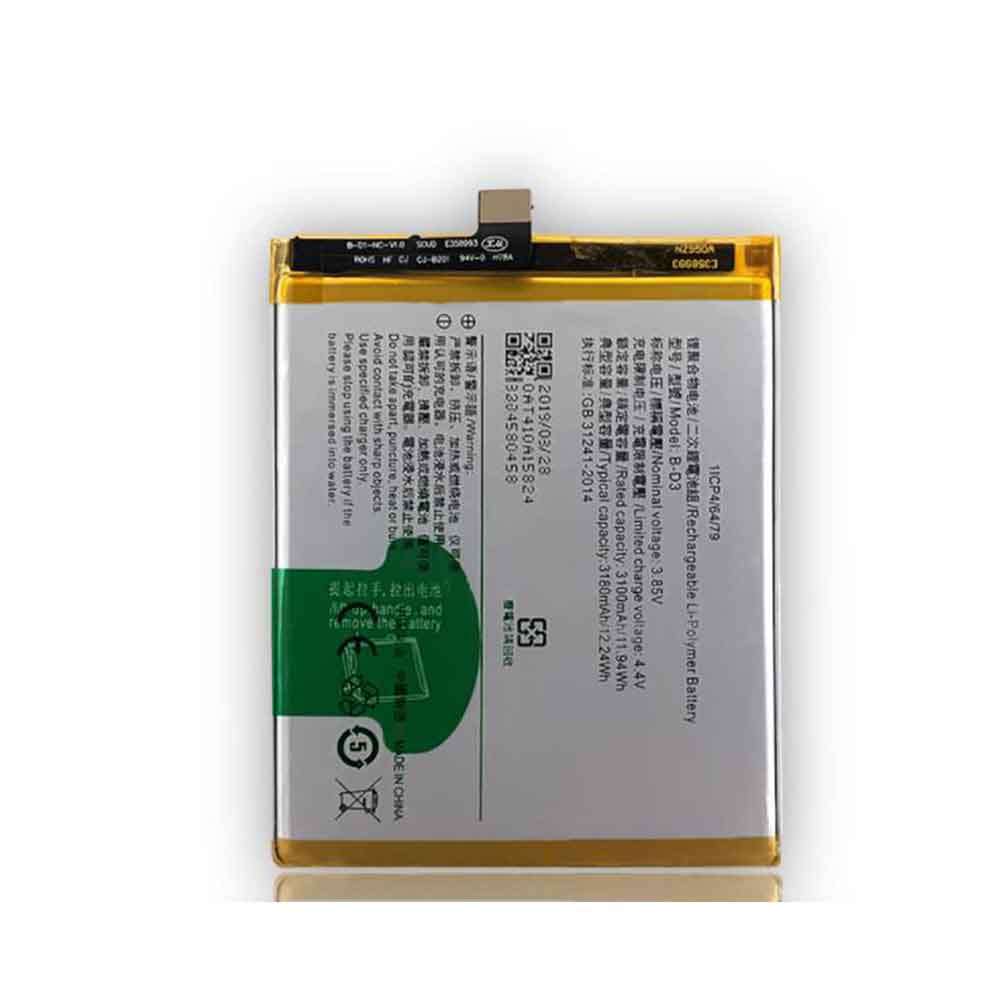
3100mAh 11.94WH 3.85V 4.4V Vivo B-D3 Li-ion Battery for Vivo X20

3100mAh 11.94WH 3.85V 4.4V Vivo B-D3 Batteries for Vivo X20, Vivo B-D3 Cell Phone battery is a brand new,100% Compatible original and replacement Phone battery,Purchase wholesale and retail B-D3 with high quality and low price!

Find ou your original model number or part number(P/N), and move your eyes on the tag of battery

B-D3

Specifications

  • Brand:Vivo
  • Capacity :3100mAh 11.94WH
  • Voltage :3.85V 4.4V
  • Type :Li-ion
  • Battery Cell Quality: Grade A
  • Descriptive: Replacement Battery – 1 Year Warranty
  • Description: Brand New, 1 Year Warranty! 30-Days Money Back! Fast Shipping!

How we test this Vivo B-D3 Battery
Step 1: Make sure customer bought the correct battery.
Step 2: Check battery’s appearance and interface.
Step 3: Test battery charger and recharger function.
Step 4: Charger the battery to 100% and recharger to 0% to get real battery capacity
Step 5: Use Ev2300 to check the voltage difference of each goroup cells.
Step 6: Charger battery power more than 30%.
Step 7: Package battery carefully and send out

Compatible Part Numbers:
B-D3

Compatible Model Numbers:
Vivo X20

How much do you know about how to run laptop well as any place? The follow Tips cut way back on protecting battery life.


1). Please recharge or change your Cell Phone battery when battery power low.
2). Using Li-Ion Replacement Vivo B-D3 Cell Phone Battery for your notebook which can work longer time than Non Li-ion one.
3). It is better to defragmentation regularly for your Cell Phone battery life.
4). In order to reduce the laptop power consumpition, you can use some optical drive spin-down and hard drive in your Cell Phone .
5). Please keep your laptop in sleep or standby model without long time using, which both save the Replacement Vivo B-D3 Cell Phone Battery power and extend battery using life.
6). Leave your battery in a dry and cool condition when without using.
7). When you rarely or generally plugged in fixed power using, Please take down your battery to avoid hurting battery life.

Hot Products

4850mAh 18.43WH AMAZON 58-000313 for Amazon 26S1021200MAH/0.77Wh SAMSUNG EB-BR365FBE for Samsung Gear Fit 2 Pro Sports94Wh LENOVO 45N1016 for Lenovo ThinkPad T410 T420 T4304910mAh/19.00WH VIVO B-O5 for VIVO y20640MAh/70Wh PANASONIC CF-VZSU80U for Panasonic CF-C2 MK1 Toughbook7200mAh DELL PC764 for Dell Latitude D620 D630 Preci50Wh ASUS C31N1339 for Asus ZenBook UX303L Q302L Lapt4900mAh/18.87WH SAMSUNG HQ-50S for Samsung Galaxy A02S57.9Wh HP SH03XL for HP Spectre X360 13-AC0XX 13-AC2980MAH 11.33WH BLACKPHONE BP2 for Blackphone 2

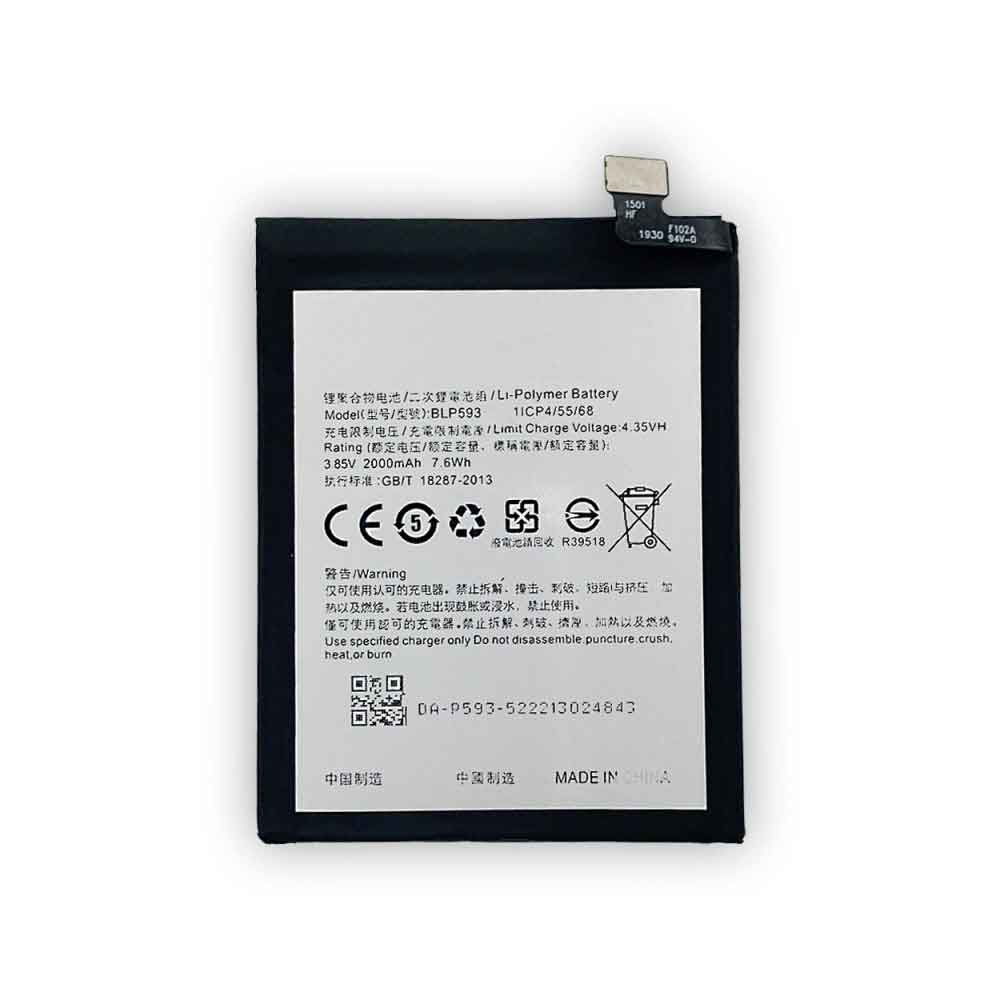
2000mAh 7.6WH 3.85V 4.35V Oppo BLP-593 Li-ion Battery for OPPO A31 A31C A31T A31U

2000mAh 7.6WH 3.85V 4.35V Oppo BLP-593 Batteries for OPPO A31 A31C A31T A31U, Oppo BLP-593 Cell Phone battery is a brand new,100% Compatible original and replacement Phone battery,Purchase wholesale and retail BLP-593 with high quality and low price!

Find ou your original model number or part number(P/N), and move your eyes on the tag of battery

BLP-593

Specifications

  • Brand:OPPO
  • Capacity :2000mAh 7.6WH
  • Voltage :3.85V 4.35V
  • Type :Li-ion
  • Battery Cell Quality: Grade A
  • Descriptive: Replacement Battery – 1 Year Warranty
  • Description: Brand New, 1 Year Warranty! 30-Days Money Back! Fast Shipping!

How we test this Oppo BLP-593 Battery
Step 1: Make sure customer bought the correct battery.
Step 2: Check battery’s appearance and interface.
Step 3: Test battery charger and recharger function.
Step 4: Charger the battery to 100% and recharger to 0% to get real battery capacity
Step 5: Use Ev2300 to check the voltage difference of each goroup cells.
Step 6: Charger battery power more than 30%.
Step 7: Package battery carefully and send out

Compatible Part Numbers:
BLP-593

Compatible Model Numbers:
OPPO A31 A31C A31T A31U

How much do you know about how to run laptop well as any place? The follow Tips cut way back on protecting battery life.


1). Please recharge or change your Cell Phone battery when battery power low.
2). Using Li-Ion Replacement Oppo BLP-593 Cell Phone Battery for your notebook which can work longer time than Non Li-ion one.
3). It is better to defragmentation regularly for your Cell Phone battery life.
4). In order to reduce the laptop power consumpition, you can use some optical drive spin-down and hard drive in your Cell Phone .
5). Please keep your laptop in sleep or standby model without long time using, which both save the Replacement Oppo BLP-593 Cell Phone Battery power and extend battery using life.
6). Leave your battery in a dry and cool condition when without using.
7). When you rarely or generally plugged in fixed power using, Please take down your battery to avoid hurting battery life.

Hot Products

4850mAh 18.43WH AMAZON 58-000313 for Amazon 26S1021200MAH/0.77Wh SAMSUNG EB-BR365FBE for Samsung Gear Fit 2 Pro Sports94Wh LENOVO 45N1016 for Lenovo ThinkPad T410 T420 T4304910mAh/19.00WH VIVO B-O5 for VIVO y20640MAh/70Wh PANASONIC CF-VZSU80U for Panasonic CF-C2 MK1 Toughbook7200mAh DELL PC764 for Dell Latitude D620 D630 Preci50Wh ASUS C31N1339 for Asus ZenBook UX303L Q302L Lapt4900mAh/18.87WH SAMSUNG HQ-50S for Samsung Galaxy A02S57.9Wh HP SH03XL for HP Spectre X360 13-AC0XX 13-AC2980MAH 11.33WH BLACKPHONE BP2 for Blackphone 2

Fast Battery Chargers and How to Speed ​​Up Your Battery Charger

 People who use electronics today no longer have the patience to wait 3 or 4 hours to fully charge their batteries. That’s why many smartphone and computer manufacturers now use fast-charging-enabled batteries in their devices. We now have smartphones like the Oppo Find X2 Pro (4260mAh) that can fully charge in 39 minutes. To get these devices to charge quickly at this rate, something has to be done.

These include:

Charger: The charger should have the ability to deliver the amount of power needed to charge the battery as quickly as possible. For example, the charger used to charge the Oppo Find X2 Pro has an output of 65W.

Charging Circuit: The circuit of the device charging system should be able to carry the large amount of current sent by the charger to the battery.

Battery: The battery should have low internal resistance to avoid overheating when charging the battery with high current. This means that the maximum continuous discharge current of the battery should be higher than the output current of the charger to avoid overheating the battery

When the battery, charging circuit, and charger all meet the fast-charging requirements, it’s safe to fast-charge your device.

What is a fast battery charger?

A fast battery charger is a charger that can provide maximum power to a battery in the shortest possible time. For example, Apple iPhone 11 models use an 18W adapter for fast charging for the shortest charging time. Using an adapter less than 18W will increase charging time.

If you use an adapter over 18W, the charging time will remain almost the same. This is because the design of the charging circuit allows a maximum of 18W. This is done to prevent the battery from being damaged by more power than it can handle.

When you ask a store or online store to buy a fast battery charger, start by knowing the maximum allowable wattage for your phone or laptop battery. This will help you avoid the expense of buying a charger with an output power much higher than the maximum input power acceptable to your phone’s charging circuit. If the adapter’s wattage (watts) is not stated, look at its output current (A) and voltage (V), and multiply the two to get the output power.

How to speed up the battery charger?

Technically, each charger is designed to have the maximum amount of power it can send to the battery being charged. The best way to increase charging speed is to make sure the adapter is delivering maximum output power to the battery. This can be done by:

Use a good quality USB cable.

The quality of the USB cable you use has a big impact on the power transferred from the adapter to the battery. Poor quality USB cables often have high resistance, which reduces the amount of current reaching the charging circuit. Due to this resistance, a large amount of energy is lost in the form of heat.

Do not charge the device while in use

If you charge the battery while using the device, some of the battery’s charge will be used to run different activities you try to perform on the device. If you want to increase the charging speed even further, you can turn off all wireless connections by enabling Airplane Mode.

Use the adapter only on supported devices

Using a 25W adapter on a device that allows up to 18W does not maximize the adapter’s potential. Before blaming the adapter’s charging speed, make sure the device charging circuit allows the maximum power output of the charger.

Avoid charging in hot environments

Some devices are designed to automatically reduce the charging speed when the battery overheats. So every time you charge your device, make sure to place it in a place that isn’t too hot.

Are there any fast charging apps that work?

There are many Android apps that claim to increase the speed of your phone’s charging. But technically, a software application can’t make an 18W adapter deliver 25W of power. Apps that claim to increase charging speed mainly use these two methods;

1. The mobile phone runs slower: Obviously, if you charge a device with a lot of background operations, the charging speed will be affected. This is because some of the power the battery gets is used to power these background activities. So, if the app can stop all those activities, the charging speed might be slightly improved, but not by a huge amount.

Second, adjust the charging algorithm: The smartphone has a battery charging algorithm in its operating system, which can adjust the charging speed of the battery. That’s why most phones slow down the battery’s charging speed above 50% or 60%. Therefore, some of these apps may adjust this algorithm to bypass the charging speed limit. However, this is dangerous and can have immediate or long-term effects on your battery life.

>>>>>>>>>>Charger

Thanks for reading, hope it helps!

Friendly reminder: If you need to buy batteries or chargers, this battery store will be your good choice:www.batteryforpc.co.uk

8 MacOS Settings You Need to Change Right Now

 If you’ve ever used a Mac, you’ve probably realized that Apple puts a lot of emphasis on making its computers easy to use, intuitive, and secure. Many of your Mac’s default settings help make using your device as easy and convenient as possible, but you also have many options to adjust settings and customize your experience beyond the defaults. If you want to enhance privacy and productivity on your Mac, you can change some MacOS settings. Here’s how to change them and why they’re important.

Here are eight MacOS settings you can change if you want to improve productivity and privacy. Let’s have a look!

Automatic software updates

Keeping your MacOS up to date is one of the easiest and most effective ways to stay safe and improve your online privacy. It’s important to keep your operating system up to date, as updates will patch known security holes and protect you from people who might exploit vulnerabilities on your Mac.

To enable automatic updates, click the Apple icon > About This Mac > Software Update > Automatically keep my Mac up to date. From the Advanced menu, you can also set your Mac to automatically download and install MacOS and app updates from the App Store.

hot corner

Hot Corners are customizable shortcuts that make it easier to navigate and activate certain features on your Mac. Once set up, accessing Hot Corners is as simple as moving the cursor to one of the four corners of the screen.

To activate hot corners, click the Apple icon > System Preferences > Desktop & Screen Saver > Hot Corners. You can then choose your preferences for what to do with each corner of the screen.

Adjust battery settings

 Mac‘s optimized battery charging features help you get the most out of your device’s lifespan. This feature learns your daily charging habits and pauses when it’s more than 80% charged until you need a battery-powered Mac.

To enable this setting, click the Apple icon > System Preferences > Battery > Optimize battery charging.

Require password immediately after sleep or screen saver

Make sure your Mac is locked when you leave, and you need to enter your password to get back in after it goes to sleep or activates a screen saver. If you don’t enable this setting, anyone with physical access to your Mac can also access files on the device, any apps or services you’re signed into, and other information.

To enable this setting, click the Apple icon > System Preferences > Security & Privacy > General. Then check the box next to Require password after sleep or screen saver starts and set it to Immediately.

Encrypt your disk with FileVault

Make sure your disk is encrypted so you can protect your files and sensitive information from loss or theft of your Mac.

To enable FileVault, click the Apple icon > System Preferences > Security & Privacy > FileVault. Click the lock icon, enter your password, and click Open FileVault.

Enable night shift

Night Shift protects your eyes by shifting the display’s colors to the warmer end of the spectrum. You can set Night Shift to activate automatically from sunset to sunrise, on a custom schedule, or manually at any time.

To enable Night Shift, click the Apple icon > System Preferences > Displays > Night Shift.

Do not disturb automatically

Use Do Not Disturb mode to eliminate daily distractions, or to make sure you’re not disturbed after get off work.

To automate Do Not Disturb on your Mac, click the Apple icon > System Preferences > Notifications > Do Not Disturb. From this window, you can set the feature to automatically turn on at a certain time of day, when mirroring to a TV or when the screen is locked, or when the display is asleep.

Change default web browser

Your Mac comes with Apple‘s Safari browser preinstalled. However, if Safari isn’t your browser of choice, you can easily change your default browser to Chrome or a more privacy-focused browser.

To change the default browser, click the Apple icon > System Preferences > General. Then set your preferred browser from the drop-down menu next to Default web browser. Just make sure you’ve downloaded the browser of your choice so it will show up in the dropdown when you make changes.

>>>>>>>>>>>>Apple battery

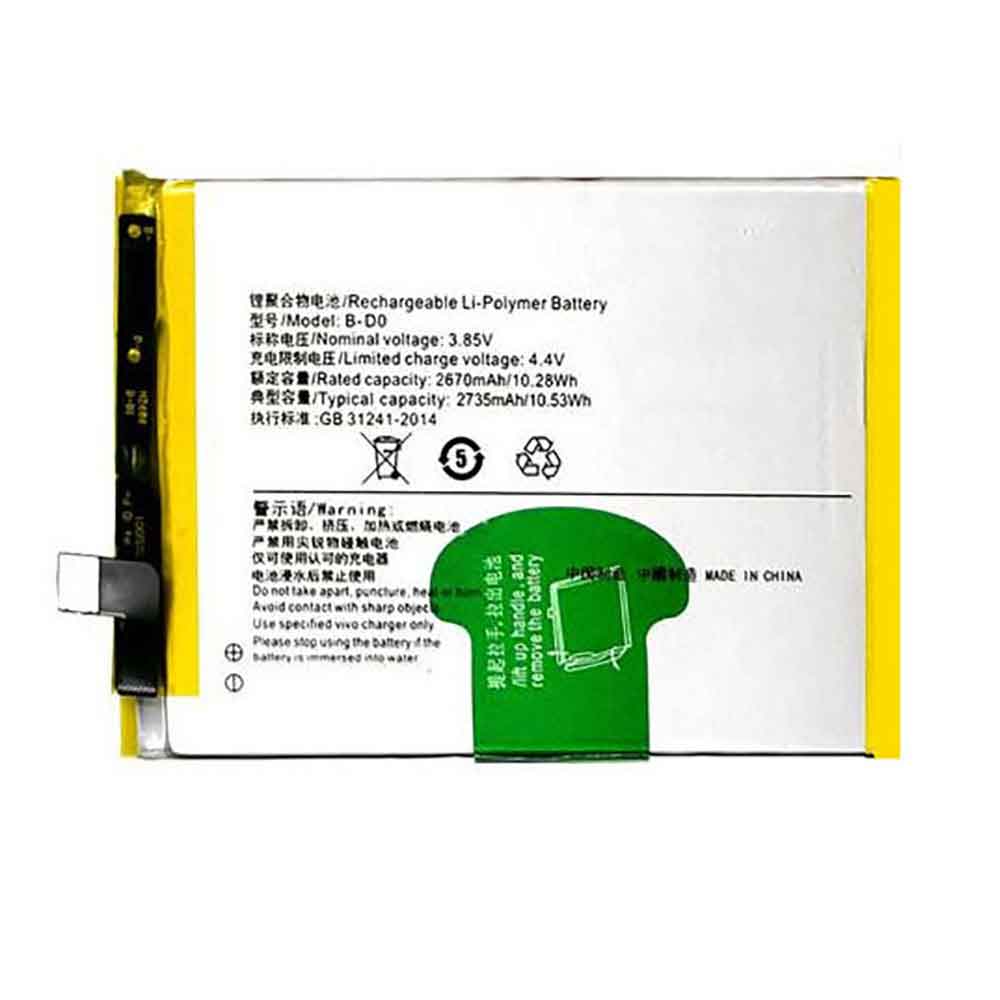
2670mAh 10.28WH 3.85V 4.4V Vivo B-D0 Li-ion Battery for Vivo Y67 Y67L

2670mAh 10.28WH 3.85V 4.4V Vivo B-D0 Batteries for Vivo Y67 Y67L, Vivo B-D0 Cell Phone battery is a brand new,100% Compatible original and replacement Phone battery,Purchase wholesale and retail B-D0 with high quality and low price!

Find ou your original model number or part number(P/N), and move your eyes on the tag of battery

B-D0

Specifications

  • Brand:Vivo
  • Capacity :2670mAh 10.28WH
  • Voltage :3.85V 4.4V
  • Type :Li-ion
  • Battery Cell Quality: Grade A
  • Descriptive: Replacement Battery – 1 Year Warranty
  • Description: Brand New, 1 Year Warranty! 30-Days Money Back! Fast Shipping!

How we test this Vivo B-D0 Battery
Step 1: Make sure customer bought the correct battery.
Step 2: Check battery’s appearance and interface.
Step 3: Test battery charger and recharger function.
Step 4: Charger the battery to 100% and recharger to 0% to get real battery capacity
Step 5: Use Ev2300 to check the voltage difference of each goroup cells.
Step 6: Charger battery power more than 30%.
Step 7: Package battery carefully and send out

Compatible Part Numbers:
B-D0

Compatible Model Numbers:
Vivo Y67 Y67L

How much do you know about how to run laptop well as any place? The follow Tips cut way back on protecting battery life.


1). Please recharge or change your Cell Phone battery when battery power low.
2). Using Li-Ion Replacement Vivo B-D0 Cell Phone Battery for your notebook which can work longer time than Non Li-ion one.
3). It is better to defragmentation regularly for your Cell Phone battery life.
4). In order to reduce the laptop power consumpition, you can use some optical drive spin-down and hard drive in your Cell Phone .
5). Please keep your laptop in sleep or standby model without long time using, which both save the Replacement Vivo B-D0 Cell Phone Battery power and extend battery using life.
6). Leave your battery in a dry and cool condition when without using.
7). When you rarely or generally plugged in fixed power using, Please take down your battery to avoid hurting battery life.

Hot Products

4850mAh 18.43WH AMAZON 58-000313 for Amazon 26S1021200MAH/0.77Wh SAMSUNG EB-BR365FBE for Samsung Gear Fit 2 Pro Sports94Wh LENOVO 45N1016 for Lenovo ThinkPad T410 T420 T4304910mAh/19.00WH VIVO B-O5 for VIVO y20640MAh/70Wh PANASONIC CF-VZSU80U for Panasonic CF-C2 MK1 Toughbook7200mAh DELL PC764 for Dell Latitude D620 D630 Preci50Wh ASUS C31N1339 for Asus ZenBook UX303L Q302L Lapt4900mAh/18.87WH SAMSUNG HQ-50S for Samsung Galaxy A02S57.9Wh HP SH03XL for HP Spectre X360 13-AC0XX 13-AC2980MAH 11.33WH BLACKPHONE BP2 for Blackphone 2

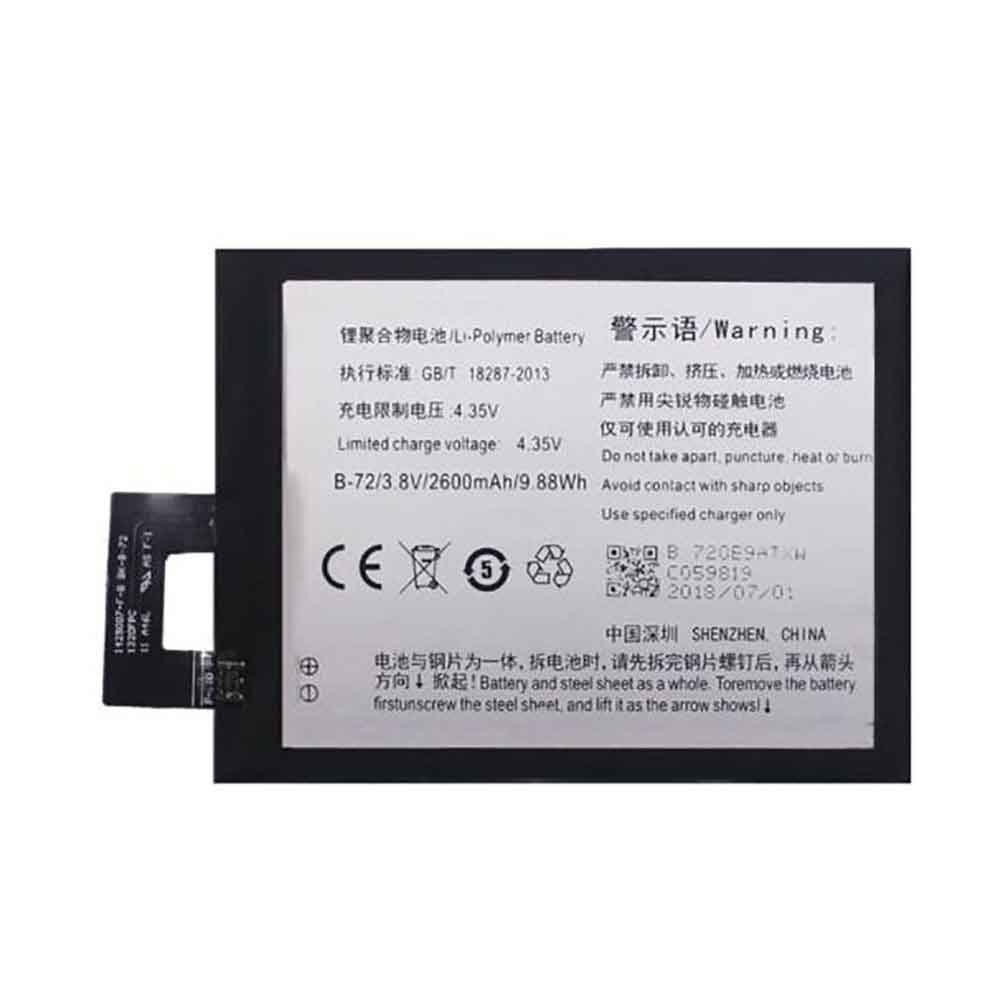
2600mAh 9.88WH 3.8V 4.35V Vivo B-72 Li-ion Battery for Vivo Xshot X710L

2600mAh 9.88WH 3.8V 4.35V Vivo B-72 Batteries for Vivo Xshot X710L, Vivo B-72 Cell Phone battery is a brand new,100% Compatible original and replacement Phone battery,Purchase wholesale and retail B-72 with high quality and low price!

Find ou your original model number or part number(P/N), and move your eyes on the tag of battery

B-72

Specifications

  • Brand:Vivo
  • Capacity :2600mAh 9.88WH
  • Voltage :3.8V 4.35V
  • Type :Li-ion
  • Battery Cell Quality: Grade A
  • Descriptive: Replacement Battery – 1 Year Warranty
  • Description: Brand New, 1 Year Warranty! 30-Days Money Back! Fast Shipping!

How we test this Vivo B-72 Battery
Step 1: Make sure customer bought the correct battery.
Step 2: Check battery’s appearance and interface.
Step 3: Test battery charger and recharger function.
Step 4: Charger the battery to 100% and recharger to 0% to get real battery capacity
Step 5: Use Ev2300 to check the voltage difference of each goroup cells.
Step 6: Charger battery power more than 30%.
Step 7: Package battery carefully and send out

Compatible Part Numbers:
B-72

Compatible Model Numbers:
Vivo Xshot X710L

How much do you know about how to run laptop well as any place? The follow Tips cut way back on protecting battery life.


1). Please recharge or change your Cell Phone battery when battery power low.
2). Using Li-Ion Replacement Vivo B-72 Cell Phone Battery for your notebook which can work longer time than Non Li-ion one.
3). It is better to defragmentation regularly for your Cell Phone battery life.
4). In order to reduce the laptop power consumpition, you can use some optical drive spin-down and hard drive in your Cell Phone .
5). Please keep your laptop in sleep or standby model without long time using, which both save the Replacement Vivo B-72 Cell Phone Battery power and extend battery using life.
6). Leave your battery in a dry and cool condition when without using.
7). When you rarely or generally plugged in fixed power using, Please take down your battery to avoid hurting battery life.

Hot Products

4850mAh 18.43WH AMAZON 58-000313 for Amazon 26S1021200MAH/0.77Wh SAMSUNG EB-BR365FBE for Samsung Gear Fit 2 Pro Sports94Wh LENOVO 45N1016 for Lenovo ThinkPad T410 T420 T4304910mAh/19.00WH VIVO B-O5 for VIVO y20640MAh/70Wh PANASONIC CF-VZSU80U for Panasonic CF-C2 MK1 Toughbook7200mAh DELL PC764 for Dell Latitude D620 D630 Preci50Wh ASUS C31N1339 for Asus ZenBook UX303L Q302L Lapt4900mAh/18.87WH SAMSUNG HQ-50S for Samsung Galaxy A02S57.9Wh HP SH03XL for HP Spectre X360 13-AC0XX 13-AC2980MAH 11.33WH BLACKPHONE BP2 for Blackphone 2