
AMD Dimgrey Cavefish Reportedly Points To Navi 23 GPU

Continuing with AMD’s tendency for fishy codenames, the chipmaker (via @Komachi Ensaka) has added support for a Dimgrey Cavefish graphics card to Mesa 20.3-devel. Much like Sienna Cichlid and Navy Flounder, Dimgrey Cavefish is presumed to be a RDNA 2 graphics cards that’ll surely unsettle the gaming graphics card hierachy as we know it.

AMD has already committed to lift the curtains for the Radeon RX 6000 series, which have been popularly baptized as Big Navi, on October 28. Therefore, it’s not too surprising that the chipmaker’s trio of next-generation graphics cards are doing their rounds in the wild. We don’t have any factual information on AMD’s RDNA 2 product stack so it’s wise to treat the specifications that are going around the hardware world with a truckload of salt.

Assuming that each Compute Unit (CU) in AMD’s RDNA 2 architecture still equates to 64 Stream Processors (SPs), we can piece together some of the rumored specifications for AMD’s Radeon RX 6000-series graphics cards.

At the current time, Sienna Cichlid is associated with the Navi 21 silicon. If the current prediction is accurate, Sienna Cichlid could end up with 80 CUs or 5,120 SPs. This would mean that Sienna Cichlid is likely to be the flagship, in which event, would be the Radeon RX 6900.

If Sienna Cichlid corresponds to Navi 21, then Navy Flounder should be Navi 22. Thus far, the silicon is rumored to bring 40 CUs, which amounts to 2,560 SPs. There is a good possibility that Navy Flounder could be the direct replacement for the current Radeon RX 5700 (XT). If that’s the case, Navy Flounder must be the Radeon RX 6700 although we can’t discard the probability of it being a Radeon RX 6800.

The Dimgrey Cavefish is the latest RDNA 2 codename to pop up. Common wisdom tells us that Dimgrey Cavefish must be Navi 23, the last piece to the puzzle. The only logical assumption is that Navi 23 will be featured in either the Radeon RX 6600 or RX 6500, depending on AMD’s intentions.

It’s uncertain which graphics card AMD will announce on October 28. The chipmaker vaguely used the Radeon RX 6000 moniker. If we look back at RDNA 1, AMD started with the Radeon RX 5700 (XT) and eventually went down the pile. Being optimistic, we would love for AMD to reveal Big Navi because the current graphics card market needs some competition in the higher tiers. Nvidia’s recent GeForce RTX 3080 has proven to be a tough cookie, and Big Navi will likely be the most worthy competitor.
AMD Ryzen 7 5700U Materializes In New Benchmark

The AMD Ryzen 7 5700U (via @TUM_APISAK) has emerged in an Ashes of the Singularity submission. The model name makes it pretty clear that the chip hails from AMD’s next-generation lineup that succeeds the Ryzen 4000-series (codename Renoir) APUs.

Where the Ryzen 7 5700U’s belongs is currently a mystery, but there are two prospects that are being thrown around: one is Lucienne and the other is Cezanne. AMD’s affection for using famous painters’ surnames as the codenames for its processors is well known, and sometimes the chipmaker’s selection might provide some clues.

A quick search shows that Lucienne was an artist herself, but more importantly, she was the secret love child between Pierre-Auguste Renoir and Frédérique Vallet-Bisson. Given the connection between Lucienne and Renoir, it’s fairly safe to assume that AMD’s codenamed Lucienne APUs could be an iteration of Renoir. If that’s the case, Lucienne should still be wielding Zen 2 cores and Vega graphics. On the flipside, there’s Cezanne that’s rumored to sport Zen 3 cores, but still retain the Vega engine.

According to the submission, the Ryzen 7 5700U comes equipped with eight cores and 16 threads. At first glance, the name suggests that it’s the direct successor to the existing Ryzen 7 4700U, however, that doesn’t seem to be the case.

While the Ryzen 7 4700U is indeed an octa-core chip, the chip lacks simultaneous multi-threading (SMT). The Ryzen 7 4800U, on the other hand, comes with a eight-cores, 16-thread design, therefore, the Ryzen 7 5700U is closer to the Ryzen 7 4800U than the Ryzen 7 4700U. It’s interesting though that AMD seemingly decided to unlock the full configuration on the Ryzen 7 5700U. 

The anonymous submitter tested the Ryzen 7 5700U on Ashes of the Singularity with the 1080p Low Preset on the Vulkan API. Unfortunately, there aren’t any Ryzen 7 4800U or Ryzen 7 4700U submissions that match those parameters so an apples-to-apples comparison wasn’t possible. Furthermore, the Ashes of the Singularity submissions don’t expose the clock speeds for the processor. For now, we’ll just have to wait for another leak to get a glimpse of the potential performance uplifts that AMD’s Ryzen 5000-series APUs could bring to the table.

HOW TO ENABLE AN EASIER PICTURE-IN-PICTURE MODE FOR CHROMEBOOKS

If you’ve ever attempted to use picture-in-picture (PIP from this point on) on a Chromebook, you likely understand a bit of the frustration that comes with the territory. For instance, you’ve always needed to right-click twice on YouTube videos to get the proper context menu to appear and choose to enable PIP. Even then, however, it didn’t always work or the option would sometimes disappear. It’s been so unreliable for me that I’ve never picked up on the habit of actually using the feature.

When I was actually using it, I was leveraging the Google-made PIP Chrome extension that, oddly enough, still lives on in the Chrome Web Store. You would think that Google would remove that since the feature is supposed to be baked into Chrome at this point, right? Perhaps, for many, having a dedicated button for PIP when you need it is the more straightforward, approachable route. It seems Google thinks so, too, and they’ve created a much more simple and direct route to start a PIP session on Chrome OS.

A new way to PIP

In the Stable Channel right now, you can turn on a simple flag to enable this new PIP setting and make it far easier and far more reliable to drop your videos in a small, floating PIP window. Just head over to chrome://flags/#global-media-controls-picture-in-picture, flip the flag to ‘enabled’, click that blue restart button and the next time you pull up a video that supports PIP (YouTube is the obvious choice, but many services use it), you can now look in your notifications tray for a new PIP button.

Over the top of your settings over in your system tray, you should see a persistent rich media player control. In that playback card, you’ll now have a new button that will quickly call up a PIP window without the need of digging through sub-menus or installing extensions. Even better, the ability to put the PIP window back into the tab from where it originated is also part of this media card. You can see in the pics above how the icon subtly changes from a pop-out button to a pop-in button. And it just works.

While this is still behind a flag, I’d assume we’ll see this as a standard feature in the next update or two to Chrome OS. It is simple, effective, and a great addition to the way PIP is handled in Chrome OS. Though we are expecting some changes to the way global media controls are presented in future updates, I’m hoping this feature comes along for the ride.

Latest Galaxy Z Fold 2 software update enables eSIM functionality

Samsung released the Galaxy Z Fold 2 globally last week. Some pre-order customers had already got their hands on the device by then. There were a few who couldn’t find the eSIM option on their new foldable device. That’s because the eSIM functionality wasn’t enabled at that time.

As many of you would be aware, the Galaxy Z Fold 2 has one physical SIM slot and an embedded SIM, quite like the Galaxy Fold. The embedded SIM wasn’t available out of the box but the latest Galaxy Z Fold 2 software update rolling out today addresses this.

Latest Galaxy Z Fold 2 update finally enables the eSIM

Samsung did confirm to us last week that it was going to enable the eSIM option for the Galaxy Z Fold 2 through a new firmware update. Fortunately, the company hasn’t taken a lot of time to follow through on this promise. The unavailability of eSIM was troublesome for those who use two different carriers or were using an eSIM before they upgraded to the Galaxy Z Fold 2.

The company is now rolling out firmware version F916BXXU1BTIA for the Galaxy Z Fold 2. It adds the SIM card manager menu that was previously missing from the Settings app, and eSIM was thus not available as a consequence. The changelog also mentions that the camera app has been updated as well. This software update is currently rolling out in Europe and it’s readily available for download from our firmware section.

HP Envy x360 13 (2020) review: This small 2-in-1 is more premium than its price

Between its small, slim design and its snappy AMD processor, HP’s midrange convertible laptop is worth seeking out.

If I was still commuting regularly on a bus or train, the HP Envy x360 13 two-in-one laptop would be on my shortlist. It would also be a top consideration if I were shopping for an older high school or college student. It’s small, stylish and light at just less than 3 pounds (1.3 kg). Battery life is long despite the size. And the AMD Ryzen 5-4500U processor delivered performance beyond that of pricier Intel chips. Add in fast Wi-Fi 6 and Bluetooth 5.0 and, essentially, you’re getting a speedy little two-in-one that’s ready for working from home or remote learning but is also ready for your backpack. 

The Envy x360 normally starts at $700 and the configuration I tested is $800 (£800, AU$2,000). (For those looking to spend even less, check out our list of best laptops under $500.) The price is more than reasonable for what you get, but the biggest issue I have with the Envy x360 13 is its availability. 

A $1,000 version comes in and out of stock and the same is true of my configuration, the Envy x360 13-ay0010nr. You can get a better configuration from Costco right now with twice the storage and a faster processor for $900, although it’s been as low as $750 from the warehouse club. The 15.6-inch version has more availability, so if you don’t mind a larger display, it starts at $700. 

Streamlined and simple

HP was aiming for a minimalist design with the Envy x360 and I’d say it hit the mark. Made from aluminum, the outside is clean and subtle. The lid lifts easily and the display doesn’t have much of a bezel around it at all, including the bottom, which is significantly smaller than the 2019 model. That reduction shifts the keyboard and touchpad up with the keyboard going nearly edge to edge.

It’s a comfortable keyboard with a two-level backlight. The key legends are easy to read and the function keys include the usual hotkeys for volume and screen brightness along with options to instantly mute your mic and block the webcam for privacy. A responsive fingerprint reader is nearly hidden in the keyboard, sitting between the right Alt key and left arrow key. 

The glossy display is definitely a highlight here. It has excellent color and contrast and, at 400 nits, it’s bright. Not quite bright enough to see past reflections outside on a sunny day, but otherwise it’s great. The reduced bezels do make it more comfortable to use on your arm as a tablet and the display supports simultaneous pen and touch input and works with MPP 2.0 pens. 

AMD’s got what it takes

No doubt about it, AMD’s newest mobile processors outperform pricier Intel CPUs. The Ryzen 5-4500U can keep pace with an Intel Core i7-1065G7 and it isn’t even the fastest AMD chip available for this two-in-one. There isn’t a huge gap in performance between the 4500U and higher-end 4700U, so if only one or the other is available you’ll be in good shape regardless. Aside from the processor, though, you might want to go with a configuration with 16GB of memory. The memory is soldered on and that means models with 8GB of memory can’t be upgraded. 

The Envy x360’s battery lasted a fairly long time. On our streaming video test, it hit 10 hours. In general use — streaming music, browsing, writing and basic photo editing — it was closer to 7 hours. However, it does charge quickly, getting up to 50% in 30 minutes. 

The HP Envy x360 13 is an excellent small two-in-one with a higher-end design than you’d typically get at this price — assuming you can find one in stock. Factor in the solid AMD performance and battery life and it’s an easy recommendation.

AMD Big Navi might still be faster than the RTX 3080

We’re just weeks away from the launch of AMD’s RDNA 2 GPUs, but a firmware listing may have prematurely outed the specs for the the company’s highly-anticipated Big Navi cards.

An eagle-eyed Redditor found a listing in the new ROCm (Radeon Open Compute) firmware that reveals some of the specs for the so-called Sienna Cichlid GPU – otherwise known Navi 21 or Big Navi – which will arrive as the flagship of the RX 6000 series

The listing hints that the GPU will feature 80 compute units (CUs) and a 256-bit memory bus. If each Compute Unit (CU) in AMD’s RDNA 2 architecture still equates to 64 Stream Processors (SPs), that means Big Navi will 5,120 SPs. 

If this is true, and if the GPU runs on TSMC’s latest 7nm process, the flagship RDNA 2 processor could deliver Nvidia RTX 3080 levels of performance. After all, AMD has already promised that RDNA 2 will deliver 50% more performance per watt than its first generation RDNA architecture. 

What’s more, a recent rumor suggests the GPU will feature 16GB VRAM – more than the 10GB Nvidia has loaded onto its Ampere GPU. 

The firmware update also references a graphics card codenamed Navy Flounder, believed to be Navi 22 or Navi 23. This mid-range GPU features 40 CUs and a 192-bit memory bus, according to the listing, which amounts to 2,560 SP.

This card will likely arrive as a replacement for the AMD RX 5700 XT, but with its newer RDNA 2 architecture, it will support real time ray tracing and be capable of gaming in 4K. We don’t have any details about performance just yet, but it could give Nvidia’s RTX 2070 a run for its money. 

It won’t be long until we find out for sure, as AMD will announce these new GPUs under the RX 6000 series branding on October 28. 

Intel NUC 11 PRO ‘Tiger Canyon’ detailed

A new series of Intel’s Next Unit of Computing (NUC) has been detailed. 

The next generation Tiger Lake NUC has been detailed

Intel is adding a new series of NUCs called 11 PRO (Tiger Canyon). The PRO series is meant for business and commercial use. These are not the same series as Panther Canyon (NUC 11 Performance), also featuring Tiger Lake, as those are meant for consumers.

Intel Tiger Canyon aka NUC 11 PRO will feature up to 11th Gen Core i7-1185G7 processor based on Tiger Lake-U architecture. This is a quad-core CPU with eight threads offering up to 4.8 GHz turbo clock at 28W. The NUC 11 PRO would also be offered with lower-tier Core processors going down to Core i3-1115G4, which is a dual-core processor.

The NUC 11 PRO would offer dual HDMI 2.1 display connectors (supported by integrated Xe-LP Graphics) and dual Thunderbolt 4 connectivity. Since these devices are often used for home theatre media boxes, such options will certainly not go unnoticed. In businesses, this might mean connecting multiple high-resolution screens for presentations.

Intel’s new MiniPC supports two M.2 slots for (key M for PCIe NVME SSD and key B for other peripherals). It supports WiFi 6 and memory up to 64GB DDR4-3200. The device does not offer discrete graphics options, but one would guess that these might come next year when Intel’s DG1 graphics become available.

The device will be offered in two sizes: ‘tall’ H chassis (117x112x54mm) and ‘slim’ K chassis (117x112x37mm), both were pictured on a leaked slide.

Samsung Galaxy S20 Fan Edition revealed with nearly top specs for a lower price

The Samsung Galaxy S20 Fan Edition is a more affordable version of the flagship phone ‘for the fans,’ which means it prioritizes cameras and display quality at a more favorable price than the rest of the Galaxy S20 line, starting at $699 / £699 / AU$1,149 for the sub-6 5G model.

The phone goes as low as £599 / AU$999 for the 4G-only version, which isn’t coming to the US, though a different mmWave 5G $749 version is coming to the US through Verizon. All S20 Fan Edition models can be pre-ordered starting September 23, while the S20 Fan Edition release date is set for October 2, except in Australia where pre-orders start September 25 and the release date is October 9.

For those prices, the S20 Fan Edition packs most of the best perks of the flagship S20 line: a Snapdragon 865 chipset (or Exynos 990 for the 4G version), 6GB of RAM, and 128GB of storage (expandable to 1TB via microSD). The phone has a 4,500mAh battery, maxing out at 25W wired fast charging and 15W wireless charging. 

A few compromises for lower cost

The S20 Fan Edition makes some compromises compared to its pricier siblings, though it has some advantages, too. Its 6.5-inch OLED display only has Full HD Plus resolution (2400 x 1080) instead of the WQHD Plus of the main S20 line, but the S20 Fan Edition retains a 120Hz refresh rate. The phone also has a polycarbonate rather than glass back, but it comes in six colors (navy, red, lavender, mint, white, orange).

Despite releasing in October 2020, the phone comes with Android 10; an expected upgrade to the recently-released Android 11 will be one of a guaranteed three major operating system updates coming in the next few years.

Ultimately, Samsung believes the S20 Fan Edition makes the right cuts and comes in at the right price to appeal to budget-conscious shoppers who still want good specs and features. It’s this phone generation’s version of the Samsung S10e or S10 Lite to tide buyers over until the 2021 slate of Samsung phones.

Adata’s first desktop PC is a 5-liter NUC with integrated graphics

We were fairly impressed with Adata’s first foray into gaming PCs, which began a few months ago with the XPG Xenia 15, a genuinely impressive laptop with better-than-expected battery life. For its followup act, Adata is trying its hand at a mini PC with its new XPG Gaia.

The Gaia is based on Intel’s NUC 9 Extreme Kit, or otherwise known as Ghost Canyon. That is not necessarily a bad thing, just perhaps a bit uninspired for Adata’s introductory desktop.

Built for “gamers, esports pros, and tech enthusiasts,” Adata appears to have simply taken the Ghost Canyon NUC and stuffed its own brand memory and storage inside, then slapped an XPG logo on the front. The result is a compact 5-liter PC that should be relatively fast out of the box, though gamers, esports pros, and tech enthusiasts will undoubtedly want to add a discrete GPU.

The system is built around an Core i9 9980HK processor, a relatively meaty 8-core/16-thread chip with a 2.4GHz base clock, 5GHz boost clock, and 16MB of L3 cache. This also provides the graphics, by way of Intel’s UHD 630 GPU (24 execution units, 350MHz to 1,25GHz clockspeed). That’s fine for playing less demanding games like League of Legends, but is not going to cut it for more graphically intensive titles (Notebookcheck has a nice rundown of benchmarks).

One of the neat things about the Ghost Canyon NUC is that it can fit a discrete graphics card up to 202mm (7.95 inches) in length. There are even graphics cards designed specifically with the Ghost Canyon NUC in mind, like the Asus Dual GeForce RTX 2070 Mini OC Edition.

As far as what comes with the Gaia, in addition to the 9980HK CPU, Adata ships it with 32GB (2x16GB) of DDR4-3200 “sorted” RAM (undoubtedly from its own stock) and an XPG SX8200 Pro SSD, a fast storage drive rated to deliver read and write speeds of up to 3,500MB/s and 3,000MB/s, respectively. Adata does not mention the capacity, so it’s likely there will be multiple SKUs with different storage allotments.

The system also boasts Wi-Fi 6 (802.11ax) and Thunderbolt 3 connectivity, and is powered by a 500W PSU that is 80 Plus Platinum certified.

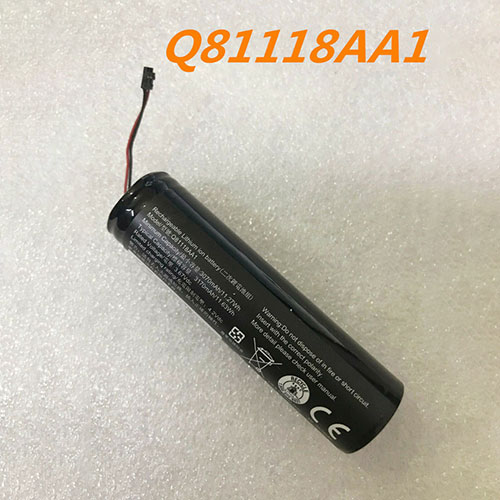
Cheap Acer Q81118AA1 Li-ion Tablets battery, Brand New Q81118AA1 replacement battery for Acer Q81118AA1

3070mAh/11.27WH 3.67V/4.4V Acer Q81118AA1 Batteries for Acer Q81118AA1, Acer Q81118AA1 Tablets battery is a brand new,100% Compatible original and replacement Laptop battery,Purchase wholesale and retail Q81118AA1 with high quality and low price!

Q81118AA1 Battery acer Li-ion 3.67V/4.4V 3070mAh/11.27WH

Q81118AA1

Specifications

  • Brand:Acer
  • Capacity :3070mAh/11.27WH
  • Voltage :3.67V/4.4V
  • Type :Li-ion
  • Battery Cell Quality: Grade A
  • Descriptive: Replacement Battery – 1 Year Warranty
  • Description: Brand New, 1 Year Warranty! 30-Days Money Back! Fast Shipping!

How we test this Acer Q81118AA1 Battery Li-ion 3.67V/4.4V 3070mAh/11.27WH

Step 1: Make sure customer bought the correct battery.
Step 2: Check battery’s appearance and interface.
Step 3: Test battery charger and recharger function.
Step 4: Charger the battery to 100% and recharger to 0% to get real battery capacity
Step 5: Use Ev2300 to check the voltage difference of each goroup cells.
Step 6: Charger battery power more than 30%.
Step 7: Package battery carefully and send out

Compatible Part Numbers:

Q81118AA1

Compatible Model Numbers:

Acer Q81118AA1

How much do you know about how to run laptop well as any place? The follow Tips cut way back on protecting battery life.


1). Please recharge or change your Tablets battery when battery power low.
2). Using Li-Ion Replacement Acer Q81118AA1 Tablets Battery for your notebook which can work longer time than Non Li-ion one.
3). It is better to defragmentation regularly for your Tablets battery life.
4). In order to reduce the laptop power consumpition, you can use some optical drive spin-down and hard drive in your Tablets .
5). Please keep your laptop in sleep or standby model without long time using, which both save the Replacement Acer Q81118AA1 Tablets Battery power and extend battery using life.
6). Leave your battery in a dry and cool condition when without using.
7). When you rarely or generally plugged in fixed power using, Please take down your battery to avoid hurting battery life.

Hot Products

11.1V/12.4v 2300mah BOSE 404600 for Bose SOUNDLINK I II III16.8V/20V 400mA/2200mAH/32Wh BOSE 300769-003 for Bose Sounddock Portable Digita7.4V 2230mAh/17Wh BOSE 063404 for 0634043.7V/4.2V 1750MAH/6.5WH AMAZON GP-S10-346392-0100 for AMAZON KINDLE 3 3G WIFI Kindle3.8V 6300mAh/23.94Wh AMAZON 2955C7 for Amazon Kindle Fire HD 10.1 7th15.4V 5209mAh RAZER RC30-0248 for RAZER Blade 15 2018 RZ09-023863.8 V 1300 mAh AMAZON MC-305070 for AMAZON Kindle Voyage7.7V 37Wh/4810mAh ACER AP16M5J for ACER A315-51-51SL N17Q1 SERIES3.8V 2930mAh/11.1Wh NETGEAR W-7 for Netgear AirCard 790S 790SP 8103.85V/4.4V 3080MAH/11.86WH ALCATEL TLp030JC for Alcatel A3 XL 9008j