
Cheap Sony VGP-BPS31 Li-ion Laptop battery, Brand New VGP-BPS31 replacement battery for Sony VAIO SVD11 Duo11 SVD112A1ST

4960mAh/37Wh 7.4V Sony VGP-BPS31 Batteries for Sony VAIO SVD11 Duo11 SVD112A1ST, Sony VGP-BPS31 Laptop battery is a brand new,100% Compatible original and replacement Laptop battery,Purchase wholesale and retail VGP-BPS31 with high quality and low price!

VGP-BPS31 Battery sony Li-ion 7.4V 4960mAh/37Wh
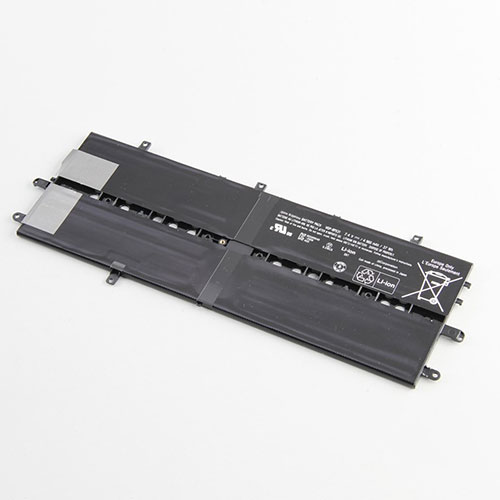
VGP-BPS31

Specifications

  • Brand:Sony
  • Capacity :4960mAh/37Wh
  • Voltage :7.4V
  • Type :Li-ion
  • Battery Cell Quality: Grade A
  • Descriptive: Replacement Battery – 1 Year Warranty
  • Description: Brand New, 1 Year Warranty! 30-Days Money Back! Fast Shipping!

How we test this Sony VGP-BPS31 Battery Li-ion 7.4V 4960mAh/37Wh

Step 1: Make sure customer bought the correct battery.
Step 2: Check battery’s appearance and interface.
Step 3: Test battery charger and recharger function.
Step 4: Charger the battery to 100% and recharger to 0% to get real battery capacity
Step 5: Use Ev2300 to check the voltage difference of each goroup cells.
Step 6: Charger battery power more than 30%.
Step 7: Package battery carefully and send out

Compatible Part Numbers:

VGP-BPS31

Compatible Model Numbers:

Sony VAIO SVD11 Duo11 SVD112A1ST

How much do you know about how to run laptop well as any place? The follow Tips cut way back on protecting battery life.


1). Please recharge or change your Laptop battery when battery power low.
2). Using Li-Ion Replacement Sony VGP-BPS31 Laptop Battery for your notebook which can work longer time than Non Li-ion one.
3). It is better to defragmentation regularly for your Laptop battery life.
4). In order to reduce the laptop power consumpition, you can use some optical drive spin-down and hard drive in your Laptop .
5). Please keep your laptop in sleep or standby model without long time using, which both save the Replacement Sony VGP-BPS31 Laptop Battery power and extend battery using life.
6). Leave your battery in a dry and cool condition when without using.
7). When you rarely or generally plugged in fixed power using, Please take down your battery to avoid hurting battery life.

Hot Products

11.1V/12.4v 2300mah BOSE 404600 for Bose SOUNDLINK I II III7.4V 2230mAh/17Wh BOSE 063404 for 0634043.7V/4.2V 1750MAH/6.5WH AMAZON GP-S10-346392-0100 for AMAZON KINDLE 3 3G WIFI Kindle3.8V 6300mAh/23.94Wh AMAZON 2955C7 for Amazon Kindle Fire HD 10.1 7th15.4V 5209mAh RAZER RC30-0248 for RAZER Blade 15 2018 RZ09-023863.8 V 1300 mAh AMAZON MC-305070 for AMAZON Kindle Voyage7.7V 37Wh/4810mAh ACER AP16M5J for ACER A315-51-51SL N17Q1 SERIES3.85V/4.4V 3080MAH/11.86WH ALCATEL TLp030JC for Alcatel A3 XL 9008j7.4V 2230mAH/17Wh BOSE 061384 for BOSE SOUNDLINK Mini Series3.8V 2930mAh/11.1Wh NETGEAR W-7 for Netgear AirCard 790S 790SP 810
Chrome OS 86 bringing tab search to Chromebooks and it’s awesome

Earlier this week the Stable Channel of Chrome OS 85 was released to Chromebooks. Hot on the heels of that, the Chrome OS 86 Dev Channel was updated and I’ve been using it on my daily driver. If you’re the kind of Chromebook user I am and have one or two dozen tabs open at any given time, you’re likely going to love the new tab search feature.

Here’s a screenshot of it in action:

Above you can see I have 9 pinned tabs, two regular active tabs and a new tab page, just for good measure.

By clicking on the drop down arrow to the right of the last tab shown, there’s a dropdown menu of all open tabs. You can’t see all of them but at least five do appear. And typing in the search bar will, of course, search through all of your active tabs.

There’s currently a keyboard shortcut to open this menu as well: It’s CTRL + Shift + E, if you’d rather not mouse or tap around.

This feature is enabled by default in the Chrome OS 86 Dev Channel, although I suspect you can enable it in Chrome OS 85 behind this flag: chrome://flags/#enable-tab-search

Since this is on by default with the Chrome OS 86 Dev Channel, I fully expect this to arrive for everyone on the Stable Channel when Chrome OS 86 is released in roughly six weeks.

Granted, if you’re just doing some basic browsing with a few tabs, you likely won’t need this feature. Once that row of browser tabs fills up though? You’ll probably be all over this new addition to Chrome OS 86.

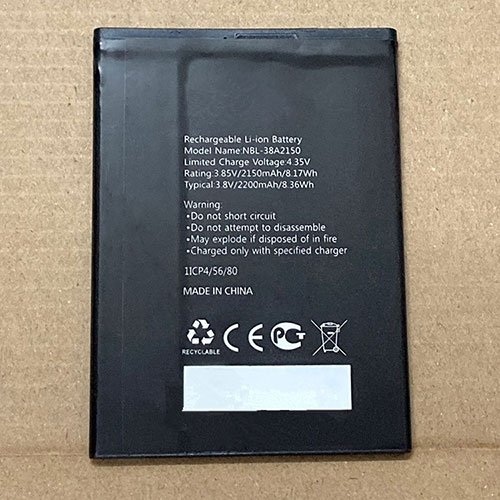
Cheap Tp-link NBL-38A2150 Li-ion Cell Phone battery, Brand New NBL-38A2150 replacement battery for TP-link neffos C7 lite

2200mAh/8.36Wh 3.85V/4.4V Tp-link NBL-38A2150 Batteries for TP-link neffos C7 lite, Tp-link NBL-38A2150 Cell Phone battery is a brand new,100% Compatible original and replacement Laptop battery,Purchase wholesale and retail NBL-38A2150 with high quality and low price!

NBL-38A2150 Battery tp-link Li-ion 3.85V/4.4V 2200mAh/8.36Wh

NBL-38A2150

Specifications

  • Brand:TP-LINK
  • Capacity :2200mAh/8.36Wh
  • Voltage :3.85V/4.4V
  • Type :Li-ion
  • Battery Cell Quality: Grade A
  • Descriptive: Replacement Battery – 1 Year Warranty
  • Description: Brand New, 1 Year Warranty! 30-Days Money Back! Fast Shipping!

How we test this Tp-link NBL-38A2150 Battery Li-ion 3.85V/4.4V 2200mAh/8.36Wh

Step 1: Make sure customer bought the correct battery.
Step 2: Check battery’s appearance and interface.
Step 3: Test battery charger and recharger function.
Step 4: Charger the battery to 100% and recharger to 0% to get real battery capacity
Step 5: Use Ev2300 to check the voltage difference of each goroup cells.
Step 6: Charger battery power more than 30%.
Step 7: Package battery carefully and send out

Compatible Part Numbers:

NBL-38A2150 1ICP4/56/80

Compatible Model Numbers:

TP-link neffos C7 lite

How much do you know about how to run laptop well as any place? The follow Tips cut way back on protecting battery life.


1). Please recharge or change your Cell Phone battery when battery power low.
2). Using Li-Ion Replacement Tp-link NBL-38A2150 Cell Phone Battery for your notebook which can work longer time than Non Li-ion one.
3). It is better to defragmentation regularly for your Cell Phone battery life.
4). In order to reduce the laptop power consumpition, you can use some optical drive spin-down and hard drive in your Cell Phone .
5). Please keep your laptop in sleep or standby model without long time using, which both save the Replacement Tp-link NBL-38A2150 Cell Phone Battery power and extend battery using life.
6). Leave your battery in a dry and cool condition when without using.
7). When you rarely or generally plugged in fixed power using, Please take down your battery to avoid hurting battery life.

Hot Products

11.1V/12.4v 2300mah BOSE 404600 for Bose SOUNDLINK I II III7.4V 2230mAh/17Wh BOSE 063404 for 0634043.7V/4.2V 1750MAH/6.5WH AMAZON GP-S10-346392-0100 for AMAZON KINDLE 3 3G WIFI Kindle3.8V 6300mAh/23.94Wh AMAZON 2955C7 for Amazon Kindle Fire HD 10.1 7th15.4V 5209mAh RAZER RC30-0248 for RAZER Blade 15 2018 RZ09-023863.8 V 1300 mAh AMAZON MC-305070 for AMAZON Kindle Voyage7.7V 37Wh/4810mAh ACER AP16M5J for ACER A315-51-51SL N17Q1 SERIES3.85V/4.4V 3080MAH/11.86WH ALCATEL TLp030JC for Alcatel A3 XL 9008j7.4V 2230mAH/17Wh BOSE 061384 for BOSE SOUNDLINK Mini Series3.8V 2930mAh/11.1Wh NETGEAR W-7 for Netgear AirCard 790S 790SP 810
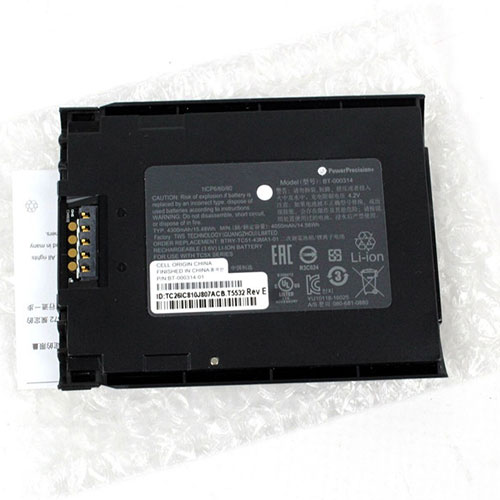
Cheap Zebra BT-000314 Li-ion Other battery, Brand New BT-000314 replacement battery for Zebra TC51 TC510 TC56

4300mAh/15.48WH 3.6V Zebra BT-000314 Batteries for Zebra TC51 TC510 TC56, Zebra BT-000314 Other battery is a brand new,100% Compatible original and replacement Laptop battery,Purchase wholesale and retail BT-000314 with high quality and low price!

BT-000314 Battery zebra Li-ion 3.6V 4300mAh/15.48WH

BT-000314

Specifications

  • Brand:Zebra
  • Capacity :4300mAh/15.48WH
  • Voltage :3.6V
  • Type :Li-ion
  • Battery Cell Quality: Grade A
  • Descriptive: Replacement Battery – 1 Year Warranty
  • Description: Brand New, 1 Year Warranty! 30-Days Money Back! Fast Shipping!

How we test this Zebra BT-000314 Battery Li-ion 3.6V 4300mAh/15.48WH

Step 1: Make sure customer bought the correct battery.
Step 2: Check battery’s appearance and interface.
Step 3: Test battery charger and recharger function.
Step 4: Charger the battery to 100% and recharger to 0% to get real battery capacity
Step 5: Use Ev2300 to check the voltage difference of each goroup cells.
Step 6: Charger battery power more than 30%.
Step 7: Package battery carefully and send out

Compatible Part Numbers:

1ICP6/60/80 BT-000314-01 BTRY-TC51-43MA1-01 BT-000314

Compatible Model Numbers:

Zebra TC51 TC510 TC56

How much do you know about how to run laptop well as any place? The follow Tips cut way back on protecting battery life.


1). Please recharge or change your Other battery when battery power low.
2). Using Li-Ion Replacement Zebra BT-000314 Other Battery for your notebook which can work longer time than Non Li-ion one.
3). It is better to defragmentation regularly for your Other battery life.
4). In order to reduce the laptop power consumpition, you can use some optical drive spin-down and hard drive in your Other .
5). Please keep your laptop in sleep or standby model without long time using, which both save the Replacement Zebra BT-000314 Other Battery power and extend battery using life.
6). Leave your battery in a dry and cool condition when without using.
7). When you rarely or generally plugged in fixed power using, Please take down your battery to avoid hurting battery life.

Hot Products

11.1V/12.4v 2300mah BOSE 404600 for Bose SOUNDLINK I II III7.4V 2230mAh/17Wh BOSE 063404 for 0634043.7V/4.2V 1750MAH/6.5WH AMAZON GP-S10-346392-0100 for AMAZON KINDLE 3 3G WIFI Kindle3.8V 6300mAh/23.94Wh AMAZON 2955C7 for Amazon Kindle Fire HD 10.1 7th15.4V 5209mAh RAZER RC30-0248 for RAZER Blade 15 2018 RZ09-023863.8 V 1300 mAh AMAZON MC-305070 for AMAZON Kindle Voyage7.7V 37Wh/4810mAh ACER AP16M5J for ACER A315-51-51SL N17Q1 SERIES3.85V/4.4V 3080MAH/11.86WH ALCATEL TLp030JC for Alcatel A3 XL 9008j7.4V 2230mAH/17Wh BOSE 061384 for BOSE SOUNDLINK Mini Series3.8V 2930mAh/11.1Wh NETGEAR W-7 for Netgear AirCard 790S 790SP 810
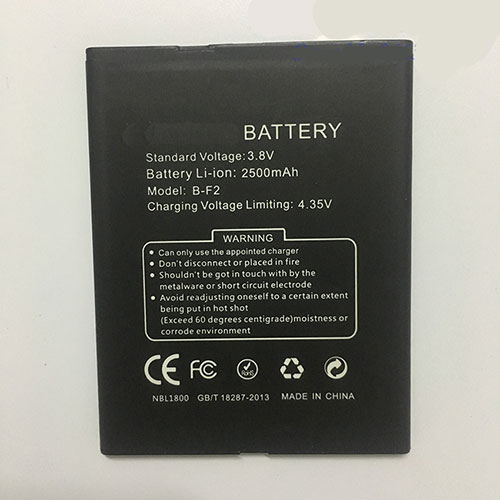
Cheap Doogee B-F2 Li-ion Cell Phone battery, Brand New B-F2 replacement battery for Doogee B-F2

2500mAh 3.8V/4.35V Doogee B-F2 Batteries for Doogee B-F2, Doogee B-F2 Cell Phone battery is a brand new,100% Compatible original and replacement Laptop battery,Purchase wholesale and retail B-F2 with high quality and low price!

B-F2 Battery doogee Li-ion 3.8V/4.35V 2500mAh

B-F2

Specifications

  • Brand:Doogee
  • Capacity :2500mAh
  • Voltage :3.8V/4.35V
  • Type :Li-ion
  • Battery Cell Quality: Grade A
  • Descriptive: Replacement Battery – 1 Year Warranty
  • Description: Brand New, 1 Year Warranty! 30-Days Money Back! Fast Shipping!

How we test this Doogee B-F2 Battery Li-ion 3.8V/4.35V 2500mAh

Step 1: Make sure customer bought the correct battery.
Step 2: Check battery’s appearance and interface.
Step 3: Test battery charger and recharger function.
Step 4: Charger the battery to 100% and recharger to 0% to get real battery capacity
Step 5: Use Ev2300 to check the voltage difference of each goroup cells.
Step 6: Charger battery power more than 30%.
Step 7: Package battery carefully and send out

Compatible Part Numbers:

B-F2

Compatible Model Numbers:

Doogee B-F2

How much do you know about how to run laptop well as any place? The follow Tips cut way back on protecting battery life.


1). Please recharge or change your Cell Phone battery when battery power low.
2). Using Li-Ion Replacement Doogee B-F2 Cell Phone Battery for your notebook which can work longer time than Non Li-ion one.
3). It is better to defragmentation regularly for your Cell Phone battery life.
4). In order to reduce the laptop power consumpition, you can use some optical drive spin-down and hard drive in your Cell Phone .
5). Please keep your laptop in sleep or standby model without long time using, which both save the Replacement Doogee B-F2 Cell Phone Battery power and extend battery using life.
6). Leave your battery in a dry and cool condition when without using.
7). When you rarely or generally plugged in fixed power using, Please take down your battery to avoid hurting battery life.

Hot Products

11.1V/12.4v 2300mah BOSE 404600 for Bose SOUNDLINK I II III7.4V 2230mAh/17Wh BOSE 063404 for 0634043.7V/4.2V 1750MAH/6.5WH AMAZON GP-S10-346392-0100 for AMAZON KINDLE 3 3G WIFI Kindle3.8V 6300mAh/23.94Wh AMAZON 2955C7 for Amazon Kindle Fire HD 10.1 7th15.4V 5209mAh RAZER RC30-0248 for RAZER Blade 15 2018 RZ09-023863.8 V 1300 mAh AMAZON MC-305070 for AMAZON Kindle Voyage7.7V 37Wh/4810mAh ACER AP16M5J for ACER A315-51-51SL N17Q1 SERIES3.85V/4.4V 3080MAH/11.86WH ALCATEL TLp030JC for Alcatel A3 XL 9008j7.4V 2230mAH/17Wh BOSE 061384 for BOSE SOUNDLINK Mini Series3.8V 2930mAh/11.1Wh NETGEAR W-7 for Netgear AirCard 790S 790SP 810
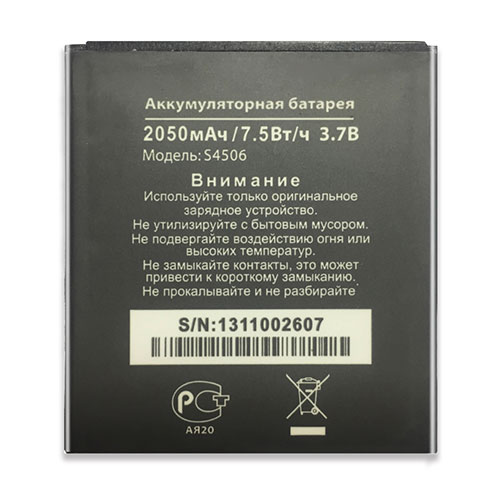
Cheap Dns S4506 Li-ion Cell Phone battery, Brand New S4506 replacement battery for DNS DNSS4505 S4505MS4506 AT-B45SE

2050mAh/7.5WH 3.7V Dns S4506 Batteries for DNS DNSS4505 S4505MS4506 AT-B45SE, Dns S4506 Cell Phone battery is a brand new,100% Compatible original and replacement Laptop battery,Purchase wholesale and retail S4506 with high quality and low price!

S4506 Battery dns Li-ion 3.7V 2050mAh/7.5WH

S4506

Specifications

  • Brand:DNS
  • Capacity :2050mAh/7.5WH
  • Voltage :3.7V
  • Type :Li-ion
  • Battery Cell Quality: Grade A
  • Descriptive: Replacement Battery – 1 Year Warranty
  • Description: Brand New, 1 Year Warranty! 30-Days Money Back! Fast Shipping!

How we test this Dns S4506 Battery Li-ion 3.7V 2050mAh/7.5WH

Step 1: Make sure customer bought the correct battery.
Step 2: Check battery’s appearance and interface.
Step 3: Test battery charger and recharger function.
Step 4: Charger the battery to 100% and recharger to 0% to get real battery capacity
Step 5: Use Ev2300 to check the voltage difference of each goroup cells.
Step 6: Charger battery power more than 30%.
Step 7: Package battery carefully and send out

Compatible Part Numbers:

S4506

Compatible Model Numbers:

DNS DNSS4505 S4505MS4506 AT-B45SE

How much do you know about how to run laptop well as any place? The follow Tips cut way back on protecting battery life.


1). Please recharge or change your Cell Phone battery when battery power low.
2). Using Li-Ion Replacement Dns S4506 Cell Phone Battery for your notebook which can work longer time than Non Li-ion one.
3). It is better to defragmentation regularly for your Cell Phone battery life.
4). In order to reduce the laptop power consumpition, you can use some optical drive spin-down and hard drive in your Cell Phone .
5). Please keep your laptop in sleep or standby model without long time using, which both save the Replacement Dns S4506 Cell Phone Battery power and extend battery using life.
6). Leave your battery in a dry and cool condition when without using.
7). When you rarely or generally plugged in fixed power using, Please take down your battery to avoid hurting battery life.

Hot Products

11.1V/12.4v 2300mah BOSE 404600 for Bose SOUNDLINK I II III7.4V 2230mAh/17Wh BOSE 063404 for 0634043.7V/4.2V 1750MAH/6.5WH AMAZON GP-S10-346392-0100 for AMAZON KINDLE 3 3G WIFI Kindle3.8V 6300mAh/23.94Wh AMAZON 2955C7 for Amazon Kindle Fire HD 10.1 7th15.4V 5209mAh RAZER RC30-0248 for RAZER Blade 15 2018 RZ09-023863.8 V 1300 mAh AMAZON MC-305070 for AMAZON Kindle Voyage7.7V 37Wh/4810mAh ACER AP16M5J for ACER A315-51-51SL N17Q1 SERIES3.85V/4.4V 3080MAH/11.86WH ALCATEL TLp030JC for Alcatel A3 XL 9008j7.4V 2230mAH/17Wh BOSE 061384 for BOSE SOUNDLINK Mini Series3.8V 2930mAh/11.1Wh NETGEAR W-7 for Netgear AirCard 790S 790SP 810

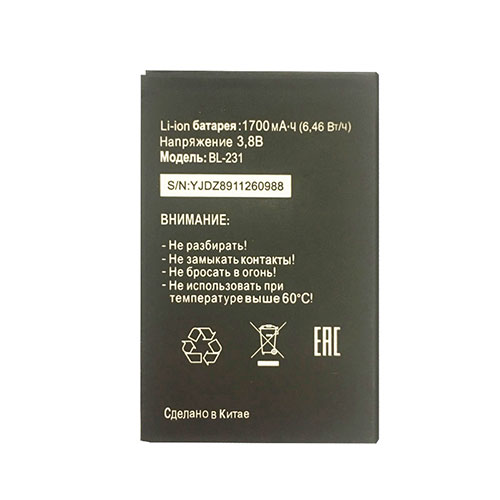
Cheap Midi BL-231 Li-ion Cell Phone battery, Brand New BL-231 replacement battery for Midi Tele2 BL231 Bl 231

1700mAh/6.46WH 3.8V Midi BL-231 Batteries for Midi Tele2 BL231 Bl 231, Midi BL-231 Cell Phone battery is a brand new,100% Compatible original and replacement Laptop battery,Purchase wholesale and retail BL-231 with high quality and low price!

BL-231 Battery midi Li-ion 3.8V 1700mAh/6.46WH

BL-231

Specifications

  • Brand:Midi
  • Capacity :1700mAh/6.46WH
  • Voltage :3.8V
  • Type :Li-ion
  • Battery Cell Quality: Grade A
  • Descriptive: Replacement Battery – 1 Year Warranty
  • Description: Brand New, 1 Year Warranty! 30-Days Money Back! Fast Shipping!

How we test this Midi BL-231 Battery Li-ion 3.8V 1700mAh/6.46WH

Step 1: Make sure customer bought the correct battery.
Step 2: Check battery’s appearance and interface.
Step 3: Test battery charger and recharger function.
Step 4: Charger the battery to 100% and recharger to 0% to get real battery capacity
Step 5: Use Ev2300 to check the voltage difference of each goroup cells.
Step 6: Charger battery power more than 30%.
Step 7: Package battery carefully and send out

Compatible Part Numbers:

BL-231

Compatible Model Numbers:

Midi BL231 Bl 231 Tele2

How much do you know about how to run laptop well as any place? The follow Tips cut way back on protecting battery life.


1). Please recharge or change your Cell Phone battery when battery power low.
2). Using Li-Ion Replacement Midi BL-231 Cell Phone Battery for your notebook which can work longer time than Non Li-ion one.
3). It is better to defragmentation regularly for your Cell Phone battery life.
4). In order to reduce the laptop power consumpition, you can use some optical drive spin-down and hard drive in your Cell Phone .
5). Please keep your laptop in sleep or standby model without long time using, which both save the Replacement Midi BL-231 Cell Phone Battery power and extend battery using life.
6). Leave your battery in a dry and cool condition when without using.
7). When you rarely or generally plugged in fixed power using, Please take down your battery to avoid hurting battery life.

Hot Products

11.1V/12.4v 2300mah BOSE 404600 for Bose SOUNDLINK I II III7.4V 2230mAh/17Wh BOSE 063404 for 0634043.7V/4.2V 1750MAH/6.5WH AMAZON GP-S10-346392-0100 for AMAZON KINDLE 3 3G WIFI Kindle3.8V 6300mAh/23.94Wh AMAZON 2955C7 for Amazon Kindle Fire HD 10.1 7th15.4V 5209mAh RAZER RC30-0248 for RAZER Blade 15 2018 RZ09-023863.8 V 1300 mAh AMAZON MC-305070 for AMAZON Kindle Voyage7.7V 37Wh/4810mAh ACER AP16M5J for ACER A315-51-51SL N17Q1 SERIES3.85V/4.4V 3080MAH/11.86WH ALCATEL TLp030JC for Alcatel A3 XL 9008j7.4V 2230mAH/17Wh BOSE 061384 for BOSE SOUNDLINK Mini Series3.8V 2930mAh/11.1Wh NETGEAR W-7 for Netgear AirCard 790S 790SP 810

Nvidia’s new Reflex latency-busting technology aims to make you a better gamer

Nvidia is today announcing the introduction of Nvidia Reflex technology. In an attempt to put a quantifiable number on gaming PC input lag, Nvidia and its pals at monitor manufacturers are introducing screen-based technology called Reflex Latency Analyzer that is able to accurately measure system latency for the first time without specialised equipment. It’s also adding per game support for a new Reflex Low-Latency Mode, which aims to lower input lag in select games.

Details remain sparse on the exact specifications for upcoming monitors with the technology, although we know Alienware, Asus, Acer, and MSI intend to introduce the functionality within new 360Hz monitors intended for competitive gaming. Asus’ model is similar to its recently announced 360Hz PG259QN—which is set to arrive later this month for $699—but packs the new technology. Look out for that under the PG259QNR name when it arrives. 

Alienware intends to introduce the functionality within a new 360Hz monitor intended for competitive gaming: the Alienware 25 Gaming Monitor (AW2521H).

Valorant, Apex Legends, Call of Duty: Warzone, and Fortnite are just a few of the games announced that will support Nvidia Reflex Low-Latency Mode, “that reduces latency by up to 50 percent.” This is a separate feature to the Reflex Latency Analyzer, and a part of the Nvidia Reflex technology suite.

Input lag is a common phrase thrown around in the gaming monitor space, but it’s not easily measured without specialist equipment or cameras. To do so, you need to measure the time between a user hitting an input (primary mouse click, for example) and the monitor’s pixels reacting to that input (your character fires a shot). 

It can also be difficult to quantify the root of latency. Latency can stem from many sources: be that your peripherals, internal PC hardware, or monitor. And for as many points in the PC gaming pipeline where latency can be introduced, there are similarly patches where it can be reduced.

Nvidia Reflex appears to be intended to shine a light on where lag is being introduced within a system, and at the very least offer an accurate measure of a system’s latency, if not reduce it.

That means there will be a lot more chat of real-world latency with this coming GPU generation, which may signify that latency is a new battleground between Nvidia and AMD—and one where Nvidia may believe it has the advantage considering today’s disclosure. 

We’ll have to wait until we have our hands on both Nvidia Ampere and AMD RDNA 2 GPUs to put that theory to the test, however.

One would assume the technology will also be limited to the latest monitors and Nvidia 30-series GPUs, however, we’re yet to hear confirmation either way.

Chrome OS 85 Stable Channel arrives: Here’s what you need to know

On Tuesday, Google announced that the Chrome OS 85 Stable Channel is released, with the typical staggered rollout over the coming days. As usual, Google has highlighted some of the newest features for Chromebooks, but there’s always more in terms of experimental functionality.

I’ll share what you need to know about Chrome OS 85 from the official release and cover thee additional items Google has held under wraps for now.

Wi-Fi password sync between Chromebooks

We knew that WiFi password synchronization between Chromebooks was coming and it’s finally here in Chrome OS 85. This is ideal for people or families that use multiple Chromebooks in the same location, and therefore, likely on the same network. Why? Because Wi-Fi passwords are part of your profile’s keychain, so they move from Chromebook to Chromebook. No word on if this feature will also include Android phones, although it likely will in the future.

Search bar in Chrome OS Settings

This is a long overdue improvement for finding different settings on a Chromebook. Not only does the Search bar find your exact queries but it’s smart enough to suggest related results, as shown above. Usability in the Chrome OS Settings has been adequate but I appreciate this new feature, which I’ve been using on the Chrome OS 86 Dev Channel.

Say hello to the new microphone slider

With so many people and students working or studying at home, video conferencing usage is up. So this new microphone volume slider is a welcome addition to Chrome OS 85. There’s no need to jump into the settings for Hangouts, Meet, Zoom or whatever video chat service you use now; you can just click and slide!

And speaking of video, the Camera app can now pause and resume video while recording, or take a still snapshot during a video. All videos are saved in MP4 format, making it easier for others to view your content, although I don’t see too many people creating sharable video with a Chromebook.

That’s all that Google is officially highlighting for Chrome OS 85 in it’s news release, so let’s hit the other goodies from the Chrome Enterprise release notes and other sources:

The “Displays” page in Settings has been updated to allow independent configuration of the resolution and the refresh rate for external monitors. This setting will be split automatically and users do not need to take any action.

When entering text using the handwriting keyboard, you can now use familiar gestures to edit your handwriting. Drawing a strikethrough will delete text, and a caret will give you space to insert text.

Users can now manage their ongoing print jobs and view what has been completed.

As previously mentioned, Chrome tabs open up to 10 percent faster and can be grouped.

I have to dig through the code commits (and there are a lot of them!) in lieu of additional release notes, so as I find other items or experimental flags, I will update this post accordingly.

Don’t download latest Windows 10 update if you own one of these popular laptops

There’s a fresh Windows 10 warning out this week and ignoring it could leave your PC facing the nightmare of the dreaded blue screen of death. The new alert has been issued by the team at Lenovo who say that, after installing the August 2020 cumulative update for Windows 10 Version 2004, some ThinkPad laptops are being hit by this irritating bug.

In a post on its support page Lenovo states that “after installing the August 2020 cumulative update for Windows 10 Version 2004, users may notice one or more of the following symptoms: Blue Screen of Death (BSoD) when booting • Blue Screen of Death (BSoD) when starting Lenovo Vantage • Blue Screen of Death (BSoD) when running Windows Defender Scan • Can’t login by Face with Windows Hello • Errors in Device Manager related to Intel Management Engine • Errors in Device Manager related to IR Camera.

If you own a ThinkPad and have found yourself staring at a blue screen rather than your usual desktop and files then it seems there is a workaround.

Lenovo says that anyone hit by this problem should disable the Enhanced Windows Biometric Security setting in BIOS Setup via the Security and Virtualization menus.

The other way to avoid this nightmare is to wait until a fix has been issued by Microsoft before even attempting to download the August 2020 cumulative update.

According to Windows Latest, it’s not just ThinkPad users who have been affected by this new glitch with non-Lenovo users complaining on Reddit and Microsoft forums. Speaking on Reddit, on Windows 10 fan said, “I went from a perfectly fine, basically brand new computer, to more busted than the old PC I replaced, basically overnight.”

Whilst another user added, “I am absolutely not having a good time with 2004. Is there any easy way to roll back to an earlier version outside of that 10 day window beyond trying to search around for a specifically updated version of windows?”

This latest bout of issues comes as Microsoft may have finally realised that its updates are causing too many problems for users, in fact it’s emerged that the US firm could be switching from two big updates each year to just one.

According to a blog post by Windows Latest, the Redmond-based firm is looking to shake-up their Windows 10 update schedule following the release of the fall patch this year. It had been thought that following this release another big Windows 10 update would be arriving in the first half of 2021.

But this release has been delayed due to Windows 10X, a new edition of Windows 10 designed for dual-screen devices, also getting help up. This new version of Windows 10 is now due to release around April or May time next year, while the launch of Windows 10’s April or May 2021 update has been delayed.

And sources have told Windows Latest that Microsoft may opt to switch to a single, annual release schedule for their tentpole Windows 10 updates from next year.