Huawei’s 24-Core 7nm Kunpeng CPU Allegedly Beats Core i9-9900K In Multi-Core Performance

Chinese news outlet IThome received word that Huawei is on the brink if launching the brand’s new desktop PC (internally known as Pangu) for the domestic market. The system utilizes a variant of the company’s Kunpeng 920, which is also known as the Hi1620. The report claims that the Kunpeng 920 3211K’s multi-core performance is slightly better than the Intel Core i9-9900K Coffee Lake processor.

The Kunpeng 920, which is based on Arm’s Neoverse N1 (codename Ares) microarchitecture, boasts core configurations that span from 24 up to 64 cores, running between 2.4 GHz and 3 GHz. TSMC used to produce Kunpeng 920 for Huawei on its 7nm process node before cutting off all ties with Chinese tech giant due to new U.S. regulations.

The Kunpeng 920 3211K in particular has 24 cores that max out at 2.6 GHz. Huawei pairs the processor with 8GB of SO-DIMM memory, a 512GB Samsung SSD and AMD’s Radeon 520 mobile graphics card.

Huawei tailors the Pangu to government and enterprise markets, meaning the system is equipped with China’s homemade Unified Operating System (UOS). User expansion and customization on the Pangu is close to zero. The Kunpeng 920 3211K is soldered to the motherboard and doesn’t support other graphics cards. The UOS is cemented into the PC so you can’t install Windows on it either. We suspect you may be able to upgrade the memory or SSD, but that’s about it.

The purported images of the Pangu show three USB Type-A ports, one USB Type-C port and a single 3.5mm headphone jack in the front of the case. There is also room for an optical drive. The rear of the case holds four USB Type-A ports, one Ethernet port, three 3.5mm audio jacks and a D-Sub port. IThome’s report states that the Pangu comes with a 23.8-inch monitor with a resolution of 1920 x 1080 and 70% NTSC color gamut.

Pricing and the exact release date for the Pangu is unknown. The IThome reader only insinuated that the Pangu will launch soon.
Chrome for Windows to gain handy Incognito Mode desktop shortcut

The Windows version of Google Chrome is preparing to add a desktop shortcut to open directly into an Incognito window, perfect for whatever you use Incognito Mode for.

Incognito Mode in Google Chrome has more than its fair share of uses, be it hiding certain web pages from your history, bypassing paywalls from larger news sites, or just wanting to do a search without it appearing in your Google Search history. Whatever you use Incognito Mode for, the current best way to open an Incognito window is to first open Chrome, then use the Ctrl-Shift-N shortcut or the “New Incognito window” menu option.

Now it seems Google is preparing a newer, handier way to open Chrome’s Incognito Mode, exclusive to Windows, by allowing you to create a desktop shortcut that opens directly to Incognito. This comes from a pair of Chromium code changes [1, 2], one of which adds a new flag to chrome://flags.

Enable Incognito Desktop Shortcut

Enables users to create a desktop shortcut for incognito mode.

#enable-incognito-shortcut-on-desktop

Digging a bit deeper, we find that this flag will add a new “Create Shortcut” option to Incognito Mode’s profile menu, just as Chrome for Windows already allows each profile to create a desktop shortcut. For now, we’re not sure why this feature is exclusive to Windows, instead of also arriving on Mac and Linux.

As this feature is still early in development and Chrome 86 is less than a month from reaching Beta, we expect that Chrome’s new Incognito desktop shortcut will probably not arrive until Chrome 87, due to release sometime in November.

WhatsApp braced for its biggest change in years but this upgrade comes with a warning

WhatsApp looks set to launch a big update soon and it will finally fix one of the biggest irritations of the popular chat app. As spotted by the ever-reliable team at WABetaInfo, it appears that the Facebook-owned chat app has begun testing a feature called “Linked Devices”.

As the name suggests, this will allow WhatsApp’s two billion users to add more than one device to their accounts meaning they can chat from a PC, smartphone and tablet without any fuss.

Currently, the only way to do this is via WhatsApp Web but this service requires the primary smartphone that’s used for the account to be powered up and connected to the web.

The new update would end all that with up to four devices all having unique access to chats simultaneously.

WABetaInfo has seen the update in action with WhatsApp currently in the early test phase but it seems both Android and iOS users are set to get this feature.

As with all WhatsApp upgrades, there’s no word on when it will be released but hopefully, we might see some official news in the next few months.

Although it will certainly be popular it has been met with some concerns about privacy.

With chats all available on numerous devices, it could leave users open to others snooping on their conversations.

Explaining more, Jake Moore, Cybersecurity Specialist at ESET: “Although using multiple devices comes with added convenience, it also brings security risks and privacy problems.

“Users must be aware that although WhatsApp’s end-to-end encryption stops people intercepting the data, it also adds multiple end points that act as decryption keys. This makes the data less secure and more vulnerable to attack.

“I advise all users to set up a lock on any device with WhatsApp installed and to set up the two factor authentication offered by the app, which makes users randomly enter a 6 digit code. This keeps prying eyes away from your sensitive data.”

Along with that “Linked Devices” update, it’s also thought that Facebook could finally be readying the launch of a dedicated iPad app.

This has been in development for some time and the release of this application for tablets could coincide with that multiple device launches.

There’s also more good news for Apple fans as the latest beta version on iPhone hints that WhatsApp is working to add the ability to individually customise each conversation or group chat within the app.

That means you’ll be able to add a different background image for every conversation within the app.

Another new customisation feature available to test in the same beta suggests WhatsApp will allow app users to adjust the brightness of their wallpaper separately from your smartphone display. That means you’ll be able to reduce bright colours so they don’t over-power the small green chat bubbles (traditionally, the most important parts of any chat app window – jazzy background, or no jazzy background).

According to the prolific team at @WABetaInfo, “This is a big move from WhatsApp, that never allowed to customise specific chats. We hope to see more similar features in future, for example the possibility to choose different auto-download settings in different chats.”

watchOS 7 public beta is out now – here’s what’s it brings to your Apple Watch

After being announced at Apple’s WWDC 2020 event in June, watchOS 7 is finally available – or, at least, a public beta of it is anyway.

This follows a developer beta which has been available for a while, but the public beta is easier to get and is actually designed for general users (albeit those who can put up with a few bugs and non-final software). Thankfully, you won’t need to pay into the Apple Developer Program, but you will need to get the iOS 14 beta on a paired iPhone first.

Grabbing the new Apple Watch software is an easy process, and we’ve got a step-by-step guide on how to get watchOS 7 beta on your Apple Watch. But is it worth downloading? Well, only you can decide that, but there are certainly some exciting new features.

Will it work with your smartwatch?

As Apple noted at WWDC 2020, only the Apple Watch 3 or newer will be able to upgrade to watchOS 7 (including the beta) – sorry, owners of older Apple wearables. 

But you won’t be able to download the watchOS 7 beta unless you’re also running the iOS 14 developer or public beta. If you haven’t done that yet, here’s how to get the iOS 14 beta on your iPhone.

We’ve got a full guide on how to get the watchOS 7 public beta on your Apple Watch, but here’s the short version: you’ll need to enroll in the Apple Beta Software Program and click ‘Sign Up,’ then head to the Beta Program Guide and click on the watchOS 7 tab. Scroll down to the ‘Get Started’ paragraph, click on the link to enroll your Apple Watch. 

Once on that page, scroll down to click on ‘Download profile’ to get the profile on your iPhone, and then your Apple Watch will automatically download the public beta unless Automatic Updates are turned off in Settings > Software Update. If that’s the case, manually check for updates in the iOS Apple Watch app, tap the ‘My Watch’ tab, and go to General > Software update.

Once downloaded and installed, you’ll be able to try out some of the new features coming in watchOS 7, which look to be big interface, sleep, and fitness additions.

Sleep, strength and hygiene

While not all of the watchOS 7 features will necessarily make it into this first public beta, we expect more of them to follow in subsequent beta versions. The big new features include sleep tracking – a long-wished-for feature that previously required a third-party app.

There are also improvements to complications, as you can now create multiple complications from a single app, and you can easily share your watch faces in a message, email, or simply by posting a link online.

There are four new workouts that can be tracked too, namely Dance, Functional Strength Training, Core Training, and Cooldown.

Plus, watchOS 7 comes with an automatic hand washing detection feature, the Maps app has added cycling directions, Siri can now handle spoken translations and dictation directly from the Apple Watch, and watchOS 7 will protect your hearing by notifying you when you’ve exceeded safe levels of listening through headphones.

So there’s a lot here and you can try it all out now. That said, being a beta the software may not be totally stable, and if you want to wait for the finished watchOS 7 experience you hopefully won’t have too much longer to go, as it’s likely to launch in or around September.

Windows 10 update means copy-and-paste will never be the same again

Microsoft may be planning to release Windows 10X in the spring of 2021 but some of the new operating system’s features could be coming to Windows 10 sooner than that including a new panel that completely changes how copying and pasting works.

As reported by Windows Latest, in Windows 10 Build 20185 the software giant has added a new panel that allows users to insert emojis, GIFs and even content from their clipboards. The new panel also includes several new features to make it easier for users to add content to their messages, documents and emails.

In addition to being able to access your most recently used emoji and GIFs as well as search for new ones, the panel includes a feature called “Clipboard history” that displays a list of items that users have recently copied to the clipboard.

While there are already clipboard replacements available for Windows, the new panel will offer similar functionality natively and can even be synced across devices.

Windows 10 clipboard update

The clipboard in Windows 10 already allows users to access their clipboard history at any time by pressing the Windows key and V. Clipboard items can also be shared across Windows 10 devices by going to system settings and choosing “Automatically sync text that I copy” in the clipboard menu under the “Sync across devices” tab. However, clipboard history currently stores a maximum of 25 entries and the oldest items are deleted as new ones appear.

The new clipboard history coming to Windows 10 soon not only supports text but also images and HTML content. Users can also delete the history of the clipboard or turn off the feature entirely from the settings menu.

If you used Google’s keyboard app Gboard before, the new panel in Windows will work in much the same way as GIFs and emojis can be accessed and inserted into your messages or documents very quickly and easily.

The new panel is expected to arrive with Windows 10’s next feature update although at this time, it is still unknown as to when Microsoft will release it.

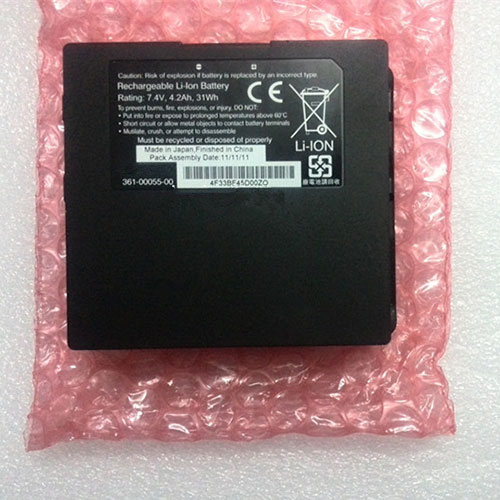
Cheap Garmin 361-00055-00 Li-ion Other battery, Brand New 361-00055-00 replacement battery for GARMIN Aera 795 796 3-D GPS MAP

4.2Ah 7.4V Garmin 361-00055-00 Batteries for GARMIN Aera 795 796 3-D GPS MAP, Garmin 361-00055-00 Other battery is a brand new,100% Compatible original and replacement Laptop battery,Purchase wholesale and retail 361-00055-00 with high quality and low price!

361-00055-00 Battery garmin Li-ion 7.4V 4.2Ah

361-00055-00

Specifications

  • Brand:GARMIN
  • Capacity :4.2Ah
  • Voltage :7.4V
  • Type :Li-ion
  • Battery Cell Quality: Grade A
  • Descriptive: Replacement Battery – 1 Year Warranty
  • Description: Brand New, 1 Year Warranty! 30-Days Money Back! Fast Shipping!

How we test this Garmin 361-00055-00 Battery Li-ion 7.4V 4.2Ah

Step 1: Make sure customer bought the correct battery.
Step 2: Check battery’s appearance and interface.
Step 3: Test battery charger and recharger function.
Step 4: Charger the battery to 100% and recharger to 0% to get real battery capacity
Step 5: Use Ev2300 to check the voltage difference of each goroup cells.
Step 6: Charger battery power more than 30%.
Step 7: Package battery carefully and send out

Compatible Part Numbers:

361-00055-00

Compatible Model Numbers:

GARMIN Aera 795 796 3-D GPS MAP

How much do you know about how to run laptop well as any place? The follow Tips cut way back on protecting battery life.


1). Please recharge or change your Other battery when battery power low.
2). Using Li-Ion Replacement Garmin 361-00055-00 Other Battery for your notebook which can work longer time than Non Li-ion one.
3). It is better to defragmentation regularly for your Other battery life.
4). In order to reduce the laptop power consumpition, you can use some optical drive spin-down and hard drive in your Other .
5). Please keep your laptop in sleep or standby model without long time using, which both save the Replacement Garmin 361-00055-00 Other Battery power and extend battery using life.
6). Leave your battery in a dry and cool condition when without using.
7). When you rarely or generally plugged in fixed power using, Please take down your battery to avoid hurting battery life.

Hot Products

11.1V/12.4v 2300mah BOSE 404600 for Bose SOUNDLINK I II III7.4V 2230mAh/17Wh BOSE 063404 for 0634043.7V/4.2V 1750MAH/6.5WH AMAZON GP-S10-346392-0100 for AMAZON KINDLE 3 3G WIFI Kindle3.8V 6300mAh/23.94Wh AMAZON 2955C7 for Amazon Kindle Fire HD 10.1 7th3.8 V 1300 mAh AMAZON MC-305070 for AMAZON Kindle Voyage3.85V/4.4V 3080MAH/11.86WH ALCATEL TLp030JC for Alcatel A3 XL 9008j7.7V 37Wh/4810mAh ACER AP16M5J for ACER A315-51-51SL N17Q1 SERIES7.4V 2230mAH/17Wh BOSE 061384 for BOSE SOUNDLINK Mini Series3.8V 2930mAh/11.1Wh NETGEAR W-7 for Netgear AirCard 790S 790SP 8103.8V/4.35V 2000MAH/7.6Wh ALCATEL TLI020F7 for Alcatel Onetouch Pixi 4 (5) 50

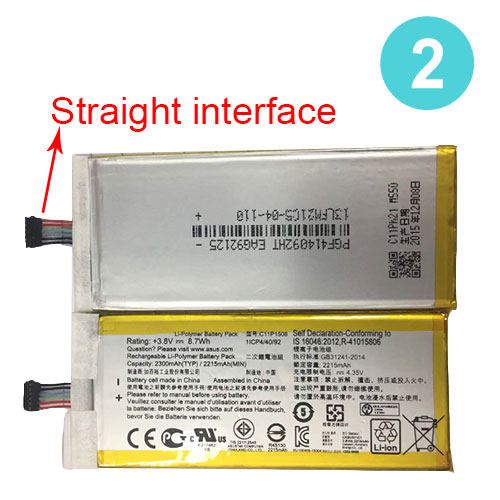
Cheap Asus C11P1508 Li-ion Cell Phone battery, Brand New C11P1508 replacement battery for ASUS Zenfone max 5000Z C550KL Z010DA Z010DD

19.2Wh 3.85V Asus C11P1508 Batteries for ASUS Zenfone max 5000Z C550KL Z010DA Z010DD, Asus C11P1508 Cell Phone battery is a brand new,100% Compatible original and replacement Laptop battery,Purchase wholesale and retail C11P1508 with high quality and low price!

C11P1508 Battery asus Li-ion 3.85V 19.2Wh

C11P1508

Specifications

  • Brand:ASUS
  • Capacity :19.2Wh
  • Voltage :3.85V
  • Color:white
  • Type :Li-ion
  • Battery Cell Quality: Grade A
  • Descriptive: Replacement Battery – 1 Year Warranty
  • Description: Brand New, 1 Year Warranty! 30-Days Money Back! Fast Shipping!

How we test this Asus C11P1508 Battery Li-ion 3.85V 19.2Wh

Step 1: Make sure customer bought the correct battery.
Step 2: Check battery’s appearance and interface.
Step 3: Test battery charger and recharger function.
Step 4: Charger the battery to 100% and recharger to 0% to get real battery capacity
Step 5: Use Ev2300 to check the voltage difference of each goroup cells.
Step 6: Charger battery power more than 30%.
Step 7: Package battery carefully and send out

Compatible Part Numbers:

C11P1508

Compatible Model Numbers:

ASUS Zenfone max 5000Z C550KL Z010DA Z010DD

This battery has two appearances, one with a small square, one with a small strip, the one with a small square interface is curved, and the other with a small strip interface is straight. The two types of batteries are not compatible with each other. Please select the correct battery when purchasing.

How much do you know about how to run laptop well as any place? The follow Tips cut way back on protecting battery life.


1). Please recharge or change your Cell Phone battery when battery power low.
2). Using Li-Ion Replacement Asus C11P1508 Cell Phone Battery for your notebook which can work longer time than Non Li-ion one.
3). It is better to defragmentation regularly for your Cell Phone battery life.
4). In order to reduce the laptop power consumpition, you can use some optical drive spin-down and hard drive in your Cell Phone .
5). Please keep your laptop in sleep or standby model without long time using, which both save the Replacement Asus C11P1508 Cell Phone Battery power and extend battery using life.
6). Leave your battery in a dry and cool condition when without using.
7). When you rarely or generally plugged in fixed power using, Please take down your battery to avoid hurting battery life.

Hot Products

11.1V/12.4v 2300mah BOSE 404600 for Bose SOUNDLINK I II III7.4V 2230mAh/17Wh BOSE 063404 for 0634043.7V/4.2V 1750MAH/6.5WH AMAZON GP-S10-346392-0100 for AMAZON KINDLE 3 3G WIFI Kindle3.8V 6300mAh/23.94Wh AMAZON 2955C7 for Amazon Kindle Fire HD 10.1 7th3.8 V 1300 mAh AMAZON MC-305070 for AMAZON Kindle Voyage3.85V/4.4V 3080MAH/11.86WH ALCATEL TLp030JC for Alcatel A3 XL 9008j7.7V 37Wh/4810mAh ACER AP16M5J for ACER A315-51-51SL N17Q1 SERIES7.4V 2230mAH/17Wh BOSE 061384 for BOSE SOUNDLINK Mini Series3.8V 2930mAh/11.1Wh NETGEAR W-7 for Netgear AirCard 790S 790SP 8103.8V/4.35V 2000MAH/7.6Wh ALCATEL TLI020F7 for Alcatel Onetouch Pixi 4 (5) 50

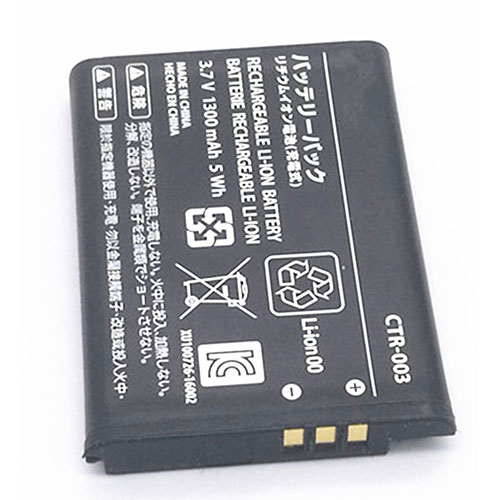
Cheap Nintendo CTR-003 Li-ion Other battery, Brand New CTR-003 replacement battery for Nintendo switch ns pro wiiu wiiu 3DS 2DS 2pcs

1300mAh /5W 3.7V Nintendo CTR-003 Batteries for Nintendo switch ns pro wiiu wiiu 3DS 2DS 2pcs, Nintendo CTR-003 Other battery is a brand new,100% Compatible original and replacement Laptop battery,Purchase wholesale and retail CTR-003 with high quality and low price!

CTR-003 Battery nintendo Li-ion 3.7V 1300mAh /5W

CTR-003

Specifications

  • Brand:Nintendo
  • Capacity :1300mAh /5W
  • Voltage :3.7V
  • Type :Li-ion
  • Battery Cell Quality: Grade A
  • Descriptive: Replacement Battery – 1 Year Warranty
  • Description: Brand New, 1 Year Warranty! 30-Days Money Back! Fast Shipping!

How we test this Nintendo CTR-003 Battery Li-ion 3.7V 1300mAh /5W

Step 1: Make sure customer bought the correct battery.
Step 2: Check battery’s appearance and interface.
Step 3: Test battery charger and recharger function.
Step 4: Charger the battery to 100% and recharger to 0% to get real battery capacity
Step 5: Use Ev2300 to check the voltage difference of each goroup cells.
Step 6: Charger battery power more than 30%.
Step 7: Package battery carefully and send out

Compatible Part Numbers:

CTR-003

Compatible Model Numbers:

Nintendo switch ns pro wiiu wiiu 3DS 2DS
Item includes: 2pcs CTR-003 batteries

How much do you know about how to run laptop well as any place? The follow Tips cut way back on protecting battery life.


1). Please recharge or change your Other battery when battery power low.
2). Using Li-Ion Replacement Nintendo CTR-003 Other Battery for your notebook which can work longer time than Non Li-ion one.
3). It is better to defragmentation regularly for your Other battery life.
4). In order to reduce the laptop power consumpition, you can use some optical drive spin-down and hard drive in your Other .
5). Please keep your laptop in sleep or standby model without long time using, which both save the Replacement Nintendo CTR-003 Other Battery power and extend battery using life.
6). Leave your battery in a dry and cool condition when without using.
7). When you rarely or generally plugged in fixed power using, Please take down your battery to avoid hurting battery life.

Hot Products

11.1V/12.4v 2300mah BOSE 404600 for Bose SOUNDLINK I II III7.4V 2230mAh/17Wh BOSE 063404 for 0634043.7V/4.2V 1750MAH/6.5WH AMAZON GP-S10-346392-0100 for AMAZON KINDLE 3 3G WIFI Kindle3.8V 6300mAh/23.94Wh AMAZON 2955C7 for Amazon Kindle Fire HD 10.1 7th3.8 V 1300 mAh AMAZON MC-305070 for AMAZON Kindle Voyage3.85V/4.4V 3080MAH/11.86WH ALCATEL TLp030JC for Alcatel A3 XL 9008j7.7V 37Wh/4810mAh ACER AP16M5J for ACER A315-51-51SL N17Q1 SERIES7.4V 2230mAH/17Wh BOSE 061384 for BOSE SOUNDLINK Mini Series3.8V 2930mAh/11.1Wh NETGEAR W-7 for Netgear AirCard 790S 790SP 8103.8V/4.35V 2000MAH/7.6Wh ALCATEL TLI020F7 for Alcatel Onetouch Pixi 4 (5) 50

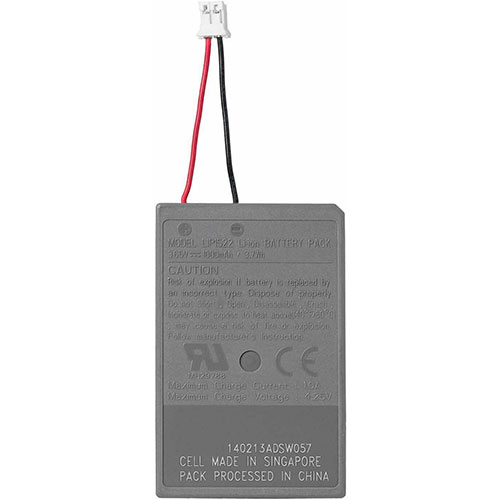
Cheap Sony LIP1522 Li-ion Other battery, Brand New LIP1522 replacement battery for SONY PS4 DualShock 4 Controller 2pcs

1000mAh/3.7WH 3.65V/4.2V Sony LIP1522 Batteries for SONY PS4 DualShock 4 Controller 2pcs, Sony LIP1522 Other battery is a brand new,100% Compatible original and replacement Laptop battery,Purchase wholesale and retail LIP1522 with high quality and low price!

LIP1522 Battery sony Li-ion 3.65V/4.2V 1000mAh/3.7WH

LIP1522

Specifications

  • Brand:SONY
  • Capacity :1000mAh/3.7WH
  • Voltage :3.65V/4.2V
  • Type :Li-ion
  • Battery Cell Quality: Grade A
  • Descriptive: Replacement Battery – 1 Year Warranty
  • Description: Brand New, 1 Year Warranty! 30-Days Money Back! Fast Shipping!

How we test this Sony LIP1522 Battery Li-ion 3.65V/4.2V 1000mAh/3.7WH

Step 1: Make sure customer bought the correct battery.
Step 2: Check battery’s appearance and interface.
Step 3: Test battery charger and recharger function.
Step 4: Charger the battery to 100% and recharger to 0% to get real battery capacity
Step 5: Use Ev2300 to check the voltage difference of each goroup cells.
Step 6: Charger battery power more than 30%.
Step 7: Package battery carefully and send out

Compatible Part Numbers:

LIP1522

Compatible Model Numbers:

SONY PS4 DualShock 4 Controller

How much do you know about how to run laptop well as any place? The follow Tips cut way back on protecting battery life.


1). Please recharge or change your Other battery when battery power low.
2). Using Li-Ion Replacement Sony LIP1522 Other Battery for your notebook which can work longer time than Non Li-ion one.
3). It is better to defragmentation regularly for your Other battery life.
4). In order to reduce the laptop power consumpition, you can use some optical drive spin-down and hard drive in your Other .
5). Please keep your laptop in sleep or standby model without long time using, which both save the Replacement Sony LIP1522 Other Battery power and extend battery using life.
6). Leave your battery in a dry and cool condition when without using.
7). When you rarely or generally plugged in fixed power using, Please take down your battery to avoid hurting battery life.

Hot Products

11.1V/12.4v 2300mah BOSE 404600 for Bose SOUNDLINK I II III7.4V 2230mAh/17Wh BOSE 063404 for 0634043.7V/4.2V 1750MAH/6.5WH AMAZON GP-S10-346392-0100 for AMAZON KINDLE 3 3G WIFI Kindle3.8V 6300mAh/23.94Wh AMAZON 2955C7 for Amazon Kindle Fire HD 10.1 7th3.8 V 1300 mAh AMAZON MC-305070 for AMAZON Kindle Voyage3.85V/4.4V 3080MAH/11.86WH ALCATEL TLp030JC for Alcatel A3 XL 9008j7.7V 37Wh/4810mAh ACER AP16M5J for ACER A315-51-51SL N17Q1 SERIES7.4V 2230mAH/17Wh BOSE 061384 for BOSE SOUNDLINK Mini Series3.8V 2930mAh/11.1Wh NETGEAR W-7 for Netgear AirCard 790S 790SP 8103.8V/4.35V 2000MAH/7.6Wh ALCATEL TLI020F7 for Alcatel Onetouch Pixi 4 (5) 50

Brydge releases new line of ‘Designed for Surface’ keyboards and accessories

On August 17th, Brydge will begin selling a new lineup of Surface accessories that have the “Designed for Surface” badge, meaning that they were made in collaboration with Microsoft. The lineup includes keyboards for the Surface Pro and Surface Go, but the most intriguing product in the group is the $99.99 W-Touch standalone trackpad. It’s apparently the first standalone wireless trackpad made for Windows 10.

The W-Touch is like a Magic Trackpad 2 that’s built for Windows 10 instead, coated in a striking black with an aluminum build. It has Bluetooth 4.2 connectivity and it supports Precision drivers and multitouch gestures, like pinch to zoom, and multifinger swipes to switch desktops. This trackpad has a large glass surface to comfortably move around in, measuring at 5.5 inches across and 3.3 inches deep, so a little smaller than Apple’s version but still spacious.

The W-Touch is said to delivery one-month battery life, and it recharges via USB-C. One hundred dollars isn’t cheap for a trackpad, but as the only standalone, wireless option made in partnership with Microsoft, Brydge gets to set the price. I haven’t had a chance to try it yet, but it could be a great accessory to have around if a mouse doesn’t jive with your workflow.

Brydge is also releasing the W-Type to complement the W-Touch. It’s a full-size wireless keyboard with aluminum detailing and a complete row of function keys. Right out of the gate, it seems like an excellent value at $59.99. The overall design, and even the printing on the keys, makes it look like an accessory that Microsoft might make — and perhaps severely overcharge for. The keys use a scissor mechanism and each has 2mm travel, which Brydge claims is the “perfect” amount of key travel. If it’s anything like what the Surface Laptop 3 has built in, there’s plenty of reason to get excited.

This model has Bluetooth 5.1 connectivity with support for up to four devices, so you can easily switch the computer to which it’s connected. Brydge claims it can last up to a month on a charge. When it zaps out, you can charge it via USB-C.

Rounding out the lineup are the new Brydge 12.3 Pro Plus and 10.5 Go Plus keyboards. The $149.99 Pro Plus model works with the Surface Pro 4, 5, 6, and 7, while the $129.99 Go Plus works with the Surface Go and Go 2. Both feature Bluetooth 5.0, backlit keys, Windows Precision trackpads with full multitouch gesture support, USB-C ports for charging, and an antimicrobial coating on the deck. Brydge has had a keyboard for the Surface Pro for some time now — this new model has a redesigned hinge, 70 percent larger trackpad, native multi-touch control in Windows, updated Bluetooth connectivity, and a plastic deck as opposed to aluminum. (The bottom of the keyboard is still metal.) It also weighs 70 grams less.

Like the Brydge Pro Plus keyboard for the iPad Pro, these turn your Surface into a more traditional clamshell laptop that can be easily balanced on your lap or closed up and thrown in a bag. When you want to use the Surface as a tablet, you can just pop it out of the Brydge’s hinge and go.

Compared to Microsoft’s Surface keyboards, the Brydge provides a more stable typing experience and longer travel on the keys. But it does require charging roughly every three months and Bluetooth isn’t as reliable of a connection as the pogo pins the Surface keyboards use. It also makes the Surface noticeably thicker and heavier, but it’s still a quite portable package.

All of these products will go on sale starting August 17th, and aside from the 10.5 Go Plus that ships the week of September 7th, the others will ship the week of August 31st.