ADATA Falcon And Swordfish SSD Reviews: Affordable NVMe Storage

By now, everyone with even the vaguest of interest in PC technology can tell you how much snappier solid state drives are than even the fastest of spinning disks of yesteryear. There have been some interesting wrinkles recently, like ultra-high speed drives that ride the PCI Express 4.0 bus, but in test after test, regardless of drive type, just having a modern SSD offers enough of a boost to make an older PC feel new again. Similarly, it’s basically a necessity to slap an SSD like one of the ADATA drives we’ll be showing you here, into a new system build to not make any big sacrifices in responsiveness.

Today, we’re going to look at a pair of 1 TB SSDs from ADATA: the Swordfish and the Falcon. Both of these drives are 2280 M.2 gumsticks that use four lanes of PCI Express 3.0 connectivity. ADATA’s Swordfish is priced for the mainstream, roughly on par with similarly-sized SATA SSDs, but with specs that leave those 2.5″ drives in its wake. The Falcon is a slightly pricier drive that — again, in terms of its specifications — will leave budget SSDs behind. Without further ado, let’s take a look at our two contenders.

ADATA’s Swordfish and Falcon are a pair of M.2 2280 NVMe SSDs with controllers we haven’t experienced before. Both drives are powered by Realtek NVMe controllers. The Swordfish features the RTS5766DL, which is a quad-channel controller with no DRAM cache. This is about as budget as NVMe SSD controllers get, and the low starting price of the drive reflects that. Despite its entry-level status the RTS5766DL, and by extension the Swordfish, supports native hardware-accelerated AES-256 encryption and SLC caching for writes. 

The Swordfish comes in three capacities: 250 GB, 500 GB, or 1,000 GB (listed as 1 TB), though their formatted capacities are somewhat smaller. Our 1 TB model had 931 GB free after formatting, which is typical for drives in this capacity. The drive is pretty budget-conscious, too—the 250 GB model will set you back just $40 on Amazon, while the 500 GB is $65 and the 1 TB drive is just $115. This is right in line with some of the best premium SATA drives like the recently-reviewed Samsung SSD 870 QVO, but it should enjoy a nice performance advantage over any SATA drive due to the inherent advantages of the NVMe interface. 

As we mentioned, ADATA’s Falcon also has a Realtek controller, but this drive features the somewhat more upscale RTS5762DL. This controller supports eight channels and should therefore have much faster throughput, as the Falcon’s specifications table states. Again there’s no DRAM cache, but just like the lower-priced drive, the Falcon supports AES-256 and SLC write cache. The same Micron 3D TLC NAND is found on this drive, too.

The Falcon comes in slightly higher capacities than the Swordfish: 256 GB, 512 GB, 1,024 GB (a full 1 TB), and 2 TB. Despite this difference, our 1 TB model also has 931 GB free when formatted, with a slightly larger over-provisioning reserve for cells as they wear out. That’s partially why this drive has a higher total bytes written spec, 1.2 petabytes to the Swordfish’s 960 terabytes. Despite its much faster speed ratings, the Falcon won’t break the bank, running $69.99 for 512 GB, $129.99 for a 1 TB drive, or $239.99 for the 2 TB model. All of these prices are a few bucks under what the Addlink S70 normally commands, and that drive has very similar specs. For example, the 1 TB S70 typically goes for $140 online, or $10 more than the Falcon.

Both of these ADATA drives also feature thin metal heat spreaders, and they’re not just for show. The Swordfish and Falcon both get pretty warm to the touch after being stressed, and the metal shield definitely helps dissipate heat. There’s also a thin cellophane sheet on the heat spreader, which definitely needs to come off before installing the drive. Many mid-range or high-end motherboards, such as the ASUS motherboard in our test system, have integrated heat spreaders for NVMe drives, which seems redundant in this case, but should further aid in managing excess heat in the drives. 
ADATA Swordfish and Falcon Benchmarks

Under each test condition, the SSDs tested here were installed as secondary volumes in our testbed, with a separate drive used for the OS and benchmark installations. Our testbed’s motherboard was updated with the latest BIOS available at the time of publication. We secure erased each SSD prior to testing (when applicable), and left them blank without partitions for some tests. Other benchmarks required the drives to be partitioned and formatted, as is the case with the ATTO, PCMark, and CrystalDiskMark tests. Windows firewall, automatic updates, and screen savers were all disabled before testing and Windows 10 Quiet Hours / Focus Assist was enabled.

First up, we used SiSoft SANDRA, the the System ANalyzer, Diagnostic and Reporting Assistant for some quick tests. The File System Test runs on a specified partition, so we ensured that the entire drive was dedicated to a single volume. Read and write performance metrics, along with the overall drive score, are detailed below.

SANDRA reports three scores: read, write, and an overall value represented as GB per second. In our write tests, the Swordfish finds itself as expected towards the bottom of the pack but still above the Addlink S70. A single test in, however, and the value of an NVMe drive already proves itself with transfer speeds twice that of SATA drives. For a mere $15 more, however, the Falcon acquits itself nicely with an average performance boost of around one third in both the read and write averages versus its lower-priced sibling. 

ATTO is a “quick and dirty” type of disk benchmark that measures transfer speeds across a specific volume length which, like SANDRA, uses a formatted partition. It measures raw transfer rates for both reads and writes and graphs them out in an easily interpreted chart. We chose .5KB through 64MB transfer sizes and a queue depth of 6 over a total max volume length of 256MB. ATTO’s workloads are sequential in nature and measure raw bandwidth, rather than I/O response time, access latency, etc.

ATTO shows how each drive copes with transfers of varying sizes all the way up to 64 MB, where at this point the drive should pretty well be maxed out in terms of read and write speeds. If we ignore the premium-priced PCIe 4.0 Sabrent Rocket 4.0, we see that the speedy Falcon hits, and even slightly exceeds, its theoretical read and write specifications once the transfer size hits 512 kB and hangs in with the similarly priced Corsair and Addlink drives. It doesn’t really set itself apart, but it’s certainly a viable option. The Swordfish also hits its performance targets, but those targets are much lower so it brings up the rear. It also reaches its peak much more quickly, at a file size of 32 kB. At that low file size and smaller, the two ADATA drives perform equally, and just a touch behind the others in our test. 

The bigger an input or output operation is, the longer it takes and therefore the entire right side of each I/O graph is completely expected. By the time we hit 8 MB, all of our drives have dropped low enough in I/O count to make it appear they’ve flatlined when in fact they are still transferring bigger blocks of data more infrequently. On the Write graph, the other unexpected behavior is that these drives from ADATA struggle mightily to keep up. If you flip back to our Samsung SSD 870 QVO review, those write figures more closely align to SATA drives than NVMe storage. 

On the other hand, the very slow start both drives get off to is very unusual, but they do abnormally well at 4 kB transactions, too. The good news is that 4 kB is the cluster size on an NTFS-formatted drive. It seems that ADATA has tuned these drives for the best performance at the 4 kB block size, another behavior shared with SATA SSDs rather than other NVMe devices. 

Next up we ran the Compression Benchmark built-into AS SSD, an SSD specific benchmark being developed by Alex Intelligent Software. This test uses a progressively more compressible data set to blast data at the drive and read it back. If the drive can optimize its write speed using data compression, the result will be that more compressible loads write more quickly to the drive. We only graphed a small fraction of the data, at 1% compressible, 50% compressible, and 100% compressible data, but the details bear out that this trend is representative of the benchmark’s complete results.

We see very subtle shifts throughout this test with most of our drives. In the write tests, all of our drives performed roughly the same across the duration of the test. How compressible the data is didn’t seem to affect how quickly the drive reads it. The read tests were a little more interesting for the Swordfish, though. The Falcon didn’t seem to be fazed, and held very closely to the Corsair MP510 and Addlink S70, as it has done in every test so far. On the other hand, the Swordfish seems to get a performance boost with moderately compressible data. As we mentioned above, the drive basically followed the curve here, too. We don’t read too much into it on this budget drive, though; even the slowest performance the Swordfish put up is twice as fast as the best SATA drives around, and the cost is roughly equal. 

EFD Software’s HD Tune is described on the company’s website as such: “HD Tune is a hard disk utility with many functions. It can be used to measure the drive’s performance, scan for errors, check the health status (S.M.A.R.T.), securely erase all data and much more.” The latest version of the benchmark added temperature statistics and improved support for SSDs, among a few other updates and fixes.

HD Tune Pro’s read tests gave us roughly what we expect. The Falcon is bunched tightly together with the Force MP510 and S70, and the Swordfish is still fairly close behind. Their read latency figures were right in line with their bandwidth. Even the burst rate results were right in the middle of the pack, where the premium Sabrent Rocket 4.0 turns in an unusually poor result. 

The writes tests, on the other hand, were all over the map. The Falcon and Swordfish turned in questionable write throughput results that were less than half as fast as their contemporaries. When we get to the write latency results, we can see why. Both drives had access times nearly three times as long as any other drive on this test. We’re talking about fractions of a millisecond, but over the course of several thousand—or even millions—of operations, that turns into really big blocks of time. We can see the direct result of that in the burst test, which returns write figures half of the other drives. 

Both the Swordfish and the Falcon advertise SLC caching for improved write performance. We’re not sure what the Falcon is doing, but it kept this kind of sawtooth performance throughout multiple runs, even after a Secure Erase in the ADATA SSD Toolbox and letting the system sit idle for 90 minutes. HD Tune uses the full capacity of a drive and requires the drive not be partitioned to run, so it’s not a file system problem. ADATA told us that a firmware update for both drives would appear soon in the SSD Toolkit to address some performance oddities we’ve seen, but as of this publication, that hasn’t happened yet. 

CrystalDiskMark is a synthetic benchmark that tests both sequential and random small and mid-sized file transfers using incompressible data. It provides a quick look at best and worst case scenarios with regard to SSD performance, best case being larger sequential transfers and worse case being small, random transfers.

The sequential tests went quite nicely for all of the drives involved, including our ADATA test subjects. Both the Falcon and the Swordfish performed up to their theoretical maximum performance on the heavily threaded Q32 test. The Q1 test is much closer to the behavior of a typical client desktop scenario, though, and the drives still performed pretty much up to expectations. 

In that test, the ADATA drives not only took a performance hit compared to their rated specifications, but could only muster performance of roughly one-third of their competition. This could be a result of the higher seek times we saw in HDTune Pro. Whatever the cause, we feel we can somewhat forgive the Swordfish considering its budget-level price and the relative performance of similarly-priced SATA drives, which is much lower still. It’s disappointing for the Falcon, however, since its more premium pricing should exclude it from this kind of uneven performance. Even when all of the drives are handicapped by a low queue depth, the ADATA drives fall behind. 

We like PCMark 10’s new quick storage benchmark module for its real-world application measurement approach to testing. PCMark offers a trace-based measurement of system response times under various scripted workloads of traditional client / desktop system operation. Here, we used the Quick System Drive storage benchmark, which puts the drive through its paces in a scripted 20-minute run of several different disk-oriented tasks. 

Once again, much higher latencies are the Swordfish and Falcon’s Achilles’ Heel. There appears to be a direct correlation between a latency nearly twice as high as any other drive and calculated bandwidth that’s half as fast as the rest. These drives are definitely sufficient for a secondary drive for our Steam libraries or other game installs, but in this test of real-world system performance, they couldn’t quite pass muster as boot volumes. 

ADATA Swordfish and Falcon Review Summary and Verdict

The performance delivered by ADATA’s Falcon was, for the most part, in line with other drives in its performance and price class. There were some surprises, however, that pushed the drive down to the lower end of the performance spectrum. When everything went well for the Falcon, it soared as expected, but when it faltered things didn’t go quite as well. That’s particularly true of the most real-world test in our suite, PCMark’s Quick System Drive test. It turned in half the performance of the rest of the field due to its much higher latency.

The Swordfish struggled similarly in the same tests as the Falcon, but that’s a budget drive where performance hiccups are more easily forgiven. Also working in the Swordfish’s favor is that when the drive took a performance hit on a test, it still performed as well as the best SATA drives. That means that for the same price as a Samsung SSD 870 QVO, one can expect the same performance or better in an NVMe gumstick that happens to be in the same price bracket. 

There might be some performance relief on the way, though. We asked ADATA about our test results, and the company’s rep mentioned that a firmware update would be coming “soon” via the ADATA SSD Toolbox. As of publication time, however, that hasn’t happened yet. We’ll keep an eye on the situation, however, and follow up when there’s more information. This is the first time we’ve tested a drive powered by Realtek, and although the controllers aren’t exactly new, there could be some teething pains that need to be sorted out. ADATA was already aware of the issue when we asked, so we were glad to hear that a solution is in the works.

Overall, ADATA’s Swordfish and Falcon represent pretty good values in NVMe solid state drives. From a cost per gigabyte perspective, the 1 TB Swordfish’s $115 street price puts it at 11.5 cents per GB, so that drive in particular is one of the lowest-priced NVMe SSDs around. More importantly, this drive’s performance places it ahead of similarly-priced SATA drives. In a vacuum, the Swordfish looks like a great evolutionary step down the chain towards NVMe price parity with SATA disks.

The Falcon is generally no slouch, either, and its $129.99 street price means the 1,024 GB version costs just 12.7 cents per GB. It’s not all that much more expensive than the Swordfish, yet it consistently delivered much better performance than the slightly cheaper drive. Its asking price is still a bit less than the competition, but only by a smidge. WD’s 1 TB Black SN750 retails for $135 on Amazon and the Addlink S70 on display in this review goes for $140. Midrange NVMe storage is a hotly contested market to say the least and the performance stumbles we encountered with the Falcon hurt its position. 

We imagine the Swordfish will be popular with system integrators that need baseline performance to check that important NVMe SSD checkbox on their spec sheets. DIY builders might be better off putting a few extra bucks into a faster drive, and that’s exactly what the Falcon represents, but only if the promised firmware update corrects the performance pitfalls we observed in our tests. The latency issues we saw mostly happened in synthetic benchmarks. However, that kind of lag issue will affect real-world system responsiveness, and that’s exactly what PCMark saw in its tests. 

In the end, ADATA’s drives mix solid, if unremarkable, performance with a solid endurance rating and a five-year warranty. Add on top of that the lower than usual asking prices, and you’ve got a recipe for success. If you have a hard budget when building a PC, ADATA’s drives—the Falcon, in particular—are worth checking out. On the other hand, if you’re just looking for a big NVMe drive to host your favorite Steam games where system performance isn’t on the line, the sequential read performance makes these a serious contender.
Galax Cooks up DDR4-5000 RAM for Performance Purists

Galax has expanded its HOF (Hall Of Fame) line with not one, not two, but three new series of high-performance memory kits. Meet the HOF OC Lab Diamond, HOF OC Lab Diamond RGB and HOF OC Lab Phantom RGB product lines.

The trio of RAM kits stay true to their HOF roots. They come equipped with a black PCB that’s passively cooled by all-white heat spreaders. In the case of the Diamond series, the heat spreaders are adorned with a diamond-shaped pattern, which is available with or without RGB lighting. The Phantom RGB series’ heat spreader, meanwhile, boasts a light bar with customizable RGB lighting. 

Regardless of the series, Galax’s memory modules are compatible with popular motherboard ecosystems, including Asus Aura Sync, MSI Mystic Light Sync, Gigabyte RGB Fusion 2.0 and ASRock RGB Sync.

Galax builds HOF OC Lab Diamond (RGB) and HOF OC Lab Phantom RGB memory modules with an eight-layer PCB featuring Samsung B-die ICs. The company only sells dual-channel 16GB DDR4 memory kits that are comprised of two 8GB memory modules.

The DDR4-5000 memory kit comes equipped with 19-26-26-46 CL timings, and it’s only available under the HOF OC Lab Diamond series. However, both series offer memory kits with varying memory speeds between DDR4-4000 and DDR4-4800 with identical timings.

The HOF OC Lab Phantom RGB is the only series out of the three that have lower-clocked offerings. The memory speeds span from DDR4-3600 up to DDR4-4000.

Like any other memory vendor, Galax backs its memory products with a limited lifetime warranty. At the moment, it’s unknown of the new memory kits will be available outside of Asia.

Huawei has the same app problem that doomed Windows Phone

Huawei is now the world’s biggest smartphone maker in terms of shipments, according to Canalys data, which suggests the Chinese tech firm surpassed rival Samsung in Q2 2020, albeit mostly due to its domestic sales in China. This is the first time in nine years that a company other than Samsung or Apple has led the market.

Huawei was quick to pounce on the news, particularly given the turbulent 14 months it has endured since the U.S. issued an embargo forcing it to stop using Google’s flavor of Android in its new handsets. But despite Huawei’s glee at surpassing Samsung, its future in the global smartphone arena looks bleak, due in large part to the app restrictions enforced by the U.S. ban. The crux of Huawei’s problem, as most people by now know, is that buyers of its newer phones can’t access many big-name apps without having to jump through gargantuan hoops. In many ways, Huawei’s predicament is similar to that Windows Phone faced a decade ago.

At the time of its launch, Microsoft’s mobile operating system was often packaged with some of the best hardware the market had to offer, and Nokia’s devices in particular offered superb cameras. But Windows Phone just couldn’t ditch the “lack of apps” tag around its neck, though Microsoft did spend considerable resources convincing developers to build for Windows Phone, even holding developer competitions. In the end, Microsoft managed to persuade some companies to build for its platform, but the apps were often not as full-featured as their iOS and Android counterparts, and a fair chunk of them were rarely updated.

Similarly, Huawei devices are widely lauded for features like AI-infused chips and quality cameras. And the company is also trying to incentivize developers to join its platform, recently launching a $1 million contest that builds on its $1 billion Shining Star developer program.

In the year or so since the U.S. embargo came into effect, Huawei has doubled down on its development of Huawei Mobile Services (HMS), its own version of Google Mobile Services (GMS) designed to replace Google’s ecosystem and provide developers with tools to create apps for the Huawei platform. In a press briefing earlier this week, Jaime Gonzalo, VP of Mobile Services Europe for Huawei’s consumer business group, touted progress the company has made in the last year, revealing that it now has 1.6 million developers on board, an increase of 76% year-on-year, and more than 80,000 apps that now use elements of HMS.

But such growth metrics don’t really matter to most people. All they care about is whether they can readily access all the tools and services they want, something Huawei has attempted to address.

“In reality, there are 3 million apps out there, so this [81,000 apps] is less,” Gonzalo said. “[But] the thing is, it’s not about volume of apps, it’s about the pertinence and the services that these provide. So we evaluated our users, how many apps they use on their phones, and we found that no matter which country, the average number of apps is about 80 … what is the point of offering 3 million apps if many of them are clones of one another or bloatware?”

Although Huawei’s case for quality over quantity is valid, the real problem is that a vast chunk of the world’s most popular apps are simply not available through its AppGallery app store.

Delayed problem

In the immediate aftermath of the U.S. embargo, most Huawei phone users saw no difference in their app selection because the restriction only affects newer Huawei and Honor-branded handsets. Huawei has often downplayed the changes during recent product launches.

Without access to Google Play Services, anyone buying a new Huawei or Honor device today cannot easily access WhatsApp, Instagram, Uber, Uber Eats, Airbnb, Facebook, Google Maps, YouTube, Netflix, Twitter, Tinder, Dropbox, Slack, Amazon Prime, Spotify, eBay, Strava, or many others.

In certain cases, it is possible to access some of the aforementioned services through a browser, though often with less functionality. Huawei also recently introduced a new service called Petal Search, which enables users to search for the .APK files of Android apps either through the companies themselves (e.g. Facebook makes its Android apps available to download directly from its own website) or from third-party .APK libraries.

But this solution is unwieldy and deviates wildly from people’s expectations. Moreover, it’s not easy to provide timely, automatic updates when companies refresh their apps — a core function served by Google and Huawei’s respective mobile services.

There aren’t any barriers stopping companies — in the U.S. or otherwise — from adding their apps to Huawei’s AppGallery. Amazon, Microsoft, and Snap have already embraced AppGallery, which points to one of the key differences between the situation Huawei faces today and the one Microsoft faced with Windows Phone. Huawei devices are still based on Android, which makes it much easier for developers to get their apps into its ecosystem.

But Huawei is now racing against the clock. The majority of its devices are currently in the hands of millions of people globally who can still access Google’s Android. Now the company is trying to get its house in order before those consumers begin upgrading to new devices. As people transition from older Huawei or Honor handsets to the fresh crop of devices, many won’t realize they’re buying into a completely different version of Android and will be left bitterly disappointed.

A decade ago, many less tech-savvy consumers were similarly impacted when they bought new Windows Phones for the camera only to discover they couldn’t access most of the apps their friends had on Android or iOS.

Online retailers are taking note this time. Some are posting prominent warnings next to new Huawei devices to ward off a backlash from confused consumers who can’t figure out how to install WhatsApp, Instagram, or Uber.

Such websites also provide detailed guides for customers, explaining the various processes they can go through to bridge at least part of this Google-sized gap. But people don’t like workarounds and they don’t like friction, which is where Huawei’s rivals stand to benefit.

Indeed, Huawei may have surpassed Samsung as the top dog in global smartphone shipments, but Samsung could be the big winner when Huawei’s customers look for brands unencumbered by app restrictions. Huawei can probably achieve some success in markets that are less reliant on apps and services from Google and other U.S. companies, like Russia, but the company’s chances of remaining a global powerhouse are slim if it can’t make core apps easily available to its users.

Sure, there will always be some users willing to try alternatives to market-leading apps, but not at any meaningful scale. In the end, it doesn’t matter how good your on-device AI is, or how amazing your camera is. That is the painful lesson Microsoft and Nokia learned with Windows Phone all those years ago.

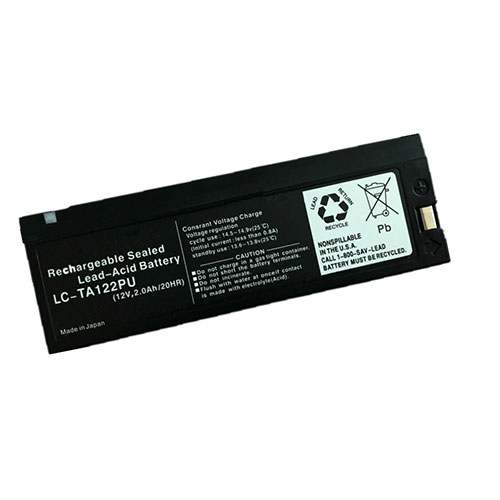
Cheap Mindray LC-TA122PU Li-ion Laptop battery, Brand New LC-TA122PU replacement battery for Mindray PM9000 8000 7000 MC1000 2000 ECG machine

2.0Ah 12V Mindray LC-TA122PU Batteries for Mindray PM9000 8000 7000 MC1000 2000 ECG machine, Mindray LC-TA122PU Laptop battery is a brand new,100% Compatible original and replacement Laptop battery,Purchase wholesale and retail LC-TA122PU with high quality and low price!

LC-TA122PU Battery mindray Li-ion 12V 2.0Ah

LC-TA122PU

Specifications

  • Brand:Mindray
  • Capacity :2.0Ah
  • Voltage :12V
  • Type :Li-ion
  • Battery Cell Quality: Grade A
  • Descriptive: Replacement Battery – 1 Year Warranty
  • Description: Brand New, 1 Year Warranty! 30-Days Money Back! Fast Shipping!

How we test this Mindray LC-TA122PU Battery Li-ion 12V 2.0Ah

Step 1: Make sure customer bought the correct battery.
Step 2: Check battery’s appearance and interface.
Step 3: Test battery charger and recharger function.
Step 4: Charger the battery to 100% and recharger to 0% to get real battery capacity
Step 5: Use Ev2300 to check the voltage difference of each goroup cells.
Step 6: Charger battery power more than 30%.
Step 7: Package battery carefully and send out

Compatible Part Numbers:

LC-TA122PU 0146-00-0043

Compatible Model Numbers:

Mindray PM9000 8000 7000 MC1000 2000 ECG machine
Mindray MEC2000 MEC1200 MEC1000

How much do you know about how to run laptop well as any place? The follow Tips cut way back on protecting battery life.


1). Please recharge or change your Laptop battery when battery power low.
2). Using Li-Ion Replacement Mindray LC-TA122PU Laptop Battery for your notebook which can work longer time than Non Li-ion one.
3). It is better to defragmentation regularly for your Laptop battery life.
4). In order to reduce the laptop power consumpition, you can use some optical drive spin-down and hard drive in your Laptop .
5). Please keep your laptop in sleep or standby model without long time using, which both save the Replacement Mindray LC-TA122PU Laptop Battery power and extend battery using life.
6). Leave your battery in a dry and cool condition when without using.
7). When you rarely or generally plugged in fixed power using, Please take down your battery to avoid hurting battery life.

Hot Products

11.1V/12.4v 2300mah BOSE 404600 for Bose SOUNDLINK I II III7.4V 2230mAh/17Wh BOSE 063404 for 0634043.8V 6300mAh/23.94Wh AMAZON 2955C7 for Amazon Kindle Fire HD 10.1 7th3.8 V 1300 mAh AMAZON MC-305070 for AMAZON Kindle Voyage3.85V/4.4V 3080MAH/11.86WH ALCATEL TLp030JC for Alcatel A3 XL 9008j7.7V 37Wh/4810mAh ACER AP16M5J for ACER A315-51-51SL N17Q1 SERIES3.7V/4.2V 1750MAH/6.5WH AMAZON GP-S10-346392-0100 for AMAZON KINDLE 3 3G WIFI Kindle7.4V 2230mAH/17Wh BOSE 061384 for BOSE SOUNDLINK Mini Series3.8V 2930mAh/11.1Wh NETGEAR W-7 for Netgear AirCard 790S 790SP 8103.8V/4.35V 2000MAH/7.6Wh ALCATEL TLI020F7 for Alcatel Onetouch Pixi 4 (5) 50

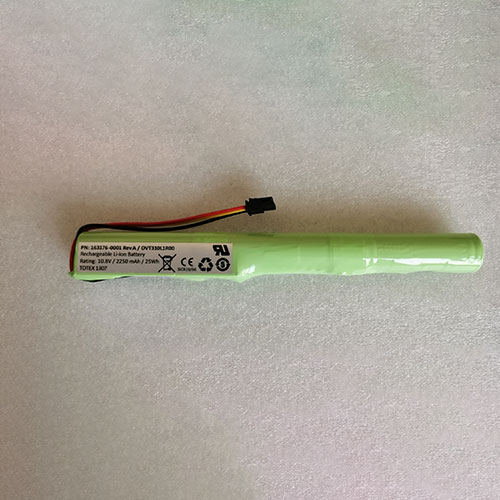
Cheap Intermec 163176-0001 Li-ion Other battery, Brand New 163176-0001 replacement battery for Intermec CV41 VM1376

2250mAh/25Wh 10.8V Intermec 163176-0001 Batteries for Intermec CV41 VM1376, Intermec 163176-0001 Other battery is a brand new,100% Compatible original and replacement Laptop battery,Purchase wholesale and retail 163176-0001 with high quality and low price!

163176-0001 Battery intermec Li-ion 10.8V 2250mAh/25Wh

163176-0001

Specifications

  • Brand:Intermec
  • Capacity :2250mAh/25Wh
  • Voltage :10.8V
  • Type :Li-ion
  • Battery Cell Quality: Grade A
  • Descriptive: Replacement Battery – 1 Year Warranty
  • Description: Brand New, 1 Year Warranty! 30-Days Money Back! Fast Shipping!

How we test this Intermec 163176-0001 Battery Li-ion 10.8V 2250mAh/25Wh

Step 1: Make sure customer bought the correct battery.
Step 2: Check battery’s appearance and interface.
Step 3: Test battery charger and recharger function.
Step 4: Charger the battery to 100% and recharger to 0% to get real battery capacity
Step 5: Use Ev2300 to check the voltage difference of each goroup cells.
Step 6: Charger battery power more than 30%.
Step 7: Package battery carefully and send out

Compatible Part Numbers:

163176-0001 Rev A OVT310L11R00

Compatible Model Numbers:

Intermec CV41 VM1376

How much do you know about how to run laptop well as any place? The follow Tips cut way back on protecting battery life.


1). Please recharge or change your Other battery when battery power low.
2). Using Li-Ion Replacement Intermec 163176-0001 Other Battery for your notebook which can work longer time than Non Li-ion one.
3). It is better to defragmentation regularly for your Other battery life.
4). In order to reduce the laptop power consumpition, you can use some optical drive spin-down and hard drive in your Other .
5). Please keep your laptop in sleep or standby model without long time using, which both save the Replacement Intermec 163176-0001 Other Battery power and extend battery using life.
6). Leave your battery in a dry and cool condition when without using.
7). When you rarely or generally plugged in fixed power using, Please take down your battery to avoid hurting battery life.

Hot Products

11.1V/12.4v 2300mah BOSE 404600 for Bose SOUNDLINK I II III7.4V 2230mAh/17Wh BOSE 063404 for 0634043.8V 6300mAh/23.94Wh AMAZON 2955C7 for Amazon Kindle Fire HD 10.1 7th3.8 V 1300 mAh AMAZON MC-305070 for AMAZON Kindle Voyage3.85V/4.4V 3080MAH/11.86WH ALCATEL TLp030JC for Alcatel A3 XL 9008j7.7V 37Wh/4810mAh ACER AP16M5J for ACER A315-51-51SL N17Q1 SERIES3.7V/4.2V 1750MAH/6.5WH AMAZON GP-S10-346392-0100 for AMAZON KINDLE 3 3G WIFI Kindle7.4V 2230mAH/17Wh BOSE 061384 for BOSE SOUNDLINK Mini Series3.8V 2930mAh/11.1Wh NETGEAR W-7 for Netgear AirCard 790S 790SP 8103.8V/4.35V 2000MAH/7.6Wh ALCATEL TLI020F7 for Alcatel Onetouch Pixi 4 (5) 50

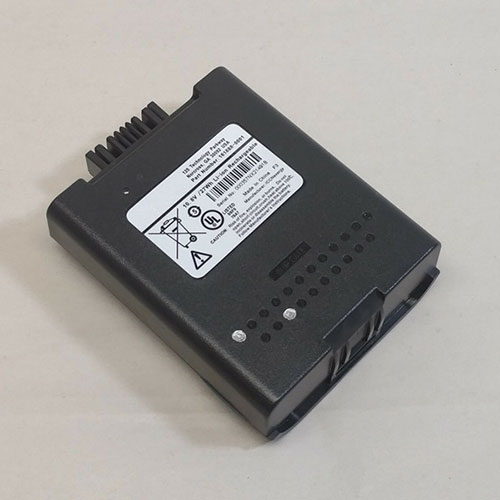
Cheap Lxe 161888-0001 Li-ion Other battery, Brand New 161888-0001 replacement battery for LXE MX9 MX9H honeywell mx9383

2500mah /27Wh 10.8V Lxe 161888-0001 Batteries for LXE MX9 MX9H honeywell mx9383, Lxe 161888-0001 Other battery is a brand new,100% Compatible original and replacement Laptop battery,Purchase wholesale and retail 161888-0001 with high quality and low price!

161888-0001 Battery lxe Li-ion 10.8V 2500mah /27Wh

161888-0001

Specifications

  • Brand:LXE
  • Capacity :2500mah /27Wh
  • Voltage :10.8V
  • Type :Li-ion
  • Battery Cell Quality: Grade A
  • Descriptive: Replacement Battery – 1 Year Warranty
  • Description: Brand New, 1 Year Warranty! 30-Days Money Back! Fast Shipping!

How we test this Lxe 161888-0001 Battery Li-ion 10.8V 2500mah /27Wh

Step 1: Make sure customer bought the correct battery.
Step 2: Check battery’s appearance and interface.
Step 3: Test battery charger and recharger function.
Step 4: Charger the battery to 100% and recharger to 0% to get real battery capacity
Step 5: Use Ev2300 to check the voltage difference of each goroup cells.
Step 6: Charger battery power more than 30%.
Step 7: Package battery carefully and send out

Compatible Part Numbers:

161888-0001

Compatible Model Numbers:

LXE MX9 MX9H honeywell mx9383

How much do you know about how to run laptop well as any place? The follow Tips cut way back on protecting battery life.


1). Please recharge or change your Other battery when battery power low.
2). Using Li-Ion Replacement Lxe 161888-0001 Other Battery for your notebook which can work longer time than Non Li-ion one.
3). It is better to defragmentation regularly for your Other battery life.
4). In order to reduce the laptop power consumpition, you can use some optical drive spin-down and hard drive in your Other .
5). Please keep your laptop in sleep or standby model without long time using, which both save the Replacement Lxe 161888-0001 Other Battery power and extend battery using life.
6). Leave your battery in a dry and cool condition when without using.
7). When you rarely or generally plugged in fixed power using, Please take down your battery to avoid hurting battery life.

Hot Products

11.1V/12.4v 2300mah BOSE 404600 for Bose SOUNDLINK I II III7.4V 2230mAh/17Wh BOSE 063404 for 0634043.8V 6300mAh/23.94Wh AMAZON 2955C7 for Amazon Kindle Fire HD 10.1 7th3.8 V 1300 mAh AMAZON MC-305070 for AMAZON Kindle Voyage3.85V/4.4V 3080MAH/11.86WH ALCATEL TLp030JC for Alcatel A3 XL 9008j7.7V 37Wh/4810mAh ACER AP16M5J for ACER A315-51-51SL N17Q1 SERIES3.7V/4.2V 1750MAH/6.5WH AMAZON GP-S10-346392-0100 for AMAZON KINDLE 3 3G WIFI Kindle7.4V 2230mAH/17Wh BOSE 061384 for BOSE SOUNDLINK Mini Series3.8V 2930mAh/11.1Wh NETGEAR W-7 for Netgear AirCard 790S 790SP 8103.8V/4.35V 2000MAH/7.6Wh ALCATEL TLI020F7 for Alcatel Onetouch Pixi 4 (5) 50

Seagate ships 18TB HDDs, but breakthrough hard drives will arrive later this year

Seagate Technology has started shipping its hard disk drives featuring a 18TB capacity to select customers, and revealed that HDDs will be more broadly available later this year. But while 18TB drives significantly increase storage capacities of modern datacenters, Seagate has a more important launch set for the next few months, as it also intends to start commercial shipments of its drives based on heat-assisted magnetic recording (HAMR). 

The importance of HAMR — a technology that has been explored for 66 years now — is fundamental as it is expected to enable hard with capacities of up to 80 TB in the coming years.

“We began shipping 18TB drives as part of our system solution in the March quarter, with shipments to select cloud customers and channel partners starting in the June quarter,” said Dave Mosley, CEO of Seagate. “We expect to begin ramping 18-terabyte drives within the calendar year, which aligns well with market readiness.”

HAMR incoming

As expected, Seagate’s first HAMR-based HDDs will feature a 20TB capacity using heat-assisted conventional magnetic recording without any ‘shingling’ and therefore these drives will offer predictable write performance. 

“We remain on track to begin shipping our first commercially available HAMR drives in late 2020 on 20TB capacities. HAMR technology will be the industry’s path to achieving drive capacities of 30, 40, 50 terabytes and even higher. We plan to offer 20TB HAMR drives to customers on a limited basis and is part of our system solution to collect production and field data.” 

It is noteworthy that Seagate has been shipping 16TB HAMR drives to select customers for a while and to that end it already has quite some information how these HDDs behave in tightly-packed datacenters. As it turns out, the company wants to gather some more data about performance of the technology.

The Canon EOS R5 is a CHEAT CODE for wildlife photography

The Canon EOS R5 is about to put professional wildlife photographers out of business. That’s our verdict, after extensively testing the Animal AF function on the new camera, which is nothing short of witchcraft. 

Much has already been said about the Canon EOS R5, and we’ll be saying plenty more in our full review (which we’re currently putting the finishing touches on). However, something that simply can’t be said enough is just how awesome the new animal autofocus is. 

We were expecting to be impressed, but we weren’t prepared to be gobsmacked. The Animal AF is so good, and so accurate, that it is actually unfair. Wildlife photographers have spent years wrestling with twitchy autofocus, learning how to perfect their timing, sucking their teeth at all the shots that were focused on the feet or the tail or the wing instead of the eyes.

With thee Canon EOS R5, you don’t need any of that. It is literally a cheat code for wildlife photography.

We’re not exaggerating. Just select ‘Subject: Animals’ in the AF menu and set continuous autofocus, then just point your camera at an animal and the R5 will find it. No need to move your focus points or even touch the joystick – just aim in the direction of the creature and the camera does the rest for you. 

It automatically finds the face and eyes, and it does so fast. Faster than you could possibly do it yourself. And it reacts quicker, too, when animals make their herky-jerky movements that you didn’t anticipate and couldn’t put your focus points in the right place for – the R5 does it without hesitation. 

Canon only certifies its Animal AF for dogs, cats and birds (including birds in flight – and yes, it does work and yes, it’s equally amazing), but we found that it works with just about any species. Gorillas? Check. Gibbons? Check. Lions? Check. Turtles, iguanas, fish, lemurs, seals? Check, check, check, check and check. 

The whole 4K and 8K overheating thing is a very public sore point for the Canon EOS R5, and we’ll give you our verdict on that in our full review. However, if you were expecting a similar kind of sting in the tail for the Animal AF… there isn’t one. It simply works, and it’s simply awesome. 

And, just like that, Sony is no longer the king of autofocus – Canon now sits proudly on the AF throne, thanks to the R5. 

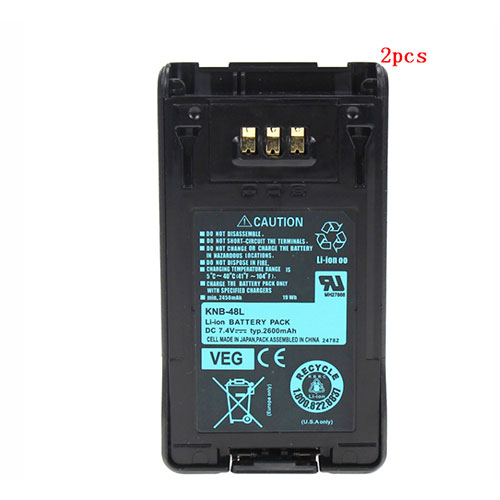
Cheap Kenwood KNB-48 Li-ion Other battery, Brand New KNB-48 replacement battery for Kenwood NX-200 NX-300 P25 TK5220 2pcs

2600mah 7.4V Kenwood KNB-48 Batteries for Kenwood NX-200 NX-300 P25 TK5220 2pcs, Kenwood KNB-48 Other battery is a brand new,100% Compatible original and replacement Laptop battery,Purchase wholesale and retail KNB-48 with high quality and low price!

KNB-48 Battery kenwood Li-Ion 7.4V 2600mah

KNB-48

Specifications

  • Brand:Kenwood
  • Capacity :2600mah
  • Voltage :7.4V
  • Type :Li-Ion
  • Battery Cell Quality: Grade A
  • Descriptive: Replacement Battery – 1 Year Warranty
  • Description: Brand New, 1 Year Warranty! 30-Days Money Back! Fast Shipping!

How we test this Kenwood KNB-48 Battery Li-Ion 7.4V 2600mah

Step 1: Make sure customer bought the correct battery.
Step 2: Check battery’s appearance and interface.
Step 3: Test battery charger and recharger function.
Step 4: Charger the battery to 100% and recharger to 0% to get real battery capacity
Step 5: Use Ev2300 to check the voltage difference of each goroup cells.
Step 6: Charger battery power more than 30%.
Step 7: Package battery carefully and send out

Compatible Part Numbers:

KNB-48 KNB-48L

Compatible Model Numbers:

Kenwood KSC-32, TK-5220, TK-5320, NEXEDGE NX-200, NEXEDGE NX-300

(Compatible KNB-47, KNB-47L)

How much do you know about how to run laptop well as any place? The follow Tips cut way back on protecting battery life.


1). Please recharge or change your Other battery when battery power low.
2). Using Li-Ion Replacement Kenwood KNB-48 Other Battery for your notebook which can work longer time than Non Li-ion one.
3). It is better to defragmentation regularly for your Other battery life.
4). In order to reduce the laptop power consumpition, you can use some optical drive spin-down and hard drive in your Other .
5). Please keep your laptop in sleep or standby model without long time using, which both save the Replacement Kenwood KNB-48 Other Battery power and extend battery using life.
6). Leave your battery in a dry and cool condition when without using.
7). When you rarely or generally plugged in fixed power using, Please take down your battery to avoid hurting battery life.

Hot Products

11.1V/12.4v 2300mah BOSE 404600 for Bose SOUNDLINK I II III7.4V 2230mAh/17Wh BOSE 063404 for 0634043.8V 6300mAh/23.94Wh AMAZON 2955C7 for Amazon Kindle Fire HD 10.1 7th3.8 V 1300 mAh AMAZON MC-305070 for AMAZON Kindle Voyage3.85V/4.4V 3080MAH/11.86WH ALCATEL TLp030JC for Alcatel A3 XL 9008j7.7V 37Wh/4810mAh ACER AP16M5J for ACER A315-51-51SL N17Q1 SERIES3.7V/4.2V 1750MAH/6.5WH AMAZON GP-S10-346392-0100 for AMAZON KINDLE 3 3G WIFI Kindle7.4V 2230mAH/17Wh BOSE 061384 for BOSE SOUNDLINK Mini Series3.8V 2930mAh/11.1Wh NETGEAR W-7 for Netgear AirCard 790S 790SP 8103.8V/4.35V 2000MAH/7.6Wh ALCATEL TLI020F7 for Alcatel Onetouch Pixi 4 (5) 50

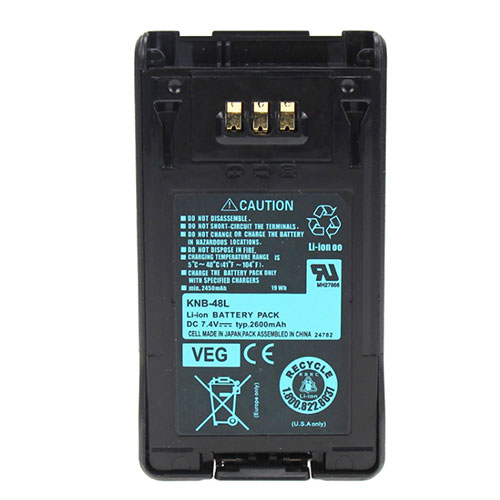
Cheap Kenwood KNB-48 Li-ion Other battery, Brand New KNB-48 replacement battery for Kenwood NX-200 NX-300 P25 TK5220

2600mah 7.4V Kenwood KNB-48 Batteries for Kenwood NX-200 NX-300 P25 TK5220, Kenwood KNB-48 Other battery is a brand new,100% Compatible original and replacement Laptop battery,Purchase wholesale and retail KNB-48 with high quality and low price!

KNB-48 Battery kenwood Li-Ion 7.4V 2600mah

KNB-48

Specifications

  • Brand:Kenwood
  • Capacity :2600mah
  • Voltage :7.4V
  • Type :Li-Ion
  • Battery Cell Quality: Grade A
  • Descriptive: Replacement Battery – 1 Year Warranty
  • Description: Brand New, 1 Year Warranty! 30-Days Money Back! Fast Shipping!

How we test this Kenwood KNB-48 Battery Li-Ion 7.4V 2600mah

Step 1: Make sure customer bought the correct battery.
Step 2: Check battery’s appearance and interface.
Step 3: Test battery charger and recharger function.
Step 4: Charger the battery to 100% and recharger to 0% to get real battery capacity
Step 5: Use Ev2300 to check the voltage difference of each goroup cells.
Step 6: Charger battery power more than 30%.
Step 7: Package battery carefully and send out

Compatible Part Numbers:

KNB-48 KNB-48L

Compatible Model Numbers:

Kenwood KSC-32, TK-5220, TK-5320, NEXEDGE NX-200, NEXEDGE NX-300

(Compatible KNB-47, KNB-47L)

How much do you know about how to run laptop well as any place? The follow Tips cut way back on protecting battery life.


1). Please recharge or change your Other battery when battery power low.
2). Using Li-Ion Replacement Kenwood KNB-48 Other Battery for your notebook which can work longer time than Non Li-ion one.
3). It is better to defragmentation regularly for your Other battery life.
4). In order to reduce the laptop power consumpition, you can use some optical drive spin-down and hard drive in your Other .
5). Please keep your laptop in sleep or standby model without long time using, which both save the Replacement Kenwood KNB-48 Other Battery power and extend battery using life.
6). Leave your battery in a dry and cool condition when without using.
7). When you rarely or generally plugged in fixed power using, Please take down your battery to avoid hurting battery life.

Hot Products

11.1V/12.4v 2300mah BOSE 404600 for Bose SOUNDLINK I II III7.4V 2230mAh/17Wh BOSE 063404 for 0634043.8V 6300mAh/23.94Wh AMAZON 2955C7 for Amazon Kindle Fire HD 10.1 7th3.8 V 1300 mAh AMAZON MC-305070 for AMAZON Kindle Voyage3.85V/4.4V 3080MAH/11.86WH ALCATEL TLp030JC for Alcatel A3 XL 9008j7.7V 37Wh/4810mAh ACER AP16M5J for ACER A315-51-51SL N17Q1 SERIES3.7V/4.2V 1750MAH/6.5WH AMAZON GP-S10-346392-0100 for AMAZON KINDLE 3 3G WIFI Kindle7.4V 2230mAH/17Wh BOSE 061384 for BOSE SOUNDLINK Mini Series3.8V 2930mAh/11.1Wh NETGEAR W-7 for Netgear AirCard 790S 790SP 8103.8V/4.35V 2000MAH/7.6Wh ALCATEL TLI020F7 for Alcatel Onetouch Pixi 4 (5) 50