When did Quad HD+ resolution become a hidden smartphone feature?

Display tech is one of the key cornerstones of a great smartphone. After all, you interact with it all the time. The display resolution wars may not be raging like they once were, but premium-tier smartphones still occasionally push the envelope. The mouthful that is Wide Quad High Definition (WQHD+) is now the standard-bearer for flagship quality, although Sony goes a step further with its 4K mobile display technology.

Despite the prevalence of very high-resolution display hardware in the market, the majority of high profile smartphones actually default to Full HD+ (~2400 x 1080) resolutions in software. That’s right, you’re probably not fully using the QHD+ (~3200 x 1440) display you paid for unless you trawl for the settings toggle.

Samsung was one of the first to adopt this approach in its Galaxy S lineup, which continues to this day. The Galaxy S20 Ultra, for example, houses a 3,200 x 1,440 resolution WQHD+ display but is actually set to just FHD+ out of the box for better battery life. This has become a major trend for flagship phones in 2020, with few handsets delivering their maximum resolution out of the box. Some of you probably don’t mind this level of fine control, but there’s probably an equally large group of consumers out there who don’t even know these options exist.

QHD isn’t really a thing in 2020

The reasoning behind such a sneaky maneuver is ultimately battery life. Powering extra pixels and pushing out higher resolutions puts more strain on your processor and eats up more power, especially from the GPU when gaming. There’s also the trend in 90Hz and 120Hz refresh rates to consider. Again these can put extra strain on processing components as well as simply sucking down more juice on their own when compared to traditional 60Hz displays.

All this can leave devices looking a bit underwhelming compared to their promotional marketing. To demonstrate, I’ve compiled just a short list of smartphone spec sheets versus what the phone defaults to out of the box.

While you can technically get everything you’re promised on a spec sheet, you’ll seldom experience this straight out of the box. Instead, customers are left to dive into settings menus themselves, often sacrificing battery life in the process. It’s the same whether you splashed out on the ultra-expensive Galaxy S20 Ultra or the more affordable OnePlus 8 Pro. This is a far cry from first-generation QHD handsets, such as the LG G3 and Oppo Find 7 that offered QHD out of the box all the way back in 2014.

Older devices like the LG G3 were set to QHD out of the box, so what gives?

Furthermore, a lot of seemingly high-end devices are just outright shipping with FHD+ displays. This list includes the LG V60, LG Velvet, Motorola Edge Plus, Xiaomi Mi 10, the standard Samsung Galaxy Note 10, and many others. QHD and QHD+ have definitely fallen out of favor compared with a couple of years ago.

In addition to the obvious reduction in resolution, most if not all phones with high-refresh rates sport variable refresh rates. They’re definitely not 90Hz or 120Hz all of the time, and it’s another compromise made at the alter of prolonged battery life.

When did this trend start?

As I mentioned earlier, Samsung quickly decided to stick with FHD out of the box for better battery life during the industry transition to QHD. The company left it up to us whether or not we wanted to take the battery hit for a small increase in visual quality. Other manufacturers followed suit with similar software options in subsequent generations and is now a virtually universal feature. However, it was the move over to wider aspect ratios and the adoption of FHD+ that sealed QHD’s fate.

To understand why, we need to know a little bit about the limits of human vision. To quickly summarise, there’s a point where even those with the best eyesight can’t tell the difference when resolution increases for a given display size and distance. For smartphone sizes and typical viewing distances, this pixel density improvement cut off falls somewhere between FHD (1,920 x 1,080) and QHD (2,560 x 1,440). Enter FHD+ (2,400 x 1,080), which sits nicely between the two in terms of pixel count and density. While discerning consumers may spot the difference between FHD and QHD, it’s virtually impossible to distinguish FHD+ from higher resolutions.

FHD+ has basically replaced the old QHD specification

If you’re interested in some numbers, a typical 6.5-inch smartphone has a resolution density of 339 pixels per inch at FHD and 452 at QHD. For very close viewing distances, around 400 or so pixels per inch is the point of imperceivable difference. A wider aspect ratio FHD+ display sits bang on this middle ground with 397 pixels per inch, making it indistinguishable from higher resolutions.

Balancing refresh rates against resolution is a price worth paying

We don’t really need QHD or WQHD+ resolutions — all that required power could be put to better use. Technology continues to move on, with newer devices increasingly boasting battery consuming high refresh rate displays too. A slight reduction in resolution, that’s virtually impossible to notice, seems like a small price to pay for slick-looking 120Hz interfaces. After all, resolution is just a small part of the display experience and most of us would prefer to ensure all-day battery life.

It’s also worth noting that the majority of video content streamed to mobile devices remains in the 1080p (FHD) format. Scaling this to fit 1440p (QHD) displays can actually make video look worse than playing back at its lower, native resolution while consuming more power. This is because FHD doesn’t factor into QHD by a whole number to keep pixels looking crisp. 1080p still looks sharp on a 4K display because each pixel is scaled up by a factor of 4. With QHD, the scaling factor from FHD is 1.3x, meaning resolution detail is averaged in order to fit. This can lead to a loss of detail and consumes processing power, or you phone may just dynamically switch resolution for playback.

This begs the question, why bother offering WQHD+ as an option anyway? Especially as the vast majority of manufacturers hide this option away in the settings where few will likely bother to venture. We can’t see the difference and driving additional pixels consumers more power even if we lower the software resolution. Why not just drop WQHD+ entirely?

Unfortunately, the fear of a renewed resolution war keeps some brands tied to these overkill specifications. You seemingly can’t charge the highest prices in the market without offering the biggest values on the spec sheet. Even if they’re pointless numbers.

Wouldn’t it be better if brands stopped pretending WQHD+ is necessary?

However, plenty of great handsets have already dropped the pretense, including flagship and premium tier smartphones, and it’s a trend that looks set to continue. These phones, like the LG Velvet and OnePlus 8, could turn out to be some of the best buys of 2020, offering comparative real-world display experiences with lower price tags and better battery life.

After all, there’s no point paying for a specification that even manufacturers have realized makes absolutely no difference.
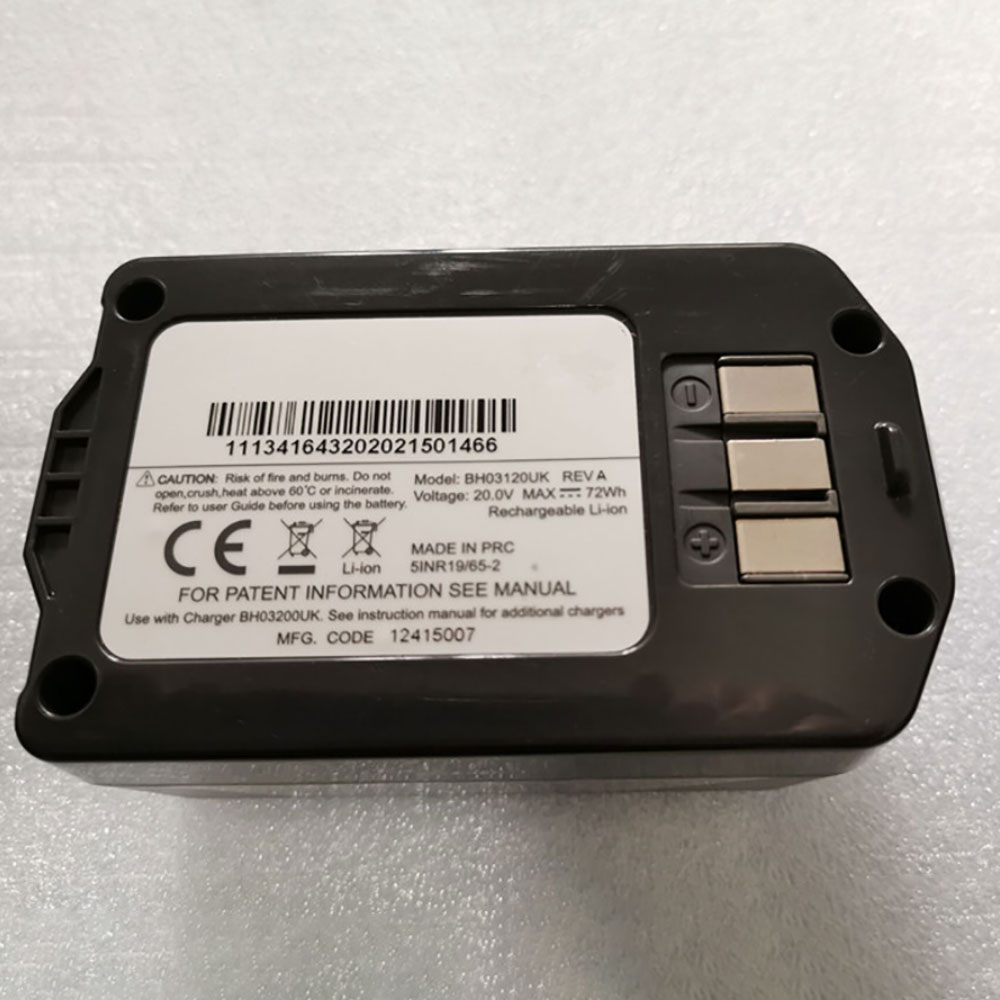
Cheap Vax BH03120UK Li-ion Other battery, Brand New BH03120UK replacement battery for Vax Air Cordless BH03120UK

72Wh /3.6Ah 20V Vax BH03120UK Batteries for Vax Air Cordless BH03120UK, Vax BH03120UK Other battery is a brand new,100% Compatible original and replacement Laptop battery,Purchase wholesale and retail BH03120UK with high quality and low price!

BH03120UK Battery vax Li-ion 20V 72Wh /3.6Ah

BH03120UK

Specifications

  • Brand:Vax
  • Capacity :72Wh /3.6Ah
  • Voltage :20V
  • Type :Li-ion
  • Battery Cell Quality: Grade A
  • Descriptive: Replacement Battery – 1 Year Warranty
  • Description: Brand New, 1 Year Warranty! 30-Days Money Back! Fast Shipping!

How we test this Vax BH03120UK Battery Li-ion 20V 72Wh /3.6Ah

Step 1: Make sure customer bought the correct battery.
Step 2: Check battery’s appearance and interface.
Step 3: Test battery charger and recharger function.
Step 4: Charger the battery to 100% and recharger to 0% to get real battery capacity
Step 5: Use Ev2300 to check the voltage difference of each goroup cells.
Step 6: Charger battery power more than 30%.
Step 7: Package battery carefully and send out

Compatible Part Numbers:

BH03120UK

Compatible Model Numbers:

Vax Air Cordless BH03120UK

How much do you know about how to run laptop well as any place? The follow Tips cut way back on protecting battery life.


1). Please recharge or change your Other battery when battery power low.
2). Using Li-Ion Replacement Vax BH03120UK Other Battery for your notebook which can work longer time than Non Li-ion one.
3). It is better to defragmentation regularly for your Other battery life.
4). In order to reduce the laptop power consumpition, you can use some optical drive spin-down and hard drive in your Other .
5). Please keep your laptop in sleep or standby model without long time using, which both save the Replacement Vax BH03120UK Other Battery power and extend battery using life.
6). Leave your battery in a dry and cool condition when without using.
7). When you rarely or generally plugged in fixed power using, Please take down your battery to avoid hurting battery life.

Hot Products

11.1V/12.4v 2300mah BOSE 404600 for Bose SOUNDLINK I II III16.8V/20V 400mA/2200mAH/32Wh BOSE 300769-003 for Bose Sounddock Portable Digita3.8V 6300mAh/23.94Wh AMAZON 2955C7 for Amazon Kindle Fire HD 10.1 7th3.8 V 1300 mAh AMAZON MC-305070 for AMAZON Kindle Voyage7.7V 37Wh/4810mAh ACER AP16M5J for ACER A315-51-51SL N17Q1 SERIES3.8V/4.35V 2000MAH/7.6Wh ALCATEL TLI020F7 for Alcatel Onetouch Pixi 4 (5) 503.8V 4000mAh/15.2Wh LENOVO L15D1P31 for Lenovo Yoga Tab3 Pro YT3-X90L3.8V 2930mAh/11.1Wh NETGEAR W-7 for Netgear AirCard 790S 790SP 8103.85V/4.4V 3080MAH/11.86WH ALCATEL TLp030JC for Alcatel A3 XL 9008j3.7V/4.2V 1750MAH/6.5WH AMAZON GP-S10-346392-0100 for AMAZON KINDLE 3 3G WIFI Kindle

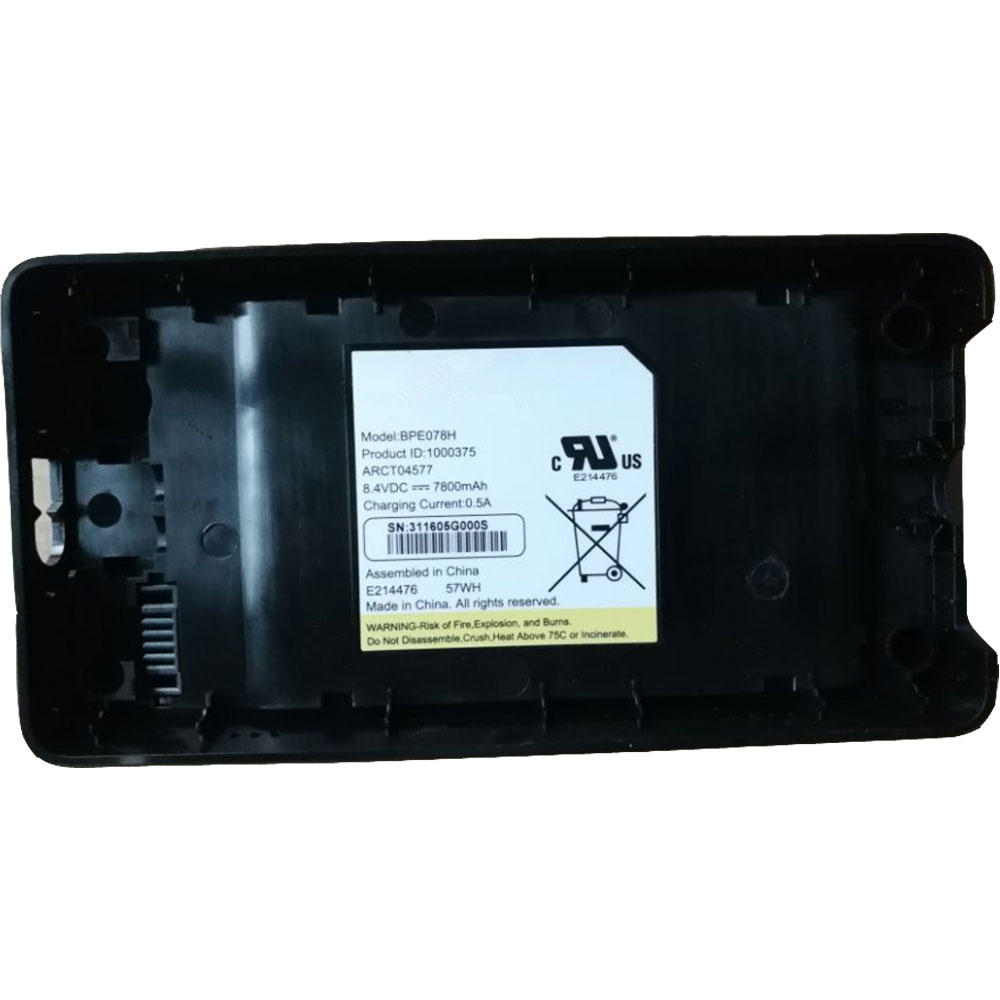
Cheap Arris BPE078H Li-ion Laptop battery, Brand New BPE078H replacement battery for ARRIS ARCT04577 1000375

7800mAh 8.4V/0.5A Arris BPE078H Batteries for ARRIS ARCT04577 1000375, Arris BPE078H Laptop battery is a brand new,100% Compatible original and replacement Laptop battery,Purchase wholesale and retail BPE078H with high quality and low price!

BPE078H Battery arris Li-ion 8.4V/0.5A 7800mAh

BPE078H

Specifications

  • Brand:ARRIS
  • Capacity :7800mAh
  • Voltage :8.4V/0.5A
  • Type :Li-ion
  • Battery Cell Quality: Grade A
  • Descriptive: Replacement Battery – 1 Year Warranty
  • Description: Brand New, 1 Year Warranty! 30-Days Money Back! Fast Shipping!

How we test this Arris BPE078H Battery Li-ion 8.4V/0.5A 7800mAh

Step 1: Make sure customer bought the correct battery.
Step 2: Check battery’s appearance and interface.
Step 3: Test battery charger and recharger function.
Step 4: Charger the battery to 100% and recharger to 0% to get real battery capacity
Step 5: Use Ev2300 to check the voltage difference of each goroup cells.
Step 6: Charger battery power more than 30%.
Step 7: Package battery carefully and send out

Compatible Part Numbers:

BPE078H

Compatible Model Numbers:

ARRIS ARCT04577 1000375

How much do you know about how to run laptop well as any place? The follow Tips cut way back on protecting battery life.


1). Please recharge or change your Laptop battery when battery power low.
2). Using Li-Ion Replacement Arris BPE078H Laptop Battery for your notebook which can work longer time than Non Li-ion one.
3). It is better to defragmentation regularly for your Laptop battery life.
4). In order to reduce the laptop power consumpition, you can use some optical drive spin-down and hard drive in your Laptop .
5). Please keep your laptop in sleep or standby model without long time using, which both save the Replacement Arris BPE078H Laptop Battery power and extend battery using life.
6). Leave your battery in a dry and cool condition when without using.
7). When you rarely or generally plugged in fixed power using, Please take down your battery to avoid hurting battery life.

Hot Products

11.1V/12.4v 2300mah BOSE 404600 for Bose SOUNDLINK I II III16.8V/20V 400mA/2200mAH/32Wh BOSE 300769-003 for Bose Sounddock Portable Digita3.8V 6300mAh/23.94Wh AMAZON 2955C7 for Amazon Kindle Fire HD 10.1 7th3.8 V 1300 mAh AMAZON MC-305070 for AMAZON Kindle Voyage7.7V 37Wh/4810mAh ACER AP16M5J for ACER A315-51-51SL N17Q1 SERIES3.8V/4.35V 2000MAH/7.6Wh ALCATEL TLI020F7 for Alcatel Onetouch Pixi 4 (5) 503.8V 4000mAh/15.2Wh LENOVO L15D1P31 for Lenovo Yoga Tab3 Pro YT3-X90L3.8V 2930mAh/11.1Wh NETGEAR W-7 for Netgear AirCard 790S 790SP 8103.85V/4.4V 3080MAH/11.86WH ALCATEL TLp030JC for Alcatel A3 XL 9008j3.7V/4.2V 1750MAH/6.5WH AMAZON GP-S10-346392-0100 for AMAZON KINDLE 3 3G WIFI Kindle

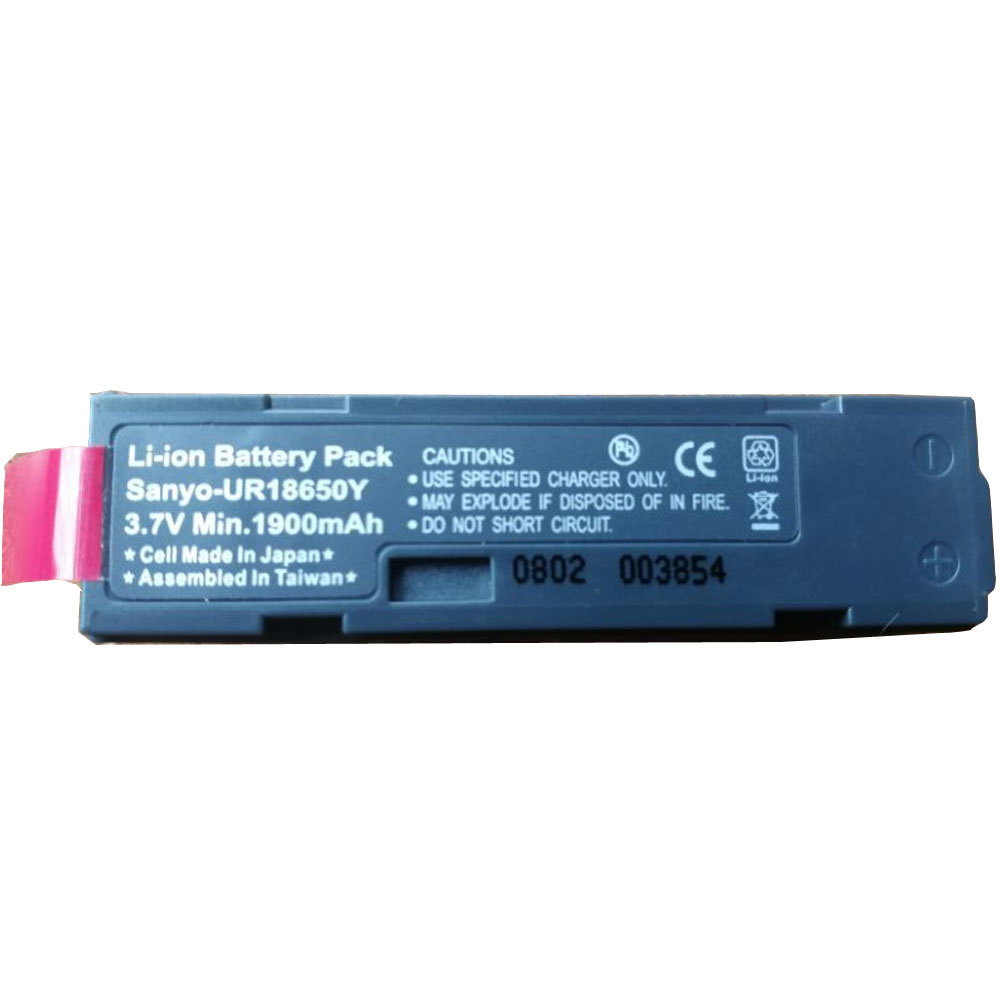
Cheap Motorola 50-1400-079 Li-ion Other battery, Brand New 50-1400-079 replacement battery for Motorola/Symbol P360, P370, P460 & P470 Scanners

1900MAH 3.7V Motorola 50-1400-079 Batteries for Motorola/Symbol P360, P370, P460 & P470 Scanners, Motorola 50-1400-079 Other battery is a brand new,100% Compatible original and replacement Laptop battery,Purchase wholesale and retail 50-1400-079 with high quality and low price!

50-1400-079 Battery motorola Li-ion 3.7V 1900MAH

50-1400-079

Specifications

  • Brand:Motorola
  • Capacity :1900MAH
  • Voltage :3.7V
  • Type :Li-ion
  • Battery Cell Quality: Grade A
  • Descriptive: Replacement Battery – 1 Year Warranty
  • Description: Brand New, 1 Year Warranty! 30-Days Money Back! Fast Shipping!

How we test this Motorola 50-1400-079 Battery Li-ion 3.7V 1900MAH

Step 1: Make sure customer bought the correct battery.
Step 2: Check battery’s appearance and interface.
Step 3: Test battery charger and recharger function.
Step 4: Charger the battery to 100% and recharger to 0% to get real battery capacity
Step 5: Use Ev2300 to check the voltage difference of each goroup cells.
Step 6: Charger battery power more than 30%.
Step 7: Package battery carefully and send out

Compatible Part Numbers:

50-1400-079 50-14000079 50-1400079 5014000079 501400079 SM-4701 SM4701 SYM360 SM470i 4UR18650F-2-QC-ZG1 50-080090-01 50-080092-00 BT-A0201-001 BT.A0201.001 WNXL2 50-14000-079

Compatible Model Numbers:

Motorola/Symbol P360, P370, P460 & P470 Scanners
Motorola/Symbol SM-4701 SM4701 SYM360 SM470i

How much do you know about how to run laptop well as any place? The follow Tips cut way back on protecting battery life.


1). Please recharge or change your Other battery when battery power low.
2). Using Li-Ion Replacement Motorola 50-1400-079 Other Battery for your notebook which can work longer time than Non Li-ion one.
3). It is better to defragmentation regularly for your Other battery life.
4). In order to reduce the laptop power consumpition, you can use some optical drive spin-down and hard drive in your Other .
5). Please keep your laptop in sleep or standby model without long time using, which both save the Replacement Motorola 50-1400-079 Other Battery power and extend battery using life.
6). Leave your battery in a dry and cool condition when without using.
7). When you rarely or generally plugged in fixed power using, Please take down your battery to avoid hurting battery life.

Hot Products

11.1V/12.4v 2300mah BOSE 404600 for Bose SOUNDLINK I II III16.8V/20V 400mA/2200mAH/32Wh BOSE 300769-003 for Bose Sounddock Portable Digita3.8V 6300mAh/23.94Wh AMAZON 2955C7 for Amazon Kindle Fire HD 10.1 7th3.8 V 1300 mAh AMAZON MC-305070 for AMAZON Kindle Voyage7.7V 37Wh/4810mAh ACER AP16M5J for ACER A315-51-51SL N17Q1 SERIES3.8V/4.35V 2000MAH/7.6Wh ALCATEL TLI020F7 for Alcatel Onetouch Pixi 4 (5) 503.8V 4000mAh/15.2Wh LENOVO L15D1P31 for Lenovo Yoga Tab3 Pro YT3-X90L3.8V 2930mAh/11.1Wh NETGEAR W-7 for Netgear AirCard 790S 790SP 8103.85V/4.4V 3080MAH/11.86WH ALCATEL TLp030JC for Alcatel A3 XL 9008j3.7V/4.2V 1750MAH/6.5WH AMAZON GP-S10-346392-0100 for AMAZON KINDLE 3 3G WIFI Kindle

Cheap Motorola 50-1400079 Li-ion Other battery, Brand New 50-1400079 replacement battery for Motorola/Symbol SM-4701 SM4701 SYM360 SM470i 5pcs

1900MAH 3.7V Motorola 50-1400079 Batteries for Motorola/Symbol SM-4701 SM4701 SYM360 SM470i 5pcs, Motorola 50-1400079 Other battery is a brand new,100% Compatible original and replacement Laptop battery,Purchase wholesale and retail 50-1400079 with high quality and low price!

50-1400079 Battery motorola Li-ion 3.7V 1900MAH

50-1400079

Specifications

  • Brand:Motorola
  • Capacity :1900MAH
  • Voltage :3.7V
  • Type :Li-ion
  • Battery Cell Quality: Grade A
  • Descriptive: Replacement Battery – 1 Year Warranty
  • Description: Brand New, 1 Year Warranty! 30-Days Money Back! Fast Shipping!

How we test this Motorola 50-1400079 Battery Li-ion 3.7V 1900MAH

Step 1: Make sure customer bought the correct battery.
Step 2: Check battery’s appearance and interface.
Step 3: Test battery charger and recharger function.
Step 4: Charger the battery to 100% and recharger to 0% to get real battery capacity
Step 5: Use Ev2300 to check the voltage difference of each goroup cells.
Step 6: Charger battery power more than 30%.
Step 7: Package battery carefully and send out

Compatible Part Numbers:

50-1400-079 50-14000079 50-1400079 5014000079 501400079 SM-4701 SM4701 SYM360 SM470i 4UR18650F-2-QC-ZG1 50-080090-01 50-080092-00 BT-A0201-001 BT.A0201.001 WNXL2 50-14000-079

Compatible Model Numbers:

Motorola/Symbol P360, P370, P460 & P470 Scanners
Motorola/Symbol SM-4701 SM4701 SYM360 SM470i

How much do you know about how to run laptop well as any place? The follow Tips cut way back on protecting battery life.


1). Please recharge or change your Other battery when battery power low.
2). Using Li-Ion Replacement Motorola 50-1400079 Other Battery for your notebook which can work longer time than Non Li-ion one.
3). It is better to defragmentation regularly for your Other battery life.
4). In order to reduce the laptop power consumpition, you can use some optical drive spin-down and hard drive in your Other .
5). Please keep your laptop in sleep or standby model without long time using, which both save the Replacement Motorola 50-1400079 Other Battery power and extend battery using life.
6). Leave your battery in a dry and cool condition when without using.
7). When you rarely or generally plugged in fixed power using, Please take down your battery to avoid hurting battery life.

Hot Products

11.1V/12.4v 2300mah BOSE 404600 for Bose SOUNDLINK I II III16.8V/20V 400mA/2200mAH/32Wh BOSE 300769-003 for Bose Sounddock Portable Digita3.8V 6300mAh/23.94Wh AMAZON 2955C7 for Amazon Kindle Fire HD 10.1 7th3.8 V 1300 mAh AMAZON MC-305070 for AMAZON Kindle Voyage7.7V 37Wh/4810mAh ACER AP16M5J for ACER A315-51-51SL N17Q1 SERIES3.8V/4.35V 2000MAH/7.6Wh ALCATEL TLI020F7 for Alcatel Onetouch Pixi 4 (5) 503.8V 4000mAh/15.2Wh LENOVO L15D1P31 for Lenovo Yoga Tab3 Pro YT3-X90L3.8V 2930mAh/11.1Wh NETGEAR W-7 for Netgear AirCard 790S 790SP 8103.85V/4.4V 3080MAH/11.86WH ALCATEL TLp030JC for Alcatel A3 XL 9008j3.7V/4.2V 1750MAH/6.5WH AMAZON GP-S10-346392-0100 for AMAZON KINDLE 3 3G WIFI Kindle

Cheap Motorola 50-14000079 Li-ion Other battery, Brand New 50-14000079 replacement battery for Motorola/Symbol P360, P370, P460 & P470 Scanners 10pcs

1900MAH 3.7V Motorola 50-14000079 Batteries for Motorola/Symbol P360, P370, P460 & P470 Scanners 10pcs, Motorola 50-14000079 Other battery is a brand new,100% Compatible original and replacement Laptop battery,Purchase wholesale and retail 50-14000079 with high quality and low price!

50-14000079 Battery motorola Li-ion 3.7V 1900MAH

50-14000079

Specifications

  • Brand:Motorola
  • Capacity :1900MAH
  • Voltage :3.7V
  • Type :Li-ion
  • Battery Cell Quality: Grade A
  • Descriptive: Replacement Battery – 1 Year Warranty
  • Description: Brand New, 1 Year Warranty! 30-Days Money Back! Fast Shipping!

How we test this Motorola 50-14000079 Battery Li-ion 3.7V 1900MAH

Step 1: Make sure customer bought the correct battery.
Step 2: Check battery’s appearance and interface.
Step 3: Test battery charger and recharger function.
Step 4: Charger the battery to 100% and recharger to 0% to get real battery capacity
Step 5: Use Ev2300 to check the voltage difference of each goroup cells.
Step 6: Charger battery power more than 30%.
Step 7: Package battery carefully and send out

Compatible Part Numbers:

50-1400-079 50-14000079 50-1400079 5014000079 501400079 SM-4701 SM4701 SYM360 SM470i 4UR18650F-2-QC-ZG1 50-080090-01 50-080092-00 BT-A0201-001 BT.A0201.001 WNXL2 50-14000-079

Compatible Model Numbers:

Motorola/Symbol P360, P370, P460 & P470 Scanners
Motorola/Symbol SM-4701 SM4701 SYM360 SM470i

How much do you know about how to run laptop well as any place? The follow Tips cut way back on protecting battery life.


1). Please recharge or change your Other battery when battery power low.
2). Using Li-Ion Replacement Motorola 50-14000079 Other Battery for your notebook which can work longer time than Non Li-ion one.
3). It is better to defragmentation regularly for your Other battery life.
4). In order to reduce the laptop power consumpition, you can use some optical drive spin-down and hard drive in your Other .
5). Please keep your laptop in sleep or standby model without long time using, which both save the Replacement Motorola 50-14000079 Other Battery power and extend battery using life.
6). Leave your battery in a dry and cool condition when without using.
7). When you rarely or generally plugged in fixed power using, Please take down your battery to avoid hurting battery life.

Hot Products

11.1V/12.4v 2300mah BOSE 404600 for Bose SOUNDLINK I II III16.8V/20V 400mA/2200mAH/32Wh BOSE 300769-003 for Bose Sounddock Portable Digita3.8V 6300mAh/23.94Wh AMAZON 2955C7 for Amazon Kindle Fire HD 10.1 7th3.8 V 1300 mAh AMAZON MC-305070 for AMAZON Kindle Voyage7.7V 37Wh/4810mAh ACER AP16M5J for ACER A315-51-51SL N17Q1 SERIES3.8V/4.35V 2000MAH/7.6Wh ALCATEL TLI020F7 for Alcatel Onetouch Pixi 4 (5) 503.8V 4000mAh/15.2Wh LENOVO L15D1P31 for Lenovo Yoga Tab3 Pro YT3-X90L3.8V 2930mAh/11.1Wh NETGEAR W-7 for Netgear AirCard 790S 790SP 8103.85V/4.4V 3080MAH/11.86WH ALCATEL TLp030JC for Alcatel A3 XL 9008j3.7V/4.2V 1750MAH/6.5WH AMAZON GP-S10-346392-0100 for AMAZON KINDLE 3 3G WIFI Kindle

TIL: DELL HAS A SWEET NEW CHROME OS WIRELESS KEYBOARD

Chrome OS is finally getting some attention from the makers of peripherals and accessories. While most keyboards, mice, trackpads and such work well when paired with a Chromebook, it wasn’t until recently that we started seeing a fair amount of accessories made specifically designed for Chrome OS. The “Works with Chromebook” branding has been adopted by some of the biggest names in the industry and the list keeps growing. Companies like Anker, Logitech, Brydge and more have jumped on the bandwagon and are proudly slapping the Works with Chromebook badge of honor on their Chrome OS-compatible hardware.

It’s great to see accessories like docks, dongles and chargers on this list but one are that still needs some attention is keyboards. Mice usually just work with Chrome OS so a Chromebook-specific mouse isn’t really “a thing” but keyboards have a unique key layout for the operating system. While most keyboards work just fine and the function keys will perform the corresponding action, many new Chrome OS users might struggle if they don’t know which Fn key matches the alternate key on a Chromebook.

Manufacturers like ASUS and Acer have often included their own, somewhat cheap wired models when you purchase a Chromebox but Logitech’s latest K580 and Brydge’s C-Type (half off at the moment right now) are the only legitimate wireless options out there. Or so I thought. (Yes, I know ASUS made one a long time ago but they don’t sell them anymore.) Well, apparently Dell has its own iteration of a wireless Chrome OS keyboard and it looks awesome. We have one of these on the way to the office so I can’t really speak to the build quality but the design is eye-catching.

The body appears to be, at least partially, aluminum and it is molded to have a gentle incline as opposed to some keyboards that use retractable feet. It is powered by two AA batteries and pairs to a USB dongle that, in our experience, is the most reliable way to do wireless on Chrome OS. We’ll get our full opinion out on the Dell Chrome OS keyboard when it gets here but if you’re interested, it’s available from Dell and it’s even on sale at the moment for $43.99. Check it out. If you have one, drop a comment below. We’d love to hear your thoughts.

KEY FEATURE MISSING IN THE LENOVO CHROMEBOOK DUET KEEPS IT FROM BEING A TRUE CHROMEBOOK REPLACEMENT

From the moment I laid eyes on the Lenovo Chromebook Duet, I gave little thought to unforeseen limitations it would ship with when it finally became available. As a matter of fact, my main concern at the time was whether or not it looked good, felt good, and performed decently. After all, with a price point of $279 with a keyboard, I was expecting cheap hardware and a super-sluggish processor. Instead, when we had our chance to really get time with the tablet at CES 2020, I found it to be attractive, well-built, and fast enough for general use purposes.

Not one time did I give a passing thought to whether or not things like account syncing and extended monitors would work as expected. Sure, the Duet is a tablet, but it is a device running Chrome OS like all other devices running Chrome OS, right? Even with under-powered, slow devices like the Lenovo S330, I can successfully output to 1440p screens with no issue whatsoever. Additionally, I’ve never run into issue with my apps installing just as expected and arranging themselves on my shelf just the way I had them previously. These are things Chrome OS just does consistently well across the board.

So, when the app strangeness happened with the 10e, I chalked it up to unfinished software. That clearly isn’t the case and it doesn’t matter how I try to get the Duet to save my installed apps and their locations, when I powerwash it, everything goes back to the stock layout with oddball things like Google Docs pinned to my shelf. It’s strange and a bit of an annoyance, but this is far from the Duet’s biggest issue for me and other users who would love – LOVE – to use this little guy as a portable workstation. The absolute most confusing and mind-boggling setback on this tablet for me right now is the lack of usable display out over USB Type C. As it stands right now, the best possible output is 1440×900, but as most monitors are of the 16:9 variety, that quickly gets reduced to 1280×720 as your only real 16:9 option.

Again, I never gave this issue a thought over the past 5 months as we’ve waited for this device to arrive. Not one time did I ever worry about how well the display output would behave. Sure, there have been Chromebooks in the past that could only manage a 1080p extended display, but even that feels OK in a package this small and affordable. For most users, an additional display at 1080p is plenty to extend the long-term usability of a small-screen device. For me, it is exactly what I was planning on doing with the tablet during my testing: use this device as a tablet in the evenings and attach a larger display for getting work done during the day alongside a keyboard and mouse.

Those hopes were quickly shot down as my initial testing shows that, like the 10e before it, the display output of the Duet is hamstrung for reasons we simply can’t understand at this point. We’ve done a bit of digging in the Chromium repositories and have found a missing bit of hardware for both ‘Krane’ and ‘Kodama’ (the Duet and 10e, respectively) that is present in upcoming ‘Kukui’ devices and absent on these two tablets. For reference, ‘Kukui’ is the unibuild baseboard for all of the MediTek Helio P60T devices on the way this year like the Duet and 10e.

This missing little bit of hardware is the Analogix ANX7625 MIPI-DSI/DPI to USB Type-C™ Bridge (Port Controller with MUX). Sure, that’s a mouth-full, but here’s some plain speak for us to see exactly what this little part does in other, upcoming MediaTek P60T Chromebooks or tablets:

The ANX7625 is an ultra-low power 4K Mobile HD Transmitter designed for portable devices. It converts MIPI DSI/DPI to DisplayPort 1.3 4K.

ANX7625 is a mobile HD transmitter designed for portable devices such as smartphones, tablets, Ultrabooks, docking stations, sports cameras, camcorders, and so on. It enables a mobile device to transfer audio, video, and data simultaneously. The ANX7625 converts MIPI™ to DisplayPort™ 1.3 high-performance video with the resolution up to 4K UHD.

While this transmitter is being added to some ‘Kukui’ boards, it seems it is absent from ‘Krane’ and ‘Kodama’. To this point, we’ve not been able to track down what – if any – transmitter is being used in the Duet and 10e. It is also unclear whether or not this is a bug, misstep, oversight, or poor choice by Lenovo to simply skip out on this addition. As the device is capable of a handful of display outputs, I’d assume there must be some transmitter present that is allowing the USB Type C port to even consider outputting a video signal. Could there be a workaround or fix to leverage the existing hardware on board to correct this oversight? Maybe.

I’ve created a bug report for this and at least one developer has acknowledged it so far. The bug is still unconfirmed and has not been assigned to anyone, but the fact that the same developer who led the charge on Virtual Desks has left an empty comment on the bug tells me at least someone is aware of the issue now. I don’t want to game the system or create a manipulative situation, but if you would like to star this bug to draw a bit more attention to it, you can do so here or the link at the top of this paragraph. Hit the link, sign in, and click the star up top. The more stars, the more likely some response will happen from the developers.

In the end, Lenovo is holding the line that this device is meant as a secondary unit and a tablet first and foremost. While I understand this, it is still a Chromebook through and through, so I can’t begin to understand the thinking that left off the aforementioned ANX7625 that is clearly being added to future Chrome OS devices built off of the exact same baseboard. Emails have already started pouring in and comments on the unboxing video have begun pointing out this deficiency in the tablet, so I’m really hopeful the developers, Google, and Lenovo can figure out a workaround to at least get us to a 1080p extended display.

This otherwise-great little tablet is set to get updates for over 8 years, so I’m still hopeful a fix will arrive to this strange misstep. For me and I’m sure many of you, the fact that I can’t spend a ton of time really working from this tablet is a bit of a black eye on the whole experience. It has changed my use cases for sure and it has ultimately altered the way that I’m going about the review process for this one. Aside from that, it just makes me a bit sad. While I don’t think the Duet has enough muscle to be my only laptop, I did feel like it had enough to be that for many potential users over the course of its long life. Being forced to always use it as a Chromebook with a 10.1-inch screen drastically changes that, however, and you can count me among the many that are severely disappointed by this whole situation right now.

The Intel Core i9-10900K is up for preorder – but it’s expensive

The Intel Core i9-10900K has gone up for pre-order in the US, and it’s bad news for those who planned on rushing out to buy the flagship Comet Lake processor. 

As spotted by Tom’s Hardware, US retailer B&H Photo Video already has the CPU available for pre-order, and despite Intel’s recommended price of $488 (about £395/A$765), it’s flogging the processor for some $600 – and that’s before you’ve bought a new motherboard, which you’ll unfortunately have to do. 

That price is much higher than the suggested price set by Intel for the Core i9-10900K, which is supposed to be just $488 (about £395/A$765). However, when Intel launches a new processor, the prices it releases are mere guidelines, rather than strict prices that retailers need to stick to.

This is also way more expensive than the Core i9-9900K, which fetched around $525 (around £420, AU$810) at launch. It’s also pricier than the 12-core AMD Ryzen 9 3900X, which arrived last year with an official price of $499. Either way, it looks like you’ll be paying a premium if you want to get in on Comet Lake-S early. 

B&H Photo and Video doesn’t say when it expects to have the CPU in stock, though it’s expected to launch at some point in May 2020. We’ve reached out to both Intel B&H Photo and Video for comment, and Intel reiterated that “Intel’s Recommended Customer Price (RCP) is only a guidance for end users of which could be consumers in the box versions.” We’ll update the article if we hear back from B&H. 

Worth it?

Despite its hefty price-tag, the Intel Core i9-10900K is shaping up to be a champion performer. Specs-wise, the CPU, which debuted earlier this month as the flagship CPU in Intel’s 10th-generation Comet Lake-S lineup, packs 10-cores, 20-threads, a TDP of 125W and boost clock speeds of up to 5.3GHz thanks to Intel’s Thermal Velocity Boost (TVB) technology.

However, early benchmarks show that the CPU is capable of hitting 5.4GHz across all 10 cores. This overclocking feat saw the Core 10900K score 3,002 points in the Cinebench R15 multi-core test, way ahead of the Intel Core i9-9900K which scored 2,184. However, the processor failed to match the AMD Ryzen 3900X, which racked up 3,168 in the same test.

It remains to be seen how the incoming Intel Core-10900K performs in single-core tests, but if anything like the chipmaker’s previous releases, it’s likely to come out on top when it comes to gaming.

However, those that haven’t yet decided whether to upgrade to the Core i9-10900K, it’s worth remembering that AMD will be launching its long-rumored Ryzen 4000 ‘Vermeer’ desktop processors later this year. The Zen 3-based CPUs are expected to deliver a significant step up over AMD’s current Zen 2 CPUs, with 10-15% IPC gains, faster clocks, and higher core counts than ever before, and they’ll even be compatible with existing AM4 motherboards.

It’s time to squirrel away a clean copy of Win10 version 1909

With Win10 version 2004 locked and loaded and ready to fire at any moment, now would be a very good time to store away an official, clean copy of Win10 version 1909. You never know when it might come in handy.

Downloading a clean Win10 version 1909 is remarkably easy, doesn’t take very long (if you have a fast internet connection anyway), and may well save your keister at some point. You can even download it from your phone or iPad.

Don’t worry, it’s 100% legal and, at worst, will occupy about 8GB on a USB drive for a while. Nothin’ to it.

Step 1. If you’re running Win10, use the Media Creation Tool

If you have a license for Windows 10, the easiest way to get version 1909 involves Microsoft’s Media Creation Tool. Go to the Download Windows 10 site and, under “Create Windows 10 installation media,” click the link marked “Download tool now.” 

You’ll see a notice that you’re opening MediaCreationTool1909.exe (screenshot). It may take a second, but when the Save File button goes live, click on it. Give approval for the Media Creation Tool to make changes to your PC, and you’ll see the Windows 10 Setup dialog. Click to accept Microsoft’s multi-page Software License Terms.

The Windows 10 Setup routine asks if you want to upgrade this PC now, or if you want to create installation media (screenshot).

Choose “Create installation media (USB flash drive, DVD, or ISO file) for another PC.” Yes, you should choose that even if you never intend to use the clean copy of Win10 1909 on any other PC. Click Next. Choose the language, architecture and edition — all of which should match what you’re currently running. 

When you’re asked to “Choose which media to use,” choose “ISO file.” Ignore the part about “You’ll need to burn the ISO file to a DVD later” — old advice, rarely necessary these days. Click Next.

When you get to the point where you choose a place to put the file, give it a name that you’ll be able to identify in the future — say, Win10 1909.iso or something similar — and stick the file someplace you’ll be able to find it.

Hit Save, wait a few minutes, and you’ll have a brand-new, clean copy of Win10 version 1909 downloaded and ready for the inevitable disaster.

When you’re told to burn the ISO file to a DVD, just ignore it and click “Finish.” OK, boomer.

Step 2. If you aren’t running Windows 10, grab a different machine

If you go to the Download Windows 10 site using anything other than a fully ordained Windows machine, you’ll see something like the screenshot, which was taken on my Android phone.

That’s good news. Really. Downloading Win10 is as simple as choosing an edition (“Windows 10 November 2019 Update” is version 1909) and clicking Confirm. You’ll need about 8GB of free space — which may or may not present a problem on your device. Moving the file from your phone, tablet, Mac, Linux machine, or Raspberry Pi is almost always a simple task.

Step 3. Make like a squirrel

No matter which path you choose, you’ll end up with a copy of the official Win10 version 1909 ISO file, which can be easily used to install 1909. At least, “easily” in a Windows kind of way. If you download right now, you’ll get the Jan. 14 flavor, known as build 18363.592.

Stow it away someplace handy. You may need it someday.