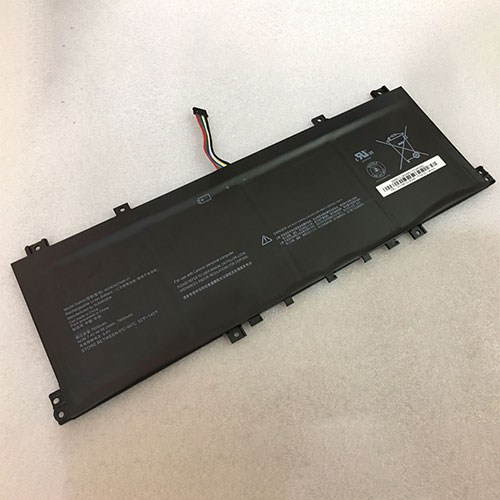
Cheap Lenovo L19M4PD2 Li-ion Laptop battery, Brand New L19M4PD2 replacement battery for LENOVO IdeaPad S740-14IIL

4080mAh/62WH 15.4V/17.6V Lenovo L19M4PD2 Batteries for LENOVO IdeaPad S740-14IIL, Lenovo L19M4PD2 Laptop battery is a brand new,100% Compatible original and replacement Laptop battery,Purchase wholesale and retail L19M4PD2 with high quality and low price!

L19M4PD2 Battery lenovo Li-ion 15.4V/17.6V 4080mAh/62WH

L19M4PD2

Specifications

  • Brand:LENOVO
  • Capacity :4080mAh/62WH
  • Voltage :15.4V/17.6V
  • Type :Li-ion
  • Battery Cell Quality: Grade A
  • Descriptive: Replacement Battery – 1 Year Warranty
  • Description: Brand New, 1 Year Warranty! 30-Days Money Back! Fast Shipping!

How we test this Lenovo L19M4PD2 Battery Li-ion 15.4V/17.6V 4080mAh/62WH

Step 1: Make sure customer bought the correct battery.
Step 2: Check battery’s appearance and interface.
Step 3: Test battery charger and recharger function.
Step 4: Charger the battery to 100% and recharger to 0% to get real battery capacity
Step 5: Use Ev2300 to check the voltage difference of each goroup cells.
Step 6: Charger battery power more than 30%.
Step 7: Package battery carefully and send out

Compatible Part Numbers:

L19M4PD2 L19L4PD2 SB10W67348 5B10U97773

Compatible Model Numbers:

LENOVO IdeaPad S740-14IIL

How much do you know about how to run laptop well as any place? The follow Tips cut way back on protecting battery life.


1). Please recharge or change your Laptop battery when battery power low.
2). Using Li-Ion Replacement Lenovo L19M4PD2 Laptop Battery for your notebook which can work longer time than Non Li-ion one.
3). It is better to defragmentation regularly for your Laptop battery life.
4). In order to reduce the laptop power consumpition, you can use some optical drive spin-down and hard drive in your Laptop .
5). Please keep your laptop in sleep or standby model without long time using, which both save the Replacement Lenovo L19M4PD2 Laptop Battery power and extend battery using life.
6). Leave your battery in a dry and cool condition when without using.
7). When you rarely or generally plugged in fixed power using, Please take down your battery to avoid hurting battery life.

Hot Products

11.1V/12.4v 2300mah BOSE 404600 for Bose SOUNDLINK I II III7.4V 2230mAh/17Wh BOSE 063404 for 0634043.8V 6300mAh/23.94Wh AMAZON 2955C7 for Amazon Kindle Fire HD 10.1 7th3.8 V 1300 mAh AMAZON MC-305070 for AMAZON Kindle Voyage7.7V 37Wh/4810mAh ACER AP16M5J for ACER A315-51-51SL N17Q1 SERIES3.7V/4.2V 1750MAH/6.5WH AMAZON GP-S10-346392-0100 for AMAZON KINDLE 3 3G WIFI Kindle7.4V 2230mAH/17Wh BOSE 061384 for BOSE SOUNDLINK Mini Series3.8V 2930mAh/11.1Wh NETGEAR W-7 for Netgear AirCard 790S 790SP 8103.8V/4.35V 2000MAH/7.6Wh ALCATEL TLI020F7 for Alcatel Onetouch Pixi 4 (5) 503.8V 4000mAh/15.2Wh LENOVO L15D1P31 for Lenovo Yoga Tab3 Pro YT3-X90L

Cheap Lenovo 45N1139 Li-ion Laptop battery, Brand New 45N1139 replacement battery for Lenovo ThinkPad S440 S431

3100mAh/46Wh 14.8V Lenovo 45N1139 Batteries for Lenovo ThinkPad S440 S431, Lenovo 45N1139 Laptop battery is a brand new,100% Compatible original and replacement Laptop battery,Purchase wholesale and retail 45N1139 with high quality and low price!

45N1139 Battery lenovo Li-ion 14.8V 3100mAh/46Wh

45N1139

Specifications

  • Brand:Lenovo
  • Capacity :3100mAh/46Wh
  • Voltage :14.8V
  • Type :Li-ion
  • Battery Cell Quality: Grade A
  • Descriptive: Replacement Battery – 1 Year Warranty
  • Description: Brand New, 1 Year Warranty! 30-Days Money Back! Fast Shipping!

How we test this Lenovo 45N1139 Battery Li-ion 14.8V 3100mAh/46Wh

Step 1: Make sure customer bought the correct battery.
Step 2: Check battery’s appearance and interface.
Step 3: Test battery charger and recharger function.
Step 4: Charger the battery to 100% and recharger to 0% to get real battery capacity
Step 5: Use Ev2300 to check the voltage difference of each goroup cells.
Step 6: Charger battery power more than 30%.
Step 7: Package battery carefully and send out

Compatible Part Numbers:

121500159 45N1138 45N1139 45N1140 45N1141

Compatible Model Numbers:

LENOVO S440 S431

Note: This battery has 2 different types of buckles (please refer our major picture) . Please leave us a message which type do you need when place order. Thank you!

How much do you know about how to run laptop well as any place? The follow Tips cut way back on protecting battery life.


1). Please recharge or change your Laptop battery when battery power low.
2). Using Li-Ion Replacement Lenovo 45N1139 Laptop Battery for your notebook which can work longer time than Non Li-ion one.
3). It is better to defragmentation regularly for your Laptop battery life.
4). In order to reduce the laptop power consumpition, you can use some optical drive spin-down and hard drive in your Laptop .
5). Please keep your laptop in sleep or standby model without long time using, which both save the Replacement Lenovo 45N1139 Laptop Battery power and extend battery using life.
6). Leave your battery in a dry and cool condition when without using.
7). When you rarely or generally plugged in fixed power using, Please take down your battery to avoid hurting battery life.

Hot Products

11.1V/12.4v 2300mah BOSE 404600 for Bose SOUNDLINK I II III7.4V 2230mAh/17Wh BOSE 063404 for 0634043.8V 6300mAh/23.94Wh AMAZON 2955C7 for Amazon Kindle Fire HD 10.1 7th3.8 V 1300 mAh AMAZON MC-305070 for AMAZON Kindle Voyage7.7V 37Wh/4810mAh ACER AP16M5J for ACER A315-51-51SL N17Q1 SERIES3.7V/4.2V 1750MAH/6.5WH AMAZON GP-S10-346392-0100 for AMAZON KINDLE 3 3G WIFI Kindle7.4V 2230mAH/17Wh BOSE 061384 for BOSE SOUNDLINK Mini Series3.8V 2930mAh/11.1Wh NETGEAR W-7 for Netgear AirCard 790S 790SP 8103.8V/4.35V 2000MAH/7.6Wh ALCATEL TLI020F7 for Alcatel Onetouch Pixi 4 (5) 503.8V 4000mAh/15.2Wh LENOVO L15D1P31 for Lenovo Yoga Tab3 Pro YT3-X90L

Cheap Dell T116C Li-ion Laptop battery, Brand New T116C replacement battery for Dell Vostro 1310 1320 1510 1520 2510

5200mAh/56W 11.1V/10.8V (Not Compatible 14.8V ) Dell T116C Batteries for Dell Vostro 1310 1320 1510 1520 2510, Dell T116C Laptop battery is a brand new,100% Compatible original and replacement Laptop battery,Purchase wholesale and retail T116C with high quality and low price!

T116C Battery dell Li-ion 11.1V/10.8V (Not Compatible 14.8V ) 5200mAh/56W

T116C

Specifications

  • Brand:Dell
  • Capacity :5200mAh/56W
  • Voltage :11.1V/10.8V (Not Compatible 14.8V )
  • Type :Li-ion
  • Battery Cell Quality: Grade A
  • Descriptive: Replacement Battery – 1 Year Warranty
  • Description: Brand New, 1 Year Warranty! 30-Days Money Back! Fast Shipping!

How we test this Dell T116C Battery Li-ion 11.1V/10.8V (Not Compatible 14.8V ) 5200mAh/56W

Step 1: Make sure customer bought the correct battery.
Step 2: Check battery’s appearance and interface.
Step 3: Test battery charger and recharger function.
Step 4: Charger the battery to 100% and recharger to 0% to get real battery capacity
Step 5: Use Ev2300 to check the voltage difference of each goroup cells.
Step 6: Charger battery power more than 30%.
Step 7: Package battery carefully and send out

Compatible Part Numbers:

0K738H 0N241H 0N950C 0T112C 0T114C 0T116C 312-0724 312-0859 451-10586 451-10655 K738H N950C T112C T114C T116C U661H

Compatible Model Numbers:

Vostro 1310 Vostro 1320 Vostro 1510 Vostro 1511 Vostro 1520 Vostro 2510
Not Compatible 14.8V
Weight:312.15g

How much do you know about how to run laptop well as any place? The follow Tips cut way back on protecting battery life.


1). Please recharge or change your Laptop battery when battery power low.
2). Using Li-Ion Replacement Dell T116C Laptop Battery for your notebook which can work longer time than Non Li-ion one.
3). It is better to defragmentation regularly for your Laptop battery life.
4). In order to reduce the laptop power consumpition, you can use some optical drive spin-down and hard drive in your Laptop .
5). Please keep your laptop in sleep or standby model without long time using, which both save the Replacement Dell T116C Laptop Battery power and extend battery using life.
6). Leave your battery in a dry and cool condition when without using.
7). When you rarely or generally plugged in fixed power using, Please take down your battery to avoid hurting battery life.

Hot Products

11.1V/12.4v 2300mah BOSE 404600 for Bose SOUNDLINK I II III7.4V 2230mAh/17Wh BOSE 063404 for 0634043.8V 6300mAh/23.94Wh AMAZON 2955C7 for Amazon Kindle Fire HD 10.1 7th3.8 V 1300 mAh AMAZON MC-305070 for AMAZON Kindle Voyage7.7V 37Wh/4810mAh ACER AP16M5J for ACER A315-51-51SL N17Q1 SERIES3.7V/4.2V 1750MAH/6.5WH AMAZON GP-S10-346392-0100 for AMAZON KINDLE 3 3G WIFI Kindle7.4V 2230mAH/17Wh BOSE 061384 for BOSE SOUNDLINK Mini Series3.8V 2930mAh/11.1Wh NETGEAR W-7 for Netgear AirCard 790S 790SP 8103.8V/4.35V 2000MAH/7.6Wh ALCATEL TLI020F7 for Alcatel Onetouch Pixi 4 (5) 503.8V 4000mAh/15.2Wh LENOVO L15D1P31 for Lenovo Yoga Tab3 Pro YT3-X90L

Cheap Asus C31N1824 Li-ion Laptop battery, Brand New C31N1824 replacement battery for Asus Chromebook C434TA

4040mAh/48Wh 11.55V Asus C31N1824 Batteries for Asus Chromebook C434TA, Asus C31N1824 Laptop battery is a brand new,100% Compatible original and replacement Laptop battery,Purchase wholesale and retail C31N1824 with high quality and low price!

C31N1824 Battery asus Li-ion 11.55V 4040mAh/48Wh

C31N1824

Specifications

  • Brand:Asus
  • Capacity :4040mAh/48Wh
  • Voltage :11.55V
  • Type :Li-ion
  • Battery Cell Quality: Grade A
  • Descriptive: Replacement Battery – 1 Year Warranty
  • Description: Brand New, 1 Year Warranty! 30-Days Money Back! Fast Shipping!

How we test this Asus C31N1824 Battery Li-ion 11.55V 4040mAh/48Wh

Step 1: Make sure customer bought the correct battery.
Step 2: Check battery’s appearance and interface.
Step 3: Test battery charger and recharger function.
Step 4: Charger the battery to 100% and recharger to 0% to get real battery capacity
Step 5: Use Ev2300 to check the voltage difference of each goroup cells.
Step 6: Charger battery power more than 30%.
Step 7: Package battery carefully and send out

Compatible Part Numbers:

C31N1824

Compatible Model Numbers:

Asus Chromebook C434TA
not Compatible C31N1824-1

How much do you know about how to run laptop well as any place? The follow Tips cut way back on protecting battery life.


1). Please recharge or change your Laptop battery when battery power low.
2). Using Li-Ion Replacement Asus C31N1824 Laptop Battery for your notebook which can work longer time than Non Li-ion one.
3). It is better to defragmentation regularly for your Laptop battery life.
4). In order to reduce the laptop power consumpition, you can use some optical drive spin-down and hard drive in your Laptop .
5). Please keep your laptop in sleep or standby model without long time using, which both save the Replacement Asus C31N1824 Laptop Battery power and extend battery using life.
6). Leave your battery in a dry and cool condition when without using.
7). When you rarely or generally plugged in fixed power using, Please take down your battery to avoid hurting battery life.

Hot Products

11.1V/12.4v 2300mah BOSE 404600 for Bose SOUNDLINK I II III7.4V 2230mAh/17Wh BOSE 063404 for 0634043.8V 6300mAh/23.94Wh AMAZON 2955C7 for Amazon Kindle Fire HD 10.1 7th3.8 V 1300 mAh AMAZON MC-305070 for AMAZON Kindle Voyage7.7V 37Wh/4810mAh ACER AP16M5J for ACER A315-51-51SL N17Q1 SERIES3.7V/4.2V 1750MAH/6.5WH AMAZON GP-S10-346392-0100 for AMAZON KINDLE 3 3G WIFI Kindle7.4V 2230mAH/17Wh BOSE 061384 for BOSE SOUNDLINK Mini Series3.8V 2930mAh/11.1Wh NETGEAR W-7 for Netgear AirCard 790S 790SP 8103.8V/4.35V 2000MAH/7.6Wh ALCATEL TLI020F7 for Alcatel Onetouch Pixi 4 (5) 503.8V 4000mAh/15.2Wh LENOVO L15D1P31 for Lenovo Yoga Tab3 Pro YT3-X90L

Windows 10 disastrous new update could break your internet connection

Windows 10 May 2020 Update is the first of two feature-packed releases planned for this year. The new version of the operating system brought a redesigned Cortana app and the ability to make your PC password-less …to name just a few new additions. Unfortunately, there were some unplanned changes that arrived with the update too, including users left unable to connect to printers, randomly deleting emails in Gmail, problems accessing files saved in OneDrive cloud storage, and stuttering video games.

And now there’s another quibble to add to the ever-growing list since the roll out of Windows 10 May 2020 Update.

Spotted by Microsoft-centric blog Windows Latest, a number of users who installed the latest Patch Tuesday – a monthly bundle of bug fixes and security improvements pushed out by Microsoft – have started to notice issues with their internet connection.

Windows 10 users who are impacted by the issue are being alerted by a “No Internet Access” warning message that appears within the “Network and Internet” panel in the Settings app. Bafflingly, the issue only appears to affect select internet-enabled services baked into the operating system.

According to one user, while the “No Internet Access” warning appears within the Settings app, browsing the internet works without a hitch… but asking Cortana a question doesn’t return an answer – only a notification that an active internet connection is required to use the digital assistant.

Even though there is an active internet connection to your device, a number of apps and system features will not work if Windows 10 believes – incorrectly, in this case – that there is a problem connecting to Wi-Fi. Anecdotal evidence from the Windows Latest blog post suggests the main features impacted for users are Cortana, Microsoft Store, and Spotify. That’s enough to cause users a serious headache.

Thankfully, Microsoft is well aware of the issue and is actively looking into a fix.

With any luck, that means we won’t have to wait very long until a new update is rolled out to fix the problem. The next Patch Tuesday is scheduled on August 11, 2020 although Microsoft could rush it out to users a little earlier as long as it’s ready / considered urgent enough.

It’s another blow for Windows 10 users who have had a rough time with the latest operating system. And as millions of people stay home to work and study due to the ongoing public health crisis, it’s not an ideal time to be breaking essential features like internet connectivity, printers and emails. (As for the video game problem, that’s admittedly less essential …but equally annoying).

Apple Confirms Stunning New MacBook Pro Details

As Apple focuses on its environmental impact and reducing the company’s carbon footprint, the MacBook Pro will lead the charge as part of a stunning commitment from Tim Cook and his team.

Today’s news from Apple confirms that it is working with aluminium suppliers on carbon-free processing. As an intermediate step, the 16-inch MacBook Pro will be the first hardware to use a low-carbon aluminium and forge a new and more environmentally friendly laptop. 

July 22 update: Aluminium International Today’s Nadine Bloxsome not only talks about the new process, but also notes the investment that Apple is making into the process alongside a number of commercial partners and government departments:

“As part of Apple’s commitment to reducing the environmental impact of our products through innovation, Alcoa helped accelerate the development of this technology. And Apple has partnered with both aluminium companies, and the governments of Canada and Quebec, to collectively invest a combined $144 million in future research and development.”

Apple is bringing its size to bear on this issue, with BBC News noting that suppliers must commit to being 100 percent renewable on their Apple production lines within ten years.

The move comes as part of Apple’s goal to becoming 100 percent carbon neutral across the entire company. From the press release:

“Apple today unveiled its plan to become carbon neutral across its entire business, manufacturing supply chain, and product life cycle by 2030. The company is already carbon neutral today for its global corporate operations, and this new commitment means that by 2030, every Apple device sold will have net zero climate impact.”

As part of takling emissions during the production process, Apple is working with its suppliers on a carbon-free smelting process, and the first beneficiary of this technology will be the 16-inch MacBook Pro:

“Apple is supporting the development of the first-ever direct carbon-free aluminium smelting process through investments and collaboration with two of its aluminum suppliers. Today the company is announcing that the first batch of this low carbon aluminum is currently being used in production intended for use with the 16-inch MacBook Pro.”

For the moment, this MacBook Pro will be unique, but it will be joined in time by the rest of the MacBook range, then the Mac family, before the new aluminium will be found in every Apple product. It’s not an immediate switch over and it may not have a public cut-of date of ‘before and after’, so there’s no way or a consumer to specify that it wants the newer materials. Instead they need to be content with the knowledge of Apple’s march forward.

What they can choose is whether to pick up the 16-inch MacBook Pro now, or later. The current 16-inch MacBook Pro is the last new MacBook to not offer one of Intel’s tenth-generation CPUs – both the MacBook Air and the MacBook Pro were refreshed to Intel’s current tech in the first half of this year. An update to the 16-inch machine from its current ninth-generation chipset is surely on the horizon.

Perhaps Tim Cook is holding back on that powerful update to showcase at the same time as the first ARM-powered MacBook Pro goes on sale to consumers during Q4 2020. What better way to reassure the geekerati that Apple, although it is pushing forward with the transition to ARM, will not be leaving behind the massive Intel user base.

Zotac Launches Compact Core i7-Powered PC For Content Creators

Zotac has announced today a new compact 5.85-liter PC that the brand bills as an excellent tool for content creators. 

The Inspire Studio SCF72060S arrives in an all-white body that measures 225 x 203 x 128mm (8.86 x 7.99 x 5.04 inches). Zotac doesn’t specify the materials used in the mini-PC’s construction, but the images show what appears to be a plastic exterior. You’ll find an Intel Core i7-9700 octa-core processor inside the Inspire Studio SCF72060S. The processor enjoys the company of a Nvidia GeForce RTX 2060 Super graphics card and 32GB of DDR4-2666 memory. Only one SO-DIMM DDR4 memory slot is occupied so there’s room for another 32GB module to expand the system’s total memory up to 64GB.

Zotac fits the Inspire Studio SCF72060S with a 512GB M.2 NVMe SSD for primary storage and a 2TB 2.5-inch hard drive for secondary storage. Microsoft Windows 10 Pro (64-bit) is included. The manufacturer also mentions a M.2 slot for Intel Optane drives up to 80mm. Additionally, the mini-PC also has an integrated card reader that’s compatible with SD, SDHC and SDXC cards.

The Inspire Studio SCF72060S is tailored towards content creators so it comes equipped with sufficient connectivity options. There are six USB 3.1 ports in total. One Type-A and one Type-C port are each located up front and the remaining four are positioned in the back of the mini-PC. The mini-PC supplies two 3.5 mm audio jacks, one for your headphones and the other for your microphone.

The system can connect to the Internet via an old-school cable or wireless connection. The Inspire Studio SCF72060S has two Gigabit Ethernet ports. Zotac doesn’t go into details, but one of the port is based on a Killer controller so the other port is likely leveraging an Intel controller. If you want to free yourself from cables, the Inspire Studio SCF72060S sports a Killer Wi-Fi 6 AX1650 module that offers Wi-Fi 6 and Bluetooth 5 features.

If multitasking is your gig, the Inspire Studio SCF72060S doesn’t disappoint either. The GeForce RTX 2060 Super lets you run up to four displays simultaneously. There are three DisplayPort 1.4 outputs and one HDMI 2.0b port at your disposal. The first does 3840 x 2160 at 60 Hz, while the latter supports 4096 x 2160 at 60 Hz.

Zotac didn’t provide any details on when the Inspire Studio SCF72060S will be available or how much it will cost.

Cheap Xtouch RBA1 Li-ion Cell Phone battery, Brand New RBA1 replacement battery for XTOUCH A1 LTE

2300mAh 3.8V Xtouch RBA1 Batteries for XTOUCH A1 LTE, Xtouch RBA1 Cell Phone battery is a brand new,100% Compatible original and replacement Laptop battery,Purchase wholesale and retail RBA1 with high quality and low price!

RBA1 Battery xtouch Li-ion 3.8V 2300mAh

RBA1

Specifications

  • Brand:XTOUCH
  • Capacity :2300mAh
  • Voltage :3.8V
  • Type :Li-ion
  • Battery Cell Quality: Grade A
  • Descriptive: Replacement Battery – 1 Year Warranty
  • Description: Brand New, 1 Year Warranty! 30-Days Money Back! Fast Shipping!

How we test this Xtouch RBA1 Battery Li-ion 3.8V 2300mAh

Step 1: Make sure customer bought the correct battery.
Step 2: Check battery’s appearance and interface.
Step 3: Test battery charger and recharger function.
Step 4: Charger the battery to 100% and recharger to 0% to get real battery capacity
Step 5: Use Ev2300 to check the voltage difference of each goroup cells.
Step 6: Charger battery power more than 30%.
Step 7: Package battery carefully and send out

Compatible Part Numbers:

RBA1

Compatible Model Numbers:

XTOUCH A1 LTE

How much do you know about how to run laptop well as any place? The follow Tips cut way back on protecting battery life.


1). Please recharge or change your Cell Phone battery when battery power low.
2). Using Li-Ion Replacement Xtouch RBA1 Cell Phone Battery for your notebook which can work longer time than Non Li-ion one.
3). It is better to defragmentation regularly for your Cell Phone battery life.
4). In order to reduce the laptop power consumpition, you can use some optical drive spin-down and hard drive in your Cell Phone .
5). Please keep your laptop in sleep or standby model without long time using, which both save the Replacement Xtouch RBA1 Cell Phone Battery power and extend battery using life.
6). Leave your battery in a dry and cool condition when without using.
7). When you rarely or generally plugged in fixed power using, Please take down your battery to avoid hurting battery life.

Hot Products

11.1V/12.4v 2300mah BOSE 404600 for Bose SOUNDLINK I II III7.4V 2230mAh/17Wh BOSE 063404 for 0634043.8V 6300mAh/23.94Wh AMAZON 2955C7 for Amazon Kindle Fire HD 10.1 7th3.8 V 1300 mAh AMAZON MC-305070 for AMAZON Kindle Voyage7.7V 37Wh/4810mAh ACER AP16M5J for ACER A315-51-51SL N17Q1 SERIES3.7V/4.2V 1750MAH/6.5WH AMAZON GP-S10-346392-0100 for AMAZON KINDLE 3 3G WIFI Kindle7.4V 2230mAH/17Wh BOSE 061384 for BOSE SOUNDLINK Mini Series3.8V 2930mAh/11.1Wh NETGEAR W-7 for Netgear AirCard 790S 790SP 8103.8V/4.35V 2000MAH/7.6Wh ALCATEL TLI020F7 for Alcatel Onetouch Pixi 4 (5) 503.8V 4000mAh/15.2Wh LENOVO L15D1P31 for Lenovo Yoga Tab3 Pro YT3-X90L

Cheap Conquest 846370 Li-ion Cell Phone battery, Brand New 846370 replacement battery for CONQUEST S8 phone

5500mAh 3.8V/4.35V Conquest 846370 Batteries for CONQUEST S8 phone, Conquest 846370 Cell Phone battery is a brand new,100% Compatible original and replacement Laptop battery,Purchase wholesale and retail 846370 with high quality and low price!

846370 Battery conquest Li-ion 3.8V/4.35V 5500mAh

846370

Specifications

  • Brand:CONQUEST
  • Capacity :5500mAh
  • Voltage :3.8V/4.35V
  • Type :Li-ion
  • Battery Cell Quality: Grade A
  • Descriptive: Replacement Battery – 1 Year Warranty
  • Description: Brand New, 1 Year Warranty! 30-Days Money Back! Fast Shipping!

How we test this Conquest 846370 Battery Li-ion 3.8V/4.35V 5500mAh

Step 1: Make sure customer bought the correct battery.
Step 2: Check battery’s appearance and interface.
Step 3: Test battery charger and recharger function.
Step 4: Charger the battery to 100% and recharger to 0% to get real battery capacity
Step 5: Use Ev2300 to check the voltage difference of each goroup cells.
Step 6: Charger battery power more than 30%.
Step 7: Package battery carefully and send out

Compatible Part Numbers:

846370

Compatible Model Numbers:

CONQUEST S8 phone

How much do you know about how to run laptop well as any place? The follow Tips cut way back on protecting battery life.


1). Please recharge or change your Cell Phone battery when battery power low.
2). Using Li-Ion Replacement Conquest 846370 Cell Phone Battery for your notebook which can work longer time than Non Li-ion one.
3). It is better to defragmentation regularly for your Cell Phone battery life.
4). In order to reduce the laptop power consumpition, you can use some optical drive spin-down and hard drive in your Cell Phone .
5). Please keep your laptop in sleep or standby model without long time using, which both save the Replacement Conquest 846370 Cell Phone Battery power and extend battery using life.
6). Leave your battery in a dry and cool condition when without using.
7). When you rarely or generally plugged in fixed power using, Please take down your battery to avoid hurting battery life.

Hot Products

11.1V/12.4v 2300mah BOSE 404600 for Bose SOUNDLINK I II III7.4V 2230mAh/17Wh BOSE 063404 for 0634043.8V 6300mAh/23.94Wh AMAZON 2955C7 for Amazon Kindle Fire HD 10.1 7th3.8 V 1300 mAh AMAZON MC-305070 for AMAZON Kindle Voyage7.7V 37Wh/4810mAh ACER AP16M5J for ACER A315-51-51SL N17Q1 SERIES3.7V/4.2V 1750MAH/6.5WH AMAZON GP-S10-346392-0100 for AMAZON KINDLE 3 3G WIFI Kindle7.4V 2230mAH/17Wh BOSE 061384 for BOSE SOUNDLINK Mini Series3.8V 2930mAh/11.1Wh NETGEAR W-7 for Netgear AirCard 790S 790SP 8103.8V/4.35V 2000MAH/7.6Wh ALCATEL TLI020F7 for Alcatel Onetouch Pixi 4 (5) 503.8V 4000mAh/15.2Wh LENOVO L15D1P31 for Lenovo Yoga Tab3 Pro YT3-X90L

Cheap X-bo KB365261A Li-ion Cell Phone battery, Brand New KB365261A replacement battery for X-BO V3 V3+

3000mAh/11.1WH 3.7V X-bo KB365261A Batteries for X-BO V3 V3+, X-bo KB365261A Cell Phone battery is a brand new,100% Compatible original and replacement Laptop battery,Purchase wholesale and retail KB365261A with high quality and low price!

KB365261A Battery x-bo Li-ion 3.7V 3000mAh/11.1WH

KB365261A

Specifications

  • Brand:X-BO
  • Capacity :3000mAh/11.1WH
  • Voltage :3.7V
  • Color:white
  • Type :Li-ion
  • Battery Cell Quality: Grade A
  • Descriptive: Replacement Battery – 1 Year Warranty
  • Description: Brand New, 1 Year Warranty! 30-Days Money Back! Fast Shipping!

How we test this X-bo KB365261A Battery Li-ion 3.7V 3000mAh/11.1WH

Step 1: Make sure customer bought the correct battery.
Step 2: Check battery’s appearance and interface.
Step 3: Test battery charger and recharger function.
Step 4: Charger the battery to 100% and recharger to 0% to get real battery capacity
Step 5: Use Ev2300 to check the voltage difference of each goroup cells.
Step 6: Charger battery power more than 30%.
Step 7: Package battery carefully and send out

Compatible Part Numbers:

KB365261A

Compatible Model Numbers:

X-BO V3 V3+

How much do you know about how to run laptop well as any place? The follow Tips cut way back on protecting battery life.


1). Please recharge or change your Cell Phone battery when battery power low.
2). Using Li-Ion Replacement X-bo KB365261A Cell Phone Battery for your notebook which can work longer time than Non Li-ion one.
3). It is better to defragmentation regularly for your Cell Phone battery life.
4). In order to reduce the laptop power consumpition, you can use some optical drive spin-down and hard drive in your Cell Phone .
5). Please keep your laptop in sleep or standby model without long time using, which both save the Replacement X-bo KB365261A Cell Phone Battery power and extend battery using life.
6). Leave your battery in a dry and cool condition when without using.
7). When you rarely or generally plugged in fixed power using, Please take down your battery to avoid hurting battery life.

Hot Products

11.1V/12.4v 2300mah BOSE 404600 for Bose SOUNDLINK I II III7.4V 2230mAh/17Wh BOSE 063404 for 0634043.8V 6300mAh/23.94Wh AMAZON 2955C7 for Amazon Kindle Fire HD 10.1 7th3.8 V 1300 mAh AMAZON MC-305070 for AMAZON Kindle Voyage7.7V 37Wh/4810mAh ACER AP16M5J for ACER A315-51-51SL N17Q1 SERIES3.7V/4.2V 1750MAH/6.5WH AMAZON GP-S10-346392-0100 for AMAZON KINDLE 3 3G WIFI Kindle7.4V 2230mAH/17Wh BOSE 061384 for BOSE SOUNDLINK Mini Series3.8V 2930mAh/11.1Wh NETGEAR W-7 for Netgear AirCard 790S 790SP 8103.8V/4.35V 2000MAH/7.6Wh ALCATEL TLI020F7 for Alcatel Onetouch Pixi 4 (5) 503.8V 4000mAh/15.2Wh LENOVO L15D1P31 for Lenovo Yoga Tab3 Pro YT3-X90L