IBUYPOWER GAMING RDY ELEMENT CL PLUS REVIEW

For over 20 years, iBuyPower has been making wild-looking performance-focused gaming PCs from this mech head looking thing to some RTX 3080-powered behemoths. The system we are messing with today, the Element CL Plus, tackles one of the major challenges for a lot of PC makers, liquid cooling.

What makes the Element CL Plus (the CL stands for Custom Loop) special is its approach to custom hardline liquid cooling. It’s special because the system itself, with all its high-end components, manages to squeeze in an impressive-looking liquid cooling system for only $2,200. 

If you’ve ever shopped for a pre-built liquid-cooled system, then you’ll know manufacturers tend to charge a premium because they are a nightmare to ship due to their fragility. All the packing material in the world is no match for the careless delivery person. Even the slightest leak can ruin all of your PC’s precious innards which is a customer service nightmare. The system itself was packed very well with soft-foam along with a complimentary gaming keyboard and mouse. 

The configuration for the Element CL Plus I was sent came armed with an Intel Core i9 10900K CPU, 32GB DDR4-3200 G-Skill Trident Z RGB RAM, 1TB NVMe SSD and an RTX 2080 Super taking the lead on the graphics front. You should note that we got this review system prior to the release of the RTX 30-series GPUs. It’s an affordable high-end system that comes with a custom hardline definitely worth checking out. If you want to save some cash there’s a config of the Element with a Core i7, RTX 2070 Super, and 16GB RAM for only $1,700 if you don’t mind the slight performance dip. 

Most of the components (aside from the processor and graphics card) can be easily upgraded and be accessed pretty easily, but it’s worth noting that the water blocks are designed specifically for the 2070-80 Super GPUs. If you’re looking to upgrade to RTX 30-series cards, you should hold off for now since iBuyPower is currently working on water blocks for those cards, but realistically you may not see those systems until early next year. 

That being said, loop care on this system is a pretty painless process with the drain ports accessible behind the front panel. Cable management is clean and hardly visible at a glance which is always a welcome non-sight. The tempered glass panels give a nice view (and easy access) at the two pairs of hardline tubing heading from the reservoir to the GPU and CPU. The custom single-bend tubing costs down on cost and labor, according to iBuyPower, which would explain the affordable pricing. RGB lighting on the fans, RAM, and water blocks are all controlled via ASUS Armory software.

Even though RTX 30-series cards are out in the wild, good luck finding one. The Element CL has got an RTX 2080 Super, which is an impressive card but suffers comparisons to the RTX 3080 which is the same price, but much, much faster. It makes reviewing this system in a bubble a little difficult when comparing the performances of the two cards. 

That in mind, the 2080 Super is still capable of producing good numbers at 1080p averaging over a hundred frames per second on the highest graphics settings. There were a few stand out results like Gears Tactics hitting over 130fps and the always demanding Total War Saga: Troy hovering around 98fps. Of course, with RTX cards we’re always curious how these systems handle ray tracing. Here you’re looking at 82fps in Shadow of the Tomb Raider and 73fps in Metro Exodus, both with ray tracing turned on. 

Right now the only thing holding back the Element CL Plus back from being full recommendation is that there aren’t any RTX 30-series configs and the inability to upgrade to the newer generations GPUs just yet. If you’re looking for a future-proof gaming rig, you’re better finding something you can upgrade with a next-gen GPU. But, if you’re looking for a solid performing gaming pre-built with impressive liquid cooling and nice-looking case, the Element CL Plus should be on your radar especially during the shopping season when the price eventually drops even if it already feels a little outdated. 

LENOVO USI STYLUS REVIEW – A SIGN OF THINGS TO COME

A Pressure Sensitive Lifestyle

As an artist, the moment I saw the Pixel Slate hit the marketplace, I eagerly bought it. No longer would I need to boot up my Windows PC, grab my Wacom tablet, plug it in and try to locate my missing stylus in order to begin drawing. No longer would I need to carry around a field notes bullet journal to compose my thoughts throughout my day. Traditionally, I would sit at my desktop to draw, find a hard surface to write on in order to use my small notebook or just use my phone for tasks and notes, but I’ve long since sought out a way to increase my productivity and comfort for both.

I wanted to carry around a lightweight tablet that fit into my bag, could be used as a quick tool to convey my thought and provided infinite space, flexibility and smart organization in ways that paper couldn’t while retaining the comfort and fluidity of it. I’ve never been an iPad sort of guy despite the fact that they would solve this need and I certainly didn’t want to return to the Android ecosystem by buying a Samsung tablet. Luckily for me, Google’s new device shipped with a detachable keyboard and the ability to add in a stylus, but there were a few issues. The Slate – while lightweight on paper – was quite heavy on the wrist after prolonged drawing or writing sessions and the Pixelbook Pen was thick and heavy. Not to mention, I lost two of them (go me!) For those who aren’t aware, Google’s stylus cost a hundred bucks to replace. All of these factors added up and I became sensitive to the pressure they added to my life. What was supposed be convenient and forward thinking ended up pushing me back to my bullet journal and clamshell Chromebook.

I’d almost given up on my dream of carrying around my entire digital life and capturing my thoughts at lightning quick speed when Lenovo announced the Chromebook Duet and Robby reviewed it. What does all of this have to do with a stylus, you ask? Well, quite a bit, actually. You see, not long afterward, Lenovo also announced a stylus that would pair with the Duet and though this review is about the stylus itself, it’s almost impossible to talk about one without the other as they’re a perfect…duet for anyone who wants the best combo for note taking, sketching and portability.

Universally designed for comfort

The Lenovo USI Pen is an active stylus (not EMR) that is a part of the Universal Stylus Initiative or USI for short. The idea that a universal standard by which hardware manufacturers would develop styli meant things were about to get very interesting for me as an artist.

I won’t go into everything that the initiative has to offer at this time because the guys have already interviewed USI’s chairman, Peter Mueller on the podcast, but what excites me most is that this pen was designed in so many ways for comfort. Yes, it feels comfortable in hand and although it’s not perfectly balanced, with most of the weight being toward its front end, it’s certainly ergonomic. It also has a cozy two-tone silver design. It’s far from cold and corporate, but that’s not exactly what I mean when I say it’s designed for comfort.

This pen was designed exclusively for Chrome OS as shown on Lenovo’s website. It pairs automatically thanks to USI’s new two way protocol, so there’s virtually no setup out of the box. I did have a few odd issues, but I’ll get to that shortly. Essentially, you just pull the tab to the battery and you’re done! After that, you simply bring the pen to the screen and you’re able to write instantly.

It’s nice and sturdy and survived my (relatively gentle) bend test. It also writes smoothly and there’s no noticeable lag. My lag test is generally Google Keep as it’s always the major offender for performance compared to something like Squid Note. Surprisingly, I didn’t have any lag in Keep either! Now we’re talking. After everything is said and done, Lenovo’s USI stylus just fits my lifestyle as someone who wants an approachable, affordable, lightweight pen that performs without any hiccups. Compared to my past experiences, this feels like the complete package. Like I said, comfortable.

Priced to be found…and lost

At just $39.99 USD, this isn’t exactly a purchase that will break the bank compared to the Pixelbook Pen or the Apple Pencil. It’s also not so inexpensive that it screams ‘cheap!’ You can keep this stylus and use it for any stylus enabled Chromebook or USI compatible device going forward instead of having to empty your wallet on the next proprietary one. Otherwise, if you lose it as I’m prone to doing, you can replace it pretty easily. This accessory is definitely already getting tons of attention and I believe it will continue to do so thanks to its price. I long for a day when we can just go out and buy any stylus for any screen. USI seeks to make this possible by standardizing the process just as USB has done and I think this pen sets us down that path.

The Finer Points

Being that you came here to experience how the pen feels, I won’t spend too much time on its dimensions. I’ll drop the specs below so you can get an idea, but we’re going to focus on the things you won’t generally find on a spec card. Please note, however, that Lenovo’s stylus has the same level of pressure sensitivity as Microsoft’s Surface Pen! It also works great for navigation for those of you who like to avoid fingerprints on your touch screen!

Diameter 9.5mm

Supported Chrome OS

Up to 4,096 levels of pressure sensitivity

150days battery life based on 2 hours in active use daily (AAAA battery)

Pen Size: 137.3*9.5*9.5mm

Pen Weight: 16g

Pen Length:

Brand: Think

Warranty: 1 year CRU

Hardware Requirements: ESD Air: 15 KV; Contact 8KV

OS Requirements: Chrome OS

Packed Weight: 60g

While the stylus does not officially magnetize to a Chromebook, you can snap it to many devices, if you wish. The Pixelbook Pen was quite heavy and although I could magnetize it to the Slate, it fell off as I walked around. Lenovo’s stylus, on the other hand, magnetizes to the bottom left or right of the Duet and because it’s lightweight, it stays. It’s not a very strong magnetic connection as it’s just utilizing the pogo pin magnet area where the Duet attaches to its keyboard, and it sure would fall off if you grip the Device where you naturally would, but it works for making sure you don’t lose it around the house.

Things to write off

Okay, so here the pen inks itself a bit. The tip of the pen, to my surprise, is not sharp. Instead, its nib is the equivalent of a dull pencil. That’s fine for note taking, but for drawing, it constantly threw me off. It’s hard to explain, but imagine trying to draw something amazing with a crayon instead of a mechanical pencil. You’d probably be pretty frustrated and limited. I’m exaggerating a bit, but just for effect.

I should also mention that there are no replacement nibs. I know it’s only forty bucks, but still. Nibs are so inexpensive that it almost feels like a sleight that there were none included. Perhaps Lenovo will offer a sharper nib as a replacement in their online store in the near future.

When I first received the pen in the mail, I opened its housing and pulled out the battery tab. Little did I know, I also accidentally pulled out the spring which connects the battery’s charge to the stylus itself. Yep, I lost it. User error? Sure was. Either way, I thought I was being clever by replacing it with a longer spring from an ink pen I had laying around the house. While I got it to work, I felt the battery heat up to the point where I could no longer hold it! I realized then that the spring I had placed inside was compressing the battery with so much force that it was going to make it explode. Luckily, I found the original spring and grabbed a new battery and was on my way.

Lastly, while palm rejection is going to be something many of you ask about, please keep in mind that this feature is more dependent on Chrome OS, and less so on the pen. There are several neural palm rejection flags available to try out in the OS which use machine learning to detect and block your hand as you place it down on the screen of your device, but as of OS 87 they did nothing to prevent Google Keep from zooming in and out while I wrote or to keep the Chrome OS shelf from coming up constantly. Frustrating, but definitely not the fault of the stylus.

ASUS also caught modifying GeForce RTX 3080 TUF and ROG STRIX PCB designs

This is a continuation of our GeForce RTX 30 series ‘stability issues’ coverage.

ASUS quietly changes RTX 3080 photos as well

We have just reported that MSI has updated the photos on their website for RTX 3080 series (GAMING X TRIO and VENTUS) featuring a new PCB design. It seems that ASUS has done the exact same thing. There is however a small difference between both manufacturers.

Unlike MSI, ASUS delayed the launch of its ROG STRIX models, likely to deliver updated designs to the reviewers. Unfortunately for ASUS and fortunately for you guys, we have a very large database of graphics cards, which is usually updated as soon as new cards are released.

Now this story is based on something that we didn’t even notice ourselves. We received this information as a tip. As it turns out ASUS also had a different PCB design before the cards were seeded to reviewers and to distributors. The manufacturer first uploaded photographs showing full SP-CAP configuration, the full MLCC design was released later. That said, ASUS must have been one of the first manufacturers to change the design before the news first broke at ComputerBase (that was the first report on a possible problem).

This article is not about the reported issue itself, but about design modifications by the AIBs. Please remember, our job is to provide news and keep consumers updated with all developments on this topic. Whether the design change was dictated by the stability issues, we don’t know yet. Neither ASUS nor NVIDIA have made public statements, although multiple vendors have already issued theirs.

Below we attached old photographs uploaded by ASUS (which we had archived in our database) compared with the new ones.

New Google ChromeOS updates cause 100% CPU usage, could set you on fire

ChromeOS users are reporting that a new series of updates which cause a Google Play Store service to utilize 100 percent of their CPUs is making their devices hot and leading to performance issues.

As reported by BleepingComputer, after upgrading their devices to ChromeOS version 85.0.4183.108 and later users have faced a number of issues including apps that are running erratically, devices getting hot, fans running at high speed and batteries draining much too quickly.

Upon investigating these issues further, users discovered that they were caused by the Google Play ‘com.android.vending:download_service’ utilizing 95 to 100 percent of their devices CPU for an extended period. 

This service is used to download new updates from the Google Play Store when they become available. However, a bug in the service causes the CPU to run at 100 percent power all of the time even when a new update is not available.

ChromeOS update issues

The bug found in the Google Play store service does not affect all Chromebooks though users of Acer Chromebooks, the ASUS Chromebook Flip and Galaxy Chromebooks have reported experiencing problems after updating their devices.

Users have come up with their own ways to resolve this issue from killing the com.android.vending:download_service process in the Chrome Task Manager to rolling back to an older Google Play Store version.

Google is now aware of this issue and one of the company’s engineer explained in a bug report that it is being caused by missing files in ChromeOS.

The issue will likely be patched in an upcoming update but for now, users can try disabling the service process in the Chrome Task Manager though this hasn’t worked for all users or rolling back to an older version of the Play Store.

AMD’s Radeon RX 6000 series GPUs may have just leaked in full

We’re just a few weeks away from AMD’s RDNA 2 launch event, but full specifications for its first Radeon RX 6000-series cards may have already surfaced online. 

As part of its latest buying guide, Newegg Insider – a company blog listed on the US retailer’s front page – has listed the alleged specifications for AMD’s Radeon RX 6000 Series graphics cards. 

While these specs should be taken with a pinch of salt, they suggest that AMD is prepping three GPUs for its October 28 launch event – the RX 6700 XT, Radeon RX 6800 XT, and Radeon RX 6900 XT.

The latter, Newegg Insider claims, will be the highest-spec of the three GPUs with 5,120 Streaming Processors (SPs), 16GB of GDDR6 memory across a 256-bit memory bus, and memory bandwidth of 512Gbps. 

The Radeon RX 6800 XT will allegedly feature 3,840 SPs, 12GB of GDDR6 memory and 385Gbps of max memory bandwidth, according to the blog, while the Radeon RX 6700 XT will reportedly back 2,560SPs, 6GB of GDDR6 memory – 2GB less than the Radeon RX 5700 XT. 

This isn’t the only thing that casts doubt over the Newegg Insider report. It also suggests that all three of AMD’s RDNA 2-based graphics cards will come with a base clock of 1,500MHz, which seems unlikely. For example, a recent macOS firmware leak, covered by Videocardz, suggested that RDNA 2 GPUs will feature clock speeds between 2050 to 2500 MHz

The Newegg report also suggests that the Radeon RX 6900 XT, RX 6800 XT and RX 6700 XT will sport TDP ratings of 300W, 200W, and 150W, respectively.

While the accuracy of this latest leak remains unclear, it won’t be long until we find out what AMD’s Radeon RX 6000 graphics cards have in store. The firm is expected to officially launch the cards at an event on October 28. 

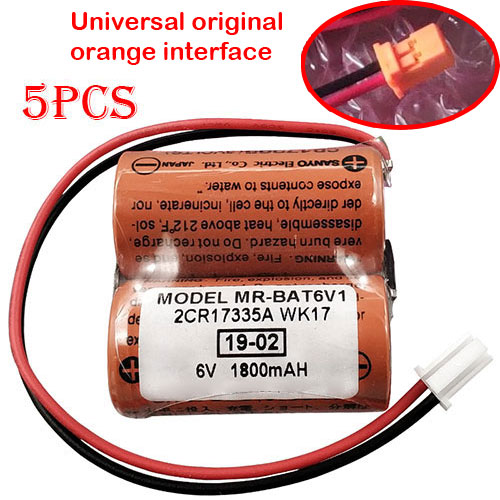
Cheap Mitsubishi MR-BAT6V1 Li-ion Other battery, Brand New MR-BAT6V1 replacement battery for 5pcs Mitsubishi 2CR17335A WK17 6V CR17335

1800mAh 6V Mitsubishi MR-BAT6V1 Batteries for 5pcs Mitsubishi 2CR17335A WK17 6V CR17335, Mitsubishi MR-BAT6V1 Other battery is a brand new,100% Compatible original and replacement Laptop battery,Purchase wholesale and retail MR-BAT6V1 with high quality and low price!

MR-BAT6V1 Battery mitsubishi Li-ion 6V 1800mAh

MR-BAT6V1

Specifications

  • Brand:Mitsubishi
  • Capacity :1800mAh
  • Voltage :6V
  • Color:orange
  • Type :Li-ion
  • Battery Cell Quality: Grade A
  • Descriptive: Replacement Battery – 1 Year Warranty
  • Description: Brand New, 1 Year Warranty! 30-Days Money Back! Fast Shipping!

How we test this Mitsubishi MR-BAT6V1 Battery Li-ion 6V 1800mAh

Step 1: Make sure customer bought the correct battery.
Step 2: Check battery’s appearance and interface.
Step 3: Test battery charger and recharger function.
Step 4: Charger the battery to 100% and recharger to 0% to get real battery capacity
Step 5: Use Ev2300 to check the voltage difference of each goroup cells.
Step 6: Charger battery power more than 30%.
Step 7: Package battery carefully and send out

Compatible Part Numbers:

MR-BAT6V1

Compatible Model Numbers:

Mitsubishi 2CR17335A WK17 6V CR17335

Package Included:
5pcs MR-BAT6V1

How much do you know about how to run laptop well as any place? The follow Tips cut way back on protecting battery life.


1). Please recharge or change your Other battery when battery power low.
2). Using Li-Ion Replacement Mitsubishi MR-BAT6V1 Other Battery for your notebook which can work longer time than Non Li-ion one.
3). It is better to defragmentation regularly for your Other battery life.
4). In order to reduce the laptop power consumpition, you can use some optical drive spin-down and hard drive in your Other .
5). Please keep your laptop in sleep or standby model without long time using, which both save the Replacement Mitsubishi MR-BAT6V1 Other Battery power and extend battery using life.
6). Leave your battery in a dry and cool condition when without using.
7). When you rarely or generally plugged in fixed power using, Please take down your battery to avoid hurting battery life.

Hot Products

11.1V/12.4v 2300mah BOSE 404600 for Bose SOUNDLINK I II III16.8V/20V 400mA/2200mAH/32Wh BOSE 300769-003 for Bose Sounddock Portable Digita7.4V 2230mAh/17Wh BOSE 063404 for 06340415.4V 5209mAh RAZER RC30-0248 for RAZER Blade 15 2018 RZ09-023863.8V 6300mAh/23.94Wh AMAZON 2955C7 for Amazon Kindle Fire HD 10.1 7th3.7V/4.2V 1750MAH/6.5WH AMAZON GP-S10-346392-0100 for AMAZON KINDLE 3 3G WIFI Kindle3.8 V 1300 mAh AMAZON MC-305070 for AMAZON Kindle Voyage7.7V 37Wh/4810mAh ACER AP16M5J for ACER A315-51-51SL N17Q1 SERIES3.8V 2930mAh/11.1Wh NETGEAR W-7 for Netgear AirCard 790S 790SP 8103.85V/4.4V 3080MAH/11.86WH ALCATEL TLp030JC for Alcatel A3 XL 9008j

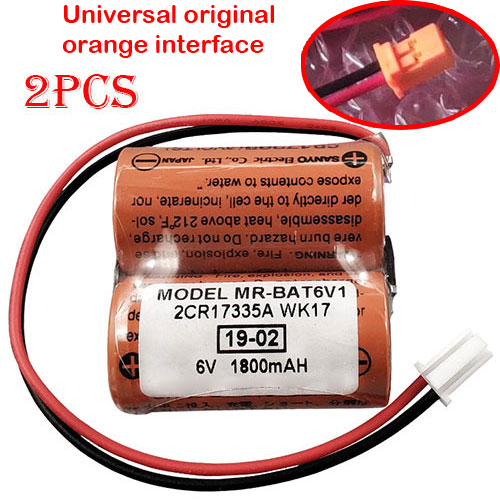
Cheap Mitsubishi MR-BAT6V1 Li-ion Other battery, Brand New MR-BAT6V1 replacement battery for 2pcs Mitsubishi 2CR17335A WK17 6V CR17335

1800mAh 6V Mitsubishi MR-BAT6V1 Batteries for 2pcs Mitsubishi 2CR17335A WK17 6V CR17335, Mitsubishi MR-BAT6V1 Other battery is a brand new,100% Compatible original and replacement Laptop battery,Purchase wholesale and retail MR-BAT6V1 with high quality and low price!

MR-BAT6V1 Battery mitsubishi Li-ion 6V 1800mAh

MR-BAT6V1

Specifications

  • Brand:Mitsubishi
  • Capacity :1800mAh
  • Voltage :6V
  • Color:orange
  • Type :Li-ion
  • Battery Cell Quality: Grade A
  • Descriptive: Replacement Battery – 1 Year Warranty
  • Description: Brand New, 1 Year Warranty! 30-Days Money Back! Fast Shipping!

How we test this Mitsubishi MR-BAT6V1 Battery Li-ion 6V 1800mAh

Step 1: Make sure customer bought the correct battery.
Step 2: Check battery’s appearance and interface.
Step 3: Test battery charger and recharger function.
Step 4: Charger the battery to 100% and recharger to 0% to get real battery capacity
Step 5: Use Ev2300 to check the voltage difference of each goroup cells.
Step 6: Charger battery power more than 30%.
Step 7: Package battery carefully and send out

Compatible Part Numbers:

MR-BAT6V1

Compatible Model Numbers:

Mitsubishi 2CR17335A WK17 6V CR17335

Package Included:
2pcs MR-BAT6V1

How much do you know about how to run laptop well as any place? The follow Tips cut way back on protecting battery life.


1). Please recharge or change your Other battery when battery power low.
2). Using Li-Ion Replacement Mitsubishi MR-BAT6V1 Other Battery for your notebook which can work longer time than Non Li-ion one.
3). It is better to defragmentation regularly for your Other battery life.
4). In order to reduce the laptop power consumpition, you can use some optical drive spin-down and hard drive in your Other .
5). Please keep your laptop in sleep or standby model without long time using, which both save the Replacement Mitsubishi MR-BAT6V1 Other Battery power and extend battery using life.
6). Leave your battery in a dry and cool condition when without using.
7). When you rarely or generally plugged in fixed power using, Please take down your battery to avoid hurting battery life.

Hot Products

11.1V/12.4v 2300mah BOSE 404600 for Bose SOUNDLINK I II III16.8V/20V 400mA/2200mAH/32Wh BOSE 300769-003 for Bose Sounddock Portable Digita7.4V 2230mAh/17Wh BOSE 063404 for 06340415.4V 5209mAh RAZER RC30-0248 for RAZER Blade 15 2018 RZ09-023863.8V 6300mAh/23.94Wh AMAZON 2955C7 for Amazon Kindle Fire HD 10.1 7th3.7V/4.2V 1750MAH/6.5WH AMAZON GP-S10-346392-0100 for AMAZON KINDLE 3 3G WIFI Kindle3.8 V 1300 mAh AMAZON MC-305070 for AMAZON Kindle Voyage7.7V 37Wh/4810mAh ACER AP16M5J for ACER A315-51-51SL N17Q1 SERIES3.8V 2930mAh/11.1Wh NETGEAR W-7 for Netgear AirCard 790S 790SP 8103.85V/4.4V 3080MAH/11.86WH ALCATEL TLp030JC for Alcatel A3 XL 9008j

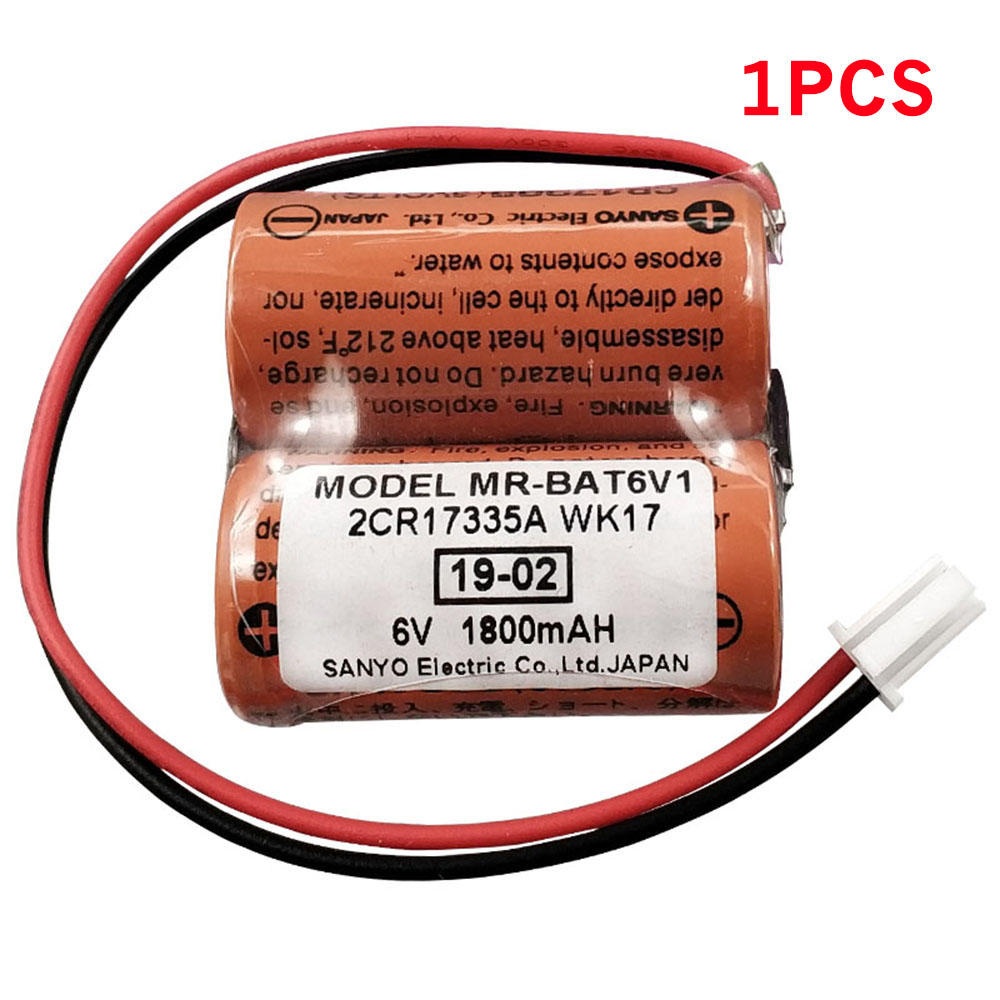
Cheap Mitsubishi MR-BAT6V1 Li-ion Other battery, Brand New MR-BAT6V1 replacement battery for Mitsubishi 2CR17335A WK17 6V CR17335

1800mAh 6V Mitsubishi MR-BAT6V1 Batteries for Mitsubishi 2CR17335A WK17 6V CR17335, Mitsubishi MR-BAT6V1 Other battery is a brand new,100% Compatible original and replacement Laptop battery,Purchase wholesale and retail MR-BAT6V1 with high quality and low price!

MR-BAT6V1 Battery mitsubishi Li-ion 6V 1800mAh

MR-BAT6V1

Specifications

  • Brand:Mitsubishi
  • Capacity :1800mAh
  • Voltage :6V
  • Color:orange
  • Type :Li-ion
  • Battery Cell Quality: Grade A
  • Descriptive: Replacement Battery – 1 Year Warranty
  • Description: Brand New, 1 Year Warranty! 30-Days Money Back! Fast Shipping!

How we test this Mitsubishi MR-BAT6V1 Battery Li-ion 6V 1800mAh

Step 1: Make sure customer bought the correct battery.
Step 2: Check battery’s appearance and interface.
Step 3: Test battery charger and recharger function.
Step 4: Charger the battery to 100% and recharger to 0% to get real battery capacity
Step 5: Use Ev2300 to check the voltage difference of each goroup cells.
Step 6: Charger battery power more than 30%.
Step 7: Package battery carefully and send out

Compatible Part Numbers:

MR-BAT6V1

Compatible Model Numbers:

Mitsubishi 2CR17335A WK17 6V CR17335

How much do you know about how to run laptop well as any place? The follow Tips cut way back on protecting battery life.


1). Please recharge or change your Other battery when battery power low.
2). Using Li-Ion Replacement Mitsubishi MR-BAT6V1 Other Battery for your notebook which can work longer time than Non Li-ion one.
3). It is better to defragmentation regularly for your Other battery life.
4). In order to reduce the laptop power consumpition, you can use some optical drive spin-down and hard drive in your Other .
5). Please keep your laptop in sleep or standby model without long time using, which both save the Replacement Mitsubishi MR-BAT6V1 Other Battery power and extend battery using life.
6). Leave your battery in a dry and cool condition when without using.
7). When you rarely or generally plugged in fixed power using, Please take down your battery to avoid hurting battery life.

Hot Products

11.1V/12.4v 2300mah BOSE 404600 for Bose SOUNDLINK I II III16.8V/20V 400mA/2200mAH/32Wh BOSE 300769-003 for Bose Sounddock Portable Digita7.4V 2230mAh/17Wh BOSE 063404 for 06340415.4V 5209mAh RAZER RC30-0248 for RAZER Blade 15 2018 RZ09-023863.8V 6300mAh/23.94Wh AMAZON 2955C7 for Amazon Kindle Fire HD 10.1 7th3.7V/4.2V 1750MAH/6.5WH AMAZON GP-S10-346392-0100 for AMAZON KINDLE 3 3G WIFI Kindle3.8 V 1300 mAh AMAZON MC-305070 for AMAZON Kindle Voyage7.7V 37Wh/4810mAh ACER AP16M5J for ACER A315-51-51SL N17Q1 SERIES3.8V 2930mAh/11.1Wh NETGEAR W-7 for Netgear AirCard 790S 790SP 8103.85V/4.4V 3080MAH/11.86WH ALCATEL TLp030JC for Alcatel A3 XL 9008j

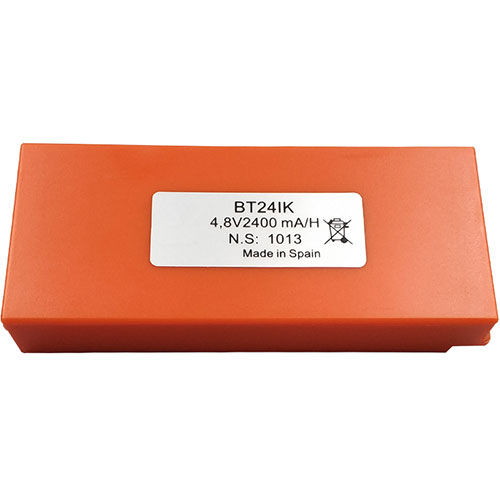
Cheap Ikusi BT24IK Li-ion Other battery, Brand New BT24IK replacement battery for IKUSI TM70/3 TM70/8 T70/3 Iribarri iK3 iK4

2000mAh/9.60Wh 4.8V Ikusi BT24IK Batteries for IKUSI TM70/3 TM70/8 T70/3 Iribarri iK3 iK4, Ikusi BT24IK Other battery is a brand new,100% Compatible original and replacement Laptop battery,Purchase wholesale and retail BT24IK with high quality and low price!

BT24IK Battery ikusi Ni-MH 4.8V 2000mAh/9.60Wh

BT24IK

Specifications

  • Brand:IKUSI
  • Capacity :2000mAh/9.60Wh
  • Voltage :4.8V
  • Type :Ni-MH
  • Battery Cell Quality: Grade A
  • Descriptive: Replacement Battery – 1 Year Warranty
  • Description: Brand New, 1 Year Warranty! 30-Days Money Back! Fast Shipping!

How we test this Ikusi BT24IK Battery Ni-MH 4.8V 2000mAh/9.60Wh

Step 1: Make sure customer bought the correct battery.
Step 2: Check battery’s appearance and interface.
Step 3: Test battery charger and recharger function.
Step 4: Charger the battery to 100% and recharger to 0% to get real battery capacity
Step 5: Use Ev2300 to check the voltage difference of each goroup cells.
Step 6: Charger battery power more than 30%.
Step 7: Package battery carefully and send out

Compatible Part Numbers:

BT24IK BT20K

Compatible Model Numbers:

IKUSI TM70/3 TM70/8 T70/3 Iribarri iK3 iK4

How much do you know about how to run laptop well as any place? The follow Tips cut way back on protecting battery life.


1). Please recharge or change your Other battery when battery power low.
2). Using Li-Ion Replacement Ikusi BT24IK Other Battery for your notebook which can work longer time than Non Li-ion one.
3). It is better to defragmentation regularly for your Other battery life.
4). In order to reduce the laptop power consumpition, you can use some optical drive spin-down and hard drive in your Other .
5). Please keep your laptop in sleep or standby model without long time using, which both save the Replacement Ikusi BT24IK Other Battery power and extend battery using life.
6). Leave your battery in a dry and cool condition when without using.
7). When you rarely or generally plugged in fixed power using, Please take down your battery to avoid hurting battery life.

Hot Products

11.1V/12.4v 2300mah BOSE 404600 for Bose SOUNDLINK I II III16.8V/20V 400mA/2200mAH/32Wh BOSE 300769-003 for Bose Sounddock Portable Digita7.4V 2230mAh/17Wh BOSE 063404 for 06340415.4V 5209mAh RAZER RC30-0248 for RAZER Blade 15 2018 RZ09-023863.8V 6300mAh/23.94Wh AMAZON 2955C7 for Amazon Kindle Fire HD 10.1 7th3.7V/4.2V 1750MAH/6.5WH AMAZON GP-S10-346392-0100 for AMAZON KINDLE 3 3G WIFI Kindle3.8 V 1300 mAh AMAZON MC-305070 for AMAZON Kindle Voyage7.7V 37Wh/4810mAh ACER AP16M5J for ACER A315-51-51SL N17Q1 SERIES3.8V 2930mAh/11.1Wh NETGEAR W-7 for Netgear AirCard 790S 790SP 8103.85V/4.4V 3080MAH/11.86WH ALCATEL TLp030JC for Alcatel A3 XL 9008j

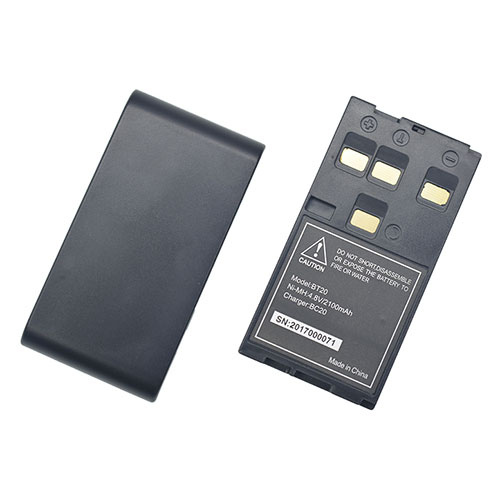
Cheap Hi-target BT20 Li-ion Other battery, Brand New BT20 replacement battery for Hi-target DT02 DT02L

2100mAh 4.8V Hi-target BT20 Batteries for Hi-target DT02 DT02L, Hi-target BT20 Other battery is a brand new,100% Compatible original and replacement Laptop battery,Purchase wholesale and retail BT20 with high quality and low price!

BT20 Battery hi-target Ni-MH 4.8V 2100mAh

BT20

Specifications

  • Brand:Hi-target
  • Capacity :2100mAh
  • Voltage :4.8V
  • Type :Ni-MH
  • Battery Cell Quality: Grade A
  • Descriptive: Replacement Battery – 1 Year Warranty
  • Description: Brand New, 1 Year Warranty! 30-Days Money Back! Fast Shipping!

How we test this Hi-target BT20 Battery Ni-MH 4.8V 2100mAh

Step 1: Make sure customer bought the correct battery.
Step 2: Check battery’s appearance and interface.
Step 3: Test battery charger and recharger function.
Step 4: Charger the battery to 100% and recharger to 0% to get real battery capacity
Step 5: Use Ev2300 to check the voltage difference of each goroup cells.
Step 6: Charger battery power more than 30%.
Step 7: Package battery carefully and send out

Compatible Part Numbers:

BT20

Compatible Model Numbers:

Hi-target DT02 DT02L

How much do you know about how to run laptop well as any place? The follow Tips cut way back on protecting battery life.


1). Please recharge or change your Other battery when battery power low.
2). Using Li-Ion Replacement Hi-target BT20 Other Battery for your notebook which can work longer time than Non Li-ion one.
3). It is better to defragmentation regularly for your Other battery life.
4). In order to reduce the laptop power consumpition, you can use some optical drive spin-down and hard drive in your Other .
5). Please keep your laptop in sleep or standby model without long time using, which both save the Replacement Hi-target BT20 Other Battery power and extend battery using life.
6). Leave your battery in a dry and cool condition when without using.
7). When you rarely or generally plugged in fixed power using, Please take down your battery to avoid hurting battery life.

Hot Products

11.1V/12.4v 2300mah BOSE 404600 for Bose SOUNDLINK I II III16.8V/20V 400mA/2200mAH/32Wh BOSE 300769-003 for Bose Sounddock Portable Digita7.4V 2230mAh/17Wh BOSE 063404 for 06340415.4V 5209mAh RAZER RC30-0248 for RAZER Blade 15 2018 RZ09-023863.8V 6300mAh/23.94Wh AMAZON 2955C7 for Amazon Kindle Fire HD 10.1 7th3.7V/4.2V 1750MAH/6.5WH AMAZON GP-S10-346392-0100 for AMAZON KINDLE 3 3G WIFI Kindle3.8 V 1300 mAh AMAZON MC-305070 for AMAZON Kindle Voyage7.7V 37Wh/4810mAh ACER AP16M5J for ACER A315-51-51SL N17Q1 SERIES3.8V 2930mAh/11.1Wh NETGEAR W-7 for Netgear AirCard 790S 790SP 8103.85V/4.4V 3080MAH/11.86WH ALCATEL TLp030JC for Alcatel A3 XL 9008j