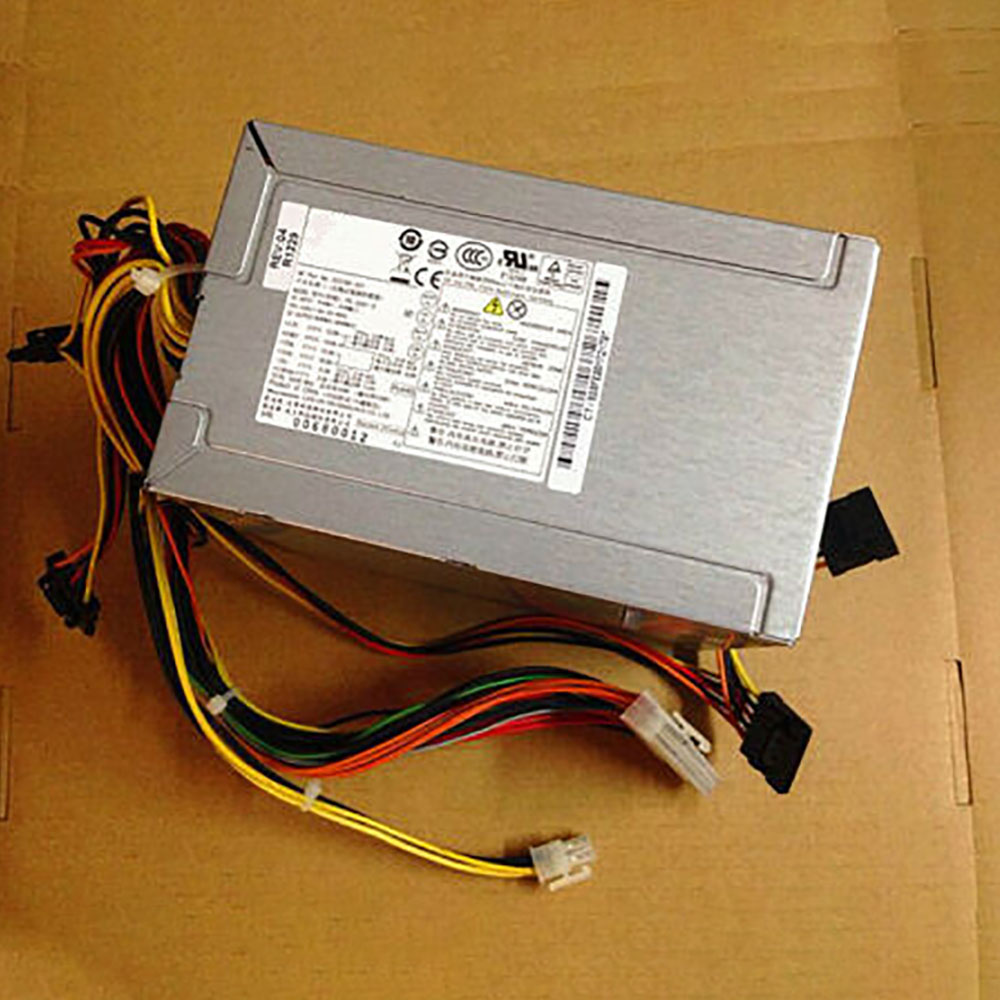
Hp PCB230 Power Supplies ,PCB230 Adapter for HP ProDesk 400 480 G1 3340 3330

300W PCB230 Laptop Charger Wholesale,Hp PCB230 Power Supplies is replacement for HP ProDesk 400 480 G1 3340 3330 ,Hp PCB230 Power Supplies discount price,Fast Shipping.

PCB230

Specifications

  • Brand:HP
  • DC Output:300W
  • AC Input:200-240V~50-60Hz 3A

Charger features:

  • CE, FCC and RoHS certified to ensure proper adapter safety and quality.
  • Sealed for protection against moisture and humidity.
  • Designed with internal safety features to protect against voltage spikes, surges or fluctuations.
  • Utilizes low voltage shut down protection.
  • Utilizes over voltage limiting protection.
  • Utilizes output over current limiting protection.
  • Utilizes “short-circuit†shutdown protection. 
  • Undergone comprehensive quality testing throughout the manufacturing and assembly process.
  • Includes a 12-month free replacement warranty for manufacturer’s defects.

Compatible Part Numbers:

752618-001 D11-300P1A 752628-001 PCB230 021GB

Compatible Model Numbers:

HP pro 3330 3340 3380 3085 power supply
HP ProDesk 400 480 G1

AC INPUT : 200-240V~50-60Hz 3A(NOT Use USA & hAOAB
TOTAL 260W MAX @50 ??
TOTAL 300W MAX @35 ??

Description of Hp PCB230 Power Supplies

High Quality, Guarantee :
Factory direct price, 100% compatible, No memory effect. Hi-Capacity, Quality garantee, certification Fast shipping. We stand behind our Replace for HP Cord/Charger Hp PCB230 100%.
Low Prices, Guarantee :
All laptop Replace for HP Cord/Charger Hp PCB230 at batteryforpc.co.uk are all directly purchased from various reputable manufacturers in the world and have passed stringent quality assurance procedures to achieve international standards. Through this direct selling model, middleman cost is minimized.
Satisfaction Guarantee :
Our goal is to make sure you receive the best value of every purchase you make at our site. We want to be your number one choice Replace for Hp PCB230. If you have any question or suggestion about this laptop ac adapter, please contact us so we can offer you the most convenient service.
Secure Shopping Guarantee :
Shopping from us is safe and secure. None of our customers have ever reported fraudulent use of their credit cards as a result of shopping with us. You can be assured that the information you give us is confidential. We do not sell, rent or share information of our customers with other parties. batteryforpc.co.uk guarantee your Replace for Hp PCB230 transaction will be 100% safe.

Hot Products

11.1V/12.4v 2300mah BOSE 404600 for Bose SOUNDLINK I II III16.8V/20V 400mA/2200mAH/32Wh BOSE 300769-003 for Bose Sounddock Portable Digita3.8V 6300mAh/23.94Wh AMAZON 2955C7 for Amazon Kindle Fire HD 10.1 7th3.8 V 1300 mAh AMAZON MC-305070 for AMAZON Kindle Voyage7.7V 37Wh/4810mAh ACER AP16M5J for ACER A315-51-51SL N17Q1 SERIES3.8V/4.35V 2000MAH/7.6Wh ALCATEL TLI020F7 for Alcatel Onetouch Pixi 4 (5) 503.8V 4000mAh/15.2Wh LENOVO L15D1P31 for Lenovo Yoga Tab3 Pro YT3-X90L3.8V 2930mAh/11.1Wh NETGEAR W-7 for Netgear AirCard 790S 790SP 8103.85V/4.4V 3080MAH/11.86WH ALCATEL TLp030JC for Alcatel A3 XL 9008j3.7V/4.2V 1750MAH/6.5WH AMAZON GP-S10-346392-0100 for AMAZON KINDLE 3 3G WIFI Kindle

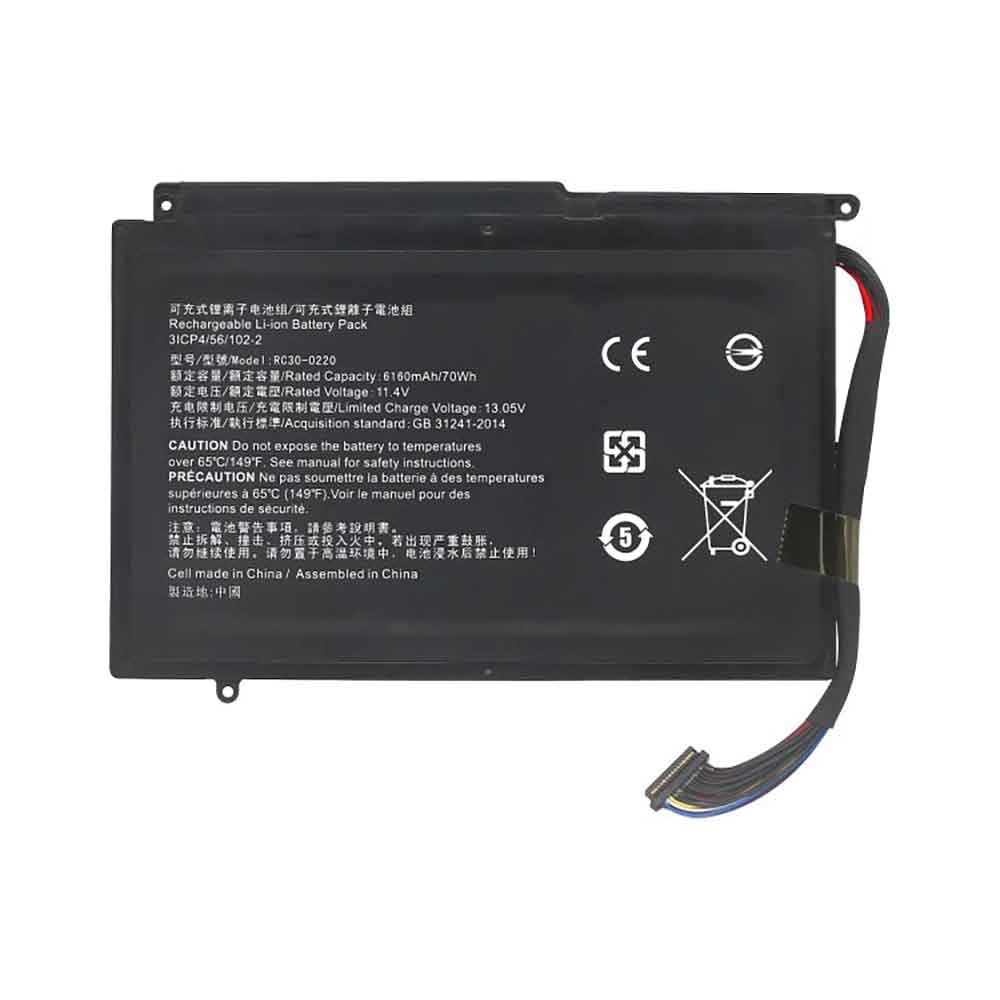
Cheap Razer RC30-0220 Li-ion Laptop battery, Brand New RC30-0220 replacement battery for Razer Blade Pro 17

70Wh/6160mAH 11.4V/13.05V Razer RC30-0220 Batteries for Razer Blade Pro 17, Razer RC30-0220 Laptop battery is a brand new,100% Compatible original and replacement Laptop battery,Purchase wholesale and retail RC30-0220 with high quality and low price!

RC30-0220 Battery razer Li-ion 11.4V/13.05V 70Wh/6160mAH

RC30-0220

Specifications

  • Brand:Razer
  • Capacity :70Wh/6160mAH
  • Voltage :11.4V/13.05V
  • Type :Li-ion
  • Battery Cell Quality: Grade A
  • Descriptive: Replacement Battery – 1 Year Warranty
  • Description: Brand New, 1 Year Warranty! 30-Days Money Back! Fast Shipping!

How we test this Razer RC30-0220 Battery Li-ion 11.4V/13.05V 70Wh/6160mAH

Step 1: Make sure customer bought the correct battery.
Step 2: Check battery’s appearance and interface.
Step 3: Test battery charger and recharger function.
Step 4: Charger the battery to 100% and recharger to 0% to get real battery capacity
Step 5: Use Ev2300 to check the voltage difference of each goroup cells.
Step 6: Charger battery power more than 30%.
Step 7: Package battery carefully and send out

Compatible Part Numbers:

RC30-0220 RZ09-0220

Compatible Model Numbers:

Razer Blade Pro 17

How much do you know about how to run laptop well as any place? The follow Tips cut way back on protecting battery life.


1). Please recharge or change your Laptop battery when battery power low.
2). Using Li-Ion Replacement Razer RC30-0220 Laptop Battery for your notebook which can work longer time than Non Li-ion one.
3). It is better to defragmentation regularly for your Laptop battery life.
4). In order to reduce the laptop power consumpition, you can use some optical drive spin-down and hard drive in your Laptop .
5). Please keep your laptop in sleep or standby model without long time using, which both save the Replacement Razer RC30-0220 Laptop Battery power and extend battery using life.
6). Leave your battery in a dry and cool condition when without using.
7). When you rarely or generally plugged in fixed power using, Please take down your battery to avoid hurting battery life.

Hot Products

11.1V/12.4v 2300mah BOSE 404600 for Bose SOUNDLINK I II III16.8V/20V 400mA/2200mAH/32Wh BOSE 300769-003 for Bose Sounddock Portable Digita3.8V 6300mAh/23.94Wh AMAZON 2955C7 for Amazon Kindle Fire HD 10.1 7th3.8 V 1300 mAh AMAZON MC-305070 for AMAZON Kindle Voyage7.7V 37Wh/4810mAh ACER AP16M5J for ACER A315-51-51SL N17Q1 SERIES3.8V/4.35V 2000MAH/7.6Wh ALCATEL TLI020F7 for Alcatel Onetouch Pixi 4 (5) 503.8V 4000mAh/15.2Wh LENOVO L15D1P31 for Lenovo Yoga Tab3 Pro YT3-X90L3.8V 2930mAh/11.1Wh NETGEAR W-7 for Netgear AirCard 790S 790SP 8103.85V/4.4V 3080MAH/11.86WH ALCATEL TLp030JC for Alcatel A3 XL 9008j3.7V/4.2V 1750MAH/6.5WH AMAZON GP-S10-346392-0100 for AMAZON KINDLE 3 3G WIFI Kindle

This UK Company Built Dirt-Cheap Intel LGA115X CPU Delid and Die Lapping Tools

If you’re looking to improve your CPU’s performance through overclocking, the key is to manage your CPU’s temperatures. You can make huge strides by simply installing a chunky CPU cooler, but die-hards often want to take things a step further. A UK company called NUDEcnc has released tools for helping you with just that, and they’re dirt cheap.

However, it must be noted that these are not for the faint of heart. The next step after a big CPU cooler is to delid your processor, which involves removal of the metal IHS (integrated heat spreader), so that the cooler can make direct contact with the CPU die. For this, NUDEcnc has the NLAP IHS tool.

If you’ve completely lost your mind and decided that even delidding (which we already advise against unless you know what you’re getting yourself into) is not enough, NUDEcnc also has the Nlap Die, which you can use to very precisely lap your CPU’s die. Lapping involves skimming the top layer off your CPU, improving thermal transfer. Typically, the CPU’s IHS get lapped as a safer alternative to delidding, so you can imagine that lapping your CPUs die below that is quite… next level. Thankfully, the tool is also good for lapping the IHS if that’s the most you’re comfortable with.

Of course, we have to give the obvious disclaimer that any of these activities will void your warranty on the CPU, and are entirely at your own risk. While you can get a warranty from Intel on damage from overclocking your CPU, you’re on your own if you take things this far.

Nevertheless, NUDEcnc assures us that both tools are built with such precision that they’re safe to use if handled with care—they can measure your progress down to 0.01mm accuracy. If by this point you’re still interested, you’ll be happy to know that risk is the biggest price you’ll be paying. The NUDEcnc Nlap Die and Nlap IHS tools cost $20, or $32 for the set.

AOC CU34G2X Curved Gaming Monitor Review: Speed, Immersion and HDR

HDR support is becoming increasingly important to having the best gaming monitor. We all agree that AMD FreeSync or Nvidia G-Sync is a must regardless of a display’s max refresh rate. But more games are appearing that take advantage of HDR and the extended color of the DCI-P3 gamut. To fully realize the creator’s intent, one must consider adding these features to their shopping list.

AOC has produced many high-performance gaming screens, and today we’re looking at one with HDR and FreeSync, the AOC CU34G2X. It’s an ultra-wide curved VA panel, 34-inches diagonal, 3440×1440 resolution and the promise of high performance, thanks to a 144 Hz refresh rate and a claimed 1ms response time. 

AOC starts with a 1500mm radius curved panel. It features a claimed 300 nits of brightness, and although AOC’s product page doesn’t advertise the CU34G2X as an HDR monitor, it supports HDR with HDR10 and an extended color gamut. FreeSync is the adaptive refresh tech of choice, but we confirmed in our tests that the CU34G2X will also run G-Sync (follow our instructions on how to run G-Sync on a FreeSync monitor), and both flavors worked with HDR. Color depth is 8-bits, so 10-bit HDR signals are compressed, but this is common practice in all but the most expensive 10-bit native monitors.

It also features the latest connectivity with DisplayPort 1.4 and HDMI 2.0 (see our DisplayPort vs. HDMI analysis for comparison), and the USB ports are version 3.2. For purists who would rather do without Adaptive-Sync, there is a blur-reduction option similar to G-Sync’s ULMB called MBR, and it works at speeds up to the max refresh of 144 Hz. The lower limit for FreeSync is 48Hz. You won’t need the best graphics card or even a high-end one to drive it, but you will want enough power to keep the action above 48 frames per second (fps). 

The CU34G2X is a bit pricier than 27-inch 16:9 1440p screens with similar feature sets but that extra screen width and its tight 1500R curvature should deliver a more immersive experience in first-person games and flight simulators. 

Unpacking and Accessories

AOC provides a quality stand and solid base for the CU34G2X that attaches to the panel without tools. The carton also includes DisplayPort, HDMI and USB cables. An IEC power cord provides the necessary electrons for a panel that draws 47 watts when the backlight is set to 200 nits. 

One thing we rarely see bundled with gaming monitors is a calibration data sheet. AOC provides color error information of a Delta E (dE) of less than 3 and a screen uniformity measurement as well. Our tests agreed with the data; this monitor is very accurate out of the box. 

Product 360

The CU34G2X has a thin bezel with a flush-mounted anti-glare layer that appears frameless when the power is off. The image shows an 8mm border with a wider trim strip across the bottom. The front layer has almost no air gap, which eliminates any grain from the picture and renders it very sharply. Uniformity is excellent with no bleed, glow or hotspots visible in our sample.

Styling is clearly gaming oriented, but AOC has left out RGB lighting. The red trim seems to glow in the photos, but that is simply its reflective surface in action. The only LED lighting is a miniscule power indicator that glows white in operation and orange in standby. The red trim extends around back with two large chevrons that accent the panel and a vertical stripe on the upright.

The stand is solid and features a 5-inch height adjustment with 30-degree swivel to either side and 21.5-degree back tilt. Movements are firm and sure with no play. If you’d rather use an aftermarket mount solution, the stand unsnaps to reveal a 100mm VESA bolt pattern. You’ll have to supply your own fasteners though.

The control buttons are in the expected place underneath on the right, but AOC chose to make them very small and recessed. Though they click firmly, they are hard to operate by feel. On a positive note, they don’t stick out visibly, but we really wish they were larger — or better yet, replaced with a joystick.

There aren’t any side-mounted USB ports, but you’ll find one upstream and four downstream v3.2 connections on the input panel. You also get two each of DisplayPort 1.4 and HDMI 2.0. FreeSync with HDR will work through any video input but to run G-Sync (unofficially) requires DisplayPort as usual. All support the CU34G2X’s full native resolution at 144 Hz.

OSD Features

The OSD is AOC’s usual strip across the bottom of the screen. It’s divided into seven sections and includes everything needed for calibration and gaming. You’ll have little need for the color controls though. The CU34G2X is very accurate by default.

The Luminance menu has brightness and contrast sliders along with eight picture modes (Eco Modes) and three gamma presets. The HDR Mode options are only available with HDR signals, meaning there is no emulation here for SDR content. We settled on DisplayHDR as the best choice for all HDR games and video.

You can calibrate the CU34G2X by selecting the User color temp, but in our tests, we couldn’t improve upon the monitor’s default grayscale or gamma tracking. Among the color temp options is an sRGB mode that’s accurate and the only way to reduce the monitor’s gamut from its native DCI-P3. The brightness slider is still available, so this mode is useful to those wishing to view their SDR content in the correct color space.

The Game Setup menu has all the necessary features to tweak gameplay, including an Adaptive-Sync toggle, blur-reduction (MBR), a frame rate counter and overdrive. For overdrive, any setting above Weak produced ghosting, but at frame rates above 80 fps, there wasn’t any blur to speak of anyway. Additionally, you must turn off Adaptive-Sync to access the MBR feature, which has 20 levels of control. Each one gets darker as blur reduces. Also here is a slider to adjust color saturation and a low blue mode for reading.

Setup and Calibration

The CU34G2X’s Standard picture mode with Warm color temp and Gamma 1 is the default and best setting. Our tests showed it to be very accurate, and we were unable to improve upon the initial numbers in the User color temp mode. If you want a darker gamma, Gamma 3 looked good too, thanks to the VA panel’s high contrast. The backlight doesn’t peak at a high level and will go down to a dim 38 nits if you zero the brightness slider. 

For HDR content, we suggest the DisplayHDR mode for the best contrast and color fidelity. Here are the brightness settings for commonly used output levels in SDR mode. When an HDR signal is detected, the backlight is locked to its maximum setting.

Gaming and Hands-on

Without a doubt, the CU34G2X excelled when playing SDR games like Tomb Raider. With its extra color and contrast, details like rock faces and metallic textures just popped off the screen. You can tell AOC engineered the color well here because reds never looked oversaturated, and the all-important flesh tones appeared perfectly natural. Highlights were nice and bright with deep shadows that retained their detail. We didn’t have to employ the shadow control option to easily see everything in the game’s darkest places.

With FreeSync on and Tomb Raider at medium settings, frame rates clocked in at 65-70 fps with an AMD Radeon R9 285-powered system. Even though the AOC CU34G2X isn’t officially G-Sync Compatible, we ran G-Sync on it with an Nvidia GeForce GTX 1080 Ti and hit 120-130 fps with details maxed out. We also tried the various overdrive settings and settled on Weak as the best option. It added a bit of motion resolution without ghosting.

Switching Windows to HDR proved interesting. The CU34G2X isn’t terribly bright, so we maxed the control panel luminance slider, then loaded up Call of Duty: WWII. A few tweaks of the in-game controls produced decent highlights and deep blacks with good shadow detail. This title is particularly well-designed to deliver a great image on any monitor when you use the provided adjustments.

Frame rates settled at around 50 fps with FreeSync and a Radeon R9 285 and 100 fps with G-Sync and a 1080 Ti. Call of Duty: WWII demands a bit more processing power, and HDR slowed things down a little. In either case, the picture looked fantastic. We spent some time exploring a Paris office building with rooms that were either brightly lit or cast in dark lamp shadows. The extra color helped bring murky details out of the fog, while highlights shined out. We wished for a bit more brightness, but once our eyes adjusted, the view was very engaging. That’s the magic of a tightly curved monitor like the CU34G2X. Its 1500mm radius wrapped the image to the edge of our peripheral vision when sitting about 3 feet away. Pixel density was never an issue with 109ppi available.

Like all curved monitors with good video processing and a fast refresh rate, the CU34G2X provides a game experience beyond what any 16:9 flat panel can deliver. While we’ve been more than satisfied with flat screens of 32 inches and larger, the ultra-wide is still our favorite gaming tool.

Uncalibrated – Maximum Backlight Level

All the monitors in the CU34G2X comparison group support HDR with edge backlights and max brightness that ranges from 350 to over 500 nits. Panels are a mix of VA (AOC Agon AG493UCX, Aorus CV27Q, Dell S3220DGF) and IPS (Aorus FI27Q, BenQ EW3280U). 

Our CU34G2X sample came up short of its claimed 300 nit output level, topping out at 232 nits. This is bright enough for SDR content though you won’t want to use this monitor in a super bright environment. Luckily, it produced good black levels that are on par with the better VA panels here. Resulting contrast is 2,394:1 with default settings in place. This is solid performance but not the best among our comparison group. 

Our calibration (see our recommended settings) consisted only of lowering the brightness setting to 200 nits. We didn’t make any other changes because we couldn’t improve upon the CU34G2X’s color accuracy in the User Color Temp mode. Regardless, black levels were quite good, and contrast was a tick higher at 2,428.3:1.

With excellent screen uniformity available, the CU34G2X also posted a solid ANSI contrast score of 2,257.7:1. You can see from all our test results that VA is by far the best panel tech for native dynamic range. Until you get into monitors with full-array local dimming backlights, which you’ll find in the best HDR monitors, this is the best way to get deep blacks on a budget. 

The CU34G2X ships in its Standard picture with the color temp set to Warm and gamma on preset 1. This is the best combination of settings as it delivers astounding out-of-box accuracy. 

Grayscale and Gamma Tracking

For an uncalibrated monitor, it doesn’t get much better than this for our grayscale and gamma tracking tests. Only at 100% brightness did the CU34G2X falter with a small rise in green, but that’s something only our i1 Pro spectrophotometer can see. Gamma was also perfect with only the tiniest deviations from the 2.2 line, again, an invisible error. AOC delivered on the numbers shown in the included calibration data sheet.

For SDR games and video, sRGB (2nd chart) is the correct color gamut to use. You’ll find the sRGB option in the color temp menu under Color Setup While many users opt for the larger DCI-P3 color space when viewing any content, color purists prefer using an accurate gamut option, and the CU34G2X provides this. There are no visible errors in the grayscale tracking test, and only 10% brightness shows an error of being too light. While that error helped bring out shadow detail, some dark scenes looked slightly washed out. You can compensate for this by reducing the Shadow Control slider in the Game Setting menu. That will make blacks a little truer. This is still great performance though. 

Comparisons

The CU34G2X easily took first place in the uncalibrated grayscale test with a super low 0.60dE result. All monitors except the AG493UCX had no visible issues before calibration. After adjustment, the FI27Q pipped ahead by a nose in the DCI-P3 mode. The AOC’s sRGB mode isn’t adjustable but still comes in with a very low error of just 1.31dE.

The top four screens deliver excellent gamma tracking with a tight range of values. The CU34G2X postrf a perfect 2.2 average score, with the BenQ and Aorus screens falling slightly behind. Gamma is important not only to shadow and highlight detail but to color tracking too, and the AOC excelled here.

Color Gamut Accuracy

The CU34G2X was equally impressive in our color gamut tests. Both the native DCI-P3 and sRGB modes showed slight under-saturation in blue and magenta but compensated for it with extra luminance for those colors. The net effect is an extremely low error level in both cases. Green also came up slightly short in the DCI gamut. This is a common behavior for monitors with extended color. 

Comparisons

Thanks to careful tuning of color luminance levels, the CU34G2X managed very low errors of 1.28dE for sRGB and 1.98 for DCI-P3 after calibration to 200 nits. This is professional monitor territory for sure. Images looked natural and well-detailed with color that never looked overblown or washed out.

Since the CU34G2X’s primaries are slightly under-saturated, DCI gamut volume suffers a bit. 81.26% DCI-P3 coverage is a bit behind the latest extended color displays we’ve reviewed. The 95.03% score for sRGB is also due to its under-saturated blue primary. While these aren’t major issues, we’d like to see a tad more color saturation in general.

Applying an HDR signal to the CU34G2X automatically switches it to HDR mode, where you’ll find four picture options. DisplayHDR, the default, is by far the best, and it’s the only one that doesn’t apply edge enhancement to contrasting objects. 

HDR Brightness and Contrast

We had hoped to see more light output from the CU34G2X in HDR mode, but it topped out at about the same level as with SDR. The result was the same whether we measured full field or window patterns. Some sort of dynamic contrast or selective overdrive of the backlight would be a great improvement here. Many of today’s HDR screens can exceed 400 nits as the other monitors here do, and we prefer to hit at least 600 nits with HDR gaming. 

Fortunately, that is somewhat made up for by an excellent black level. The HDR contrast level is about the same as SDR, which isn’t ideal, but the CU34G2X still looks better than the FI27Q or EW3280U HDR monitors. Dynamic range is king, and no edge-lit monitor does it better than the Dell S3220DGF with over 18,000:1 contrast, achieved by some clever engineering of its firmware.

Applying an HDR signal to the CU34G2X automatically switches it to HDR mode, where you’ll find four picture options. DisplayHDR, the default, is by far the best, and it’s the only one that doesn’t apply edge enhancement to contrasting objects. 

Curved monitors are generally less consistent when it comes to screen uniformity, but the CU34G2X is clearly one of the better examples. Our sample showed no visible issues, even at the edges. The anti-glare layer is fitted tightly, making that performance even more impressive. The picture modes include a uniformity option that marries up with the included calibration data sheet, but that only serves to raise black levels. Clearly, it’s not necessary anyway; 9.09% is a solid score in this test. 

In the response time test, the CU34G2X was just 1ms off from the 165 Hz screens. We thought it would beat the 120 Hz AG493UCX, but it didn’t quite pull that off. It did lop 2ms off the total lag score, fitting in right between the 120Hz and 165Hz levels, as it should. While the most competitive gamers will want even less lag, the majority of players will enjoy the smoothness and responsiveness of the CU34G2X. We certainly observed no issues during gameplay with perfect synchronization of our gaming mouse and gaming keyboard inputs to on-screen action. 

There is no question that ultra-wide displays have become a de facto standard for gaming enthusiasts. What began a few years ago as a novelty–an answer to an unasked question–has evolved into a desirable piece of hardware for gamers seeking full immersion. While the best VR headsets still provide a greater sense of sensory deprivation, a curved 21:9 screen manages to capture much of that feeling without a bulky apparatus on your head.

The AOC CU34G2X is a great example of the genre and the evolution of gaming monitors in general. It takes the staple features of fast refresh and Adaptive-Sync and adds image-enhancing elements: extended color, HDR and QHD resolution, which still represents the sweet spot between pixel density and frame rate performance. To that, it adds blur-reduction that works up to 144 Hz, a rare thing since most backlight strobes only go up to 120 Hz and some top out at 100 Hz.

However, the monitor misses its claimed 300 nits brightness and doesn’t provide any extra light in HDR mode. Though the VA panel delivers around 2,400:1 contrast, it doesn’t offer any extra dynamic range for HDR material. We saw good black levels, but there are a few HDR monitors that do more with their HDR modes.

If you’re looking for solid video processing, the CU34G2X has it. FreeSync and G-Sync (unofficially) both worked with HDR, and overall input lag kept with other 144 Hz screens we’ve tested. Panel response was fast enough to keep motion blur low, and blur reduction wasn’t necessary as long as frame rates stayed over 80 fps. At QHD resolution, that won’t require an expensive graphics card to achieve.

The CU34G2X sells at a near-premium price point but doesn’t cost much more than other 34-inch ultra-wide displays. Better HDR performance, more brightness and a larger color gamut can be had but at a higher price. However, this monitor delivers excellent performance for the money. 

New Raspberry Pi OS Looks Like Windows XP

While you can’t quite have the full Windows XP experience on a Raspberry Pi, this Linux Raspbian XP Professional operating system (OS) from Pi Lab definitely gets close. It’s designed to run on the Raspberry Pi 4, the only model powerful enough to handle it.

Linux Raspbian XP Professional comes with a number of features that are reminiscent of the old XP OS. It has a working Start Menu complete with a usable search bar at the top. All of the menus, icons and taskbars have the classic bubbly XP. They even included the complete LibreOffice suite in lieu of Microsoft Office needs.

Since this is Raspbian with an XP overlay, you won’t be able to run XP applications as-is. It is possible to run Windows software from that era, however. You just need the right emulator. If you want to run a native Windows application, you can use the built-in Windows 98 virtual machine.

The OS is preloaded with several emulation platforms, like BOX86, that can run old PC games. You can also take advantage of other emulators, such as DOSBox, Mupen64 and MAME (here’s how to run emulators on Raspberry Pi 4). By connecting a USB controller, the whole system doubles as a retro gaming console.

This is still a work in progress, so expect a few updates in the future. In the meantime, check out the current build and see what it’s all about. You can visit the official Pi Lab channel on YouTube for installation details and new editions.

Microsoft Surface Book 3 may be a content creation powerhouse

Microsoft is expected to launch the Surface Book 3 in a matter of weeks and a new leak suggests it will offer a major spec upgrade under the hood. 

The leak, courtesy of tipster Roland Quandt, all but confirms that the Surface Book 3 will feature Intel 10th-generation Comet Lake processors, with the 13-inch model and 15-inch variants set to pack Core i5-10210U and Core i7-10510U CPUs, respectively. 

Microsoft Surface Book 3 prices US$. GTX on all except high-end 15in which have Quadro.13ini5 8GB/256GB 1699,99 (no dGPU)i7 16GB/256GB 1999,99i7 32GB/512GB 2499,99i7 32GB/1TB 2699,9915ini7 16GB/256GB 2299,99i7 32GB/512GB 2799,99i7 32GB/1TB 2999,99i7 32GB/2TB 3399,99April 20, 2020

Further, a 3DMark listing suggests that Microsoft will offer the Surface Book 3 with the GeForce GTX 1650 Max-Q and GTX 1660 Ti Max-Q graphics, positioning the laptop as a specced-out machine aimed at content creators and professional users.

Quandt believes these Quadro GPUs will only make their way to the Surface Book 3 15, specifically SKUs with 32GB of RAM and at least 512GB of storage.

According to this latest leak from Quandt, the Surface Book 3 will be available from $1,699 (around £1,385, AU$3,318), which will get you a 13-inch i5 model sans dGPU with 8GB RAM and 256GB storage. Microsoft’s top-spec 15-inch Core i7 model with 32GB RAM and 2TB storage will set you back a hefty $3,399 (around £2,770, AU$6,640). The Surface Book 3 is widely expected to make its debut in May, alongside a revamped Surface Dock and the so-called Surface Go 2.

Many forms

The tipster also notes that Microsoft is planning more, as yet undisclosed variants of the Surface Book 3. Given last year’s Surface Laptop 3 was offered in both Intel and AMD versions, we wouldn’t be surprised if Microsoft was also planning to add an Team Red variant to its Surface Book lineup.

Hardware leaker @_rogame recently discovered AMD Ryzen 4000 benchmark that showed the Zen 2 APU inside a mysterious Surface device, speculating that the device, which sports a custom Ryzen 7 CPU with integrated Radeon RX Vega 11 graphics, could be the incoming Surface Book 3.

This all means that the Surface Book 3 could be utilizing a wide range of different hardware so both casual and professional users can get a model that will be perfect for their actual needs. Whether you need the professional graphics power that a Quadro GPU offers or whether you just need something that can run Photoshop, these Surface Book 3 leaks suggest everyone will get what they need. 

Samsung Galaxy Note 20 leak reveals under-display camera to beat iPhone 12

The Samsung Galaxy Note 20 could be set for a reveal soon, as possible teaser images for the upcoming phone have popped up on the company’s Galaxy Store. 

An eagle-eyed reader of SamMobile flagged a featured image in the Galaxy Store’s “Samsung Rewards” section, which included a theme for an unreleased Samsung phone. Going by its proportion, it looks like it could be the Galaxy Note 20. 

The image isn’t very clear and we are unable to corroborate it on our own Samsung Galaxy Note 10 Plus, though our unit is set up for the UK. There’s also a good chance that Samsung has pulled the theme from its store. 

But from what we can see, the theme for the unknown phone in the middle of the image shows the handset has an expansive display with no cutout hole for the front-facing camera. That could mean Samsung has found some way to embed a selfie camera under the display, or it could be using a pop-up camera, such as the one found in the OnePlus 7T Pro. That phone has now been succeeded by the OnePlus 8 Pro, which has a punch-hole front-facing camera. 

However, this theme is potentially just a mockup designed to stand in for the Note 20 until it’s actually announced later this year. There’s a noticeable lack of buttons on the phone’s side, and dropping the Infinity-O display doesn’t track with other leaks and rumours. Most sources currently suggest it’ll have more of a spec and camera upgrade than a major overhaul over the Samsung Galaxy Note 10. 

Given the mystery phone has its left side obscured by the Galaxy S10 Plus in the image, it could be that Samsung has decided to move the punch-hole camera to the top left-hand side of the Note 20. Again, this would seem odd as the Galaxy S20, Galaxy S20 Plus, and Galaxy S20 Ultra all have their cutouts centred in the display’s top edge, continuing the design set by the Note 10. 

This mockup might just be that: a mockup with no solid grounding in final product design for the Galaxy Note 20. But we would like to see Samsung push things further with its smartphone design, and a nearly button-less handset with an under-display selfie camera could help the Note 20 in its upcoming battle against the iPhone 12. 

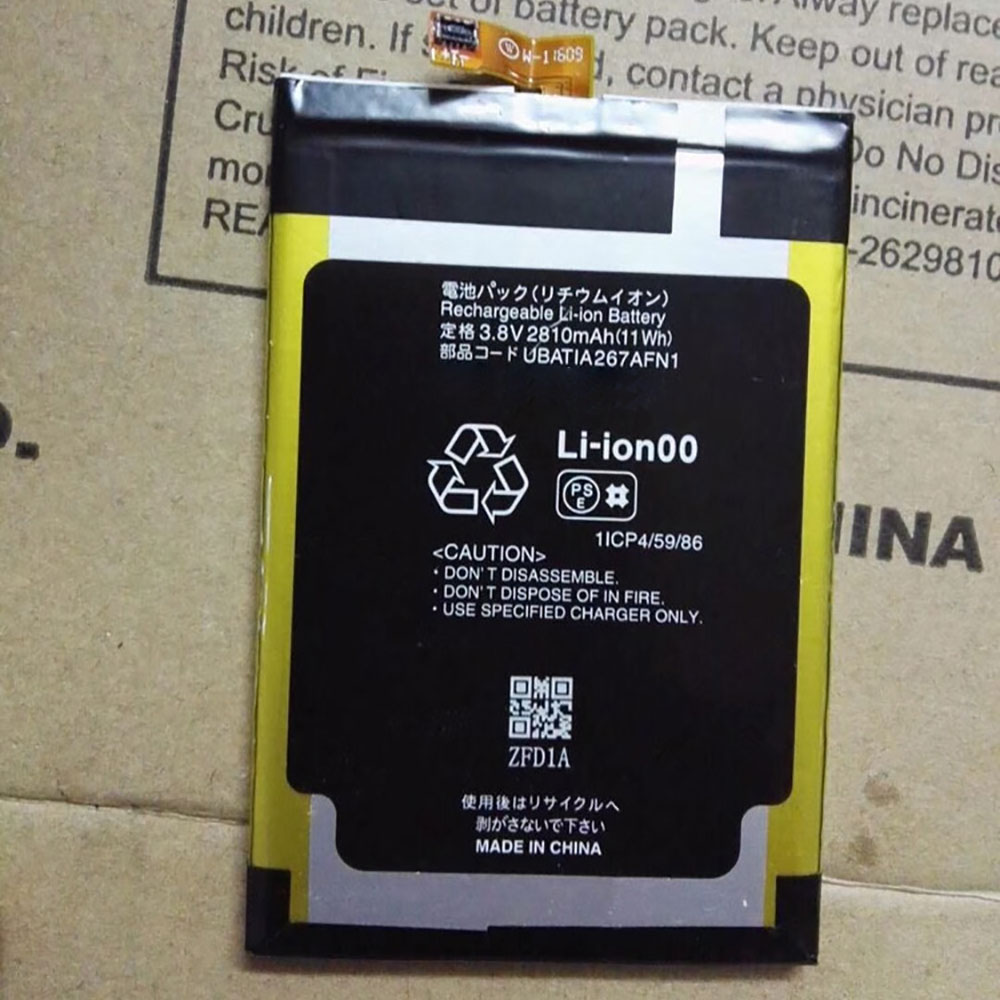
Cheap Sharp SH-02H Li-ion Cell Phone battery, Brand New SH-02H replacement battery for SHARP cell phone

2810Mah/11Wh 3.8V/4.3V Sharp SH-02H Batteries for SHARP cell phone, Sharp SH-02H Cell Phone battery is a brand new,100% Compatible original and replacement Laptop battery,Purchase wholesale and retail SH-02H with high quality and low price!

SH-02H Battery sharp Li-ion 3.8V/4.3V 2810Mah/11Wh

SH-02H

Specifications

  • Brand:SHARP
  • Capacity :2810Mah/11Wh
  • Voltage :3.8V/4.3V
  • Type :Li-ion
  • Battery Cell Quality: Grade A
  • Descriptive: Replacement Battery – 1 Year Warranty
  • Description: Brand New, 1 Year Warranty! 30-Days Money Back! Fast Shipping!

How we test this Sharp SH-02H Battery Li-ion 3.8V/4.3V 2810Mah/11Wh

Step 1: Make sure customer bought the correct battery.
Step 2: Check battery’s appearance and interface.
Step 3: Test battery charger and recharger function.
Step 4: Charger the battery to 100% and recharger to 0% to get real battery capacity
Step 5: Use Ev2300 to check the voltage difference of each goroup cells.
Step 6: Charger battery power more than 30%.
Step 7: Package battery carefully and send out

Compatible Part Numbers:

UBATIA267AFN1 SH-02H

Compatible Model Numbers:

SHARP cell phone

How much do you know about how to run laptop well as any place? The follow Tips cut way back on protecting battery life.


1). Please recharge or change your Cell Phone battery when battery power low.
2). Using Li-Ion Replacement Sharp SH-02H Cell Phone Battery for your notebook which can work longer time than Non Li-ion one.
3). It is better to defragmentation regularly for your Cell Phone battery life.
4). In order to reduce the laptop power consumpition, you can use some optical drive spin-down and hard drive in your Cell Phone .
5). Please keep your laptop in sleep or standby model without long time using, which both save the Replacement Sharp SH-02H Cell Phone Battery power and extend battery using life.
6). Leave your battery in a dry and cool condition when without using.
7). When you rarely or generally plugged in fixed power using, Please take down your battery to avoid hurting battery life.

Hot Products

11.1V/12.4v 2300mah BOSE 404600 for Bose SOUNDLINK I II III16.8V/20V 400mA/2200mAH/32Wh BOSE 300769-003 for Bose Sounddock Portable Digita3.8V 6300mAh/23.94Wh AMAZON 2955C7 for Amazon Kindle Fire HD 10.1 7th3.8 V 1300 mAh AMAZON MC-305070 for AMAZON Kindle Voyage7.7V 37Wh/4810mAh ACER AP16M5J for ACER A315-51-51SL N17Q1 SERIES3.8V/4.35V 2000MAH/7.6Wh ALCATEL TLI020F7 for Alcatel Onetouch Pixi 4 (5) 503.8V 4000mAh/15.2Wh LENOVO L15D1P31 for Lenovo Yoga Tab3 Pro YT3-X90L3.8V 2930mAh/11.1Wh NETGEAR W-7 for Netgear AirCard 790S 790SP 8103.85V/4.4V 3080MAH/11.86WH ALCATEL TLp030JC for Alcatel A3 XL 9008j3.7V/4.2V 1750MAH/6.5WH AMAZON GP-S10-346392-0100 for AMAZON KINDLE 3 3G WIFI Kindle

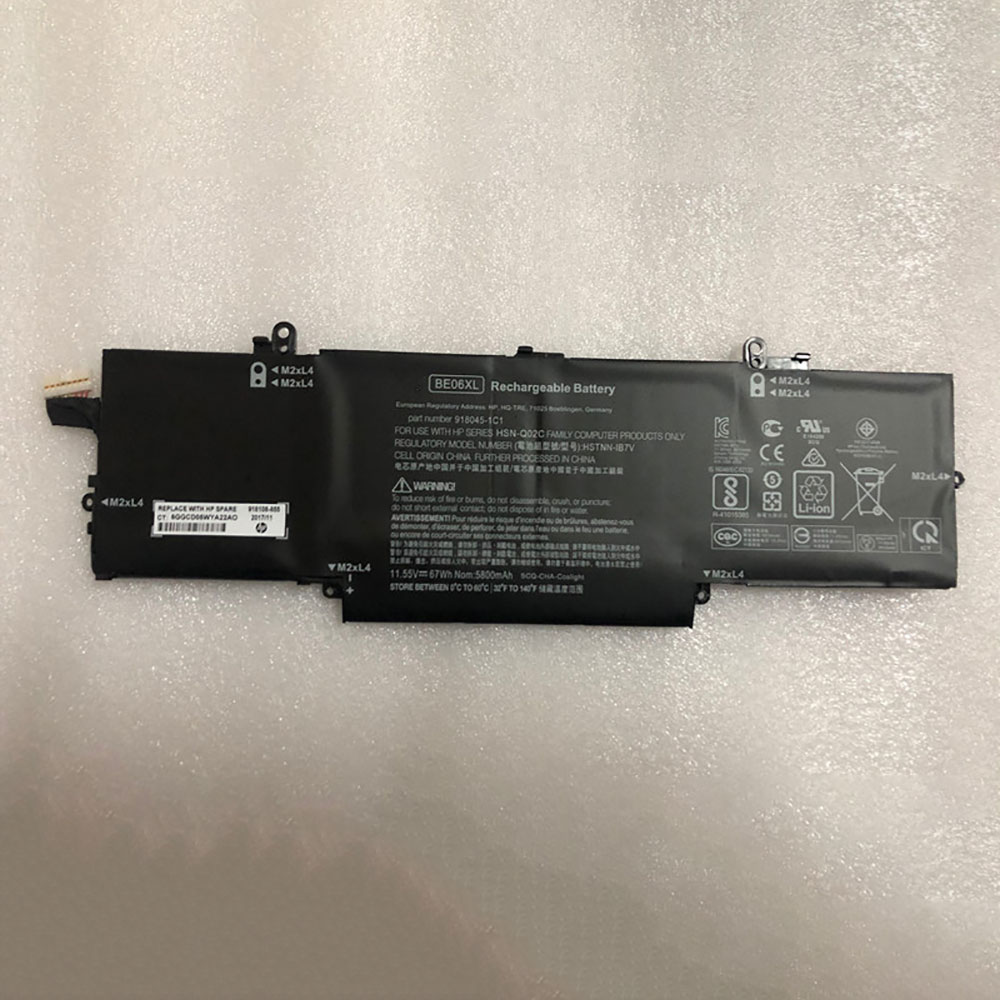
Cheap Hp BE06XL Li-ion Laptop battery, Brand New BE06XL replacement battery for HP Elitebook 1040 G4

67Wh/5800mAh 11.55V Hp BE06XL Batteries for HP Elitebook 1040 G4, Hp BE06XL Laptop battery is a brand new,100% Compatible original and replacement Laptop battery,Purchase wholesale and retail BE06XL with high quality and low price!

BE06XL Battery hp Li-ion 11.55V 67Wh/5800mAh

BE06XL

Specifications

  • Brand:HP
  • Capacity :67Wh/5800mAh
  • Voltage :11.55V
  • Type :Li-ion
  • Battery Cell Quality: Grade A
  • Descriptive: Replacement Battery – 1 Year Warranty
  • Description: Brand New, 1 Year Warranty! 30-Days Money Back! Fast Shipping!

How we test this Hp BE06XL Battery Li-ion 11.55V 67Wh/5800mAh

Step 1: Make sure customer bought the correct battery.
Step 2: Check battery’s appearance and interface.
Step 3: Test battery charger and recharger function.
Step 4: Charger the battery to 100% and recharger to 0% to get real battery capacity
Step 5: Use Ev2300 to check the voltage difference of each goroup cells.
Step 6: Charger battery power more than 30%.
Step 7: Package battery carefully and send out

Compatible Part Numbers:

918045-1C1 918045-271 918108-855 918180-855 BE06XL HSN-Q02C HSTNN-1B7V HSTNN-DB7Y HSTNN-IB7V 918045-2C1

Compatible Model Numbers:

HP Elitebook 1040 G4
HP Elitebook 1040 G4-2XU40UT
HP E litebook Folio 1040 G4

How much do you know about how to run laptop well as any place? The follow Tips cut way back on protecting battery life.


1). Please recharge or change your Laptop battery when battery power low.
2). Using Li-Ion Replacement Hp BE06XL Laptop Battery for your notebook which can work longer time than Non Li-ion one.
3). It is better to defragmentation regularly for your Laptop battery life.
4). In order to reduce the laptop power consumpition, you can use some optical drive spin-down and hard drive in your Laptop .
5). Please keep your laptop in sleep or standby model without long time using, which both save the Replacement Hp BE06XL Laptop Battery power and extend battery using life.
6). Leave your battery in a dry and cool condition when without using.
7). When you rarely or generally plugged in fixed power using, Please take down your battery to avoid hurting battery life.

Hot Products

11.1V/12.4v 2300mah BOSE 404600 for Bose SOUNDLINK I II III16.8V/20V 400mA/2200mAH/32Wh BOSE 300769-003 for Bose Sounddock Portable Digita3.8V 6300mAh/23.94Wh AMAZON 2955C7 for Amazon Kindle Fire HD 10.1 7th3.8 V 1300 mAh AMAZON MC-305070 for AMAZON Kindle Voyage7.7V 37Wh/4810mAh ACER AP16M5J for ACER A315-51-51SL N17Q1 SERIES3.8V/4.35V 2000MAH/7.6Wh ALCATEL TLI020F7 for Alcatel Onetouch Pixi 4 (5) 503.8V 4000mAh/15.2Wh LENOVO L15D1P31 for Lenovo Yoga Tab3 Pro YT3-X90L3.8V 2930mAh/11.1Wh NETGEAR W-7 for Netgear AirCard 790S 790SP 8103.85V/4.4V 3080MAH/11.86WH ALCATEL TLp030JC for Alcatel A3 XL 9008j3.7V/4.2V 1750MAH/6.5WH AMAZON GP-S10-346392-0100 for AMAZON KINDLE 3 3G WIFI Kindle

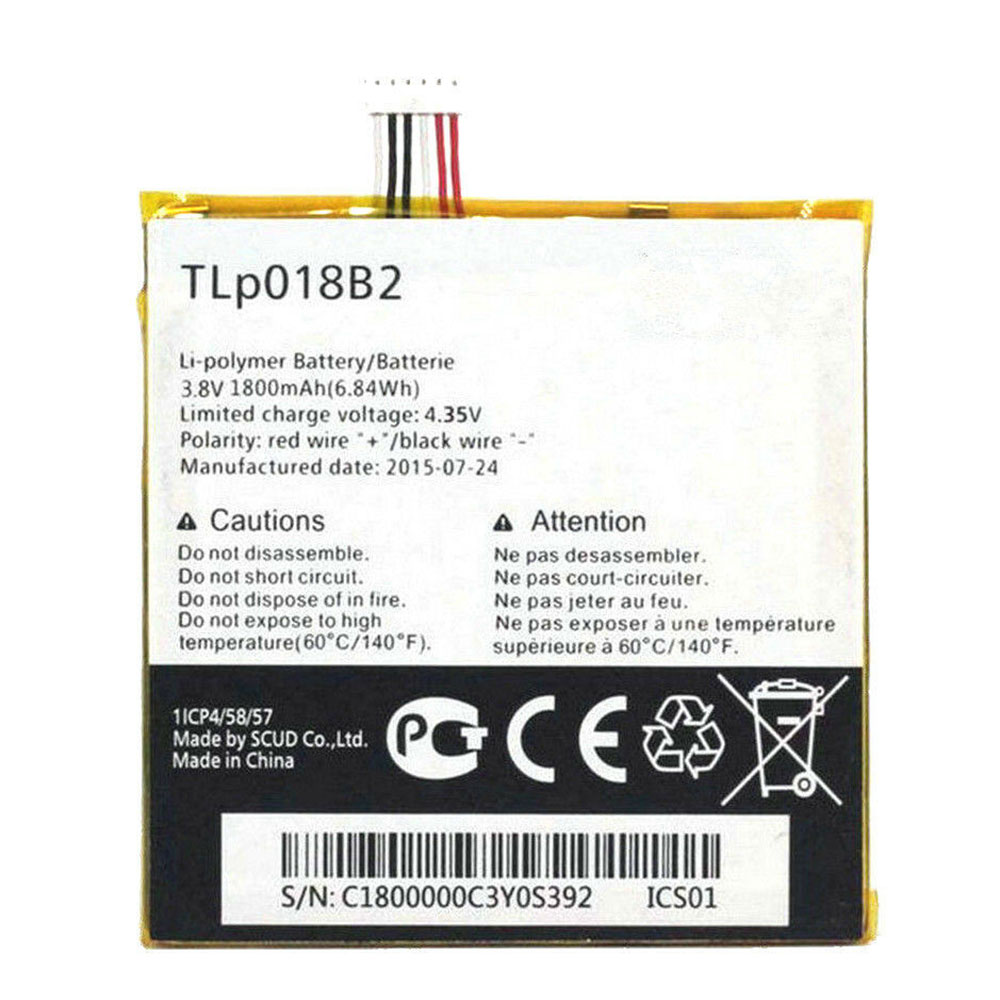
Cheap Alcatel TLP018B2 Li-ion Cell Phone battery, Brand New TLP018B2 replacement battery for TCL Alcatel One Touch Idol 6030 7024 S820 phone

1800mAh/6.84WH 3.8V/4.3V Alcatel TLP018B2 Batteries for TCL Alcatel One Touch Idol 6030 7024 S820 phone, Alcatel TLP018B2 Cell Phone battery is a brand new,100% Compatible original and replacement Laptop battery,Purchase wholesale and retail TLP018B2 with high quality and low price!

TLP018B2 Battery alcatel Li-ion 3.8V/4.3V 1800mAh/6.84WH

TLP018B2

Specifications

  • Brand:Alcatel
  • Capacity :1800mAh/6.84WH
  • Voltage :3.8V/4.3V
  • Type :Li-ion
  • Battery Cell Quality: Grade A
  • Descriptive: Replacement Battery – 1 Year Warranty
  • Description: Brand New, 1 Year Warranty! 30-Days Money Back! Fast Shipping!

How we test this Alcatel TLP018B2 Battery Li-ion 3.8V/4.3V 1800mAh/6.84WH

Step 1: Make sure customer bought the correct battery.
Step 2: Check battery’s appearance and interface.
Step 3: Test battery charger and recharger function.
Step 4: Charger the battery to 100% and recharger to 0% to get real battery capacity
Step 5: Use Ev2300 to check the voltage difference of each goroup cells.
Step 6: Charger battery power more than 30%.
Step 7: Package battery carefully and send out

Compatible Part Numbers:

TLP018B2

Compatible Model Numbers:

TCL Alcatel One Touch Idol 6030 7024 S820
Alcatel One Touch Fierce 7024 7024w 7024N
Alcatel One Touch Idol Ot-6030 6030D

How much do you know about how to run laptop well as any place? The follow Tips cut way back on protecting battery life.


1). Please recharge or change your Cell Phone battery when battery power low.
2). Using Li-Ion Replacement Alcatel TLP018B2 Cell Phone Battery for your notebook which can work longer time than Non Li-ion one.
3). It is better to defragmentation regularly for your Cell Phone battery life.
4). In order to reduce the laptop power consumpition, you can use some optical drive spin-down and hard drive in your Cell Phone .
5). Please keep your laptop in sleep or standby model without long time using, which both save the Replacement Alcatel TLP018B2 Cell Phone Battery power and extend battery using life.
6). Leave your battery in a dry and cool condition when without using.
7). When you rarely or generally plugged in fixed power using, Please take down your battery to avoid hurting battery life.

Hot Products

11.1V/12.4v 2300mah BOSE 404600 for Bose SOUNDLINK I II III16.8V/20V 400mA/2200mAH/32Wh BOSE 300769-003 for Bose Sounddock Portable Digita3.8V 6300mAh/23.94Wh AMAZON 2955C7 for Amazon Kindle Fire HD 10.1 7th3.8 V 1300 mAh AMAZON MC-305070 for AMAZON Kindle Voyage7.7V 37Wh/4810mAh ACER AP16M5J for ACER A315-51-51SL N17Q1 SERIES3.8V/4.35V 2000MAH/7.6Wh ALCATEL TLI020F7 for Alcatel Onetouch Pixi 4 (5) 503.8V 4000mAh/15.2Wh LENOVO L15D1P31 for Lenovo Yoga Tab3 Pro YT3-X90L3.8V 2930mAh/11.1Wh NETGEAR W-7 for Netgear AirCard 790S 790SP 8103.85V/4.4V 3080MAH/11.86WH ALCATEL TLp030JC for Alcatel A3 XL 9008j3.7V/4.2V 1750MAH/6.5WH AMAZON GP-S10-346392-0100 for AMAZON KINDLE 3 3G WIFI Kindle