Four Simple Ways to Format Your Flash Drive on Windows 10

Has your flash drive been malfunctioning lately? Or have you experienced any lags or corrupted data that has turned you a bit skeptical towards the performance of your flash drive? As portable as flash drives can be, they are also prone to such problems over the course of time but, fortunately, a format is all that you need to set things straight.

The reason why you should know about all the four simple ways to format flash drive on Windows 10 is that the File Explorer method might not always work out and you might have to format your flash drive via the Command Prompt or Windows PowerShell.

Here’s how you can format your flash drive on Windows 10 multiple ways:

Using the File Explorer:

Open the File Explorer on your PC by pressing the Windows key + E. Your USB flash drive would be listed with the hard drive partitions of your PC.

Right-click on your flash drive and select Format to continue.

Click on Start to begin the formatting process. In the Format menu, you can also reprogram the file system of your flash drives such as change it from NTFS to FAT32 or exFAT. NTFS is partition friendly and uses data compression.

The system will prompt that this will erase all the data on the flash drive. Select OK to proceed.

You will be notified once the formatting process has been completed. Click on OK to finish.

Using the Disk Management System:

Open the Start menu and type diskmgmt.msc in the search bar. Click on the diskmgmt.msc option to proceed.

In the Disk Management system, you need to locate your flash drive listed along with the other drives of your PC. Right-click on the flash drive and select Format.

The system would ask for your permission to proceed as this would clear out all the data on the drive. Click on Yes to continue.

After you have set up an appropriate Volume label for your flash drive, simply select the File system, and make sure that the quick format box is checked if you wish to perform a quick format. Click on OK.

The system will prompt a final warning that your flash drive will be wiped clean during this process. Select OK to finalize the process.

Once the formatting is complete, you can view the formatted drive in the Disk Management System’s listing.

Using Command Prompt:

Open the Start menu and type cmd in the search bar. Right-click on the Command Prompt app and select Run as Administrator.

Type the command below where you need to replace the VOLUME with the assigned letter of your drive which in this case is H. FLASHDRIVE-LABEL will be replaced by the name that you wish to give your flash drive, and FILE-SYSTEM is replaced by NTFS, FAT32 or exFAT. Once you are done replacing the necessary values, simply enter the command into the Command Prompt window and press Enter.

format VOLUME: /v:FLASHDRIVE-LABEL /fs:FILE-SYSTEM /q

If you wish to perform a full format of your flash drive instead of a Quick Format, simply remove the /q from the above-mentioned command, this will make it:

format VOLUME: /v:FLASHDRIVE-LABEL /fs:FILE-SYSTEM

Please note that a full format can take up from 10 to 15 minutes based on your system’s performance because it also scans for bad sectors in your flash drive as opposed to a Quick Format.

The system will ask you to insert the drive that you wish to format. If the flash drive is already plugged in then simply press Enter again.

The format would take 10 to 15 seconds as it is Quick Format and then you can view the complete overview of your drive’s specifications as soon as the format finishes.

Using Windows PowerShell:

Open the Start menu and type powershell in the search bar. Right-click on the Windows PowerShell app and select Run as Administrator.

Type the command below where you need to replace the VOLUME with the assigned letter of your drive which in this case is H. FLASHDRIVE-LABEL will be replaced by the name that you wish to give your flash drive, and FILE-SYSTEM is replaced by NTFS, FAT32 or exFAT. Once you are done replacing the necessary values, simply enter the command into the Command Prompt window and press Enter.

format VOLUME: /v:FLASHDRIVE-LABEL /fs:FILE-SYSTEM /q

If you wish to perform a full format of your flash drive instead of a Quick Format, simply remove the /q from the above mentioned command, this will make it:

format VOLUME: /v:FLASHDRIVE-LABEL /fs:FILE-SYSTEM

Note that a full format can take up from 10 to 15 minutes based on your system’s performance because it also scans for bad sectors in your flash drive as opposed to a Quick Format.

The system will ask you to insert the drive that you wish to format. If the flash drive is already plugged in then simply press Enter again.

The format would take 10 to 15 seconds as it is Quick Format and then you can view the complete overview of your drive’s specifications as soon as the format finishes.

These four ways to format your flash drive on Windows 10 are not only easy to follow but also ensure that any loose ends are tied up on the performance side. You can also shuffle between file systems to suit your requirements and repair any damaged sectors of your flash drive via a full format.

Huawei Watch GT 2e hands-on: The endurance smartwatch

I’ve liked Huawei’s watch efforts since the original Huawei Watch. It’s only since the epic two-week battery life of the Watch GT series though that Huawei watches have become a staple on my wrist. I’ve long appreciated the classic watch design of the GT series, but now there’s a cheaper, sportier version. Today, we’re going hands-on with the Huawei Watch GT 2e.

When I reviewed the original Watch GT, I called it a fitness tracker in smartwatch clothing. The much-improved Huawei Watch GT 2 looked much the same — essentially a fitness tracker that looked like a traditional watch. The brand-new Huawei Watch GT 2e breaks free of the suit-and-tie of traditional watch styling and slips into something a little more… athleisure.

Design

46mm

1.39-inch AMOLED touchscreen

454 x 454, 326ppi

43g (without strap)

The biggest difference between the €199 Watch GT 2e and its GT 2 predecessor is apparent on the outside. The GT 2e swaps the traditional watch crowns for more sporty-looking buttons. Beyond looking more contemporary, they also look to me like they won’t dig into the back of your hand during certain types of exercise.

The Watch GT 2e switches up the lug area, opting for a solid lug that transitions seamlessly into the watch strap. Depending on what color you get, you’ll either get a fluoroelastomer strap (Graphite Black, Icy White) or a TPU strap (Lava Red, Mint Green). In keeping with its fitness DNA, the GT 2e strap is perforated for increased airflow. The GT 2e is water-resistant up to 5ATM so is sweat-proof and can handle the pool as well.

There’s also a subtle change in the way the stainless steel bezel area has been treated. On the Watch GT 2, the diver’s watch markings are on the angled outer part only, leaving an unused bezel area on the flat part of the watch’s face. The GT 2e makes better use of this area, bringing the diver’s watch markings onto the front as well (see image below). There’s no extra screen or smaller bezel here but the GT 2e arguably makes better use of the same amount of space.

Software and hardware

Kirin A1 wearable chip

4GB ROM, 32MB RAM

455mAh battery

We can’t say too much about the Watch GT 2e’s software because the unit we got access to is awaiting a final software update in mid-April. Stay tuned for our full Huawei Watch GT 2e review for more on that.

What we can tell you is that the Watch GT 2e pairs to your phone via Huawei Health, a comprehensive but easy-to-navigate fitness companion you can install from the Google Play Store or the Apple App Store if you’re on an iPhone. The Watch GT 2e is compatible with devices running Android 4.4 or newer or iOS 9.0 and newer.

Fitness tracking

The Huawei Watch GT 2e has 85 custom workout modes for tracking activities like parkour, skateboarding, yoga, and rock-climbing. There are also 15 professional workout modes for more precise tracking. The GT 2e can detect six common activities and automatically prompt you to start tracking them: indoor/outdoor walking, elliptical, rowing, and indoor/outdoor running. GPS and GLONASS ensure accurate positioning data no matter where you exercise.

Blood oxygen saturation level monitoring (SPO2) has been added via a dedicated IR sensor and the heart rate sensor has been upgraded. Stress levels, sleep patterns, and music playback are also supported, although the GT 2e doesn’t have a microphone or speaker so you can’t use a voice assistant with it or receive calls (alarms are handled by vibration so that’s not a problem). The GT 2e can store up to 500 songs on its 4GB of storage if you want to stream music to a pair of wireless earbuds over Bluetooth 5.1.

The two-week 455mAh battery ensures that no matter how long you can exercise, the GT 2e will outlast you. One of the upshots of the epic battery life the GT series promises is you can even have a live watch face on your GT 2e. Additional watch faces can be downloaded from Huawei Health if you’re not feeling the dozen that are pre-loaded (only with EMUI 10 or newer, not available on iOS). Switching the always-on display on will cut your battery life roughly in half and in my experience, it isn’t really worth it seeing you can just use raise-to-wake when you need the time.

Exclusive: iPhone 9 launch imminent, 2020 ‘iPhone SE’ in red, white, and black with up to 256GB

9to5Mac has learned new information about Apple’s long-rumored, entry-level iPhone model, including the marketing name, product colors, and storage options, based on a tip from a highly trusted reader.

Based on the new information, it’s possible Apple could be planning to open orders for the new iPhone as soon as tomorrow; the information definitely tells us that Apple is ready to start accepting orders very soon.

2020 iPhone SE

Apple’s marketing names are perhaps the most protected component of new iPhones, so we’ve used two nicknames to reference the rumored iPhone 8 replacement so far: iPhone SE 2 and iPhone 9.

Based on the new information 9to5Mac has learned, Apple will simply call the new entry-level model “iPhone SE” while referencing the new hardware as the 2020 version.

Apple originally used the iPhone SE marketing name for the 4-inch model that use the iPhone 5s body with the camera and processor from the iPhone 6s.

We expect the new model to use the same chip as the iPhone 11, 11 Pro, and 11 Pro Plus: Apple’s A13 processor. That’s two generations up from the A11 Bionic chip inside the iPhone 8.

The new iPhone SE will likely be popular with iPhone 6 customers who no longer receive major new software updates. A13 enables Apple Arcade and augmented reality features not possible on the software running on iPhone 6 and iPhone 6 Plus.

Color and storage

9to5Mac can also confirm the color and storage options for the 2020 iPhone SE.

Color options will include three options:

White

Black

PRODUCT (Red)

Five iPhone SE cases will also be available:

Black silicone

White silicone

Red leather

Black leather

Midnight blue leather

We can also confirm three storage tiers for the new iPhone SE:

64GB

128GB

256GB

iPhone 8 originally included the same storage tiers, but the pricier 256GB version was discontinued last fall.

Price and availability

New reporting from 9to5Mac corroborates reliable supply chain analyst Ming-Chi Kuo who reported the red color option and 64GB and 128GB options last fall. The higher-capacity 256GB option was not previously reported.

While we cannot confirm the three price points for Apple’s new iPhone SE, Ming-Chi Kuo reported last fall that Apple was planning to price the new model from $399. iPhone 8 is currently priced at $449.

The new iPhone SE is expected to have the same design as the iPhone 8, although battery life should much improved with the removal of 3D Touch, a special feature on older iPhones.

Also new to the 2020 iPhone SE compared to the iPhone 8 that it replaces: Express Card and future CarKey support.

While we cannot confirm when Apple will announce the 2020 iPhone SE, it’s possible Apple could reveal and begin taking orders for the new iPhone as soon as tomorrow.

9to5Mac learned from a separate source earlier this week that retailers are preparing to start merchandising cases for the new iPhone starting Sunday. This doesn’t rule out an official announcement early next week.

Intel 10th Gen Comet Lake-H Clashes With AMD Ryzen 4000 in New Benchmarks

Intel finally announced the 10th Generation Comet Lake-H processors for mobile devices today. Notebookcheck has the scoop on what you can expect from the new 14nm processors in terms of performance.

These new chips rock the Comet Lake-H microarchitecture, which is on Intel’s 14nm process node. AMD Ryzen 4000-series (codename Renoir), on the other hand, is based off AMD’s Zen 2 microarchitecture and the 7nm process node from TSMC. From a technological standpoint, AMD’s offerings are more modern. 

Being H-series parts, Comet Lake-H and Renoir processors are mobile-friendly with TDP (thermal design power) ratings of 45W. In AMD’s case, the chipmaker has a special HS-series branch that’s optimized for 35W. Both chipmakers have processors that max out at eight cores and 16 threads. However, the Comet Lake-H portfolio starts at four cores, while the Ryzen 4000 lineup starts at six cores.

Intel 10th Gen Comet Lake-H Benchmarks

Notebookcheck compared the i9-10880H, i7-10750H and i5-10300H SKUs against the Ryzen 9 4900HS, (which we also tested in our Asus ROG Zephyrus G14 review ) and Ryzen 7 4800H. The site also pulled in the new chips’ Coffee Lake-H counterparts, the i9-9880H, i7-9750H and i5-9300H. The Comet Lake-H laptops used for testing used dual-channel DDR4-2666 RAM. 

The publication noted that the i9-10880H and i7-10750H results are from two different laptops. Consequently, the results will vary according to the laptop’s design and cooling solution. Notebookcheck averaged the Ryzen 4000-series and Coffee Lake-H results scores across a different number of devices.

Based on Notebookcheck’s results, Intel is still the king of single-core performance, but AMD isn’t too far behind. The Cinebench R15 results show the i9-10880H as being up to 10.9% faster than the Ryzen 9 4900HS. On the more recent Cinebench R20 benchmark, the i9-10880H’s lead dropped to just 3%.

Generation-over-generation improvements will depend on which Comet Lake-H and Coffee Lake-H models you compare. For comparison, the i9-10880H delivers up to 7.6% and 11.2% more performance in Cinebench R20 than the Core i9-9980HK and Core i9-9880H, respectively, according to the benchmarks shared today. 

The tides turned in AMD’s favor when it came multi-core performance. The Ryzen 7 4800H outperformed the i9-10880H by 24% and 2.2% in Cinebench R20 and Cinebench R15, respectively, in Notebookcheck’s testing. 

Although the i9-10880H’s results look bad compared to the Ryzen 7 4800H, the Comet Lake-H showed improved multi-core performance over the prior i9-9980H. According to Noteboocheck’s results, the i9-10880H is up to 3.1% faster than the i9-9980H in Cinebench R20 and up to 19.6% quicker in Cinebench R15. 

With Zen 2, AMD has almost caught up to Intel in regard to single-core performance. If Intel doesn’t move to a new microarchitecture and process node soon, we suspect that AMD will pass Intel when it graduates to Zen 3, 7nm+ chips. Notebookcheck’s numbers showed Comet Lake-H failing to compete with Renoir in the multi-core performance race and barely clinging to the single-core ribbon.

Cheap Sony 3059C3N Li-ion Laptop battery, Brand New 3059C3N replacement battery for SONY GB-S20-3059C3-020H 2ICP4/59/123

3235mAh/24.5Wh 7.6V/8.7V Sony 3059C3N Batteries for SONY GB-S20-3059C3-020H 2ICP4/59/123, Sony 3059C3N Laptop battery is a brand new,100% Compatible original and replacement Laptop battery,Purchase wholesale and retail 3059C3N with high quality and low price!

3059C3N Battery sony Li-ion 7.6V/8.7V 3235mAh/24.5Wh

3059C3N

Specifications

  • Brand:Sony
  • Capacity :3235mAh/24.5Wh
  • Voltage :7.6V/8.7V
  • Type :Li-ion
  • Battery Cell Quality: Grade A
  • Descriptive: Replacement Battery – 1 Year Warranty
  • Description: Brand New, 1 Year Warranty! 30-Days Money Back! Fast Shipping!

How we test this Sony 3059C3N Battery Li-ion 7.6V/8.7V 3235mAh/24.5Wh

Step 1: Make sure customer bought the correct battery.
Step 2: Check battery’s appearance and interface.
Step 3: Test battery charger and recharger function.
Step 4: Charger the battery to 100% and recharger to 0% to get real battery capacity
Step 5: Use Ev2300 to check the voltage difference of each goroup cells.
Step 6: Charger battery power more than 30%.
Step 7: Package battery carefully and send out

Compatible Part Numbers:

3059C3N

Compatible Model Numbers:

SONY GB-S20-3059C3-020H 2ICP4/59/123

How much do you know about how to run laptop well as any place? The follow Tips cut way back on protecting battery life.


1). Please recharge or change your Laptop battery when battery power low.
2). Using Li-Ion Replacement Sony 3059C3N Laptop Battery for your notebook which can work longer time than Non Li-ion one.
3). It is better to defragmentation regularly for your Laptop battery life.
4). In order to reduce the laptop power consumpition, you can use some optical drive spin-down and hard drive in your Laptop .
5). Please keep your laptop in sleep or standby model without long time using, which both save the Replacement Sony 3059C3N Laptop Battery power and extend battery using life.
6). Leave your battery in a dry and cool condition when without using.
7). When you rarely or generally plugged in fixed power using, Please take down your battery to avoid hurting battery life.

Hot Products

11.1V/12.4v 2300mah BOSE 404600 for Bose SOUNDLINK I II III16.8V/20V 400mA/2200mAH/32Wh BOSE 300769-003 for Bose Sounddock Portable Digita3.8V 6300mAh/23.94Wh AMAZON 2955C7 for Amazon Kindle Fire HD 10.1 7th3.8 V 1300 mAh AMAZON MC-305070 for AMAZON Kindle Voyage3.8V/4.35V 2000MAH/7.6Wh ALCATEL TLI020F7 for Alcatel Onetouch Pixi 4 (5) 507.7V 37Wh/4810mAh ACER AP16M5J for ACER A315-51-51SL N17Q1 SERIES3.8V 2930mAh/11.1Wh NETGEAR W-7 for Netgear AirCard 790S 790SP 8103.85V/4.4V 3080MAH/11.86WH ALCATEL TLp030JC for Alcatel A3 XL 9008j3.7V/4.2V 1750MAH/6.5WH AMAZON GP-S10-346392-0100 for AMAZON KINDLE 3 3G WIFI Kindle3.8V 4000mAh/15.2Wh LENOVO L15D1P31 for Lenovo Yoga Tab3 Pro YT3-X90L

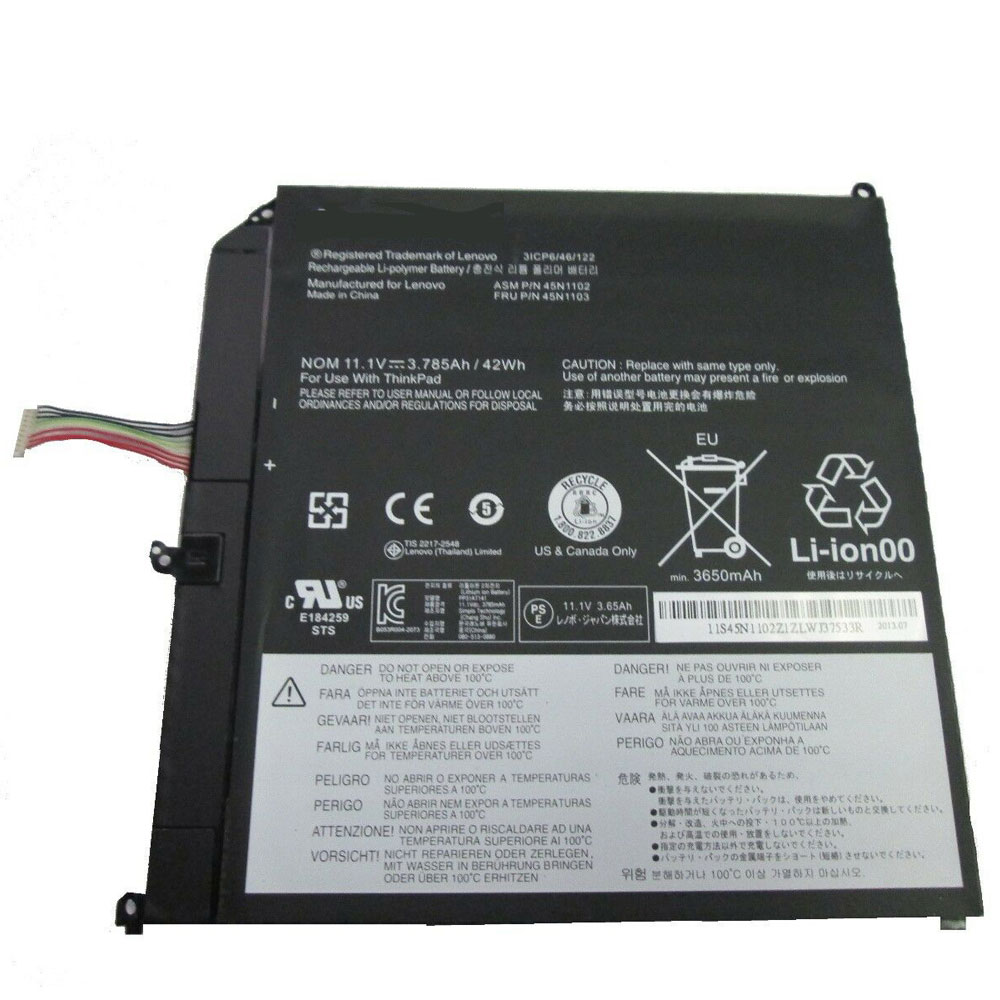
Cheap Lenovo 45N1102 Li-ion Tablets battery, Brand New 45N1102 replacement battery for Lenovo ThinkPad Helix Series 3ICP6/46/122

3785mAh/42WH 11.1V Lenovo 45N1102 Batteries for Lenovo ThinkPad Helix Series 3ICP6/46/122, Lenovo 45N1102 Tablets battery is a brand new,100% Compatible original and replacement Laptop battery,Purchase wholesale and retail 45N1102 with high quality and low price!

45N1102 Battery lenovo Li-ion 11.1V 3785mAh/42WH

45N1102

Specifications

  • Brand:LENOVO
  • Capacity :3785mAh/42WH
  • Voltage :11.1V
  • Type :Li-ion
  • Battery Cell Quality: Grade A
  • Descriptive: Replacement Battery – 1 Year Warranty
  • Description: Brand New, 1 Year Warranty! 30-Days Money Back! Fast Shipping!

How we test this Lenovo 45N1102 Battery Li-ion 11.1V 3785mAh/42WH

Step 1: Make sure customer bought the correct battery.
Step 2: Check battery’s appearance and interface.
Step 3: Test battery charger and recharger function.
Step 4: Charger the battery to 100% and recharger to 0% to get real battery capacity
Step 5: Use Ev2300 to check the voltage difference of each goroup cells.
Step 6: Charger battery power more than 30%.
Step 7: Package battery carefully and send out

Compatible Part Numbers:

45N1102 45N1103

Compatible Model Numbers:

Lenovo ThinkPad Helix Series 3ICP6/46/122

How much do you know about how to run laptop well as any place? The follow Tips cut way back on protecting battery life.


1). Please recharge or change your Tablets battery when battery power low.
2). Using Li-Ion Replacement Lenovo 45N1102 Tablets Battery for your notebook which can work longer time than Non Li-ion one.
3). It is better to defragmentation regularly for your Tablets battery life.
4). In order to reduce the laptop power consumpition, you can use some optical drive spin-down and hard drive in your Tablets .
5). Please keep your laptop in sleep or standby model without long time using, which both save the Replacement Lenovo 45N1102 Tablets Battery power and extend battery using life.
6). Leave your battery in a dry and cool condition when without using.
7). When you rarely or generally plugged in fixed power using, Please take down your battery to avoid hurting battery life.

Hot Products

11.1V/12.4v 2300mah BOSE 404600 for Bose SOUNDLINK I II III16.8V/20V 400mA/2200mAH/32Wh BOSE 300769-003 for Bose Sounddock Portable Digita3.8V 6300mAh/23.94Wh AMAZON 2955C7 for Amazon Kindle Fire HD 10.1 7th3.8 V 1300 mAh AMAZON MC-305070 for AMAZON Kindle Voyage3.8V/4.35V 2000MAH/7.6Wh ALCATEL TLI020F7 for Alcatel Onetouch Pixi 4 (5) 507.7V 37Wh/4810mAh ACER AP16M5J for ACER A315-51-51SL N17Q1 SERIES3.8V 2930mAh/11.1Wh NETGEAR W-7 for Netgear AirCard 790S 790SP 8103.85V/4.4V 3080MAH/11.86WH ALCATEL TLp030JC for Alcatel A3 XL 9008j3.7V/4.2V 1750MAH/6.5WH AMAZON GP-S10-346392-0100 for AMAZON KINDLE 3 3G WIFI Kindle3.8V 4000mAh/15.2Wh LENOVO L15D1P31 for Lenovo Yoga Tab3 Pro YT3-X90L

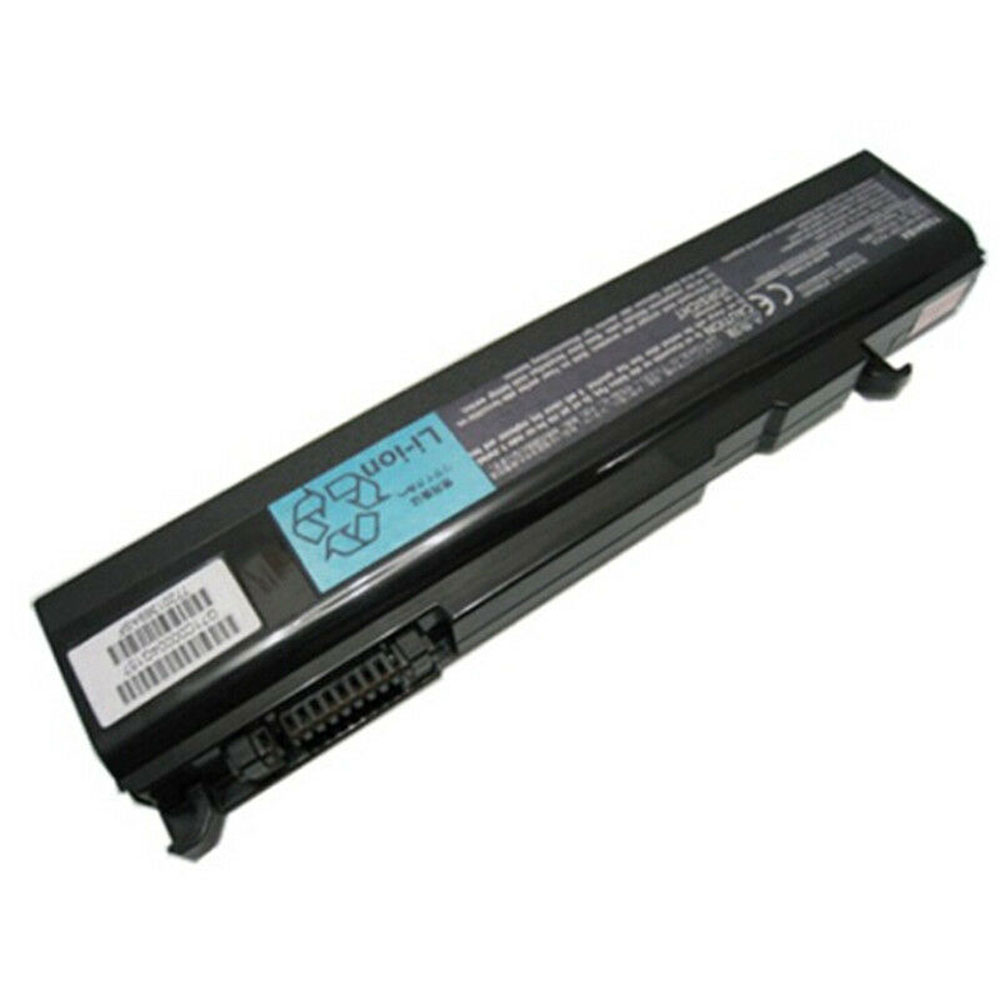
Cheap Toshiba PA3587U-1BRS Li-ion Laptop battery, Brand New PA3587U-1BRS replacement battery for Toshiba Satellite Pro S300 S300M PABAS048 Tecra P5

44WH 10.8V Toshiba PA3587U-1BRS Batteries for Toshiba Satellite Pro S300 S300M PABAS048 Tecra P5, Toshiba PA3587U-1BRS Laptop battery is a brand new,100% Compatible original and replacement Laptop battery,Purchase wholesale and retail PA3587U-1BRS with high quality and low price!

PA3587U-1BRS Battery toshiba Li-ion 10.8V 44WH

PA3587U-1BRS

Specifications

  • Brand:Toshiba
  • Capacity :44WH
  • Voltage :10.8V
  • Type :Li-ion
  • Battery Cell Quality: Grade A
  • Descriptive: Replacement Battery – 1 Year Warranty
  • Description: Brand New, 1 Year Warranty! 30-Days Money Back! Fast Shipping!

How we test this Toshiba PA3587U-1BRS Battery Li-ion 10.8V 44WH

Step 1: Make sure customer bought the correct battery.
Step 2: Check battery’s appearance and interface.
Step 3: Test battery charger and recharger function.
Step 4: Charger the battery to 100% and recharger to 0% to get real battery capacity
Step 5: Use Ev2300 to check the voltage difference of each goroup cells.
Step 6: Charger battery power more than 30%.
Step 7: Package battery carefully and send out

Compatible Part Numbers:

PA3587U-1BRS PA3588U-1BRS PA3587U PA3588U PA3356U

Compatible Model Numbers:

Toshiba Satellite Pro S300 S300M PABAS048 Tecra P5
TOSHIBA Tecra A10 A2 A3X A9 M10 M2 M3 M5 M6 M9

How much do you know about how to run laptop well as any place? The follow Tips cut way back on protecting battery life.


1). Please recharge or change your Laptop battery when battery power low.
2). Using Li-Ion Replacement Toshiba PA3587U-1BRS Laptop Battery for your notebook which can work longer time than Non Li-ion one.
3). It is better to defragmentation regularly for your Laptop battery life.
4). In order to reduce the laptop power consumpition, you can use some optical drive spin-down and hard drive in your Laptop .
5). Please keep your laptop in sleep or standby model without long time using, which both save the Replacement Toshiba PA3587U-1BRS Laptop Battery power and extend battery using life.
6). Leave your battery in a dry and cool condition when without using.
7). When you rarely or generally plugged in fixed power using, Please take down your battery to avoid hurting battery life.

Hot Products

11.1V/12.4v 2300mah BOSE 404600 for Bose SOUNDLINK I II III16.8V/20V 400mA/2200mAH/32Wh BOSE 300769-003 for Bose Sounddock Portable Digita3.8V 6300mAh/23.94Wh AMAZON 2955C7 for Amazon Kindle Fire HD 10.1 7th3.8 V 1300 mAh AMAZON MC-305070 for AMAZON Kindle Voyage3.8V/4.35V 2000MAH/7.6Wh ALCATEL TLI020F7 for Alcatel Onetouch Pixi 4 (5) 507.7V 37Wh/4810mAh ACER AP16M5J for ACER A315-51-51SL N17Q1 SERIES3.8V 2930mAh/11.1Wh NETGEAR W-7 for Netgear AirCard 790S 790SP 8103.85V/4.4V 3080MAH/11.86WH ALCATEL TLp030JC for Alcatel A3 XL 9008j3.7V/4.2V 1750MAH/6.5WH AMAZON GP-S10-346392-0100 for AMAZON KINDLE 3 3G WIFI Kindle3.8V 4000mAh/15.2Wh LENOVO L15D1P31 for Lenovo Yoga Tab3 Pro YT3-X90L

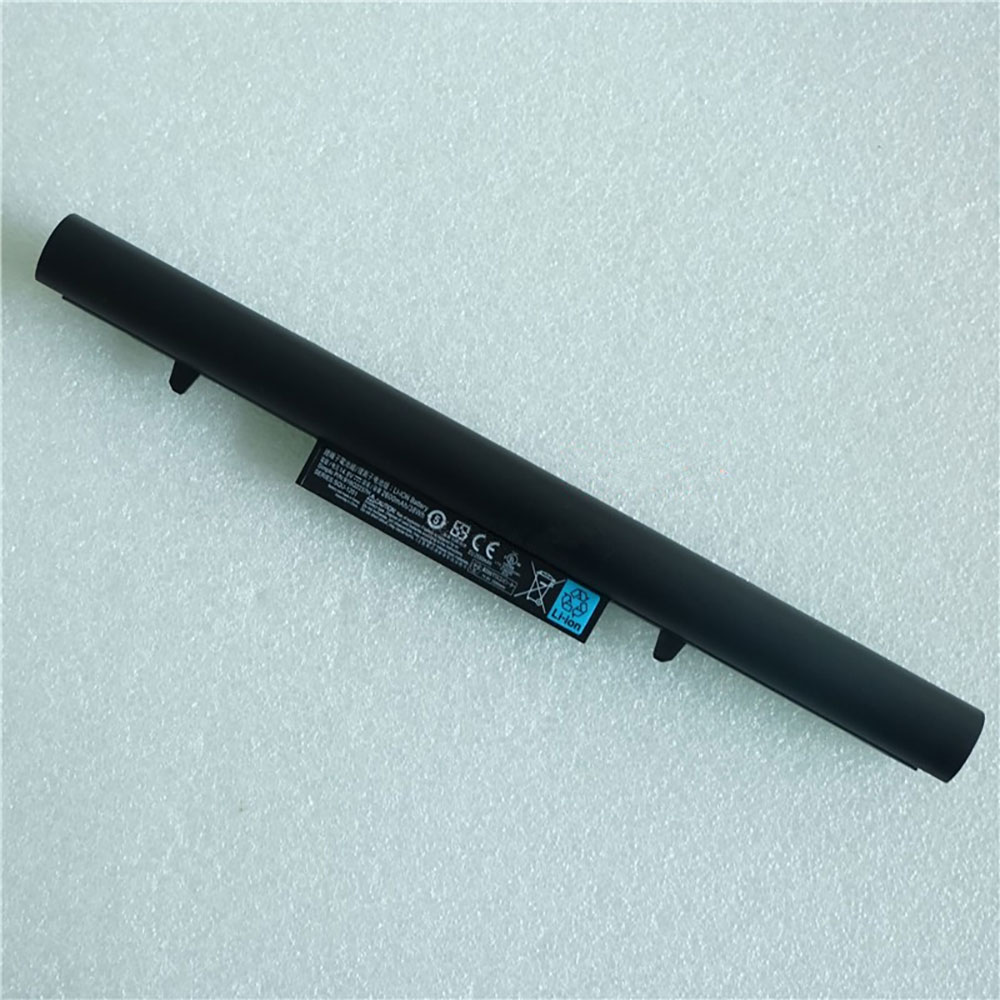
Cheap Hasee SQU-1303 Li-ion Laptop battery, Brand New SQU-1303 replacement battery for HASEE K610D K570C K480N Q480S UN45 A40L-741HD

2200mAh 14.8V Hasee SQU-1303 Batteries for HASEE K610D K570C K480N Q480S UN45 A40L-741HD, Hasee SQU-1303 Laptop battery is a brand new,100% Compatible original and replacement Laptop battery,Purchase wholesale and retail SQU-1303 with high quality and low price!

SQU-1303 Battery hasee Li-ion 14.8V 2200mAh

SQU-1303

Specifications

  • Brand:Hasee
  • Capacity :2200mAh
  • Voltage :14.8V
  • Type :Li-ion
  • Battery Cell Quality: Grade A
  • Descriptive: Replacement Battery – 1 Year Warranty
  • Description: Brand New, 1 Year Warranty! 30-Days Money Back! Fast Shipping!

How we test this Hasee SQU-1303 Battery Li-ion 14.8V 2200mAh

Step 1: Make sure customer bought the correct battery.
Step 2: Check battery’s appearance and interface.
Step 3: Test battery charger and recharger function.
Step 4: Charger the battery to 100% and recharger to 0% to get real battery capacity
Step 5: Use Ev2300 to check the voltage difference of each goroup cells.
Step 6: Charger battery power more than 30%.
Step 7: Package battery carefully and send out

Compatible Part Numbers:

SQU-1303 SQU-1201

Compatible Model Numbers:

HASEE K610D K570C K480N Q480S UN45 A40L-741HD Series

How much do you know about how to run laptop well as any place? The follow Tips cut way back on protecting battery life.


1). Please recharge or change your Laptop battery when battery power low.
2). Using Li-Ion Replacement Hasee SQU-1303 Laptop Battery for your notebook which can work longer time than Non Li-ion one.
3). It is better to defragmentation regularly for your Laptop battery life.
4). In order to reduce the laptop power consumpition, you can use some optical drive spin-down and hard drive in your Laptop .
5). Please keep your laptop in sleep or standby model without long time using, which both save the Replacement Hasee SQU-1303 Laptop Battery power and extend battery using life.
6). Leave your battery in a dry and cool condition when without using.
7). When you rarely or generally plugged in fixed power using, Please take down your battery to avoid hurting battery life.

Hot Products

11.1V/12.4v 2300mah BOSE 404600 for Bose SOUNDLINK I II III16.8V/20V 400mA/2200mAH/32Wh BOSE 300769-003 for Bose Sounddock Portable Digita3.8V 6300mAh/23.94Wh AMAZON 2955C7 for Amazon Kindle Fire HD 10.1 7th3.8 V 1300 mAh AMAZON MC-305070 for AMAZON Kindle Voyage3.8V/4.35V 2000MAH/7.6Wh ALCATEL TLI020F7 for Alcatel Onetouch Pixi 4 (5) 507.7V 37Wh/4810mAh ACER AP16M5J for ACER A315-51-51SL N17Q1 SERIES3.8V 2930mAh/11.1Wh NETGEAR W-7 for Netgear AirCard 790S 790SP 8103.85V/4.4V 3080MAH/11.86WH ALCATEL TLp030JC for Alcatel A3 XL 9008j3.7V/4.2V 1750MAH/6.5WH AMAZON GP-S10-346392-0100 for AMAZON KINDLE 3 3G WIFI Kindle3.8V 4000mAh/15.2Wh LENOVO L15D1P31 for Lenovo Yoga Tab3 Pro YT3-X90L

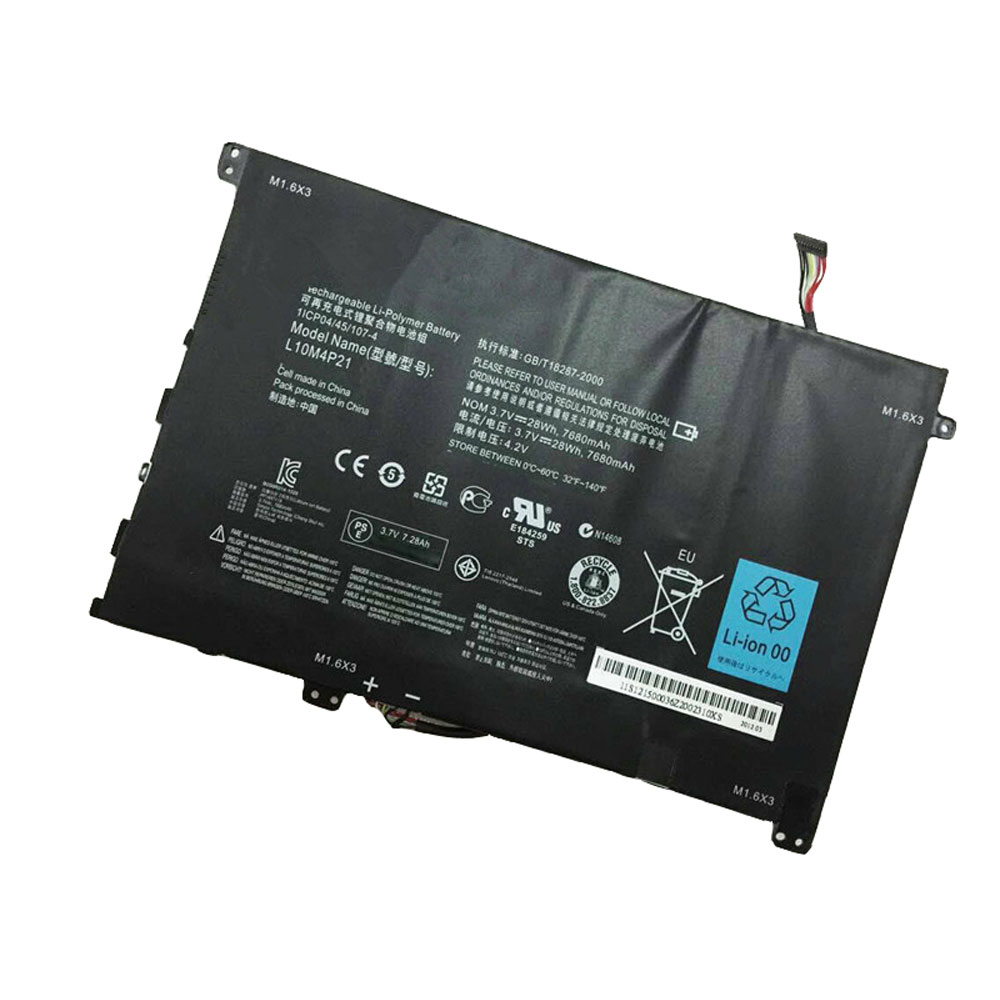
Cheap Lenovo L10M4P21 Li-ion Laptop battery, Brand New L10M4P21 replacement battery for Lenovo IdeaPad S2010A 1ICP04/45/107-4

7680mAh/28WH 3.7V/4.2V Lenovo L10M4P21 Batteries for Lenovo IdeaPad S2010A 1ICP04/45/107-4, Lenovo L10M4P21 Laptop battery is a brand new,100% Compatible original and replacement Laptop battery,Purchase wholesale and retail L10M4P21 with high quality and low price!

L10M4P21 Battery lenovo Li-ion 3.7V/4.2V 7680mAh/28WH

L10M4P21

Specifications

  • Brand:LENOVO
  • Capacity :7680mAh/28WH
  • Voltage :3.7V/4.2V
  • Type :Li-ion
  • Battery Cell Quality: Grade A
  • Descriptive: Replacement Battery – 1 Year Warranty
  • Description: Brand New, 1 Year Warranty! 30-Days Money Back! Fast Shipping!

How we test this Lenovo L10M4P21 Battery Li-ion 3.7V/4.2V 7680mAh/28WH

Step 1: Make sure customer bought the correct battery.
Step 2: Check battery’s appearance and interface.
Step 3: Test battery charger and recharger function.
Step 4: Charger the battery to 100% and recharger to 0% to get real battery capacity
Step 5: Use Ev2300 to check the voltage difference of each goroup cells.
Step 6: Charger battery power more than 30%.
Step 7: Package battery carefully and send out

Compatible Part Numbers:

L10M4P21

Compatible Model Numbers:

Lenovo IdeaPad S2010A 1ICP04/45/107-4

How much do you know about how to run laptop well as any place? The follow Tips cut way back on protecting battery life.


1). Please recharge or change your Laptop battery when battery power low.
2). Using Li-Ion Replacement Lenovo L10M4P21 Laptop Battery for your notebook which can work longer time than Non Li-ion one.
3). It is better to defragmentation regularly for your Laptop battery life.
4). In order to reduce the laptop power consumpition, you can use some optical drive spin-down and hard drive in your Laptop .
5). Please keep your laptop in sleep or standby model without long time using, which both save the Replacement Lenovo L10M4P21 Laptop Battery power and extend battery using life.
6). Leave your battery in a dry and cool condition when without using.
7). When you rarely or generally plugged in fixed power using, Please take down your battery to avoid hurting battery life.

Hot Products

11.1V/12.4v 2300mah BOSE 404600 for Bose SOUNDLINK I II III16.8V/20V 400mA/2200mAH/32Wh BOSE 300769-003 for Bose Sounddock Portable Digita3.8V 6300mAh/23.94Wh AMAZON 2955C7 for Amazon Kindle Fire HD 10.1 7th3.8 V 1300 mAh AMAZON MC-305070 for AMAZON Kindle Voyage3.8V/4.35V 2000MAH/7.6Wh ALCATEL TLI020F7 for Alcatel Onetouch Pixi 4 (5) 507.7V 37Wh/4810mAh ACER AP16M5J for ACER A315-51-51SL N17Q1 SERIES3.8V 2930mAh/11.1Wh NETGEAR W-7 for Netgear AirCard 790S 790SP 8103.85V/4.4V 3080MAH/11.86WH ALCATEL TLp030JC for Alcatel A3 XL 9008j3.7V/4.2V 1750MAH/6.5WH AMAZON GP-S10-346392-0100 for AMAZON KINDLE 3 3G WIFI Kindle3.8V 4000mAh/15.2Wh LENOVO L15D1P31 for Lenovo Yoga Tab3 Pro YT3-X90L

New Always On Display update improves layouts, fixes a couple of bugs

Samsung is rolling out a new update for Always On Display, pushing the app to version 5.2.05.8. It fixes a couple of bugs related to Dark Mode and Bluetooth-connected keyboards, and also claims to improve the layouts for some clock styles.

Before this update, Always On Display had an issue whereby the background would turn gray when using a Bluetooth keyboard. AOD settings were also difficult to see while Dark Mode was enabled on certain themes. These bugs have now been addressed with version 5.2.05.8.

You don’t need One UI 2.1 for this update

The update is rolling out now, and we can confirm that it is available at least on the Galaxy Note 10 (running One UI 2.0 and not the latest One UI 2.1 update). But the new Always On Display version should be pushed to more Samsung devices as we speak.

You can check which Always On Display version you’re running by opening Settings, navigating to Lock screen » Always On Display (don’t tap the toggle, but the text itself), and tapping About Always On Display. If the update hasn’t reached your phone yet, you may have to wait for a few more days. You can also launch the Galaxy Store on your phone, tap the ‘hamburger’ menu in the upper-left corner, and check if the new version is waiting for you in the Updates category.