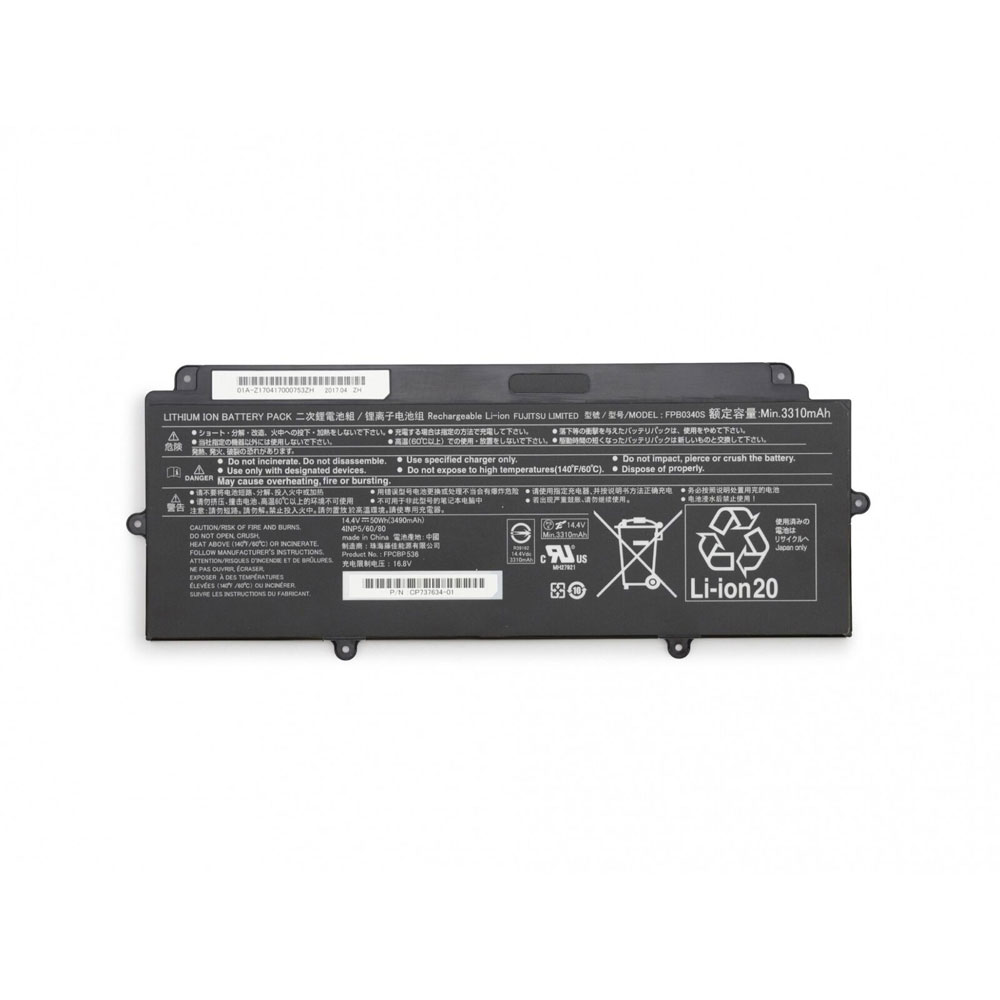
Cheap Fujitsu FPCBP536 Li-ion Laptop battery, Brand New FPCBP536 replacement battery for Fujitsu Lifebook E548 U937

3490mAh/50WH 14.4V/16.8V Fujitsu FPCBP536 Batteries for Fujitsu Lifebook E548 U937, Fujitsu FPCBP536 Laptop battery is a brand new,100% Compatible original and replacement Laptop battery,Purchase wholesale and retail FPCBP536 with high quality and low price!

FPCBP536 Battery fujitsu Li-ion 14.4V/16.8V 3490mAh/50WH

FPCBP536

Specifications

  • Brand:Fujitsu
  • Capacity :3490mAh/50WH
  • Voltage :14.4V/16.8V
  • Type :Li-ion
  • Battery Cell Quality: Grade A
  • Descriptive: Replacement Battery – 1 Year Warranty
  • Description: Brand New, 1 Year Warranty! 30-Days Money Back! Fast Shipping!

How we test this Fujitsu FPCBP536 Battery Li-ion 14.4V/16.8V 3490mAh/50WH

Step 1: Make sure customer bought the correct battery.
Step 2: Check battery’s appearance and interface.
Step 3: Test battery charger and recharger function.
Step 4: Charger the battery to 100% and recharger to 0% to get real battery capacity
Step 5: Use Ev2300 to check the voltage difference of each goroup cells.
Step 6: Charger battery power more than 30%.
Step 7: Package battery carefully and send out

Compatible Part Numbers:

FPCBP536 FPB0340S

Compatible Model Numbers:

Fujitsu Lifebook E548 U937

How much do you know about how to run laptop well as any place? The follow Tips cut way back on protecting battery life.


1). Please recharge or change your Laptop battery when battery power low.
2). Using Li-Ion Replacement Fujitsu FPCBP536 Laptop Battery for your notebook which can work longer time than Non Li-ion one.
3). It is better to defragmentation regularly for your Laptop battery life.
4). In order to reduce the laptop power consumpition, you can use some optical drive spin-down and hard drive in your Laptop .
5). Please keep your laptop in sleep or standby model without long time using, which both save the Replacement Fujitsu FPCBP536 Laptop Battery power and extend battery using life.
6). Leave your battery in a dry and cool condition when without using.
7). When you rarely or generally plugged in fixed power using, Please take down your battery to avoid hurting battery life.

Hot Products

11.1V/12.4v 2300mah BOSE 404600 for Bose SOUNDLINK I II III16.8V/20V 400mA/2200mAH/32Wh BOSE 300769-003 for Bose Sounddock Portable Digita3.8V 6300mAh/23.94Wh AMAZON 2955C7 for Amazon Kindle Fire HD 10.1 7th3.8 V 1300 mAh AMAZON MC-305070 for AMAZON Kindle Voyage3.8V/4.35V 2000MAH/7.6Wh ALCATEL TLI020F7 for Alcatel Onetouch Pixi 4 (5) 507.7V 37Wh/4810mAh ACER AP16M5J for ACER A315-51-51SL N17Q1 SERIES3.8V 2930mAh/11.1Wh NETGEAR W-7 for Netgear AirCard 790S 790SP 8103.85V/4.4V 3080MAH/11.86WH ALCATEL TLp030JC for Alcatel A3 XL 9008j3.8V 4000mAh/15.2Wh LENOVO L15D1P31 for Lenovo Yoga Tab3 Pro YT3-X90L3.7V/4.2V 1750MAH/6.5WH AMAZON GP-S10-346392-0100 for AMAZON KINDLE 3 3G WIFI Kindle

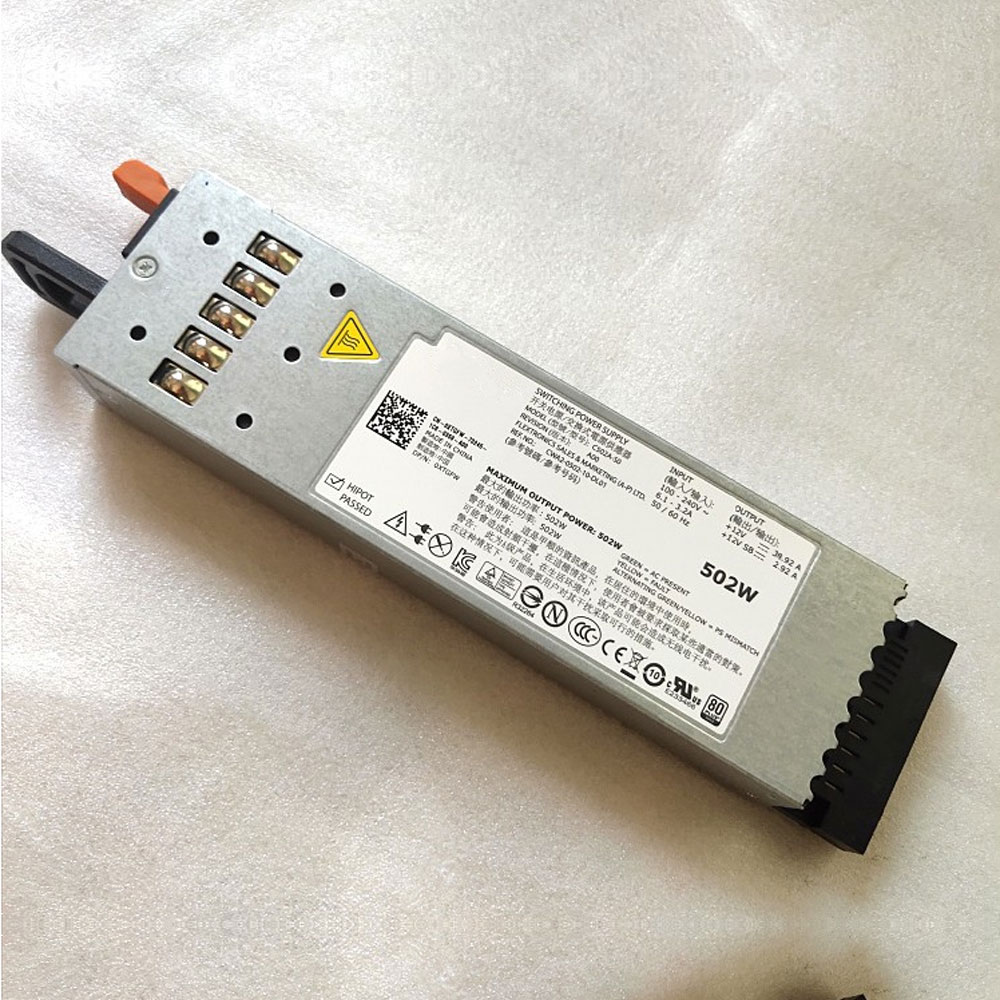
Dell 0J38MN Power Supplies ,0J38MN Adapter for Dell Poweredge R610

+12V == 38.92A 0J38MN Laptop Charger Wholesale,Dell 0J38MN Power Supplies is replacement for Dell Poweredge R610 ,Dell 0J38MN Power Supplies discount price,Fast Shipping.

0J38MN

Specifications

  • Brand:DELL
  • DC Output:+12V == 38.92A
  • AC Input:100-240V ~6.1-3.2A 50/60Hz

Charger features:

  • CE, FCC and RoHS certified to ensure proper adapter safety and quality.
  • Sealed for protection against moisture and humidity.
  • Designed with internal safety features to protect against voltage spikes, surges or fluctuations.
  • Utilizes low voltage shut down protection.
  • Utilizes over voltage limiting protection.
  • Utilizes output over current limiting protection.
  • Utilizes “short-circuit†shutdown protection. 
  • Undergone comprehensive quality testing throughout the manufacturing and assembly process.
  • Includes a 12-month free replacement warranty for manufacturer’s defects.

Compatible Part Numbers:

C502A-S0 A502P-00 J38MN XTGFW 8V22F 0J38MN

Compatible Model Numbers:

MAXIMUM OUTPUT POWER :502W
OUTPUT :+12V == 38.92A
+12V SB == 2.92A

Dell Poweredge R610

Description of Dell 0J38MN Power Supplies

High Quality, Guarantee :
Factory direct price, 100% compatible, No memory effect. Hi-Capacity, Quality garantee, certification Fast shipping. We stand behind our Replace for DELL Cord/Charger Dell 0J38MN 100%.
Low Prices, Guarantee :
All laptop Replace for DELL Cord/Charger Dell 0J38MN at batteryforpc.co.uk are all directly purchased from various reputable manufacturers in the world and have passed stringent quality assurance procedures to achieve international standards. Through this direct selling model, middleman cost is minimized.
Satisfaction Guarantee :
Our goal is to make sure you receive the best value of every purchase you make at our site. We want to be your number one choice Replace for Dell 0J38MN. If you have any question or suggestion about this laptop ac adapter, please contact us so we can offer you the most convenient service.
Secure Shopping Guarantee :
Shopping from us is safe and secure. None of our customers have ever reported fraudulent use of their credit cards as a result of shopping with us. You can be assured that the information you give us is confidential. We do not sell, rent or share information of our customers with other parties. batteryforpc.co.uk guarantee your Replace for Dell 0J38MN transaction will be 100% safe.

Hot Products

11.1V/12.4v 2300mah BOSE 404600 for Bose SOUNDLINK I II III16.8V/20V 400mA/2200mAH/32Wh BOSE 300769-003 for Bose Sounddock Portable Digita3.8V 6300mAh/23.94Wh AMAZON 2955C7 for Amazon Kindle Fire HD 10.1 7th3.8 V 1300 mAh AMAZON MC-305070 for AMAZON Kindle Voyage3.8V/4.35V 2000MAH/7.6Wh ALCATEL TLI020F7 for Alcatel Onetouch Pixi 4 (5) 507.7V 37Wh/4810mAh ACER AP16M5J for ACER A315-51-51SL N17Q1 SERIES3.8V 2930mAh/11.1Wh NETGEAR W-7 for Netgear AirCard 790S 790SP 8103.85V/4.4V 3080MAH/11.86WH ALCATEL TLp030JC for Alcatel A3 XL 9008j3.8V 4000mAh/15.2Wh LENOVO L15D1P31 for Lenovo Yoga Tab3 Pro YT3-X90L3.7V/4.2V 1750MAH/6.5WH AMAZON GP-S10-346392-0100 for AMAZON KINDLE 3 3G WIFI Kindle

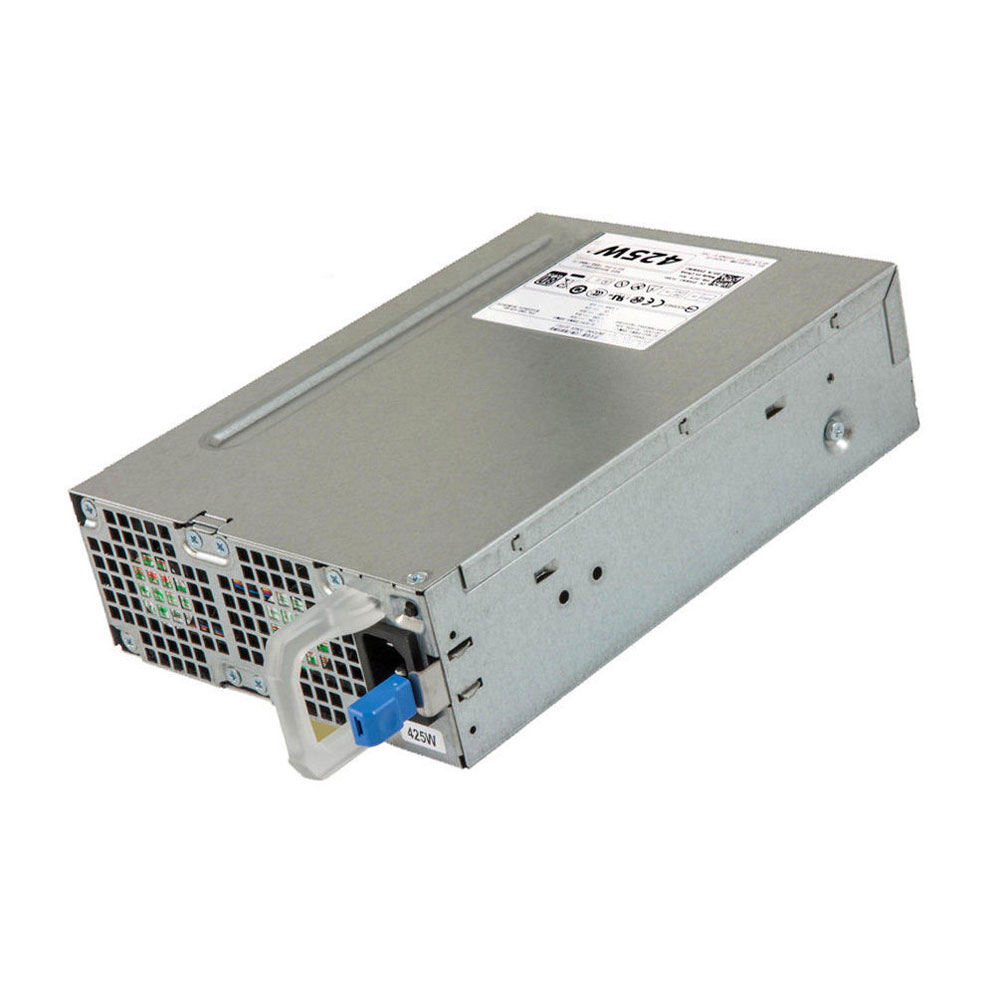
Dell AC425EF-00 Power Supplies ,AC425EF-00 Adapter for Dell Precision T3600

+12VA === 18.0A AC425EF-00 Laptop Charger Wholesale,Dell AC425EF-00 Power Supplies is replacement for Dell Precision T3600 ,Dell AC425EF-00 Power Supplies discount price,Fast Shipping.

AC425EF-00

Specifications

  • Brand:DELL
  • DC Output:+12VA === 18.0A
  • AC Input:100-240V~,50-60Hz,6.0A

Charger features:

  • CE, FCC and RoHS certified to ensure proper adapter safety and quality.
  • Sealed for protection against moisture and humidity.
  • Designed with internal safety features to protect against voltage spikes, surges or fluctuations.
  • Utilizes low voltage shut down protection.
  • Utilizes over voltage limiting protection.
  • Utilizes output over current limiting protection.
  • Utilizes “short-circuit†shutdown protection. 
  • Undergone comprehensive quality testing throughout the manufacturing and assembly process.
  • Includes a 12-month free replacement warranty for manufacturer’s defects.

Compatible Part Numbers:

AC425EF-00 Y6WWJ G50YW

Compatible Model Numbers:

MAX. OUTPUT POWER IS 425W
DC OUTPUT :
+12VA === 18.0A
+12VB ===18.0A
+12VC === 18.0A
-12V === 0.5A
+5.0VSB ===4.0A

Dell Precision T3600

Description of Dell AC425EF-00 Power Supplies

High Quality, Guarantee :
Factory direct price, 100% compatible, No memory effect. Hi-Capacity, Quality garantee, certification Fast shipping. We stand behind our Replace for DELL Cord/Charger Dell AC425EF-00 100%.
Low Prices, Guarantee :
All laptop Replace for DELL Cord/Charger Dell AC425EF-00 at batteryforpc.co.uk are all directly purchased from various reputable manufacturers in the world and have passed stringent quality assurance procedures to achieve international standards. Through this direct selling model, middleman cost is minimized.
Satisfaction Guarantee :
Our goal is to make sure you receive the best value of every purchase you make at our site. We want to be your number one choice Replace for Dell AC425EF-00. If you have any question or suggestion about this laptop ac adapter, please contact us so we can offer you the most convenient service.
Secure Shopping Guarantee :
Shopping from us is safe and secure. None of our customers have ever reported fraudulent use of their credit cards as a result of shopping with us. You can be assured that the information you give us is confidential. We do not sell, rent or share information of our customers with other parties. batteryforpc.co.uk guarantee your Replace for Dell AC425EF-00 transaction will be 100% safe.

Hot Products

11.1V/12.4v 2300mah BOSE 404600 for Bose SOUNDLINK I II III16.8V/20V 400mA/2200mAH/32Wh BOSE 300769-003 for Bose Sounddock Portable Digita3.8V 6300mAh/23.94Wh AMAZON 2955C7 for Amazon Kindle Fire HD 10.1 7th3.8 V 1300 mAh AMAZON MC-305070 for AMAZON Kindle Voyage3.8V/4.35V 2000MAH/7.6Wh ALCATEL TLI020F7 for Alcatel Onetouch Pixi 4 (5) 507.7V 37Wh/4810mAh ACER AP16M5J for ACER A315-51-51SL N17Q1 SERIES3.8V 2930mAh/11.1Wh NETGEAR W-7 for Netgear AirCard 790S 790SP 8103.85V/4.4V 3080MAH/11.86WH ALCATEL TLp030JC for Alcatel A3 XL 9008j3.8V 4000mAh/15.2Wh LENOVO L15D1P31 for Lenovo Yoga Tab3 Pro YT3-X90L3.7V/4.2V 1750MAH/6.5WH AMAZON GP-S10-346392-0100 for AMAZON KINDLE 3 3G WIFI Kindle

Leak shows the Honor 30 camera will match the Galaxy S20 Ultra sensor size

A leaked presentation for the Honor 30 shows that its main camera will have a large Sony sensor – 1/1.3″, essentially the same size as the 1/1.33″ sensor of the Samsung Galaxy S20 Ultra.

However, the Sony sensor will have larger pixels, 1.2µm (up from 0.8µm on the Samsung). This should give the Honor the edge in low-light shooting. And it should have an advantage over the Oppo Find X2 Pro too, which uses a Sony-made 1/1.43″ sensor (48MP resolution, 1.12µm).

The resolution is not listed, but it should be 48MP as the sensor and pixel sizes match up with this 48MP sensor from OmniVision. However, the unnamed Sony IMX chip might have some advantages, e.g. the new 2×2 OCL autofocus system (which Oppo calls “omni-directional AF”).

Note that this is for the Honor 30, not the 30S that is coming on March 30 with the fast Kirin 820 5G chipset. Looking at the Honor 20 vs. 20S, the chipset and camera were the main differences and this 1/1.3″ sensor may be one of the things that separate the Honor 30 and the 30S.

watchOS 6.2 now available for Apple Watch, bringing ECG app to three new countries

In addition to iOS 13.4 and iPadOS 13.4, Apple is also releasing watchOS 6.2 to the public today. The update brings in-app purchase support to Apple Watch apps, ECG features to more countries, and more. Read on for the full details.

Apple says that watchOS 6.2 finally brings support for in-app purchases to Apple Watch applications. This means you can make in-app purchases directly from your Apple Watch, which is excellent news for the growing number of completely independent Apple Watch apps.

watchOS 6.2 also brings the ECG app to three new countries: Chile, New Zealand, and Turkey. Irregular heart rhythm notifications are also now available in those three countries.

The ECG application allows users to take an electrocardiogram, measuring the electrical pulses of your heart. Irregular heart rate notifications do not require an active ECG to be taken. The watch will analyze heart rate readings continuously in the background and trigger an alert if something seems off.

Finally, Apple says watchOS 6.2 includes a bug fix that could affect music playback when switching from Wi-Fi to Bluetooth connectivity.

Here are the full release notes for watchOS 6.2, which is rolling out now:

watchOS 6.2 includes new features, improvements, and bug fixes:

Introduces in-app purchases for Apple Watch apps

Fixes an issue where music playback could pause when switching from Wi-Fi to

Bluetooth connectivity

ECG app on Apple Watch Series 4 or later now available in Chile, New Zealand, and Turkey

Irregular heart rhythm notifications now available in Chile, New Zealand, and Turkey

To update your Apple Watch to watchOS 6.2, you can open the Apple Watch app on your iPhone and tap General then Software Update. You can also update directly from your Apple Watch by opening the Settings app and tapping General then Software Update.

Apple is also releasing watchOS 5.3.6 today for people using an Apple Watch with an iPhone not capable of running iOS 13.

What new watchOS 6.2 feature are you most excited to try out? Let us know down in the comments!

Keeping in touch: How to start a WhatsApp group

Welcome to TNW Basics, a collection of tips, guides, and advice on how to easily get the most out of your gadgets, apps, and other stuff.

Quarantine, isolation, social distancing — no matter what the occasion for you to be apart from your nearest and dearest, it’s never easy. But luckily in this day and age it’s easy to find solutions to keep up digitally. And while that’s no substitute for the real thing, sometimes a WhatsApp group might be what you need to keep in touch with your friends, family, and colleagues.

So here’s how you can get started with your own Whatsapp group.

To start, go to your chat tab in WhatsApp and select “New group.” Then select who, from your contact list, will be part of the group. From the next screen, you’ll be able to name the group and add an icon if you desire.

And there you go, you now have a WhatsApp group. That’s the gist of it, but let’s go through some of the things you can do within a WhatsApp group.

Much like almost every other form of communication, you can tag members of the group in messages by using the @ symbol. You can also visit each member’s profile and start a private chat with them by tapping on their icons.

Within the group settings — which you can access by tapping on the group name at the top of the screen — you can search for what kinds of links and photos you’ve sent to each other, as well as find individual messages with Chat Search. You can also mute the chat — also helpful depending on how large the group is.

Depending on how large the group is, it might be helpful to appoint another user to be an admin, who are permitted to make changes to the group. You can also find individual members from the list of participants.

When you want to leave a group chat, you can go to the group settings, and scroll to the bottom of the screen, where you’ll see the option. You can also archive a group by swiping left from the chat list, which will hide it and help keep things organized.

And there you go: everything you need to set up a WhatsApp group with your friends, family, and colleagues. Good luck!

Leaks show how the Honor 30’s camera stacks up against the Galaxy S20 Ultra

With the Honor 30S set to release in just five days, we’re getting some more details about its more expensive sibling, the Honor 30. While it’s not yet unknown when the latter phone will be released, we do know that it will be able to hold its own in the camera department, possibly even against Samsung’s most expensive offering yet, the Galaxy S20 Ultra.

Leaked slides released by Slashleaks (via GSMArena) shows the phone’s primary sensor will about the same size as the Galaxy S20 Ultra’s. The two phones come in at 1/1.3″ and 1/1.33″. For those whose math is a little rusty, since the denominator for the S20 Ultra is slightly larger, the Honor 30’s sensor should actually come out as slightly ahead in size between the two.

Far more significant, however, is the difference in the pixel size of each sensor. The Galaxy S20 Ultra’s Samsung-made image sensor’s pixels are 0.8µm, while the Honor 30’s Sony sensor comes in at 1.2µm, where a larger number is better. That’ll certainly give the Huawei sub-brand an advantage in low-light photography.

Where the Samsung phone will win out hands-down, though, is the megapixel count. It’s one of the very few phones in the market right now with a 108MP camera — why Samsung is charging the big bucks for it — while the Honor 30 sports a more typical 48MP shooter.

Also, while the Honor 30 will likely match the S20 Ultra in the number of cameras on its back (four, at least), it remains to be seen just how the entire package comes together. For example, Samsung’s used some amazing engineering to achieve crazy levels of optical zoom on its phone, and it’s unlikely Honor will offer the same level of imaging fidelity. For that, you’ll probably need to hold out for Huawei’s P40 lineup.

This Asus gaming laptop with a GTX 1660 Ti is just $850 right now

Ever since last year’s Black Friday/Cyber Monday season ended, it has been rare to find gaming laptops with Nvidia’s GTX 1660 Ti graphics card for under $900 or so. Thankfully, one Asus TUF laptop with that GPU has now dropped to $849.99 at Walmart—a savings of $250 from the original price.

The model on sale includes a 4-core/8-thread AMD Ryzen 7 3750H processor, an Nvidia GeForce GTX 1660 Ti graphics card, 8GB of RAM, a 256GB NVMe SSD, and a 15.6-inch 1080p display. You also get a backlit keyboard with 1.8mm travel distance and a “reinforced chassis.”

While the GTX 1660 Ti graphics card in this laptop will handle most titles just fine, Asus did make a few other cutbacks to reach the $850 price point. The 8GB RAM is the main problem—some newer games won’t work smoothly without 16GB. The 256GB SSD is also small given the large download sizes that come with most open-world games.

Thankfully, Asus makes it easy to upgrade most of the components in its TUF laptops, so you can add more RAM or replace the main drive later if you wish. The product description for the model on sale doesn’t mention any extra drives, so it seems like the 2.5-inch bay might be empty. If that’s the case, you can put in an extra SSD or hard drive later on, as long as it fits the 2.5″ form factor.

Intel 10th Gen Laptop CPU at 5 GHz Spotted Before Release

The Intel Core i9-10880H, which should be the direct successor to last year’s i9-9880H, hasn’t been announced yet, but benchmarks results are already creeping up. Hardware leaker @_rogame reportedly found the upcoming mobile chip in a 3DMark submission yesterday.

The i9-10880H (codename Comet Lake-H) is expected to arrive sporting eight cores and 16 threads like its predecessor. Besides the improved clock speeds, there isn’t any significant architectural changes with Comet Lake over the i9-10880H’s Coffee Lake. Therefore, we expect the i9-10880H to retain the same 16MB of L3 cache as the i9-9880H. Being a H-series part, the 14nm processor will likely operate within the 45W envelope.

According to the 3DMark entry, the i9-10880H could come with a base clock fixed at 2.3 GHz, which is the same base clock on the prior i9-9980H. The only thing that the i9-10880H has going for it is the higher boost clock. If the 3DMark’s report is accurate, the i9-10880H will flex a 5 GHz boost clock, which is 200 MHz higher than the i9-9980H but only by 4.2%.

With the previous generation, Intel offered consumers the i9-9980H and faster i9-9980HK. The latter operates with a 100 MHz and 200 MHz higher base and boost clocks, respectively. It’s plausible that Intel would release a i9-10880HK with slightly faster clocks.

So far, the i9-10980HK has appeared with a 3.1 base clock and 5.27 GHz boost clock in unconfirmed benchmarks. Given the huge gap between the i9-10980HK and i9-10880H’s specifications, there’s certainly room for a i9-10880HK to slide in between. 

The i9-10880H and i9-10980HK should be very popular choices for upcoming high-performance mobile workstations and gaming laptops. However, they’ll have to compete with AMD’s Ryzen 4000-series (codename Renoir) chips, such as the Ryzen 9 4900H and Ryzen 7 4800H.

Apple iPad Pro Review: Great Tablet Gets Subtle, Dazzling Upgrade

A new iPad Pro was revealed last Wednesday. I’ve been using the 12.9in model non-stop since hours after. Here’s everything you need to know.

Update March 24: New details have been added describing extra trackpad benefits.

It’s the best iPad yet. Obviously.

From the front, this iPad Pro looks identical to the previous model, released in November 2018. This isn’t a bad thing – that newly redesigned machine was a great-looking upgrade with Face ID, no notch in the screen and gently curved corners on the display that perfectly matched the tablet’s shape. The display is the same as before, too.

Flip the iPad Pro over, though, and there’s one big difference. The single camera and flash unit has been replaced by the familiar square camera unit found on the iPhone 11 and iPhone 11 Pro. Here, there are two cameras – wide and ultra-wide. But the right hand side of the square has a circular detail, though it’s not a camera. Where the two lenses gently protrude from the raised square, the other item sits flush. It’s a scanner.

LiDAR? Well, la-di-da.

We’ve seen time-of-flight cameras on other smartphones, though not yet an iPhone. These are designed to grab depth information in great detail, at high speed. Time-of-flight means it works by projecting light onto objects which is reflected back and, based on the time it takes, gives a near-instant depth map of the surroundings.

On the iPad, the scanner uses LiDAR, which stands for Light Direction And Ranging. The difference between this and other time-of-flight systems is that works indoors and out, and can reach further, up to 5 metres away.

This will make for great portrait mode effects, potentially, though that’s not its main purpose here. After all, as I’ve said before, the iPad is not ergonomically the best shape to suit photography, apart from having a dreamily big monitor on which to frame your shots.

LiDAR is mostly for Augmented Reality (AR) apps, and some of the ones in the works look great. Shapr3D is great for creating 2D and then 3D floor plans. IKEA Place also helps you plan your home environment, with the IKEA app recognizing your couch or coffee table and making suggestions accordingly, plonking a realistic version of a new light or cushion or whatever into the room. Then there’s Complete Anatomy, which measures a patient’s movements in three dimensions and compares the real-life subject to a database of 3D muscle animations. The popular Apple Arcade game, Hot Lava, is also getting a LiDAR makeover, allowing the familiar characters to appear in an even more familiar situation: your living room.

Right now, the first manifestation of the AR capabilities LiDAR permits is an updated version of the Measure app. This was already a useful way of measuring stuff without a tape and now, thanks to LiDAR and Apple’s neural engine, it’s more detailed. It can automatically spot when the virtual line you’re drawing reaches the end of the table, say and as you walk closer to the object, the line suddenly adds increments to become a more effective tape measure substitute.

Trackpad capabilities – and not just for iPad Pro

The new iPad Pro works with a mouse or trackpad. In fact, so does the current iPad Pro, and any other iPad, as soon as it’s been updated to iPadOS 13.4, available today.

I’ve been using mine with an Apple Magic Trackpad and it’s sublimely easy to set up – just pair it using the Bluetooth menu in settings and you’re done. Then, you have an extra way to interact with the tablet. Touch the trackpad and a cursor appears on the iPad Pro screen just as it would if you were using the trackpad with a Mac laptop.

Actually, that’s not quite true because here the cursor is especially versatile and changes shape according to context. So, when you first tap the trackpad, a grey circle appears, mimicking the shape of your fingertip, of course. Place it in the text of a document, for instance, and it becomes a blue vertical cursor. Tap twice to highlight a word, or press more firmly to move the cursor within a word. It’s easy to highlight text, by highlighting a word and then placing the cursor, now circular again, on top one of the end bars and dragging.

As you change context, the cursor shape as other tricks up its sleeve, including when it touches the dock, it highlights and wiggles the app icons. When you’re in the Calendar app, it transforms again so that if you’re moving between Day and Week and Month indicators, it matches the shape of the item it’s on. The coloring here is subtle and is easier to see in Day mode than Night mode, I’d say.

Tapping the trackpad even wakes the iPad Pro screen. There are also shortcuts which are useful and convenient, meaning you can raise the dock or swipe between apps easily.

So, is it a real alternative to using a laptop? Well, it’ll take a lot for me to want to move on from my Mac, which remains the ultimate in intuitive and appealing interfaces, but it’s certainly getting very close.

The Magic Keyboard isn’t here yet, though the updated Smart Keyboard Folio works well, with a pleasing amount of travel to the keys and a comfortable typing experience.

Update: The more I use the trackpad, the more I’m convinced that the Apple execution of the mouse and cursor on the iPad Pro is not just as good as it gets, it’s something so well-crafted that it offers a new way of doing things and Apple and other manufacturers should consider the lessons learned here for regular laptop interfaces. Sure, there are some elements like text highlighting which take some getting used to. For instance, when you pick the cursor up by resting your thumb on the trackpad and dragging it to a new position with your finger, you might have thought that this would highlight text. No, that’s done by double-clicking to highlight a word and then clicking on the grabber bar at the end of the word and dragging it. So, there is definitely a learning curve to get on top of this new system. But on the whole, it’s sublime.

And there are the iPad specials, such as the three-finger swipe up to go home and the three-finger swipe to switch apps. Then there are the curiosities: as you swipe down on the trackpad you reach the bottom of the cursor movement on the iPad Pro display. But just keep going: as your finger moves further south something else happens and the dock springs into view. It really takes a bit of time to accustom yourself to this, but it works well.

Performance and battery life

Both are excellent. The new chip, called A12Z Bionic, is the most powerful chip Apple has ever made – yes, more powerful even than the A13 Bionic found in the Apple iPhone 11 series. Well, the gorgeous display means there’s a lot more pixels to move around here, for a start. Apple says the architecture of this chip is different from anything found on a PC. It’s designed so even advanced apps like Photoshop CC will work perfectly, assisted by the trackpad capabilities and, of course, the Apple Pencil. In practice, the iPad Pro works fast and smoothly. And at length, as usual. Like previous iPad Pros, this one has 10 hours battery life claimed, and it seems to live up to this.

iPad Pro: do you need one?

Some will be disappointed that there’s not another radical redesign as there was last time. Others will have wanted 5G connectivity, as had been rumored. In practice, the reason the new iPad Pro is so desirable is that the upgrades have been the ones that matter: improved performance, an extra camera and the cool new features that LiDAR promises to deliver. And then there’s that very cool upgrade which is coming to other iPad models – trackpad support. This is a significant change which will add powerful functionality to all compatible iPads and will make a lot of people make the move to iPadOS instead of another laptop.

This is a slick, effective and highly desirable tablet – easily the most attractive and accomplished one out there – that is suddenly even more powerful. And the keyboard, Pencil and trackpad capabilities now qualify it as a solid laptop alternative.