Apple iPad Pro (2022) vs iPad Pro (2021): Which year wins?

 Apple’s premium tablet is now in its sixth generation, and the iPad Pro (2022) brings some notable improvements. That includes the inclusion of the powerful M2 chip, which you’ll also find in the latest MacBook Pros. The question is, if you ignore this new processor, is there anything else really important under the hood of the tablet that makes it a better buy than last year’s iPad Pro (2021)? Let’s take a look below!

Design, Display and Durability

Apple is very, very happy with the design of its iPad Pro because it hasn’t changed its basic look over the years. That means the iPad Pro (2022) is nearly identical to its predecessor, with the same bezel-less display and narrow bezels. Both devices feature an aluminum frame and back, while the 11-inch and 12.9-inch versions are the same size. They also weigh the same, so no matter which model you choose, you’ll have the same level of comfort and comfort.

We also have no choice but to report that generations of monitors happen to be the same. If you choose the 11-inch version of either iPad, you’ll receive a Liquid Retina IPS LCD display with a resolution of 1688 x 2388 pixels. If you opt for the 12.9-inch version, you get an excellent 12.9-inch Liquid Retina XDR mini-LED LCD panel that packs 2048 x 2732 pixels. Regardless of the size of your model, you’ll have a 120Hz refresh rate for some really smooth scrolling and animations.

Neither tablet is waterproof, so they’re not the most durable. That said, their screen is made of scratch-resistant glass that repels oil and fingerprints, and their aluminum frame doesn’t break visibly like glass.

Performance, battery life and charging

We were surprised when the iPad Pro (2021) featured Apple’s M1 chip, giving it the power to handle any type of task, app or video game. Now, the iPad Pro (2022) has a more powerful M2 chip, which Apple says is about 20 percent faster than the M1. That could mean the new iPads can handle intensive multitasking more comfortably than the older ones, though most people will struggle to see a real difference given the M1 chip is already so powerful. Both devices come with either 8GB or 16GB of RAM, giving them enough memory to thrive in 2022 and beyond.

In terms of internal storage, both devices come standard with 128GB, but can go up to 2TB.

In terms of batteries, this is also a case of history repeating itself. The battery capacity is the same for both models, including the 11-inch and 12.9-inch versions. Of course, software changes could mean better battery life for the iPad Pro (2022), though we’ll need a full review to confirm that.

Camera

The new iPad Pro (2022) also happens to have the old camera, with the same dual-lens rear setup as the 2021 model. That means a 12MP main lens and a 10MP ultra-wide-angle lens, as well as a LiDAR sensor for depth perception. Meanwhile, it has a 12MP ultra-wide selfie camera on the front, just like the iPad Pro (2021).

As before, the 12MP ultra-wide selfie camera supports an AI-powered center stage function for some impressive panoramic selfies. More generally, as far as tablet cameras go, the rear lenses on both models are excellent, capable of taking great photos in most normal situations. However, since there is no difference between the two.

Software and Updates

The iPad Pro (2022) will ship out of the box with iPadOS 16, bringing some useful new features to the iPad experience. The most notable of these is Stage Manager, which is basically a multitasking tool that enables users to run up to 8 applications simultaneously. This makes it ideal for professional and creative users, and while the iPad Pro (2021) currently runs on iPadOS 15, it will receive a 16th version once it is released.

Special function

There’s no real difference between the two iPad Pros. They all support 5G, and they all support the new Stage Manager feature as well as the Center Stage camera feature.

They are also equipped with a lidar sensor and can use a range of augmented reality applications. There’s also Face ID and support for Magic Keyboard accessories, which means you can turn your iPad into a laptop. Other than that, they’re basically high-performance, high-reliability tablets.

>>>>>>>>>>>iPad battery

The iPad 2022’s USB-C port isn’t the upgrade you expected

 The iPad 2022 finally adds USB-C connectivity to Apple’s entry-level tablet, joining the iPad mini 6, iPad Air, and iPad Pro that have been using the connector for some time. But, as it turns out, the change comes with a few caveats — including Lightning Layer data transfer speeds.

As The Verge points out, the new iPad‘s USB-C port is limited to USB 2.0-class data transfer speeds. That’s about 480 Mbps, the same as Lightning, and pretty paltry compared to the 5 Gbps speed offered by the iPad mini 6’s USB 3.1 port. The iPad Air also offers 10 Gbps data transfer, while the iPad Pro with the Thunderbolt M1 can reach 40 Gbps.

YouTuber Max Tech also did their own comparison, stating that it took 10 minutes and 27 seconds to transfer a 25GB video file from an SSD to an iPad 2022. Meanwhile, the same file takes a minute to transfer to his Mac and the latest iPad Air. Mike Rumor has also conducted its own tests and confirmed the data transfer rate.

Of course, the changes to USB-C aren’t just superficial. First, Max Tech is able to connect the new iPad to a portable SSD, which cannot be connected to the 2021 model via Lightning. Again, our own testing shows that the USB-C connector does seem to reduce charging times.

We found that the new iPad successfully charged to 26% in 30 minutes, while the 2021 model only hit 19% in the same time. It’s a small boost, to be sure, but it’s still an upgrade. Also, while we all want batteries to last longer, faster charging speeds are very useful.

That said, it’s rather a shame Apple didn’t upgrade the ports to USB 3.0. Considering the iPad 2021 starts at $329 from day one, and the new model starts at $449, we expect Apple to do better.

There are of course other upgrades compared to the iPad 2021. They include the A14 Bionic processor, Wi-Fi 6 and 5G support, a larger 10.9-inch display, and a 12MP (f/1.8) rear camera. But that’s still a glaring oversight, another example of only supporting the first-generation Apple Pencil.

This is the case with entry-level iPads, so one might not care too much about slow data transfer speeds. However, anyone who cares about being able to move large files in and out of a tablet might want to look elsewhere — and pay more for the privilege. At least you can plug in the iPad 2022 with the same cable as pretty much every other non-iPhone device, which is definitely something to celebrate.

>>>>>>>>>>>iPad battery

iPadOS 16.1 is now available for download

 On Monday, Apple released iPadOS 16.1 for its iPad lineup — the first official release of iPadOS 16, while skipping iPadOS 16.0 in the process.

Like iOS 16 for iPhone, iPadOS updates include editing and unsending text messages, easier sharing of photos and videos using iCloud‌ Shared Photo Library, and the ability to view sports scores on the lock screen with live activity, as well as some iPad-specific features. new function. As long as you have a compatible iPad, such as an iPad Pro or iPad Air, you can download and install iPadOS 16.1 right away. Let’s take a look below!

Does your iPad support iPadOS 16.1?

Apple says the following devices support iPadOS 16.1:

iPad Pro (all models), iPad Air (3rd generation and later), iPad (5th generation and later), iPad Mini (5th generation and later)

If you don’t know which iPad you have, go to Settings > General > About and check the option next to Model Name, which should include the model and generation of the iPad.

How to download iPadOS 16.1

If you own any of the Apple tablets listed in the previous section, you can download and install iPadOS 16.1. To download the latest software, go to Settings > General > Software Update and wait a few seconds for the iPadOS 16.1 update to appear.

Now click Upgrade to iPadOS 16.1 > Download and Install, if prompted to enter your password and wait for iPadOS 16.1 to download, agree to the terms and conditions, and wait again. After the download is complete, click Install Now and your iPadOS 16.1 will reboot. When it restarts, iPadOS 16.1 will be installed on your iPad.

Will you get all the new features of iPadOS 16.1?

As long as your iPad supports iPadOS 16.1, you should get most of the new features, with a few caveats. Some of the new iPadOS 16.1 features listed below are only available on iPads with M1 or M2 chips:

External monitor support (M1 iPad and later), reference mode (12.9-inch iPad Pro), magnifying glass detection (2020 iPad Pro), door detection (2020 iPad Pro), virtual memory swap (iPad Air 5 256GB or M1 iPad Pro) , Stage Manager (iPad Pro 3rd generation and later)

>>>>>>>>>>>>>iPad battery

Why the M1 iPad Pro might be a better buy now than the new M2 model

 Apple released a new generation of iPad Pro this week. Even though it comes with Apple’s latest M2 chip, there’s not much new on these iPads. For those considering buying a new iPad Pro, the M1 model seems more appealing than ever. That’s why the M1 iPad Pro is still a good choice.

Some of us expected the new iPad Pro update to be more important than it actually appeared. For example, Apple chose to keep the same design as the previous-generation M1 iPad Pro — not a bad thing, but there are a few areas that could be improved.

The M2 iPad Pro is not a big upgrade

In the new 10th-generation iPad, Apple put the front-facing camera in landscape mode, so it looks more natural when users are in a video conference. It’s a much-needed change for many iPad users, but the new iPad Pro doesn’t get it. There were rumors that the new iPad Pro would get inductive wireless charging somehow, but that didn’t happen either.

The big news for the new iPad Pro is definitely the M2 chip. But honestly, it’s not big news. Of course, the M2 is faster. But compared to the M1 chip, the difference probably won’t change your workflow unless you’re a heavy user. The M2’s CPU is 15% faster than the M1. The vast majority of users have a hard time noticing the difference, especially when iPadOS has few features or apps that push its limits. In terms of graphics performance, the difference becomes even more pronounced, as the M2 chip’s GPU is about 35 percent more powerful than the M1’s GPU. But again, only a handful of iPad apps take advantage of this performance.

Another new feature unique to the M2 iPad Pro is the “hover” feature of the Apple Pencil. In other words, the display is now able to detect when the Apple Pencil is hovering over the screen to more accurately show where the user will be touching, improving the accuracy of writing and drawing. This is certainly a useful feature for anyone who uses the Apple Pencil on a daily basis.

There are some other spec enhancements in the new iPad Pro. It supports the Wi-Fi 6E standard for faster transfer speeds, as well as more 5G frequency bands than before. But again, that’s not something everyone notices when dealing with routine tasks. Meanwhile, the cameras are the same as on the M1 iPad Pro, and Apple didn’t bring the Mini-LED display to the smaller 11-inch model.

Which one should you get?

At this point, if you’re considering upgrading from an older iPad or considering buying your first iPad, I firmly believe that the M1 iPad Pro is still a good option, maybe even better than the M2 model. It’s still a super-powerful device that supports all the latest iPadOS 16 features, including Stage Manager. The M1 iPad Pro also features technologies like ProMotion, Thunderbolt support and up to 2TB of storage and 8GB or 16GB of RAM. Which one would you choose?

>>>>>>>>>iPad battery

The new iPad 2022 is almost an iPad Air — but it’s missing these essential features

 Apple’s new iPad 2022 gives the popular entry-level tablet a much-needed revamped design. Now with a large 10.9-inch Liquid Retina display, A14 Bionic, USB-C port and advanced cameras, the 10th generation iPad looks very familiar with another popular Apple tablet: the iPad Air.

Of course, the latest iPad Air 2022 now comes with the mighty M1 chip. Not so long ago, however, the iPad Air 2020 also featured the impressive A14 Bionic, which now powers the new iPad 10. With the same design, the same 10.9-inch display, Touch ID side buttons, and 12MP front and rear cameras, the updated entry-level iPad is closer than ever to the iPad Air.

With its similarities, the iPad 10 seems like a great, affordable option at $449/£499, while the iPad Air with the M1 is $599/£669. However, the standard iPad lacks some features compared to the iPad Air.

This includes the display. While both iPads offer 10.9-inch Liquid Retina (2360 x 1640) LED panels, each offering 500 nits of brightness, the iPad 10 only supports sRGB color overlay, which is in contrast to iPads that offer the industry-standard DCI-P3 wide color gamut Air is different.

What’s more, the new iPad’s display doesn’t have an anti-reflective coating like the iPad Air, which helps reduce glare. Plus, the iPad Air’s display is fully laminated, while the iPad 10 isn’t.

Another feature missing from the 10th-generation iPad is support for the second-generation Apple Pencil, as it only supported Apple’s first stylus. To make matters worse, since the first Apple Pencil charged via the Lightning port, users needed to use an adapter to connect the stylus to the iPad‘s newer USB-C port.

iPad 2022 still impressive

While potential buyers may lose some features, the iPad 10 still brings an interesting update. On the one hand, users will get the same front-facing 12MP ultra-wide camera as the iPad Air, but this time it’s in the top center of the display in landscape mode, meaning users won’t appear to be staring at the video call side. Also, expect the same 12MP wide-angle camera lens on the front.

What’s more, in the absence of the Home button in sight, you get the handy side button with Touch ID. The iPad 2022 (9.79 x 7.07 x 0.28 inches, 1.05 pounds) also has a similar slim and lightweight form factor to the iPad Air (9.74 x 7.02 x 0.24 inches, 1.02 pounds).

>>>>>>>>>iPad battery

The 2022-inch iPad Pro is closer to replacing your MacBook

 Apple has announced an update to its iPad Pro, bringing the powerful Apple M2 chip from the MacBook Air (M2, 2022) to the tablet. The new Pro tablet won’t get the fancy colors of the new iPad 10th-gen models, but it does offer some fancy new features for the Apple Pencil 2, as well as enhancements to media recording and playback, thanks to the M2. The iPad Pro is available for pre-order now and will hit store shelves on October 26.

The iPad Pro is powered by the Apple M2 chip, which will include new image processing and media engines that can enhance video capture and editing. The iPad Pro will be able to capture ProRes video, but the camera itself hasn’t gotten an upgrade from the previous model’s Pro camera array. You still get the same 12MP main camera and 10MP ultra-wide-angle lens, with a 12MP selfie camera on the front.

The Apple Pencil 2 gets some new tricks with the updated iPad Pro. When the Pencil is 12mm above the screen and closer, the iPad Pro can detect its presence and enable a new hover feature. These seem to be aimed primarily at the art and drawing genres, but Apple says the iPad Pro will grow a text box when it detects a pencil, giving you more room to write.

Thanks to the performance of the new Apple M2 chip, the new iPad Pro will convert writing to text faster. Processing cores will only be 15% faster, which is a modest upgrade, but there will also be a more significant boost in Neural Engine performance. The Neural Engine is part of a chipset that handles machine learning tasks, including tasks such as speech recognition and handwriting detection.

Apple has made a major upgrade to the iPad‘s networking capabilities. The new tablet will support Wi-Fi 6E, a “fast lane” flavor of Wi-Fi 6 that uses its own radio frequency band. Even the iPhone 14 Pro lacks this Wi-Fi capability, but other new phones like the Google Pixel 7 Pro support it. The iPad Pro also gets more radio frequency bands for 5G compatibility.

The iPad Pro is an expensive beast, sitting at the top of Apple’s massive tablet pyramid. Prices start at $799/£899/AU$1,399 for the 11-inch model, or you can buy it for $999/£1,079/AU$1,649 over 5G. You can get started for just $1,099 / £1,249 / AU$1,899 for the 12.9-inch iPad Pro, or $1,299 / £1,429 / AU$2,149 for 5G.

The 12.9-inch iPad Pro gives you a more advanced display than the 11-inch iPad Pro. You get Apple’s XDR branding, which includes a mini-LED backlight with local dimming. Both monitors have the same 264ppi pixel density.

Analysis: iPad Pro updated to support premium OS

The iPad Pro update isn’t the most exciting. The processor is only slightly faster. The pen hover feature is similar to what we saw on Samsung Galaxy Note II phones in 2012, and we didn’t find them useful at the time either. So what’s new?

The Apple M2 chip isn’t a bragging chipset, but it will power the major new features in iPad OS 16.1. The new Stage Manager feature will make multitasking useful on the iPad, a historic struggle. New external monitor support will let you connect a monitor to your iPad instead of just using the iPad as an external monitor.

Apple has long said the iPad is a full-fledged computer, and now we’re seeing them get closer in newer operating systems. Of course, all new iPads will get the same iPadOS, but the new iPad Pro will only do a better job of helping the iPad tablet get closer to the iPad desktop status.

>>>>>>>>>iPad battery

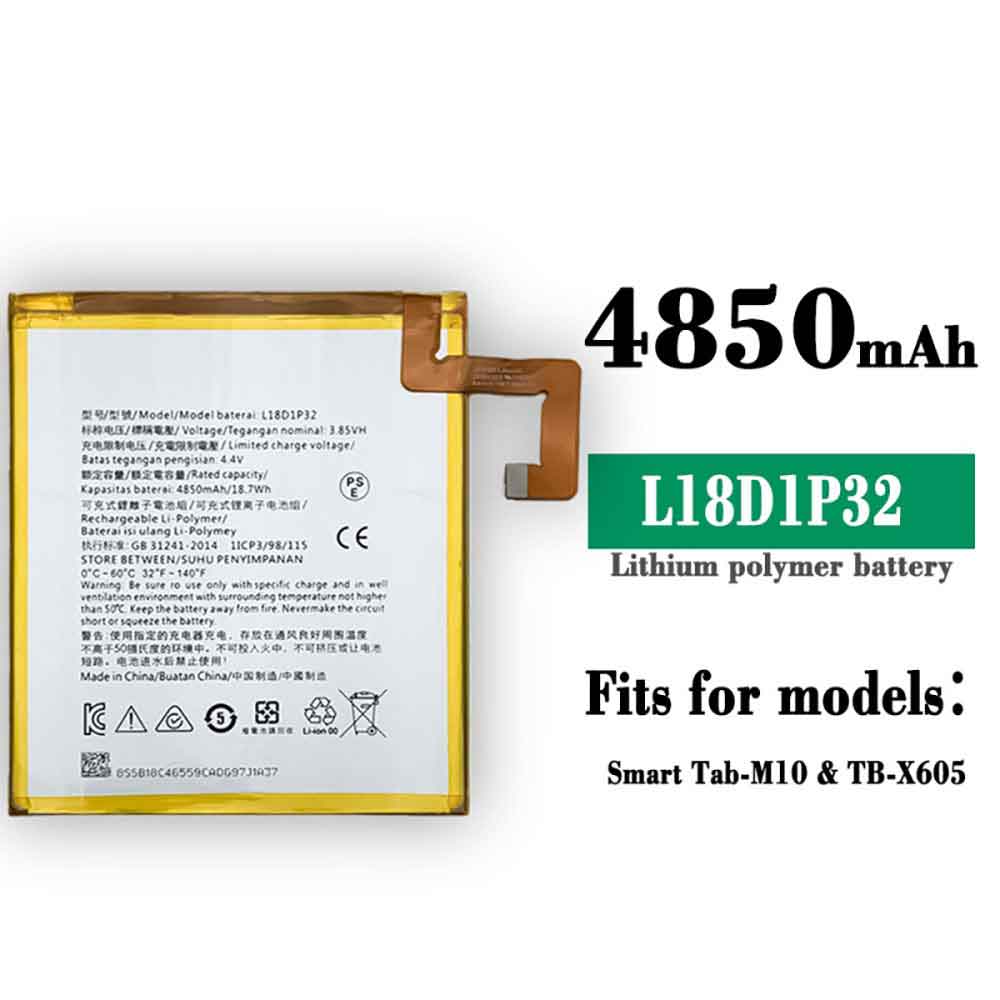
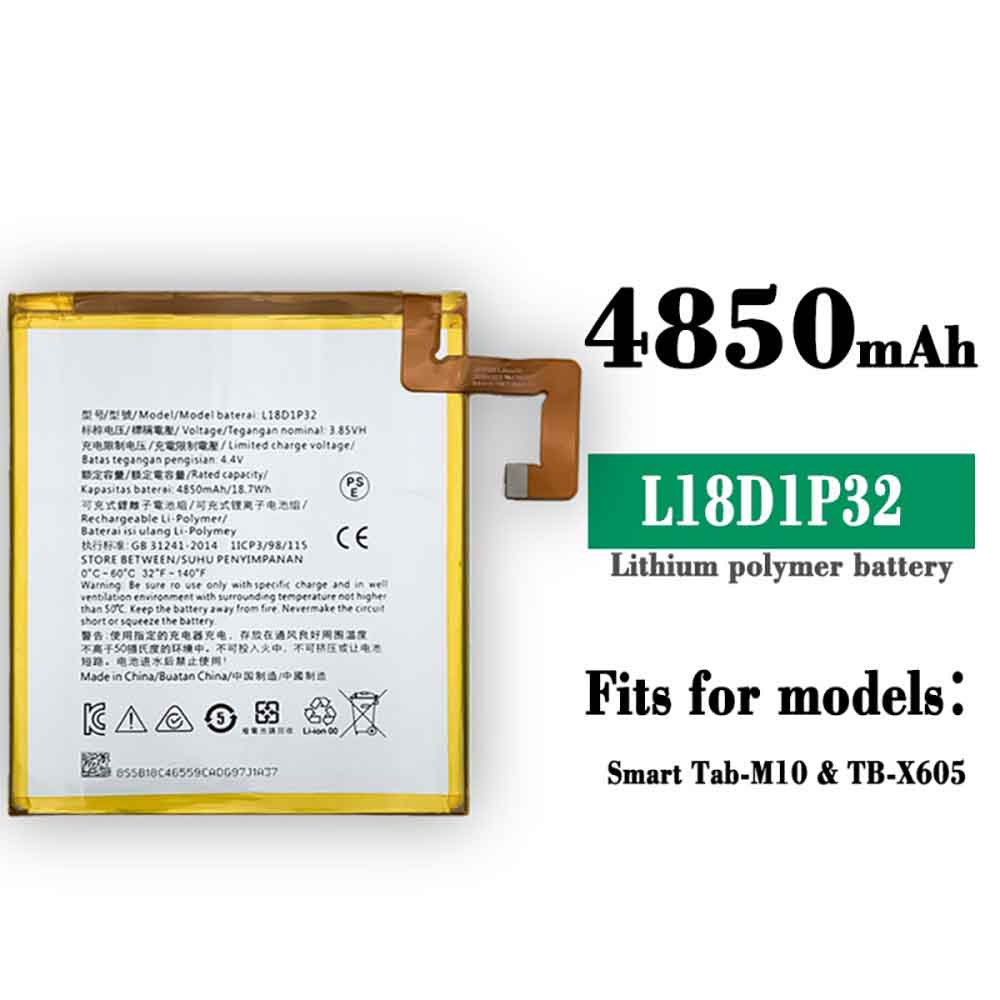
4850mAh/18.7WH 3.85V 4.4V Lenovo L18D1P32DI Li-ion Battery for Lenovo Smart Tab M10 TB-X605F

4850mAh/18.7WH 3.85V 4.4V Lenovo L18D1P32DI Batteries for Lenovo Smart Tab M10 TB-X605F, Lenovo L18D1P32DI Tablets battery is a brand new,100% Compatible original and replacement Tablets battery,Purchase wholesale and retail L18D1P32DI with high quality and low price!

Find ou your original model number or part number(P/N), and move your eyes on the tag of battery

L18D1P32DI

Specifications

  • Brand:Lenovo
  • Capacity :4850mAh/18.7WH
  • Voltage :3.85V 4.4V
  • Type :Li-ion
  • Battery Cell Quality: Grade A
  • Descriptive: Replacement Battery – 1 Year Warranty
  • Description: Brand New, 1 Year Warranty! 30-Days Money Back! Fast Shipping!

How we test this Lenovo L18D1P32DI Battery
Step 1: Make sure customer bought the correct battery.
Step 2: Check battery’s appearance and interface.
Step 3: Test battery charger and recharger function.
Step 4: Charger the battery to 100% and recharger to 0% to get real battery capacity
Step 5: Use Ev2300 to check the voltage difference of each goroup cells.
Step 6: Charger battery power more than 30%.
Step 7: Package battery carefully and send out

Compatible Part Numbers:
L18D1P32DI

Compatible Model Numbers:
Lenovo Smart Tab M10 TB-X605F

How much do you know about how to run laptop well as any place? The follow Tips cut way back on protecting battery life.


1). Please recharge or change your Tablets battery when battery power low.
2). Using Li-Ion Replacement Lenovo L18D1P32DI Tablets Battery for your notebook which can work longer time than Non Li-ion one.
3). It is better to defragmentation regularly for your Tablets battery life.
4). In order to reduce the laptop power consumpition, you can use some optical drive spin-down and hard drive in your Tablets .
5). Please keep your laptop in sleep or standby model without long time using, which both save the Replacement Lenovo L18D1P32DI Tablets Battery power and extend battery using life.
6). Leave your battery in a dry and cool condition when without using.
7). When you rarely or generally plugged in fixed power using, Please take down your battery to avoid hurting battery life.

Hot Products

5209mAh RAZER RC30-0248 for RAZER Blade 15 2018 RZ09-023863948mAh/30WH LENOVO L17L2PB1 for Lenovo V330-14IKB Series2000mAh ALCATEL TLi019D7 for ALCATEL 1 (2018) 5033 5033D 5042Wh ASUS C31N1843 for Asus VivoBook S15 S532FL X532F45Wh/3150mAh FUJITSU FMVNBP232 for Fujitsu Lifebook FPCBP425 U74510000mAh/37Wh HAIER PL3710398P-2p for Haier VL-40100100-2s N14 NB444220mAh/16.33WH REALME BLP833 for Realme V153000mAh NOKIA WT330 for Nokia 4.2 TA-1150 TA-11336700Mah/72Wh LENOVO L11S6R01 for LENOVO IdeaPad Y400 Y490 Y5003000mAh 11.4WH VSUN SATURN-Selfie for Vsun SATURN-Selfie

4850mAh/18.7WH 3.85V 4.4V Lenovo L18D1P32D Li-ion Battery for Lenovo Tab M10 TB-X605

4850mAh/18.7WH 3.85V 4.4V Lenovo L18D1P32D Batteries for Lenovo Tab M10 TB-X605, Lenovo L18D1P32D Tablets battery is a brand new,100% Compatible original and replacement Tablets battery,Purchase wholesale and retail L18D1P32D with high quality and low price!

Find ou your original model number or part number(P/N), and move your eyes on the tag of battery

L18D1P32D

Specifications

  • Brand:Lenovo
  • Capacity :4850mAh/18.7WH
  • Voltage :3.85V 4.4V
  • Type :Li-ion
  • Battery Cell Quality: Grade A
  • Descriptive: Replacement Battery – 1 Year Warranty
  • Description: Brand New, 1 Year Warranty! 30-Days Money Back! Fast Shipping!

How we test this Lenovo L18D1P32D Battery
Step 1: Make sure customer bought the correct battery.
Step 2: Check battery’s appearance and interface.
Step 3: Test battery charger and recharger function.
Step 4: Charger the battery to 100% and recharger to 0% to get real battery capacity
Step 5: Use Ev2300 to check the voltage difference of each goroup cells.
Step 6: Charger battery power more than 30%.
Step 7: Package battery carefully and send out

Compatible Part Numbers:
L18D1P32D

Compatible Model Numbers:
Lenovo Tab M10 TB-X605

How much do you know about how to run laptop well as any place? The follow Tips cut way back on protecting battery life.


1). Please recharge or change your Tablets battery when battery power low.
2). Using Li-Ion Replacement Lenovo L18D1P32D Tablets Battery for your notebook which can work longer time than Non Li-ion one.
3). It is better to defragmentation regularly for your Tablets battery life.
4). In order to reduce the laptop power consumpition, you can use some optical drive spin-down and hard drive in your Tablets .
5). Please keep your laptop in sleep or standby model without long time using, which both save the Replacement Lenovo L18D1P32D Tablets Battery power and extend battery using life.
6). Leave your battery in a dry and cool condition when without using.
7). When you rarely or generally plugged in fixed power using, Please take down your battery to avoid hurting battery life.

Hot Products

10000mAh/37Wh HAIER PL3710398P-2p for Haier VL-40100100-2s N14 NB444220mAh/16.33WH REALME BLP833 for Realme V153000mAh NOKIA WT330 for Nokia 4.2 TA-1150 TA-11336700Mah/72Wh LENOVO L11S6R01 for LENOVO IdeaPad Y400 Y490 Y5003000mAh 11.4WH VSUN SATURN-Selfie for Vsun SATURN-Selfie3200mah SONY VGP-BPS27/N for Sony N50 Series1100mAh AUTEL MLP4795117-2P for Autel MaxiSys MS908 MS908P PRO3640mAh/42Wh ASUS B31N1911 for Asus TP420IA TP470EA TP470EZ X2970mAh DJI 973760 for DJI SPARK MAVIC PRO/AIR4220mAh/16.33WH REALME BLP833 for Realme V15

iPadOS 16.1: New features, supported iPads, everything we know

 If you own a recent iPad, iPadOS 16.1 is what you want to know — it’s the next version of Apple’s iPad software, and this new version of iPadOS was introduced at Apple’s annual WWDC 2022 conference, where the company showed off Its new operating system, iOS 16, is the biggest upgrade, showing off a new lock screen and more.

Recently, Apple announced that iPadOS 16.1 would instead be coming later in 2022, requiring more time to improve Stage Manager, its new way of multitasking on the tablet.

Below we’ve covered all the features Apple announced on stage, along with details on when iPadOS 16.1 is coming and who can get it.

iPadOS 16.1 release date

The iPadOS 16.1 developer beta and public beta are already available, but the full rollout will be later this year. Apple has rarely delayed iPadOS 16.1 until October to make it more polished.

iPadOS 16 compatibility

So which iPads will get iPadOS 16? This is the official list provided by Apple.

iPad (5th generation) and later, iPad Mini (5th generation) and later, iPad Air (3rd generation) and later, each iPad Pro model.

If you need to check which iPad you have, go into the Settings app, select the About option, and find the model name.

iPadOS 16.1 Features

Here’s what you need to know about the iPadOS 16.1 update:

iPadOS 16.1 Borrowing Features

Many of the features of iPadOS 16.1 are primarily iOS 16 features and expand upon them.

Another comes from Apple Maps: You can create a route in an app on your iPad and send it to your iPhone, so you can plan your trip more easily on the big screen, then on the smaller one.

You can also schedule emails to be sent at specific times, recall emails you just sent, and set reminders for emails you don’t want to deal with right away.

Another new app on the iPad is Reference Mode, which is designed to keep the iPad’s screen colors in sync with the colors of the monitor and other monitors, which is useful for colorists.

iPadOS 16.1 Collaboration: Improved collaboration is the focus of the next iPad update.

Now, when you share a document with your friends or colleagues, you’ll share the actual document, not a copy of it – making it easier for collaborators to edit together.

iPadOS 16.1 Desktop Focus

iPadOS introduces a new approach to multitasking in the form of Stage Manager, which gives you desktop-like functionality—you can have overlapping windows, and you can move all your background apps aside to be in one list View them, and you can resize the viewport.

This feature will work on iPads released after 2018, with the exception of the iPad mini.

iPadOS 16.1 Freeform

Announced the upcoming launch of an app called FreeForm, which will be available in iPadOS 16.1 and macOS Ventura later this year. It’s basically a federated digital message board, or a shared version of the Notes application, so multiple users can draft and jot down ideas.

Apple shows that many people draw lots of different mind maps using sticky notes, colored lines, and annotations – and the Apple Pencil is considered a useful tool for contributing to such documents.

If you’ve used Google Jamboard, this feels like the Apple equivalent, but since it’s for a tablet with a stylus, it should be a little more convenient to use.

>>>>>>>>>>iPad battery

Pixel tablet: Google teases the mysterious device again

 Google really wants people to know it’s working on a new tablet. After first revealing it was working on a tablet at its I/O developer conference in May, at its Pixel event on Thursday, the company dropped some hints about the upcoming device again.

Unlike the metal Pixel 7 phone, the tablet will be built with a “nano-ceramic” coating “inspired” by porcelain. The body of the tablet is made from “100% recycled aluminum”.

We still don’t know much about the tablet, although Google says it will be a “premium version” that will arrive in 2023. It will run on Google’s Tensor G2 processor, similar to the one that powers the Pixel 7 and Pixel 7 Pro.

The device will have a charging speaker base that attaches magnetically to the back of the tablet, turning the Pixel tablet into a detachable Nest Hub. Once docked, the tablet can display photos or control your smart home using widgets or the Google Assistant.

While it has teased some extra features, Google hasn’t revealed pricing or a release date. However, the company did reiterate that the tablet will go on sale next year.

Is it more of a smart display than a laptop?

Google’s preview makes the tablet look more like a photo frame, smart home hub and video calling device than some sort of laptop replacement. The keyboard accessory isn’t shown: instead, the magnetic charging dock appears to be a key way to keep the tablet at home. (The Pixel tablet won’t arrive until 2023, so there may be more to come.)

Performance: As good as the Pixel 7, what else?

Google’s proposed tablet use sounds powerful (it has the new Tensor G2 chip) and sounds similar to its Pixel phones. But Google’s emphasis on app compatibility with split-screen mode and stylus support may be part of the reason the tablet took longer to roll out. The wallpapers and design themes look consistent with the Pixel, suggesting that Android on its tablet will feel very similar this time around.

How much will it cost?

The price is unknown, which is a big deal. If Google tried to make it a casual home tablet, would it price it accordingly? (The Nest Hub Max, for example, sells for $229.) Or, if its goal is to be a more versatile device, are other accessories worth putting it in the premium zone? It’s hard to say, and we probably won’t know more about this until next year. But if you’ve been dying for a new Android tablet, you might want to wait for it.

>>>>>>>>>>>>Tablet battery