Why my MacBook battery isn’t charging and how to check

 Batteries occupy so much of our lives that they are now everywhere. Whether it’s a watch worn on the wrist or a computer that most people use for their day-to-day work, the battery is always there.

This is because of the amazing benefits of batteries, such as portable power and extended usage, that make everything around us need batteries. However, in addition to all these amazing benefits, there are some problems.

One of the most common problems is that the battery won’t charge. So here we are going to discuss everything you need to know in this regard.

My battery is not charging fast

Small devices such as cell phones can be fully charged in an hour or a few minutes. The same goes for tablets and laptops, which require more free time. However, sometimes things get worse and the fast charging feature may not work properly. Although this can make your life very difficult as these devices take a long time to charge. Here, we’ll discuss some of the reasons and how to deal with it.

What could cause a battery not to charge fast?

If your device supports fast charging and still isn’t fast charging, there is a problem somewhere. Here, we’ll discuss some of the most common problems and how to deal with them:

Charger failure

The first thing to check is the charger. Either you are not using the correct charger or the charger is broken. In both cases, you’ll need to replace the charger to get fast charging

faulty cable

If replacing the charger doesn’t fix the problem, then there’s a problem with the cable, and you can change the charger to fix the problem.

Some problems with your device

There may be some issues with your device, some of which are listed below:

1. Dirty connection ports do not allow proper connection for fast charging.

2. Replacing faulty motherboard components such as controllers may stop the fast charging function.

3. A faulty battery will not charge quickly.

The battery on my MacBook Air is not charging:

Whether you have an older or newer model, there may be issues with not being charged. So if this happens to you, you can do it.

Check the apps you’re using on your MacBook Air.

The first thing you need to check is the apps running on your MacBook Air. This is a laptop that’s not designed for high performance, although it still delivers amazing performance. For performance-demanding and time-consuming tasks, the MacBook Pro is the best choice.

So if you’re using some application that requires a lot of hardware, then it shouldn’t be a problem. Here the laptop is using more power than required for charging, so the charging process is not taking place.

Check charger support.

If no apps are breaking, then you need to check the charger. Does your MacBook Air support a charger? Are there issues such as a faulty charger or a faulty connector?

Try restarting your MacBook.

If the charger is fine, then you can try restarting your MacBook Air, as it will reset the hardware inside. This may help restore charging functionality.

Repairing your MacBook would be the best option.

If the problem persists, then you need to service your MacBook Air because there may be a problem with the ports, the motherboard, or the battery itself.

>>>>>>>>>>>>>Battery

Thanks for reading, hope it helps!

Friendly reminder: If you need to replace the battery of your device, this battery store will be a good choice: www.batteryforpc.co.uk
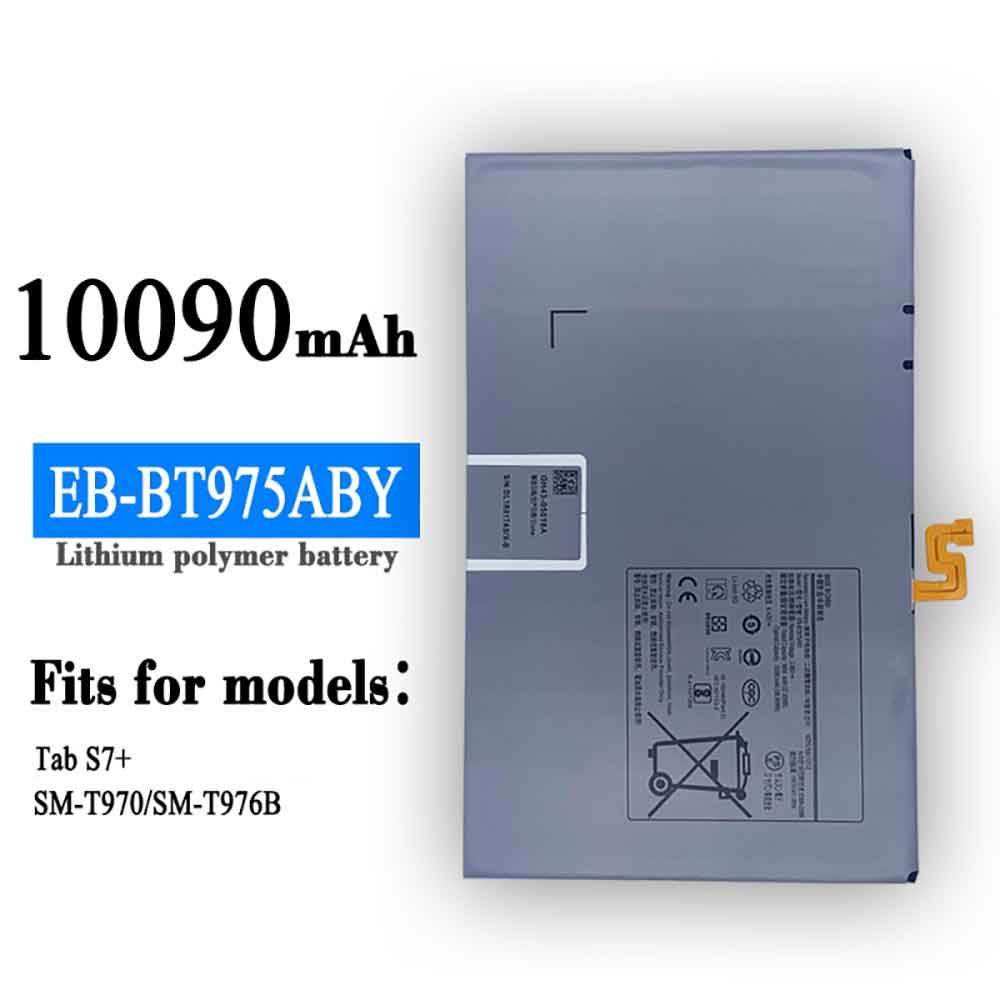
10090mAh/38.95WH 3.86V 4.43V Samsung EB-BT975ABY Li-ion Battery for Samsung Galaxy Tab S7+

10090mAh/38.95WH 3.86V 4.43V Samsung EB-BT975ABY Batteries for Samsung Galaxy Tab S7+, Samsung EB-BT975ABY Tablets battery is a brand new,100% Compatible original and replacement Tablets battery,Purchase wholesale and retail EB-BT975ABY with high quality and low price!

Find ou your original model number or part number(P/N), and move your eyes on the tag of battery

EB-BT975ABY

Specifications

  • Brand:Samsung
  • Capacity :10090mAh/38.95WH
  • Voltage :3.86V 4.43V
  • Type :Li-ion
  • Battery Cell Quality: Grade A
  • Descriptive: Replacement Battery – 1 Year Warranty
  • Description: Brand New, 1 Year Warranty! 30-Days Money Back! Fast Shipping!

How we test this Samsung EB-BT975ABY Battery
Step 1: Make sure customer bought the correct battery.
Step 2: Check battery’s appearance and interface.
Step 3: Test battery charger and recharger function.
Step 4: Charger the battery to 100% and recharger to 0% to get real battery capacity
Step 5: Use Ev2300 to check the voltage difference of each goroup cells.
Step 6: Charger battery power more than 30%.
Step 7: Package battery carefully and send out

Compatible Part Numbers:
EB-BT975ABY

Compatible Model Numbers:
Samsung Galaxy Tab S7+

How much do you know about how to run laptop well as any place? The follow Tips cut way back on protecting battery life.


1). Please recharge or change your Tablets battery when battery power low.
2). Using Li-Ion Replacement Samsung EB-BT975ABY Tablets Battery for your notebook which can work longer time than Non Li-ion one.
3). It is better to defragmentation regularly for your Tablets battery life.
4). In order to reduce the laptop power consumpition, you can use some optical drive spin-down and hard drive in your Tablets .
5). Please keep your laptop in sleep or standby model without long time using, which both save the Replacement Samsung EB-BT975ABY Tablets Battery power and extend battery using life.
6). Leave your battery in a dry and cool condition when without using.
7). When you rarely or generally plugged in fixed power using, Please take down your battery to avoid hurting battery life.

Hot Products

3900mAh/15.015WH CATERPILLAR APP00240 for Caterpillar CAT S313500mAh/13.48WH SAMSUNG EB-BA730ABE for Samsung GALAXY A8+ A7 A730X SM4100mAh/62.32Wh GETAC GK5CN-00-13-4S1P-0 for GETAC GK5CN5Z GK5CN6Z GK5CN4Z930mAh/3.4Wh GARMIN 361-00035-01 for GARMIN Nuvi 2595LMT 1250 12556580mAh/25.333WH BLACKVIEW 726280P for Blackview BV6800 pro Phone1350mAh/4.995WH ALCATEL TLI013CA for Alcatel phone3310mAh/50WH FUJITSU FPB0338S for Fujitsu Lifebook E548 E558 T932800mAh/10.36WH INFOCUS P2424 for InFocus P242433Wh HP BV02XL for HP Envy X2 Detachable 13 Serie875mAh DJI HB3 for DJI Osmo Pocket 2

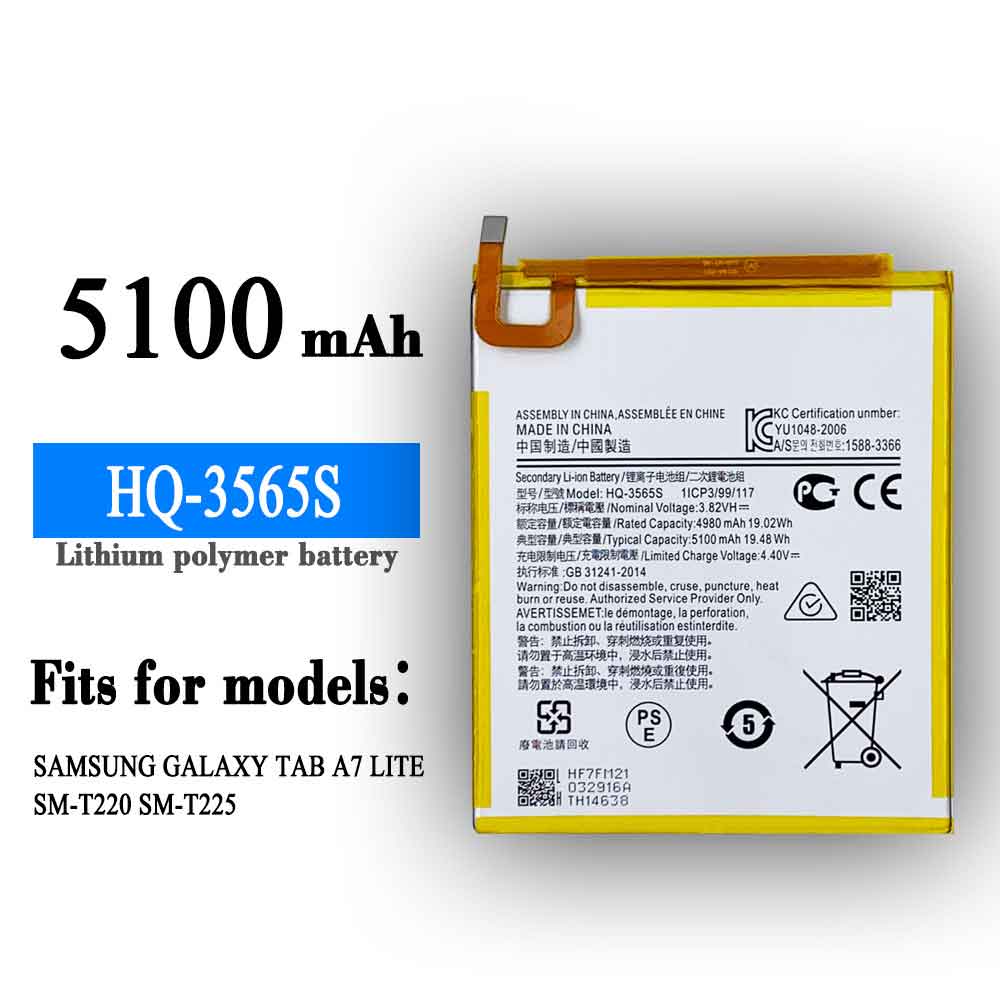
5100mAh/19.48WH 3.82V 4.4V Samsung HQ-3565S Li-ion Battery for Samsung Galaxy Tab A7 Lite

5100mAh/19.48WH 3.82V 4.4V Samsung HQ-3565S Batteries for Samsung Galaxy Tab A7 Lite, Samsung HQ-3565S Tablets battery is a brand new,100% Compatible original and replacement Tablets battery,Purchase wholesale and retail HQ-3565S with high quality and low price!

Find ou your original model number or part number(P/N), and move your eyes on the tag of battery

HQ-3565S

Specifications

  • Brand:Samsung
  • Capacity :5100mAh/19.48WH
  • Voltage :3.82V 4.4V
  • Type :Li-ion
  • Battery Cell Quality: Grade A
  • Descriptive: Replacement Battery – 1 Year Warranty
  • Description: Brand New, 1 Year Warranty! 30-Days Money Back! Fast Shipping!

How we test this Samsung HQ-3565S Battery
Step 1: Make sure customer bought the correct battery.
Step 2: Check battery’s appearance and interface.
Step 3: Test battery charger and recharger function.
Step 4: Charger the battery to 100% and recharger to 0% to get real battery capacity
Step 5: Use Ev2300 to check the voltage difference of each goroup cells.
Step 6: Charger battery power more than 30%.
Step 7: Package battery carefully and send out

Compatible Part Numbers:
HQ-3565S

Compatible Model Numbers:
Samsung Galaxy Tab A7 Lite

How much do you know about how to run laptop well as any place? The follow Tips cut way back on protecting battery life.


1). Please recharge or change your Tablets battery when battery power low.
2). Using Li-Ion Replacement Samsung HQ-3565S Tablets Battery for your notebook which can work longer time than Non Li-ion one.
3). It is better to defragmentation regularly for your Tablets battery life.
4). In order to reduce the laptop power consumpition, you can use some optical drive spin-down and hard drive in your Tablets .
5). Please keep your laptop in sleep or standby model without long time using, which both save the Replacement Samsung HQ-3565S Tablets Battery power and extend battery using life.
6). Leave your battery in a dry and cool condition when without using.
7). When you rarely or generally plugged in fixed power using, Please take down your battery to avoid hurting battery life.

Hot Products

3900mAh/15.015WH CATERPILLAR APP00240 for Caterpillar CAT S313500mAh/13.48WH SAMSUNG EB-BA730ABE for Samsung GALAXY A8+ A7 A730X SM4100mAh/62.32Wh GETAC GK5CN-00-13-4S1P-0 for GETAC GK5CN5Z GK5CN6Z GK5CN4Z930mAh/3.4Wh GARMIN 361-00035-01 for GARMIN Nuvi 2595LMT 1250 12556580mAh/25.333WH BLACKVIEW 726280P for Blackview BV6800 pro Phone1350mAh/4.995WH ALCATEL TLI013CA for Alcatel phone3310mAh/50WH FUJITSU FPB0338S for Fujitsu Lifebook E548 E558 T932800mAh/10.36WH INFOCUS P2424 for InFocus P242433Wh HP BV02XL for HP Envy X2 Detachable 13 Serie875mAh DJI HB3 for DJI Osmo Pocket 2

2400mAh 3.7V Motorola 82-150612-01 Li-ion Battery for Motorola Symbol MC2100 MC2080 MC2180 BTRY-MC21EAB0E

2400mAh 3.7V Motorola 82-150612-01 Batteries for Motorola Symbol MC2100 MC2080 MC2180 BTRY-MC21EAB0E, Motorola 82-150612-01 Tablets battery is a brand new,100% Compatible original and replacement Tablets battery,Purchase wholesale and retail 82-150612-01 with high quality and low price!

Find ou your original model number or part number(P/N), and move your eyes on the tag of battery

82-150612-01

Specifications

  • Brand:Motorola
  • Capacity :2400mAh
  • Voltage :3.7V
  • Color:black
  • Type :Li-ion
  • Battery Cell Quality: Grade A
  • Descriptive: Replacement Battery – 1 Year Warranty
  • Description: Brand New, 1 Year Warranty! 30-Days Money Back! Fast Shipping!

How we test this Motorola 82-150612-01 Battery
Step 1: Make sure customer bought the correct battery.
Step 2: Check battery’s appearance and interface.
Step 3: Test battery charger and recharger function.
Step 4: Charger the battery to 100% and recharger to 0% to get real battery capacity
Step 5: Use Ev2300 to check the voltage difference of each goroup cells.
Step 6: Charger battery power more than 30%.
Step 7: Package battery carefully and send out

Compatible Part Numbers:
82-150612-01

Compatible Model Numbers:
(Not Compatible 82-150612-02 ,Because the installed capacity of a problem)
Motorola Symbol MC2100 MC2080 MC2180

How much do you know about how to run laptop well as any place? The follow Tips cut way back on protecting battery life.


1). Please recharge or change your Tablets battery when battery power low.
2). Using Li-Ion Replacement Motorola 82-150612-01 Tablets Battery for your notebook which can work longer time than Non Li-ion one.
3). It is better to defragmentation regularly for your Tablets battery life.
4). In order to reduce the laptop power consumpition, you can use some optical drive spin-down and hard drive in your Tablets .
5). Please keep your laptop in sleep or standby model without long time using, which both save the Replacement Motorola 82-150612-01 Tablets Battery power and extend battery using life.
6). Leave your battery in a dry and cool condition when without using.
7). When you rarely or generally plugged in fixed power using, Please take down your battery to avoid hurting battery life.

Hot Products

3500mAh/13.48WH SAMSUNG EB-BA730ABE for Samsung GALAXY A8+ A7 A730X SM4100mAh/62.32Wh GETAC GK5CN-00-13-4S1P-0 for GETAC GK5CN5Z GK5CN6Z GK5CN4Z930mAh/3.4Wh GARMIN 361-00035-01 for GARMIN Nuvi 2595LMT 1250 12556580mAh/25.333WH BLACKVIEW 726280P for Blackview BV6800 pro Phone1350mAh/4.995WH ALCATEL TLI013CA for Alcatel phone3310mAh/50WH FUJITSU FPB0338S for Fujitsu Lifebook E548 E558 T932800mAh/10.36WH INFOCUS P2424 for InFocus P242433Wh HP BV02XL for HP Envy X2 Detachable 13 Serie875mAh DJI HB3 for DJI Osmo Pocket 230.4Wh/4000mAh LG LBG722VH for LG Gram 14Z950 13Z940 13ZD940

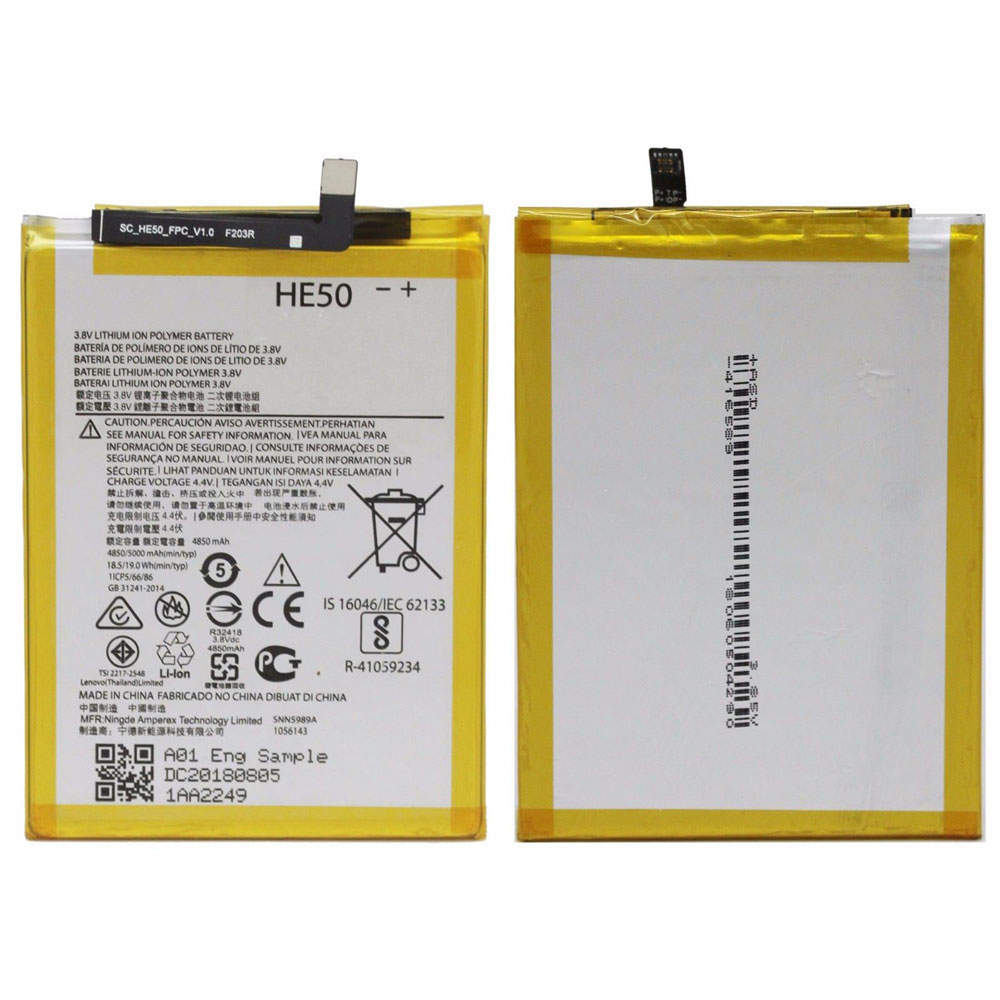
4850MAH/18.5WH 3.8V/4.4V Motorola SNN5989A Li-ion Battery for Motorola Moto E4 Plus XT1770 XT1775 XT1776

4850MAH/18.5WH 3.8V/4.4V Motorola SNN5989A Batteries for Motorola Moto E4 Plus XT1770 XT1775 XT1776, Motorola SNN5989A Tablets battery is a brand new,100% Compatible original and replacement Tablets battery,Purchase wholesale and retail SNN5989A with high quality and low price!

Find ou your original model number or part number(P/N), and move your eyes on the tag of battery

SNN5989A

Specifications

  • Brand:Motorola
  • Capacity :4850MAH/18.5WH
  • Voltage :3.8V/4.4V
  • Type :Li-ion
  • Battery Cell Quality: Grade A
  • Descriptive: Replacement Battery – 1 Year Warranty
  • Description: Brand New, 1 Year Warranty! 30-Days Money Back! Fast Shipping!

How we test this Motorola SNN5989A Battery
Step 1: Make sure customer bought the correct battery.
Step 2: Check battery’s appearance and interface.
Step 3: Test battery charger and recharger function.
Step 4: Charger the battery to 100% and recharger to 0% to get real battery capacity
Step 5: Use Ev2300 to check the voltage difference of each goroup cells.
Step 6: Charger battery power more than 30%.
Step 7: Package battery carefully and send out

Compatible Part Numbers:
HE50
SNN5989A

Compatible Model Numbers:
Motorola Moto E4 Plus XT1770 XT1775 XT1776

How much do you know about how to run laptop well as any place? The follow Tips cut way back on protecting battery life.


1). Please recharge or change your Tablets battery when battery power low.
2). Using Li-Ion Replacement Motorola SNN5989A Tablets Battery for your notebook which can work longer time than Non Li-ion one.
3). It is better to defragmentation regularly for your Tablets battery life.
4). In order to reduce the laptop power consumpition, you can use some optical drive spin-down and hard drive in your Tablets .
5). Please keep your laptop in sleep or standby model without long time using, which both save the Replacement Motorola SNN5989A Tablets Battery power and extend battery using life.
6). Leave your battery in a dry and cool condition when without using.
7). When you rarely or generally plugged in fixed power using, Please take down your battery to avoid hurting battery life.

Hot Products

3500mAh/13.48WH SAMSUNG EB-BA730ABE for Samsung GALAXY A8+ A7 A730X SM4100mAh/62.32Wh GETAC GK5CN-00-13-4S1P-0 for GETAC GK5CN5Z GK5CN6Z GK5CN4Z930mAh/3.4Wh GARMIN 361-00035-01 for GARMIN Nuvi 2595LMT 1250 12556580mAh/25.333WH BLACKVIEW 726280P for Blackview BV6800 pro Phone1350mAh/4.995WH ALCATEL TLI013CA for Alcatel phone3310mAh/50WH FUJITSU FPB0338S for Fujitsu Lifebook E548 E558 T932800mAh/10.36WH INFOCUS P2424 for InFocus P242433Wh HP BV02XL for HP Envy X2 Detachable 13 Serie875mAh DJI HB3 for DJI Osmo Pocket 230.4Wh/4000mAh LG LBG722VH for LG Gram 14Z950 13Z940 13ZD940

Five Signs You Need to Replace Your Tablet

 The main reason people prefer to use tablets over smartphones is that they are portable, lightweight, and still offer a big-screen experience. Compared to laptops, they are lighter and more portable. Compared to smartphones, they offer very large screens without adding a lot of bulk. If you’re on the go a lot, you know how important a tablet is. Just like any other electronic device, tablets show some signs of failure. Below, we’ll tell you some common problems that pop up with tablets, and whether you need to buy a new tablet to replace your old one. Let’s take a look below!

Tablets drain battery faster

Once charged, your tablet can work continuously for five to six hours. However, if you’re used to having all your apps open all the time, battery life can take a serious hit. The easiest thing you can do to save battery is to make sure the screen is only as bright as it needs to be. To reduce battery consumption, set a shorter screen-off time by doing the following:

1. Open the Settings menu.

2. Tap Display or Screen, depending on the tablet’s operating system.

3. Now go to the submenu where you can set the screen timeout settings.

4. Now, select the 30 seconds option.

In addition to this, it is also important to take care of the battery so that it can run longer. Here are some tips to keep in mind:

1. Use the power adapter that came with your device, as other power adapters may charge slowly or damage your device or battery.

2. Avoid situations where the device may overheat. Even if you don’t use it, the battery will drain faster when it heats up. This leakage can easily damage the tablet’s battery.

3. Never wait until the battery is completely drained and dropped to zero charge. Once you see the battery level drop to 20%, make sure to fully charge it, otherwise it will affect the charge cycle.

If your tablet’s battery life doesn’t improve after following all the tips above, you need a new tablet.

software failure

Tablets have a shorter lifespan. They can run for up to two years, after which they may need constant fixes if the software isn’t updated. This is a problem with most Android tablets. It’s either starting to hang more frequently, working very slowly, or showing signs of failure.

It would be wise to spend a little more on an extended warranty plan when buying a tablet. The Extended Warranty Program covers all defects and malfunctions covered by the standard manufacturer’s warranty. This also includes software glitches. After the warranty period ends, the extended warranty period begins. This way, your tablet will be covered for an additional year. The benefit of this program is that it extends the life of your equipment by a year at a very nominal cost.

low storage

Tablets don’t have the storage capacity of laptops, which means you can’t keep your entire digital life on a tablet without dealing with storage issues. For Android tablets, you can add a microSD card to the device to increase the amount of storage you have. If you have an iPad, this option is not available. Your only options are to upgrade to an iPad with more storage or clean up your device. To clean your device, you first need to uninstall unwanted apps. Try cleaning up music and videos on your tablet. Instead, use Box, Dropbox, Google Drive, iCloud Drive, or OneDrive to back up your documents, images, and videos.

Tablet touchscreen not working

If the touchscreen isn’t responding, you can’t do anything with the tablet. Any damage to the display, be it scratches or cracks, can result in damage to the device. Also, it can be very expensive to fix. However, there are a few things you can try before heading to a service center for repairs.

The touchscreen is sensitive to any dust or grime, so clean the screen before fixing the problem. Also, sometimes a wrong software update can cause issues related to the touchscreen. Check if an update is available for your tablet. To update your tablet, go to Settings > About Tablet or About Device > System Update or Software Update. If it’s still not responding, you can use a tablet repair service at your door to fix it.

Tablet overheating

Overheating your tablet is bad for your device. It’s not uncommon for your tablet to get overheated when you’re using it heavily or running heavy-duty apps that drain your battery. The processor and screen are the biggest battery drains in a tablet, so cut back on anything that’s causing these components to overwork. Finally, avoid sitting the tablet in direct sunlight for too long, as this can also overheat the device. As soon as you notice your tablet starts to get hot, stop using it temporarily. Turn off the tablet and allow the battery to cool. If it still continues to overheat, there may be a problem with the battery or motherboard.

>>>>>>>>>>Tablet battery

Thanks for reading, hope it helps!

Friendly reminder: If you need to replace the battery of your device, this battery store will be a good choice: www.batteryforpc.co.uk

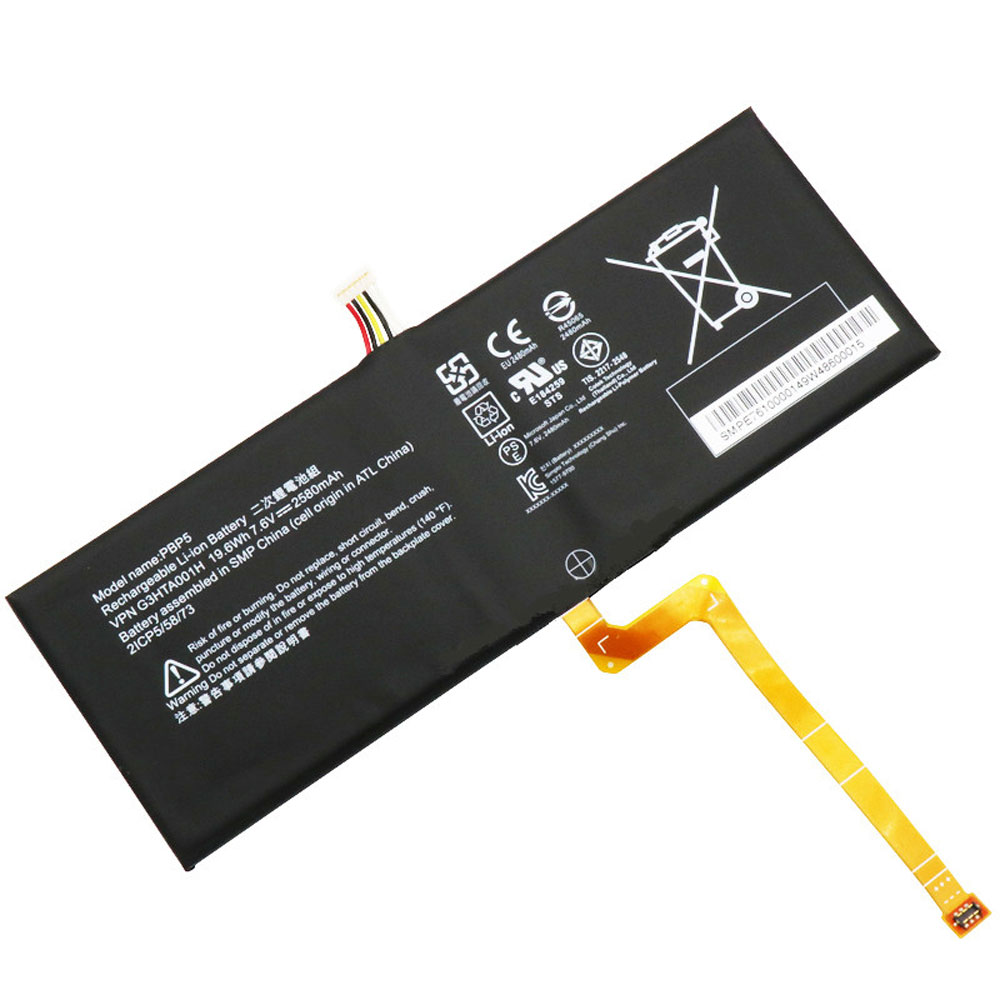
19.6Wh/2580mAh 7.6V Microsoft G3HTA001H Li-ion Battery for Microsoft Surface Book

19.6Wh/2580mAh 7.6V Microsoft G3HTA001H Batteries for Microsoft Surface Book with Performance base, Microsoft G3HTA001H Tablets battery is a brand new,100% Compatible original and replacement Tablets battery,Purchase wholesale and retail G3HTA001H with high quality and low price!

Find ou your original model number or part number(P/N), and move your eyes on the tag of battery

G3HTA001H

Specifications

  • Brand:Microsoft
  • Capacity :19.6Wh/2580mAh
  • Voltage :7.6V
  • Type :Li-ion
  • Battery Cell Quality: Grade A
  • Descriptive: Replacement Battery – 1 Year Warranty
  • Description: Brand New, 1 Year Warranty! 30-Days Money Back! Fast Shipping!

How we test this Microsoft G3HTA001H Battery
Step 1: Make sure customer bought the correct battery.
Step 2: Check battery’s appearance and interface.
Step 3: Test battery charger and recharger function.
Step 4: Charger the battery to 100% and recharger to 0% to get real battery capacity
Step 5: Use Ev2300 to check the voltage difference of each goroup cells.
Step 6: Charger battery power more than 30%.
Step 7: Package battery carefully and send out

Compatible Part Numbers:
PBP5
G3HTA001H
2ICP5/58/73

Compatible Model Numbers:
Microsoft Surface Book with Performance base
Note: This battery is installed under the screen

How much do you know about how to run laptop well as any place? The follow Tips cut way back on protecting battery life.


1). Please recharge or change your Tablets battery when battery power low.
2). Using Li-Ion Replacement Microsoft G3HTA001H Tablets Battery for your notebook which can work longer time than Non Li-ion one.
3). It is better to defragmentation regularly for your Tablets battery life.
4). In order to reduce the laptop power consumpition, you can use some optical drive spin-down and hard drive in your Tablets .
5). Please keep your laptop in sleep or standby model without long time using, which both save the Replacement Microsoft G3HTA001H Tablets Battery power and extend battery using life.
6). Leave your battery in a dry and cool condition when without using.
7). When you rarely or generally plugged in fixed power using, Please take down your battery to avoid hurting battery life.

Hot Products

4100mAh/62.32Wh GETAC GK5CN-00-13-4S1P-0 for GETAC GK5CN5Z GK5CN6Z GK5CN4Z930mAh/3.4Wh GARMIN 361-00035-01 for GARMIN Nuvi 2595LMT 1250 12556580mAh/25.333WH BLACKVIEW 726280P for Blackview BV6800 pro Phone1350mAh/4.995WH ALCATEL TLI013CA for Alcatel phone3310mAh/50WH FUJITSU FPB0338S for Fujitsu Lifebook E548 E558 T932800mAh/10.36WH INFOCUS P2424 for InFocus P242433Wh HP BV02XL for HP Envy X2 Detachable 13 Serie875mAh DJI HB3 for DJI Osmo Pocket 230.4Wh/4000mAh LG LBG722VH for LG Gram 14Z950 13Z940 13ZD9403575mAh/42WH LENOVO SB10J78991 for Lenovo ThinkPad Yoga 11E 3rd G

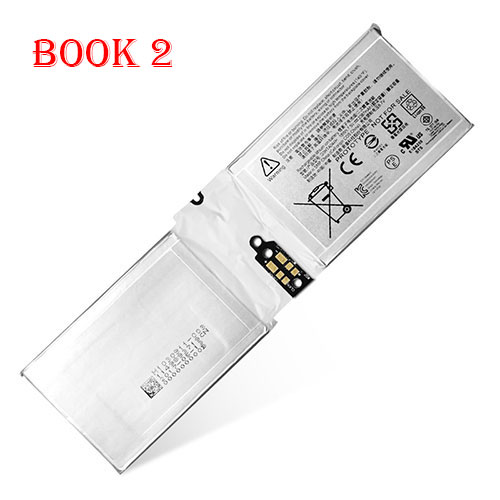
18Wh/2387mAh/2Cell 7.5V/8.7V Microsoft G3HTA044H Li-ion Battery for Microsoft Surface Book 2 1832

18Wh/2387mAh/2Cell 7.5V/8.7V Microsoft G3HTA044H Batteries for Microsoft Surface Book 2 1832, Microsoft G3HTA044H Tablets battery is a brand new,100% Compatible original and replacement Tablets battery,Purchase wholesale and retail G3HTA044H with high quality and low price!

Find ou your original model number or part number(P/N), and move your eyes on the tag of battery

G3HTA044H

Specifications

  • Brand:Microsoft
  • Capacity :18Wh/2387mAh/2Cell
  • Voltage :7.5V/8.7V
  • Type :Li-ion
  • Battery Cell Quality: Grade A
  • Descriptive: Replacement Battery – 1 Year Warranty
  • Description: Brand New, 1 Year Warranty! 30-Days Money Back! Fast Shipping!

How we test this Microsoft G3HTA044H Battery
Step 1: Make sure customer bought the correct battery.
Step 2: Check battery’s appearance and interface.
Step 3: Test battery charger and recharger function.
Step 4: Charger the battery to 100% and recharger to 0% to get real battery capacity
Step 5: Use Ev2300 to check the voltage difference of each goroup cells.
Step 6: Charger battery power more than 30%.
Step 7: Package battery carefully and send out

Compatible Part Numbers:
G3HTA045H
G3HTA044H
DAK822470K
G3HTA020H

Compatible Model Numbers:
Microsoft Surface Book 2 1832 (Compatible Microsoft Surface Book 1 CR7 13.5 CR7-00005 CR7-00007 Series)

How much do you know about how to run laptop well as any place? The follow Tips cut way back on protecting battery life.


1). Please recharge or change your Tablets battery when battery power low.
2). Using Li-Ion Replacement Microsoft G3HTA044H Tablets Battery for your notebook which can work longer time than Non Li-ion one.
3). It is better to defragmentation regularly for your Tablets battery life.
4). In order to reduce the laptop power consumpition, you can use some optical drive spin-down and hard drive in your Tablets .
5). Please keep your laptop in sleep or standby model without long time using, which both save the Replacement Microsoft G3HTA044H Tablets Battery power and extend battery using life.
6). Leave your battery in a dry and cool condition when without using.
7). When you rarely or generally plugged in fixed power using, Please take down your battery to avoid hurting battery life.

Hot Products

4100mAh/62.32Wh GETAC GK5CN-00-13-4S1P-0 for GETAC GK5CN5Z GK5CN6Z GK5CN4Z930mAh/3.4Wh GARMIN 361-00035-01 for GARMIN Nuvi 2595LMT 1250 12556580mAh/25.333WH BLACKVIEW 726280P for Blackview BV6800 pro Phone1350mAh/4.995WH ALCATEL TLI013CA for Alcatel phone3310mAh/50WH FUJITSU FPB0338S for Fujitsu Lifebook E548 E558 T932800mAh/10.36WH INFOCUS P2424 for InFocus P242433Wh HP BV02XL for HP Envy X2 Detachable 13 Serie875mAh DJI HB3 for DJI Osmo Pocket 230.4Wh/4000mAh LG LBG722VH for LG Gram 14Z950 13Z940 13ZD9403575mAh/42WH LENOVO SB10J78991 for Lenovo ThinkPad Yoga 11E 3rd G

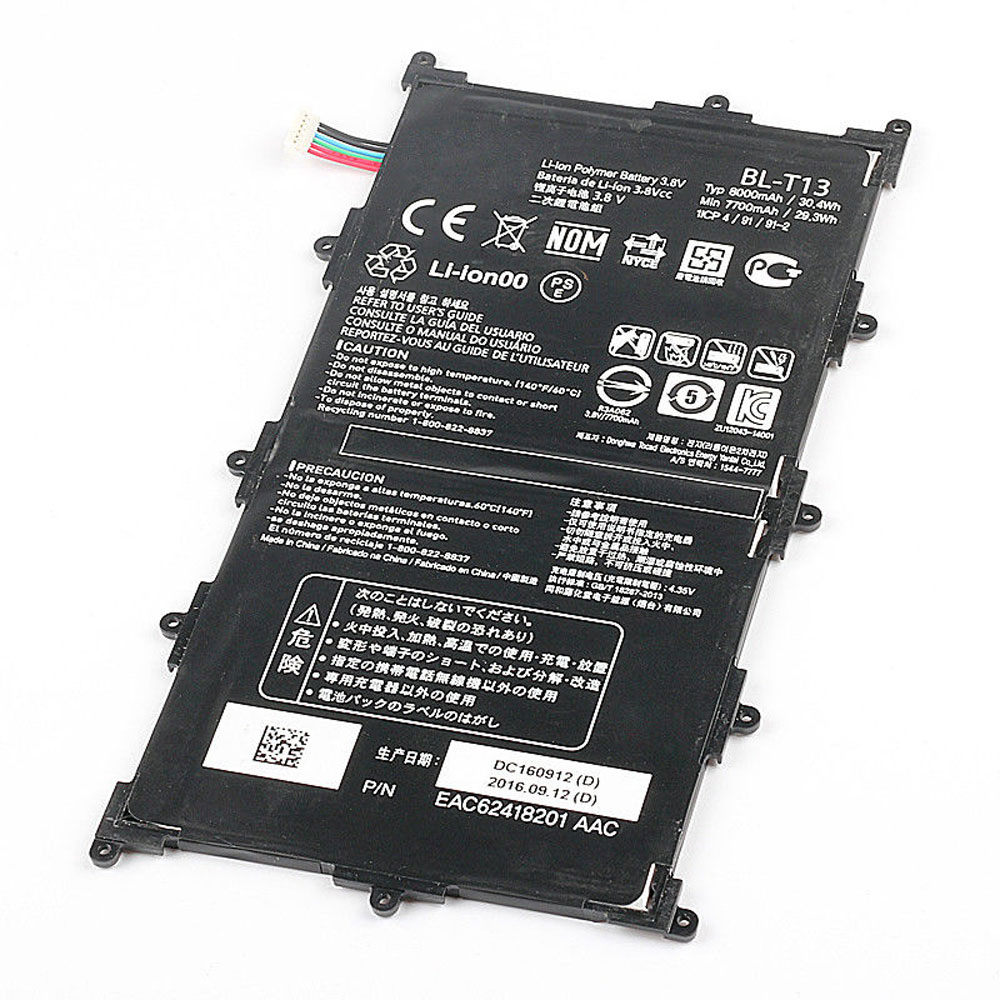
8000mAh/30.4WH 3.8V Lg BL-T13 Li-ion Battery for LG G Pad VK700 Verizon Tablet

8000mAh/30.4WH 3.8V Lg BL-T13 Batteries for LG G Pad VK700 Verizon Tablet, Lg BL-T13 Tablets battery is a brand new,100% Compatible original and replacement Tablets battery,Purchase wholesale and retail BL-T13 with high quality and low price!

Find ou your original model number or part number(P/N), and move your eyes on the tag of battery

BL-T13

Specifications

  • Brand:LG
  • Capacity :8000mAh/30.4WH
  • Voltage :3.8V
  • Type :Li-ion
  • Battery Cell Quality: Grade A
  • Descriptive: Replacement Battery – 1 Year Warranty
  • Description: Brand New, 1 Year Warranty! 30-Days Money Back! Fast Shipping!

How we test this Lg BL-T13 Battery
Step 1: Make sure customer bought the correct battery.
Step 2: Check battery’s appearance and interface.
Step 3: Test battery charger and recharger function.
Step 4: Charger the battery to 100% and recharger to 0% to get real battery capacity
Step 5: Use Ev2300 to check the voltage difference of each goroup cells.
Step 6: Charger battery power more than 30%.
Step 7: Package battery carefully and send out

Compatible Part Numbers:
BL-T13

Compatible Model Numbers:
LG G Pad VK700 Verizon Tablet

How much do you know about how to run laptop well as any place? The follow Tips cut way back on protecting battery life.


1). Please recharge or change your Tablets battery when battery power low.
2). Using Li-Ion Replacement Lg BL-T13 Tablets Battery for your notebook which can work longer time than Non Li-ion one.
3). It is better to defragmentation regularly for your Tablets battery life.
4). In order to reduce the laptop power consumpition, you can use some optical drive spin-down and hard drive in your Tablets .
5). Please keep your laptop in sleep or standby model without long time using, which both save the Replacement Lg BL-T13 Tablets Battery power and extend battery using life.
6). Leave your battery in a dry and cool condition when without using.
7). When you rarely or generally plugged in fixed power using, Please take down your battery to avoid hurting battery life.

Hot Products

4100mAh/62.32Wh GETAC GK5CN-00-13-4S1P-0 for GETAC GK5CN5Z GK5CN6Z GK5CN4Z930mAh/3.4Wh GARMIN 361-00035-01 for GARMIN Nuvi 2595LMT 1250 12556580mAh/25.333WH BLACKVIEW 726280P for Blackview BV6800 pro Phone1350mAh/4.995WH ALCATEL TLI013CA for Alcatel phone3310mAh/50WH FUJITSU FPB0338S for Fujitsu Lifebook E548 E558 T932800mAh/10.36WH INFOCUS P2424 for InFocus P242433Wh HP BV02XL for HP Envy X2 Detachable 13 Serie875mAh DJI HB3 for DJI Osmo Pocket 230.4Wh/4000mAh LG LBG722VH for LG Gram 14Z950 13Z940 13ZD9403575mAh/42WH LENOVO SB10J78991 for Lenovo ThinkPad Yoga 11E 3rd G

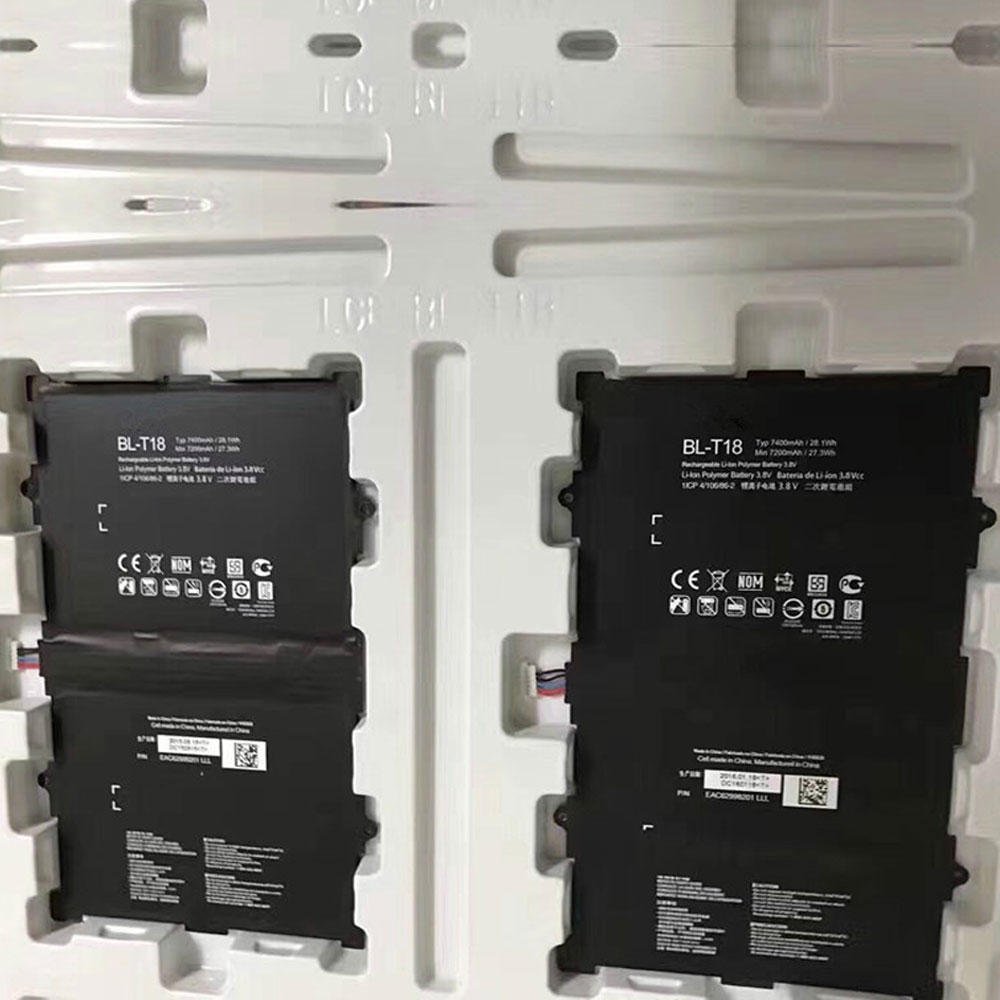
7400mAh /28.1Wh 3.8V/4.35V Lg BL-T18 Li-ion Battery for LG G PAD II PAD X 10.1 V930 V935

7400mAh /28.1Wh 3.8V/4.35V Lg BL-T18 Batteries for LG G PAD II PAD X 10.1 V930 V935, Lg BL-T18 Tablets battery is a brand new,100% Compatible original and replacement Tablets battery,Purchase wholesale and retail BL-T18 with high quality and low price!

Find ou your original model number or part number(P/N), and move your eyes on the tag of battery

BL-T18

Specifications

  • Brand:LG
  • Capacity :7400mAh /28.1Wh
  • Voltage :3.8V/4.35V
  • Type :Li-ion
  • Battery Cell Quality: Grade A
  • Descriptive: Replacement Battery – 1 Year Warranty
  • Description: Brand New, 1 Year Warranty! 30-Days Money Back! Fast Shipping!

How we test this Lg BL-T18 Battery
Step 1: Make sure customer bought the correct battery.
Step 2: Check battery’s appearance and interface.
Step 3: Test battery charger and recharger function.
Step 4: Charger the battery to 100% and recharger to 0% to get real battery capacity
Step 5: Use Ev2300 to check the voltage difference of each goroup cells.
Step 6: Charger battery power more than 30%.
Step 7: Package battery carefully and send out

Compatible Part Numbers:
BL-T18

Compatible Model Numbers:
LG G PAD II PAD X 10.1 V930 V935

How much do you know about how to run laptop well as any place? The follow Tips cut way back on protecting battery life.


1). Please recharge or change your Tablets battery when battery power low.
2). Using Li-Ion Replacement Lg BL-T18 Tablets Battery for your notebook which can work longer time than Non Li-ion one.
3). It is better to defragmentation regularly for your Tablets battery life.
4). In order to reduce the laptop power consumpition, you can use some optical drive spin-down and hard drive in your Tablets .
5). Please keep your laptop in sleep or standby model without long time using, which both save the Replacement Lg BL-T18 Tablets Battery power and extend battery using life.
6). Leave your battery in a dry and cool condition when without using.
7). When you rarely or generally plugged in fixed power using, Please take down your battery to avoid hurting battery life.

Hot Products

4100mAh/62.32Wh GETAC GK5CN-00-13-4S1P-0 for GETAC GK5CN5Z GK5CN6Z GK5CN4Z930mAh/3.4Wh GARMIN 361-00035-01 for GARMIN Nuvi 2595LMT 1250 12556580mAh/25.333WH BLACKVIEW 726280P for Blackview BV6800 pro Phone1350mAh/4.995WH ALCATEL TLI013CA for Alcatel phone3310mAh/50WH FUJITSU FPB0338S for Fujitsu Lifebook E548 E558 T932800mAh/10.36WH INFOCUS P2424 for InFocus P242433Wh HP BV02XL for HP Envy X2 Detachable 13 Serie875mAh DJI HB3 for DJI Osmo Pocket 230.4Wh/4000mAh LG LBG722VH for LG Gram 14Z950 13Z940 13ZD9403575mAh/42WH LENOVO SB10J78991 for Lenovo ThinkPad Yoga 11E 3rd G