MSI’s GeForce RTX 3090 Suprim Emerges With Jaw-Dropping 1,965 MHz Boost Clock

A Redditor has received one of MSI’s looming GeForce RTX 3090 Suprim as a replacement for the Asus ROG Strix GeForce RTX 3090 Gaming, which the U.K. retailer didn’t have in stock. The lucky owner shared some photographs and interesting information on the unreleased graphics card.

If you don’t take into account the exclusive Lightning series, the Gaming X series has always delivered the fastest gaming graphics cards from MSI. However, the latest evidence lends credence to the rumors that MSI might have reshuffled its products. The introduction of the Suprim series would logically relegate Gaming X series, suggesting that the new offerings should be the highest-end models with steeper price tags.

The GeForce RTX 3090 Suprim measures 13.1 inches (332mm) long and judging by the provided photograph, the graphics card probably features a 2.9-slot cooler. We should accept the fact that the bulky designs are here to stay since high-end graphics cards, such as the GeForce RTX 3090 (Ampere) are carrying a 350W TDP (thermal design power).

In terms of cooling, the GeForce RTX 3090 Suprim relies heavily on a triple-fan cooler. The graphics card should be using MSI’s Tri Frozr 2 cooling system, although the shroud’s design looks a bit different from the one that MSI uses on the GeForce RTX 3090 Gaming and Gaming X Trio models. Three proprietary Torx 4.0 cooling fans are on duty to provide the GeForce RTX 3090 Suprim with adequate active cooling. According to the Redditor, the included metallic backplate features a nice logo of the MSI dragon with RGB backlighting.

Specification-wise, the GeForce RTX 3090 Suprim will arrive with the same 10,496 CUDA cores, 328 Tensor cores and 82 RT cores as the Founders Edition. Unless MSI overclocks the memory, the 24GB of GDDR6X should still be operating at 19.5 Gbps across a 384-bit memory interface, amounting to a theoretical maximum memory bandwidth up to 936.2 GBps. The clock speeds will be the biggest difference maker. 

The Redditor indicated that the GeForce RTX 3090 Suprim comes with a 1,965 MHz boost clock out of the box. For comparison, the Founders Edition has a 1,695 MHz boost clock, while MSI’s own GeForce RTX 3090 Gaming X Trio rocks a 1,785 MHz boost clock. Therefore, the Suprim boasts 15.9% and 10% higher boost clock speeds than the Founders Edition and Gaming X Trio, respectively.

The typical display output configuration on the GeForce RTX 3090 includes three DisplayPort 1.4a outputs and one HDMI 2.1 port. The Redditor didn’t reveal the GeForce RTX 3090 Suprim’s layout so it’s uncertain if MSI made any changes in that department. However, the three 8-pin PCIe power connectors are visible. The Redditor stated that the power limit on the GeForce RTX 3090 Suprim is 450W.

The GeForce RTX 3090 Suprim comes with dual-BIOS support, a feature that isn’t present on MSI’s GeForce RTX 3090 Gaming and Gaming X Trio models. The photograph reveals a Silent mode, which likely prioritizes accoustics over performance, and a Gaming mode that does the vice-versa.

For the sake of confidentiality, the Redditor didn’t reveal the name of the U.K. retailer. However, he confirmed that he didn’t pay extra for the GeForce RTX 3090 Suprim, suggesting that it shares a similar price tag with the Asus ROG Strix GeForce RTX 3090 Gaming. When in stock, the OC Edition sells for $1,799.99 so the regular variant and MSI’s Suprim model should sell for below that price. Given that the GeForce RTX 3090 Suprim is evidently in stock at an U.K. retailer, it shouldn’t take long until MSI makes an official announcement.
AMD Ryzen 5000 undervolting will return better than ever in future update

Director of technical marketing at AMD, Robert Hallock, is promising new and improved undervolting capabilities are on the way for Ryzen 5000 chips, to be bundled into a future AGESA firmware update.

Currently AMD’s Ryzen 5000 processors do not offer undervolting in any capacity, and that means you’ll have to stick to only positive voltage tweaks today. AMD does offer the ability to run your processor within the constraints of a lower TDP, such as taking a 105W TDP part down to 65W TDP, but beyond that you’re a bit stuck at the stock configuration.

At least for the time being. AMD’s Robert Hallock has listed a couple of PSAs over on his Twitter account, including one that details a new ‘hype’ undervolting functionality. 

AMD has not offered an exact time-frame on when the AGESA update containing the new functionality will arrive, but when it does we can expect “better frequency, voltage, and performance tweaking.”

Which AGESA update you’re running on, and which you should download, can get a little confusing. You can read more over on AMD’s community website, but essentially it’s down to manufacturers to implement the code. You’ll often see which AGESA, or “AMD Generic Encapsulated System Architecture”, has been implemented on a per BIOS basis on the manufacturer’s downloads page.

New functionality expected to arrive with AGESA versions beyond existing AGESA 1.1.0.0 includes:

Returning support for negative core voltage offsets (“undervolting”) with all-new AMD functionality for better frequency, voltage, and performance tweaking

Additional AMD optimization for performance and stability at ~2000MHz fabric clock

Additional functionality tuning for benchmarking under extreme OC conditions (e.g. LN2)

The flck optimizations will help ensure you’re able to run your AMD Ryzen 5000 processor at a 1:1 ratio with 4,000MHz DDR4 RAM. Currently that functionality is limited to those lucky enough to own the better performing samples of Zen 3, as our Alan discovered when his chip turned out to not be up to the task.

If you can’t wait to mess with your chip’s internals, however, there’s always overclocking. While we didn’t have much luck with the Ryzen 9 5900X, a chip that’s seemingly at its very limits out of the box, we’ve had much greater success overclocking the cheaper Ryzen 5 5600X. Alan managed to push this 65W chip (which is likely the key to its success) to 4.7GHz at 1.3v or 4.6GHz at 1.2v. And with a bit of fine tuning there’s probably more to be gained, too.

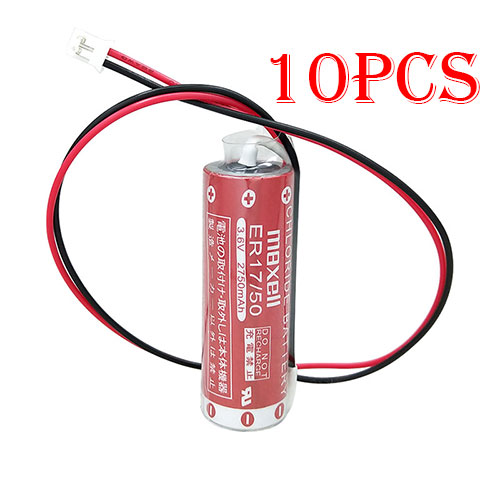
Cheap Maxell ER17/50 Li-ion Other battery, Brand New ER17/50 replacement battery for 10pcs Maxell ER17/50 17/50 with white Plug

2750mAh 3.6V Maxell ER17/50 Batteries for 10pcs Maxell ER17/50 17/50 with white Plug, Maxell ER17/50 Other battery is a brand new,100% Compatible original and replacement Laptop battery,Purchase wholesale and retail ER17/50 with high quality and low price!

ER17/50 Battery maxell Li-ion 3.6V 2750mAh

ER17/50

Specifications

  • Brand:Maxell
  • Capacity :2750mAh
  • Voltage :3.6V
  • Color:red
  • Type :Li-ion
  • Battery Cell Quality: Grade A
  • Descriptive: Replacement Battery – 1 Year Warranty
  • Description: Brand New, 1 Year Warranty! 30-Days Money Back! Fast Shipping!

How we test this Maxell ER17/50 Battery Li-ion 3.6V 2750mAh

Step 1: Make sure customer bought the correct battery.
Step 2: Check battery’s appearance and interface.
Step 3: Test battery charger and recharger function.
Step 4: Charger the battery to 100% and recharger to 0% to get real battery capacity
Step 5: Use Ev2300 to check the voltage difference of each goroup cells.
Step 6: Charger battery power more than 30%.
Step 7: Package battery carefully and send out

Compatible Part Numbers:

ER17/50 17/50

Compatible Model Numbers:

plug : white Plug(not Compatible balck & brown plug)

Maxell ER17/50 17/50

Package Included:
10pcs ER17/50 batteries

How much do you know about how to run laptop well as any place? The follow Tips cut way back on protecting battery life.


1). Please recharge or change your Other battery when battery power low.
2). Using Li-Ion Replacement Maxell ER17/50 Other Battery for your notebook which can work longer time than Non Li-ion one.
3). It is better to defragmentation regularly for your Other battery life.
4). In order to reduce the laptop power consumpition, you can use some optical drive spin-down and hard drive in your Other .
5). Please keep your laptop in sleep or standby model without long time using, which both save the Replacement Maxell ER17/50 Other Battery power and extend battery using life.
6). Leave your battery in a dry and cool condition when without using.
7). When you rarely or generally plugged in fixed power using, Please take down your battery to avoid hurting battery life.

Hot Products

11.1V/12.4v 2300mah BOSE 404600 for Bose SOUNDLINK I II III16.8V/20V 400mA/2200mAH/32Wh BOSE 300769-003 for Bose Sounddock Portable Digita15.4V 5209mAh RAZER RC30-0248 for RAZER Blade 15 2018 RZ09-023867.4V 2230mAh/17Wh BOSE 063404 for 0634043.8V 6300mAh/23.94Wh AMAZON 2955C7 for Amazon Kindle Fire HD 10.1 7th3.7V/4.2V 1750MAH/6.5WH AMAZON GP-S10-346392-0100 for AMAZON KINDLE 3 3G WIFI Kindle3.8 V 1300 mAh AMAZON MC-305070 for AMAZON Kindle Voyage7.7V 37Wh/4810mAh ACER AP16M5J for ACER A315-51-51SL N17Q1 SERIES3.8V 2930mAh/11.1Wh NETGEAR W-7 for Netgear AirCard 790S 790SP 8103.85V/4.4V 3080MAH/11.86WH ALCATEL TLp030JC for Alcatel A3 XL 9008j

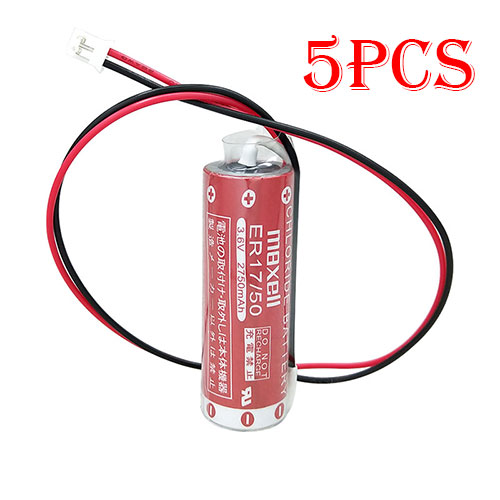
Cheap Maxell ER17/50 Li-ion Other battery, Brand New ER17/50 replacement battery for 5pcs Maxell ER17/50 17/50 with white Plug

2750mAh 3.6V Maxell ER17/50 Batteries for 5pcs Maxell ER17/50 17/50 with white Plug, Maxell ER17/50 Other battery is a brand new,100% Compatible original and replacement Laptop battery,Purchase wholesale and retail ER17/50 with high quality and low price!

ER17/50 Battery maxell Li-ion 3.6V 2750mAh

ER17/50

Specifications

  • Brand:Maxell
  • Capacity :2750mAh
  • Voltage :3.6V
  • Color:red
  • Type :Li-ion
  • Battery Cell Quality: Grade A
  • Descriptive: Replacement Battery – 1 Year Warranty
  • Description: Brand New, 1 Year Warranty! 30-Days Money Back! Fast Shipping!

How we test this Maxell ER17/50 Battery Li-ion 3.6V 2750mAh

Step 1: Make sure customer bought the correct battery.
Step 2: Check battery’s appearance and interface.
Step 3: Test battery charger and recharger function.
Step 4: Charger the battery to 100% and recharger to 0% to get real battery capacity
Step 5: Use Ev2300 to check the voltage difference of each goroup cells.
Step 6: Charger battery power more than 30%.
Step 7: Package battery carefully and send out

Compatible Part Numbers:

ER17/50 17/50

Compatible Model Numbers:

plug : white Plug(not Compatible balck & brown plug)

Maxell ER17/50 17/50

Package Included:
5pcs ER17/50 batteries

How much do you know about how to run laptop well as any place? The follow Tips cut way back on protecting battery life.


1). Please recharge or change your Other battery when battery power low.
2). Using Li-Ion Replacement Maxell ER17/50 Other Battery for your notebook which can work longer time than Non Li-ion one.
3). It is better to defragmentation regularly for your Other battery life.
4). In order to reduce the laptop power consumpition, you can use some optical drive spin-down and hard drive in your Other .
5). Please keep your laptop in sleep or standby model without long time using, which both save the Replacement Maxell ER17/50 Other Battery power and extend battery using life.
6). Leave your battery in a dry and cool condition when without using.
7). When you rarely or generally plugged in fixed power using, Please take down your battery to avoid hurting battery life.

Hot Products

11.1V/12.4v 2300mah BOSE 404600 for Bose SOUNDLINK I II III16.8V/20V 400mA/2200mAH/32Wh BOSE 300769-003 for Bose Sounddock Portable Digita15.4V 5209mAh RAZER RC30-0248 for RAZER Blade 15 2018 RZ09-023867.4V 2230mAh/17Wh BOSE 063404 for 0634043.8V 6300mAh/23.94Wh AMAZON 2955C7 for Amazon Kindle Fire HD 10.1 7th3.7V/4.2V 1750MAH/6.5WH AMAZON GP-S10-346392-0100 for AMAZON KINDLE 3 3G WIFI Kindle3.8 V 1300 mAh AMAZON MC-305070 for AMAZON Kindle Voyage7.7V 37Wh/4810mAh ACER AP16M5J for ACER A315-51-51SL N17Q1 SERIES3.8V 2930mAh/11.1Wh NETGEAR W-7 for Netgear AirCard 790S 790SP 8103.85V/4.4V 3080MAH/11.86WH ALCATEL TLp030JC for Alcatel A3 XL 9008j

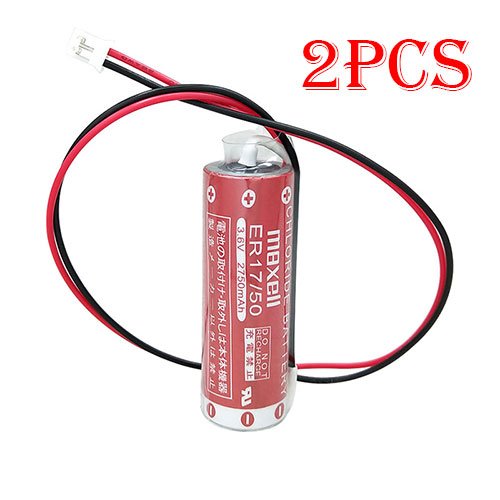
Cheap Maxell ER17/50 Li-ion Other battery, Brand New ER17/50 replacement battery for 2pcs Maxell ER17/50 17/50 with white Plug

2750mAh 3.6V Maxell ER17/50 Batteries for 2pcs Maxell ER17/50 17/50 with white Plug, Maxell ER17/50 Other battery is a brand new,100% Compatible original and replacement Laptop battery,Purchase wholesale and retail ER17/50 with high quality and low price!

ER17/50 Battery maxell Li-ion 3.6V 2750mAh

ER17/50

Specifications

  • Brand:Maxell
  • Capacity :2750mAh
  • Voltage :3.6V
  • Color:red
  • Type :Li-ion
  • Battery Cell Quality: Grade A
  • Descriptive: Replacement Battery – 1 Year Warranty
  • Description: Brand New, 1 Year Warranty! 30-Days Money Back! Fast Shipping!

How we test this Maxell ER17/50 Battery Li-ion 3.6V 2750mAh

Step 1: Make sure customer bought the correct battery.
Step 2: Check battery’s appearance and interface.
Step 3: Test battery charger and recharger function.
Step 4: Charger the battery to 100% and recharger to 0% to get real battery capacity
Step 5: Use Ev2300 to check the voltage difference of each goroup cells.
Step 6: Charger battery power more than 30%.
Step 7: Package battery carefully and send out

Compatible Part Numbers:

ER17/50 17/50

Compatible Model Numbers:

plug : white Plug(not Compatible balck & brown plug)

Maxell ER17/50 17/50

Package Included:
2pcs ER17/50 batteries

How much do you know about how to run laptop well as any place? The follow Tips cut way back on protecting battery life.


1). Please recharge or change your Other battery when battery power low.
2). Using Li-Ion Replacement Maxell ER17/50 Other Battery for your notebook which can work longer time than Non Li-ion one.
3). It is better to defragmentation regularly for your Other battery life.
4). In order to reduce the laptop power consumpition, you can use some optical drive spin-down and hard drive in your Other .
5). Please keep your laptop in sleep or standby model without long time using, which both save the Replacement Maxell ER17/50 Other Battery power and extend battery using life.
6). Leave your battery in a dry and cool condition when without using.
7). When you rarely or generally plugged in fixed power using, Please take down your battery to avoid hurting battery life.

Hot Products

11.1V/12.4v 2300mah BOSE 404600 for Bose SOUNDLINK I II III16.8V/20V 400mA/2200mAH/32Wh BOSE 300769-003 for Bose Sounddock Portable Digita15.4V 5209mAh RAZER RC30-0248 for RAZER Blade 15 2018 RZ09-023867.4V 2230mAh/17Wh BOSE 063404 for 0634043.8V 6300mAh/23.94Wh AMAZON 2955C7 for Amazon Kindle Fire HD 10.1 7th3.7V/4.2V 1750MAH/6.5WH AMAZON GP-S10-346392-0100 for AMAZON KINDLE 3 3G WIFI Kindle3.8 V 1300 mAh AMAZON MC-305070 for AMAZON Kindle Voyage7.7V 37Wh/4810mAh ACER AP16M5J for ACER A315-51-51SL N17Q1 SERIES3.8V 2930mAh/11.1Wh NETGEAR W-7 for Netgear AirCard 790S 790SP 8103.85V/4.4V 3080MAH/11.86WH ALCATEL TLp030JC for Alcatel A3 XL 9008j

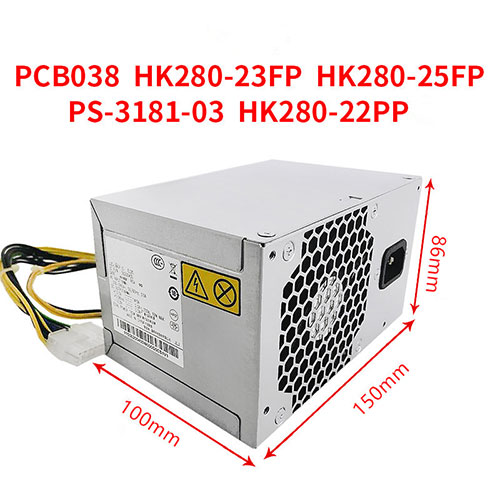
Lenovo HK280-23FP Power Supplies ,HK280-23FP Adapter for Lenovo Q85 Q87 Q77 Q75

HK280-23FP Laptop Charger Wholesale,Lenovo HK280-23FP Power Supplies is replacement for Lenovo Q85 Q87 Q77 Q75 ,Lenovo HK280-23FP Power Supplies discount price,Fast Shipping.

HK280-23FP

Specifications

  • Brand:Lenovo
  • DC Output:
  • AC Input:

Charger features:

  • CE, FCC and RoHS certified to ensure proper adapter safety and quality.
  • Sealed for protection against moisture and humidity.
  • Designed with internal safety features to protect against voltage spikes, surges or fluctuations.
  • Utilizes low voltage shut down protection.
  • Utilizes over voltage limiting protection.
  • Utilizes output over current limiting protection.
  • Utilizes “short-circuit†shutdown protection. 
  • Undergone comprehensive quality testing throughout the manufacturing and assembly process.
  • Includes a 12-month free replacement warranty for manufacturer’s defects.

Compatible Part Numbers:

HK280-23FP HK280-25FP HK280-22PP PCB037 PCBO37 PCB038 PS-3181-03PE-3181-01 and other models(Please leave a message for the specified model)

Compatible Model Numbers:

Power interface: 14p (motherboard) + 4p (CPU)

Lenovo Q85 Q87 Q77 Q75
Lenovo H5050,H5055,D5050,F5050,T530
M2610n,M4500,M4550,M4800n,T4900,M6300,
Used in M6400,M6475,A6800t,M8400 and other models

Description of Lenovo HK280-23FP Power Supplies

High Quality, Guarantee :
Factory direct price, 100% compatible, No memory effect. Hi-Capacity, Quality garantee, certification Fast shipping. We stand behind our Replace for Lenovo Cord/Charger Lenovo HK280-23FP 100%.
Low Prices, Guarantee :
All laptop Replace for Lenovo Cord/Charger Lenovo HK280-23FP at batteryforpc.co.uk are all directly purchased from various reputable manufacturers in the world and have passed stringent quality assurance procedures to achieve international standards. Through this direct selling model, middleman cost is minimized.
Satisfaction Guarantee :
Our goal is to make sure you receive the best value of every purchase you make at our site. We want to be your number one choice Replace for Lenovo HK280-23FP. If you have any question or suggestion about this laptop ac adapter, please contact us so we can offer you the most convenient service.
Secure Shopping Guarantee :
Shopping from us is safe and secure. None of our customers have ever reported fraudulent use of their credit cards as a result of shopping with us. You can be assured that the information you give us is confidential. We do not sell, rent or share information of our customers with other parties. batteryforpc.co.uk guarantee your Replace for Lenovo HK280-23FP transaction will be 100% safe.

Hot Products

11.1V/12.4v 2300mah BOSE 404600 for Bose SOUNDLINK I II III16.8V/20V 400mA/2200mAH/32Wh BOSE 300769-003 for Bose Sounddock Portable Digita15.4V 5209mAh RAZER RC30-0248 for RAZER Blade 15 2018 RZ09-023867.4V 2230mAh/17Wh BOSE 063404 for 0634043.8V 6300mAh/23.94Wh AMAZON 2955C7 for Amazon Kindle Fire HD 10.1 7th3.7V/4.2V 1750MAH/6.5WH AMAZON GP-S10-346392-0100 for AMAZON KINDLE 3 3G WIFI Kindle3.8 V 1300 mAh AMAZON MC-305070 for AMAZON Kindle Voyage7.7V 37Wh/4810mAh ACER AP16M5J for ACER A315-51-51SL N17Q1 SERIES3.8V 2930mAh/11.1Wh NETGEAR W-7 for Netgear AirCard 790S 790SP 8103.85V/4.4V 3080MAH/11.86WH ALCATEL TLp030JC for Alcatel A3 XL 9008j

Hp PCD010 Power Supplies ,PCD010 Adapter for 24-Pin HP Pavilion 500 110 PSU

180W;+12Vb=10A;-12V=0.3A;+5.08Vsb=1.5A PCD010 Laptop Charger Wholesale,Hp PCD010 Power Supplies is replacement for 24-Pin HP Pavilion 500 110 PSU ,Hp PCD010 Power Supplies discount price,Fast Shipping.

PCD010

Specifications

  • Brand:HP
  • DC Output:180W;+12Vb=10A;-12V=0.3A;+5.08Vsb=1.5A
  • AC Input:100-240V ~50-60Hz 6.0A

Charger features:

  • CE, FCC and RoHS certified to ensure proper adapter safety and quality.
  • Sealed for protection against moisture and humidity.
  • Designed with internal safety features to protect against voltage spikes, surges or fluctuations.
  • Utilizes low voltage shut down protection.
  • Utilizes over voltage limiting protection.
  • Utilizes output over current limiting protection.
  • Utilizes “short-circuit†shutdown protection. 
  • Undergone comprehensive quality testing throughout the manufacturing and assembly process.
  • Includes a 12-month free replacement warranty for manufacturer’s defects.

Compatible Part Numbers:

PCD010 742317-001 751589-001 759769-001 759051-001

Compatible Model Numbers:

HP Pavilion 500 110 PSU

Package Included:
1PC PCD010 power supply

Description of Hp PCD010 Power Supplies

High Quality, Guarantee :
Factory direct price, 100% compatible, No memory effect. Hi-Capacity, Quality garantee, certification Fast shipping. We stand behind our Replace for HP Cord/Charger Hp PCD010 100%.
Low Prices, Guarantee :
All laptop Replace for HP Cord/Charger Hp PCD010 at batteryforpc.co.uk are all directly purchased from various reputable manufacturers in the world and have passed stringent quality assurance procedures to achieve international standards. Through this direct selling model, middleman cost is minimized.
Satisfaction Guarantee :
Our goal is to make sure you receive the best value of every purchase you make at our site. We want to be your number one choice Replace for Hp PCD010. If you have any question or suggestion about this laptop ac adapter, please contact us so we can offer you the most convenient service.
Secure Shopping Guarantee :
Shopping from us is safe and secure. None of our customers have ever reported fraudulent use of their credit cards as a result of shopping with us. You can be assured that the information you give us is confidential. We do not sell, rent or share information of our customers with other parties. batteryforpc.co.uk guarantee your Replace for Hp PCD010 transaction will be 100% safe.

Hot Products

11.1V/12.4v 2300mah BOSE 404600 for Bose SOUNDLINK I II III16.8V/20V 400mA/2200mAH/32Wh BOSE 300769-003 for Bose Sounddock Portable Digita15.4V 5209mAh RAZER RC30-0248 for RAZER Blade 15 2018 RZ09-023867.4V 2230mAh/17Wh BOSE 063404 for 0634043.8V 6300mAh/23.94Wh AMAZON 2955C7 for Amazon Kindle Fire HD 10.1 7th3.7V/4.2V 1750MAH/6.5WH AMAZON GP-S10-346392-0100 for AMAZON KINDLE 3 3G WIFI Kindle3.8 V 1300 mAh AMAZON MC-305070 for AMAZON Kindle Voyage7.7V 37Wh/4810mAh ACER AP16M5J for ACER A315-51-51SL N17Q1 SERIES3.8V 2930mAh/11.1Wh NETGEAR W-7 for Netgear AirCard 790S 790SP 8103.85V/4.4V 3080MAH/11.86WH ALCATEL TLp030JC for Alcatel A3 XL 9008j

Shuttle XH410G: 3-litre mini-PC launched with Comet Lake-S processors and NVIDIA GeForce GTX 1650 support

Shuttle has announced its latest mini-PC, the XH410G. While the machine may look like a run of the mill mini-PC, the XH410G packs a punch. Measure 250 x 200 x 79 mm, the XH410G supports with a choice of 65 W Intel processors, an expansion slot and multiple ports.

Specifically, Shuttle has designed the XH410G with an LGA1200 socket, meaning that it supports Comet Lake S from the Celeron G5900 to the Core i9-10900. The machine also has two SO-DIMM slots, an M.2 2280 slot and a 2.5-inch bay that can take up to 9.5 mm drives. Additionally, Shuttle has included an M.2 2230AE slot for Wi-Fi cards.

The XH410G has multiple ports, including Gigabit Ethernet, HDMI 2.0a, VGA and four USB 3.2 Gen1 Type-A ports. There are also four USB 2.0 ports and dedicated headphone and microphone jacks.

Another highlight of the XH410G is its PCIe slot, which supports X16 PCIe 3.0 and up to 75 W. Shuttle has left enough space in the chassis to accommodate a graphics card, so you could install something like the GeForce GTX 1650. The XH410G supports up to 208 x 120 x 33 mm expansion cards, for reference.

The Shuttle XH410G will be available from €283. It is unclear when the machine will be purchasable, though.

THE BEST PEN-BASED NOTE-TAKING APPS FOR YOUR CHROMEBOOK

Have you ever tried to use your Chromebook for note-taking with a stylus? Some devices are more suited to the task than others, with the Lenovo Chromebook Duet being the best, in my opinion. There are a lot of pen-enabled apps that you can use, but which ones are truly the best? Today, we’re going to tell you which three we think are the most featureful and provide the best experience on Chromebooks. Then, we’ll give you a few runners up that you can try out as well. If you’re interested in seeing which apps are best for sketching and drawing on a Chromebook, you can check out our round-up for that as well. Let us know in the comments if you feel we missed any note-taking apps that you use or recommend!

Squid Notes

The king of the hill, by far, is Squid Notes. This app is really the go-to for testing for pen latency on a Chromebook because, well, there is none. Where others have failed, Squid has somehow created a perfectly optimized app that – aside from the fact that you’re drawing on glass – feels like you’re drawing on paper. There’s no delay between what you’re thinking and what you’re writing and that’s probably the most vital feature of such an app. I won’t gush much longer over this, because you can just read our review from a few years ago. It’s stood the test of time and the fact that we’re still talking about it today, says something.

For just one dollar per month, you can also use it to sign PDFs. There is the ability to create individual notebooks to separate your work, but compared to Noteshelf, it’s pretty bare. While it has great features, its speed is truly the reason to be excited about it. Besides, Chromebook owners get it for free for six months! If you’re an educator, there’s also an EDU version with special bulk pricing because Google does not support payments from Play apps through Google Workspace for Education.

Noteshelf

Every now and then an app comes along that I feel has great potential, but many people don’t get a chance to see it. Noteshelf is that app. I first discovered it via the Chromebook Perks page years ago and instantly loved it. Some of its best features include separate notebooks with unique covers paper types that feel more tangible than that of Squid Notes, rich text formatting, smart shapes, the ability to mark up PNG, JPG or PDF files, audio recording and backup to Dropbox or Google Drive.

The best thing is that the paper doesn’t zoom in and out on you as you try to write as Google Keep does. You can pinch and zoom on the paper, but there’s quick access to a pen-only mode that disables touch input while you write with your stylus. Aside from your Chromebook shelf sliding upward (please fix this, Google), Noteshelf is the app that feels the most like a real notebook to me – and I’ve tried what I believe are all of the top apps. A big differentiator here is that the pen tracks well with my intentions when I write much smaller whereas Bamboo Paper does not, even after buying Wacom’s pro pack to get more writing utensils.

Lastly, there is an awesome store where you can buy extra page templates, paper types, and notebook covers. This means that you can easily customize your journals for a wide range of use cases. There are templates for parents, students, travel, home planning, creativity, and logging workouts, to name a few. Apart from it having a tiny bit of latency compared to Squid, this app would have my top pick for its level of personalization.

Bamboo Paper

By far the cleanest and most professional – yet still somehow cozy – note-taking app is Bamboo Paper by Wacom. It prominently features your digital notebooks on a carousel and allows you to customize their cover and paper type similar to how Noteshelf does. Their built-in store features packs of paper, notebook covers, and pens that are themed to different types of people – the thinker, the maker, the artist, and the writer – but if you’re serious about using this app, just buy the Pro Pack for $5.49 because it includes them all. I just wish the notebooks came with the sweet image strips they advertise in the store or the ability to add your own.

Bamboo Paper can be used for note-taking or drawing, so as an artist, it wins points from me there. Also, I own several bamboo products, so I like the synchronicity between them with Wacom’s proprietary service called Inkspace (which I keep typing out as Inkscape). Inkspace allows you to synchronize your notes and drawings across the cloud and turn them into image, vector, or video file formats that you can then edit in any program. It works in harmony with their Bamboo Slate and Bamboo Folio smartpads and Intuos Pro Paper Edition pen tablet so that you don’t have to sacrifice the joy of drawing on real paper or a standard graphics tablet if your main computer for creative design is a Mac or Windows.

For those wondering how this app handles palm rejection while taking notes, a pen-only mode was added just this month and it works pretty well. Because I can gripe twice in one day about the Chrome OS shelf sliding up while writing, I will. Google, pretty please find a way to lock the shelf gesture while an active stylus is in use. I don’t know how you’ll do it, but I believe in you – we all do.

More note-taking apps

At this point, you may be wondering why we haven’t placed Google Keep as one of our top three picks. Those of you who have tried to use Keep for note-taking with a stylus probably already understand our frustrations with it. The app’s palm rejection is pretty terrible and no matter what you do, you can’t prevent the page from zooming in or out as you try to type. I love Keep’s simplicity and the fact that it syncs with my Google account, so it’s great for typing out quick ideas, but I don’t really think anyone serious about using their Chromebook to take notes should consider using its pen-based features. It breaks my heart to say that, but Google really needs to revisit the app and add page zoom locking, pressure sensitivity, rich text markup, and more before it becomes a serious contender.

Other great note-taking apps for your Chromebook include INKredible, Evernote, OneNote, and even Nebo, but this one is only compatible with specific Chromebooks and active styli. If you’re into the idea of having a physical notebook that coincides with a digital space and of keeping them in sync with one another, you can try out Moleskin Notes or Rocketbook.

If the Apple Silicon MacBook looks like this, I need it

The MacBook Pro you see in this article is like a dream come true. The work is a set of concept illustrations made into 3D rendered goodness by the folks at Zone of Tech. In this device is a true meeting of worlds, with industrial design elements from the recent past of both the MacBook and the iPad Pro, including but not limited to a giant trackpad, a super bright and colorful display, and bezels that are equal on all sides and corners.

The MacBook Pro ARM (Apple Silicon) Concept appeared in a Tweet from Daniel (ZoneOfTech) this week with a pointer toward the next-generation machine as it’ll appear at the Apple event next week. In said Tweet, the imagery (that you also see here) displays the power of the next-generation hardware VIA a macOS user interface combined with iOS apps. This system is made possible by Apple’s integration of self-designed ARM chips, ready to roll for the second week of November, 2020.

In reality, the most likely situation is that Apple’s next-gen MacBook will look a whole lot more like the most recently-release MacBook, depending on the power of the internal components to push sales through the future. As is often the case with conceptual design works, this set of renderings moves just far enough away from the most likely step-by-step iterative design Apple’s prone to use. Just far away enough to create a device that’d be shocking and pleasing to behold and experience.

Stick around as the “One More Thing” event takes place on November 10, with Apple’s next-gen MacBook collection on display. Cross your fingers we’ll see some surprises, as well.

The Apple event at which Apple’s desktop chips will be revealed in full (more than likely) will be broadcast online at approximately 10AM PST on November 10. That’s 11AM Mountain Time, 12PM (noon) Central Time, and 1PM Eastern Time here in the United States. This event might also bring some light to the future of the iMac – the future we’ve been waiting for for ages! We shall see!