HOW TO GET PRODUCTIVE WITH FULL HD EXTENDED DISPLAYS ON THE LENOVO CHROMEBOOK DUET

Since the Lenovo Chromebook Duet arrived on the scene back in January 2020 at CES, most users have been a bit enamored by the diminutive tablet with the bright, beautiful display and very low starting price. After all, getting a great tablet, kickstand cover and keyboard/trackpad combo in the box for $299 is pretty amazing and makes for a great overall Chromebook experience. Add to that mix the fact that we’re starting to see pretty deep discounts on this package for the shopping season and picking up a Duet has never been more attractive.

There’s one issue that’s been a bit of a thorn in many sides, however, and that is the fact that this Chromebook doesn’t behave like others when hooked into a USB-C docking station. In fact, it behaves unlike just about any other device we’ve ever seen with a USB-C port on board. I won’t go any further into a rant here as I’ve done that quite a bit, but I’m still a bit baffled why this little Chrome OS tablet didn’t get the simple extended display treatment other far-less-prominent Chromebooks have had for years. It was an odd omission for sure.

Verified: how to get a proper extended display with the Duet

Not too long ago we began hearing about users having some luck with different display adapters and being able to extend the Lenovo Duet’s display out to multi-monitor setups of up to two additional screens. Though hearing of these anecdotes, try as I might, I could not get a workable resolution output to any extended display with the handful of USB-C adapters around our office. To be honest, I’d all but given up on the idea of extending the Duet’s display in any workable fashion.

However, a comment in the bug thread for this issue prompted me to rethink my methods and dig up an older display output tech that I’d not considered in years: DisplayLink. Chromebooks began supporting DisplayLink back in 2016, so this isn’t anything new. However, with the arrival of USB Type C on most Chromebooks in the past few years, the need for DisplayLink has nearly vanished. For those unfamiliar, DisplayLink can create display outputs over standard USB 3.0 ports and requires some special drivers to do so on Windows and MacOS systems. Chrome OS has these drivers built in, so DisplayLink works just fine on any Chromebook you have lying around at this point.

After seeing the comment in the bug report about a user having success with a DisplayLink adapter, I realized we have a couple of those lying around the office and I set out to give it a go. You know what? I’m typing this article on the Lenovo Chromebook Duet extended to a portable 1080p monitor at full resolution and full 60hz refresh rates. The setup isn’t pretty, requiring a USB A to C adapter (DisplayLink adapters are USB Type A) to plug into the Duet and a DVI to HDMI adapter to get to the right output for most monitors. But it is working.

With a better adapter (like the ones we’ll link below), you could clean this up quite a bit. You’ll still need the USB A to C adapter to get the right output from the Duet, but after that point you’ll have a clean HDMI port to hook into. For desktop monitors, this works OK, but you still need more adapters to charge your Chromebook at the same time since the Duet only has one USB Type C port. For a fully-mobile setup, you’ll also need external power for the monitor since DisplayLink doesn’t carry power along the connection like we see with the single cable USB Type C setup.

I did test my simple USB Type C Samsung dock and verified that I could run the DisplayLink connection from the USB Type A port there while also having a spot for power to pass through to my tablet, but that doesn’t really fix the monitor power issue. If this is a setup you’d like to use on the go, you are 100% going to need a battery pack in your bag at all times to get some juice to the display. If you are planning on using this at your desk most times, no worries there as your monitor obviously stays plugged in.

One other consideration before you go to assemble your workstation: I’d highly recommend a Bluetooth mouse and keyboard. Again, with the Duet’s limited port selection, hooking up an external keyboard and mouse is far simpler with Bluetooth, and our favorite pair is still the Logitech K580 and M355 as they are both designed to work perfectly with Chrome OS and still get the job done every time they are needed.

Is this the most perfect desktop setup? Not at all. In fact, I’d only go this route if forced to. With DisplayLink being a technology that taxes the processor a good bit, performance isn’t great, here. The Duet is already a slow Chromebook experience, so this setup just makes it feel a bit more sluggish. However, compared with completing this post on the Duet’s included keyboard/trackpad and 10.1-inch screen, I can definitely say that having a larger extended display made my task far simpler to accomplish.

I’m still hoping that a Snapdragon 7c Chrome OS tablet or something with MediaTek’s upcoming 6nm MT 8195 may be that tiny, light Chromebook detachable I’ve been after for both desktop work and leisurely browsing, but those devices are still a ways off. While I wouldn’t want to bind myself to the Duet on a daily basis, it gives me all sorts of hope for what this setup could be with a Chromebook that simply has proper display output via USB Type C and a bit more oomph under the hood. Lenovo didn’t see fit to make that happen with the Duet, but that doesn’t mean you can’t work around it if you are bound and determined to make this tablet a productivity machine, too. Hope this helps make that a reality for some of you looking.
This Windows 10/macOS combination is the perfect desktop operating system

We know that Microsoft is planning to give Windows 10 a makeover in the future, but it’s unlikely that the software giant will really go to town on the design, with the focus of its UI revamp — codenamed Sun Valley — being more on tweaking things and expanding on the Fluent Design language currently in use.

While some people are more than happy with how Windows 10 looks, it’s pretty bland when compared to macOS. But what if Apple and Microsoft joined forces to produce a Windows/macOS hybrid?

Over on Reddit, Kaiwave33x has put his design skills to good use to add macOS elements to his copy of Windows 10.

The customized OS, which he’s showcased in Light and Dark Mode, has a dock at the top, rather the traditional Windows taskbar at the bottom, with tiles for all of the most accessed apps and widgets sitting on the right.

He has put together a step-by-step guide for anyone interested in replicating it, but this has currently been flagged as spam on Reddit and removed. He is however, planning on creating an install script in the future.

In the meantime you can grab the wallpapers he used for DarkMode and LightMode.

Kamer Kaan Avdan, who has previously released videos for alternative versions of Windows 95, Windows XP, Windows 7, Windows 11 and Windows 20, came up with his own vision of Apple’s Windows 10 late last year, although sadly that was just a concept, and not something that could actually be installed, unlike this.

What do you think of Kaiwave33x’s hybrid? Share your comments below.

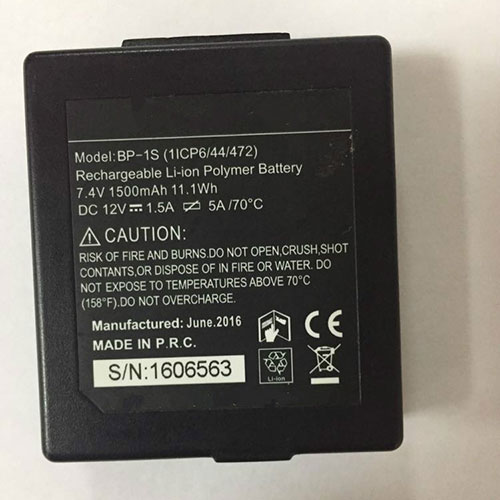
Cheap Stonex BP-1S Li-ion Other battery, Brand New BP-1S replacement battery for Stori S3S6 S9 Hezhong Strong P7 Hand Thin Controller

1500mAh/11.1WH 7.4V Stonex BP-1S Batteries for Stori S3S6 S9 Hezhong Strong P7 Hand Thin Controller, Stonex BP-1S Other battery is a brand new,100% Compatible original and replacement Laptop battery,Purchase wholesale and retail BP-1S with high quality and low price!

BP-1S Battery stonex Li-ion 7.4V 1500mAh/11.1WH

BP-1S

Specifications

  • Brand:Stonex
  • Capacity :1500mAh/11.1WH
  • Voltage :7.4V
  • Type :Li-ion
  • Battery Cell Quality: Grade A
  • Descriptive: Replacement Battery – 1 Year Warranty
  • Description: Brand New, 1 Year Warranty! 30-Days Money Back! Fast Shipping!

How we test this Stonex BP-1S Battery Li-ion 7.4V 1500mAh/11.1WH

Step 1: Make sure customer bought the correct battery.
Step 2: Check battery’s appearance and interface.
Step 3: Test battery charger and recharger function.
Step 4: Charger the battery to 100% and recharger to 0% to get real battery capacity
Step 5: Use Ev2300 to check the voltage difference of each goroup cells.
Step 6: Charger battery power more than 30%.
Step 7: Package battery carefully and send out

Compatible Part Numbers:

BP-1S

Compatible Model Numbers:

Stori S3S6 S9 Hezhong Strong P7 Hand Thin Controller

DC 12V==1.5A

How much do you know about how to run laptop well as any place? The follow Tips cut way back on protecting battery life.


1). Please recharge or change your Other battery when battery power low.
2). Using Li-Ion Replacement Stonex BP-1S Other Battery for your notebook which can work longer time than Non Li-ion one.
3). It is better to defragmentation regularly for your Other battery life.
4). In order to reduce the laptop power consumpition, you can use some optical drive spin-down and hard drive in your Other .
5). Please keep your laptop in sleep or standby model without long time using, which both save the Replacement Stonex BP-1S Other Battery power and extend battery using life.
6). Leave your battery in a dry and cool condition when without using.
7). When you rarely or generally plugged in fixed power using, Please take down your battery to avoid hurting battery life.

Hot Products

11.1V/12.4v 2300mah BOSE 404600 for Bose SOUNDLINK I II III16.8V/20V 400mA/2200mAH/32Wh BOSE 300769-003 for Bose Sounddock Portable Digita15.4V 5209mAh RAZER RC30-0248 for RAZER Blade 15 2018 RZ09-023867.4V 2230mAh/17Wh BOSE 063404 for 0634043.8V 6300mAh/23.94Wh AMAZON 2955C7 for Amazon Kindle Fire HD 10.1 7th3.7V/4.2V 1750MAH/6.5WH AMAZON GP-S10-346392-0100 for AMAZON KINDLE 3 3G WIFI Kindle3.8 V 1300 mAh AMAZON MC-305070 for AMAZON Kindle Voyage7.7V 37Wh/4810mAh ACER AP16M5J for ACER A315-51-51SL N17Q1 SERIES3.8V 2930mAh/11.1Wh NETGEAR W-7 for Netgear AirCard 790S 790SP 8103.85V/4.4V 3080MAH/11.86WH ALCATEL TLp030JC for Alcatel A3 XL 9008j

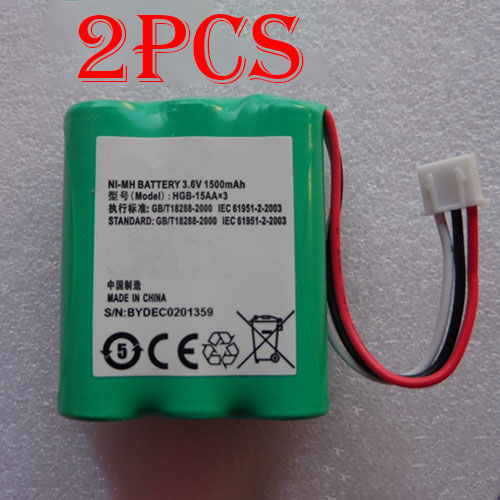
Cheap Huawei HGB-2A10x3 Li-ion Cell Phone battery, Brand New HGB-2A10x3 replacement battery for 2pcs HUAWEI 4g lte router CPE E5172

3780mAh 3.85V/4.4V Huawei HGB-2A10x3 Batteries for 2pcs HUAWEI 4g lte router CPE E5172, Huawei HGB-2A10x3 Cell Phone battery is a brand new,100% Compatible original and replacement Laptop battery,Purchase wholesale and retail HGB-2A10x3 with high quality and low price!

HGB-2A10x3 Battery huawei Li-ion 3.85V/4.4V 3780mAh

HGB-2A10x3

Specifications

  • Brand:HUAWEI
  • Capacity :3780mAh
  • Voltage :3.85V/4.4V
  • Color:white
  • Type :Li-ion
  • Battery Cell Quality: Grade A
  • Descriptive: Replacement Battery – 1 Year Warranty
  • Description: Brand New, 1 Year Warranty! 30-Days Money Back! Fast Shipping!

How we test this Huawei HGB-2A10x3 Battery Li-ion 3.85V/4.4V 3780mAh

Step 1: Make sure customer bought the correct battery.
Step 2: Check battery’s appearance and interface.
Step 3: Test battery charger and recharger function.
Step 4: Charger the battery to 100% and recharger to 0% to get real battery capacity
Step 5: Use Ev2300 to check the voltage difference of each goroup cells.
Step 6: Charger battery power more than 30%.
Step 7: Package battery carefully and send out

Compatible Part Numbers:

HGB-2A10x3 HGB-15AAx3

Compatible Model Numbers:

Huawei ETS5623,515H,ETS3125,ETS3125i
Huawei ETS2222 ETS2222+ ETS2252 ETS3023
HUAWEI 4g lte router CPE E5172

How much do you know about how to run laptop well as any place? The follow Tips cut way back on protecting battery life.


1). Please recharge or change your Cell Phone battery when battery power low.
2). Using Li-Ion Replacement Huawei HGB-2A10x3 Cell Phone Battery for your notebook which can work longer time than Non Li-ion one.
3). It is better to defragmentation regularly for your Cell Phone battery life.
4). In order to reduce the laptop power consumpition, you can use some optical drive spin-down and hard drive in your Cell Phone .
5). Please keep your laptop in sleep or standby model without long time using, which both save the Replacement Huawei HGB-2A10x3 Cell Phone Battery power and extend battery using life.
6). Leave your battery in a dry and cool condition when without using.
7). When you rarely or generally plugged in fixed power using, Please take down your battery to avoid hurting battery life.

Hot Products

11.1V/12.4v 2300mah BOSE 404600 for Bose SOUNDLINK I II III16.8V/20V 400mA/2200mAH/32Wh BOSE 300769-003 for Bose Sounddock Portable Digita15.4V 5209mAh RAZER RC30-0248 for RAZER Blade 15 2018 RZ09-023867.4V 2230mAh/17Wh BOSE 063404 for 0634043.8V 6300mAh/23.94Wh AMAZON 2955C7 for Amazon Kindle Fire HD 10.1 7th3.7V/4.2V 1750MAH/6.5WH AMAZON GP-S10-346392-0100 for AMAZON KINDLE 3 3G WIFI Kindle3.8 V 1300 mAh AMAZON MC-305070 for AMAZON Kindle Voyage7.7V 37Wh/4810mAh ACER AP16M5J for ACER A315-51-51SL N17Q1 SERIES3.8V 2930mAh/11.1Wh NETGEAR W-7 for Netgear AirCard 790S 790SP 8103.85V/4.4V 3080MAH/11.86WH ALCATEL TLp030JC for Alcatel A3 XL 9008j

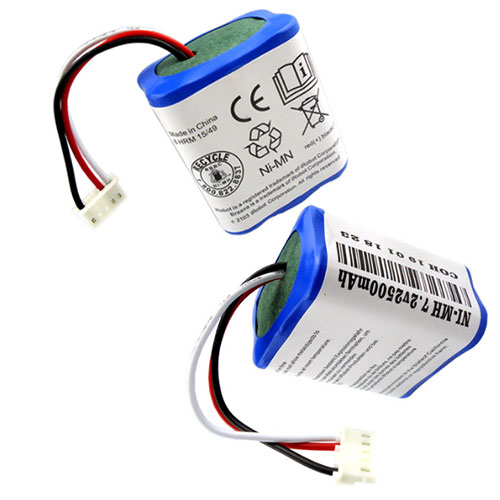
Cheap Irobot GPRHC202N026 Li-ion Other battery, Brand New GPRHC202N026 replacement battery for 1pcs iRobot Braava 380 380T Mint 5200B 5200C Floor Mopping Robots

2500mAh 7.2V Irobot GPRHC202N026 Batteries for 1pcs iRobot Braava 380 380T Mint 5200B 5200C Floor Mopping Robots, Irobot GPRHC202N026 Other battery is a brand new,100% Compatible original and replacement Laptop battery,Purchase wholesale and retail GPRHC202N026 with high quality and low price!

GPRHC202N026 Battery irobot Li-ion 7.2V 2500mAh

GPRHC202N026

Specifications

  • Brand:iRobot
  • Capacity :2500mAh
  • Voltage :7.2V
  • Type :Li-ion
  • Battery Cell Quality: Grade A
  • Descriptive: Replacement Battery – 1 Year Warranty
  • Description: Brand New, 1 Year Warranty! 30-Days Money Back! Fast Shipping!

How we test this Irobot GPRHC202N026 Battery Li-ion 7.2V 2500mAh

Step 1: Make sure customer bought the correct battery.
Step 2: Check battery’s appearance and interface.
Step 3: Test battery charger and recharger function.
Step 4: Charger the battery to 100% and recharger to 0% to get real battery capacity
Step 5: Use Ev2300 to check the voltage difference of each goroup cells.
Step 6: Charger battery power more than 30%.
Step 7: Package battery carefully and send out

Compatible Part Numbers:

4409709 GPRHC202N026

Compatible Model Numbers:

iRobot Braava 380 380T Mint 5200 5200B 5200C Floor Mopping Robots

How much do you know about how to run laptop well as any place? The follow Tips cut way back on protecting battery life.


1). Please recharge or change your Other battery when battery power low.
2). Using Li-Ion Replacement Irobot GPRHC202N026 Other Battery for your notebook which can work longer time than Non Li-ion one.
3). It is better to defragmentation regularly for your Other battery life.
4). In order to reduce the laptop power consumpition, you can use some optical drive spin-down and hard drive in your Other .
5). Please keep your laptop in sleep or standby model without long time using, which both save the Replacement Irobot GPRHC202N026 Other Battery power and extend battery using life.
6). Leave your battery in a dry and cool condition when without using.
7). When you rarely or generally plugged in fixed power using, Please take down your battery to avoid hurting battery life.

Hot Products

11.1V/12.4v 2300mah BOSE 404600 for Bose SOUNDLINK I II III16.8V/20V 400mA/2200mAH/32Wh BOSE 300769-003 for Bose Sounddock Portable Digita15.4V 5209mAh RAZER RC30-0248 for RAZER Blade 15 2018 RZ09-023867.4V 2230mAh/17Wh BOSE 063404 for 0634043.8V 6300mAh/23.94Wh AMAZON 2955C7 for Amazon Kindle Fire HD 10.1 7th3.7V/4.2V 1750MAH/6.5WH AMAZON GP-S10-346392-0100 for AMAZON KINDLE 3 3G WIFI Kindle3.8 V 1300 mAh AMAZON MC-305070 for AMAZON Kindle Voyage7.7V 37Wh/4810mAh ACER AP16M5J for ACER A315-51-51SL N17Q1 SERIES3.8V 2930mAh/11.1Wh NETGEAR W-7 for Netgear AirCard 790S 790SP 8103.85V/4.4V 3080MAH/11.86WH ALCATEL TLp030JC for Alcatel A3 XL 9008j

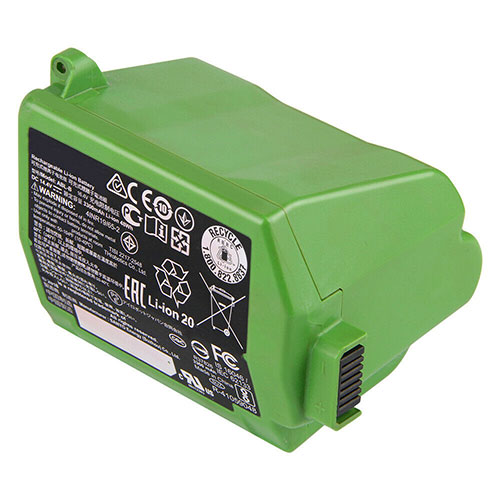
Cheap Irobot ABL-B Li-ion Other battery, Brand New ABL-B replacement battery for Irobot Roomba iRobo s9+

3300mAh 14.4V Irobot ABL-B Batteries for Irobot Roomba iRobo s9+, Irobot ABL-B Other battery is a brand new,100% Compatible original and replacement Laptop battery,Purchase wholesale and retail ABL-B with high quality and low price!

ABL-B Battery irobot Li-ion 14.4V 3300mAh

ABL-B

Specifications

  • Brand:Irobot
  • Capacity :3300mAh
  • Voltage :14.4V
  • Color:green
  • Type :Li-ion
  • Battery Cell Quality: Grade A
  • Descriptive: Replacement Battery – 1 Year Warranty
  • Description: Brand New, 1 Year Warranty! 30-Days Money Back! Fast Shipping!

How we test this Irobot ABL-B Battery Li-ion 14.4V 3300mAh

Step 1: Make sure customer bought the correct battery.
Step 2: Check battery’s appearance and interface.
Step 3: Test battery charger and recharger function.
Step 4: Charger the battery to 100% and recharger to 0% to get real battery capacity
Step 5: Use Ev2300 to check the voltage difference of each goroup cells.
Step 6: Charger battery power more than 30%.
Step 7: Package battery carefully and send out

Compatible Part Numbers:

ABL-B

Compatible Model Numbers:

Irobot Roomba iRobo s9+

How much do you know about how to run laptop well as any place? The follow Tips cut way back on protecting battery life.


1). Please recharge or change your Other battery when battery power low.
2). Using Li-Ion Replacement Irobot ABL-B Other Battery for your notebook which can work longer time than Non Li-ion one.
3). It is better to defragmentation regularly for your Other battery life.
4). In order to reduce the laptop power consumpition, you can use some optical drive spin-down and hard drive in your Other .
5). Please keep your laptop in sleep or standby model without long time using, which both save the Replacement Irobot ABL-B Other Battery power and extend battery using life.
6). Leave your battery in a dry and cool condition when without using.
7). When you rarely or generally plugged in fixed power using, Please take down your battery to avoid hurting battery life.

Hot Products

11.1V/12.4v 2300mah BOSE 404600 for Bose SOUNDLINK I II III16.8V/20V 400mA/2200mAH/32Wh BOSE 300769-003 for Bose Sounddock Portable Digita15.4V 5209mAh RAZER RC30-0248 for RAZER Blade 15 2018 RZ09-023867.4V 2230mAh/17Wh BOSE 063404 for 0634043.8V 6300mAh/23.94Wh AMAZON 2955C7 for Amazon Kindle Fire HD 10.1 7th3.7V/4.2V 1750MAH/6.5WH AMAZON GP-S10-346392-0100 for AMAZON KINDLE 3 3G WIFI Kindle3.8 V 1300 mAh AMAZON MC-305070 for AMAZON Kindle Voyage7.7V 37Wh/4810mAh ACER AP16M5J for ACER A315-51-51SL N17Q1 SERIES3.8V 2930mAh/11.1Wh NETGEAR W-7 for Netgear AirCard 790S 790SP 8103.85V/4.4V 3080MAH/11.86WH ALCATEL TLp030JC for Alcatel A3 XL 9008j

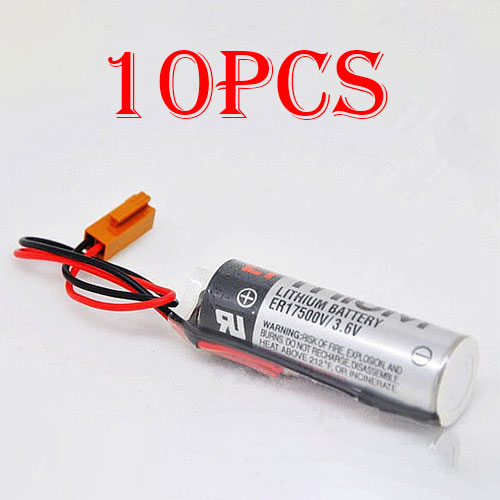
Cheap Toshiba ER17500V Li-ion Other battery, Brand New ER17500V replacement battery for 10pcs TOSHIBA ER17500V ER17/50 CS1W-BAT01 With Brown Plug

2700mah 3.6V Toshiba ER17500V Batteries for 10pcs TOSHIBA ER17500V ER17/50 CS1W-BAT01 With Brown Plug, Toshiba ER17500V Other battery is a brand new,100% Compatible original and replacement Laptop battery,Purchase wholesale and retail ER17500V with high quality and low price!

ER17500V Battery toshiba Li-ion 3.6V 2700mah

ER17500V

Specifications

  • Brand:TOSHIBA
  • Capacity :2700mah
  • Voltage :3.6V
  • Type :Li-ion
  • Battery Cell Quality: Grade A
  • Descriptive: Replacement Battery – 1 Year Warranty
  • Description: Brand New, 1 Year Warranty! 30-Days Money Back! Fast Shipping!

How we test this Toshiba ER17500V Battery Li-ion 3.6V 2700mah

Step 1: Make sure customer bought the correct battery.
Step 2: Check battery’s appearance and interface.
Step 3: Test battery charger and recharger function.
Step 4: Charger the battery to 100% and recharger to 0% to get real battery capacity
Step 5: Use Ev2300 to check the voltage difference of each goroup cells.
Step 6: Charger battery power more than 30%.
Step 7: Package battery carefully and send out

Compatible Part Numbers:

ER17500V

Compatible Model Numbers:

TOSHIBA ER17500V ER17/50 CS1W-BAT01 With Brown Plug

Brown plug(not Compatible black plug )

Package include:
10pcs ER17500V (3.6V) PLC battery

How much do you know about how to run laptop well as any place? The follow Tips cut way back on protecting battery life.


1). Please recharge or change your Other battery when battery power low.
2). Using Li-Ion Replacement Toshiba ER17500V Other Battery for your notebook which can work longer time than Non Li-ion one.
3). It is better to defragmentation regularly for your Other battery life.
4). In order to reduce the laptop power consumpition, you can use some optical drive spin-down and hard drive in your Other .
5). Please keep your laptop in sleep or standby model without long time using, which both save the Replacement Toshiba ER17500V Other Battery power and extend battery using life.
6). Leave your battery in a dry and cool condition when without using.
7). When you rarely or generally plugged in fixed power using, Please take down your battery to avoid hurting battery life.

Hot Products

11.1V/12.4v 2300mah BOSE 404600 for Bose SOUNDLINK I II III16.8V/20V 400mA/2200mAH/32Wh BOSE 300769-003 for Bose Sounddock Portable Digita15.4V 5209mAh RAZER RC30-0248 for RAZER Blade 15 2018 RZ09-023867.4V 2230mAh/17Wh BOSE 063404 for 0634043.8V 6300mAh/23.94Wh AMAZON 2955C7 for Amazon Kindle Fire HD 10.1 7th3.7V/4.2V 1750MAH/6.5WH AMAZON GP-S10-346392-0100 for AMAZON KINDLE 3 3G WIFI Kindle3.8 V 1300 mAh AMAZON MC-305070 for AMAZON Kindle Voyage7.7V 37Wh/4810mAh ACER AP16M5J for ACER A315-51-51SL N17Q1 SERIES3.8V 2930mAh/11.1Wh NETGEAR W-7 for Netgear AirCard 790S 790SP 8103.85V/4.4V 3080MAH/11.86WH ALCATEL TLp030JC for Alcatel A3 XL 9008j

This water-cooled RTX 3080 is the most cyberpunk design Gigabyte’s made yet

Gigabyte is making a splash with the new water-cooled GeForce RTX 3080 design, now entering the maelstrom of custom Ampere graphics cards being swiftly swept away by the tide. The new Aorus Xtreme Waterforce WBs (noted by Computerbase) is overclocked by 8 percent, meaning it’ll be throwing up boosts clocks of 1,845MHz, and it’ll do so in a full-cover, water-cooled wet suit with impeccable cyberpunk style.

Gigabyte also claims more efficient heat dissipation thanks to the “shortened distance between the water channel and the GPU”, and the broad copper base plate covers the whole surface of the water channels. So it should (in theory) be pretty darn effective. As for connectivity, we’re looking at three DisplayPort 1.4a, two HDMI 2.1, and a single HDMI 2.0, so you can run your 4K displays at 120Hz or 8K at 60Hz.

There are a host of alternative water-cooling solutions available as separate units for the RTX 3080 and 3090 already, such as the EK-Quantum Vector, but there are some real benefits of investing in a GPU with a pre-installed water block. You could save a bunch of time and effort, and pre-installed water cooling means relief from the stress of self-assembly and the possibility of voiding your GPU warranty by jamming a water block into it. Just ask our Jacob who bled for his custom water-cooled PC build.

Black Friday 2020 deals: the place to go for the all the best Black Friday bargains.

Really, though, from a value for money perspective, pre-installed water blocks may not be the most cost effective solutions available.

That said, the Aorus Xtreme Waterforce WB 10G looks the absolute bomb with its subtle RGB LEDs and cyberpunk look, and it should integrate easily into existing water cooling systems by way of two G1/4-inch thread connections. It also features all important leak detection, complete with flashing warning lights, in case you somehow manage to get the install wrong.

If you’re worried about such cockups, according to the product page, the GPU comes with a four year warranty, but there’s not a wisp of info about pricing. With the Aorus Waterforce cooled versions of the previous gen RTX 2080 Ti GPUs coming in at $150 above the MSRP, we’re expecting the Aorus Xtreme Waterforce RTX 3080 WB cards to be something in the region of $850. 

But that remains to be seen, and good luck getting your hands on one!

G.skill launches extreme low-latency memory that’s ideal for AMD Ryzen gaming PCs

G.Skill has announced two brand new kits of extreme low-latency DDR4-3600 memory—a 32GB kit smack bang in the sweet spot for gaming and a 64GB kit for memory-heavy applications, such as content creation.

The new low-latency memory kits will be rated to CL14-15-15-35, which matches the Team Extreem ARGB C14 kits currently sitting atop of our best RAM for gaming guide. G.Skill will be offering its extreme low-latency kits under its Trident X Neo, Trident Z Royal, Trident Z RGB, and Ripjaws V series—plenty of options from bling to bare. 

All kits are built using Samsung B-Die chips, a fan favourite for overclocking.

Fitting the criteria for AMD Ryzen Zen 2 perfectly, the new kits from G.Skill will be a dab hand for AMD Ryzen builds. As you can see in Chris Szewczyk’s performance testing across multiple RAM speeds, a heady mix of both frequency and low latency offers the most consistently high performance in a range of games.

The new AMD Ryzen 5000 processors are reportedly going to run at their best at 4,000MHz (effective) but there’s unlikely to be much in it between that and a low-latency 3,600MHz kit. Similarly, Intel systems don’t care quite as much for memory speed and latency, but even so low-latency kits often outperform those with 1GHz+ higher frequencies.

A 16GB kit is currently the go-to choice for gaming PCs, but if you want to keep your PC a little ahead of the game, it’s a good time to pick up a 32GB kit as they’re often going for as little as 16GB kits were just a year back. The higher capacity will ensure you’re more than equipped for future games and memory hogs, and it’s really satisfying to fill all four motherboard memory slots.

Apple to Launch MacBooks With Own Chips Next Week

Apple Inc.’s 15-year relationship with Intel Corp. will officially begin to unwind next week when new Mac computers are revealed.

The Cupertino, California-based technology giant said on Monday that it will hold an online event dubbed “One more thing” on Nov. 10. That “thing” will be Macs with main processors designed by Apple for the first time, replacing Intel chips that have been a mainstay since 2006. An Apple spokesman declined to comment.

Apple and overseas suppliers are ramping up production of three Mac laptops with Apple processors: new 13-inch and 16-inch MacBook Pros and a new 13-inch MacBook Air, according to people familiar with the matter. Foxconn, known also as Hon Hai Precision Industry Co., is assembling the two smaller laptops, while Quanta Computer Inc. is building the larger MacBook Pro. The smaller models are further ahead in production and at least those two laptops will be shown at next week’s event. Beyond the processor switch, the devices won’t have significant design changes.

Apple has less than 10% of the market for personal computers, so the direct impact on Intel sales may be limited. However, the change highlights a crisis engulfing the world’s largest chipmaker. It has delayed a new manufacturing process, giving rivals a chance to catch up. These problems are at least partly behind Apple’s decision to move to in-house chips, although the company has been steadily shifting to this approach for years.

The partnership between Apple and Intel started in 2005, when Steve Jobs outlined a move away from PowerPC processors. Intel helped Apple catch up to Windows computers, some of which were more powerful at the time. In tandem, though, Apple was working on more energy-efficient chips for mobile devices based on Arm Ltd. designs and continues to use those to power the iPhone and iPad.

On Apple’s recent earnings call, Chief Executive Officer Tim Cook hinted at the Mac launch by saying, “without giving away too much, I can tell you that this year has a few more exciting things in store.” The company generated a record $9 billion in revenue from the Mac in its fiscal fourth quarter.

The first Mac processors from Apple will be based on the A14 chip found in the latest iPhones and iPad Air, and tests inside Apple indicate improved power efficiency over the Intel parts they are replacing. The new machines will also have Apple-designed graphics and machine-learning processors.

Apple said in June that the transition away from Intel chips will take two years. After updating its laptop line, Apple will still have until 2022 to update desktop computers — the iMac, iMac Pro, Mac Pro and Mac mini — with its own processors.

The company is already at work on a redesigned iMac, the company’s all-in-one desktop, and a new Mac Pro model, Apple’s highest-end desktop, other people familiar with the company’s plans said.

Apple engineers are currently developing a new Mac Pro that looks like the current design at about half the size. It’s unclear if that Mac will replace the current Mac Pro or if it’s an additional model. Apple’s chip designs could help the company reduce the size of its computers due to increased power efficiency, but the current Mac Pro is large, in part, to fit components like additional storage drives and graphics chips.

Apple’s test Mac for developers to write apps for the new processors is a Mac mini with an iPad Pro processor, but the company will still need to roll out a proper update to that model with a Mac-specific chip. The new Macs require macOS Big Sur, a redesigned Mac operating system that makes the software more like iPhones and iPads.

When announcing the transition in June, Apple said the move would provide a common architecture across all of its devices. That means future iPhones, Macs, iPads and Apple Watches will run a variation of the same chip. That will allow devices to work together better and let iPhone apps run natively on Macs for the first time.

Bloomberg first reported on the transition away from Intel in 2018 and again in April. The new Macs will mark Apple’s third major product release this fall. In September, the company announced new Apple Watches and iPads. The iPhone 12 and HomePod mini lines debuted in October.