290MAH/1.10WH 3.8V 4.35V Amazfit PL332728V Li-ion Battery for Amazfit Stratos 2/2S A1609 A1619

290MAH/1.10WH 3.8V 4.35V Amazfit PL332728V Batteries for Amazfit Stratos 2/2S A1609 A1619, Amazfit PL332728V Other battery is a brand new,100% Compatible original and replacement battery,Purchase wholesale and retail PL332728V with high quality and low price!

Find ou your original model number or part number(P/N), and move your eyes on the tag of battery
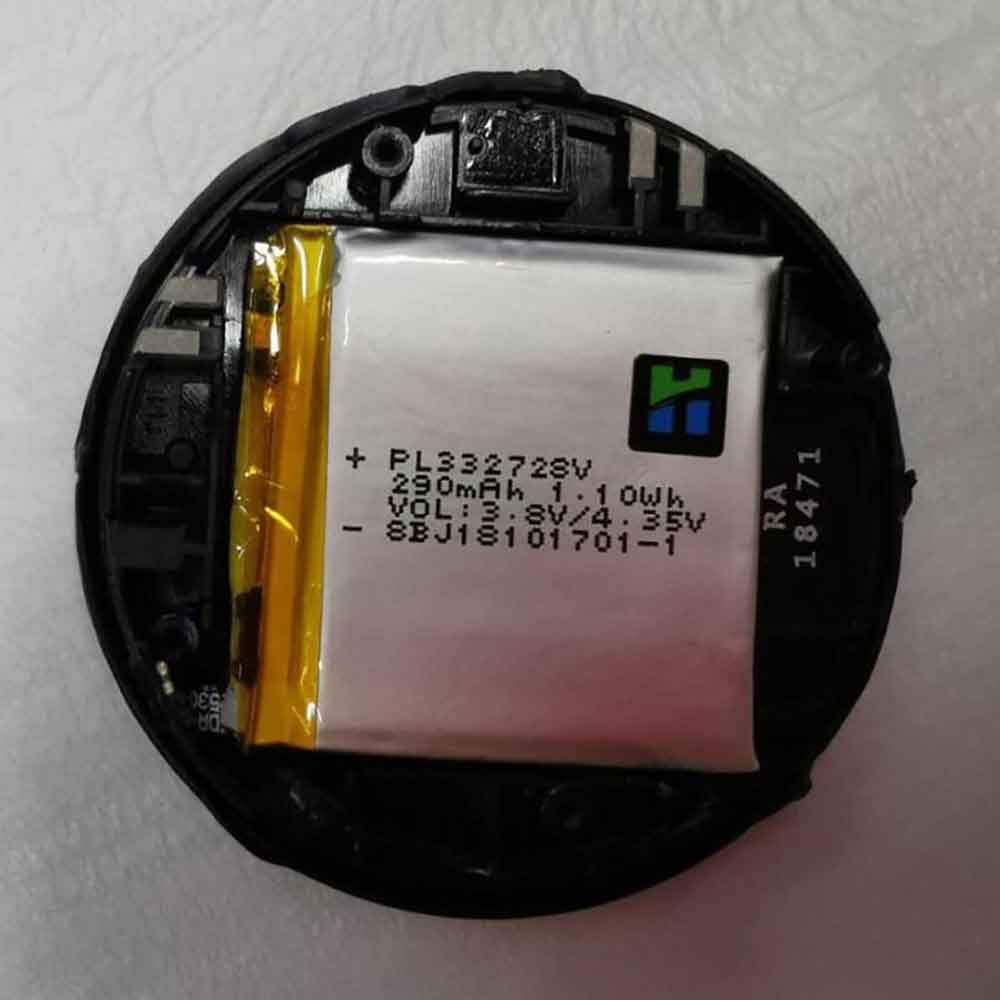
PL332728V

Specifications

  • Brand:Amazfit
  • Capacity :290MAH/1.10WH
  • Voltage :3.8V 4.35V
  • Type :Li-ion
  • Battery Cell Quality: Grade A
  • Descriptive: Replacement Battery – 1 Year Warranty
  • Description: Brand New, 1 Year Warranty! 30-Days Money Back! Fast Shipping!

How we test this Amazfit PL332728V Battery
Step 1: Make sure customer bought the correct battery.
Step 2: Check battery’s appearance and interface.
Step 3: Test battery charger and recharger function.
Step 4: Charger the battery to 100% and recharger to 0% to get real battery capacity
Step 5: Use Ev2300 to check the voltage difference of each goroup cells.
Step 6: Charger battery power more than 30%.
Step 7: Package battery carefully and send out

Compatible Part Numbers:
PL332728V

Compatible Model Numbers:
Amazfit Stratos 2/2S A1609 A1619

How much do you know about how to run laptop well as any place? The follow Tips cut way back on protecting battery life.


1). Please recharge or change your Other battery when battery power low.
2). Using Li-Ion Replacement Amazfit PL332728V Other Battery for your notebook which can work longer time than Non Li-ion one.
3). It is better to defragmentation regularly for your Other battery life.
4). In order to reduce the laptop power consumpition, you can use some optical drive spin-down and hard drive in your Other .
5). Please keep your laptop in sleep or standby model without long time using, which both save the Replacement Amazfit PL332728V Other Battery power and extend battery using life.
6). Leave your battery in a dry and cool condition when without using.
7). When you rarely or generally plugged in fixed power using, Please take down your battery to avoid hurting battery life.

Hot Products

1700mAh VIVO BK-B-60 for Vivo Y115920mAh MICROSOFT 4588105 for Microsoft WinBook CW140 MEDION4800mAh SAMSUNG T4800U for Samsung Tab Pro 8.4 T320/ T3251500mAh/5.78WH NOKIA BV-6A for Nokia 3060 5250 81101800mAh 13.3Wh MOTOROLA PMNN4001C for Motorola GP68 Radio1900MAH/7.22Wh ALCATEL TLI019B1 for Alcatel One Touch POP C7 7041D4400mAh DELL 312-0314 for Dell Latitude D410 serie3500mAh BLACKBERRY Tlp035B1 for BlackBerry KEY2 cellphone2200mAh/17.02WH OPPO BLP855 for OPPO Reno6 Pro4200mAh GETAC BP-S410-Main-32/2040 for GETAC s410
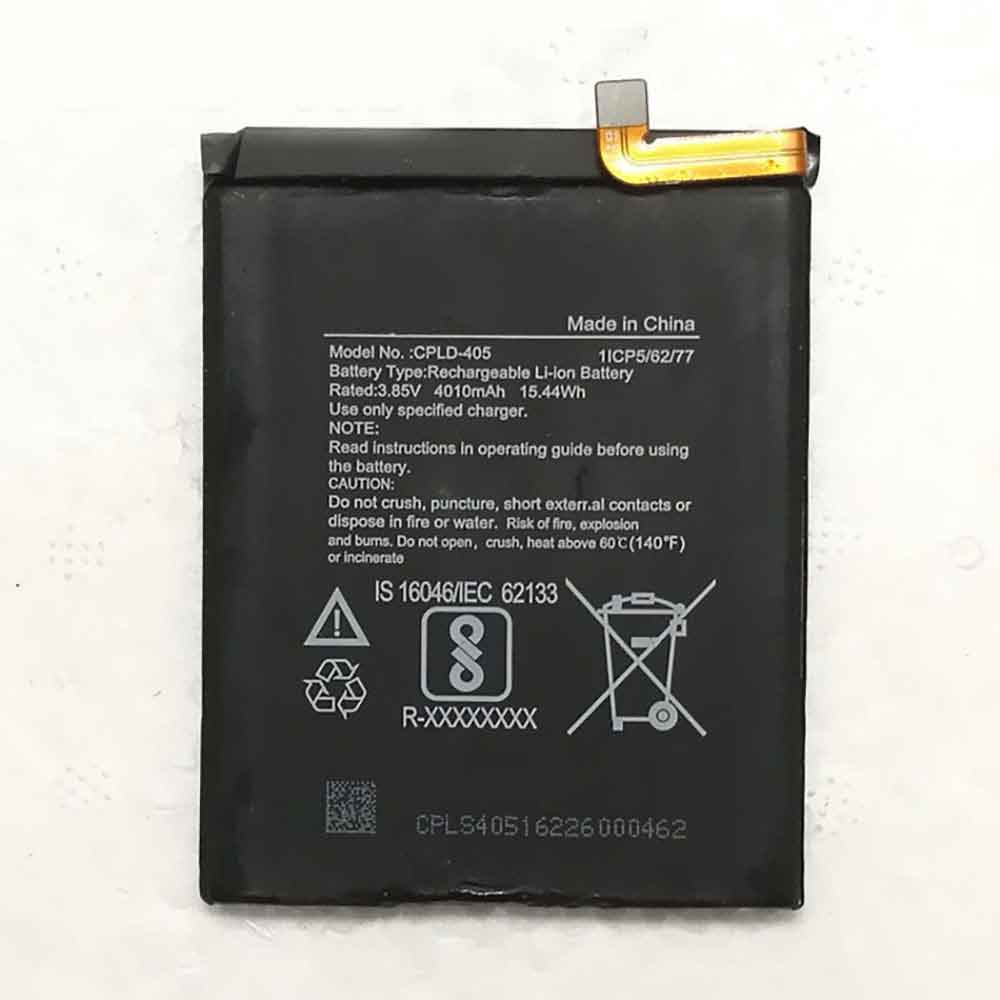
4010MAH/15.44WH 3.85V Coolpad CPLD-400/405 Li-ion Battery for Coolpad 3600I-S00 3600L A9S AS9-9

4010MAH/15.44WH 3.85V Coolpad CPLD-400/405 Batteries for Coolpad 3600I-S00 3600L A9S AS9-9, Coolpad CPLD-400/405 Cell Phone battery is a brand new,100% Compatible original and replacement Phone battery,Purchase wholesale and retail CPLD-400/405 with high quality and low price!

Find ou your original model number or part number(P/N), and move your eyes on the tag of battery

CPLD-400/405

Specifications

  • Brand:Coolpad
  • Capacity :4010MAH/15.44WH
  • Voltage :3.85V
  • Type :Li-ion
  • Battery Cell Quality: Grade A
  • Descriptive: Replacement Battery – 1 Year Warranty
  • Description: Brand New, 1 Year Warranty! 30-Days Money Back! Fast Shipping!

How we test this Coolpad CPLD-400/405 Battery
Step 1: Make sure customer bought the correct battery.
Step 2: Check battery’s appearance and interface.
Step 3: Test battery charger and recharger function.
Step 4: Charger the battery to 100% and recharger to 0% to get real battery capacity
Step 5: Use Ev2300 to check the voltage difference of each goroup cells.
Step 6: Charger battery power more than 30%.
Step 7: Package battery carefully and send out

Compatible Part Numbers:
CPLD-400/405

Compatible Model Numbers:
Coolpad 3600I-S00 3600L A9S AS9-9

How much do you know about how to run laptop well as any place? The follow Tips cut way back on protecting battery life.


1). Please recharge or change your Cell Phone battery when battery power low.
2). Using Li-Ion Replacement Coolpad CPLD-400/405 Cell Phone Battery for your notebook which can work longer time than Non Li-ion one.
3). It is better to defragmentation regularly for your Cell Phone battery life.
4). In order to reduce the laptop power consumpition, you can use some optical drive spin-down and hard drive in your Cell Phone .
5). Please keep your laptop in sleep or standby model without long time using, which both save the Replacement Coolpad CPLD-400/405 Cell Phone Battery power and extend battery using life.
6). Leave your battery in a dry and cool condition when without using.
7). When you rarely or generally plugged in fixed power using, Please take down your battery to avoid hurting battery life.

Hot Products

1700mAh VIVO BK-B-60 for Vivo Y115920mAh MICROSOFT 4588105 for Microsoft WinBook CW140 MEDION4800mAh SAMSUNG T4800U for Samsung Tab Pro 8.4 T320/ T3251500mAh/5.78WH NOKIA BV-6A for Nokia 3060 5250 81101800mAh 13.3Wh MOTOROLA PMNN4001C for Motorola GP68 Radio1900MAH/7.22Wh ALCATEL TLI019B1 for Alcatel One Touch POP C7 7041D4400mAh DELL 312-0314 for Dell Latitude D410 serie3500mAh BLACKBERRY Tlp035B1 for BlackBerry KEY2 cellphone2200mAh/17.02WH OPPO BLP855 for OPPO Reno6 Pro4200mAh GETAC BP-S410-Main-32/2040 for GETAC s410
Google Pixel 6A vs Pixel 6: How Google’s cheaper Android 12 flagships are different

 Google’s Pixel 6A is coming, and it puts the best of Google’s Pixel 6 into a smaller, cheaper phone. Google’s $449 (£399, AU$749) Pixel 6A, which launches on July 28, will be a step up from Apple’s $429 iPhone SE. The cheaper Android 12 phone will keep the same Tensor chip as the $599 Pixel 6 — just like the iPhone SE contains Apple’s latest A15 Bionic chip — and put it in a slightly smaller phone with a camera Older Pixel phones, like the 2020 Pixel 5A.

The Pixel 6A still includes many of the exclusive features offered by Google‘s Tensor chip, including a magic eraser that lets you remove people or objects from your photos. Let’s take a look at some of its key differences, including its screen, design, camera, and software.

screen and design

When it comes to what the Pixel 6A looks like, you might confuse it with the more expensive Pixel 6. Both phones feature a dual-tone design on the back, flanked by a camera bar. The camera bar on the 6A is as striking as the Pixel 6 was when it debuted in November.

The phone sits on the front of the 6A and includes a 6.1-inch OLED 1080p screen with a locked 60Hz refresh rate. That’s slightly smaller than the Pixel 6’s 6.4-inch OLED 1080p screen, which can run at 60Hz or 90Hz. In terms of materials, the Pixel 6A’s screen will cover Corning’s legacy Gorilla Glass 3 instead of Corning’s new Gorilla Glass Victus on the Pixel 6.

The phone also includes an in-screen fingerprint reader, and while we haven’t gotten our hands on the phone yet, it’s rumored to be faster than the Pixel 6’s. While it doesn’t affect the look of the phone, the Pixel 6A doesn’t have wireless charging on its body, and the Pixel 6 does include it.

camera

Perhaps the biggest difference between the Pixel 6A and the Pixel 6 is its camera. While the Pixel 6 featured a 50-megapixel wide camera and a 12.2-megapixel ultra-wide camera, the Pixel 6A will include a 12-megapixel wide camera and a 12-megapixel ultra-wide camera. That’s not a bad thing, as this setup largely mirrors the cameras included in the Pixel 5A. Both the Pixel 6A and Pixel 6 include the same 8-megapixel front-facing camera

The Pixel 6A will also take advantage of its Tensor chip to enhance photos, including its Real Tone skin tone feature, Face Unblur to sharpen otherwise blurry images, Night Sight for photography in darker locations, and Magic Eraser, which will be an update to allow the color of objects within the photo to be adjusted.

The Android 12 implementation of the Pixel 6A will come with many of these camera features, which will largely mirror the Pixel 6.

software

The Pixel 6A and Pixel 6 will be largely identical in terms of software, with both phones running Android 12 and its Material You color customization. The Pixel 6A will also join the Pixel 6 and 6 Pro as one of the first phones to be updated to Android 13, which will be released publicly later this year.

One hardware-related note that can affect multitasking: The Pixel 6A includes 6GB of RAM, while the Pixel 6 includes 8GB. For most people, 6GB will be plenty of memory for everyday tasks, but it’s worth mentioning that the Pixel 6 should be able to handle a little more.

>>>>>>>>>>>>>Google battery

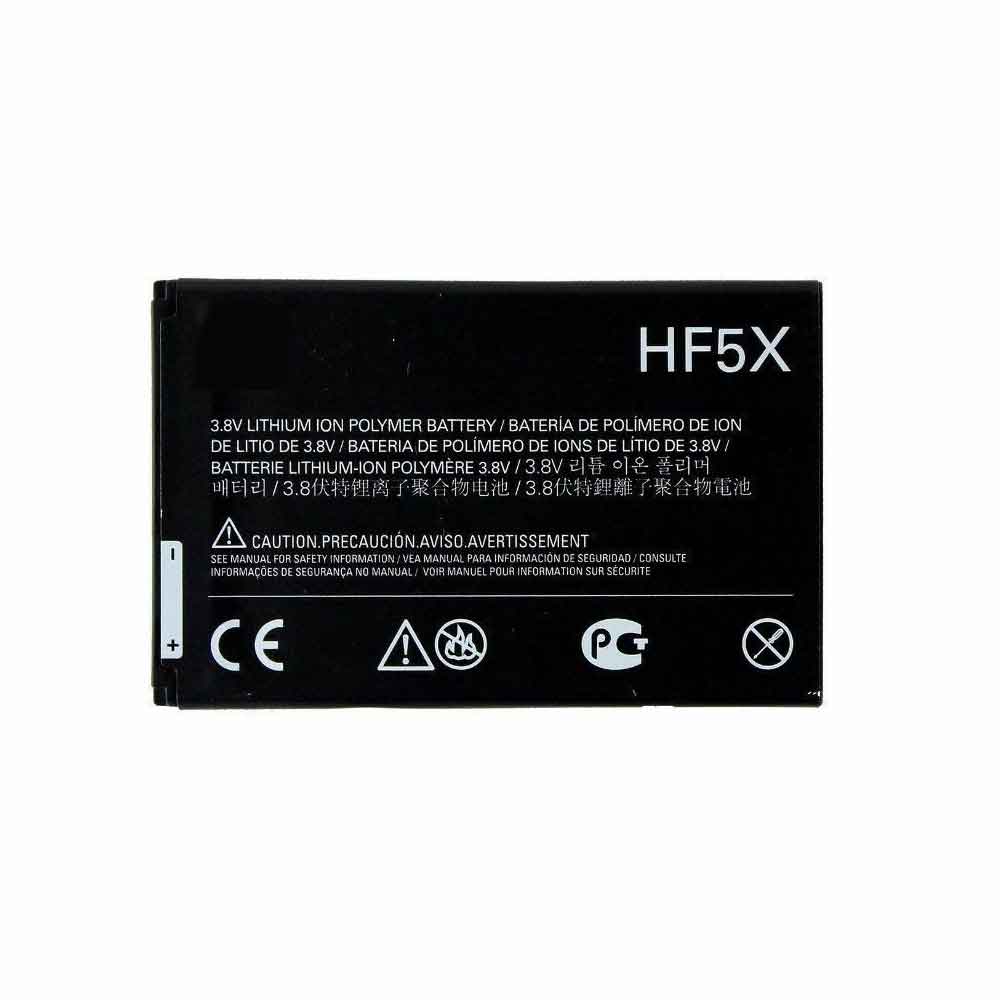
1650mAh/6.3WH 3.8V 4.35V Motorola HF5X Li-ion Battery for Motorola Photon 4G MB855

1650mAh/6.3WH 3.8V 4.35V Motorola HF5X Batteries for Motorola Photon 4G MB855, Motorola HF5X Cell Phone battery is a brand new,100% Compatible original and replacement Phone battery,Purchase wholesale and retail HF5X with high quality and low price!

Find ou your original model number or part number(P/N), and move your eyes on the tag of battery

HF5X

Specifications

  • Brand:Motorola
  • Capacity :1650mAh/6.3WH
  • Voltage :3.8V 4.35V
  • Type :Li-ion
  • Battery Cell Quality: Grade A
  • Descriptive: Replacement Battery – 1 Year Warranty
  • Description: Brand New, 1 Year Warranty! 30-Days Money Back! Fast Shipping!

How we test this Motorola HF5X Battery
Step 1: Make sure customer bought the correct battery.
Step 2: Check battery’s appearance and interface.
Step 3: Test battery charger and recharger function.
Step 4: Charger the battery to 100% and recharger to 0% to get real battery capacity
Step 5: Use Ev2300 to check the voltage difference of each goroup cells.
Step 6: Charger battery power more than 30%.
Step 7: Package battery carefully and send out

Compatible Part Numbers:
HF5X

Compatible Model Numbers:
Motorola Photon 4G MB855

How much do you know about how to run laptop well as any place? The follow Tips cut way back on protecting battery life.


1). Please recharge or change your Cell Phone battery when battery power low.
2). Using Li-Ion Replacement Motorola HF5X Cell Phone Battery for your notebook which can work longer time than Non Li-ion one.
3). It is better to defragmentation regularly for your Cell Phone battery life.
4). In order to reduce the laptop power consumpition, you can use some optical drive spin-down and hard drive in your Cell Phone .
5). Please keep your laptop in sleep or standby model without long time using, which both save the Replacement Motorola HF5X Cell Phone Battery power and extend battery using life.
6). Leave your battery in a dry and cool condition when without using.
7). When you rarely or generally plugged in fixed power using, Please take down your battery to avoid hurting battery life.

Hot Products

1900MAH/7.22Wh ALCATEL TLI019B1 for Alcatel One Touch POP C7 7041D4400mAh DELL 312-0314 for Dell Latitude D410 serie3500mAh BLACKBERRY Tlp035B1 for BlackBerry KEY2 cellphone2200mAh/17.02WH OPPO BLP855 for OPPO Reno6 Pro4200mAh GETAC BP-S410-Main-32/2040 for GETAC s4104000mAh/31Wh/4 cells SAMSUNG AA-PBUN4AR for Samsung NP940X3L 900X5L NP900X56WH DELL 90V7W for Dell XPS 13 9343 9350 JD25G 5K6.6Ah/71.28Wh/9Cell ITRONIX IX600 for Itronix Hummer GoBook VR-1 VR-48.29Wh SMP A70 for SMP SMPLE A70 823-00088-01 0a-1950mAh APPLE A1672 for Apple Magic Mouse 2

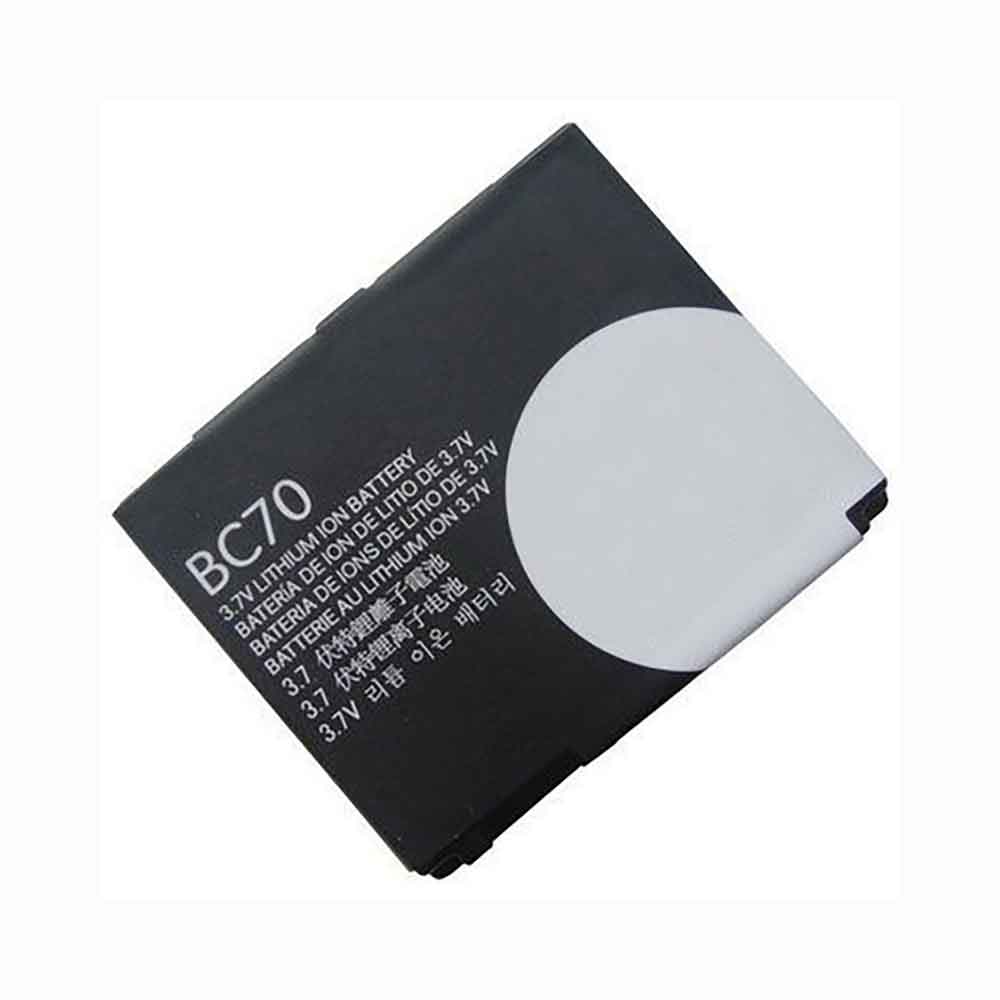
1100mAh 3.7V 4.2V Motorola BC70 Li-ion Battery for Motorola A1800

1100mAh 3.7V 4.2V Motorola BC70 Batteries for Motorola A1800, Motorola BC70 Cell Phone battery is a brand new,100% Compatible original and replacement Phone battery,Purchase wholesale and retail BC70 with high quality and low price!

Find ou your original model number or part number(P/N), and move your eyes on the tag of battery

BC70

Specifications

  • Brand:Motorola
  • Capacity :1100mAh
  • Voltage :3.7V 4.2V
  • Type :Li-ion
  • Battery Cell Quality: Grade A
  • Descriptive: Replacement Battery – 1 Year Warranty
  • Description: Brand New, 1 Year Warranty! 30-Days Money Back! Fast Shipping!

How we test this Motorola BC70 Battery
Step 1: Make sure customer bought the correct battery.
Step 2: Check battery’s appearance and interface.
Step 3: Test battery charger and recharger function.
Step 4: Charger the battery to 100% and recharger to 0% to get real battery capacity
Step 5: Use Ev2300 to check the voltage difference of each goroup cells.
Step 6: Charger battery power more than 30%.
Step 7: Package battery carefully and send out

Compatible Part Numbers:
BC70

Compatible Model Numbers:
Motorola A1800

How much do you know about how to run laptop well as any place? The follow Tips cut way back on protecting battery life.


1). Please recharge or change your Cell Phone battery when battery power low.
2). Using Li-Ion Replacement Motorola BC70 Cell Phone Battery for your notebook which can work longer time than Non Li-ion one.
3). It is better to defragmentation regularly for your Cell Phone battery life.
4). In order to reduce the laptop power consumpition, you can use some optical drive spin-down and hard drive in your Cell Phone .
5). Please keep your laptop in sleep or standby model without long time using, which both save the Replacement Motorola BC70 Cell Phone Battery power and extend battery using life.
6). Leave your battery in a dry and cool condition when without using.
7). When you rarely or generally plugged in fixed power using, Please take down your battery to avoid hurting battery life.

Hot Products

1900MAH/7.22Wh ALCATEL TLI019B1 for Alcatel One Touch POP C7 7041D4400mAh DELL 312-0314 for Dell Latitude D410 serie3500mAh BLACKBERRY Tlp035B1 for BlackBerry KEY2 cellphone2200mAh/17.02WH OPPO BLP855 for OPPO Reno6 Pro4200mAh GETAC BP-S410-Main-32/2040 for GETAC s4104000mAh/31Wh/4 cells SAMSUNG AA-PBUN4AR for Samsung NP940X3L 900X5L NP900X56WH DELL 90V7W for Dell XPS 13 9343 9350 JD25G 5K6.6Ah/71.28Wh/9Cell ITRONIX IX600 for Itronix Hummer GoBook VR-1 VR-48.29Wh SMP A70 for SMP SMPLE A70 823-00088-01 0a-1950mAh APPLE A1672 for Apple Magic Mouse 2

What makes the computer shut down suddenly?

 A sudden PC shutdown is often a symptom of a power problem and can be very frustrating. This could cause you to lose whatever you were working on, but it could also be a sign of damage to the computer itself. Usually, when a computer shuts down on its own, it’s due to power, malware, overheating, or driver issues. Let’s take a look at the specific reasons that may appear below!

tip

Usually, when a computer shuts down on its own, it’s due to power, malware, overheating, or driver issues.

power supply

Behind the case where the power cord actually connects to the computer is the power supply, which is a small box with a fan. When the power supply goes bad, it causes your computer to shut down. While you can replace the power supply yourself, do not attempt to turn it on. Even if it’s unplugged or fails, it can still carry a lethal charge.

overheat

Computers have heat sinks and fans to keep the central processing unit (CPU) cool, but if the CPU overheats, the computer will shut down to prevent further damage. Adding thermal paste between the CPU and its heatsink helps prevent overheating, just like cooling systems like fans or water cooling. Dust and pet hair can be drawn into the computer case and block airflow, causing the CPU to overheat. Keep the inside of the computer clean by blowing out any foreign objects with compressed air.

malicious software

Viruses, Trojan horses, and worms operate exactly according to their program, and some are created to shut down your computer, like the Sasser worm, which initiates a shutdown sequence of an infected computer every time you start your computer. A severe malware infection can cause a computer to shut down due to overworked CPU. Malware that causes the shutdown sequence to start may require professional cleaning, as traditional virus scans are interrupted by computer shutdowns.

mistake

Software bugs and hardware driver issues are also causes of computer shutdowns. Depending on the type of error, the computer may have to reset itself to recover, or you may need to update hardware drivers. Starting your computer in Safe Mode will allow you to determine if this is the cause, as Safe Mode runs only the core hardware and software loaded at startup. If the computer is running in safe mode, a software application or driver might be the culprit.

Hardware components can also fail, such as memory (RAM), motherboard, or video card.

>>>>>>>>>>>Laptop battery

Thanks for reading, hope it helps!

Friendly reminder: If you need to replace the battery of your device, this battery store will be a good choice: www.batteryforpc.co.uk

AirPods: Try this factory reset for a quick fix

 Apple’s AirPods Pro are one of the best wireless earbuds you can buy. With great sound quality, excellent active noise cancellation, and a compact design, AirPods Pro set the tone for premium wireless earbuds that quickly evolved into the everyday device of many Apple enthusiasts. But even great headphones are prone to issues, and if you’ve been using them for a while, sometimes your AirPods might have some issues.

Knowing how to reset your AirPods is a useful tip, whether you want to restart your AirPods or sell them before a deal. good news? It’s an easy process that you can learn in just a few minutes, and the same steps apply whether you have the original AirPods, AirPods 2, AirPods 3, or noise-cancelling AirPods Pro.

How to factory reset AirPods or AirPods Pro

1. Put your AirPods in the charging case and make sure the lid is closed.

2. After 30 seconds, open the cover to connect your iPhone or iPad. On either device, go to Settings > Bluetooth , then tap the blue i icon next to AirPods. (If you don’t see your AirPods in Settings > Bluetooth, go to the next step.)

3. Tap Forget this device, then tap Confirm again.

4. Now that your AirPods are forgotten, open the lid, press and hold the button on the back of the case for about 15 seconds, or until the status light flashes amber, then turns white.

If you are using an Android phone, the first two steps are the same, then:

3. Go to Settings, then Connected Devices and tap the gear icon next to AirPods or AirPods Pro.

4. Now, tap Forget and then Forget Device to confirm.

After resetting your AirPods, the earbuds will no longer automatically recognize the device associated with your iCloud account. Opening the AirPods case near your iOS device will start the setup process as if you were using it for the first time.

>>>>>>>>>>>>>>>AirPods battery

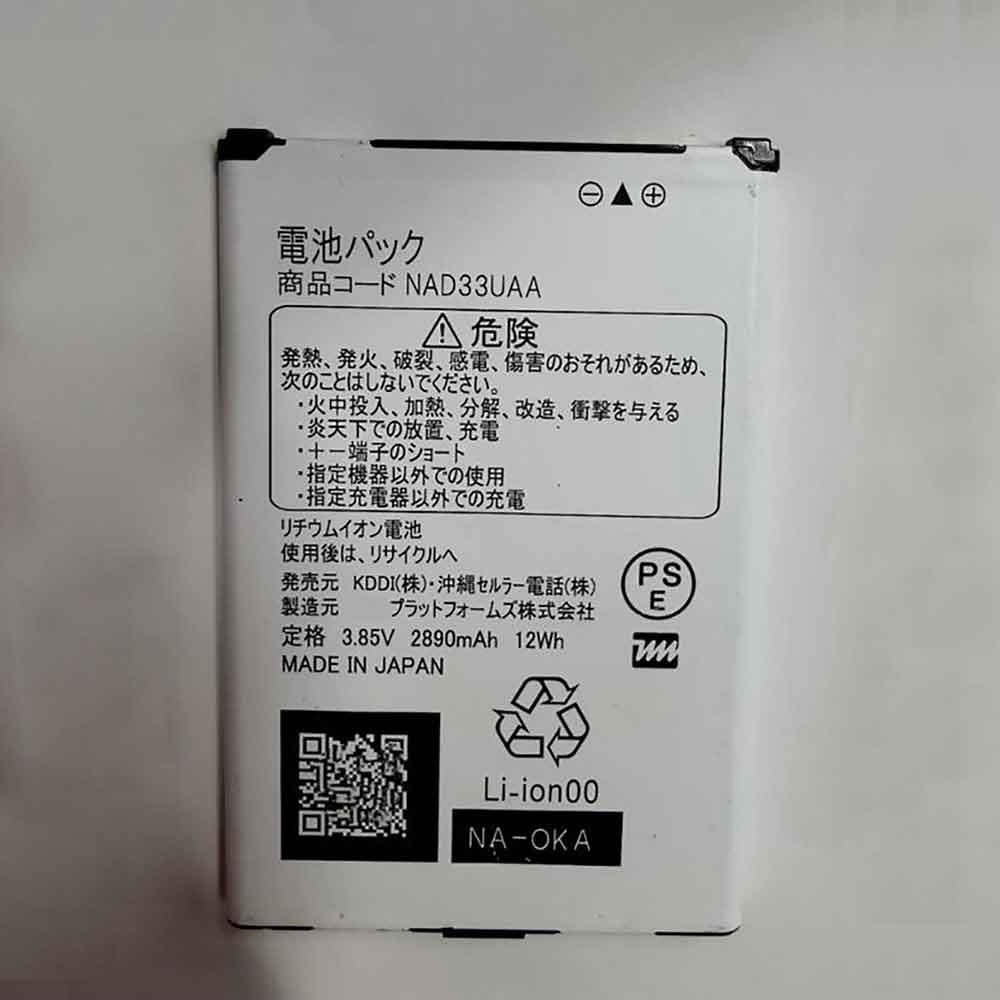
2890MAH/12WH 3.85V Nec NAD33UAA Li-ion Battery for NEC UQ Wimax 2+

2890MAH/12WH 3.85V Nec NAD33UAA Batteries for NEC UQ Wimax 2+, Nec NAD33UAA Other battery is a brand new,100% Compatible original and replacement battery,Purchase wholesale and retail NAD33UAA with high quality and low price!

Find ou your original model number or part number(P/N), and move your eyes on the tag of battery

NAD33UAA

Specifications

  • Brand:NEC
  • Capacity :2890MAH/12WH
  • Voltage :3.85V
  • Type :Li-ion
  • Battery Cell Quality: Grade A
  • Descriptive: Replacement Battery – 1 Year Warranty
  • Description: Brand New, 1 Year Warranty! 30-Days Money Back! Fast Shipping!

How we test this Nec NAD33UAA Battery
Step 1: Make sure customer bought the correct battery.
Step 2: Check battery’s appearance and interface.
Step 3: Test battery charger and recharger function.
Step 4: Charger the battery to 100% and recharger to 0% to get real battery capacity
Step 5: Use Ev2300 to check the voltage difference of each goroup cells.
Step 6: Charger battery power more than 30%.
Step 7: Package battery carefully and send out

Compatible Part Numbers:
NAD33MLU
NAD33UAA

Compatible Model Numbers:
NEC UQ Wimax 2+

How much do you know about how to run laptop well as any place? The follow Tips cut way back on protecting battery life.


1). Please recharge or change your Other battery when battery power low.
2). Using Li-Ion Replacement Nec NAD33UAA Other Battery for your notebook which can work longer time than Non Li-ion one.
3). It is better to defragmentation regularly for your Other battery life.
4). In order to reduce the laptop power consumpition, you can use some optical drive spin-down and hard drive in your Other .
5). Please keep your laptop in sleep or standby model without long time using, which both save the Replacement Nec NAD33UAA Other Battery power and extend battery using life.
6). Leave your battery in a dry and cool condition when without using.
7). When you rarely or generally plugged in fixed power using, Please take down your battery to avoid hurting battery life.

Hot Products

3500mAh BLACKBERRY Tlp035B1 for BlackBerry KEY2 cellphone2200mAh/17.02WH OPPO BLP855 for OPPO Reno6 Pro4200mAh GETAC BP-S410-Main-32/2040 for GETAC s4104000mAh/31Wh/4 cells SAMSUNG AA-PBUN4AR for Samsung NP940X3L 900X5L NP900X56WH DELL 90V7W for Dell XPS 13 9343 9350 JD25G 5K6.6Ah/71.28Wh/9Cell ITRONIX IX600 for Itronix Hummer GoBook VR-1 VR-48.29Wh SMP A70 for SMP SMPLE A70 823-00088-01 0a-1950mAh APPLE A1672 for Apple Magic Mouse 22600mAh 9.88WH OUKITEL U13 for Oukitel U1338Wh / 4950mAh HP SO04XL for HP Spectre Pro 13 G1

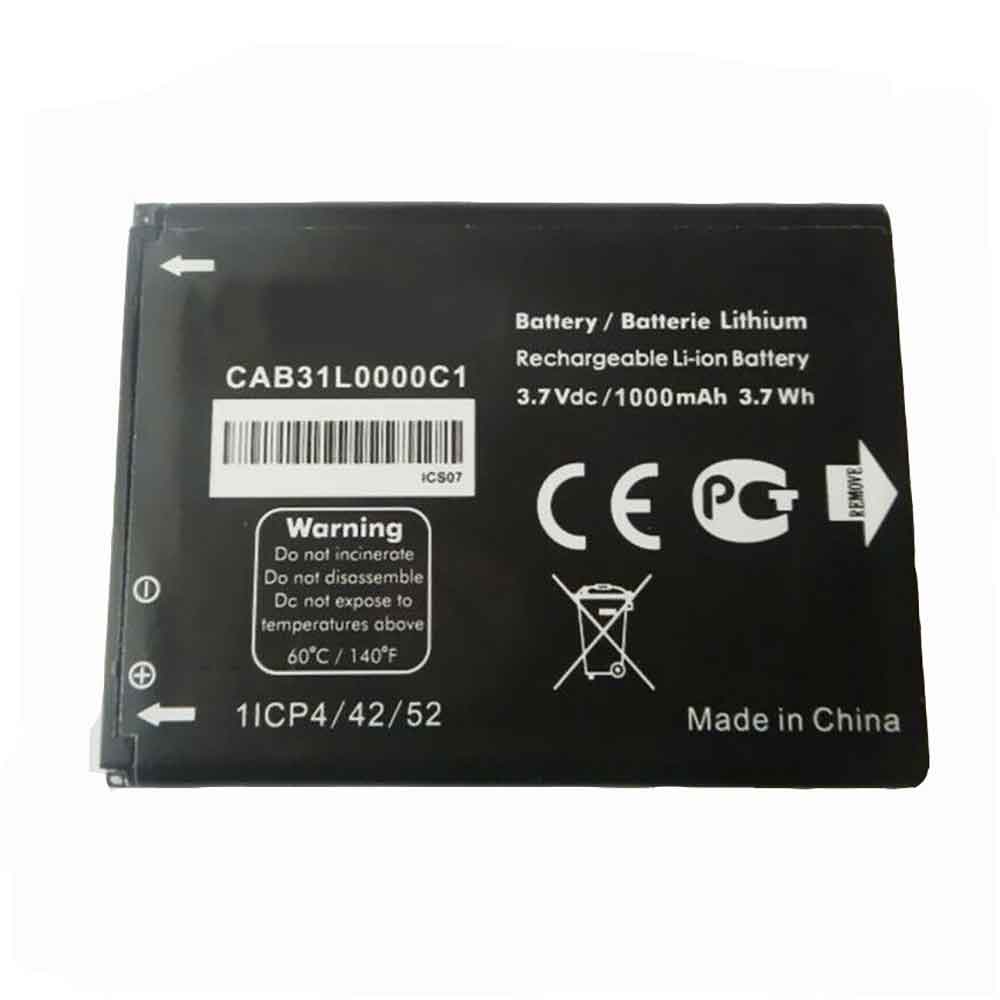
1000mAh/3.7WH 3.7V 4.2V Alcatel CAB31l0000C1 Li-ion Battery for Alcatel A382G A383G T66 A890

1000mAh/3.7WH 3.7V 4.2V Alcatel CAB31l0000C1 Batteries for Alcatel A382G A383G T66 A890, Alcatel CAB31l0000C1 Cell Phone battery is a brand new,100% Compatible original and replacement Phone battery,Purchase wholesale and retail CAB31l0000C1 with high quality and low price!

Find ou your original model number or part number(P/N), and move your eyes on the tag of battery

CAB31l0000C1

Specifications

  • Brand:Alcatel
  • Capacity :1000mAh/3.7WH
  • Voltage :3.7V 4.2V
  • Type :Li-ion
  • Battery Cell Quality: Grade A
  • Descriptive: Replacement Battery – 1 Year Warranty
  • Description: Brand New, 1 Year Warranty! 30-Days Money Back! Fast Shipping!

How we test this Alcatel CAB31l0000C1 Battery
Step 1: Make sure customer bought the correct battery.
Step 2: Check battery’s appearance and interface.
Step 3: Test battery charger and recharger function.
Step 4: Charger the battery to 100% and recharger to 0% to get real battery capacity
Step 5: Use Ev2300 to check the voltage difference of each goroup cells.
Step 6: Charger battery power more than 30%.
Step 7: Package battery carefully and send out

Compatible Part Numbers:
CAB31l0000C1

Compatible Model Numbers:
Alcatel A382G A383G T66 A890

How much do you know about how to run laptop well as any place? The follow Tips cut way back on protecting battery life.


1). Please recharge or change your Cell Phone battery when battery power low.
2). Using Li-Ion Replacement Alcatel CAB31l0000C1 Cell Phone Battery for your notebook which can work longer time than Non Li-ion one.
3). It is better to defragmentation regularly for your Cell Phone battery life.
4). In order to reduce the laptop power consumpition, you can use some optical drive spin-down and hard drive in your Cell Phone .
5). Please keep your laptop in sleep or standby model without long time using, which both save the Replacement Alcatel CAB31l0000C1 Cell Phone Battery power and extend battery using life.
6). Leave your battery in a dry and cool condition when without using.
7). When you rarely or generally plugged in fixed power using, Please take down your battery to avoid hurting battery life.

Hot Products

3500mAh BLACKBERRY Tlp035B1 for BlackBerry KEY2 cellphone2200mAh/17.02WH OPPO BLP855 for OPPO Reno6 Pro4200mAh GETAC BP-S410-Main-32/2040 for GETAC s4104000mAh/31Wh/4 cells SAMSUNG AA-PBUN4AR for Samsung NP940X3L 900X5L NP900X56WH DELL 90V7W for Dell XPS 13 9343 9350 JD25G 5K6.6Ah/71.28Wh/9Cell ITRONIX IX600 for Itronix Hummer GoBook VR-1 VR-48.29Wh SMP A70 for SMP SMPLE A70 823-00088-01 0a-1950mAh APPLE A1672 for Apple Magic Mouse 22600mAh 9.88WH OUKITEL U13 for Oukitel U1338Wh / 4950mAh HP SO04XL for HP Spectre Pro 13 G1

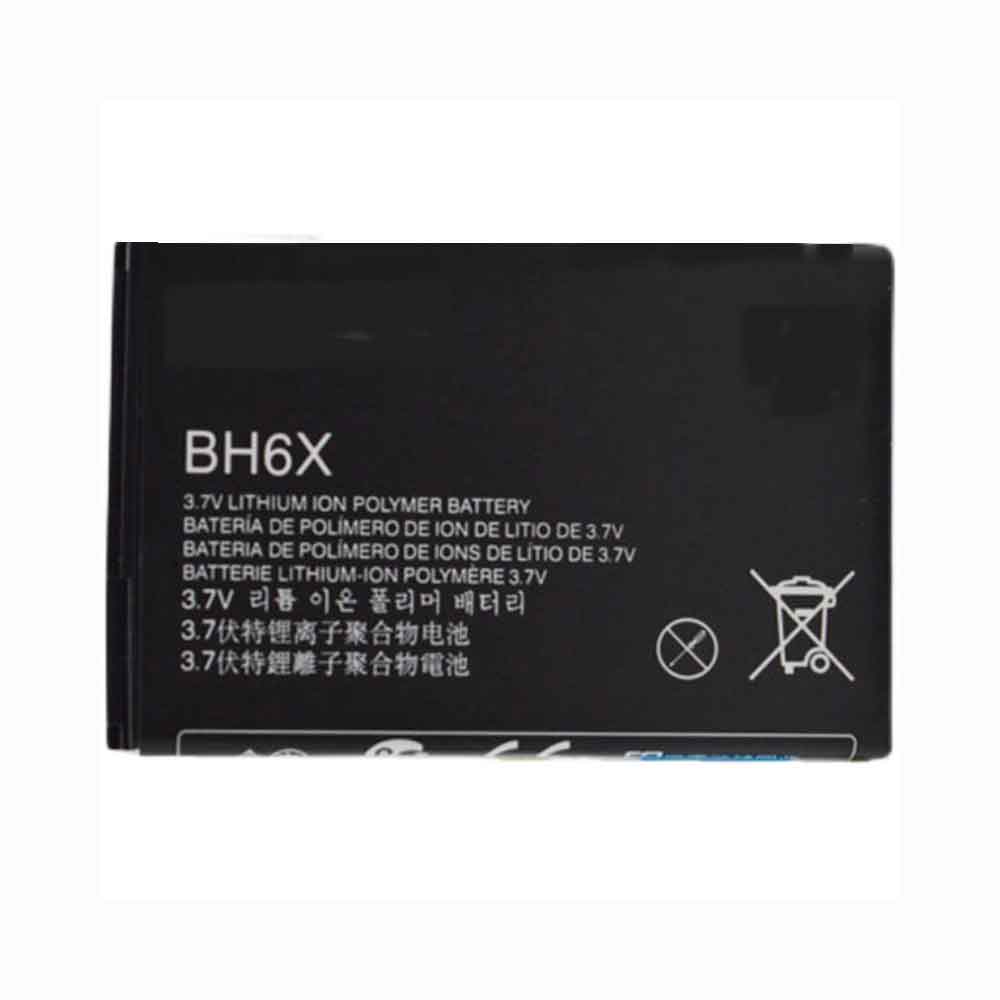
2000mAh 3.7V Motorola BH6X Li-ion Battery for Motorola Atrix MB860

2000mAh 3.7V Motorola BH6X Batteries for Motorola Atrix MB860, Motorola BH6X Cell Phone battery is a brand new,100% Compatible original and replacement Phone battery,Purchase wholesale and retail BH6X with high quality and low price!

Find ou your original model number or part number(P/N), and move your eyes on the tag of battery

BH6X

Specifications

  • Brand:Motorola
  • Capacity :2000mAh
  • Voltage :3.7V
  • Type :Li-ion
  • Battery Cell Quality: Grade A
  • Descriptive: Replacement Battery – 1 Year Warranty
  • Description: Brand New, 1 Year Warranty! 30-Days Money Back! Fast Shipping!

How we test this Motorola BH6X Battery
Step 1: Make sure customer bought the correct battery.
Step 2: Check battery’s appearance and interface.
Step 3: Test battery charger and recharger function.
Step 4: Charger the battery to 100% and recharger to 0% to get real battery capacity
Step 5: Use Ev2300 to check the voltage difference of each goroup cells.
Step 6: Charger battery power more than 30%.
Step 7: Package battery carefully and send out

Compatible Part Numbers:
BH6X

Compatible Model Numbers:
Motorola Atrix MB860

How much do you know about how to run laptop well as any place? The follow Tips cut way back on protecting battery life.


1). Please recharge or change your Cell Phone battery when battery power low.
2). Using Li-Ion Replacement Motorola BH6X Cell Phone Battery for your notebook which can work longer time than Non Li-ion one.
3). It is better to defragmentation regularly for your Cell Phone battery life.
4). In order to reduce the laptop power consumpition, you can use some optical drive spin-down and hard drive in your Cell Phone .
5). Please keep your laptop in sleep or standby model without long time using, which both save the Replacement Motorola BH6X Cell Phone Battery power and extend battery using life.
6). Leave your battery in a dry and cool condition when without using.
7). When you rarely or generally plugged in fixed power using, Please take down your battery to avoid hurting battery life.

Hot Products

3500mAh BLACKBERRY Tlp035B1 for BlackBerry KEY2 cellphone2200mAh/17.02WH OPPO BLP855 for OPPO Reno6 Pro4200mAh GETAC BP-S410-Main-32/2040 for GETAC s4104000mAh/31Wh/4 cells SAMSUNG AA-PBUN4AR for Samsung NP940X3L 900X5L NP900X56WH DELL 90V7W for Dell XPS 13 9343 9350 JD25G 5K6.6Ah/71.28Wh/9Cell ITRONIX IX600 for Itronix Hummer GoBook VR-1 VR-48.29Wh SMP A70 for SMP SMPLE A70 823-00088-01 0a-1950mAh APPLE A1672 for Apple Magic Mouse 22600mAh 9.88WH OUKITEL U13 for Oukitel U1338Wh / 4950mAh HP SO04XL for HP Spectre Pro 13 G1