Replacing Laptop Batteries – Introduction and Precautions

 No matter how much effort you put into taking care of your laptop’s battery, it will eventually die because every battery has a certain lifespan. Then there comes the question, you’re wondering if it’s possible to replace the laptop battery, or if so, is it worth replacing my laptop battery, you’re definitely in the right place for your answer now. In this article, we will discuss replacing the laptop battery. So, let’s take a look together!

Can the laptop battery be replaced?

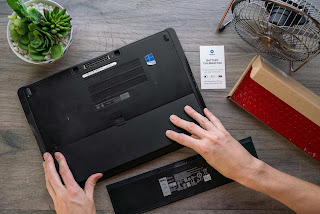
definitely. You can replace your laptop’s battery. The battery is inside. All you have to do is remove every screw on the bottom of the laptop. Try opening the bottom cover and you may see the battery immediately. Replace it with a new one and put each screw back in and you’re done.

Is it worth replacing the laptop battery?

Many people wonder whether to buy a new laptop or replace the battery. Replacing a laptop without powering it on is often superfluous. It may just be having problems charging, the problem may be due to the battery.

Today, a bad laptop battery can be easily replaced. All you have to do is to confirm if the laptop battery is the culprit. You can do this by plugging the laptop into a power wall without plugging in the laptop battery. If the laptop is on, then the laptop battery is the culprit. The laptop battery can be removed from the back of the laptop to determine the type of battery the laptop is using and use that information to research battery replacements.

Here’s what you need to know when shopping for a replacement laptop battery:

Compare prices and warranty details – Laptop batteries typically cost between $50 and $150. Start with your laptop manufacturer’s official website. Get replacement prices and make sure you find warranty details.

Look online for a third-party battery supplier – you may come across the same brand-name battery at a lower price. Some 3rd party batteries promise more power. However, keep an eye on the battery warranty.

Meet the necessary specifications – you won’t be able to fit a battery designed for Dell laptops into a Toshiba laptop.

Matching Voltage – If your laptop’s original battery is rated at 14.8 V, then it’s your ticket to a replacement model. You should not exceed/below the stated power.

Get Fresh – You have no reason to buy used batteries. Make sure to check the manufacturer date.

Use High Capacity – You may be able to replace your original battery with a battery with a higher watt-hour/amp-hour rating, within the manufacturer’s specifications. It enables you to work longer.

>>>>>>>>>Laptop’s battery

Thanks for reading, hope it helps!

Friendly reminder: If you need to replace the laptop battery, this safe, reliable and guaranteed battery store will be your good choice: www.batteryforpc.co.uk

5580mAh 21.204WH 3.8V 4.35V Doogee BAT173605580 Li-ion Battery for Doogee S60\S60 Lite S60

5580mAh 21.204WH 3.8V 4.35V Doogee BAT173605580 Batteries for Doogee S60\S60 Lite S60, Doogee BAT173605580 Cell Phone battery is a brand new,100% Compatible original and replacement Phone battery,Purchase wholesale and retail BAT173605580 with high quality and low price!

Find ou your original model number or part number(P/N), and move your eyes on the tag of battery

BAT173605580

Specifications

  • Brand:Doogee
  • Capacity :5580mAh 21.204WH
  • Voltage :3.8V 4.35V
  • Type :Li-ion
  • Battery Cell Quality: Grade A
  • Descriptive: Replacement Battery – 1 Year Warranty
  • Description: Brand New, 1 Year Warranty! 30-Days Money Back! Fast Shipping!

How we test this Doogee BAT173605580 Battery
Step 1: Make sure customer bought the correct battery.
Step 2: Check battery’s appearance and interface.
Step 3: Test battery charger and recharger function.
Step 4: Charger the battery to 100% and recharger to 0% to get real battery capacity
Step 5: Use Ev2300 to check the voltage difference of each goroup cells.
Step 6: Charger battery power more than 30%.
Step 7: Package battery carefully and send out

Compatible Part Numbers:
BAT173605580

Compatible Model Numbers:
Doogee S60\S60 Lite S60

How much do you know about how to run laptop well as any place? The follow Tips cut way back on protecting battery life.


1). Please recharge or change your Cell Phone battery when battery power low.
2). Using Li-Ion Replacement Doogee BAT173605580 Cell Phone Battery for your notebook which can work longer time than Non Li-ion one.
3). It is better to defragmentation regularly for your Cell Phone battery life.
4). In order to reduce the laptop power consumpition, you can use some optical drive spin-down and hard drive in your Cell Phone .
5). Please keep your laptop in sleep or standby model without long time using, which both save the Replacement Doogee BAT173605580 Cell Phone Battery power and extend battery using life.
6). Leave your battery in a dry and cool condition when without using.
7). When you rarely or generally plugged in fixed power using, Please take down your battery to avoid hurting battery life.

Hot Products

236mAh SAMSUNG EB-BR500ABU for Samsung Galaxy Watch Active SM10800mah 39.96Wh GFL 4661140 for GFL MS-ND51 talble4320mAh/16.7WH XIAOMI BM4U for Xiaomi Redmi K304200mah CUBOT J9 for Cubot J93200mAh/12.4WH SONY LIP1701ERPC for Sony Xperia 1 XZ4 J8110 J817060WH DELL HW892 for Dell Latitude E4300 E43102200mAh/8.4WH LENOVO L17D1P34 for LENOVO Cell Phone4400mAh FOUNDER I40-3S4400-S1B1 for FOUNDER R410IU4335MAH/50WH ASUS C31N1816 for ASUS C31N1816 3ICP5/70/81 seri86Wh/5973mAh HP FM08 for HP HSTNN-LB8B 922753-421 92297

2885mAh 23.2WH 7.74V 8.90V Asus C21P2001 Li-ion Battery for Asus ROG5 Phone5 I005DA

2885mAh 23.2WH 7.74V 8.90V Asus C21P2001 Batteries for Asus ROG5 Phone5 I005DA, Asus C21P2001 Cell Phone battery is a brand new,100% Compatible original and replacement Phone battery,Purchase wholesale and retail C21P2001 with high quality and low price!

Find ou your original model number or part number(P/N), and move your eyes on the tag of battery

C21P2001

Specifications

  • Brand:Asus
  • Capacity :2885mAh 23.2WH
  • Voltage :7.74V 8.90V
  • Type :Li-ion
  • Battery Cell Quality: Grade A
  • Descriptive: Replacement Battery – 1 Year Warranty
  • Description: Brand New, 1 Year Warranty! 30-Days Money Back! Fast Shipping!

How we test this Asus C21P2001 Battery
Step 1: Make sure customer bought the correct battery.
Step 2: Check battery’s appearance and interface.
Step 3: Test battery charger and recharger function.
Step 4: Charger the battery to 100% and recharger to 0% to get real battery capacity
Step 5: Use Ev2300 to check the voltage difference of each goroup cells.
Step 6: Charger battery power more than 30%.
Step 7: Package battery carefully and send out

Compatible Part Numbers:
C21P2001

Compatible Model Numbers:
Asus ROG5 Phone5 I005DA

How much do you know about how to run laptop well as any place? The follow Tips cut way back on protecting battery life.


1). Please recharge or change your Cell Phone battery when battery power low.
2). Using Li-Ion Replacement Asus C21P2001 Cell Phone Battery for your notebook which can work longer time than Non Li-ion one.
3). It is better to defragmentation regularly for your Cell Phone battery life.
4). In order to reduce the laptop power consumpition, you can use some optical drive spin-down and hard drive in your Cell Phone .
5). Please keep your laptop in sleep or standby model without long time using, which both save the Replacement Asus C21P2001 Cell Phone Battery power and extend battery using life.
6). Leave your battery in a dry and cool condition when without using.
7). When you rarely or generally plugged in fixed power using, Please take down your battery to avoid hurting battery life.

Hot Products

236mAh SAMSUNG EB-BR500ABU for Samsung Galaxy Watch Active SM10800mah 39.96Wh GFL 4661140 for GFL MS-ND51 talble4320mAh/16.7WH XIAOMI BM4U for Xiaomi Redmi K304200mah CUBOT J9 for Cubot J93200mAh/12.4WH SONY LIP1701ERPC for Sony Xperia 1 XZ4 J8110 J817060WH DELL HW892 for Dell Latitude E4300 E43102200mAh/8.4WH LENOVO L17D1P34 for LENOVO Cell Phone4400mAh FOUNDER I40-3S4400-S1B1 for FOUNDER R410IU4335MAH/50WH ASUS C31N1816 for ASUS C31N1816 3ICP5/70/81 seri86Wh/5973mAh HP FM08 for HP HSTNN-LB8B 922753-421 92297

How to charge the battery? Here’s what you need to know!

 Everyone recharges their own batteries, even when the batteries are dead. However, when you charge your battery, do you just take a charger or an adapter to charge your battery? This is unsafe, and it may cause a serious risk of explosion! Below is an overview of rechargeable batteries that may help you!

1. Use a suitable charger for the battery you want to charge

Rechargeable batteries are usually charged in an A/C adapter that plugs into a household cradle outlet. Depending on the type of battery you’re charging, at any electronics or hardware store, you’ll usually find a charger that’s the right size.

Fast chargers are similar to standard chargers, but they also lack a charge control system that prevents or mitigates voltage surges. They’re efficient at quickly charging the battery, but drastically reduce battery life.

2. Use a suitable battery in the charger

Never try to recycle a single-use battery, or you may damage and corrode the battery. Only try to charge batteries that are specifically marked “rechargeable”. If you have some dead disposable batteries, dispose of them properly and buy rechargeable batteries.

Nickel-metal hydride (NiMH) batteries are common in consumer products, especially power tools. In electronic devices, by contrast, lithium-ion batteries are common. Both battery variants are commonly used and both are rechargeable. When you first start using a new set of rechargeable batteries, turn them off completely before charging. When a battery’s capacity is reduced due to premature charging, it reduces the likelihood of a phenomenon known as the “memory effect.”

3. Insert the charger into the socket

The power indicator lights automatically when most A/C adapter chargers or when the “off” button is turned on. Make sure all power lights are on and you can start charging the battery. Always refer to the manufacturer’s instructions. Read the battery charger instruction manual carefully, which should include important information such as the time it takes to complete charging, the key to the indicator lights, and battery-specific safety information.

4. Correct configuration

This means that the positive (+) end is in contact with the positive terminal of the charger. On most chargers with A/C, the diagram should show how to properly position the battery. One side of a flat battery will usually rest against the spring, while the “bump” on the battery will be on the flatter side.

5. Fully charge the battery

Most chargers should change the light from green to red when the battery is fully charged and vice versa. Do not interrupt the program by unplugging the charger’s power cord or removing the battery early, or your battery life will be drastically reduced.

6. Remove when charging 100%

Overcharging the battery is a major cause of shortened battery life, especially with fast charge chargers.

“Trickle charging” is a technique that reduces the charge to around 10% of the battery’s capacity, which is usually enough to keep the battery in its final state of charge without triggering a discharge, which could result in a shorter battery life. Many manufacturers don’t support long-term trickle charging, but if you have a battery with an adjustable charging rate, dropping it to a lower price can be an effective way to keep your battery juicy.

>>>>>>>>>>>>>Battery

New Laptop Battery Won’t Charge: Causes And How To Fix It

 Have you ever encountered your new laptop, only to find that the laptop battery doesn’t charge for a few days? This makes you pissed off because this isn’t an old laptop, so why isn’t your new laptop battery charging? In fact, there are many reasons why the battery does not charge. However, most of the problems usually lie in the location of batteries, chargers and other technical components. It could also be related to the laptop’s settings. Here, we’ll provide several ways to troubleshoot your new laptop battery.

How to fix new laptop battery not charging problem?

There are a few things you can do when your new laptop battery isn’t charging. Here are some steps you can take:

1. Check your laptop’s settings.

The first thing you should do is check your laptop’s settings. It’s not uncommon for new batteries to have problems due to incorrect battery settings. If you have Windows, you can go to Power and Sleep Settings and check other power settings. There, you can check the battery settings for display, sleep settings, and laptop brightness.

If you have a Mac, go to Energy Saver and check the settings according to your wishes and needs.

For Windows, if you’ve changed the settings and you’re still having issues with the battery, you can go to Device Manager and look at the battery section. Right-click Microsoft AC Adapter and Microsoft ACPI-Compliant Control Method Battery to uninstall them. After that, shut down your laptop and unplug the charger or remove the battery for a while. After a few minutes, plug back the charger or replace the battery, and turn on the laptop.

2. Check how you inserted the charger and battery.

If the setup is not an issue, then it’s time to check the battery and laptop. First, you should check how to insert the battery. Make sure the power cord is plugged in correctly. Laptops also have different types of ports, so make sure you use the correct port for charging. You also need to make sure how the battery is placed (if it’s removable). Getting everything plugged in and positioned correctly the way it should be.

3. Check the battery.

If you’ve plugged in the charger and positioned the battery correctly, it’s time to check the battery. First, you can check for dust or dirt on the battery. After all, it hinders the connection between the battery and the laptop. So remove the battery, clean it, and plug it back in.

Another way to check the battery is to remove the battery and use the charger only. If your battery is removable, remove it and press the laptop’s power button. This action is to remove any remaining power inside the laptop. If the laptop is still working, then most likely the battery is misplaced.

4. Check the charger.

If your battery and settings are fine, it’s time to check the charger. Sometimes our charger cable is faulty, causing the charger not to work properly. Checking the charger cable is easy. If the laptop is not charging, continue moving the battery cable. If the power cord is causing the laptop to be charging instead of charging, then it’s definitely the charger cord. You can buy a new power cord to fix this problem.

The problem could also be with the wattage of the charger itself. Sometimes the power of the charger is not enough to charge the laptop, especially when the charger is a USB type of charger. If you bought a new charger, make sure the new charger has the same wattage as the original one. Using a lower wattage charger will only reduce the charging power and prolong the charging time. Of course, the best solution is to buy the brand’s official charger for the best output and performance.

5. Use a fan.

Last but not least, the problem could be the temperature of the battery. A common fact is that an overheated battery can cause issues like sensor misfires or automatic shutdowns to prevent more damage to the battery. The solution to your battery heating problem is to use a laptop fan.

>>>>>>>>>>>>>Laptop’s battery

Thanks for reading, hope it helps!

Friendly reminder: If you need to replace the battery, this battery store will be a good choice: www.batteryforpc.co.uk

3730mAh 14.4WH 3.85V Sharp UBATIA304AFN1 Li-ion Battery for Sharp Aquos R5G SHG01/908SH

3730mAh 14.4WH 3.85V Sharp UBATIA304AFN1 Batteries for Sharp Aquos R5G SHG01/908SH, Sharp UBATIA304AFN1 Cell Phone battery is a brand new,100% Compatible original and replacement Phone battery,Purchase wholesale and retail UBATIA304AFN1 with high quality and low price!

Find ou your original model number or part number(P/N), and move your eyes on the tag of battery

UBATIA304AFN1

Specifications

  • Brand:Sharp
  • Capacity :3730mAh 14.4WH
  • Voltage :3.85V
  • Type :Li-ion
  • Battery Cell Quality: Grade A
  • Descriptive: Replacement Battery – 1 Year Warranty
  • Description: Brand New, 1 Year Warranty! 30-Days Money Back! Fast Shipping!

How we test this Sharp UBATIA304AFN1 Battery
Step 1: Make sure customer bought the correct battery.
Step 2: Check battery’s appearance and interface.
Step 3: Test battery charger and recharger function.
Step 4: Charger the battery to 100% and recharger to 0% to get real battery capacity
Step 5: Use Ev2300 to check the voltage difference of each goroup cells.
Step 6: Charger battery power more than 30%.
Step 7: Package battery carefully and send out

Compatible Part Numbers:
UBATIA304AFN1

Compatible Model Numbers:
Sharp Aquos R5G SHG01/908SH

How much do you know about how to run laptop well as any place? The follow Tips cut way back on protecting battery life.


1). Please recharge or change your Cell Phone battery when battery power low.
2). Using Li-Ion Replacement Sharp UBATIA304AFN1 Cell Phone Battery for your notebook which can work longer time than Non Li-ion one.
3). It is better to defragmentation regularly for your Cell Phone battery life.
4). In order to reduce the laptop power consumpition, you can use some optical drive spin-down and hard drive in your Cell Phone .
5). Please keep your laptop in sleep or standby model without long time using, which both save the Replacement Sharp UBATIA304AFN1 Cell Phone Battery power and extend battery using life.
6). Leave your battery in a dry and cool condition when without using.
7). When you rarely or generally plugged in fixed power using, Please take down your battery to avoid hurting battery life.

Hot Products

236mAh SAMSUNG EB-BR500ABU for Samsung Galaxy Watch Active SM10800mah 39.96Wh GFL 4661140 for GFL MS-ND51 talble4320mAh/16.7WH XIAOMI BM4U for Xiaomi Redmi K304200mah CUBOT J9 for Cubot J93200mAh/12.4WH SONY LIP1701ERPC for Sony Xperia 1 XZ4 J8110 J817060WH DELL HW892 for Dell Latitude E4300 E43102200mAh/8.4WH LENOVO L17D1P34 for LENOVO Cell Phone4400mAh FOUNDER I40-3S4400-S1B1 for FOUNDER R410IU4335MAH/50WH ASUS C31N1816 for ASUS C31N1816 3ICP5/70/81 seri86Wh/5973mAh HP FM08 for HP HSTNN-LB8B 922753-421 92297

4415mAh 17.08WH 3.87V Fujitsu RA07002-1091 Li-ion Battery for Fujitsu RA07002-1091

4415mAh 17.08WH 3.87V Fujitsu RA07002-1091 Batteries for Fujitsu RA07002-1091, Fujitsu RA07002-1091 Cell Phone battery is a brand new,100% Compatible original and replacement Find ou your original model number or part number(P/N), and move your eyes on the tag of battery battery,Purchase wholesale and retail RA07002-1091 with high quality and low price!

Find ou your original model number or part number(P/N), and move your eyes on the tag of battery

RA07002-1091

Specifications

  • Brand:Fujitsu
  • Capacity :4415mAh 17.08WH
  • Voltage :3.87V
  • Type :Li-ion
  • Battery Cell Quality: Grade A
  • Descriptive: Replacement Battery – 1 Year Warranty
  • Description: Brand New, 1 Year Warranty! 30-Days Money Back! Fast Shipping!

How we test this Fujitsu RA07002-1091 Battery
Step 1: Make sure customer bought the correct battery.
Step 2: Check battery’s appearance and interface.
Step 3: Test battery charger and recharger function.
Step 4: Charger the battery to 100% and recharger to 0% to get real battery capacity
Step 5: Use Ev2300 to check the voltage difference of each goroup cells.
Step 6: Charger battery power more than 30%.
Step 7: Package battery carefully and send out

Compatible Part Numbers:
RA07002-1091

Compatible Model Numbers:
Fujitsu RA07002-1091

How much do you know about how to run laptop well as any place? The follow Tips cut way back on protecting battery life.


1). Please recharge or change your Cell Phone battery when battery power low.
2). Using Li-Ion Replacement Fujitsu RA07002-1091 Cell Phone Battery for your notebook which can work longer time than Non Li-ion one.
3). It is better to defragmentation regularly for your Cell Phone battery life.
4). In order to reduce the laptop power consumpition, you can use some optical drive spin-down and hard drive in your Cell Phone .
5). Please keep your laptop in sleep or standby model without long time using, which both save the Replacement Fujitsu RA07002-1091 Cell Phone Battery power and extend battery using life.
6). Leave your battery in a dry and cool condition when without using.
7). When you rarely or generally plugged in fixed power using, Please take down your battery to avoid hurting battery life.

Hot Products

236mAh SAMSUNG EB-BR500ABU for Samsung Galaxy Watch Active SM10800mah 39.96Wh GFL 4661140 for GFL MS-ND51 talble4320mAh/16.7WH XIAOMI BM4U for Xiaomi Redmi K304200mah CUBOT J9 for Cubot J93200mAh/12.4WH SONY LIP1701ERPC for Sony Xperia 1 XZ4 J8110 J817060WH DELL HW892 for Dell Latitude E4300 E43102200mAh/8.4WH LENOVO L17D1P34 for LENOVO Cell Phone4400mAh FOUNDER I40-3S4400-S1B1 for FOUNDER R410IU4335MAH/50WH ASUS C31N1816 for ASUS C31N1816 3ICP5/70/81 seri86Wh/5973mAh HP FM08 for HP HSTNN-LB8B 922753-421 92297

3300mAh 12.70WH 3.85V 4.40V Coolpad CPLD-419 Li-ion Battery for Coolpad CPLD-419

3300mAh 12.70WH 3.85V 4.40V Coolpad CPLD-419 Batteries for Coolpad CPLD-419, Coolpad CPLD-419 Cell Phone battery is a brand new,100% Compatible original and replacement Phone battery,Purchase wholesale and retail CPLD-419 with high quality and low price!

Find ou your original model number or part number(P/N), and move your eyes on the tag of battery

CPLD-419

Specifications

  • Brand:Coolpad
  • Capacity :3300mAh 12.70WH
  • Voltage :3.85V 4.40V
  • Type :Li-ion
  • Battery Cell Quality: Grade A
  • Descriptive: Replacement Battery – 1 Year Warranty
  • Description: Brand New, 1 Year Warranty! 30-Days Money Back! Fast Shipping!

How we test this Coolpad CPLD-419 Battery
Step 1: Make sure customer bought the correct battery.
Step 2: Check battery’s appearance and interface.
Step 3: Test battery charger and recharger function.
Step 4: Charger the battery to 100% and recharger to 0% to get real battery capacity
Step 5: Use Ev2300 to check the voltage difference of each goroup cells.
Step 6: Charger battery power more than 30%.
Step 7: Package battery carefully and send out

Compatible Part Numbers:
CPLD-419

Compatible Model Numbers:
Coolpad CPLD-419

How much do you know about how to run laptop well as any place? The follow Tips cut way back on protecting battery life.


1). Please recharge or change your Cell Phone battery when battery power low.
2). Using Li-Ion Replacement Coolpad CPLD-419 Cell Phone Battery for your notebook which can work longer time than Non Li-ion one.
3). It is better to defragmentation regularly for your Cell Phone battery life.
4). In order to reduce the laptop power consumpition, you can use some optical drive spin-down and hard drive in your Cell Phone .
5). Please keep your laptop in sleep or standby model without long time using, which both save the Replacement Coolpad CPLD-419 Cell Phone Battery power and extend battery using life.
6). Leave your battery in a dry and cool condition when without using.
7). When you rarely or generally plugged in fixed power using, Please take down your battery to avoid hurting battery life.

Hot Products

236mAh SAMSUNG EB-BR500ABU for Samsung Galaxy Watch Active SM10800mah 39.96Wh GFL 4661140 for GFL MS-ND51 talble4320mAh/16.7WH XIAOMI BM4U for Xiaomi Redmi K304200mah CUBOT J9 for Cubot J93200mAh/12.4WH SONY LIP1701ERPC for Sony Xperia 1 XZ4 J8110 J817060WH DELL HW892 for Dell Latitude E4300 E43102200mAh/8.4WH LENOVO L17D1P34 for LENOVO Cell Phone4400mAh FOUNDER I40-3S4400-S1B1 for FOUNDER R410IU4335MAH/50WH ASUS C31N1816 for ASUS C31N1816 3ICP5/70/81 seri86Wh/5973mAh HP FM08 for HP HSTNN-LB8B 922753-421 92297

2190mAh 16.95WH 7.74V 8.90V Nubia Li3945T44P8h556490 Li-ion Battery for ZTE Nubia Red Magic 6 Plus 6+

2190mAh 16.95WH 7.74V 8.90V Nubia Li3945T44P8h556490 Batteries for ZTE Nubia Red Magic 6 Plus 6+, Nubia Li3945T44P8h556490 Cell Phone battery is a brand new,100% Compatible original and replacement Phone battery,Purchase wholesale and retail Li3945T44P8h556490 with high quality and low price!

Find ou your original model number or part number(P/N), and move your eyes on the tag of battery

Li3945T44P8h556490

Specifications

  • Brand:Nubia
  • Capacity :2190mAh 16.95WH
  • Voltage :7.74V 8.90V
  • Type :Li-ion
  • Battery Cell Quality: Grade A
  • Descriptive: Replacement Battery – 1 Year Warranty
  • Description: Brand New, 1 Year Warranty! 30-Days Money Back! Fast Shipping!

How we test this Nubia Li3945T44P8h556490 Battery
Step 1: Make sure customer bought the correct battery.
Step 2: Check battery’s appearance and interface.
Step 3: Test battery charger and recharger function.
Step 4: Charger the battery to 100% and recharger to 0% to get real battery capacity
Step 5: Use Ev2300 to check the voltage difference of each goroup cells.
Step 6: Charger battery power more than 30%.
Step 7: Package battery carefully and send out

Compatible Part Numbers:
Li3945T44P8h556490

Compatible Model Numbers:
ZTE Nubia Red Magic 6 Plus 6+

How much do you know about how to run laptop well as any place? The follow Tips cut way back on protecting battery life.


1). Please recharge or change your Cell Phone battery when battery power low.
2). Using Li-Ion Replacement Nubia Li3945T44P8h556490 Cell Phone Battery for your notebook which can work longer time than Non Li-ion one.
3). It is better to defragmentation regularly for your Cell Phone battery life.
4). In order to reduce the laptop power consumpition, you can use some optical drive spin-down and hard drive in your Cell Phone .
5). Please keep your laptop in sleep or standby model without long time using, which both save the Replacement Nubia Li3945T44P8h556490 Cell Phone Battery power and extend battery using life.
6). Leave your battery in a dry and cool condition when without using.
7). When you rarely or generally plugged in fixed power using, Please take down your battery to avoid hurting battery life.

Hot Products

236mAh SAMSUNG EB-BR500ABU for Samsung Galaxy Watch Active SM10800mah 39.96Wh GFL 4661140 for GFL MS-ND51 talble4320mAh/16.7WH XIAOMI BM4U for Xiaomi Redmi K304200mah CUBOT J9 for Cubot J93200mAh/12.4WH SONY LIP1701ERPC for Sony Xperia 1 XZ4 J8110 J817060WH DELL HW892 for Dell Latitude E4300 E43102200mAh/8.4WH LENOVO L17D1P34 for LENOVO Cell Phone4400mAh FOUNDER I40-3S4400-S1B1 for FOUNDER R410IU4335MAH/50WH ASUS C31N1816 for ASUS C31N1816 3ICP5/70/81 seri86Wh/5973mAh HP FM08 for HP HSTNN-LB8B 922753-421 92297

Laptop External Battery Charger

 Laptops have a variety of useful features. In most cases, we usually use the charger to charge the battery directly. However, the laptop’s power supply is something you have to deal with. When you’re using your laptop outside of a room where it can’t be charged, its battery life may not meet your requirements, or your laptop’s charging port may be damaged, preventing you from using the charger to charge it as usual. So that means you need to charge it externally. Let’s take a look at whether the laptop battery can be externally charged?

It’s perfectly possible to charge your laptop battery, but you need to follow these steps to charge the battery to prevent accidents:

1. You need to check your laptop battery to see if it has an AC adapter connected. If it has an AC adapter connection, you can use your laptop’s AC adapter to connect to this battery port and charge it. If it doesn’t have the correct port, you’ll need to get a connector for it or buy a new battery with a link to the AC adapter.

2. You should buy a spare battery for your laptop. It’s a good idea to buy a spare battery from the laptop’s manufacturer, so you can more easily confirm that your new battery matches your laptop and AC adapter.

3. Buy a suitable external charger for your laptop battery. It’s best to buy a charger from the laptop’s manufacturer that matches your laptop’s battery. Therefore, if you don’t want to buy the wrong charger and cannot connect your laptop battery, you should check the specifications and model of the charger carefully.

External laptop batteries may not seem difficult, with one exception, your laptop battery has a built-in non-removable battery, and you’d better not try to charge it externally. If you insist on charging an external non-removable battery, you need to use instruments and tools to remove the battery from the laptop, which requires you to have enough battery repair experience or the help of a technician. Well, since a non-removable battery can’t possibly have an AC adapter port and a proper charger, you’ll need to build a proper dedicated charging device for it, which requires you to have a lot of battery expertise.

>>>>>>>>laptop battery

Thanks for reading, hope it helps!

Friendly reminder: If you need to replace the battery of your device, this battery store will be a good choice: www.batteryforpc.co.uk