Nearby Share file feature on Android now, Chromebooks in the “coming months”

Well, I picked a great time to pull the SIM card from my iPhone and plop it into a Google Pixel 4. Android devices running 6.0 or better now have a “Nearby Share” feature that’s functionally identical to Apple’s AirDrop for iOS and macOS. With it, you can wirelessly share files and photos between two devices.

I tested it on two Pixel phones I have and it works great. But that’s not a standard use case, of course.

Beaming a file from one person to another is the typical situation, and as long those two people have Android phones running a supported software version, it will work. I’m more interested in when it Nearby Share arrives on Chromebooks, which is in “the coming months”, according to Google.

And by “coming months”, I don’t expect us to have to wait too long. Last month, Chrome Story got Nearby Share working between Android and Chrome OS using the Canary channel.

I’m running Chrome OS 85 Beta Channel and already see bits of Nearby Share on my Chromebook. There’s the experimental flag to enable it, for example:

Enabling it and restarting the browser adds Nearby Share to the Settings options as well.

Unfortunately, with this version of Chrome OS 85 Beta Channel, that’s as far as I can get.

The Nearby Share option doesn’t appear in the right-click menu of Files to actually share the file. And trying to send a photo from my connected Android phone to my Chromebook doesn’t yet work either.

Perhaps I’ll drop down to the Dev Channel of Chrome OS 86, which is currently available, and have more luck.

Either way, I don’t see this feature sitting around in the Chromium Team for long.

Even if it’s just hidden behind a flag for a bit, I suspect Chrome OS 86 will deliver this functionality.

Regardless, when it does arrive, you’ll be able to share files between Android and Chrome OS, either over Bluetooth, WebRTC or peer-to-peer WiFi, whichever the system deems faster and available, making for a slightly more cohesive ecosystem.

Wear OS is set to lose music streaming features “within weeks”

If you’re enjoying streaming music using your Wear OS smartwatch, unfortunately those days are numbered.

Currently Google Play Music is the sole service that can play music from the wrist, but Google is preparing to shutter the service by the end of the year.

But Android Police has spotted that support for Wear OS will end a lot sooner – in fact, “in the next couple of weeks”.

“Users will no longer be able to use or download Google Play Music on their Wear OS by Google smartwatches. Google is investing heavily in improving integrated music services through all of your connected devices with YouTube Music,” reports Android Police, from a Google forum.

To those not in the know, Google is moving over to YouTube Music for its streaming service.

But there’s no sign that YouTube Music will have a Wear OS app any time soon – if at all.

That’s really frustrating for Wear OS users, and just adds more fuel to the argument that Google’s heart isn’t in its smartwatch OS.

When you consider the Samsung Galaxy Watch 3 is taking the fight to Apple with features like offline Spotify playlists, ECG, fall detection, stress monitoring, Spo2 and more – Wear OS isn’t even in the picture.

With Wear OS now losing features, it’s little wonder that the company is looking to buy Fitbit to advance its wearable tech ambitions.

First Look: macOS Big Sur Public Beta

So here we are, at the end of OS X. Two decades ago Apple parked the sixteen-year-old Classic Mac OS and leaped to version 10.0, but four years ago the company rebranded the software that drives the Mac as macOS, and the writing was on the wall. And now in 2020 it’s macOS Big Sur, version 11.0. The name is an extension of Apple’s use of California places to brand its Mac releases, but the version number is the real story. The Mac OS X era is truly over. macOS Big Sur is the start of a radically new era in the Mac’s life.

With the release of the macOS Big Sur Public Beta, Apple is inviting users to get a head start on the journey that will eventually lead to Macs running Apple-designed processors and software built for iPhones and iPads alongside apps made specifically for the Mac. With huge changes to Mac hardware looming on the horizon, Apple has made the biggest design changes to macOS since the launch of Mac OS X.

Last year’s macOS Catalina felt like a release designed to settle old scores and clear the field for future advancement. It broke a lot of old software, frustrated a lot of users, and generally had the worst reputation of any macOS update in a decade. (I see you, Mac OS X Lion.) Did Apple sacrifice Catalina so that future OS updates wouldn’t be blamed for them? That’s probably a conspiracy theory too far, but I will say this: Good Cop macOS Big Sur fills me with excitement about the future of the Mac in a way Bad Cop Catalina never did.

The new macOS design

When Apple makes major operating-system design changes, they tend to start out a bit extreme and then get beaten into shape over time—until they become boring and are replaced by a new design. There are definitely some aggressive, challenging changes in the macOS Big Sur design that will throw long-time Mac users for a loop. And I expect that some of them will end up getting re-thought by Apple’s designers, if not this summer than over the next couple of years.

That said, a lot of aspects of the Big Sur already feel comfortable—probably because I also use an iPhone and an iPad (as do most Mac users) and Big Sur is picking up aspects of the design of those devices. Big Sur’s design has a lot of rough edges, but it also has a lot of potential.

High-contrast windows

If the atom of the Mac interface is the window, then Apple has split the atom in Big Sur. The first time you look at a Finder window in Big Sur, you will realize that the Mac you have known for years is gone. Let’s start with the sheer lightness (or in Dark Mode, darkness) of it all: the gray gradient of the title bar and toolbar is gone, replaced by a white (or very dark gray) space that’s populated with the contents of both the title bar and toolbar, collapsed into a single row of items. Toolbar icons are simple glyphs that only gain an outline when you mouse over them. The title, once centered, has been aligned to the left and made bolder, with its icon hidden (until you mouse over). The Back and Forward buttons are perched on the extreme left, even beyond the title of the window. The Search box is now gone, collapsed by default—you must click the Search icon to make it appear.

Apple has also altered the geography of the window itself, in a move that was telegraphed with the design of several apps, including Music, Podcasts, Reminders, and Maps, in macOS Catalina. Previously, a normal Mac window was best thought of as a single space with a title bar and toolbar spanning its entire width, and within it could be a content area or a sidebar and content area. But if you have a window with a sidebar in Big Sur, the geography is different. The window is instead sectioned in two, with the sidebar and the red/yellow/green “traffic light” buttons on the left (with a slightly translucent background), and the title bar, toolbar, and content area on the right.

SF Symbols, Apple’s library of glyphs, has been added to macOS with Big Sur, and it lends an air of consistency to toolbars and sidebars. The appearance of colored glyphs in sidebars—favorites in the Finder are blue, for example—is a pleasant addition. Even the venerable “disclosure triangle” that you can click to reveal the contents of a folder has been reduced—it’s lost its third edge and its gray fill color, and is now just a carat. (It also appears in sidebars as a way to collapse or expand lists of sub-items, replacing the word “Hide” that appears in Catalina.)

While the density in the toolbar has gone way up, the rest of the window has spaced out. There’s much more space between the red/yellow/green “traffic light” buttons and the edge of the window, and the same is true of the additional white space above and to the right of the title bars/toolbar.

The windows of apps that haven’t been updated to support this new format will receive a more minor makeover. The title bar will be white (or dark gray), and the title font is now bold, but the title is still centered and there’s none of the additional padding that’s been added to new-style Big Sur windows.

Make room for Big Sur

Adding more padding is a recurring theme in Big Sur. Apple has also made the menu bar taller (as well as making it distractingly translucent). The menus themselves now sport curved edges at the top (which seems wrong metaphorically?), and there’s additional space between each menu items.

The big question is, does this mean that Apple is preparing for a future where Mac screens also support touch input, so that you could navigate a menu with your finger in a pinch? It sure feels that way, but I’m open to the possibility that Apple just thinks that our displays are big enough now that they can afford to look a little less cramped. I wonder what this design decision means for the future of tiny Apple laptops. I know I’d be frustrated if my old 11-inch MacBook Air was this inefficient with space.

It also feels that everything in Big Sur is rounded at the edges, from windows to menu items to alerts to the Dock to the icons… it’s consistent, and in keeping with most of Apple’s hardware designs, which eschew sharp edges. It makes me wonder why Apple didn’t just mask the corners of the screen in Big Sur (as they were on the original Mac) to make them feel equally curved. The right angles at the corner of my display seem awfully jarring when I’m using Big Sur.

Speaking of icons, I should mention that Apple has redesigned all of its app icons and appears to be all in on making the iOS-style rounded rectangle the standard on macOS as well. Every single Apple icon is a roundrect, and given that future Macs will be able to run iOS and iPadOS apps, perhaps it makes sense to strive for some sort of icon harmony.

That said, Apple’s icons are peculiarly inconsistent when it comes to items placed in front of the roundrect, such as the (outmoded) hard drive in Disk Utility, the loupe in Preview, and the chess piece in Chess. Not only do these items break the silhouette of the roundrect shape, which spoils the entire point, but they’re not even placed consistently—they’re all viewed from somewhat different perspectives.

I’m also not sold on some of the additional detail Apple has added to the icons. Apple says that the level of detail in the new Mac icons is intended to be an homage to the rich icons from OS X’s past. But at most sizes, the added shading to the Messages icon just makes it look dusty. And I guess adding a line of text on the back of the Mail icon’s envelope is a fun easter egg, but at certain sizes it’s just a nondescript line that kind of looks like a mistake.

If you happen to be someone who designs app icons, though, you will be cheering. One look at the Dock in Big Sur will tell you who has gotten with the program and who is, in the words of Steve Jobs, a “laggard app.” Circles? Random shapes? They stick out like sore thumbs. Apps with existing iOS counterparts will probably just use versions of those icons; every other Mac app is going to need a roundrect icon update to avoid looking hideously out of step with the times.

The Dock itself has, of course, also gotten a makeover. It’s more translucent (which is fine, since there are no legibility problems with icons like there are with text in the menu bar), it’s floated away from the edge of the window (there’s that trend toward more padding again), and of course the corners are aggressively rounded.

Revolution in the menu bar

Another major change to macOS is happening in the upper right corner of the menu bar, where Apple has introduced Control Center and redesigned Notification Center. Both of these moves have a lot of potential, but I’m less impressed with the execution.

When you click on the new Control Center menu bar item, you’ll see a Mac expression of the Control Center concept that’s been on the iPhone and iPad for a while now. Essentially, Apple is grouping a bunch of common device controls in a single sub-menu, rather than putting them all under individual menu bar items. If you do want an individual menu bar item for a particular control, you can drag it out of Control Center and into the menu bar to add it. (But it remains in Control Center, too.)

Control Center offers controls for Wi-Fi, Bluetooth, AirDrop, Do Not Disturb, keyboard brightness, AirPlay Display, display brightness and related controls, volume level and other sound controls, and a Now Playing item for media control. Many of these controls are simple sliders and buttons, but when you mouse over them you’re offered a carat symbol that leads to more in-depth settings.

It’s a nice idea, but the execution is a mixed bag. You can remove some items from Control Center (via the Dock and Menu Bar area in System Preferences), but not others. I like the idea of pulling a lot of stray icons out of the menu bar, and giving users a single place to go to adjust a lot of device settings. But there needs to be more customizability and consistency.

To access the new Notification Center, you click on the clock in the menu bar, rather than the previous Notification Center icon. I’m all for reducing menu bar clutter, but this doesn’t make sense to me. Notification Center isn’t related to the clock in any way. This is Apple attempting to cut corners and hide one thing underneath another in order to save space. There should be a Notification Center menu bar item, separate from the clock.

Appearing underneath the clock when you click on it (or if you swipe from the right edge of a trackpad) is a remixed Notification Center that’s a lot better than the previous version. Gone is separation between Today and Notification views—there’s a single view with notifications at the top and widgets below. Notifications are now grouped by app and they’re limited to a few slots, with a button to view more notifications below them, so they don’t consume all the space. It’s a more iOS-like approach, and it’s an improvement, though I feel like I’ve never really properly used Notification Center on the Mac and I’m not sure this will improve matters.

Below the notifications is where the fun really begins, though. The new-style widgets from iOS 14 and iPadOS 14 are also present in Big Sur. Widgets come in three sizes and you can configure them to display how you like. I doubt that the Mac will ever be as big a home for widgets as iPhone or iPad, but I’m glad they exist. It might be nice if you could choose to drag widgets out of Notification Center and plop them on your Desktop, too. But it’s a nice addition to macOS that also brings across some family unity with Apple’s other devices. If you like that weather widget you’ve got on iOS, you can get in on your Mac, too.

It’s early days in beta season so I won’t judge Apple’s widgets too harshly, but they do seem a bit buggy. I was unable to reorder cities in the World Time widget, for example, and sometimes widgets didn’t seem to be serving out updated data. I hope that Apple works the bugs out over the summer.

App changes

As always, a new operating system means changes to many of the apps Apple includes with the operating system. This year Apple has made a bunch of changes to Safari—which, for those of us who don’t use an alternate web browser, might just be the most-used app on our Macs. There are also new apps that have been imported from iPadOS via Mac Catalyst, and a raft of other changes. Here are some of the highlights.

Safari

I am a loyal Safari user, across all of Apple’s platforms. And I’ve got an admission to make: I use the Start page. That page that feels like the web-browser equivalent of a super-uncool, AOL-start-page, MySpace-using, “gateway to the ‘Net”? That Start page. I don’t use it exclusively—on the Mac, at least, I also keep a row of toolbar favorites visible at all times. But I have gravitated toward using it on my iPad, and that has in turn trained me to use it more on my Mac, too.

In Safari 14—which, as is generally the case, will appear not just on Big Sur but will also be available for macOS Catalina and macOS Mojave—the Start page has gotten a nice upgrade. You can now customize it with a background image of your choosing, which is fun, but you can also click on an icon in the bottom corner of the screen and choose which sorts of items you want to see in the Start page: Favorites and Frequently Visited, of course, but also Siri Suggestions, Reading List, and the new Privacy Report feature that sums up what Safari has been doing to prevent anyone from tracking you from site to site.

Privacy Report also appears in the Safari toolbar by default. Click on it when you’re on any webpage and it’ll give you a report about how many cross-site trackers that Safari encountered. There’s not really anything you can do with this information, so it’s more of an advertisement for Apple’s laudable attempts to guard the privacy of its users than an actual feature unto itself.

I’m also not a fan of the way the information is presented by Privacy Report: It lists how many “trackers prevented,” but it’s not actually preventing the “trackers” from working—it’s just preventing the information they gather from tracking you when you visit different sites. And many of the “trackers”, like Google Analytics and ChartBeat, are arguably not trackers at all.

I’m also a bit disappointed that Apple didn’t go the extra mile and have the Privacy Report widget display a score or grade for the privacy features of any particular website. That’s what DuckDuckGo’s Safari extension does, and while the user can’t really do anything with that information other than complain or choose not to go to that website ever again, at least it would have some name-and-shame value that might motivate websites to be better citizens.

Safari is finally catching up to Google Chrome with the addition of in-place translation across seven languages. Once Safari detects a foreign language, it will display a translation icon in the search bar. Once you’ve clicked to see a translation, any additional pages you visit on that site will automatically load in translation while you’re there. Apple is launching with support for seven languages, including English, Spanish, Simplified Chinese, French, German, Russian, and Brazilian Portuguese.

Safari 14 also completely embraces the website favicon in browser tabs. If you don’t remember the debate about this feature from back in 2017, the short version is that for ages now Chrome has included a small website icon in its browser tabs, along with the name of the page. Safari didn’t used to show the icon, though it now lets you optionally display it. In Safari 14, favicon display is on by default, and Apple has improved legibility when you’ve got a lot of tabs open by collapsing tiny tabs down to only display the icon. Apple has also added a quick page preview when you hover the pointer over a tab, letting you see what’s there before clicking.

Finally, Apple is adding support for the popular WebExtensions API that’s used by developers to write plug-ins for other browsers, such as Chrome and Firefox. Theoretically, this will allow Safari users to finally take advantage of all of the cool extensions written for those other browsers. But of course, there’s a catch. For an extension to work in Safari, the developer may need to make some changes in order to meet Apple’s security standards. They’ll also need to use Xcode (which means they’ll need to buy a Mac if they don’t own one), and they’ll need to submit their extension to the App Store.

That’s a lot of barriers just to reach Mac users running Safari who could just as easily open a different browser to get that functionality. It feels like the big inducement here is to be ready with Safari extensions for macOS and then rush into iOS and iPadOS the moment Apple supports these extensions on those platforms, too. But if you’ve got a favorite Chrome extension that you’d like to see come to macOS, you may need to write to the developer and try to convince them.

I hope Apple makes this work and Safari gets a much richer extension library out of this, but there’s also a scenario where plug-in developers just don’t bother with Safari. That would be a shame. We’ll see.

Catalyst moves ahead (at last)

Two years ago, in macOS Mojave, Apple began the migration of iPad apps to the Mac with four stock apps. Last year, Apple opened up the technology used to make that migration possible, Mac Catalyst, to all app developers. The results in the past year have been mixed. While a few interesting apps have come across, it’s been a relatively quiet migration. Developers I’ve talked to have cited the limitations of Catalyst, and expressed hope that it would be improved in Big Sur.

Early indications are that it has been improved quite a bit, and maybe this will finally bring a much larger number of iPad-only apps to the Mac at last. Perhaps one reason for the improvement during this cycle is Apple’s replacement of two prominent Mac apps with new Catalyst versions: Maps and Messages. Apple might’ve been able to sneak by with an iffy implementation of Catalyst for a bunch of apps that hadn’t existed before on the Mac, as was the case with previous Catalyst apps, but with Maps and Messages each feature regression would be an indictment of Catalyst.

So I’m happy to report that my early experience with both apps is good. They feel like Mac apps, albeit with an iPad sort of flavor. Catalyst now supports multiple windows, so you can pop out a chat from Messages into a separate window without any trouble. The date and time pickers are no longer spinning wheels, which was perhaps the most glaring example of Catalyst’s unfinished nature.

And then there’s the upside: Apple’s been adding features to both Maps and Messages over the years—and just not bringing them to macOS. With the move to Catalyst in Big Sur, we finally get access to those features on the Mac. If someone on an iPhone sends you a message with lasers, you will see the lasers. And can respond with balloons. This isn’t just the case where the Mac is getting this year’s Messages improvements (like pinned chats, threading, and mentions)—it’s getting those, and last year’s improvements, and the previous year’s, too. The same is true for Maps, which gets this year’s feature additions like bike directions, but also previous iPad features like street view.

Now, let’s be clear: Getting this version of Messages is only a cause for celebration because Apple essentially abandoned the Mac app for several years. And the same is true, to an extent, to Maps. I don’t want to praise Apple too much for these new apps, because it was shameful that these core system apps (especially Messages) were kept in stasis, buggy and behind the times, for so long. But at least now, they will move in lockstep across Apple’s platforms—and that’s fundamentally good for the Mac.

This is really a glimpse into the future of the Mac, too. Mac Catalyst really exists because Apple doesn’t want to (or can’t afford to) maintain separate apps for the Mac and iPhone/iPad. Now Apple—and any other developer who wants to take advantage of Mac Catalyst—can start looking at the Mac as an additional place for their iOS development work to go. I think in the end this will be a net benefit for the Mac.

And the rest

There are dozens of other feature additions in Big Sur, and I look forward to spending the rest of the summer investigating them. A few stood out, though.

Reminders gets a bunch of new features, including the ability to assign items to people in a shared list. Photos has improved its Retouch tool to use machine learning, which has the potential to dramatically improve that feature.

And if you use a laptop with Big Sur, you get access to the very nice Battery system preferences panel, which displays some graphs of your battery level and usage in the last 24 hours and 10 days. (Desktop users will instead see the classic Energy Saver panel.)

Apple has revamped the system sounds, both beeps and other sound effects. We went over many of them in a recent episode of Upgrade, and while some of them are improvements, others feel like real downgrades. I guess we’ll all get used to them.

Of course, perhaps the biggest feature of macOS Big Sur aren’t even really available to the general public yet: support for Macs running Apple silicon rather than Intel. This is the first version of macOS that will support those Macs, when they begin arriving later this fall. I’d imagine that we may see some special macOS features that are only enabled on those systems and that Apple is holding close to its chest in the meantime. (I’m fascinated to see just how the process of downloading iOS apps and running them on a Mac feels, for instance.) But it’s worth remembering that this isn’t just a normal macOS release, but the first release that offers compatibility with an entirely different processor architecture.

How big is Big Sur?

It’s still early yet. There are probably months to go before macOS Big Sur makes its way to people who haven’t signed up for beta testing, and there are rough edges here, to be sure.

But overall, I think this is an exciting time to be a Mac user. Yes, Big Sur looks and feels very different from the Mac we’ve all come to know. But that’s part of the excitement. I’m excited that Apple is shaking up the Mac after many years of complacency. If you’re not excited by this, I understand it—and Catalina (and let’s be honest, Mojave) is there for you in the meantime.

I’m happy that the Mac has more life left in it, and Big Sur feels like the start of the next phase. With it, Apple is redefining how we use our Macs and the software on them while preparing for a new generation of Macs running Apple-built processors. If Catalina was a bitter taste of medicine, maybe Big Sur is the reward.

AMD Ryzen 9 4950X leak has appeared – and it could take Intel’s gaming crown

A new leak has detailed AMD’s Zen 3-based Ryzen 9 4950X CPU – and it should have Intel worried.

This leak comes via Igors Lab, which reveals that the so-called Ryzen 9 4950X will be a 16-core, 32-thread part with an impressive boost frequency of 4.8GHz. 

The information comes from an OPN code which reads “100-000000059-52_48/35_Y.” The ’35’ at the end signifies the 3.5 GHz base clock, with ’48’ telling us the boost clock is 4.8 GHz. That’s 100MHz higher than the AMD Ryzen 9 3950X, which tops out at 4.7GHz. 

There’s a whole world of PC components out there

These are the best gaming laptops of 2020

Check out the best rival Intel processors

What’s more, this code likely refers to an engineering sample of the Zen 3 ‘Vermeer’ CPU, so it’s likely that these clock speeds will be even higher at launch – potentially even entering Intel’s 5GHz territory. 

Some reports speculate that the processor could undergo a name change ahead of its official unveiling, too, and claim AMD could skip the Ryzen 4000 series nomenclature on desktop to avoid confusion with its current-zen Zen 2-based Ryzen 4000 mobile chips. 

While this leak doesn’t tell us much else about AMD’s incoming Zen 3 desktop CPUs, we’re expecting a major improvement in the performance department. 

A previous leak claims Ryzen 4000 CPUs will deliver 15% to 17% better IPC (instructions per clock) compared to AMD’s Ryzen 3000 desktop processors, which is bad news for Intel. 

AMD is expected to launch its first Zen 3-based processors in September, likely just days after Intel reveals its long-awaited 10nm Tiger Lake CPUs. 

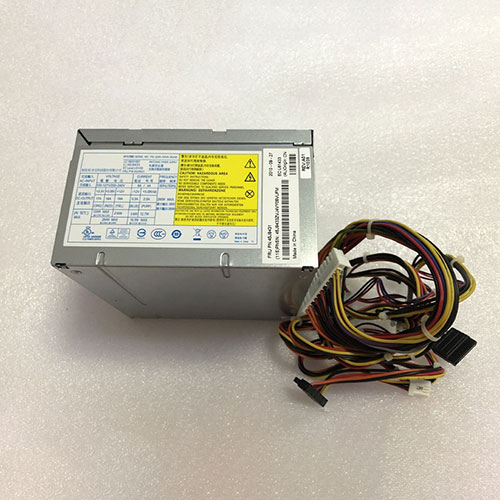
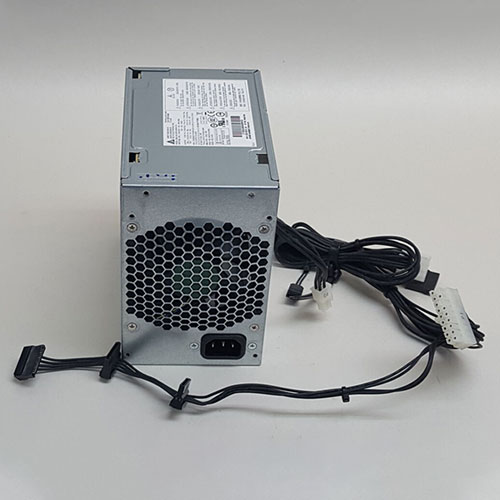
Hp 705045-001 Power Supplies ,705045-001 Adapter for HP Z230 Workstation Tower

V12N==/0.15A(0.15A),+11Vsb==/1.74A(1.74A) 705045-001 Laptop Charger Wholesale,Hp 705045-001 Power Supplies is replacement for HP Z230 Workstation Tower ,Hp 705045-001 Power Supplies discount price,Fast Shipping.

705045-001

Specifications

  • Brand:HP
  • DC Output:V12N==/0.15A(0.15A),+11Vsb==/1.74A(1.74A)
  • AC Input:100-240V~/6A,50Hz-60Hz

Charger features:

  • CE, FCC and RoHS certified to ensure proper adapter safety and quality.
  • Sealed for protection against moisture and humidity.
  • Designed with internal safety features to protect against voltage spikes, surges or fluctuations.
  • Utilizes low voltage shut down protection.
  • Utilizes over voltage limiting protection.
  • Utilizes output over current limiting protection.
  • Utilizes “short-circuit†shutdown protection. 
  • Undergone comprehensive quality testing throughout the manufacturing and assembly process.
  • Includes a 12-month free replacement warranty for manufacturer’s defects.

Compatible Part Numbers:

705045-001 704427-001 DPS-400AB-19 A

Compatible Model Numbers:

INPUT : 100-240V~/6A, 50Hz-60Hz
118V~/6A,400Hz
MAX COMBINED POWER ON V12-CPU &V12-G & V12-B & V12-S OUTPUT IS 400W
TOTAL OUTPUT POWER 400W

HP Z230 Workstation Tower

Description of Hp 705045-001 Power Supplies

High Quality, Guarantee :
Factory direct price, 100% compatible, No memory effect. Hi-Capacity, Quality garantee, certification Fast shipping. We stand behind our Replace for HP Cord/Charger Hp 705045-001 100%.
Low Prices, Guarantee :
All laptop Replace for HP Cord/Charger Hp 705045-001 at batteryforpc.co.uk are all directly purchased from various reputable manufacturers in the world and have passed stringent quality assurance procedures to achieve international standards. Through this direct selling model, middleman cost is minimized.
Satisfaction Guarantee :
Our goal is to make sure you receive the best value of every purchase you make at our site. We want to be your number one choice Replace for Hp 705045-001. If you have any question or suggestion about this laptop ac adapter, please contact us so we can offer you the most convenient service.
Secure Shopping Guarantee :
Shopping from us is safe and secure. None of our customers have ever reported fraudulent use of their credit cards as a result of shopping with us. You can be assured that the information you give us is confidential. We do not sell, rent or share information of our customers with other parties. batteryforpc.co.uk guarantee your Replace for Hp 705045-001 transaction will be 100% safe.

Hot Products

11.1V/12.4v 2300mah BOSE 404600 for Bose SOUNDLINK I II III7.4V 2230mAh/17Wh BOSE 063404 for 0634043.8V 6300mAh/23.94Wh AMAZON 2955C7 for Amazon Kindle Fire HD 10.1 7th3.8 V 1300 mAh AMAZON MC-305070 for AMAZON Kindle Voyage3.85V/4.4V 3080MAH/11.86WH ALCATEL TLp030JC for Alcatel A3 XL 9008j3.7V/4.2V 1750MAH/6.5WH AMAZON GP-S10-346392-0100 for AMAZON KINDLE 3 3G WIFI Kindle7.7V 37Wh/4810mAh ACER AP16M5J for ACER A315-51-51SL N17Q1 SERIES7.4V 2230mAH/17Wh BOSE 061384 for BOSE SOUNDLINK Mini Series3.8V 2930mAh/11.1Wh NETGEAR W-7 for Netgear AirCard 790S 790SP 8103.8V/4.35V 2000MAH/7.6Wh ALCATEL TLI020F7 for Alcatel Onetouch Pixi 4 (5) 50

Lenovo 45J9433 Power Supplies ,45J9433 Adapter for LENOVO PS-5281-02VA-RoHS

280W 45J9433 Laptop Charger Wholesale,Lenovo 45J9433 Power Supplies is replacement for LENOVO PS-5281-02VA-RoHS ,Lenovo 45J9433 Power Supplies discount price,Fast Shipping.

45J9433

Specifications

  • Brand:Lenovo
  • DC Output:280W
  • AC Input:100-127V/200-240V

Charger features:

  • CE, FCC and RoHS certified to ensure proper adapter safety and quality.
  • Sealed for protection against moisture and humidity.
  • Designed with internal safety features to protect against voltage spikes, surges or fluctuations.
  • Utilizes low voltage shut down protection.
  • Utilizes over voltage limiting protection.
  • Utilizes output over current limiting protection.
  • Utilizes “short-circuit†shutdown protection. 
  • Undergone comprehensive quality testing throughout the manufacturing and assembly process.
  • Includes a 12-month free replacement warranty for manufacturer’s defects.

Compatible Part Numbers:

36001697 45J9433 L61433 45J9431

Compatible Model Numbers:

LENOVO PS-5281-02VA-RoHS
LC : 36001697
LI : 45J9433
EC Level : L61433
FRU P/N : 45J9431

Description of Lenovo 45J9433 Power Supplies

High Quality, Guarantee :
Factory direct price, 100% compatible, No memory effect. Hi-Capacity, Quality garantee, certification Fast shipping. We stand behind our Replace for Lenovo Cord/Charger Lenovo 45J9433 100%.
Low Prices, Guarantee :
All laptop Replace for Lenovo Cord/Charger Lenovo 45J9433 at batteryforpc.co.uk are all directly purchased from various reputable manufacturers in the world and have passed stringent quality assurance procedures to achieve international standards. Through this direct selling model, middleman cost is minimized.
Satisfaction Guarantee :
Our goal is to make sure you receive the best value of every purchase you make at our site. We want to be your number one choice Replace for Lenovo 45J9433. If you have any question or suggestion about this laptop ac adapter, please contact us so we can offer you the most convenient service.
Secure Shopping Guarantee :
Shopping from us is safe and secure. None of our customers have ever reported fraudulent use of their credit cards as a result of shopping with us. You can be assured that the information you give us is confidential. We do not sell, rent or share information of our customers with other parties. batteryforpc.co.uk guarantee your Replace for Lenovo 45J9433 transaction will be 100% safe.

Hot Products

11.1V/12.4v 2300mah BOSE 404600 for Bose SOUNDLINK I II III7.4V 2230mAh/17Wh BOSE 063404 for 0634043.8V 6300mAh/23.94Wh AMAZON 2955C7 for Amazon Kindle Fire HD 10.1 7th3.8 V 1300 mAh AMAZON MC-305070 for AMAZON Kindle Voyage3.85V/4.4V 3080MAH/11.86WH ALCATEL TLp030JC for Alcatel A3 XL 9008j3.7V/4.2V 1750MAH/6.5WH AMAZON GP-S10-346392-0100 for AMAZON KINDLE 3 3G WIFI Kindle7.7V 37Wh/4810mAh ACER AP16M5J for ACER A315-51-51SL N17Q1 SERIES7.4V 2230mAH/17Wh BOSE 061384 for BOSE SOUNDLINK Mini Series3.8V 2930mAh/11.1Wh NETGEAR W-7 for Netgear AirCard 790S 790SP 8103.8V/4.35V 2000MAH/7.6Wh ALCATEL TLI020F7 for Alcatel Onetouch Pixi 4 (5) 50

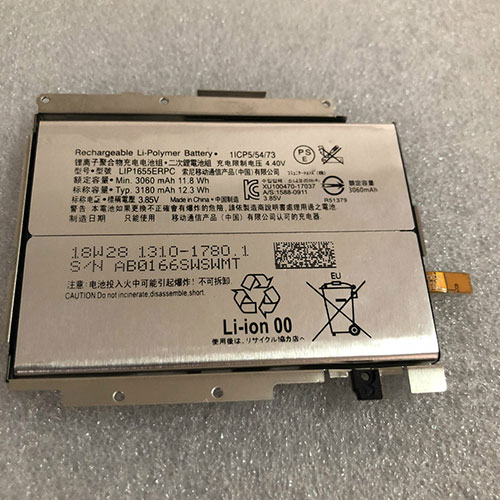
Cheap Sony LIP1655ERPC Li-ion Cell Phone battery, Brand New LIP1655ERPC replacement battery for Sony Xperia XZ2 Plus

3060mAh/11.8WH 3.85V/4.40V Sony LIP1655ERPC Batteries for Sony Xperia XZ2 Plus, Sony LIP1655ERPC Cell Phone battery is a brand new,100% Compatible original and replacement Laptop battery,Purchase wholesale and retail LIP1655ERPC with high quality and low price!

LIP1655ERPC Battery sony Li-ion 3.85V/4.40V 3060mAh/11.8WH

LIP1655ERPC

Specifications

  • Brand:Sony
  • Capacity :3060mAh/11.8WH
  • Voltage :3.85V/4.40V
  • Color:white
  • Type :Li-ion
  • Battery Cell Quality: Grade A
  • Descriptive: Replacement Battery – 1 Year Warranty
  • Description: Brand New, 1 Year Warranty! 30-Days Money Back! Fast Shipping!

How we test this Sony LIP1655ERPC Battery Li-ion 3.85V/4.40V 3060mAh/11.8WH

Step 1: Make sure customer bought the correct battery.
Step 2: Check battery’s appearance and interface.
Step 3: Test battery charger and recharger function.
Step 4: Charger the battery to 100% and recharger to 0% to get real battery capacity
Step 5: Use Ev2300 to check the voltage difference of each goroup cells.
Step 6: Charger battery power more than 30%.
Step 7: Package battery carefully and send out

Compatible Part Numbers:

LIP1655ERPC

Compatible Model Numbers:

Sony Xperia XZ2 Plus

How much do you know about how to run laptop well as any place? The follow Tips cut way back on protecting battery life.


1). Please recharge or change your Cell Phone battery when battery power low.
2). Using Li-Ion Replacement Sony LIP1655ERPC Cell Phone Battery for your notebook which can work longer time than Non Li-ion one.
3). It is better to defragmentation regularly for your Cell Phone battery life.
4). In order to reduce the laptop power consumpition, you can use some optical drive spin-down and hard drive in your Cell Phone .
5). Please keep your laptop in sleep or standby model without long time using, which both save the Replacement Sony LIP1655ERPC Cell Phone Battery power and extend battery using life.
6). Leave your battery in a dry and cool condition when without using.
7). When you rarely or generally plugged in fixed power using, Please take down your battery to avoid hurting battery life.

Hot Products

11.1V/12.4v 2300mah BOSE 404600 for Bose SOUNDLINK I II III7.4V 2230mAh/17Wh BOSE 063404 for 0634043.8V 6300mAh/23.94Wh AMAZON 2955C7 for Amazon Kindle Fire HD 10.1 7th3.8 V 1300 mAh AMAZON MC-305070 for AMAZON Kindle Voyage3.85V/4.4V 3080MAH/11.86WH ALCATEL TLp030JC for Alcatel A3 XL 9008j3.7V/4.2V 1750MAH/6.5WH AMAZON GP-S10-346392-0100 for AMAZON KINDLE 3 3G WIFI Kindle7.7V 37Wh/4810mAh ACER AP16M5J for ACER A315-51-51SL N17Q1 SERIES7.4V 2230mAH/17Wh BOSE 061384 for BOSE SOUNDLINK Mini Series3.8V 2930mAh/11.1Wh NETGEAR W-7 for Netgear AirCard 790S 790SP 8103.8V/4.35V 2000MAH/7.6Wh ALCATEL TLI020F7 for Alcatel Onetouch Pixi 4 (5) 50

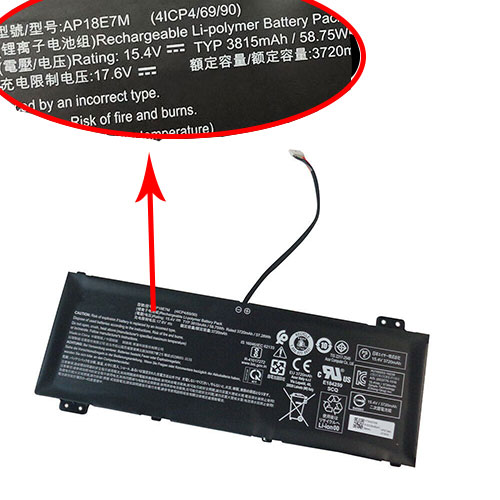
Cheap Acer AP18E7M Li-ion Laptop battery, Brand New AP18E7M replacement battery for Acer Nitro 5 AN515-43 AN515-53 AN515-54 AN517-51

3815mAh/58.75Wh 15.4V Acer AP18E7M Batteries for Acer Nitro 5 AN515-43 AN515-53 AN515-54 AN517-51, Acer AP18E7M Laptop battery is a brand new,100% Compatible original and replacement Laptop battery,Purchase wholesale and retail AP18E7M with high quality and low price!

AP18E7M Battery acer Li-ion 15.4V 3815mAh/58.75Wh

AP18E7M

Specifications

  • Brand:Acer
  • Capacity :3815mAh/58.75Wh
  • Voltage :15.4V
  • Type :Li-ion
  • Battery Cell Quality: Grade A
  • Descriptive: Replacement Battery – 1 Year Warranty
  • Description: Brand New, 1 Year Warranty! 30-Days Money Back! Fast Shipping!

How we test this Acer AP18E7M Battery Li-ion 15.4V 3815mAh/58.75Wh

Step 1: Make sure customer bought the correct battery.
Step 2: Check battery’s appearance and interface.
Step 3: Test battery charger and recharger function.
Step 4: Charger the battery to 100% and recharger to 0% to get real battery capacity
Step 5: Use Ev2300 to check the voltage difference of each goroup cells.
Step 6: Charger battery power more than 30%.
Step 7: Package battery carefully and send out

Compatible Part Numbers:

5447 4ICP4/69/90 AP18E7M

Compatible Model Numbers:

ACER
Aspire 7 A715-74G, 7 A715-74G-50U5, 7 A715-74G-51QJ, 7 A715-74G-52B0, 7 A715-74G-52BP, 7 A715-74G-53DG, 7 A715-74G-53YM, 7 A715-74G-544W, 7 A715-74G-56VU, 7 A715-74G-57GR, Aspire 7 A715-74G-59DN, 7 A715-74G-702T, 7 A715-74G-70T9, 7 A715-74G-71WS, 7 A715-74G-72GL, 7 A715-74G-73BV, 7 A715-74G-73M5, 7 A715-74G-73R3, 7 A715-74G-75FB, 7 A715-74G-75NZ, ASPIRE 7 A715-74G-75QA, 7 A715-74G-7602, 7 A715-74G-76NV, 7 A715-74G-76PW, 7 A715-74G-77AW, 7 A715-74G-77PA, 7 A715-74G-77QL, 7 A715-74G-77UR, 7 A715-74G-782K, 7 A715-74G-785A, Aspire 7 A715-74g-792d, 7 A715-74G-792U, 7 A715-74G-79EJ, 7 A715-74G-79KJ, 7 A715-74G-79MQ, AN517-51, AN517-51-56EU, AN517-51-57X5, AN517-51-70C7, AN517-51-70ND, ASPIRE AN517-51-714J, AN517-51-71D5, AN517-51-720H, AN517-51-757H, AN517-51-75RY, AN517-51-7887, NITRO 5 A517-51-51XT, Nitro 5 AN515-54, Nitro 5 AN515-54-53Z2, Nitro 5 AN515-54-57LV, Aspire Nitro 5 AN515-54-78TL, NITRO 5 AN517-51-515S, NITRO 5 AN517-51-52CK, NITRO 5 AN517-51-54WS, NITRO 5 AN517-51-56EU, NITRO 5 AN517-51-56YW, NITRO 5 AN517-51-57EG, NITRO 5 AN517-51-57NL, NITRO 5 AN517-51-57X5, NITRO 5 AN517-51-59D9, ASPIRE NITRO 5 AN517-51-59ZT, NITRO 5 AN517-51-70ND, NITRO 5 AN517-51-71D5, NITRO 5 AN517-51-7201, NITRO 5 AN517-51-720H, NITRO 5 AN517-51-72GC, NITRO 5 AN517-51-72T9, NITRO 5 AN517-51-72ZZ, NITRO 5 AN517-51-739K, NITRO 5 AN517-51-754T, ASPIRE NITRO 5 AN517-51-757H, NITRO 5 AN517-51-75RY, NITRO 5 AN517-51-75VU, NITRO 5 AN517-51-75X3, NITRO 5 AN517-51-75Y2, NITRO 5 AN517-51-76UV, NITRO 5 AN517-51-777Y, NITRO 5 AN517-51-77B8, NITRO 5 AN517-51-77M5, NITRO 5 AN517-51-77Q0, ASPIRE NITRO 5 AN517-51-77QJ, NITRO 5 AN517-51-77T2, NITRO 5 AN517-51-7887, NITRO 5 AN517-51-78MC, Nitro 7 AN715-51, Nitro 7 AN715-51-71HA, Nitro 7 AN715-51-726G, Nitro 7 AN715-51-76SY, Nitro 7 AN715-51-77D0, NITRO 7 AN715-51-79NX, ConceptD 3 CN315-71, ConceptD 3 CN315-71-003, ConceptD 3 CN315-71-005, ConceptD 3 CN315-71-514V, ConceptD 3 CN315-71-59SB, ConceptD 3 CN315-71-70C5, ConceptD 3 CN315-71-72AM, ConceptD 3 CN315-71-72J3, ConceptD 3 CN315-71-76MR, Conceptd 3 CN315-71-7891, Conceptd 3 Cn315-71-791U, ConceptD 3 CN315-71-79QM, ConceptD 3 CN315-71-79VR, ConceptD 3 CN315-71P-7341, ConceptD 3 CN315-71P-74AC, conceptd 3 CN315-71P-77A0, ConceptD 3 Pro CN315-71P, ConceptD 3 Pro CN315-71P-55AD, ConceptD 3 Pro CN315-71P-59QP, ConceptD 3 Pro CN315-71P-72PM, ConceptD 3 Pro CN315-71P-7341, ConceptD 3 Pro CN315-71P-73W1, ConceptD 3 Pro CN315-71P-746A, ConceptD 3 Pro CN315-71P-74AC, ConceptD 3 Pro CN315-71P-760X, ConceptD 3 Pro CN315-71P-7695, ConceptD 3 Pro CN315-71P-769Y, ConceptD 3 Pro CN315-71P-77A0, ConceptD 3 Pro CN315-71P-780K, ConceptD 3 Pro CN315-71P-78QP, ConceptD 3 Pro CN315-71P-79C6, ConceptD 5 CN517-71, ConceptD 5 CN517-71-70R8, ConceptD 5 CN517-71-72HS, ConceptD 5 CN517-71-73JD, ConceptD 5 CN517-71-74YA, ConceptD 5 CN517-71-75ZU, ConceptD 5 CN517-71-769B, ConceptD 5 CN517-71-76FU, ConceptD 5 CN517-71-77UB, ConceptD 5 Cn517-71-7824, ConceptD 5 CN517-71-7824P, ConceptD 5 CN517-71-78BD, ConceptD 5 CN517-71-79S7, ConceptD 5 CN517-71-79XL, ConceptD 5 Pro 17, ConceptD 5 Pro CN515-71P-75FQ, ConceptD 5 Pro CN517-71P, ConceptD 5 Pro CN517-71P-70SZ, ConceptD 5 Pro CN517-71P-72T0, ConceptD 5 Pro CN517-71P-72XU, ConceptD 5 Pro CN517-71P-7388, ConceptD 5 Pro CN517-71P-753A, ConceptD 5 Pro CN517-71P-75WN, ConceptD 5 Pro CN517-71P-76BH, ConceptD 5 Pro CN517-71P-76BZ, ConceptD 5 Pro CN517-71P-77RU, Nitro 5 AN515-54, Nitro 5 AN515-54-51M5, Nitro 5 AN515-54-530D, Nitro 5 AN515-54-54ZK, Nitro 5 AN515-54-5692, Nitro 5 AN515-54-57LV, Nitro 5 AN515-54-59WX, Nitro 5 AN515-54-71UP, Nitro 5 AN515-54-72B7, Nitro 5 AN515-54-72J1, Nitro 5 AN515-54-735S, NITRO 5 AN515-54-73P5, Nitro 5 AN515-54-74BV, Nitro 5 AN515-54-74NF, Nitro 5 AN515-54-74YP, Nitro 5 AN515-55, Nitro 5 AN515-55-729Y, Nitro 5 AN515-55-72MF, Nitro 5 AN517-51, NITRO 5 AN517-51-51YA, NITRO 5 AN517-51-55B9, Nitro 5 AN517-51-56YW, Nitro 5 AN517-51-576U, NITRO 5 AN517-51-57NL, NITRO 5 AN517-51-57V5, Nitro 5 AN517-51-57X5, Nitro 5 AN517-51-58AD, Nitro 5 AN517-51-58QJ, Nitro 5 AN517-51-58TZ, Nitro 5 AN517-51-59D9, Nitro 5 AN517-51-70ND, Nitro 5 AN517-51-71D5, Nitro 5 AN517-51-71S6, Nitro 5 AN517-51-7201, NITRO 5 AN517-51-723Y, Nitro 5 AN517-51-73RV, NITRO 5 AN517-51-754T, Nitro 5 AN517-51-757H, Nitro 5 AN517-51-75RY, Nitro 5 AN517-51-76FT, Nitro 5 AN517-51-76UV, Nitro 5 AN517-51-77B8, Nitro 5 AN517-51-77M5, NITRO 5 AN517-51-77P6, Nitro 5 AN517-51-782J, Nitro 5 AN517-51-7887, Nitro 5 AN517-51-78MC, Nitro 5 AN517-51-797S, Nitro 5 AN517-51-79C9, Nitro 7 AN715-51, Nitro 7 AN715-51-51GR, Nitro 7 AN715-51-574Z, Nitro 7 AN715-51-58X1, Nitro 7 AN715-51-70D5, Nitro 7 AN715-51-70TG, Nitro 7 AN715-51-7171, Nitro 7 AN715-51-71DE, Nitro 7 AN715-51-73BU, Nitro 7 AN715-51-74S3, Nitro 7 AN715-51-752B, Nitro 7 AN715-51-75FZ, NITRO 7 AN715-51-75FZ GAMING, Nitro 7 AN715-51-75N8, Nitro 7 AN715-51-75WR, NITRO 7 AN715-51-76B7, Nitro 7 AN715-51-76ML, Nitro 7 AN715-51-76T7, Nitro 7 AN715-51-76YF, Nitro 7 AN715-51-773J, Nitro 7 AN715-51-773L, Nitro 7 AN715-51-77D0, Nitro 7 AN715-51-77FG, Nitro 7 AN715-51-786X, Nitro 7 AN715-51-79Y2, NITRO AN715-51-71HA, Predator Helios 300 PH315-52, Predator Helios 300 PH315-52-558P, Predator Helios 300 PH315-52-5807, Predator Helios 300 PH315-52-58EG, Predator Helios 300 PH315-52-59CY, Predator Helios 300 PH315-52-704J, Predator Helios 300 PH315-52-707V, Predator Helios 300 PH315-52-708C, Predator Helios 300 PH315-52-713C, Predator Helios 300 PH315-52-718Q, Predator Helios 300 PH315-52-71HH, Predator Helios 300 PH315-52-71RT, Predator Helios 300 PH315-52-7210, Predator Helios 300 PH315-52-72EV, Predator Helios 300 PH315-52-72RG, Predator Helios 300 PH315-52-73P3, Predator Helios 300 PH315-52-73PA, Predator Helios 300 PH315-52-73XY, Predator Helios 300 PH315-52-746Q, Predator Helios 300 PH315-52-74XE, Predator Helios 300 PH315-52-74XZ, Predator Helios 300 PH315-52-754M, Predator Helios 300 PH315-52-75VP, Predator Helios 300 PH315-52-766X, Predator Helios 300 PH315-52-77EK, Predator Helios 300 PH315-52-77YA, Predator Helios 300 PH315-52-78HH, Predator Helios 300 PH315-52-78T7, Predator Helios 300 PH315-52-78VL, Predator Helios 300 PH315-52-78XW, Predator Helios 300 PH315-52-794X, Predator Helios 300 PH315-52-79H2, Predator Helios 300 PH315-52-79H8, Predator Helios 300 PH315-52-79TY, Predator Helios 300 PH315-52-79ZD, PREDATOR HELIOS 300 PH317-52-53KY, Predator Helios 300 PH317-53, PREDATOR HELIOS 300 PH317-53-70E6, PREDATOR HELIOS 300 PH317-53-716R, PREDATOR HELIOS 300 PH317-53-71D6, PREDATOR HELIOS 300 PH317-53-7222, PREDATOR HELIOS 300 PH317-53-72H9, PREDATOR HELIOS 300 PH317-53-72P5, PREDATOR HELIOS 300 PH317-53-738G, PREDATOR HELIOS 300 PH317-53-74KK, PREDATOR HELIOS 300 PH317-53-75SY, PREDATOR HELIOS 300 PH317-53-7777, PREDATOR HELIOS 300 PH317-53-77N4, PREDATOR HELIOS 300 PH317-53-77NT, PREDATOR HELIOS 300 PH317-53-78G0, PREDATOR HELIOS 300 PH317-53-78JX, PREDATOR HELIOS 300 PH317-53-790P, PREDATOR HELIOS 300 PH317-53-79JM, PREDATOR HELIOS 300 PH317-53-79S0, PREDATOR HELIOS 300 PH317-53-79Y1, Predator Helios 300-PH315-52-74NQ, PREDATOR HELIOS 300-PH317-53-76VZ, PREDATOR HELIOS 300-PH317-53-77ZX, Predator Triton 300 PT315-51, Predator Triton 300 PT315-51-51SG, Predator Triton 300 PT315-51-539R, Predator Triton 300 PT315-51-544M, Predator Triton 300 PT315-51-56W4, Predator Triton 300 PT315-51-58BG, Predator Triton 300 PT315-51-58VY, Predator Triton 300 PT315-51-597Z, Predator Triton 300 PT315-51-70E9, Predator Triton 300 PT315-51-740T, Predator Triton 300 PT315-51-74M0, Predator Triton 300 PT315-51-75DV, Predator Triton 300 PT315-51-762F, Predator Triton 300 PT315-51-76B3, Predator Triton 300 PT315-51-76VK, Predator Triton 300 PT315-51-7815, Predator Triton 300 PT315-52, Predator Triton 300 PT315-52-720T, Predator Triton 300 PT315-52-79LP

How much do you know about how to run laptop well as any place? The follow Tips cut way back on protecting battery life.


1). Please recharge or change your Laptop battery when battery power low.
2). Using Li-Ion Replacement Acer AP18E7M Laptop Battery for your notebook which can work longer time than Non Li-ion one.
3). It is better to defragmentation regularly for your Laptop battery life.
4). In order to reduce the laptop power consumpition, you can use some optical drive spin-down and hard drive in your Laptop .
5). Please keep your laptop in sleep or standby model without long time using, which both save the Replacement Acer AP18E7M Laptop Battery power and extend battery using life.
6). Leave your battery in a dry and cool condition when without using.
7). When you rarely or generally plugged in fixed power using, Please take down your battery to avoid hurting battery life.

Hot Products

11.1V/12.4v 2300mah BOSE 404600 for Bose SOUNDLINK I II III7.4V 2230mAh/17Wh BOSE 063404 for 0634043.8V 6300mAh/23.94Wh AMAZON 2955C7 for Amazon Kindle Fire HD 10.1 7th3.8 V 1300 mAh AMAZON MC-305070 for AMAZON Kindle Voyage3.85V/4.4V 3080MAH/11.86WH ALCATEL TLp030JC for Alcatel A3 XL 9008j3.7V/4.2V 1750MAH/6.5WH AMAZON GP-S10-346392-0100 for AMAZON KINDLE 3 3G WIFI Kindle7.7V 37Wh/4810mAh ACER AP16M5J for ACER A315-51-51SL N17Q1 SERIES7.4V 2230mAH/17Wh BOSE 061384 for BOSE SOUNDLINK Mini Series3.8V 2930mAh/11.1Wh NETGEAR W-7 for Netgear AirCard 790S 790SP 8103.8V/4.35V 2000MAH/7.6Wh ALCATEL TLI020F7 for Alcatel Onetouch Pixi 4 (5) 50

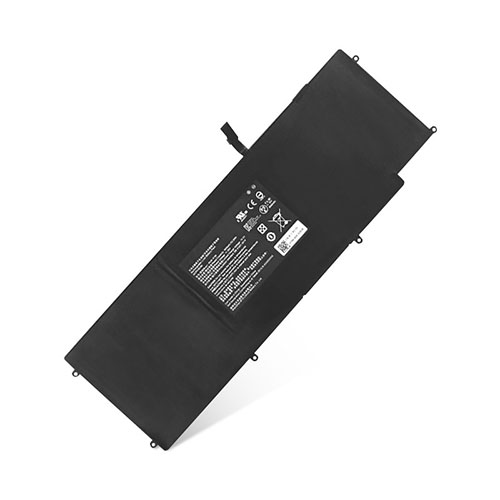
Cheap Razer RZ09-0168 Li-ion Laptop battery, Brand New RZ09-0168 replacement battery for Razer Blade Stealth 12.5 RC30-01962E53 RZ09-01682E24

3950mAh/45Wh 11.4V/11.55V Razer RZ09-0168 Batteries for Razer Blade Stealth 12.5 RC30-01962E53 RZ09-01682E24, Razer RZ09-0168 Laptop battery is a brand new,100% Compatible original and replacement Laptop battery,Purchase wholesale and retail RZ09-0168 with high quality and low price!

RZ09-0168 Battery razer Li-ion 11.4V/11.55V 3950mAh/45Wh

RZ09-0168

Specifications

  • Brand:Razer
  • Capacity :3950mAh/45Wh
  • Voltage :11.4V/11.55V
  • Type :Li-ion
  • Battery Cell Quality: Grade A
  • Descriptive: Replacement Battery – 1 Year Warranty
  • Description: Brand New, 1 Year Warranty! 30-Days Money Back! Fast Shipping!

How we test this Razer RZ09-0168 Battery Li-ion 11.4V/11.55V 3950mAh/45Wh

Step 1: Make sure customer bought the correct battery.
Step 2: Check battery’s appearance and interface.
Step 3: Test battery charger and recharger function.
Step 4: Charger the battery to 100% and recharger to 0% to get real battery capacity
Step 5: Use Ev2300 to check the voltage difference of each goroup cells.
Step 6: Charger battery power more than 30%.
Step 7: Package battery carefully and send out

Compatible Part Numbers:

3ICP4/92/77 HAZEL RZ09-0168 CN-B-4-HAZEL-599

Compatible Model Numbers:

Razer
RZ09-01682E24, RZ09-01962E53, razer blade stealth 7th gen i7, RAZER Blade Stealth 2017, razer blade stealth 12.5

How much do you know about how to run laptop well as any place? The follow Tips cut way back on protecting battery life.


1). Please recharge or change your Laptop battery when battery power low.
2). Using Li-Ion Replacement Razer RZ09-0168 Laptop Battery for your notebook which can work longer time than Non Li-ion one.
3). It is better to defragmentation regularly for your Laptop battery life.
4). In order to reduce the laptop power consumpition, you can use some optical drive spin-down and hard drive in your Laptop .
5). Please keep your laptop in sleep or standby model without long time using, which both save the Replacement Razer RZ09-0168 Laptop Battery power and extend battery using life.
6). Leave your battery in a dry and cool condition when without using.
7). When you rarely or generally plugged in fixed power using, Please take down your battery to avoid hurting battery life.

Hot Products

11.1V/12.4v 2300mah BOSE 404600 for Bose SOUNDLINK I II III7.4V 2230mAh/17Wh BOSE 063404 for 0634043.8V 6300mAh/23.94Wh AMAZON 2955C7 for Amazon Kindle Fire HD 10.1 7th3.8 V 1300 mAh AMAZON MC-305070 for AMAZON Kindle Voyage3.85V/4.4V 3080MAH/11.86WH ALCATEL TLp030JC for Alcatel A3 XL 9008j3.7V/4.2V 1750MAH/6.5WH AMAZON GP-S10-346392-0100 for AMAZON KINDLE 3 3G WIFI Kindle7.7V 37Wh/4810mAh ACER AP16M5J for ACER A315-51-51SL N17Q1 SERIES7.4V 2230mAH/17Wh BOSE 061384 for BOSE SOUNDLINK Mini Series3.8V 2930mAh/11.1Wh NETGEAR W-7 for Netgear AirCard 790S 790SP 8103.8V/4.35V 2000MAH/7.6Wh ALCATEL TLI020F7 for Alcatel Onetouch Pixi 4 (5) 50

WhatsApp: with any luck, you’ll never have to use this important new feature

WhatsApp has started to trial a new feature designed to stop the spread of misinformation on the immensely-popular chat app, which boasts more than two billion users worldwide. From today, you’ll be able to quickly search the contents of a WhatsApp message with a single tap to make sure that you haven’t been duped by a viral text which has been forwarded or copy-pasted between thousands of people worldwide.

The new feature appears in the form of a magnifying glass icon next to the text message. Tapping this will trigger a web search using your default web browser and search engine on the device. Crucially, the magnifying glass symbol will only appear next to messages which have been forwarded more than five times – or passed by five people prior to being sent to you.

WhatsApp has flagged highly-forwarded messages for some time now. Since the messaging service is end-to-end encrypted, the team at WhatsApp are unable to read any of the contents of your texts – something that makes weeding out misinformation a little tougher. According to research by WhatsApp, text messages which have been forwarded to high volumes of people without any tweaks are the most likely to be problematic.

In a screenshot shared by WhatsApp to demonstrate how its latest tool to help combat misinformation works inside the app, it’s possible to read a highly-forwarded text that reads: “Drinking fresh boiled garlic water will cure COVID-19,” followed by a web link. Since the text is flagged as “Forwarded” – denoting that it has been shared with five contacts or more – WhatsApp lets the smartphone owner launch a Google search. In the example, this immediately returns three fact-checking websites that flag this garlic-related claim as nonsense.