13000mAh/50WH 3.85V 4.4V Blackview BV9100 Li-ion Battery for Blackview BV9100

13000mAh/50WH 3.85V 4.4V Blackview BV9100 Batteries for Blackview BV9100, Blackview BV9100 Cell Phone battery is a brand new,100% Compatible original and replacement Phone battery,Purchase wholesale and retail BV9100 with high quality and low price!

Find ou your original model number or part number(P/N), and move your eyes on the tag of battery

BV9100

Specifications

  • Brand:Blackview
  • Capacity :13000mAh/50WH
  • Voltage :3.85V 4.4V
  • Type :Li-ion
  • Battery Cell Quality: Grade A
  • Descriptive: Replacement Battery – 1 Year Warranty
  • Description: Brand New, 1 Year Warranty! 30-Days Money Back! Fast Shipping!

How we test this Blackview BV9100 Battery
Step 1: Make sure customer bought the correct battery.
Step 2: Check battery’s appearance and interface.
Step 3: Test battery charger and recharger function.
Step 4: Charger the battery to 100% and recharger to 0% to get real battery capacity
Step 5: Use Ev2300 to check the voltage difference of each goroup cells.
Step 6: Charger battery power more than 30%.
Step 7: Package battery carefully and send out

Compatible Part Numbers:
BV9100

Compatible Model Numbers:
Blackview BV9100

How much do you know about how to run laptop well as any place? The follow Tips cut way back on protecting battery life.


1). Please recharge or change your Cell Phone battery when battery power low.
2). Using Li-Ion Replacement Blackview BV9100 Cell Phone Battery for your notebook which can work longer time than Non Li-ion one.
3). It is better to defragmentation regularly for your Cell Phone battery life.
4). In order to reduce the laptop power consumpition, you can use some optical drive spin-down and hard drive in your Cell Phone .
5). Please keep your laptop in sleep or standby model without long time using, which both save the Replacement Blackview BV9100 Cell Phone Battery power and extend battery using life.
6). Leave your battery in a dry and cool condition when without using.
7). When you rarely or generally plugged in fixed power using, Please take down your battery to avoid hurting battery life.

Hot Products

73Wh ASUS C42N1630 for ASUS Zenbook Pro UX550 UX550VD3900mAh/15.0WH XIAOMI BN48 for Xiaomi Redmi Note 6 Pro Note64000mAh/31Wh/4 cells SAMSUNG AA-PBUN4AR for Samsung NP940X3L 900X5L NP900X3700mAh/14.2WH XIAOMI BM37 for Xiaomi Mi 5S Mi5s plus4550mAh 51.28Wh THUNDEROBOT SQU-1711 for Thunderobot 911AIR 911ME 911S7.6V DELL 4GVMP for Dell Latitude 5400 55004900mAh/18.87WH SAMSUNG HQ-50S for Samsung Galaxy A02S4120mAh/45Wh LENOVO L17M3P52 for Lenovo 01AV447 SB10K97608 Seri

5580mAh Blackview BV5900 Li-ion Battery for Blackview BV5900

5580mAh Blackview BV5900 Batteries for Blackview BV5900, Blackview BV5900 Cell Phone battery is a brand new,100% Compatible original and replacement Phone battery,Purchase wholesale and retail BV5900 with high quality and low price!

Find ou your original model number or part number(P/N), and move your eyes on the tag of battery

BV5900

Specifications

  • Brand:Blackview
  • Capacity :5580mAh
  • Type :Li-ion
  • Battery Cell Quality: Grade A
  • Descriptive: Replacement Battery – 1 Year Warranty
  • Description: Brand New, 1 Year Warranty! 30-Days Money Back! Fast Shipping!

How we test this Blackview BV5900 Battery
Step 1: Make sure customer bought the correct battery.
Step 2: Check battery’s appearance and interface.
Step 3: Test battery charger and recharger function.
Step 4: Charger the battery to 100% and recharger to 0% to get real battery capacity
Step 5: Use Ev2300 to check the voltage difference of each goroup cells.
Step 6: Charger battery power more than 30%.
Step 7: Package battery carefully and send out

Compatible Part Numbers:
BV5900

Compatible Model Numbers:
Blackview BV5900

How much do you know about how to run laptop well as any place? The follow Tips cut way back on protecting battery life.


1). Please recharge or change your Cell Phone battery when battery power low.
2). Using Li-Ion Replacement Blackview BV5900 Cell Phone Battery for your notebook which can work longer time than Non Li-ion one.
3). It is better to defragmentation regularly for your Cell Phone battery life.
4). In order to reduce the laptop power consumpition, you can use some optical drive spin-down and hard drive in your Cell Phone .
5). Please keep your laptop in sleep or standby model without long time using, which both save the Replacement Blackview BV5900 Cell Phone Battery power and extend battery using life.
6). Leave your battery in a dry and cool condition when without using.
7). When you rarely or generally plugged in fixed power using, Please take down your battery to avoid hurting battery life.

Hot Products

73Wh ASUS C42N1630 for ASUS Zenbook Pro UX550 UX550VD3900mAh/15.0WH XIAOMI BN48 for Xiaomi Redmi Note 6 Pro Note64000mAh/31Wh/4 cells SAMSUNG AA-PBUN4AR for Samsung NP940X3L 900X5L NP900X3700mAh/14.2WH XIAOMI BM37 for Xiaomi Mi 5S Mi5s plus4550mAh 51.28Wh THUNDEROBOT SQU-1711 for Thunderobot 911AIR 911ME 911S7.6V DELL 4GVMP for Dell Latitude 5400 55004900mAh/18.87WH SAMSUNG HQ-50S for Samsung Galaxy A02S4120mAh/45Wh LENOVO L17M3P52 for Lenovo 01AV447 SB10K97608 Seri5280mAh 20.43WH BLACKVIEW Li566376HTT for Blackview Bl6000 Pro1000mAh NOKIA BPS-2 for Nokia 6310i 5130 5110 6210 711

Google: Want to try Android 13? How to Get the Developer Preview Now

 Google has announced the limited release of Android 13 Developer Preview 1, codenamed Tiramisu with a focus on dessert. This latest version of the Android operating system will introduce several new color themes, enhanced privacy and security features, lock and home screen updates, and more.

As long as you have a compatible phone, you can connect your device to your computer and use Google’s Android Flash tool to easily download and install Android 13 Developer Preview 1. Note: The Android 13 Developer Preview can sometimes be unstable! Here’s how to download and install the Android 13 Developer Preview on your phone, let’s take a look!

Which phones is the Android 13 Developer Preview available for?

Google is expected to release Android 13 this fall. It will then be available on a variety of Android phones, but currently you can only install the Android 13 Developer Preview on many compatible Pixel devices: Pixel 4, Pixel 4 XL, Pixel 4A, Pixel 4A 5G, Pixel 5, Pixel 5A and 5G , Pixel 6, Pixel 6 Pro, if your device isn’t on this list, you’ll have to wait for a later version of Android 13, be it public beta or public release.

Backup your Android device first

By default, your Pixel backs up automatically whenever you’re connected to Wi-Fi and your phone has been idle and charged for 2 hours, but you can also back up manually at any time. To back up your Pixel, go to Settings > Google > Backup and tap Back Up Now .

Now you need to enable USB debugging and OEM unlock

To install Android 13 on your Pixel, you’ll need to connect your phone to your computer via USB, which requires your Pixel to be unlocked and USB debugging enabled. While it’s easy to unlock your phone, to enable USB debugging, you’ll need to unlock the developer options first.

1. To unlock the developer options, go to Settings > About phone and tap Build number seven times. Enter your password when prompted and a new developer options menu will appear in system settings.

2. Now, enable USB debugging. Go to Settings > System > Developer options and turn on USB debugging. In the notification that appears, briefly describe what USB debugging means, click OK.

3. While you are still in developer options, turn on OEM unlocking. This will unlock your device’s bootloader, which is what loads the operating system. Once unlocked, you will be able to choose a different operating system to boot from.

Refresh your device with the Android Flash Tool in Chrome

There are two ways to flash the Android 13 Developer Preview system image on the Pixel using a computer, but for simplicity, we’ll use the Android Flash tool, which only works with some web browsers. Additionally, your computer must have 10GB of free storage to function properly.

If all is well, connect your Pixel to your computer via USB, unlock the device and visit the Android Flash Tool website in Chrome and do the following:

1. First, click Get started at the bottom of the website.

2. Next, click Allow ADB Access in the popup that appears (if any ad blockers are present, turn them off).

3. Now click Add New Device, select your device from the list and click Connect.

4. On your Pixel, check the box next to Always allow from this computer and tap Allow to give the Android Flash Tool access to your phone.

5. Back on your computer, click “Developer Preview 1” under “Popular Versions”.

6. Click Install to build, and then click OK.

The pop-up that appears will warn you that installing Android 13 will factory reset your phone, but that’s not a problem if you have a Pixel backed up. Make sure you don’t touch your phone or disconnect it from your computer during this process, or you could brick your phone. If you get another popup on your computer that mentions accepting the Android 13 version, do the following:

1. Click Start in the pop-up window that appears on your computer.

2. Go back to your Pixel, use the volume keys to select Unlock Bootloader, then tap the side key, which will cause your phone to reboot.

3. The software will start downloading, which may take a few minutes depending on your internet connection.

4. After the installation process is complete, click Start in the pop-up window that appears on your computer.

5. Again, back on your Pixel, use the volume keys to toggle to Lock Bootloader, then tap the side button.

6. Finally, on your computer, click Done and your phone will restart as usual.

If all went well, “Installation Complete” should appear in the Android Flash Tool. This means that the Android 13 Developer Preview is installed and you can safely disconnect your Pixel from your computer. After your Pixel reboots, you’ll see a notification that you’re now running the Android 13 Developer Preview. Click OK and set up your phone like a brand new phone.

>>>>>>>>Google battery

Thanks for reading, hope it helps!

Friendly reminder: If you need to replace the battery, this battery store will be a good choice: www.batteryforpc.co.uk

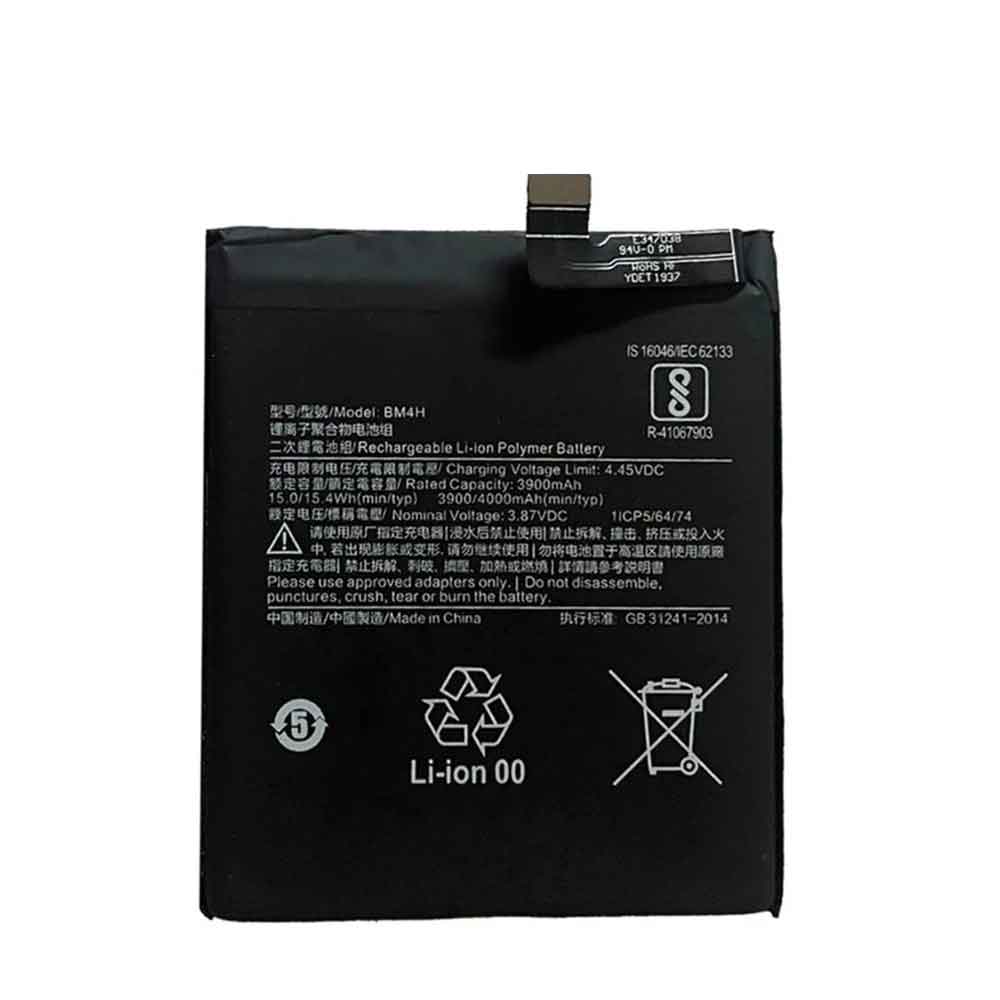
4000mAh/15.4WH 3.87V 4.45V Xiaomi BM4H Li-ion Battery for Xiaomi Mi 9 Pro

4000mAh/15.4WH 3.87V 4.45V Xiaomi BM4H Batteries for Xiaomi Mi 9 Pro, Xiaomi BM4H Cell Phone battery is a brand new,100% Compatible original and replacement Phone battery,Purchase wholesale and retail BM4H with high quality and low price!

Find ou your original model number or part number(P/N), and move your eyes on the tag of battery

BM4H

Specifications

  • Brand:Xiaomi
  • Capacity :4000mAh/15.4WH
  • Voltage :3.87V 4.45V
  • Type :Li-ion
  • Battery Cell Quality: Grade A
  • Descriptive: Replacement Battery – 1 Year Warranty
  • Description: Brand New, 1 Year Warranty! 30-Days Money Back! Fast Shipping!

How we test this Xiaomi BM4H Battery
Step 1: Make sure customer bought the correct battery.
Step 2: Check battery’s appearance and interface.
Step 3: Test battery charger and recharger function.
Step 4: Charger the battery to 100% and recharger to 0% to get real battery capacity
Step 5: Use Ev2300 to check the voltage difference of each goroup cells.
Step 6: Charger battery power more than 30%.
Step 7: Package battery carefully and send out

Compatible Part Numbers:
BM4H

Compatible Model Numbers:
Xiaomi Mi 9 Pro

How much do you know about how to run laptop well as any place? The follow Tips cut way back on protecting battery life.


1). Please recharge or change your Cell Phone battery when battery power low.
2). Using Li-Ion Replacement Xiaomi BM4H Cell Phone Battery for your notebook which can work longer time than Non Li-ion one.
3). It is better to defragmentation regularly for your Cell Phone battery life.
4). In order to reduce the laptop power consumpition, you can use some optical drive spin-down and hard drive in your Cell Phone .
5). Please keep your laptop in sleep or standby model without long time using, which both save the Replacement Xiaomi BM4H Cell Phone Battery power and extend battery using life.
6). Leave your battery in a dry and cool condition when without using.
7). When you rarely or generally plugged in fixed power using, Please take down your battery to avoid hurting battery life.

Hot Products

3700mAh/14.2WH XIAOMI BM37 for Xiaomi Mi 5S Mi5s plus4550mAh 51.28Wh THUNDEROBOT SQU-1711 for Thunderobot 911AIR 911ME 911S7.6V DELL 4GVMP for Dell Latitude 5400 55004900mAh/18.87WH SAMSUNG HQ-50S for Samsung Galaxy A02S4120mAh/45Wh LENOVO L17M3P52 for Lenovo 01AV447 SB10K97608 Seri5280mAh 20.43WH BLACKVIEW Li566376HTT for Blackview Bl6000 Pro1000mAh NOKIA BPS-2 for Nokia 6310i 5130 5110 6210 71151Wh/3321mAh LENOVO L18L4P71 for Lenovo ThinkPad X1 Carbon 7th1950mAh APPLE A1672 for Apple Magic Mouse 22800mAh/10.64WH NOKIA V3760T for Nokia Cell Phone

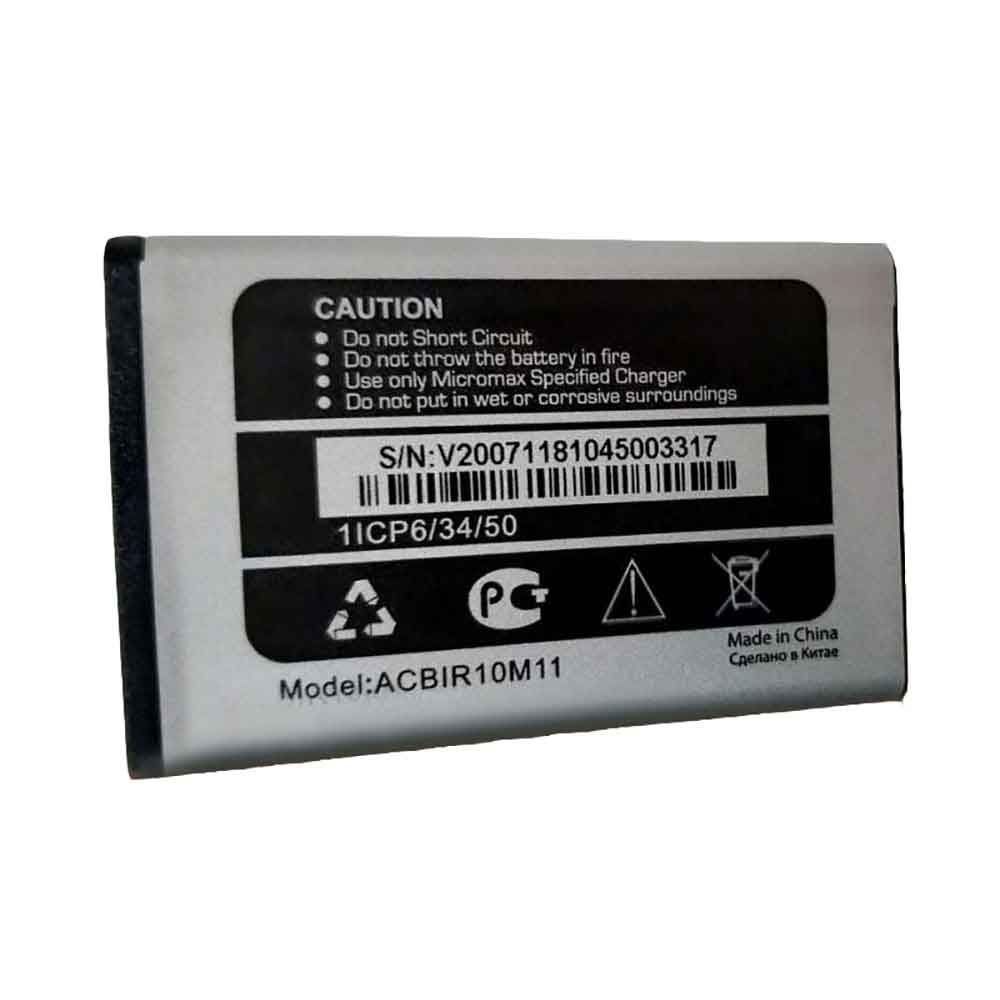
1000mAh/3.7WH 3.7V 4.2V Micromax ACBIR10M11 Li-ion Battery for Micromax ACBIR10M11

1000mAh/3.7WH 3.7V 4.2V Micromax ACBIR10M11 Batteries for Micromax ACBIR10M11, Micromax ACBIR10M11 Cell Phone battery is a brand new,100% Compatible original and replacement Phone battery,Purchase wholesale and retail ACBIR10M11 with high quality and low price!

Find ou your original model number or part number(P/N), and move your eyes on the tag of battery

ACBIR10M11

Specifications

  • Brand:Micromax
  • Capacity :1000mAh/3.7WH
  • Voltage :3.7V 4.2V
  • Type :Li-ion
  • Battery Cell Quality: Grade A
  • Descriptive: Replacement Battery – 1 Year Warranty
  • Description: Brand New, 1 Year Warranty! 30-Days Money Back! Fast Shipping!

How we test this Micromax ACBIR10M11 Battery
Step 1: Make sure customer bought the correct battery.
Step 2: Check battery’s appearance and interface.
Step 3: Test battery charger and recharger function.
Step 4: Charger the battery to 100% and recharger to 0% to get real battery capacity
Step 5: Use Ev2300 to check the voltage difference of each goroup cells.
Step 6: Charger battery power more than 30%.
Step 7: Package battery carefully and send out

Compatible Part Numbers:
ACBIR10M11

Compatible Model Numbers:
Micromax ACBIR10M11

How much do you know about how to run laptop well as any place? The follow Tips cut way back on protecting battery life.


1). Please recharge or change your Cell Phone battery when battery power low.
2). Using Li-Ion Replacement Micromax ACBIR10M11 Cell Phone Battery for your notebook which can work longer time than Non Li-ion one.
3). It is better to defragmentation regularly for your Cell Phone battery life.
4). In order to reduce the laptop power consumpition, you can use some optical drive spin-down and hard drive in your Cell Phone .
5). Please keep your laptop in sleep or standby model without long time using, which both save the Replacement Micromax ACBIR10M11 Cell Phone Battery power and extend battery using life.
6). Leave your battery in a dry and cool condition when without using.
7). When you rarely or generally plugged in fixed power using, Please take down your battery to avoid hurting battery life.

Hot Products

3700mAh/14.2WH XIAOMI BM37 for Xiaomi Mi 5S Mi5s plus4550mAh 51.28Wh THUNDEROBOT SQU-1711 for Thunderobot 911AIR 911ME 911S7.6V DELL 4GVMP for Dell Latitude 5400 55004900mAh/18.87WH SAMSUNG HQ-50S for Samsung Galaxy A02S4120mAh/45Wh LENOVO L17M3P52 for Lenovo 01AV447 SB10K97608 Seri5280mAh 20.43WH BLACKVIEW Li566376HTT for Blackview Bl6000 Pro1000mAh NOKIA BPS-2 for Nokia 6310i 5130 5110 6210 71151Wh/3321mAh LENOVO L18L4P71 for Lenovo ThinkPad X1 Carbon 7th1950mAh APPLE A1672 for Apple Magic Mouse 22800mAh/10.64WH NOKIA V3760T for Nokia Cell Phone

iPhone SE 3 Features You Need to Know Before Buying the iPhone SE 3

 The latest iPhone SE debuted on Tuesday at Apple’s “Peek Performance” event. The most notable updates to the affordable iPhone are 5G connectivity and Apple‘s latest mobile chipset. Aside from minor cosmetic changes, the third-generation iPhone SE looks identical to the previous-generation model launched in 2020. The phone still has a 4.7-inch screen and huge top and bottom bezels. It also retains the Home button with Touch ID, which is great for people who don’t want to use facial recognition to unlock their phones. Let’s take a look at the new features of the iPhone SE 3!

5G connectivity: Sub-6 yes, mmWave no

The most exciting new feature of the iPhone SE is support for faster data transfer speeds over 5G networks. However, the iPhone SE doesn’t support all types of 5G — it can’t connect to parts of the network that use the fastest mmWave type of 5G, which is currently found mostly in city centers and stadiums. As carriers continue to build out their 5G networks in 2022 and beyond, we’re still figuring out which networks the iPhone SE can connect to. Currently, we know that the iPhone SE can use C-band frequencies in the 3.7GHz to 3.98GHz range, which is already available for US carriers.

AT&T has confirmed that the iPhone SE will not support the 3.45GHz mid-band that will be added to its 5G network later this year and that only the best phones of 2022 will be able to connect to.

A15 Bionic Chipset: Better Performance, More iOS Updates

First introduced with the iPhone 13 series in September, the A15 Bionic chipset is Apple’s most advanced mobile chip. In addition to 5G connectivity, it also offers some new tricks for the iPhone SE. It should also support the same iOS update lifespan as the iPhone 13, which could be extended by seven years or more given how often Apple updates its oldest phones right now.

On the camera side, the new chipset should allow the iPhone SE to take better photos than its predecessors, but only because of computational photography improvements and AI tricks. The new phone has the same cameras as the 2020 model: a 12-megapixel, f1.8 rear camera and a 7-megapixel, f2.2 front-facing camera.

Even with the same A15 Bionic processor, the iPhone SE’s 3GB of RAM should slow down gaming performance and apps compared to the iPhone 13 Pro’s 6GB.

New glass back

The new iPhone SE looks almost unchanged from the previous model, but glass has replaced the all-aluminum back of the previous version. While the new glass back is an elegant touch, it’s unclear if it will change the shape of the new iPhones, making them incompatible with existing cases and accessories.

How is your iPhone SE experience?

While we haven’t gotten a full review of the new iPhone SE, it does lack some features and polish. Its lower-resolution LCD display can’t deliver crisp, colorful pictures like the sharp OLED screens on the iPhone 13 series. While the new budget phones share the same chipset, the iPhone 13 has more RAM, more storage, and a larger battery with wireless charging.

The iPhone SE’s single rear camera is also better than the additional lens on the iPhone 13 series, with the iPhone 13 Pro featuring an ultra-wide-angle and 12-megapixel 3x optical zoom camera. Android users considering switching to a cheaper iPhone might be disappointed, as budget phones from Samsung and Motorola often feature two or even three rear cameras. If you just want your iOS phone to use some apps, watch some shows, and take some daylight photos, the iPhone SE should give you the right basics.

>>>>>>>>>>>>Apple battery

How to fix slow charging phone battery

 Have you ever encountered that when your phone starts charging fast, but after a few months, the phone battery charges slowly. Does this make you feel anxious, thinking your phone battery is dead or your phone charger is broken. Then below we will tell you why your phone battery is charging slowly and how to fix it!

Before we can fix the problem of slow charging of the phone, we must first find out what is causing the slow charging. Here are some problems you can try to fix your phone charging slowly:

1. Clean the charging port

If you’ve been using your smartphone for more than a few months, especially in a dusty environment, your phone’s charging port is bound to attract a lot of dust and other elements. The charging port is magnetic, since dust will accumulate in magnetic places – silicon is magnetic and part of dust, and too much dust will make it difficult for current to flow properly into the phone.

Here’s how to clean the charging port:

Get yourself a toothpick or ear swab and gently rub the toothpick or cotton swab into the charging port. Make sure you’re trying to throw the dust out, not push it in. Keep the angle no more than 80°.

You need to redo this over and over again in a few minutes.

After cleaning the port, use a flashlight to check if there is still dust or grime lurking in the charging port. After successfully cleaning the port, plug the phone into the charger and you may see the slow battery charging problem resolved.

2. Restore factory settings

If your phone charged too fast before, but now the fast charge is gone, it may be a problem with your phone software.

A factory reset might just fix the problem and help you with the problem you’re having. However, only try this after you’ve tried all the other methods we’ve mentioned here. Once you factory reset your smartphone, all data will be lost.

3. Check your charger or data cable

If the problem is neither the phone’s charging port nor its software, the problem might be the charger’s output voltage. You can use a special app like Ampere to check the voltage going into your phone. If it is significantly lower than the overall capacity of the advertised charger, the problem may be the charger or the data cable.

A damaged or bent cable can make your phone’s battery charge slowly—especially if you have Apple’s Lighting cable or a Type-B (MicroUSB 2.0) cable.

>>>>>>>>>>>>>>Phone battery

Thanks for reading, hope it helps!

Friendly reminder: If you need to replace the battery or adapter, this battery store will be a good choice: www.batteryforpc.co.uk

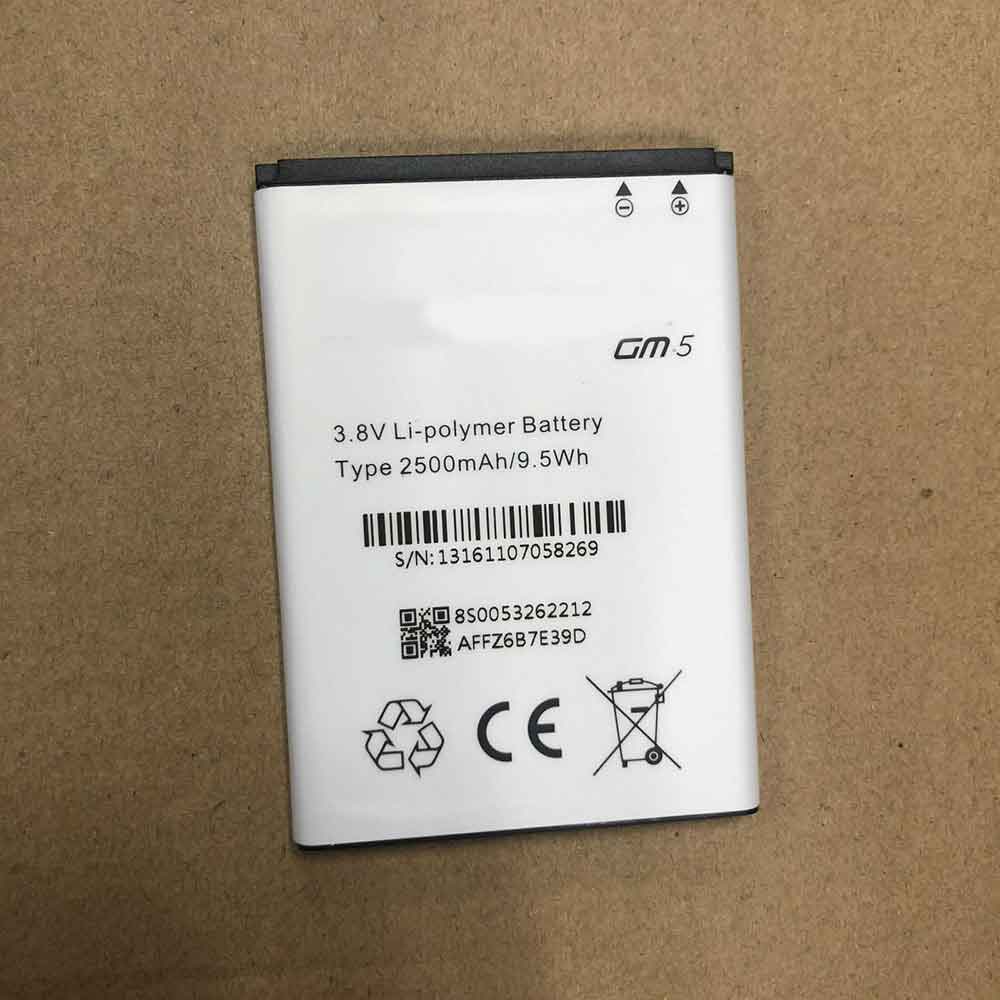
2500mAh/9.5WH 3.8V General GM5 Li-ion Battery for General GM5

2500mAh/9.5WH 3.8V General GM5 Batteries for General GM5, General GM5 Cell Phone battery is a brand new,100% Compatible original and replacement Phone battery,Purchase wholesale and retail GM5 with high quality and low price!

Find ou your original model number or part number(P/N), and move your eyes on the tag of battery

GM5

Specifications

  • Brand:General
  • Capacity :2500mAh/9.5WH
  • Voltage :3.8V
  • Type :Li-ion
  • Battery Cell Quality: Grade A
  • Descriptive: Replacement Battery – 1 Year Warranty
  • Description: Brand New, 1 Year Warranty! 30-Days Money Back! Fast Shipping!

How we test this General GM5 Battery
Step 1: Make sure customer bought the correct battery.
Step 2: Check battery’s appearance and interface.
Step 3: Test battery charger and recharger function.
Step 4: Charger the battery to 100% and recharger to 0% to get real battery capacity
Step 5: Use Ev2300 to check the voltage difference of each goroup cells.
Step 6: Charger battery power more than 30%.
Step 7: Package battery carefully and send out

Compatible Part Numbers:
GM5

Compatible Model Numbers:
General GM5

How much do you know about how to run laptop well as any place? The follow Tips cut way back on protecting battery life.


1). Please recharge or change your Cell Phone battery when battery power low.
2). Using Li-Ion Replacement General GM5 Cell Phone Battery for your notebook which can work longer time than Non Li-ion one.
3). It is better to defragmentation regularly for your Cell Phone battery life.
4). In order to reduce the laptop power consumpition, you can use some optical drive spin-down and hard drive in your Cell Phone .
5). Please keep your laptop in sleep or standby model without long time using, which both save the Replacement General GM5 Cell Phone Battery power and extend battery using life.
6). Leave your battery in a dry and cool condition when without using.
7). When you rarely or generally plugged in fixed power using, Please take down your battery to avoid hurting battery life.

Hot Products

7.6V DELL 4GVMP for Dell Latitude 5400 55004900mAh/18.87WH SAMSUNG HQ-50S for Samsung Galaxy A02S4120mAh/45Wh LENOVO L17M3P52 for Lenovo 01AV447 SB10K97608 Seri5280mAh 20.43WH BLACKVIEW Li566376HTT for Blackview Bl6000 Pro1000mAh NOKIA BPS-2 for Nokia 6310i 5130 5110 6210 71151Wh/3321mAh LENOVO L18L4P71 for Lenovo ThinkPad X1 Carbon 7th1950mAh APPLE A1672 for Apple Magic Mouse 22800mAh/10.64WH NOKIA V3760T for Nokia Cell Phone4400mAh ADVENT L51-3S4400-C1S5 for Advent 7109B 8111 8115 8215 926600mAh MEDION BP-DRAGON-GT(P) for Medion MAM2100 MIM2300 Akoya E

2500mAh/9.5WH 3.8V Blu C975339250P Li-ion Battery for BLU C975339250P

2500mAh/9.5WH 3.8V Blu C975339250P Batteries for BLU C975339250P, Blu C975339250P Cell Phone battery is a brand new,100% Compatible original and replacement Phone battery,Purchase wholesale and retail C975339250P with high quality and low price!

Find ou your original model number or part number(P/N), and move your eyes on the tag of battery

C975339250P

Specifications

  • Brand:BLU
  • Capacity :2500mAh/9.5WH
  • Voltage :3.8V
  • Type :Li-ion
  • Battery Cell Quality: Grade A
  • Descriptive: Replacement Battery – 1 Year Warranty
  • Description: Brand New, 1 Year Warranty! 30-Days Money Back! Fast Shipping!

How we test this Blu C975339250P Battery
Step 1: Make sure customer bought the correct battery.
Step 2: Check battery’s appearance and interface.
Step 3: Test battery charger and recharger function.
Step 4: Charger the battery to 100% and recharger to 0% to get real battery capacity
Step 5: Use Ev2300 to check the voltage difference of each goroup cells.
Step 6: Charger battery power more than 30%.
Step 7: Package battery carefully and send out

Compatible Part Numbers:
C975339250P

Compatible Model Numbers:
BLU C975339250P

How much do you know about how to run laptop well as any place? The follow Tips cut way back on protecting battery life.


1). Please recharge or change your Cell Phone battery when battery power low.
2). Using Li-Ion Replacement Blu C975339250P Cell Phone Battery for your notebook which can work longer time than Non Li-ion one.
3). It is better to defragmentation regularly for your Cell Phone battery life.
4). In order to reduce the laptop power consumpition, you can use some optical drive spin-down and hard drive in your Cell Phone .
5). Please keep your laptop in sleep or standby model without long time using, which both save the Replacement Blu C975339250P Cell Phone Battery power and extend battery using life.
6). Leave your battery in a dry and cool condition when without using.
7). When you rarely or generally plugged in fixed power using, Please take down your battery to avoid hurting battery life.

Hot Products

7.6V DELL 4GVMP for Dell Latitude 5400 55004900mAh/18.87WH SAMSUNG HQ-50S for Samsung Galaxy A02S4120mAh/45Wh LENOVO L17M3P52 for Lenovo 01AV447 SB10K97608 Seri5280mAh 20.43WH BLACKVIEW Li566376HTT for Blackview Bl6000 Pro1000mAh NOKIA BPS-2 for Nokia 6310i 5130 5110 6210 71151Wh/3321mAh LENOVO L18L4P71 for Lenovo ThinkPad X1 Carbon 7th1950mAh APPLE A1672 for Apple Magic Mouse 22800mAh/10.64WH NOKIA V3760T for Nokia Cell Phone4400mAh ADVENT L51-3S4400-C1S5 for Advent 7109B 8111 8115 8215 926600mAh MEDION BP-DRAGON-GT(P) for Medion MAM2100 MIM2300 Akoya E

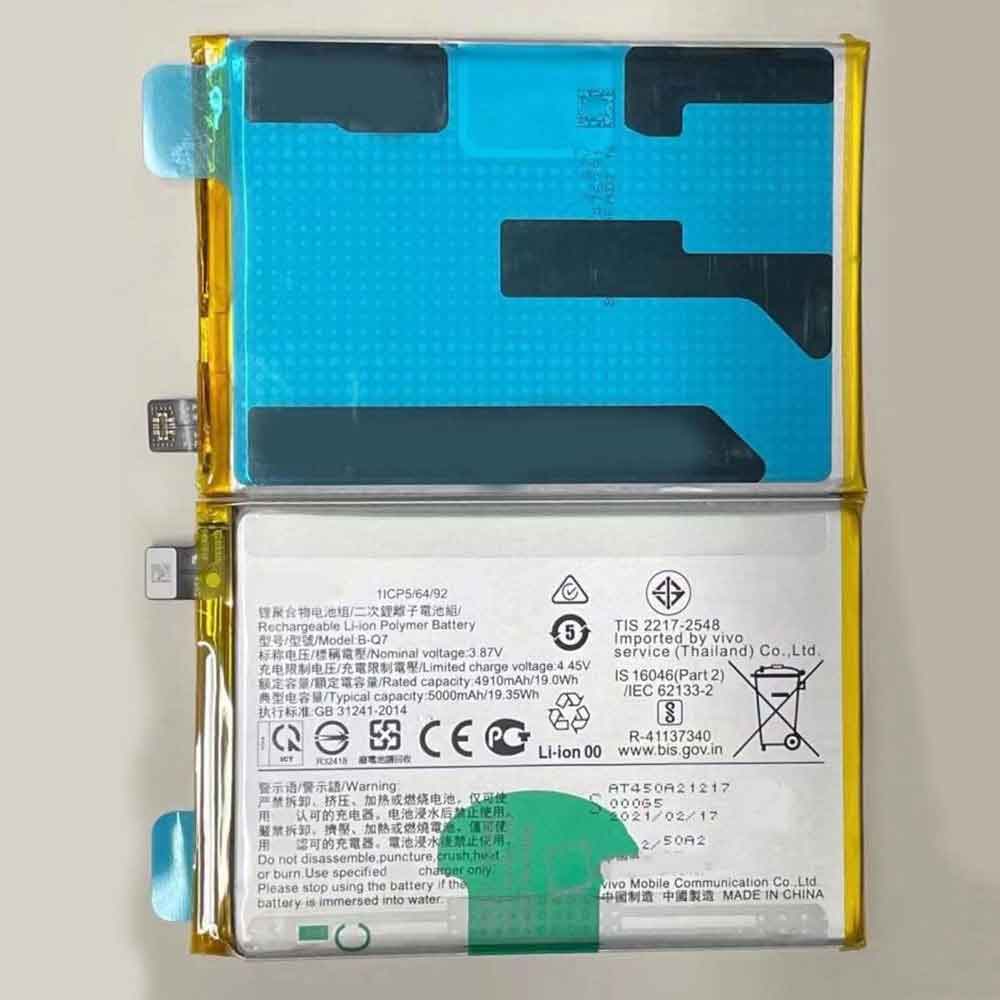
5000mAh/19.35WH 3.87V 4.45V Vivo B-Q7 Li-ion Battery for Vivo Y53

5000mAh/19.35WH 3.87V 4.45V Vivo B-Q7 Batteries for Vivo Y53, Vivo B-Q7 Cell Phone battery is a brand new,100% Compatible original and replacement Phone battery,Purchase wholesale and retail B-Q7 with high quality and low price!

Find ou your original model number or part number(P/N), and move your eyes on the tag of battery

B-Q7

Specifications

  • Brand:Vivo
  • Capacity :5000mAh/19.35WH
  • Voltage :3.87V 4.45V
  • Type :Li-ion
  • Battery Cell Quality: Grade A
  • Descriptive: Replacement Battery – 1 Year Warranty
  • Description: Brand New, 1 Year Warranty! 30-Days Money Back! Fast Shipping!

How we test this Vivo B-Q7 Battery
Step 1: Make sure customer bought the correct battery.
Step 2: Check battery’s appearance and interface.
Step 3: Test battery charger and recharger function.
Step 4: Charger the battery to 100% and recharger to 0% to get real battery capacity
Step 5: Use Ev2300 to check the voltage difference of each goroup cells.
Step 6: Charger battery power more than 30%.
Step 7: Package battery carefully and send out

Compatible Part Numbers:
B-Q7

Compatible Model Numbers:
Vivo Y53

How much do you know about how to run laptop well as any place? The follow Tips cut way back on protecting battery life.


1). Please recharge or change your Cell Phone battery when battery power low.
2). Using Li-Ion Replacement Vivo B-Q7 Cell Phone Battery for your notebook which can work longer time than Non Li-ion one.
3). It is better to defragmentation regularly for your Cell Phone battery life.
4). In order to reduce the laptop power consumpition, you can use some optical drive spin-down and hard drive in your Cell Phone .
5). Please keep your laptop in sleep or standby model without long time using, which both save the Replacement Vivo B-Q7 Cell Phone Battery power and extend battery using life.
6). Leave your battery in a dry and cool condition when without using.
7). When you rarely or generally plugged in fixed power using, Please take down your battery to avoid hurting battery life.

Hot Products

7.6V DELL 4GVMP for Dell Latitude 5400 55004900mAh/18.87WH SAMSUNG HQ-50S for Samsung Galaxy A02S4120mAh/45Wh LENOVO L17M3P52 for Lenovo 01AV447 SB10K97608 Seri5280mAh 20.43WH BLACKVIEW Li566376HTT for Blackview Bl6000 Pro1000mAh NOKIA BPS-2 for Nokia 6310i 5130 5110 6210 71151Wh/3321mAh LENOVO L18L4P71 for Lenovo ThinkPad X1 Carbon 7th1950mAh APPLE A1672 for Apple Magic Mouse 22800mAh/10.64WH NOKIA V3760T for Nokia Cell Phone4400mAh ADVENT L51-3S4400-C1S5 for Advent 7109B 8111 8115 8215 926600mAh MEDION BP-DRAGON-GT(P) for Medion MAM2100 MIM2300 Akoya E