Blue Screen of Death returns! Windows 10 users’ worst nightmare is back

Windows 10 fans are once again having to endure another problematic update release, in a Groundhog Day-style scenario that keeps on plaguing PC fans. This year has seen plenty of patches released by Microsoft that, while fixing some issues or adding new features, has also caused plenty of unintended knock-on effects. Only recently Windows 10 users saw the release of the October 2020 patch (one of the major landmark upgrades of the year) cause a slew of glitches such as driver compatibility issues.

While other patches released by Microsoft have caused a litany of problems, such as issues with Google Chrome, internet connectivity troubles, printers not working, and – of course – the dreaded Blue Screen of Death (BSoD) error.

This month Microsoft released their latest cumulative updates for Windows 10, with the KB4592438 patch fixing (among other things) one Blue Screen of Death issue that has been plaguing PCs since May.

This particular BSoD error impacted PCs with Intel NVMe SSDs drives.

However, in an ironic turn of events since the release of the latest Microsoft patches more Windows 10 users have been hit with BSoD errors.

As reported by Windows Latest, the latest BSoD problem has impacted some Windows 10 users that have CorsairVBusDriver.sys installed.

CorsairVBusDriver.sys is a component of drivers shipped out by Corsair – a leading name when it comes to PC gaming, who make a wide range of gaming tech – from eye-catching RGB cooling fans, to mechanical keyboards, mouses, RAM and much, much more.

If you’ve seen a Twitch streamer or gaming influencer running a stunning looking gaming set-up then it would be a surprise if their machine is fitted with Corsair components.

And this latest issue that impacts machines with the Corsair driver is a particularly troubling one, as some users have reported it has caused their machines to be stuck in a loop where they get an BSoD error and can’t access the desktop.

On Reddit one user posted: “I really need some help. I tried all the fixes I could find on youtube/google but they didn’t work.

“At first there was no file mentioned on the blue screen, only ‘system_thread_exception_not_handled’ and ‘we are sending a report’.

“But after over one hour of trying fixes ‘file error winhv.sys’ appeared at the bottom.

“And sadly I have no backups. I can’t restore back to anything”.

While another wrote: “I’ve had the same experience as everyone else today – for some people, it seems to have been caused by the Corsair driver interfering with the system boot up (even within Safe Mode).”

And one posted: “I have been using my PC for 4 years without any problems and got the “systemthread_exception_not_handled.

“I have K95 corsair keyboard, I can’t see what’s causing my BSOD.”

If you’ve got Corsair drivers installed on your machine then you might want to hold fire downloading the latest Windows 10 cumulative updates until this issue is fully resolved.

HP Omen 30L Review: A sleek 4K gaming tower with a modern design

When it comes to tower PCs, you have two camps: those who insist on the superiority of building your own and those who want something out of the box that works.

The new HP Omen 30L falls into the latter category, but HP, like other PC makers, borrows from the DIY crowd with success. Yes, it’s a pre-made system, but its new one-button toolless entry, pre-wiring for expansion, and multiple RGB lighting zones make it feel a bit more custom.

I use the Omen Obelisk myself, so stepping up to the Omen 30L with new RTX 3080 graphics and 10th Gen Core i9 has me a bit jealous. And if you don’t like Intel, don’t worry, as you can get a system with AMD instead.

HP Omen 30L specs and features

When buying the Omen 30L, you have multiple options. You can buy pre-made machines at Best Buy with AMD Ryzen 5 or 7 processors and up to an RTX 2060 graphics card for around $1,250.

At HP.com, you can go a bit crazier by building your own system, including up to a Core i9-10850K, up to 64GB of HyperX RAM, RAID, Intel Optane, and more. But like every other manufacturer, sourcing an RTX 3000 series card is hard to find due to tight supply right now.

The unit reviewed here is a top-tier model with that Core i9-10850K, RTX 3080, 1TB SSD + 2TB HDD, and 32GB of RAM. The total price is $3,100. HP sources components from Kingston (HyperX RAM), Western Digital Black SN750 (SSD), and Cooler Master (fans).

The 30L gets its name due to its size (17.7 by 6.5 by 16.6 inches), and it is a more modern look over last year’s Obelisk. It’s hard to miss the gorgeous tempered glass front panel that features the Omen logo in RGB with a similarly lit RGB 120mm Cooler Master fan. Standing back in a dark room and the look is modest but cool. HP has veered more towards a contemporary design than a pure gamer look. That was the right choice, especially for adults who may want this PC.

For additional cooling, a 92mm rear fan does a decent job of removing heat and the top fan for the CPU’s liquid cooling radiator. These fans sound similar to last year’s Obelisk, which is pretty quiet but not the best.

Like the Obelisk, HP continues to use its angled and recessed front port area. On top, you get two USB 3.2 Gen 1 Type-A ports, an audio combo (headphone/microphone) jack, and a separate microphone jack. The design is excellent, letting you easily guide peripherals into the port with little fuss, making it perfect for thumb drives or a security key.

To the rear and you get the usual assortment of ports, including one USB 3.2 Gen 2 Type-C, six USB Type-A ports (two version 3.2 Gen 1, two 3.2 Gen 2, and two legacy 2.0). There is also a microphone, line-in, and line-out jacks.

The GeForce RTX 3080 in this review unit includes three DisplayPort video outputs and one HDMI. That monstrous GPU, thankfully, is bolted to the front to prevent card “sag.”

There’s not much room for expansion, mostly due to the size of the RTX 3080. But there is an M.2 Type-2280 slot is just under the graphics card. HP also has pre-run power and SATA cables for the additional for the 3.5-inch bays.

However, the real story is HP’s new single-button mechanism to pop off that tempered glass left panel. No more thumb screws, no more aligning the door panel to slide into place awkwardly. You press, and the panel releases. It’s great.

The reason HP is doing a toolless design is apparent: the company encourages you to buy this PC at a lower price, and you can upgrade the Intel Z490-based ATX motherboard when your budget is right. Sure, you can buy the model I have for $3,109, but you can also start at $1,200 and work your way up by swapping out GPUs, processor, storage options, and RAM yourself. That’s a significant shift from years ago where these towers were one and done.

That RAM is also Kingston HyperX DDR4-3200 RGB. While this review unit is 32GB (8GB x 4), you can buy 64GB through HP. The RGB doesn’t quite sync with the rest of the 30L’s RGB lighting, but it still looks cool.

Cabling is OK. Yes, it’s tied together, and some tape holds it to the case. But the Omen 30L won’t win awards for cleanest (or nicest looking) cabling, and perhaps that glass panel shows too much. On the other hand, if you’re new to tower gaming PCs and don’t know any better, it’s just fine. Like me, you’ll be wowed by the pulsing RGB.

Last year, HP used some red cables for the liquid cooling radiator. This year, they went with just black. I think red looked better, but the Omen 30L seems to be consciously moving away from “Omen red,” which has been the brand’s color for ages. Instead, the whole system is more color-neutral, with users configuring RGB colors to their liking.

Let’s not forget the tower’s four feet. Gone are the flat nubs of Obelisk, and instead, we have four, much taller feet that give more clearance to the bottom of the case. Those feet also work well on a rug.

Powering it all is a prominent, powerful, and not great looking Cooler Master 750-watt power supply. It works and should be enough for the most demanding gamer, but it could use either a smaller design or a bit more flair.

It’s worth noting that HP has a whole assortment of matching accessories and peripherals. Those include the OMEN 27i gaming monitor, Photon Wireless Mouse, and my favorite, HP Omen Mindframe headphones, which actively cool your ears (it’s wild).

HP Omen 30L performance

The Intel Core i9-10900K is a powerful ten-core chip that can peak at 5.3GHz. You can also get an AMD Ryzen 7 3700X, which is cheaper and still a good performer.

Being a “K” processor, it is overclockable. Overclocking is not for the faint of heart, but HP makes it easy via its Omen Gaming Hub software. With a mouse click, the system reboots and does its own stress tests for around 20 minutes. It then finds the range of acceptable overclocking while keeping system stability. It’s impressive stuff that any novice will feel confident in using. The performance boost isn’t massive – maybe around five percent overall – but hey, it’s a free few extra frames in that video game.

That Omen Gaming Hub app does a lot of heavy lifting on the Omen 30L. You can also control the three zones of RGB lighting (logo, front fan, internal light) and the HyperX RAM. Lighting ranges from reactive, multi-colors, and the usual fare. It pales next to Razer’s Chroma, but it’s not bad either. You can enable “Dual Force,” which combines your Wi-Fi 6 and Ethernet connections, giving Ethernet priority for specified apps and games. HP also combines all your games on your system into one place regardless of the stores you bought them from. It’s an excellent app and fun to use.

Turning to raw benchmarks 3DMark, regardless of the test (Fire Strike, Fire Strike Extreme, Time Spy), the Omen 30L gets rated as “great.” That means it’s speedy and holds its own against more expensive systems. It also means it never really leads in any single category, coming in just shy of the average.

Real-world usage (not overclocked), playing something like Red Dead Redemption 2 at 1440P at ultra yields over 65 frames-per-second (FPS). Grand Theft Auto V gets 85 FPS and Fortnite, also at 1440P on ultra, brings in a respectable 165+ FPS. None of that should be too surprising as the 3080 is an impressive GPU, which is why we called the RTX 3080 the best for 4K gaming.

PCMark 10, which combines CPU and GPU usage, gives some better results with a score of 7,898, making it “better than 99 percent of all results” and blowing pass the average for a premium gaming PC in 2020 (7,163).

The Western Digital SSD is also a solid performer. On sequential read, it brought in 3,315 MB/s while write was just over 3,000 MB/s.

Fans can whirl up under load, and they are not the worst, but things could also be a bit quieter. Of course, if you wear over-the-ear gaming headphones, the point is mostly moot. During regular productivity usage, there is more a slight hum than any constant whirring.

HP Omen 30L: Should you buy?

Back in the day, I would build my own gaming towers. It was way before RGB everything, but it was still fun and rewarding. But when you hit a certain age, you just want to 2K game at 160FPS (or 4K game at 60) and not have to bother spending hours researching every top-tier component in the world.

The Omen 30L is a nice improvement over the Obelisk. The look is more mature and certainly less gamer-red. The glossy glass front panel looks sophisticated and minimal (though watch the fingerprints). Upgrading is straightforward with that single-button design. The RGB lighting also looks sharp without being overwhelming.

For performance, the Omen 30L does not smash records, but I’m not sure it needs to either – not for this demographic. We all know that if you want extreme performance, you DIY (and spend a fortune). But if you just want to game and let HP do all the work, I can’t say I’m disappointed. It’s great.

Pricing is also in the range of similar systems from Dell (e.g., Alienware Aurora R11), which has a whole different vibe if this is too tame.

For more ideas, check our Best Gaming Desktop PC for additional recommendations.

Overall, the Omen 30L is an excellent pick for mainstream audiences who either want a tower to build up or get top-tier gaming right now. The range of options for configurations, design, and pricing all make it a competitive choice backed by HP’s name.

Intel NUC 11 Performance to arrive with up to a Core i7-1165G7 and in three chassis variants

Intel is supposedly due to announce the NUC 11 Performance this month, according to Fanless Tech. However, @9550pro has already revealed the full details of the device, and it has also been spotted on UserBenchmark. Intel will offer the NUC 11 Performance with a choice of three Tiger Lake processors, the leaked slide states, ranging from the Core i3-1115G4 to the Core i7-1165G7. All are 28 W processors and boost above 4 GHz. The Core i3 includes a lesser GPU though, with Xe Graphics reserved for the Core i5 and Core i7 SKUs.

Only the Core i7-1165G7 model has appeared on UserBenchmark so far. Benchmarked as the Intel NUC11PHi7, the NUC 11 Performance has been paired with a GeForce RTX 2070 GPU. It is unclear how this was done, but it may have been with an eGPU connecting to one of the machine’s Thunderbolt ports. There will also be three USB 3.1 Gen2 ports, USB 2.0 ports via internal headers, a Gigabit Ethernet port, an HDMI 2.0b port and a Mini DisplayPort 1.4 connection.

The same leak by @9550pro details that Intel will release three chassis types of the NUC 11 Performance. The “Slim” K will be the smallest of the three, measuring 117 x 112 x 38 mm, with the “Tall” H and “Tall Q” chassis coming in at 51 mm and 56 mm tall, respectively. The three chassis will include the same core features, but the “Tall” H and “Tall Q” will include additional equipment that the “Slim” K lacks. The “Tall” H and “Tall” Q will both have a 2.5-inch SATA 3 bay capable of housing up to 7 mm thick drives, while the “Tall” Q will also have a wireless charger built into its lid.

The NUC 11 Performance ‘Panther Canyon’ is not the only NUC that Intel plans to release soon, either. Tiger Canyon and Phantom Canyon are both in the pipeline, both based on the company’s Tiger Lake platform. Tiger Canyon and Phantom Canyon are expected to arrive in early 2021. 

Lenovo ThinkPad L14 Review: AMD Does It Again

The Lenovo ThinkPad L14 is successor to last year’s 14-inch ThinkPad L490. During last year’s review, we noticed that neither the display nor the CPU performed particularly well despite what turned out to be an overall decent package. This year, for the first time in the history of Lenovo’s L-series, you can choose between an Intel and an AMD processor. Lenovo’s L-series sits right in-between the higher-quality T-series and the more affordable entry-level E-series and is aimed primarily at business users. Given that the L14 shares many of its exterior attributes with its predecessor we are going to focus mainly on the new AMD CPU in this review.

Case – Typical ThinkPad

As expected of Lenovo overall build quality is solid. The ThinkPad L14 neither creaks nor flexes considerably, and the entire top of the 14-inch case is made of roughened plastic despite of which it manages to attract fingerprints. The thin display bezels are slightly rubberized and sit flush with the palm rests with the display lid closed. The two hinges are firm and offer the perfect amount of resistance required to ensure that one-handed opening remains possible. The maximum opening angle is 180 degrees.

Maintenance is simple and straightforward on this model as well given that the bottom panel can be easily removed by undoing a few screws. This will give you access to the most important components, such as for example the RAM which can be upgraded up to 64 GB. The battery, unfortunately, is not user replaceable.

Connectivity – AMD brings HDMI 2.0

Connectivity remained unchanged over last year’s L490. The L-series continues to lack a Thunderbolt port, which is only available on the T-series. Port layout has also remained unchanged over the ThinkPad L490. The main difference is the new HDMI port, which now supports 4K resolutions at 60 instead of 30 Hz.

Keep in mind that the HDMI port differs between the Intel and AMD models. While AMD SKUs support HDMI 2.0 (4k at 60 Hz) Intel SKUs are still limited to HDMI 1.4 (4K at 24 Hz).

Display – Only Marginally Better

Last year’s L490 featured a different panel than its predecessor, and it was barely any brighter than the L480’s display that was significantly too dim. This year, we see yet another panel in the ThinkPad L14, the Innolux N140HCA-EAC – basically a cheaper model of the ThinkPad T14s’s Innolux N140HCG-GQ2 panel.

The differences between the L and the T-series are very obvious in regard to maximum brightness (244 vs. 371 nits) as well as color space coverage, and the L14 is far behind its more expensive business sibling. When compared with the L490, brightness remained practically identical with some improvements in contrast ratio and black level. That said our review unit still managed to outperform the HP and Dell.

Outdoor usability was decent even in bright environments, but you should definitely avoid direct light sources. In order to get comfortable, you need an overcast day or at least full shade.

The panel itself is a relatively inexpensive IPS panel that continued to suffer from major color deviations even post calibration. The L14 is thus unsuitable for serious photo editing but should work perfectly fine in typical office and business environments.

Performance – No Throttling with AMD

Processor

AMD’s Ryzen 5 4500U does not support Hyperthreading on its six Zen 2 cores and thus features exactly as many threads as it has cores to offer. It does, however, run at a slightly higher base clock speed of 2.3 GHz with a turbo boost of up to 4 GHz. Additional details can be found on our dedicated page.

In multi-core benchmarks, the AMD Ryzen 5-powered ThinkPad L14 performed similarly to the recently reviewed ThinkPad E14 and outperformed its identically equipped HP ProBook 445 and Dell Latitude 14 competitors. We also found no evidence of throttling as performance remained stable and consistent even after 20 consecutive runs into our CineBench loop, much unlike Intel CPUs whose performance tends to drop significantly after the first run. Long story short: Intel CPUs seem to be more susceptible to performance throttling than AMD CPUs.

All Ryzen 5 notebooks performed almost identically in our single-core benchmark and managed to outperform Intel’s Core i5 by a small margin.

System Performance

Compared to its competitors, the ThinkPad L14 performed average in PCMark 10. Nevertheless, it performed above average for an office and business notebook, which became noticeable not only in this particular synthetic benchmark but also during everyday use. 

Storage Devices

Our review unit featured a 512 GB Wester Digital SSD (WDC PC SN730 SDBQNTY-512GB) whose very important (from the operating system’s point of view at least) CrystalDiskMark 5.2 read/write 4K performance was lower than on all of its competitors. In AS SSD, its 4K read performance was lower than expected as well. We also found a significant performance difference between running on battery and running on mains. Without an active power supply, the read seq numbers dropped by almost 40 %.

GPU Performance

The Ryzen 5 features an AMD Radeon RX Vega 6 GPU with 8 CUs running at 1.2 GHz. This new GPU is a giant leap compared to the L490’s ancient Intel UHD Graphics 620, which is best exemplified by the fact that scores in 3DMark 11 doubled. Thus, the AMD-powered L-series is capable of taking on its Intel-equipped T-series that continues to include Intel’s UHD Graphics 620, and thus only performed half as well in our benchmarks. That said our review unit could have achieved even better scores with dual-channel RAM instead of its default single-channel configuration. Take for example the ThinkPad E14 with the very same iGPU as the L14 but dual-channel instead of single-channel mode RAM: it ran up to 29 % faster.

The L14 passed our stress test with flying colors. You will find more details in the emissions section under temperature below. Performance dropped slightly on battery. In 3DMark 11, we noticed a 5 % decrease in CPU (6,664 vs. 7,061 in Physics) and 9 % decrease in GPU performance (3,092 vs. 3,401 in Graphics).Gaming performance was right where we would have expected it to be. Overall, the L14 performed slightly below average for an AMD Radeon RX Vega 6. AMD’s Radeon RX Vega 7, such as we find for example in Lenovo’s T14s, was significantly faster, and outperformed our L14 by 10 FPS on average in FHD, a very common gaming display resolution.

Gaming Performance

Gaming performance was right where we would have expected it to be. Overall, the L14 performed slightly below average for an AMD Radeon RX Vega 6. AMD’s Radeon RX Vega 7, such as we find for example in Lenovo’s T14s, was significantly faster, and outperformed our L14 by 10 FPS on average in FHD, a very common gaming display resolution.

Emissions – Quiet Fan, Quiet Speaker

Noise Emissions

Just like its predecessor and the ThinkPad T14s our review unit remained pleasantly quiet overall. It peaked at just 32.8 dB(A) during our stress test, which was a pleasant surprise. Fan noise frequency was also very pleasant overall and not at all annoying even after long periods of time. We found no evidence of coil whine on our review unit.

Temperature

Overall, the ThinkPad L14’s temperatures around the keyboard area were better than its L490 predecessor’s with Whiskey Lake that tended to reach up to 46 °C in the top right corner. In comparison, our AMD-powered review unit peaked at 43 °C. Unfortunately, temperatures around the palm rests are around 7 °C higher than on the L490. The L14’s hot spot is located at the bottom rear where it peaked at around 50 °C – too hot for lap use.

Power consumption very quickly settled at 25 W during our stress test resulting in around 2.8 GHz and around 890 MHz for CPU and GPU, respectively.

Energy Management – AMD Is Power Hungry

Power Consumption

Compared to its predecessor, power consumption increased by around 13 %. At maximum load it drew 50.6 W through its 65 W power supply. Our comparison table also reveals that Lenovo’s AMD-powered notebooks on average tend to have a higher power consumption than their Intel-equipped counterparts.

Battery Life

Compared to its Whiskey Lake-equipped predecessor the AMD Ryzen 5-powered L14 ran about an hour longer under full load but shorter during video playback in return. In this particular test, the L14 landed in last place of its comparison group.

Verdict – A Breath of Fresh Air thanks to AMD

Lenovo did an overall very good job with the ThinkPad L14, which continues to emphasize Lenovo’s traditional strengths such as its sturdy high-quality case, its pleasant-to-use keyboard, straightforward maintenance, and an interesting collection of ports and connectivity including a smart card reader as well as a docking port for business users.

On the other hand, Lenovo missed its opportunity to improve upon the L490’s weaknesses, such as for example the dim display or its overall poor speakers that lack both volume and bass. Lenovo’s choice of display panel is a sore point in particular, and we would have wished for a wiser choice.

The most important achievement for the L-series is the introduction of AMD’s Ryzen 5 4500U. In our reviews of the ThinkPad E14 and T14 the AMD SKUs proved to perform much better than the Intel SKUs, and the same holds true with the L14 as well. AMD is simply better.

There was no noticeable throttling and thus no drop in performance during our CineBench loop. In contrast, Intel CPUs tend to lose a lot of performance after the first run due to performance throttling. The price you pay for this increase in performance is a slightly higher power consumption as well as higher surface temperatures at the bottom under maximum load. The GPU’s comparatively poor performance can be easily remedied by adding a second RAM module.

AMD brings a breath of fresh air to Lenovo’s ThinkPad series, and changes the traditional rules. Intel’s dominance is about to falter as AMD not only offers lower prices but also a significant performance boost. Thus, we have no choice but to once again highly recommend the AMD SKU over its Intel counterpart.

Cheap Samsung EB-BR830ABY Li-ion Other battery, Brand New EB-BR830ABY replacement battery for Samsung Galaxy Watch Active2 40mm SM-R830 SM-R835

240mAh/0.92WH 3.85V/4.4V Samsung EB-BR830ABY Batteries for Samsung Galaxy Watch Active2 40mm SM-R830 SM-R835, Samsung EB-BR830ABY Other battery is a brand new,100% Compatible original and replacement Laptop battery,Purchase wholesale and retail EB-BR830ABY with high quality and low price!

EB-BR830ABY Battery samsung Li-ion 3.85V/4.4V 240mAh/0.92WH

EB-BR830ABY

Specifications

  • Brand:Samsung
  • Capacity :240mAh/0.92WH
  • Voltage :3.85V/4.4V
  • Color:silver
  • Type :Li-ion
  • Battery Cell Quality: Grade A
  • Descriptive: Replacement Battery – 1 Year Warranty
  • Description: Brand New, 1 Year Warranty! 30-Days Money Back! Fast Shipping!

How we test this Samsung EB-BR830ABY Battery Li-ion 3.85V/4.4V 240mAh/0.92WH

Step 1: Make sure customer bought the correct battery.
Step 2: Check battery’s appearance and interface.
Step 3: Test battery charger and recharger function.
Step 4: Charger the battery to 100% and recharger to 0% to get real battery capacity
Step 5: Use Ev2300 to check the voltage difference of each goroup cells.
Step 6: Charger battery power more than 30%.
Step 7: Package battery carefully and send out

Compatible Part Numbers:

EB-BR830ABY

Compatible Model Numbers:

Samsung Galaxy Watch Active2 40mm SM-R830 SM-R835

How much do you know about how to run laptop well as any place? The follow Tips cut way back on protecting battery life.


1). Please recharge or change your Other battery when battery power low.
2). Using Li-Ion Replacement Samsung EB-BR830ABY Other Battery for your notebook which can work longer time than Non Li-ion one.
3). It is better to defragmentation regularly for your Other battery life.
4). In order to reduce the laptop power consumpition, you can use some optical drive spin-down and hard drive in your Other .
5). Please keep your laptop in sleep or standby model without long time using, which both save the Replacement Samsung EB-BR830ABY Other Battery power and extend battery using life.
6). Leave your battery in a dry and cool condition when without using.
7). When you rarely or generally plugged in fixed power using, Please take down your battery to avoid hurting battery life.

Hot Products

16.8V/20V 400mA/2200mAH/32Wh BOSE 300769-003 for Bose Sounddock Portable Digita11.1V/12.4v 2300mah BOSE 404600 for Bose SOUNDLINK I II III15.4V 5209mAh RAZER RC30-0248 for RAZER Blade 15 2018 RZ09-023867.4V 2230mAh/17Wh BOSE 063404 for 0634043.8V 6300mAh/23.94Wh AMAZON 2955C7 for Amazon Kindle Fire HD 10.1 7th3.7V/4.2V 1750MAH/6.5WH AMAZON GP-S10-346392-0100 for AMAZON KINDLE 3 3G WIFI Kindle3.8 V 1300 mAh AMAZON MC-305070 for AMAZON Kindle Voyage7.7V 37Wh/4810mAh ACER AP16M5J for ACER A315-51-51SL N17Q1 SERIES3.8V 2930mAh/11.1Wh NETGEAR W-7 for Netgear AirCard 790S 790SP 8103.85V/4.4V 3080MAH/11.86WH ALCATEL TLp030JC for Alcatel A3 XL 9008j

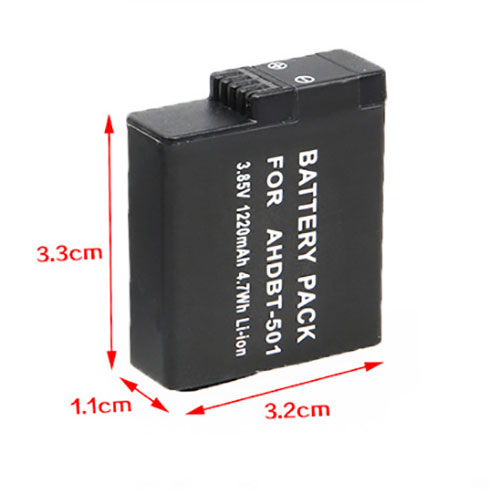
Cheap Gopro AHDBT-501 Li-ion Other battery, Brand New AHDBT-501 replacement battery for Gopro Hero6/Hero5

1220mAh/4.7WH 3.85V Gopro AHDBT-501 Batteries for Gopro Hero6/Hero5, Gopro AHDBT-501 Other battery is a brand new,100% Compatible original and replacement Laptop battery,Purchase wholesale and retail AHDBT-501 with high quality and low price!

AHDBT-501 Battery gopro Li-ion 3.85V 1220mAh/4.7WH

AHDBT-501

Specifications

  • Brand:GoPro
  • Capacity :1220mAh/4.7WH
  • Voltage :3.85V
  • Type :Li-ion
  • Battery Cell Quality: Grade A
  • Descriptive: Replacement Battery – 1 Year Warranty
  • Description: Brand New, 1 Year Warranty! 30-Days Money Back! Fast Shipping!

How we test this Gopro AHDBT-501 Battery Li-ion 3.85V 1220mAh/4.7WH

Step 1: Make sure customer bought the correct battery.
Step 2: Check battery’s appearance and interface.
Step 3: Test battery charger and recharger function.
Step 4: Charger the battery to 100% and recharger to 0% to get real battery capacity
Step 5: Use Ev2300 to check the voltage difference of each goroup cells.
Step 6: Charger battery power more than 30%.
Step 7: Package battery carefully and send out

Compatible Part Numbers:

AHDBT-501

Compatible Model Numbers:

Gopro Hero6/Hero5

How much do you know about how to run laptop well as any place? The follow Tips cut way back on protecting battery life.


1). Please recharge or change your Other battery when battery power low.
2). Using Li-Ion Replacement Gopro AHDBT-501 Other Battery for your notebook which can work longer time than Non Li-ion one.
3). It is better to defragmentation regularly for your Other battery life.
4). In order to reduce the laptop power consumpition, you can use some optical drive spin-down and hard drive in your Other .
5). Please keep your laptop in sleep or standby model without long time using, which both save the Replacement Gopro AHDBT-501 Other Battery power and extend battery using life.
6). Leave your battery in a dry and cool condition when without using.
7). When you rarely or generally plugged in fixed power using, Please take down your battery to avoid hurting battery life.

Hot Products

16.8V/20V 400mA/2200mAH/32Wh BOSE 300769-003 for Bose Sounddock Portable Digita11.1V/12.4v 2300mah BOSE 404600 for Bose SOUNDLINK I II III15.4V 5209mAh RAZER RC30-0248 for RAZER Blade 15 2018 RZ09-023867.4V 2230mAh/17Wh BOSE 063404 for 0634043.8V 6300mAh/23.94Wh AMAZON 2955C7 for Amazon Kindle Fire HD 10.1 7th3.7V/4.2V 1750MAH/6.5WH AMAZON GP-S10-346392-0100 for AMAZON KINDLE 3 3G WIFI Kindle3.8 V 1300 mAh AMAZON MC-305070 for AMAZON Kindle Voyage7.7V 37Wh/4810mAh ACER AP16M5J for ACER A315-51-51SL N17Q1 SERIES3.8V 2930mAh/11.1Wh NETGEAR W-7 for Netgear AirCard 790S 790SP 8103.85V/4.4V 3080MAH/11.86WH ALCATEL TLp030JC for Alcatel A3 XL 9008j

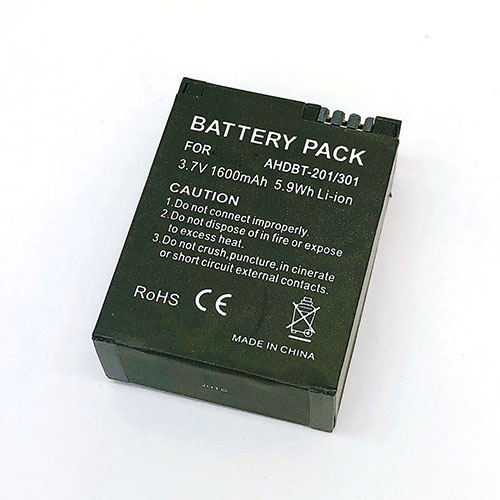
Cheap Gopro AHDBT-301 Li-ion Other battery, Brand New AHDBT-301 replacement battery for GoPro HD Hero3 3

1600mAh/5.9WH 3.7V Gopro AHDBT-301 Batteries for GoPro HD Hero3 3, Gopro AHDBT-301 Other battery is a brand new,100% Compatible original and replacement Laptop battery,Purchase wholesale and retail AHDBT-301 with high quality and low price!

AHDBT-301 Battery gopro Li-ion 3.7V 1600mAh/5.9WH

AHDBT-301

Specifications

  • Brand:GoPro
  • Capacity :1600mAh/5.9WH
  • Voltage :3.7V
  • Type :Li-ion
  • Battery Cell Quality: Grade A
  • Descriptive: Replacement Battery – 1 Year Warranty
  • Description: Brand New, 1 Year Warranty! 30-Days Money Back! Fast Shipping!

How we test this Gopro AHDBT-301 Battery Li-ion 3.7V 1600mAh/5.9WH

Step 1: Make sure customer bought the correct battery.
Step 2: Check battery’s appearance and interface.
Step 3: Test battery charger and recharger function.
Step 4: Charger the battery to 100% and recharger to 0% to get real battery capacity
Step 5: Use Ev2300 to check the voltage difference of each goroup cells.
Step 6: Charger battery power more than 30%.
Step 7: Package battery carefully and send out

Compatible Part Numbers:

AHDBT-301 AHDBT-302 AHDBT-201

Compatible Model Numbers:

GoPro HD Hero3 3

How much do you know about how to run laptop well as any place? The follow Tips cut way back on protecting battery life.


1). Please recharge or change your Other battery when battery power low.
2). Using Li-Ion Replacement Gopro AHDBT-301 Other Battery for your notebook which can work longer time than Non Li-ion one.
3). It is better to defragmentation regularly for your Other battery life.
4). In order to reduce the laptop power consumpition, you can use some optical drive spin-down and hard drive in your Other .
5). Please keep your laptop in sleep or standby model without long time using, which both save the Replacement Gopro AHDBT-301 Other Battery power and extend battery using life.
6). Leave your battery in a dry and cool condition when without using.
7). When you rarely or generally plugged in fixed power using, Please take down your battery to avoid hurting battery life.

Hot Products

16.8V/20V 400mA/2200mAH/32Wh BOSE 300769-003 for Bose Sounddock Portable Digita11.1V/12.4v 2300mah BOSE 404600 for Bose SOUNDLINK I II III15.4V 5209mAh RAZER RC30-0248 for RAZER Blade 15 2018 RZ09-023867.4V 2230mAh/17Wh BOSE 063404 for 0634043.8V 6300mAh/23.94Wh AMAZON 2955C7 for Amazon Kindle Fire HD 10.1 7th3.7V/4.2V 1750MAH/6.5WH AMAZON GP-S10-346392-0100 for AMAZON KINDLE 3 3G WIFI Kindle3.8 V 1300 mAh AMAZON MC-305070 for AMAZON Kindle Voyage7.7V 37Wh/4810mAh ACER AP16M5J for ACER A315-51-51SL N17Q1 SERIES3.8V 2930mAh/11.1Wh NETGEAR W-7 for Netgear AirCard 790S 790SP 8103.85V/4.4V 3080MAH/11.86WH ALCATEL TLp030JC for Alcatel A3 XL 9008j

Cheap Ulefone armor3 Li-ion Cell Phone battery, Brand New armor3 replacement battery for ulefone armor 3T

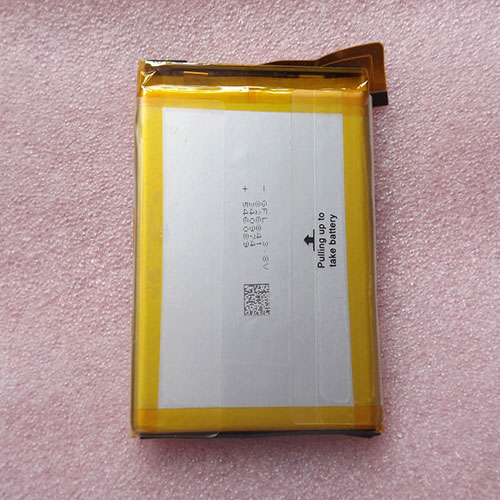
10300mAh 3.8V Ulefone armor3 Batteries for ulefone armor 3T, Ulefone armor3 Cell Phone battery is a brand new,100% Compatible original and replacement Laptop battery,Purchase wholesale and retail armor3 with high quality and low price!

armor3 Battery ulefone Li-ion 3.8V 10300mAh

armor3

Specifications

  • Brand:Ulefone
  • Capacity :10300mAh
  • Voltage :3.8V
  • Color:white
  • Type :Li-ion
  • Battery Cell Quality: Grade A
  • Descriptive: Replacement Battery – 1 Year Warranty
  • Description: Brand New, 1 Year Warranty! 30-Days Money Back! Fast Shipping!

How we test this Ulefone armor3 Battery Li-ion 3.8V 10300mAh

Step 1: Make sure customer bought the correct battery.
Step 2: Check battery’s appearance and interface.
Step 3: Test battery charger and recharger function.
Step 4: Charger the battery to 100% and recharger to 0% to get real battery capacity
Step 5: Use Ev2300 to check the voltage difference of each goroup cells.
Step 6: Charger battery power more than 30%.
Step 7: Package battery carefully and send out

Compatible Part Numbers:

armor3

Compatible Model Numbers:

ulefone armor 3T

How much do you know about how to run laptop well as any place? The follow Tips cut way back on protecting battery life.


1). Please recharge or change your Cell Phone battery when battery power low.
2). Using Li-Ion Replacement Ulefone armor3 Cell Phone Battery for your notebook which can work longer time than Non Li-ion one.
3). It is better to defragmentation regularly for your Cell Phone battery life.
4). In order to reduce the laptop power consumpition, you can use some optical drive spin-down and hard drive in your Cell Phone .
5). Please keep your laptop in sleep or standby model without long time using, which both save the Replacement Ulefone armor3 Cell Phone Battery power and extend battery using life.
6). Leave your battery in a dry and cool condition when without using.
7). When you rarely or generally plugged in fixed power using, Please take down your battery to avoid hurting battery life.

Hot Products

16.8V/20V 400mA/2200mAH/32Wh BOSE 300769-003 for Bose Sounddock Portable Digita11.1V/12.4v 2300mah BOSE 404600 for Bose SOUNDLINK I II III15.4V 5209mAh RAZER RC30-0248 for RAZER Blade 15 2018 RZ09-023867.4V 2230mAh/17Wh BOSE 063404 for 0634043.8V 6300mAh/23.94Wh AMAZON 2955C7 for Amazon Kindle Fire HD 10.1 7th3.7V/4.2V 1750MAH/6.5WH AMAZON GP-S10-346392-0100 for AMAZON KINDLE 3 3G WIFI Kindle3.8 V 1300 mAh AMAZON MC-305070 for AMAZON Kindle Voyage7.7V 37Wh/4810mAh ACER AP16M5J for ACER A315-51-51SL N17Q1 SERIES3.8V 2930mAh/11.1Wh NETGEAR W-7 for Netgear AirCard 790S 790SP 8103.85V/4.4V 3080MAH/11.86WH ALCATEL TLp030JC for Alcatel A3 XL 9008j

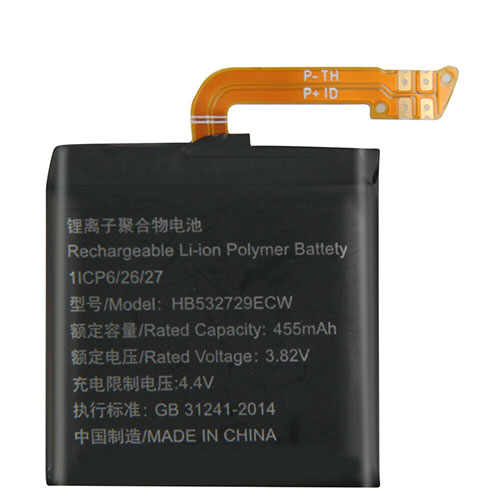
Cheap Huawei HB532729ECW Li-ion Other battery, Brand New HB532729ECW replacement battery for Huawei Watch GT 2 GT2 GT 246mm watch

455mAh 3.82V/4.4V Huawei HB532729ECW Batteries for Huawei Watch GT 2 GT2 GT 246mm watch, Huawei HB532729ECW Other battery is a brand new,100% Compatible original and replacement Laptop battery,Purchase wholesale and retail HB532729ECW with high quality and low price!

HB532729ECW Battery huawei Li-ion 3.82V/4.4V 455mAh

HB532729ECW

Specifications

  • Brand:Huawei
  • Capacity :455mAh
  • Voltage :3.82V/4.4V
  • Type :Li-ion
  • Battery Cell Quality: Grade A
  • Descriptive: Replacement Battery – 1 Year Warranty
  • Description: Brand New, 1 Year Warranty! 30-Days Money Back! Fast Shipping!

How we test this Huawei HB532729ECW Battery Li-ion 3.82V/4.4V 455mAh

Step 1: Make sure customer bought the correct battery.
Step 2: Check battery’s appearance and interface.
Step 3: Test battery charger and recharger function.
Step 4: Charger the battery to 100% and recharger to 0% to get real battery capacity
Step 5: Use Ev2300 to check the voltage difference of each goroup cells.
Step 6: Charger battery power more than 30%.
Step 7: Package battery carefully and send out

Compatible Part Numbers:

HB532729ECW HB472023ECW

Compatible Model Numbers:

Huawei Watch GT 2 GT2 46mm watch

How much do you know about how to run laptop well as any place? The follow Tips cut way back on protecting battery life.


1). Please recharge or change your Other battery when battery power low.
2). Using Li-Ion Replacement Huawei HB532729ECW Other Battery for your notebook which can work longer time than Non Li-ion one.
3). It is better to defragmentation regularly for your Other battery life.
4). In order to reduce the laptop power consumpition, you can use some optical drive spin-down and hard drive in your Other .
5). Please keep your laptop in sleep or standby model without long time using, which both save the Replacement Huawei HB532729ECW Other Battery power and extend battery using life.
6). Leave your battery in a dry and cool condition when without using.
7). When you rarely or generally plugged in fixed power using, Please take down your battery to avoid hurting battery life.

Hot Products

16.8V/20V 400mA/2200mAH/32Wh BOSE 300769-003 for Bose Sounddock Portable Digita11.1V/12.4v 2300mah BOSE 404600 for Bose SOUNDLINK I II III15.4V 5209mAh RAZER RC30-0248 for RAZER Blade 15 2018 RZ09-023867.4V 2230mAh/17Wh BOSE 063404 for 0634043.8V 6300mAh/23.94Wh AMAZON 2955C7 for Amazon Kindle Fire HD 10.1 7th3.7V/4.2V 1750MAH/6.5WH AMAZON GP-S10-346392-0100 for AMAZON KINDLE 3 3G WIFI Kindle3.8 V 1300 mAh AMAZON MC-305070 for AMAZON Kindle Voyage7.7V 37Wh/4810mAh ACER AP16M5J for ACER A315-51-51SL N17Q1 SERIES3.8V 2930mAh/11.1Wh NETGEAR W-7 for Netgear AirCard 790S 790SP 8103.85V/4.4V 3080MAH/11.86WH ALCATEL TLp030JC for Alcatel A3 XL 9008j

Windows 10 command line tool will help you keep track of all your storage

Microsoft has added a new built-in command line tool called DiskUsage to Insider builds of Windows 10 that reports how much disk space folders use.

As first reported by BleepingComputer, the news outlet discovered the new utility when testing Windows Insider builds 20277 and 21277. DiskUsage is capable of scanning entire drives or specified folders and reporting how much drive space each folder is using.

The utility is located in System 32 and is still in the early stages of development. Currently some features are now working as expected and there are even some spelling errors in the the DiskUsage’s instructions.

Still though, admins may find it useful to analyze disk space from terminal windows though most Windows users will likely continue using popular tools such as WizTree or TreeSize.

DiskUsage

As DiskUsage is still in development by Microsoft, the tool currently reports file and folder sizes in bytes as opposed to doing so in megabytes or gigabytes. However, the software giant has included a /h argument to display file and folder sizes in a more conventional way.

It’s also worth noting that DiskUsage requires administrative privileges so Windows Insiders that want to test it out for themselves will need to open an elevated command prompt in Windows 10 before running the tool or else it will display an error.

The tool can be used for general disk space scans but users can also configure it to say, display all of the folders on a drive that are larger that 1GB in size. DiskUsage also includes other features such as creating configuration files with the options you want to use automatically, output customization and the ability to skip over certain folders depending on their type.

We’ll likely hear more about DiskUsage from Microsoft itself once the company is ready to ship the tool in an upcoming Windows 10 release. For now though, Windows Insiders running builds 20277 and 21277 can begin experimenting with it.