How to Fix Audio Level Problems in Windows 10

Windows 10 includes a custom volume mixer, which sounds like a great idea on paper—who wouldn’t a way to control the volume of individual apps? It’s incredibly useful when you need to dial back your game audio a bit so you can hear your guildmates on Discord (or the YouTube video you’re listening to in the background). It’s not so useful when you forget it exists.

For the past week or two, some YouTube videos I’ve watched have sounded a little faint. I didn’t think much of it at first, assuming I simply bumped the dial on the external DAC I use with my headphones. I cranked that up a little bit, which solved the YouTube problem, but I then had to dial back Windows 10’s overall volume because my games and system sounds were coming in a bit too hot.

I didn’t really think about the relationship between my apps and volume. Instead, I kept moving my system’s volume up and down as needed when switching between apps. I figured some of the YouTube videos were just encoded at a lower volume. It happens. The difference between those videos’ volumes, my system volume, and the volumes of my other apps wasn’t jarring enough to make me think something was wrong.

Something was wrong.

After around two weeks of this, it finally clicked. Maybe there was something weird going on with my audio levels. And right before I was about to bury myself in Windows 10’s sound settings, I remembered that damn Windows 10 volume mixer.

You can see it in action yourself by right-clicking on the volume icon in the lower-right corner of your taskbar, and then left-clicking on “Open volume mixer.” In a perfect world, all of the sliders would be at the exact same level, like so:

If you’re seeing some sliders set much differently, or finding that some apps are muted even though you’re still hearing sounds in others (or hearing general Windows system sounds) you’ve found your problem.

To fix this, you’ll have to engage in a fun dance of moving all the sliders either to the top or the bottom of their ranges so they all match. Then, move your Device volume (the left-most slider) to a comfortable position, and it should move all of the other sliders at the same rate. Getting everything to equal out can be a little annoying, but that’s how you fix it.

I haven’t tried it, but there’s another technique to consider: I believe you can also pull up Windows 10’s Sound mixer options via a Start Menu search. In the screen that appears, scroll down a bit, and then click on the “Reset” button in the lower-left corner. This should turn all of your apps up to 100%—that’s one-hundred percent of the system volume, since it’s a relative measurement—without messing with your actual system volume and blowing out your eardrums in the process.

New Apple Leak Reveals Stunning MacBook Pro Upgrade

Thanks to Apple’s new M1 processor, the latest MacBook Air, MacBook Pro, and Mac Mini machines are breaking benchmarks left, right, and center. That’s enough for many of the geekrati to level up to the ARM-based hardware, but Apple has something spectacular planned for 2021.

Building on his previous reports, noted Apple analyst Ming Chi-Kuo lays out a stronger case for Apple switching to mini-LED displays in the MacBook hardware next year. With Apple’s suppliers gearing up for a massive switch in production, it’s clear that the LED panels offering improved colors, higher contract, and better brightness, are on the way. Tim Hardwick reports:

“According to the report, Apple is set to launch its first mini-LED iPad Pro in the first quarter of 2021 and mass produce mini-LED MacBook Pro models in the second quarter, and a number of Taiwan manufacturers are building a “pre-emptive presence” in the Mini-LED segment in anticipation.”

consideration of the silicon. The M1 chip is posting some great numbers of benchmarking sites, and the raw processing power is already matching top tier chips from Intel. While there is more to a computer than the processor, it makes a pretty big difference.

While many are pointing out that Intel still has the superior chip, that misses two pieces of positioning.

The first is that you have to look at the chips being compared. The entry level MacBook Air, with the lowest specced M1, is outperforming everything bar Intel’s top tier of chips. Put the M1 chip against one of Intel’s entry level chips, say in the Core i3 range, and you have a more honest comparison.

Yet the M1 chip is the first generation chip. Literally any MacBook released after this point is going to have more performance in it. When Apple rolls out an M2, or perhaps even the presumptively named M1X for faster desk-bound machines, I would expect Intel to lose that the performance lead.

Then there is Apple’s hardware and software. For all of the slick presentation and joyful initial reviews the M1 and the associated Mac machines are still first generation hardware; coupled with a signification update to macOS to allow it to run on Apple’s ARM-based silicon. While some apps work wonderfully, others are causing problems, running slower than on the Intel Macs, and significantly impacting on battery life.

As with any computing platforms, many of these problems will be addressed with software updates in the majority of cases, although the possibility remains that issues could be found in the hardware. Much as the lore of Apple is rock solid, in practice this is first generation hardware and software. The cautious should wait.

And finally, as typified by this report on the upcoming use of mini-LED screens in next year’s MacBook machines, the current MacBook Air and MacBook Pro machines are old designs. While they have the M1 chip inside, and the necessary updates circuitry to accomodate the changes, apple declined to make any external changes.

That certainly makes the sell to the average consumer a little easier (“look,” the theory goes, “it’s the same Mac you know and love, but its faster and has a longer lasting battery”), yet the brave new world of ARM surely demands a brave new design with the latest technology? That’s coming next year.

A faster processor that will out-gun most if not all of the x86 options; iterations to improve the first generation hardware and software; and the latest technology. All of these are expected in next year’s new MacBooks. 

AMD Radeon RX 6700 XT BIOS files leaked and analysed

Tech enthusiasts gleaned some pre-launch insight into the AMD Radeon RX 6800/XT graphics cards ahead of launch thanks to developer Patrick Schur sharing an AIB card BIOS with veteran tech reviewer Igor Wallossek. Now it looks like history is repeating, with the dynamic duo teaming up to produce insightful analysis of an ‘AMD Radeon RX 6700 XT’ before it becomes official.

The Igor’s Lab blog, spotted via VideoCardz, says that Schur sent along two AMD Navi22 AIB BIOS files for analysis. Before we go on to that it is worth stopping and considering the questions – qhat is an AMD Radeon RX 6700 XT? According to this leaked information it is, nice and neatly, about half-an-RX 6900 XT. Compared to that known quantity flagship it has half the Shaders/TMUs/ROPs/RT Units at 2560/192/64/40. Other spec downgrades are the 3MB L2 cache (down from 4MB), and that the RX 3700 XT has 12GB of GDDR6 on a 192-bit bus.

Checking over the BIOS with his More PowerTool, Igor reckons that “enormous clock rates are expected” from the RX 6700 XT partner cards. The top GFX clock rates supported by the partner BIOS is 2,854MHz – that is higher than the RX 6800 XT limit of 2,800MHz, but less than the RX 6900 XT limit of 3,000MHz. It is much faster than its predecessor, the RX 5700 XT / Navi 21, could muster.

The two BIOS files under scrutiny had been set to different TGPs; one a moderate 186W, the other pushed it to 211W – expected to be a BIOS from a heavily overclocked sample. Another interesting insight derived from the BIOS settings is that the lower TGP model might well be a single fan design (looking at the very high cooling fan RPM). The OC model, meanwhile, has a 15 degree higher temperature max fan target of 95°C.

The rumour mill points to the AMD Radeon RX 6700 XT arriving in Q1 next year, and it is possible a non-XT version will arrive at the same time. Reports suggest that Nvidia is imminently launching the GeForce RTX 3060 Ti so it will be addressing the biggest GPU market first, if stocks are available.

New Second Gen EVE V 2-in-1: Tiger Lake 3840×2400 with Thunderbolt 4

Sometimes for a company to get its projects over the line, it requires the help of crowdsourcing ideas. One such company is Eve Tech, or EVE for short, and looking to build on the success of its first-generation EVE V 2-in-1 dubbed the “Surface Pro Killer”. Today the company has officially lifted the lid on its second-generation EVE V. The new EVE V 2-in-1 includes a whole host of impressive features and specs including Intel’s Tiger Lake mobile processors with Xe integrated graphics, Thunderbolt 4, Wi-Fi 6, and a 13.4″ 4K (3840 x 2400) with 10-point multitouch. The design of the device has been through deep interactions with interested end-user customers to build a device with the specifications that they want.

The EVE V 2nd generation has crammed all of its technology into a very high specification 2-in-1 with consultation of potential customers. For a convertible designed to compete with the latest and greatest, Eve Tech has lifted the lid on the EVE V 2nd Gen specifications, the technologies under the hood, as well as an impressive array of features.

Focusing on the screen, the EVE V is using a 13.4-inch Indium Gallium Zinc Oxide (IGZO) panel with a native 3840 x 2400 pixel (4K 16:10) resolution. This has a 16:10 aspect ratio, with two different variations including the higher-spec 4K resolution, or an FHD 1920 x 1080 resolution at 16:9. Some of the finer specifications of the screen include a 1500:1 contrast ratio, up to 500 nits of brightness, and is using edge-to-edge Corning Gorilla Victus glass, announced recently as one of the most scratch resistant glass surfaces.

The Tiger Lake processor comes with four cores and eight threads, as well as Xe graphics and Thunderbolt 4 support. For a convertable, the EVE V uses a lot of that IO, with three Type-C ports, two of them Thunderbolt 4. The two Thunderbolt 4 Type-C ports also include DisplayPort 1.4 and HDMI 1.4b video support, with a power output of up to 5V or 15 watts as well as charging capabilities. Other connectivity includes a USB 3.2 G2 Type-C port, with a single 3.5 mm audio jack, a microSD reader with compatibility for SDXC up to a maximum of 2 TB. The sound capabilities are also impressive with dual 0.7-watt front-facing speakers, and a pair of 1 W front-facing low-frequency speakers that resemble subwoofer qualities. Some variations of the EVE V will come with a Nano Sim slot for 4G capabilities.

Included with the EVE V is its V pen, which has been upgraded over the EVE V 2016 model. It is based on Wacom’s AES 2.0 technology and features 4096 pressure levels which is designed to benefit from the 10-point touchscreen. The new V keyboard supplied includes a folio cover with a soft touch feel, with a Windows Precision touchpad that includes a textured glass surface for optimal precision. It also includes an adjustable backlight for low light situations. There is a 5 Megapixel rear-facing camera, as well as a 720p front-facing camera for conference calls, as well as a fingerprint reader integrated into the power button.

Although Eve Tech hasn’t fully announced the availability of the V, it estimates that it’ll start shipping by the end of Q3 2021, and will be available globally across various retailers. Users can reserve the EVE V with a fully refundable down payment of $300, with the remaining expected to be paid prior to shipping.

The EVE V will start at $1399 for the base model with a Core i5, 16 GB of memory and a 512 GB NVMe SSD, with the top-spec model with the Core i7, 32 GB of RAM, and a 2 TB NVMe SSD for around $2000. This is inline with some of the premium Tiger Lake notebooks we have seen being launched recently with 3840×2400 screens, such as the Dell XPS13 and the Razer Book 13.

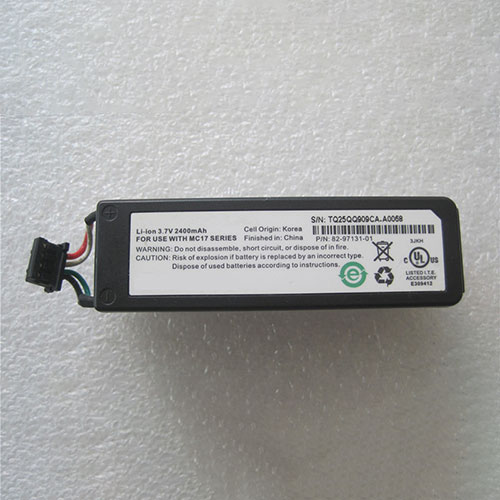
Cheap Motorola 82-97131-01 Li-ion Other battery, Brand New 82-97131-01 replacement battery for Motorola MC17

2400mAh 3.7V Motorola 82-97131-01 Batteries for Motorola MC17, Motorola 82-97131-01 Other battery is a brand new,100% Compatible original and replacement Laptop battery,Purchase wholesale and retail 82-97131-01 with high quality and low price!

82-97131-01 Battery motorola Li-ion 3.7V 2400mAh

82-97131-01

Specifications

  • Brand:Motorola
  • Capacity :2400mAh
  • Voltage :3.7V
  • Type :Li-ion
  • Battery Cell Quality: Grade A
  • Descriptive: Replacement Battery – 1 Year Warranty
  • Description: Brand New, 1 Year Warranty! 30-Days Money Back! Fast Shipping!

How we test this Motorola 82-97131-01 Battery Li-ion 3.7V 2400mAh

Step 1: Make sure customer bought the correct battery.
Step 2: Check battery’s appearance and interface.
Step 3: Test battery charger and recharger function.
Step 4: Charger the battery to 100% and recharger to 0% to get real battery capacity
Step 5: Use Ev2300 to check the voltage difference of each goroup cells.
Step 6: Charger battery power more than 30%.
Step 7: Package battery carefully and send out

Compatible Part Numbers:

82-97131-01

Compatible Model Numbers:

Motorola MC17

How much do you know about how to run laptop well as any place? The follow Tips cut way back on protecting battery life.


1). Please recharge or change your Other battery when battery power low.
2). Using Li-Ion Replacement Motorola 82-97131-01 Other Battery for your notebook which can work longer time than Non Li-ion one.
3). It is better to defragmentation regularly for your Other battery life.
4). In order to reduce the laptop power consumpition, you can use some optical drive spin-down and hard drive in your Other .
5). Please keep your laptop in sleep or standby model without long time using, which both save the Replacement Motorola 82-97131-01 Other Battery power and extend battery using life.
6). Leave your battery in a dry and cool condition when without using.
7). When you rarely or generally plugged in fixed power using, Please take down your battery to avoid hurting battery life.

Hot Products

16.8V/20V 400mA/2200mAH/32Wh BOSE 300769-003 for Bose Sounddock Portable Digita11.1V/12.4v 2300mah BOSE 404600 for Bose SOUNDLINK I II III15.4V 5209mAh RAZER RC30-0248 for RAZER Blade 15 2018 RZ09-023867.4V 2230mAh/17Wh BOSE 063404 for 0634043.8V 6300mAh/23.94Wh AMAZON 2955C7 for Amazon Kindle Fire HD 10.1 7th3.7V/4.2V 1750MAH/6.5WH AMAZON GP-S10-346392-0100 for AMAZON KINDLE 3 3G WIFI Kindle3.8 V 1300 mAh AMAZON MC-305070 for AMAZON Kindle Voyage7.7V 37Wh/4810mAh ACER AP16M5J for ACER A315-51-51SL N17Q1 SERIES3.8V 2930mAh/11.1Wh NETGEAR W-7 for Netgear AirCard 790S 790SP 8103.85V/4.4V 3080MAH/11.86WH ALCATEL TLp030JC for Alcatel A3 XL 9008j

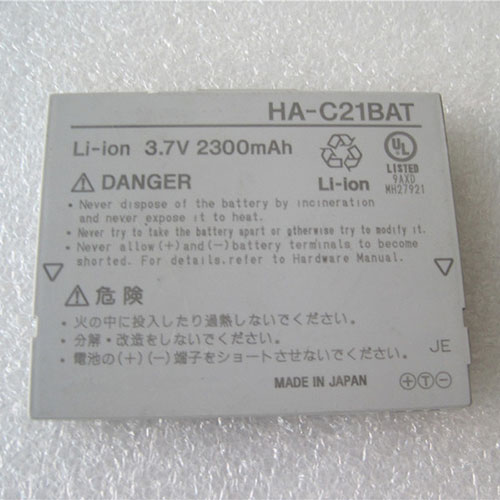
Cheap Casio HA-C21BAT Li-ion Other battery, Brand New HA-C21BAT replacement battery for Casio IT10

2300mAh 3.7V Casio HA-C21BAT Batteries for Casio IT10, Casio HA-C21BAT Other battery is a brand new,100% Compatible original and replacement Laptop battery,Purchase wholesale and retail HA-C21BAT with high quality and low price!

HA-C21BAT Battery casio Li-ion 3.7V 2300mAh

HA-C21BAT

Specifications

  • Brand:Casio
  • Capacity :2300mAh
  • Voltage :3.7V
  • Color:white
  • Type :Li-ion
  • Battery Cell Quality: Grade A
  • Descriptive: Replacement Battery – 1 Year Warranty
  • Description: Brand New, 1 Year Warranty! 30-Days Money Back! Fast Shipping!

How we test this Casio HA-C21BAT Battery Li-ion 3.7V 2300mAh

Step 1: Make sure customer bought the correct battery.
Step 2: Check battery’s appearance and interface.
Step 3: Test battery charger and recharger function.
Step 4: Charger the battery to 100% and recharger to 0% to get real battery capacity
Step 5: Use Ev2300 to check the voltage difference of each goroup cells.
Step 6: Charger battery power more than 30%.
Step 7: Package battery carefully and send out

Compatible Part Numbers:

HA-C21BAT

Compatible Model Numbers:

Casio IT10

How much do you know about how to run laptop well as any place? The follow Tips cut way back on protecting battery life.


1). Please recharge or change your Other battery when battery power low.
2). Using Li-Ion Replacement Casio HA-C21BAT Other Battery for your notebook which can work longer time than Non Li-ion one.
3). It is better to defragmentation regularly for your Other battery life.
4). In order to reduce the laptop power consumpition, you can use some optical drive spin-down and hard drive in your Other .
5). Please keep your laptop in sleep or standby model without long time using, which both save the Replacement Casio HA-C21BAT Other Battery power and extend battery using life.
6). Leave your battery in a dry and cool condition when without using.
7). When you rarely or generally plugged in fixed power using, Please take down your battery to avoid hurting battery life.

Hot Products

16.8V/20V 400mA/2200mAH/32Wh BOSE 300769-003 for Bose Sounddock Portable Digita11.1V/12.4v 2300mah BOSE 404600 for Bose SOUNDLINK I II III15.4V 5209mAh RAZER RC30-0248 for RAZER Blade 15 2018 RZ09-023867.4V 2230mAh/17Wh BOSE 063404 for 0634043.8V 6300mAh/23.94Wh AMAZON 2955C7 for Amazon Kindle Fire HD 10.1 7th3.7V/4.2V 1750MAH/6.5WH AMAZON GP-S10-346392-0100 for AMAZON KINDLE 3 3G WIFI Kindle3.8 V 1300 mAh AMAZON MC-305070 for AMAZON Kindle Voyage7.7V 37Wh/4810mAh ACER AP16M5J for ACER A315-51-51SL N17Q1 SERIES3.8V 2930mAh/11.1Wh NETGEAR W-7 for Netgear AirCard 790S 790SP 8103.85V/4.4V 3080MAH/11.86WH ALCATEL TLp030JC for Alcatel A3 XL 9008j

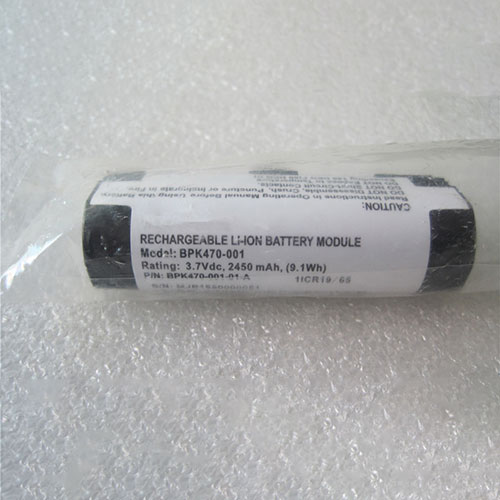
Cheap Verifone BPK470-001 Li-ion Other battery, Brand New BPK470-001 replacement battery for Verifone POS

2450mAh/9.1WH 3.7V Verifone BPK470-001 Batteries for Verifone POS, Verifone BPK470-001 Other battery is a brand new,100% Compatible original and replacement Laptop battery,Purchase wholesale and retail BPK470-001 with high quality and low price!

BPK470-001 Battery verifone Li-ion 3.7V 2450mAh/9.1WH

BPK470-001

Specifications

  • Brand:Verifone
  • Capacity :2450mAh/9.1WH
  • Voltage :3.7V
  • Color:white
  • Type :Li-ion
  • Battery Cell Quality: Grade A
  • Descriptive: Replacement Battery – 1 Year Warranty
  • Description: Brand New, 1 Year Warranty! 30-Days Money Back! Fast Shipping!

How we test this Verifone BPK470-001 Battery Li-ion 3.7V 2450mAh/9.1WH

Step 1: Make sure customer bought the correct battery.
Step 2: Check battery’s appearance and interface.
Step 3: Test battery charger and recharger function.
Step 4: Charger the battery to 100% and recharger to 0% to get real battery capacity
Step 5: Use Ev2300 to check the voltage difference of each goroup cells.
Step 6: Charger battery power more than 30%.
Step 7: Package battery carefully and send out

Compatible Part Numbers:

BPK470-001

Compatible Model Numbers:

Verifone POS

How much do you know about how to run laptop well as any place? The follow Tips cut way back on protecting battery life.


1). Please recharge or change your Other battery when battery power low.
2). Using Li-Ion Replacement Verifone BPK470-001 Other Battery for your notebook which can work longer time than Non Li-ion one.
3). It is better to defragmentation regularly for your Other battery life.
4). In order to reduce the laptop power consumpition, you can use some optical drive spin-down and hard drive in your Other .
5). Please keep your laptop in sleep or standby model without long time using, which both save the Replacement Verifone BPK470-001 Other Battery power and extend battery using life.
6). Leave your battery in a dry and cool condition when without using.
7). When you rarely or generally plugged in fixed power using, Please take down your battery to avoid hurting battery life.

Hot Products

16.8V/20V 400mA/2200mAH/32Wh BOSE 300769-003 for Bose Sounddock Portable Digita11.1V/12.4v 2300mah BOSE 404600 for Bose SOUNDLINK I II III15.4V 5209mAh RAZER RC30-0248 for RAZER Blade 15 2018 RZ09-023867.4V 2230mAh/17Wh BOSE 063404 for 0634043.8V 6300mAh/23.94Wh AMAZON 2955C7 for Amazon Kindle Fire HD 10.1 7th3.7V/4.2V 1750MAH/6.5WH AMAZON GP-S10-346392-0100 for AMAZON KINDLE 3 3G WIFI Kindle3.8 V 1300 mAh AMAZON MC-305070 for AMAZON Kindle Voyage7.7V 37Wh/4810mAh ACER AP16M5J for ACER A315-51-51SL N17Q1 SERIES3.8V 2930mAh/11.1Wh NETGEAR W-7 for Netgear AirCard 790S 790SP 8103.85V/4.4V 3080MAH/11.86WH ALCATEL TLp030JC for Alcatel A3 XL 9008j

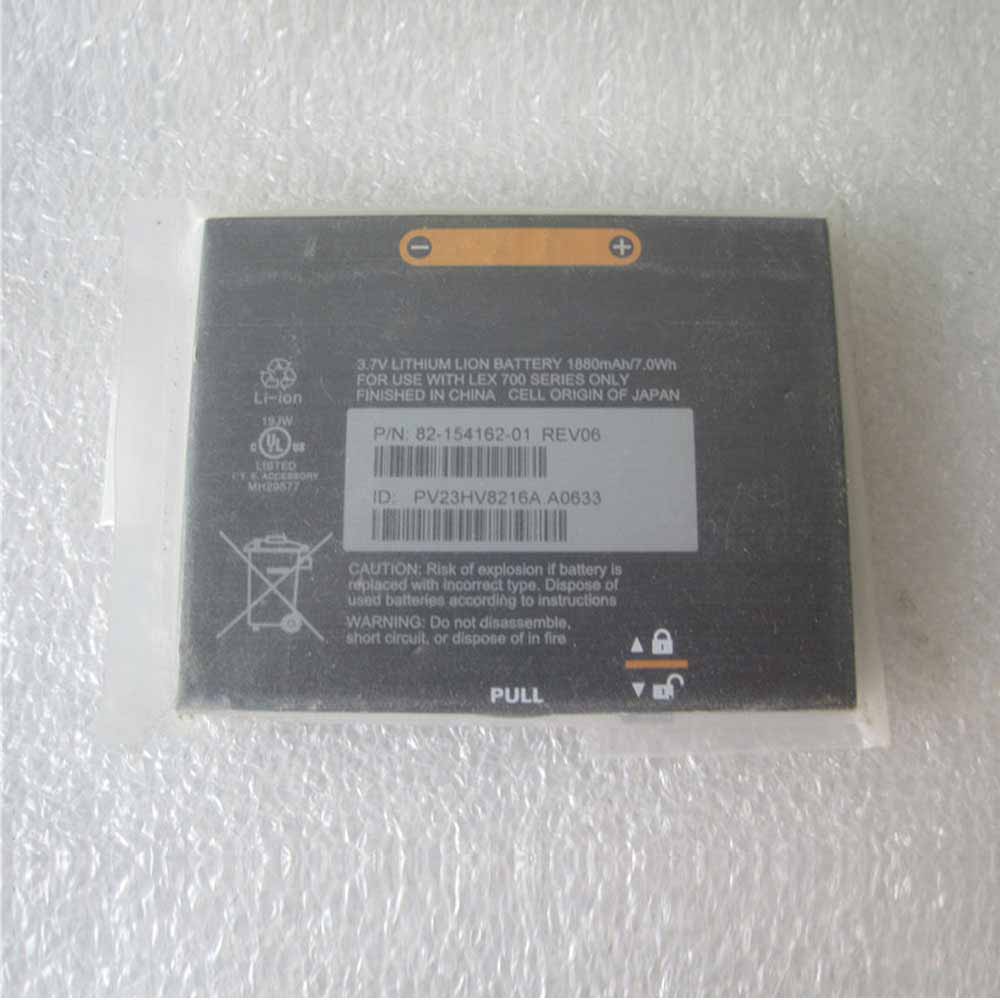
Cheap Motorola 82-1541562-01 Li-ion Other battery, Brand New 82-1541562-01 replacement battery for Motorola LEX700

1880mAh/7.0WH 3.7V Motorola 82-1541562-01 Batteries for Motorola LEX700, Motorola 82-1541562-01 Other battery is a brand new,100% Compatible original and replacement Laptop battery,Purchase wholesale and retail 82-1541562-01 with high quality and low price!

82-1541562-01 Battery motorola Li-ion 3.7V 1880mAh/7.0WH

82-1541562-01

Specifications

  • Brand:Motorola
  • Capacity :1880mAh/7.0WH
  • Voltage :3.7V
  • Type :Li-ion
  • Battery Cell Quality: Grade A
  • Descriptive: Replacement Battery – 1 Year Warranty
  • Description: Brand New, 1 Year Warranty! 30-Days Money Back! Fast Shipping!

How we test this Motorola 82-1541562-01 Battery Li-ion 3.7V 1880mAh/7.0WH

Step 1: Make sure customer bought the correct battery.
Step 2: Check battery’s appearance and interface.
Step 3: Test battery charger and recharger function.
Step 4: Charger the battery to 100% and recharger to 0% to get real battery capacity
Step 5: Use Ev2300 to check the voltage difference of each goroup cells.
Step 6: Charger battery power more than 30%.
Step 7: Package battery carefully and send out

Compatible Part Numbers:

82-1541562-01

Compatible Model Numbers:

Motorola LEX700

How much do you know about how to run laptop well as any place? The follow Tips cut way back on protecting battery life.


1). Please recharge or change your Other battery when battery power low.
2). Using Li-Ion Replacement Motorola 82-1541562-01 Other Battery for your notebook which can work longer time than Non Li-ion one.
3). It is better to defragmentation regularly for your Other battery life.
4). In order to reduce the laptop power consumpition, you can use some optical drive spin-down and hard drive in your Other .
5). Please keep your laptop in sleep or standby model without long time using, which both save the Replacement Motorola 82-1541562-01 Other Battery power and extend battery using life.
6). Leave your battery in a dry and cool condition when without using.
7). When you rarely or generally plugged in fixed power using, Please take down your battery to avoid hurting battery life.

Hot Products

16.8V/20V 400mA/2200mAH/32Wh BOSE 300769-003 for Bose Sounddock Portable Digita11.1V/12.4v 2300mah BOSE 404600 for Bose SOUNDLINK I II III15.4V 5209mAh RAZER RC30-0248 for RAZER Blade 15 2018 RZ09-023867.4V 2230mAh/17Wh BOSE 063404 for 0634043.8V 6300mAh/23.94Wh AMAZON 2955C7 for Amazon Kindle Fire HD 10.1 7th3.7V/4.2V 1750MAH/6.5WH AMAZON GP-S10-346392-0100 for AMAZON KINDLE 3 3G WIFI Kindle3.8 V 1300 mAh AMAZON MC-305070 for AMAZON Kindle Voyage7.7V 37Wh/4810mAh ACER AP16M5J for ACER A315-51-51SL N17Q1 SERIES3.8V 2930mAh/11.1Wh NETGEAR W-7 for Netgear AirCard 790S 790SP 8103.85V/4.4V 3080MAH/11.86WH ALCATEL TLp030JC for Alcatel A3 XL 9008j

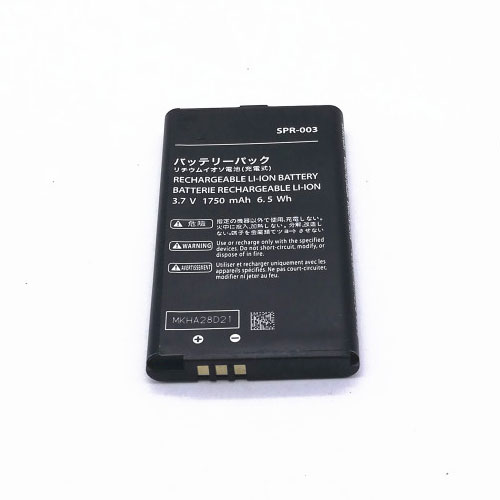
Cheap Nintendo SPR-003 Li-ion Other battery, Brand New SPR-003 replacement battery for Nintendo 3DS XL And 3DS XL

1750mah/6.5Wh 3.7V/4.2V Nintendo SPR-003 Batteries for Nintendo 3DS XL And 3DS XL, Nintendo SPR-003 Other battery is a brand new,100% Compatible original and replacement Laptop battery,Purchase wholesale and retail SPR-003 with high quality and low price!

SPR-003 Battery nintendo Li-ion 3.7V/4.2V 1750mah/6.5Wh

SPR-003

Specifications

  • Brand:Nintendo
  • Capacity :1750mah/6.5Wh
  • Voltage :3.7V/4.2V
  • Type :Li-ion
  • Battery Cell Quality: Grade A
  • Descriptive: Replacement Battery – 1 Year Warranty
  • Description: Brand New, 1 Year Warranty! 30-Days Money Back! Fast Shipping!

How we test this Nintendo SPR-003 Battery Li-ion 3.7V/4.2V 1750mah/6.5Wh

Step 1: Make sure customer bought the correct battery.
Step 2: Check battery’s appearance and interface.
Step 3: Test battery charger and recharger function.
Step 4: Charger the battery to 100% and recharger to 0% to get real battery capacity
Step 5: Use Ev2300 to check the voltage difference of each goroup cells.
Step 6: Charger battery power more than 30%.
Step 7: Package battery carefully and send out

Compatible Part Numbers:

SPR-003

Compatible Model Numbers:

Nintendo 3DS XL And 3DS XL

How much do you know about how to run laptop well as any place? The follow Tips cut way back on protecting battery life.


1). Please recharge or change your Other battery when battery power low.
2). Using Li-Ion Replacement Nintendo SPR-003 Other Battery for your notebook which can work longer time than Non Li-ion one.
3). It is better to defragmentation regularly for your Other battery life.
4). In order to reduce the laptop power consumpition, you can use some optical drive spin-down and hard drive in your Other .
5). Please keep your laptop in sleep or standby model without long time using, which both save the Replacement Nintendo SPR-003 Other Battery power and extend battery using life.
6). Leave your battery in a dry and cool condition when without using.
7). When you rarely or generally plugged in fixed power using, Please take down your battery to avoid hurting battery life.

Hot Products

16.8V/20V 400mA/2200mAH/32Wh BOSE 300769-003 for Bose Sounddock Portable Digita11.1V/12.4v 2300mah BOSE 404600 for Bose SOUNDLINK I II III15.4V 5209mAh RAZER RC30-0248 for RAZER Blade 15 2018 RZ09-023867.4V 2230mAh/17Wh BOSE 063404 for 0634043.8V 6300mAh/23.94Wh AMAZON 2955C7 for Amazon Kindle Fire HD 10.1 7th3.7V/4.2V 1750MAH/6.5WH AMAZON GP-S10-346392-0100 for AMAZON KINDLE 3 3G WIFI Kindle3.8 V 1300 mAh AMAZON MC-305070 for AMAZON Kindle Voyage7.7V 37Wh/4810mAh ACER AP16M5J for ACER A315-51-51SL N17Q1 SERIES3.8V 2930mAh/11.1Wh NETGEAR W-7 for Netgear AirCard 790S 790SP 8103.85V/4.4V 3080MAH/11.86WH ALCATEL TLp030JC for Alcatel A3 XL 9008j

The Asus RT-AX86U Is a Wi-Fi 6 Router That Doesn’t Sacrifice Looks for Power

Wi-Fi 6 has accelerated its creep into mainstream wireless networking, urged along by the similarly accelerating spread of gigabit internet. Until the last few months or so, purchasing a Wi-Fi 6 device has largely been a decision more about future-proofing and less about immediate gain. That’s quickly changing, however, with all manner of wireless device manufacturers releasing products boasting about blazing this and blistering that, and it’s finally time to take a serious look at 802.11ax routers.

The Asus RT-AX88U was an early entrant in the field, and the company now has several follow-ups, including our best gaming router runner-up: the RT-AX86U. There, I gave it credit for being extremely fast and for its restrained physical design. However, I took issue with Asus’s UI decisions. In the end, I concluded that I would recommend it to anyone looking for a good gaming experience. Now I’m taking an even deeper dive to find out: Is this router worth it for just any old person and not just gamers presumably reading this in a hoodie with some kind of RGB lighting and heat vents? I think so, and you should, too.

As far as the design of the Asus RT-AX86U goes, there isn’t much to say, and frankly, that’s a good thing. It’s neither a slab nor a monolith, neither an ancient alien artifact nor an air freshener chic pod (though it can be a Gundam, apparently). It’s black, it stands upright, and it has three stabby, removable, adjustable antennas jutting from the top. It has four outgoing gigabit ethernet ports—one of which is an auto-prioritizing gaming port—in the back, a gigabit WAN, and a 2.5-gigabit LAN/WAN port for those lucky enough to be able to make use of it. Two USB 3.2 Gen 1 ports give you a fast NAS if you’ve got a hard drive lying around.

Getting it set up is a quick process, refreshingly letting me choose up front whether to separate the 2.4 and 5 GHz bands. Knowing that I would need to reconfigure some real dumb smart devices, I opted for separation, and my network was up and running in about five minutes.

But it should be noted there are two ways to handle setup and management. One is via a lovely mobile app, and the other is via the browser, and I hate the browser-based UI of Asus routers. It’s just a weird, unfocused, confusing mess. If you’re the type of person who wants deep, granular control of your home network, but don’t want to shell out for expensive enterprise-grade hardware, you could do a lot worse than Asus, but prepare to hunt for the settings you need to adjust. Trudging through the settings reveals menus and submenus that stretch out seemingly to infinity, with an intimidating depth that would have most people regarding it with narrowed eyes and a feigned understanding, muttering, “Yes, I see,” as they slowly mouse up to click the X button on that tab.

The intro screen has a basic network topology map which gives you a diagram of what all is connected, and a section where you can split out your 2.4 and 5 GHz bands or update your network SSID and password. After that, you get the shiny feature-y stuff, the majority of which, like the specific data-type prioritizing Adaptive QoS, Traffic Analysis, and various media modes and security, is powered by Trend Micro.

Together they offer a host of security features in the AiProtection section, promising to block malicious sites, protect you from Distributed Denial of Service attacks, and network vulnerability attacks like Heartbleed, while also monitoring outgoing traffic for suspicious packets from virus-infected devices. Each tab under this section gives you reports of suspicious network behavior, with downloadable logs for your review. In testing at wicar.org, the router blocked all but two of 10 sites, with Safari catching the last two. It seemed to work well, though the experience is barebones, and unlike the rest of the settings for the router, there are no opportunities for customization, just toggles for each of the three categories of protection. But using this, or a few other key features powered by Trend Micro, will bring you eventually to this EULA notice:

It seems that in order to have access to Trend Micro’s features, you must agree to give them access to all kinds of data, which may include your e-mails or your web browsing history. It’s spooky stuff, as usual, but thankfully all fairly easy to opt in or out of, as well—so long as you can bear the ensuing message about the valuable capabilities you’ll lose out on. So, it’s not quite the deal with Ursula the Sea Witch I initially worried it was, and, in the end, the details in the EULA are perhaps not unexpected for security software like this. I reached out to both Asus and Trend Micro for their input on what sort of data they collect and how exactly it’s used, and we’ll update here when we get a response.

Deeper in the menus, you will find a surprisingly pleasant Open NAT section with pre-configured port reservations for specific games and consoles, and NAS options that include support for Apple’s Time Machine backup software. Most people will go wall-eyed looking at options past these, but it’s worth noting that if you want to use features like OFDMA and MU-MIMO, beamforming, and, I don’t know, the actual Wi-Fi 6 standard, you’ll want to push on into the advanced settings—just don’t expect to understand much of what you are presented with here, unless you have studied networking down to a very specific level. That said, if you have time and sufficient grit, you can sift through it and find some truly powerful options.

Now, for all the shade I throw at the browser interface, Asus actually does a pretty decent job with their mobile app. Appearance-wise, it’s far from the tidy design of most of Asus’s competitors; the app looks the way we might have imagined the UI of the future would in the early aughts or late ‘90s—all sci-fi space controls floating against a star field, complete with animations that are just there to look neat. While very silly, it’s a breath of fresh air after using the web interface, with more of the stuff you would want quick access to right there on the home screen, like Adaptive QoS mode switching, letting you quickly switch priority to games, video conferencing software, media streaming, and more.

While not quite as robust as the browser UI, the mobile app is far more user-friendly, even if it isn’t perfect. I greatly appreciated seeing signal noise shown for individual devices—also an option in the browser—which helps a lot when placing them for the best signal, which is especially important for things like smart speakers, which can be made or broken by your choices regarding network topology.

Looking at the feature list, it’s not unusual to wonder why in the hell you would want to command your router with Alexa. But, in the interest of being thorough, I grabbed my long-banished Echo Dot to test, and I did find some genuinely useful bits here—temporarily activating your guest network, for example, or pausing wifi. Perhaps the most useful of the bunch is the ability to change Adaptive QoS modes without going into the app.

The main shortcoming of Alexa Skills remains: Every command must be prefaced with “Alexa, ask my router…”, followed by a prescribed set of phrases you must memorize (or look up every time, defeating the purpose). The pricier RT-AX88U gives you a small selection of more natural-sounding phrases like, “Alexa, pause my wifi.” I tried anyway; not only did it not work, but Alexa pretended not to know who I was.

The rest of my smart home experience on this router, initial difficulties aside, was a good one—lightbulbs flicked on and off, routines ran, and my chosen smart assistant didn’t hesitate to respond to my requests.

The RT-AX86U is powered by a 1.8 GHz quad-core CPU with 1 GB of RAM and 256 MB Flash memory. Theoretically, it can transmit up to 4804 Mbps on the 5 GHz band, or up to 861 Mbps on the 2.4, but you’ll never see those speeds, nor should you expect them. It has four antennas—one of which is an internal, printed circuit board antenna, and works all the way up to the 160 MHz band, which is a key component of Wi-Fi 6, and necessary to reach the fastest speeds the router is capable of. It has a long list of other terms that describe how powerful it is.

As I’ve noted previously, the RT-AX86U is great for gaming. I wanted to take it further, so I decided to stress test the router, streaming music at the highest quality available on multiple devices, watching a 4K nature documentary on Apple TV, which is known for its high-bitrate streaming, conducting a video call with a friend, and playing CS:GO on official servers. This is a realistic scenario in my home, and the RT-AX86U aced it—I saw no sign of buffering or stuttering anywhere, my friend reported clear audio and smooth video, and in-game ping seemed unaffected. In raw numbers, I had to move into my back yard to get anything slower than the max I’m getting from my ISP, finding that I had good, usable internet even at the farthest reaches of my yard, which is about a fifth of an acre.

I tested file transfers with a 734 MB copy of Ernest Saves Christmas—a typical use case for network storage—and found the transfers to be very fast, with the limiting factor seemingly the actual read/write capability of the router. Transfer speeds reached as high as 465.79 Mbps, but averaged between 310 and 350 Mbps, and hardly budged at any distance. Write speeds were about half that.

After determining that the RT-AX86U was gross overkill for my needs, I thought I would look at Asus’s AiMesh, which lets you use multiple Asus routers to create a mesh network. Self-healing and pretty straightforward to set up, an AiMesh network can definitely get you that kind of blanketed internet plants crave.

I tested the mesh capabilities with the addition of an RT-AX82U, and for some reason, setting this up ended up actually being the only way I could finally get my “smart” bathroom light switch to join my new network. I came to this experience with the breezy setup of Eero already in mind and found it similarly easy with Asus. Network performance was as expected, with devices generally connecting to the node closest to them or, at least, with the lowest amount of signal noise, and no real noticeable changeover time. Basically, mesh networking is a revelation to anyone who hasn’t used it, and that much is true here, as well.

In the end, the Asus RT-AX86U is a great router, with speedy performance and easy setup, despite an annoying menu system. Actually getting down and dirty in the settings is a pain, thanks to confusing, incompletely explained technicals and messy organization, but basic and intermediate settings can be easily changed in the mobile app. Security and device prioritization for the router is decent, though I recommend you review the EULA before proceeding to make sure you’re comfortable with the exchange you must make to take advantage. The mesh setup was fairly painless. The RT-AX86U met and, in some cases exceeded, my expectations, at least where it counts. Of course, you’re going to pay for it, at MSRP $250—though you can find decent discounts at the usual online retailers.

Whether you just want lag-free gaming or you need something that can handle a heavy overall load, this router does it with aplomb. We are rapidly approaching the day when recommendations like this one isn’t just about future-proofing, but you will find in the RT-AX86U a router more than capable of meeting the unexpected demands put upon all of us this year. If you’ve got a smaller home that needs a lot of power and would prefer to check out mesh networking at a later date, this is absolutely the router for you.