ASRock x Razer: New Razer Taichi Edition X570 and B550 AMD Motherboards

ASRock and Razer have today announced a product collaboration. Two of ASRock’s premium models for AM4 are being updated with Razer styling and Razer Chroma connectivity: the X570 and B550 Taichi Razer Edition. Built upon the popular Taichi series, both of the new Razer Edition variants include a 16-phase power delivery, with official support and compatibility with Razer’s Chroma RGB ecosystem.

Whenever Razer does a collaboration with any company in the hardware industry, it gets people excited and talking. One of the most prominent brands globally with its green inspired peripheral range, as well as its various wacky ideas such as an RGB gaming toaster; I can’t ever be as excited for a toaster as much as the Chroma Edition.

Back to the actual hardware, and it has teamed up with ASRock, a company seemingly fearless when trying new and off-the-wall ideas. This has realised the two new models, the B550 and X570 Taichi Razer Edition. The Taichi series is one of ASRock’s most popular ranges, especially in the premium motherboard space, and the new Razer Editions will build upon this with both the AMD AM4 500 series chipsets being treated to some Chroma.

Both the ASRock X570 and B550 Taichi Razer Edition models will feature much of the same feature set including a large 16-phase VRM, built with premium 60 A chokes and Nichicon 12K black capacitors. In regards to the actual specifications, both of these new models correspond nearly identically with its non Chroma counterparts. The X570 Taichi Razer edition includes three PCIe 4.0 x4 M.2 slots, eight SATA ports from the chipset, a 2.5 GbE port as well as a Killer AX1650 Wi-Fi 6 module. For the B550, it is slightly lower down the pecking order due to the PCIe 4.0 support coming only from the CPU. It includes one PCIe 4.0 x4 M.2 slot, with an additional PCIe 3.0 x4 M.2 slot with eight SATA ports, four from the chipset and four from an ASMedia SATA controller.

The biggest impact and only differences between the standard X570 and B550 Taichi’s compared to the Razer Edition models comes visually, with Razer’s flair located around the board itself. The addition of addressable RGB headers taps into one of the biggest RGB Ecosystems around, the Razer Chroma RGB. On both models, the Razer logo can be found on the rear panel cover and the chipset heatsinks, for a bit of added flair and vibrance that RGB offers. These aren’t OLED screens, just Razer branded vanity plates.

It should be noted that Razer is famous (infamous?) for doing things like green USB ports to unify the branding. That hasn’t happened here however, indicating that this is more of a collaborative branding exercise rather co-design effort.

As it stands, the ASRock X570 and B550 Taichi Razer Editions aren’t on the open market and neither company has opted to announce a release date or pricing. Given that both models include official pages (X570 and B550) on the ASRock website means that this launch for its target markets (TBA) should be imminent.

HP’s latest privacy tool for laptops is meant to thwart prying eyes

It’s getting pretty difficult to make a laptop that stands out. There are countless thin and light notebooks with comfortable keyboards, beautiful screens and enough power for most professional workflows. To really make an impression, manufacturers have to introduce some unique features that rise above mere gimmickry. HP’s latest attempt is something called Presence Aware on the EliteBook 1040, which lets the machine know when you’re in front of it so that it can dim the screen when you leave and wake up when you return. There’s also a new AI noise reduction tool to make your voice sound clearer on calls. 

Though we don’t review many commercial laptops like HP’s EliteBook series, we’re making an exception this time because interesting new features like Presence Aware and AI Noise Reduction tend to show up in HP’s consumer models after debuting in business-first lines. The $1,560 EliteBook 1040 is our first chance to determine if these are actually useful or if they’re actually useful.

Summary

The HP EliteBook x360 1040 G7 is our first chance to test the company’s presence-sensing feature that dims and locks your computer when you leave and wakes it when you return. It works as advertised, but is mostly useful for people working in an office and don’t always remember to lock their machine when they step away. The EliteBook x360 1040 G7’s screen is on the dim side, but if you can tolerate that you’ll appreciate its beautiful design, reliable performance and good battery life.

Design

HP has become a leader in laptop design, with its Spectre series being some of the best-looking ultraportables around. The company’s machines often have super thin silhouettes with unique flourishes like leather coverings. The EliteBook 1040 is less striking — its silver exterior and sloping profile are pretty typical these days, but touches like the angled lip and shiny branding on the back edge add subtle style. HP also said this year’s model is slightly smaller and lighter than the last generation. Regardless, this is a good-looking machine, and one of few commercial laptops that also looks stylish. 

The 14-inch display is surrounded by thin bezels on the right and left, though the top and bottom borders are wider to accommodate a Windows Hello-capable IR webcam (and, uh, HP’s logo). You can use a dedicated keyboard shortcut to trigger a physical shutter to keep prying eyes from spying through your webcam. Meanwhile, next to the spacebar sits a fingerprint sensor. Unlike Samsung’s Galaxy Book Flex 13, which also has a fingerprint scanner on the keyboard, HP’s reader takes the form of a button that you can actually push down on. It’s a bit superfluous since you don’t have to press the key for the laptop to read your fingerprint. 

Possibly because it’s meant for business users, the EliteBook 1040 comes with a conservative (which is to say generous) port selection, including two USB-A connections, an HDMI socket, a microSD card reader and a headphone jack. There’s also a pair of Thunderbolt-friendly USB-C ports, which you can use to charge the device on the right edge. That said, having one on either side would have been a bit more convenient. 

Display and audio

The EliteBook’s 1,920 x 1,080 screen is crisp and colorful. I enjoyed watching Engadget’s docuseries Superhumans and the speakers flanking the keyboard were loud and clear. I also played videos of Costa Rica in 4K and they looked rich and detailed, while Christmas jazz music was bright and well-rounded. 

I do wish the display were brighter, though — it was sometimes hard to see in sunlight. It’s still clearer than HP’s other laptops with built-in privacy filters, though. By skipping out on the filter, the EliteBook 1040 instantly improved its viewing angles. 

Keyboard and trackpad 

I’ve loved HP’s EliteBook keyboards for some time now, and the 1040 doesn’t disappoint. The buttons are satisfyingly deep and offer clicky feedback that reminds me of mechanical keys. The layout is well spaced, and since this is a 14-inch machine there’s also room on the right for an additional column of keys including Home, Page Down, Page Up and End. 

HP also threw in a nifty programmable key in the shortcut row at the top, which you can set to launch your favorite apps, files or websites. Using a combination of Ctrl, Alt and Shift with the programmable button, you can create up to four different shortcuts. For example, you could set the key to launch your messaging apps, browser with tabs open for email and calendar, as well as your photo and audio editing software. This way, you can start your work day with all your frequently used tools with just a push. Then you could set Shift-ProgramKey to pull up three different browsers set to the PlayStation 5 order page for various retailers when a drop is about to happen. It’s a simple but surprisingly useful feature that I wish more companies would adopt.

Presence Aware and AI Noise Reduction

Another feature unique to the new EliteBook 10 series is HP’s Presence Aware. This uses a proximity sensor to tell if you’re in front of your laptop to dim your screen and lock your machine when you walk away, and wake it up when you’re back. Because it uses a proximity sensor instead of a camera, Presence Aware will also work if you’ve shuttered the webcam, and it’s not looking for identifying features like your eyes or face.

On my first review unit I couldn’t use Presence Aware at all; the settings page just said “Service Unavailable.” The second unit worked fine, and I set the system to dim and lock within five seconds of me leaving. It mostly behaved as I expected: The system woke up once I returned, and signed me in via Windows Hello using the webcam. 

Since I’m working from home and no one else is here, Presence Aware doesn’t offer many benefits for me other than a fraction of a second saved by not having to hit a button to wake the laptop up. HP claims that this can also help save battery by putting the machine to sleep when you’re away, though I don’t find it that different from existing screen timeout tools. 

When we do return to offices, though, this feature could be useful for those of us who don’t always remember to lock our laptops when we leave our desks. It still requires at least a few seconds after you walk away to lock your machine, so if someone stood in front of your desk once you leave they could thwart the auto-lock. But at least if you are still in the vicinity, you’d be aware of would-be interlopers.

point out that it uses a 60-degree TOF sensor that scans a wider angle so it’s quicker at knowing when you’re back at your desk.

Another feature that’s new with the EliteBook 1040 is an “AI noise reduction” tool that’s supposed to suppress ambient noise for “crystal-clear conferencing.” You might want to reword your claim, HP, because even though the feature seemed to work, it didn’t make my voice sound completely clear. 

I used Audacity to record myself speaking while I played sounds of a siren on my phone, and the AI was smart enough to silence the noise when I wasn’t talking. Whenever I did say anything, though, the mic activated and the EliteBook picked up the wailing sounds in the background, so I still had to compete to be heard. It’s impressive that the system is smart enough to know when I’m speaking and open up the microphone, but it doesn’t appear to be suppressing the sounds it claims it does while I’m talking. These noises include rustling paper, barking dogs and slamming doors. HP also didn’t respond to a question about whether this is something you can turn off. 

Performance and battery life

Thanks to its 10th-gen Intel Core i7 processor, the EliteBook 1040 was more than capable of handling my daily workflow. I encountered no delays as I wrote up news posts while covering a live event on YouTube, downloading and editing pictures and researching stories. It kept running even as I pushed it harder, jumping in and out of League Of Legends to chat with my friends on Discord and Telegram. That said, it did take a second or so to switch between those apps. 

The EliteBook also lasts a long time. On our video rundown test, it clocked 14 hours and 23 minutes, which is a respectable score. In general use, the EliteBook 1040 also managed to stick around all day.

Wrap-up

The EliteBook x360 1040 G7 starts at $1,500 with a hefty discount on HP’s website right now, and for that price there are plenty of better consumer options to consider. Of course, your company’s IT department might be willing to pay more for the security software and protocols that are compatible with its setup. 

But features like HP Presence Aware and noise reduction are what I’m more concerned about in this review and neither of them are very exciting just yet. If they’re a taste of what’s to come in future mainstream laptops, I believe companies will continue to struggle to find ways to make their products stand out. Aside from those features and its somewhat dim screen, though, the HP EliteBook x360 1040 G7 is a good if somewhat pricey laptop.

Jabra Elite 85t review: AirPods Pro-beating noise cancelling Bluetooth earbuds

Jabra is back with its fourth-generation Bluetooth true wireless earbuds, the Elite 85t, with improved fit, better sound and active noise cancelling to rival Apple’s AirPods Pro.

The Elite 85t cost £219.99 and top the range that includes its predecessors the £170 Elite 75t and £140 Elite 65t.

The new earbuds have a lighter and more balanced fit compared with the Elite 75t. The redesigned oval-shaped silicone ear tips don’t enter your ear canal quite so deeply, but are no less secure. The remainder of the earbud sits comfortably outside your ear, avoiding resting on any delicate parts or protruding too far.

Specifications

Water resistance: sweat and weather resistant (IPX4)

Drivers: 12mm

Connectivity: Bluetooth 5.1, SBC, AAC

Battery life: 5.5 hours with ANC (up to 25 hours with case)

Earbud dimensions: 23.1 x 19.0 x 16.2mm

Earbud weight: 7g each

Charging case dimensions: 64.8 x 41.1 x 28.5mm

Charging case weight: 45.1g

Case charging: USB-C, Qi wireless charging

Connectivity and controls

The Elite 85t are some of the first true wireless earbuds to be able to connect to two different devices simultaneously – something that is common in high-end Bluetooth over-ear headphones and handy for connecting a phone and computer or tablet at the same time.

They support the latest Bluetooth 5.1 and both the universal SBC standard Bluetooth audio format as well as the higher quality AAC format used by Apple’s various products and most Android devices. They do not support aptX or higher quality audio formats commonly used by Windows PCs and Android devices, however.

Their connection to various iPhone 12 models, a Samsung Galaxy Z Fold 2 and OnePlus 8T was rock solid. The right earbud can be used on its own for calls or music, but the left cannot.

A button on each earbud supports single, double or triple presses to control playback, noise cancelling or to summon your phone’s voice assistant. You can set which button combo does what in the Jabra Sound+ app. Pressing and holding adjusts the volume – left earbud for down, right for up – with useful audible clicks as each new volume level is set. The music pauses on removal of an earbud and resumes once reinserted.

Sound and noise cancelling

The sound quality is much improved over Jabra’s previous efforts. The earbuds produced a rich, highly detailed but balanced sound with excellent dynamic range. Bass is deep, but doesn’t dominate in the way it does for the Elite 75t, mids are rich in detail and highs are precise.

The earbuds handle most music genres well, including the complex and overlapping tones of tracks such as the Who’s Baba O’Riley. They are suitably aggressive for Dr Dre’s Next Episode while still managing to sound deep and rich on tracks such as Darkside’s Paper Trails.

A fully customisable equaliser is available in the Sound+ app alongside a test to personalise the sound to your hearing, although they sounded great out of the box.

They beat Apple’s AirPods Pro on audio quality, making them easily some of the best-sounding true wireless earbuds you can buy, but fall just shy of the sonic highs of Sony WF-1000XM3.

The active noise cancelling is equally impressive. Turned up to maximum it was very effective, reducing the sounds of speech, eliminating rumble and unwanted noise but without making you feel completely plugged in or cut off from the outside world.

There are five noise cancelling levels to choose from, plus “hearthrough”, which is a really good ambient listening mode that allows you to hear the world around you – great for listening out for announcements or road awareness.

Battery life and case

The battery lasts more than five hours of continuous playback with noise cancelling active or about seven with it off. The case can recharge the earbuds 3.5 times, bringing the total combined battery life to 25 hours with noise cancelling or 31 without. A 15-minute charge in the case provides up to an hour of playback.

The case is small, black and plastic with a flip-top lid. It’ll fit in the money pocket of a pair of jeans, making it one of the best in the business.

Sustainability

Jabra estimates the batteries in the earbuds and case will last for 500 full-charge cycles while retaining at least 80% of capacity. None of the batteries are replaceable nor are the earbuds repairable, ultimately making them disposable.

You can buy replacement tips, earbuds and cases. Jabra operates a recycling and trade-in scheme but the product does not contain any recycled material. The company publishes sustainability goals and yearly reports as part of parent company GN Store Nord.

Observations

Activating noise cancelling doesn’t inhibit the bass or tone.

Call quality was good, with recipients saying I sounded clear, and there was little background noise.

Price

The Jabra Elite 85t cost £219.99.

For comparison, the Elite 75t has an RRP of £169.99, the Bose QuietComfort Earbuds cost £249.95, Samsung’s Galaxy Buds Live cost £179, Apple’s AirPods Pro cost £249 and Sony’s WF-1000MX3 cost £169.

Verdict

The Jabra Elite 85t are some of the best true wireless earbuds you can buy.

They combine great sound, good noise cancelling, long battery life and a comfortable fit with an excellent, pocketable case and the ability to connect to two devices at the same time. Only the right earbud can be used on its own and it is regrettable, similar to most true wireless earbuds, that they cannot be repaired.

It has been a long time coming, but Apple’s AirPods Pro have finally been bettered by the Jabra Elite 85t, particularly for Android users.

Pros: great sound, good noise cancelling, multi-connection, good controls, comfortable fit, great case, long battery, no stalks.

Cons: only right earbud can be used on its own, no aptX, not repairable, batteries not replaceable, expensive.

Is Windows Defender Good Enough to Protect Your PC by Itself?

I mostly write reviews of VPNs, articles and features about VPNs, and responses to emails (of varying degrees of hostility) from or about VPN services. In nearly all of these contexts, I’ve tried to explain that VPNs (although excellent for securing your internet traffic) don’t replace password managers, antivirus suites, or the use of two-factor authentication (2FA). But recently a reader asked me if I was implying that the security software from Microsoft was somehow lacking. That’s a question worth considering.

Here’s what our intrepid reader sent me. Note that this excerpt has been edited for brevity and to remove personal information.

The short answer is that the bundled security solution from Microsoft is pretty good at most things. But the longer answer is that it could do better—and you can still do better with third-party antivirus.

Is Windows Defender Any Good?

For those who are unaware, Microsoft Security Essentials was antivirus software included by Microsoft with Windows starting in 2009, until it was supplanted by Microsoft Windows Defender Security Center. With this software, Microsoft ensured that customers would have some kind of protection from the moment they first booted up their computer. It costs them nothing and doesn’t require them to take any action.

When Microsoft’s security offering first went under the microscope, it didn’t impress. But it improved over time, so much so that it started to snag top scores from independent lab assessments. In his review, my colleague Neil Rubenking found that Microsoft’s offering did an excellent job detecting and preventing malicious software.

Now, Defender hasn’t totally stolen the spotlight away from the McAfees and the Bitdefenders of the world. You could chalk that up to decades of name recognition for competitors, but testing has revealed some notable shortcomings in Windows Defender. Rubenking found that the SmartScreen filter in Edge blocked just 68 percent of phishing sites, for example. That’s particularly bad compared to the 89 and 90 percent blocked by Firefox and Chrome. In those tests, Kaspersky and McAfee blocked 100 percent of the phishing sites.

That’s especially disappointing because phishing attacks can do a lot of damage to victims, and they don’t require a lot of technical sophistication on the part of attackers. A phishing site tricks people into voluntarily handing over personal information—like credit card numbers—by impersonating a legitimate website. For more on this particular threat, you can read our story on how to avoid phishing attacks.

Windows Defender also doesn’t cover the same breadth of products that third-party security companies do. The company that sells you antivirus software can also provide backup protection, a password manager, a VPN, parental control, and more besides, often rolled up in a security suite. 

A Matter of Perspective

I’m always glad when I get a reader question that I can answer definitively. I’m even happier when I can point to the work of some like my colleague Neil Rubenking, to back me up. But there was a point that I needed to take from this reader’s question as well.

I realized that even when I tangentially recommend security products, I should strive to make the recommendations as accessible as possible. Windows Defender is a great example. It’s something most people already have, works well, and doesn’t require consumers to pay anything (beyond the cost of Windows, at least).

This is especially important because, to my mind, the two biggest obstacles preventing people from adopting good security practices in their lives are money and effort. Security software is not fun to buy and only a little fun to use. It’s also expensive! These days, we’re expected to pay subscriptions for the videos we watch, the games we play, and now security software. We’re rapidly approaching a future where security and especially privacy area luxury afforded to the people that can pay extra.

It shouldn’t have to be that way, and it doesn’t have to be. High-quality free security products do exist, and Windows Defender is a good way to keep you and your computer safe. It is, however, not the best. For that, we recommend Bitdefender Antivirus Plus, Kaspersky Anti-Virus, and Webroot SecureAnywhere AntiVirus, among others. If you can afford them, these options will provide far more protection.

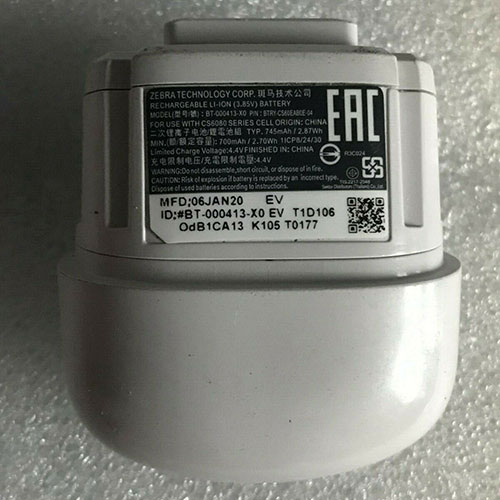
Cheap Zebra BT-000413 Li-ion Other battery, Brand New BT-000413 replacement battery for Zebra P/N:BTRY-CS60EAB0E-04

745mAh 3.8V/4.4V Zebra BT-000413 Batteries for Zebra P/N:BTRY-CS60EAB0E-04, Zebra BT-000413 Other battery is a brand new,100% Compatible original and replacement Laptop battery,Purchase wholesale and retail BT-000413 with high quality and low price!

BT-000413 Battery zebra Li-ion 3.8V/4.4V 745mAh

BT-000413

Specifications

  • Brand:Zebra
  • Capacity :745mAh
  • Voltage :3.8V/4.4V
  • Color:white
  • Type :Li-ion
  • Battery Cell Quality: Grade A
  • Descriptive: Replacement Battery – 1 Year Warranty
  • Description: Brand New, 1 Year Warranty! 30-Days Money Back! Fast Shipping!

How we test this Zebra BT-000413 Battery Li-ion 3.8V/4.4V 745mAh

Step 1: Make sure customer bought the correct battery.
Step 2: Check battery’s appearance and interface.
Step 3: Test battery charger and recharger function.
Step 4: Charger the battery to 100% and recharger to 0% to get real battery capacity
Step 5: Use Ev2300 to check the voltage difference of each goroup cells.
Step 6: Charger battery power more than 30%.
Step 7: Package battery carefully and send out

Compatible Part Numbers:

BT-000413 BT-000413-X0

Compatible Model Numbers:

Zebra P/N:BTRY-CS60EAB0E-04

How much do you know about how to run laptop well as any place? The follow Tips cut way back on protecting battery life.


1). Please recharge or change your Other battery when battery power low.
2). Using Li-Ion Replacement Zebra BT-000413 Other Battery for your notebook which can work longer time than Non Li-ion one.
3). It is better to defragmentation regularly for your Other battery life.
4). In order to reduce the laptop power consumpition, you can use some optical drive spin-down and hard drive in your Other .
5). Please keep your laptop in sleep or standby model without long time using, which both save the Replacement Zebra BT-000413 Other Battery power and extend battery using life.
6). Leave your battery in a dry and cool condition when without using.
7). When you rarely or generally plugged in fixed power using, Please take down your battery to avoid hurting battery life.

Hot Products

16.8V/20V 400mA/2200mAH/32Wh BOSE 300769-003 for Bose Sounddock Portable Digita11.1V/12.4v 2300mah BOSE 404600 for Bose SOUNDLINK I II III15.4V 5209mAh RAZER RC30-0248 for RAZER Blade 15 2018 RZ09-023867.4V 2230mAh/17Wh BOSE 063404 for 0634043.8V 6300mAh/23.94Wh AMAZON 2955C7 for Amazon Kindle Fire HD 10.1 7th3.7V/4.2V 1750MAH/6.5WH AMAZON GP-S10-346392-0100 for AMAZON KINDLE 3 3G WIFI Kindle3.8 V 1300 mAh AMAZON MC-305070 for AMAZON Kindle Voyage7.7V 37Wh/4810mAh ACER AP16M5J for ACER A315-51-51SL N17Q1 SERIES3.8V 2930mAh/11.1Wh NETGEAR W-7 for Netgear AirCard 790S 790SP 8103.85V/4.4V 3080MAH/11.86WH ALCATEL TLp030JC for Alcatel A3 XL 9008j

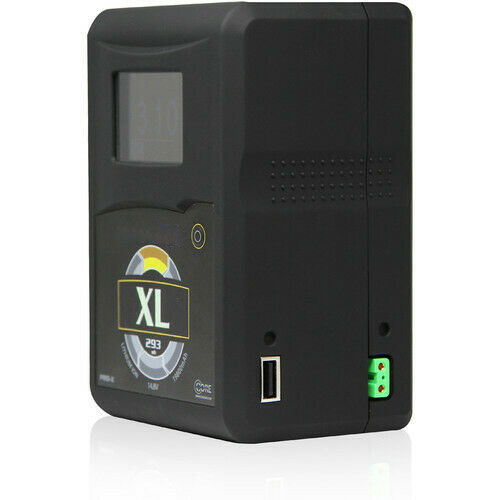
Cheap Hypercore XL Li-ion Other battery, Brand New XL replacement battery for Core SWX Hypercore XL 14.8V 293Wh Gold Mount Battery

293Wh 14.8V Hypercore XL Batteries for Core SWX Hypercore XL 14.8V 293Wh Gold Mount Battery, Hypercore XL Other battery is a brand new,100% Compatible original and replacement Laptop battery,Purchase wholesale and retail XL with high quality and low price!

XL Battery hypercore Li-ion 14.8V 293Wh

XL

Specifications

  • Brand:Hypercore
  • Capacity :293Wh
  • Voltage :14.8V
  • Type :Li-ion
  • Battery Cell Quality: Grade A
  • Descriptive: Replacement Battery – 1 Year Warranty
  • Description: Brand New, 1 Year Warranty! 30-Days Money Back! Fast Shipping!

How we test this Hypercore XL Battery Li-ion 14.8V 293Wh

Step 1: Make sure customer bought the correct battery.
Step 2: Check battery’s appearance and interface.
Step 3: Test battery charger and recharger function.
Step 4: Charger the battery to 100% and recharger to 0% to get real battery capacity
Step 5: Use Ev2300 to check the voltage difference of each goroup cells.
Step 6: Charger battery power more than 30%.
Step 7: Package battery carefully and send out

Compatible Part Numbers:

XL

Compatible Model Numbers:

Core SWX Hypercore XL Gold Mount battery

How much do you know about how to run laptop well as any place? The follow Tips cut way back on protecting battery life.


1). Please recharge or change your Other battery when battery power low.
2). Using Li-Ion Replacement Hypercore XL Other Battery for your notebook which can work longer time than Non Li-ion one.
3). It is better to defragmentation regularly for your Other battery life.
4). In order to reduce the laptop power consumpition, you can use some optical drive spin-down and hard drive in your Other .
5). Please keep your laptop in sleep or standby model without long time using, which both save the Replacement Hypercore XL Other Battery power and extend battery using life.
6). Leave your battery in a dry and cool condition when without using.
7). When you rarely or generally plugged in fixed power using, Please take down your battery to avoid hurting battery life.

Hot Products

16.8V/20V 400mA/2200mAH/32Wh BOSE 300769-003 for Bose Sounddock Portable Digita11.1V/12.4v 2300mah BOSE 404600 for Bose SOUNDLINK I II III15.4V 5209mAh RAZER RC30-0248 for RAZER Blade 15 2018 RZ09-023867.4V 2230mAh/17Wh BOSE 063404 for 0634043.8V 6300mAh/23.94Wh AMAZON 2955C7 for Amazon Kindle Fire HD 10.1 7th3.7V/4.2V 1750MAH/6.5WH AMAZON GP-S10-346392-0100 for AMAZON KINDLE 3 3G WIFI Kindle3.8 V 1300 mAh AMAZON MC-305070 for AMAZON Kindle Voyage7.7V 37Wh/4810mAh ACER AP16M5J for ACER A315-51-51SL N17Q1 SERIES3.8V 2930mAh/11.1Wh NETGEAR W-7 for Netgear AirCard 790S 790SP 8103.85V/4.4V 3080MAH/11.86WH ALCATEL TLp030JC for Alcatel A3 XL 9008j

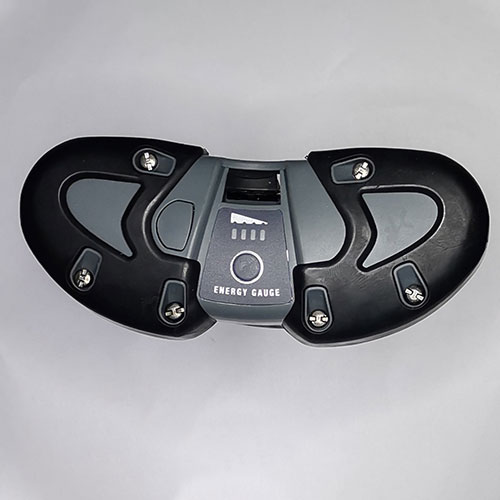
Cheap Petzl E51-430 Li-ion Other battery, Brand New E51-430 replacement battery for Petzl Accu 4

5200mah/38.48Wh 7.4V Petzl E51-430 Batteries for Petzl Accu 4, Petzl E51-430 Other battery is a brand new,100% Compatible original and replacement Laptop battery,Purchase wholesale and retail E51-430 with high quality and low price!

E51-430 Battery petzl Li-ion 7.4V 5200mah/38.48Wh

E51-430

Specifications

  • Brand:Petzl
  • Capacity :5200mah/38.48Wh
  • Voltage :7.4V
  • Type :Li-ion
  • Battery Cell Quality: Grade A
  • Descriptive: Replacement Battery – 1 Year Warranty
  • Description: Brand New, 1 Year Warranty! 30-Days Money Back! Fast Shipping!

How we test this Petzl E51-430 Battery Li-ion 7.4V 5200mah/38.48Wh

Step 1: Make sure customer bought the correct battery.
Step 2: Check battery’s appearance and interface.
Step 3: Test battery charger and recharger function.
Step 4: Charger the battery to 100% and recharger to 0% to get real battery capacity
Step 5: Use Ev2300 to check the voltage difference of each goroup cells.
Step 6: Charger battery power more than 30%.
Step 7: Package battery carefully and send out

Compatible Part Numbers:

E51-430

Compatible Model Numbers:

Petzl Accu 4

How much do you know about how to run laptop well as any place? The follow Tips cut way back on protecting battery life.


1). Please recharge or change your Other battery when battery power low.
2). Using Li-Ion Replacement Petzl E51-430 Other Battery for your notebook which can work longer time than Non Li-ion one.
3). It is better to defragmentation regularly for your Other battery life.
4). In order to reduce the laptop power consumpition, you can use some optical drive spin-down and hard drive in your Other .
5). Please keep your laptop in sleep or standby model without long time using, which both save the Replacement Petzl E51-430 Other Battery power and extend battery using life.
6). Leave your battery in a dry and cool condition when without using.
7). When you rarely or generally plugged in fixed power using, Please take down your battery to avoid hurting battery life.

Hot Products

16.8V/20V 400mA/2200mAH/32Wh BOSE 300769-003 for Bose Sounddock Portable Digita11.1V/12.4v 2300mah BOSE 404600 for Bose SOUNDLINK I II III15.4V 5209mAh RAZER RC30-0248 for RAZER Blade 15 2018 RZ09-023867.4V 2230mAh/17Wh BOSE 063404 for 0634043.8V 6300mAh/23.94Wh AMAZON 2955C7 for Amazon Kindle Fire HD 10.1 7th3.7V/4.2V 1750MAH/6.5WH AMAZON GP-S10-346392-0100 for AMAZON KINDLE 3 3G WIFI Kindle3.8 V 1300 mAh AMAZON MC-305070 for AMAZON Kindle Voyage7.7V 37Wh/4810mAh ACER AP16M5J for ACER A315-51-51SL N17Q1 SERIES3.8V 2930mAh/11.1Wh NETGEAR W-7 for Netgear AirCard 790S 790SP 8103.85V/4.4V 3080MAH/11.86WH ALCATEL TLp030JC for Alcatel A3 XL 9008j

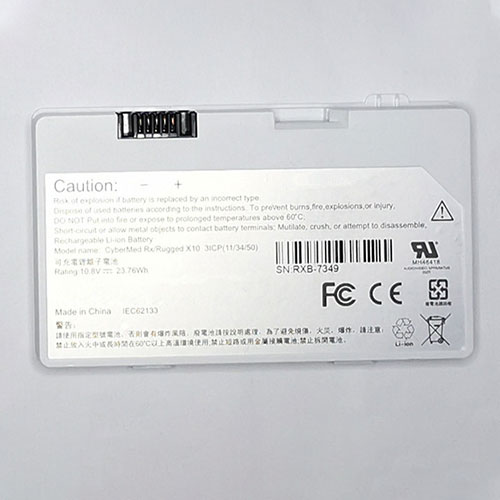
Cheap Cybernet RXB-7349 Li-ion Tablets battery, Brand New RXB-7349 replacement battery for CYBERNET Cybermed Rx Rugged X10 3ICP(11/34/50)

23.78Wh 10.8V Cybernet RXB-7349 Batteries for CYBERNET Cybermed Rx Rugged X10 3ICP(11/34/50), Cybernet RXB-7349 Tablets battery is a brand new,100% Compatible original and replacement Laptop battery,Purchase wholesale and retail RXB-7349 with high quality and low price!

RXB-7349 Battery cybernet Li-ion 10.8V 23.78Wh

RXB-7349

Specifications

  • Brand:CYBERNET
  • Capacity :23.78Wh
  • Voltage :10.8V
  • Color:white
  • Type :Li-ion
  • Battery Cell Quality: Grade A
  • Descriptive: Replacement Battery – 1 Year Warranty
  • Description: Brand New, 1 Year Warranty! 30-Days Money Back! Fast Shipping!

How we test this Cybernet RXB-7349 Battery Li-ion 10.8V 23.78Wh

Step 1: Make sure customer bought the correct battery.
Step 2: Check battery’s appearance and interface.
Step 3: Test battery charger and recharger function.
Step 4: Charger the battery to 100% and recharger to 0% to get real battery capacity
Step 5: Use Ev2300 to check the voltage difference of each goroup cells.
Step 6: Charger battery power more than 30%.
Step 7: Package battery carefully and send out

Compatible Part Numbers:

RXB-7349

Compatible Model Numbers:

CYBERNET Cybermed Rx Rugged X10 3ICP(11/34/50)

How much do you know about how to run laptop well as any place? The follow Tips cut way back on protecting battery life.


1). Please recharge or change your Tablets battery when battery power low.
2). Using Li-Ion Replacement Cybernet RXB-7349 Tablets Battery for your notebook which can work longer time than Non Li-ion one.
3). It is better to defragmentation regularly for your Tablets battery life.
4). In order to reduce the laptop power consumpition, you can use some optical drive spin-down and hard drive in your Tablets .
5). Please keep your laptop in sleep or standby model without long time using, which both save the Replacement Cybernet RXB-7349 Tablets Battery power and extend battery using life.
6). Leave your battery in a dry and cool condition when without using.
7). When you rarely or generally plugged in fixed power using, Please take down your battery to avoid hurting battery life.

Hot Products

16.8V/20V 400mA/2200mAH/32Wh BOSE 300769-003 for Bose Sounddock Portable Digita11.1V/12.4v 2300mah BOSE 404600 for Bose SOUNDLINK I II III15.4V 5209mAh RAZER RC30-0248 for RAZER Blade 15 2018 RZ09-023867.4V 2230mAh/17Wh BOSE 063404 for 0634043.8V 6300mAh/23.94Wh AMAZON 2955C7 for Amazon Kindle Fire HD 10.1 7th3.7V/4.2V 1750MAH/6.5WH AMAZON GP-S10-346392-0100 for AMAZON KINDLE 3 3G WIFI Kindle3.8 V 1300 mAh AMAZON MC-305070 for AMAZON Kindle Voyage7.7V 37Wh/4810mAh ACER AP16M5J for ACER A315-51-51SL N17Q1 SERIES3.8V 2930mAh/11.1Wh NETGEAR W-7 for Netgear AirCard 790S 790SP 8103.85V/4.4V 3080MAH/11.86WH ALCATEL TLp030JC for Alcatel A3 XL 9008j

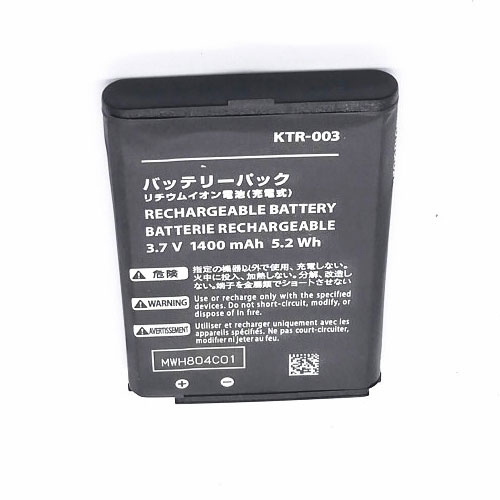
Cheap Nintendo KTR-003 Li-ion Other battery, Brand New KTR-003 replacement battery for Nintendo 3DS N3DS

1400mAh/5.2Wh 3.7V/4.2V Nintendo KTR-003 Batteries for Nintendo 3DS N3DS, Nintendo KTR-003 Other battery is a brand new,100% Compatible original and replacement Laptop battery,Purchase wholesale and retail KTR-003 with high quality and low price!

KTR-003 Battery nintendo Li-ion 3.7V/4.2V 1400mAh/5.2Wh

KTR-003

Specifications

  • Brand:Nintendo
  • Capacity :1400mAh/5.2Wh
  • Voltage :3.7V/4.2V
  • Type :Li-ion
  • Battery Cell Quality: Grade A
  • Descriptive: Replacement Battery – 1 Year Warranty
  • Description: Brand New, 1 Year Warranty! 30-Days Money Back! Fast Shipping!

How we test this Nintendo KTR-003 Battery Li-ion 3.7V/4.2V 1400mAh/5.2Wh

Step 1: Make sure customer bought the correct battery.
Step 2: Check battery’s appearance and interface.
Step 3: Test battery charger and recharger function.
Step 4: Charger the battery to 100% and recharger to 0% to get real battery capacity
Step 5: Use Ev2300 to check the voltage difference of each goroup cells.
Step 6: Charger battery power more than 30%.
Step 7: Package battery carefully and send out

Compatible Part Numbers:

KTR-003

Compatible Model Numbers:

Nintendo 3DS N3DS

How much do you know about how to run laptop well as any place? The follow Tips cut way back on protecting battery life.


1). Please recharge or change your Other battery when battery power low.
2). Using Li-Ion Replacement Nintendo KTR-003 Other Battery for your notebook which can work longer time than Non Li-ion one.
3). It is better to defragmentation regularly for your Other battery life.
4). In order to reduce the laptop power consumpition, you can use some optical drive spin-down and hard drive in your Other .
5). Please keep your laptop in sleep or standby model without long time using, which both save the Replacement Nintendo KTR-003 Other Battery power and extend battery using life.
6). Leave your battery in a dry and cool condition when without using.
7). When you rarely or generally plugged in fixed power using, Please take down your battery to avoid hurting battery life.

Hot Products

16.8V/20V 400mA/2200mAH/32Wh BOSE 300769-003 for Bose Sounddock Portable Digita11.1V/12.4v 2300mah BOSE 404600 for Bose SOUNDLINK I II III15.4V 5209mAh RAZER RC30-0248 for RAZER Blade 15 2018 RZ09-023867.4V 2230mAh/17Wh BOSE 063404 for 0634043.8V 6300mAh/23.94Wh AMAZON 2955C7 for Amazon Kindle Fire HD 10.1 7th3.7V/4.2V 1750MAH/6.5WH AMAZON GP-S10-346392-0100 for AMAZON KINDLE 3 3G WIFI Kindle3.8 V 1300 mAh AMAZON MC-305070 for AMAZON Kindle Voyage7.7V 37Wh/4810mAh ACER AP16M5J for ACER A315-51-51SL N17Q1 SERIES3.8V 2930mAh/11.1Wh NETGEAR W-7 for Netgear AirCard 790S 790SP 8103.85V/4.4V 3080MAH/11.86WH ALCATEL TLp030JC for Alcatel A3 XL 9008j

G.Skill Trident Z Royal DDR4-4000 C17 2x16GB Review: Outshining The Competition

High-speed memory kits are often associated with sloppy timings: Once you surpass that DDR4-4000 mark, it requires a lot of resources to cherry-pick the best integrated circuits (ICs) that meet the requirements. G.Skill is one of a handful of memory vendors willing to invest time and resources into bringing high-speed memory kits that aren’t held back by loose timings to the enthusiast market.

G.Skill offers a wide variety of DDR4-4000 memory kits with densities that start at 16GB (2x8GB) and go up to an awe-spiring 128GB (4x32GB). The CAS latency timings on these kits generally span from C15 up to C19. On this occasion, we’ll take a look at a DDR4-4000 C17 memory kit that hails from G.Skill’s exclusive Trident Z Royal family.

While the distinctive tri-fin design still remains, the Trident Z Royal looks more like a piece of jewelry than computer memory. The aluminum heat spreader, which features a gold or silver paint job, now comes with a beautiful mirror finish. It’s a complete delight to look at for sure, but the shiny surface is a dust and fingerprint magnet. G.Skill was considerate enough to provide a small microfiber cloth for cleaning the memory modules, so you don’t scratch the surface.

Despite the drastic makeover, the Trident Z Royal still measures 44mm (1.73 inches) tall. G.Skill replaced the boring light bar with one that flaunts a crystalline design. The eight-zone RGB lighting remains untouched. As usual, you have the option to control the Trident Z Royal’s illumination with either the provided Trident Z Lighting Control software or through your motherboard’s software, including Asus Aura Sync, Gigabyte RGB Fusion 2.0, MSI Mystic Light Sync, and ASRock Polychrome Sync.

There are no surprises here. Given that each memory module is 16GB, they feature a dual-rank configuration. G.Skill uses a custom 10-layer PCB in tandem with high-quality Samsung K4A8G085WB-BCPB (B-die) ICs to assure very tight timings.

When your system posts for the first time, you’ll find the Trident Z Royal memory kit at DDR4-2133 with 15-15-15-36 timings. At this point, you can either set up the memory modules manually, or by enabling the XMP profile. In either case, the Trident Z Royal is certified to run at DDR4-4000 with a 1.4V DRAM voltage and 17-18-18-38 timings. For more on timings and frequency considerations, see our PC Memory 101 feature, as well as our How to Shop for RAM story.

Our Intel test system consists of an Intel Core i7-10700K and Asus ROG Maximus XII Apex on the 0707 firmware. On the opposite end, the AMD testbed leverages an AMD Ryzen 5 3600 and ASRock B550 Taichi with the 1.30 firmware. The MSI GeForce RTX 2080 Ti Gaming Trio handles the graphical duties on both platforms.

Intel Performance

The Trident Z Royal was the best performer on the Intel platform, whether it be application or gaming performance. The memory kit demonstrated its superiority in the individual tests, placing first in most of them.

AMD Performance

Unfortunately, the Trident Z Royal kit struggled on the AMD platform due to the nature of the Zen 2 microarchitecture. The inability to run the memory modules with the processor’s Infinity Fabric clock (FCLK) and memory clock (MCLK) in a 1:1 ratio led to added latency. As a result, the Trident Z Royal trailed behind its DDR4-3600 rivals. Bear in mind, tuning the kit to a 1:1 fabric/memory ratio will yield better results. 

Overclocking and Latency Tuning

We suspect that G.Skill binned this particular Trident Z Royal memory kit close to the borderline of its capacity. Even at 1.45V, we could only push it to DDR4-4133 with timings at 18-19-19-39.

On the contrary, we had better luck at optimizing the timings at the advertised DDR4-4000 frequency. A small 0.05V increase to the DRAM voltage was sufficient for us to reduce the XMP timings from 17-18-18-38 down to 15-16-16-36, which represents a major increase in performance.

Bottom Line

While aesthetics is a subjective matter, the Trident Z Royal DDR4-4000 C17’s strong performance is unquestionable. A bit of fine-tuning can even take the memory kit to another level. While we can’t speak for every single kit, our sample was stable with very tight timings with just a small bump in the DRAM voltage. A CAS Latency of 15 is no joke, considering that we are dealing with DDR4-4000 speeds here.

There’s one important aspect to take into consideration with the Trident Z Royal DDR4-4000 C17, though. The memory kit evidently performs at its highest on the Intel platform. Zen 2 processors will have a very hard if not impossible time to run these memory modules in a 1:1 ratio between the FCLK and MCLK. Zen 2 chips typically support up to 1,800 MHz on the FCLK (DDR4-3600), with the really spectacular samples doing a bit higher. The latest Zen 3 parts, on the other hand, have a higher chance of exploiting the Trident Z Royal memory kit as hitting a 2,000 MHz FCLK (DDR4-4000) isn’t a given, but it’s more common. That’s really the sweet spot for this kit on a Ryzen platform. 

The Trident Z Royal DDR4-4000 C17 is a high-end memory kit, and it’s priced like one. It retails for $289.99 and represents a good purchase if you want a fast memory kit that doesn’t hinder your equally high-end system.